
cfchris.com

Loading

c++ software engineer

C++ Software Engineer: Roles, Skills, and Career Paths

What Does a C++ Software Engineer Do?

A C++ software engineer designs, builds, tests, and maintains software using C++, a powerful programming language known for its performance and flexibility. C++ is used in systems where speed, reliability, and control over computer resources matter—from game engines and desktop applications to embedded devices and financial platforms.

Key Responsibilities

The day-to-day work of a C++ software engineer depends on the product and industry, but often includes:

  • Writing and reviewing clear, efficient C++ code
  • Designing software components and application architecture
  • Finding and fixing bugs, performance issues, and memory problems
  • Creating automated tests and maintaining existing test suites
  • Working with other engineers, designers, and product teams
  • Documenting technical decisions and supporting software releases

Because C++ gives developers significant control over memory and system resources, engineers must consider how their code behaves—not just whether it produces the right result. Careful testing and code review help make software dependable and easier to maintain.

Where C++ Engineers Work

C++ is used across a wide range of industries. Engineers may work on:

  • Games and entertainment: Game engines, graphics, physics, and real-time systems
  • Embedded software: Code for vehicles, appliances, robotics, and industrial equipment
  • Operating systems and infrastructure: System tools, databases, browsers, and networking software
  • Finance: Applications that need low-latency processing and predictable performance
  • Scientific computing: Simulations and data-intensive applications

Skills That Matter

Strong C++ fundamentals are essential, including familiarity with object-oriented and generic programming, the standard library, and modern language features. Engineers also benefit from understanding data structures, algorithms, concurrency, debugging, and performance profiling.

Knowledge of tools and related technologies can be valuable, too. Depending on the role, a C++ engineer might use build systems, version control, testing frameworks, integrated development environments, and platforms such as Linux or Windows. Experience with graphics APIs, networking, databases, or embedded hardware may be important for specialized positions.

Technical ability is only part of the job. Communication, collaboration, curiosity, and the ability to explain tradeoffs help engineers contribute effectively to a team.

How to Become a C++ Software Engineer

Many C++ engineers study computer science, software engineering, or a related field, but there are multiple ways to build the skills needed for the role. A practical learning path might include:

  1. Learn programming fundamentals and core C++ concepts.
  2. Practice writing small programs, then build larger projects.
  3. Study data structures, algorithms, and software design.
  4. Learn to use debugging, testing, and version-control tools.
  5. Create a portfolio that demonstrates problem-solving and code quality.
  6. Apply for internships, entry-level positions, or projects that provide hands-on experience.

Personal projects can make learning more concrete. Building a small game, command-line utility, simulation, or embedded project gives aspiring engineers a chance to practice design, testing, and debugging in a realistic setting.

Why Choose a Career in C++?

C++ remains relevant because many applications require high performance, precise resource management, or close interaction with hardware. The language also offers opportunities to work in varied fields, from game development to robotics and infrastructure software.

The work can be challenging. C++ has a large feature set, and writing safe, maintainable code requires care. But for people who enjoy understanding how software works beneath the surface and solving complex technical problems, a C++ software engineering career can be both engaging and rewarding.

Conclusion

A C++ software engineer combines programming expertise with problem-solving and careful engineering practices. Whether developing real-time applications, embedded systems, or performance-critical software, these professionals help build technology that is efficient, reliable, and capable of meeting demanding requirements.


Top 9 Frequently Asked Questions About C++ Software Engineering Careers

  1. What is the salary of C programmer?
  2. What engineer makes $500,000 a year?
  3. Can I be a software engineer with C++?
  4. How is C++ used in software engineering?
  5. Is C++ good for software engineering?
  6. What is the difference between C and C++ developer?
  7. Are C programmers rare?
  8. Do I need C++ to be a software engineer?
  9. Is a C++ Developer a software Engineer?

What is the salary of C programmer?

In the United States, a C programmer’s salary can vary widely, but many roles pay roughly $70,000 to $130,000 per year. Pay depends on experience, location, industry, and the complexity of the work; engineers specializing in areas such as embedded systems, operating systems, or performance-critical software may earn more. Because employers often group C programming with broader software engineering roles, job titles and responsibilities can affect salary comparisons.

What engineer makes $500,000 a year?

Engineers who earn $500,000 a year are typically highly experienced specialists or senior leaders, such as principal or distinguished software engineers at major technology companies, or quantitative software engineers at hedge funds and trading firms. These figures usually refer to total compensation—including salary, bonuses, and stock—not base salary alone, and they are uncommon and depend on the employer, location, performance, and market conditions. C++ expertise can be valuable in areas such as trading systems, game engines, and infrastructure, but knowing C++ alone does not guarantee this level of pay.

Can I be a software engineer with C++?

Yes, you can become a software engineer with C++. It’s widely used to build games, desktop applications, operating systems, embedded software, and other performance-critical systems. Learn core C++ concepts alongside data structures, algorithms, testing, debugging, and software design, then apply those skills in projects that demonstrate your abilities. Depending on the role, employers may also value experience with tools such as Git, build systems, and Linux.

How is C++ used in software engineering?

C++ is used in software engineering to build fast, reliable applications that need strong performance and control over system resources. C++ software engineers use it to develop game engines, operating systems, embedded software, browsers, databases, financial platforms, and scientific applications. Its speed and ability to work close to hardware make it a good fit for complex, resource-intensive systems, while its broad range of features supports large-scale software development.

Is C++ good for software engineering?

Yes, C++ is a strong choice for software engineering, especially when performance, efficiency, and direct control over system resources are important. It’s widely used in areas such as game development, embedded systems, operating systems, financial technology, and other performance-critical applications. C++ can have a steeper learning curve than some languages, so it may not be the best fit for every project, but its versatility and mature ecosystem make it a valuable skill for software engineers.

What is the difference between C and C++ developer?

A C developer primarily works with C, a procedural language often used for operating systems, embedded devices, and other low-level software. A C++ developer uses C++, which supports procedural programming as well as object-oriented and generic programming, making it common in areas such as game development, desktop applications, and performance-critical systems. The languages share some syntax and concepts, but C++ has additional features, libraries, and design approaches. In practice, the difference depends on the role: both developers may work close to hardware, while C++ positions often emphasize classes, templates, and larger software architectures.

Are C programmers rare?

C programmers aren’t necessarily rare, but roles requiring deep, specialized C expertise are less common than general software development jobs. C remains important in embedded systems, operating systems, device drivers, and other performance-critical software, so experienced C programmers are valued in those fields. Many developers also know C alongside C++ or other languages, which can make it harder to judge how many are dedicated C specialists.

Do I need C++ to be a software engineer?

No, you don’t need to know C++ to become a software engineer. Many engineers work primarily with languages such as Python, Java, JavaScript, C#, or Swift, depending on the products they build. C++ is especially useful for performance-critical software, game engines, embedded systems, and other applications that require close control over hardware and memory. Choose a language based on your interests and career goals, then focus on core skills like problem-solving, data structures, testing, and writing maintainable code.

Is a C++ Developer a software Engineer?

Yes, a C++ developer can be a software engineer, but the titles aren’t always interchangeable. “C++ developer” usually describes someone who builds software primarily with C++, while “software engineer” often emphasizes the broader process of designing, testing, and maintaining reliable software systems. In practice, many C++ developers perform software engineering work, and the exact title depends on the employer and responsibilities.
mobile app builder software

Mobile App Builder Software: A Practical Guide to Choosing the Right Platform

Mobile App Builder Software: A Practical Guide

Mobile app builder software helps people and organizations create apps for smartphones and tablets without building every feature from scratch. Depending on the platform, users can design screens, connect data, add common functions, and publish an app with little or no coding. These tools can make app development more accessible, but the right choice depends on what the app needs to do and how it will be maintained.

What Is Mobile App Builder Software?

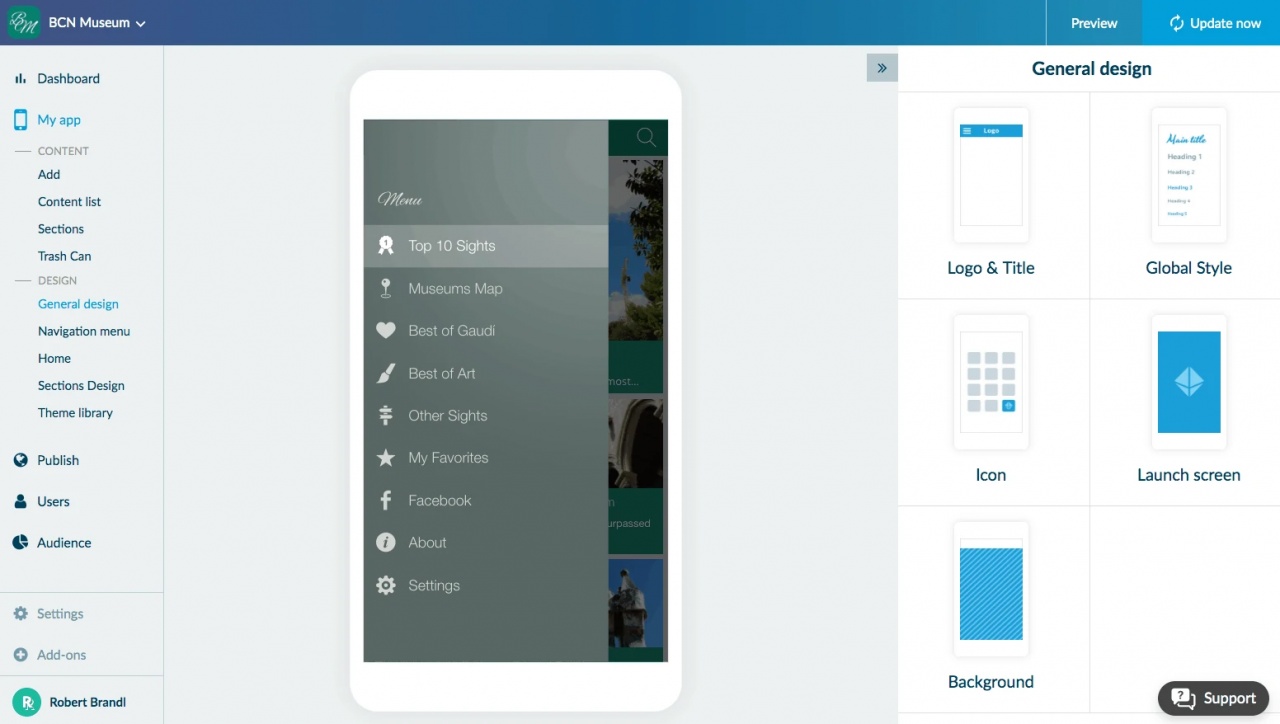
A mobile app builder is a platform for creating mobile applications through visual tools, reusable components, templates, or code-assisted workflows. Many builders offer a drag-and-drop editor, so users can arrange buttons, forms, menus, and other elements on a screen. Some also provide integrations for payments, customer databases, maps, notifications, and analytics.

App builders vary considerably. Some are designed for simple internal tools or content-based apps, while others support custom logic and more complex products. A platform may generate a native app, create a cross-platform app from a shared codebase, or deliver a web app that runs in a mobile browser.

Common Features

Although capabilities differ by provider, mobile app builder software may include:

  • Visual design tools: Create screens and arrange interface elements without writing every line of code.
  • Templates and components: Start with common layouts or add reusable elements such as forms, menus, and product listings.
  • Data connections: Link the app to spreadsheets, databases, business systems, or cloud services.
  • Workflow automation: Set up actions, approvals, and notifications based on user input or other events.
  • Testing and previews: Check how the app looks and behaves on different screen sizes or devices.
  • Publishing support: Prepare an app for distribution through an app store or an organization’s own channels.
  • Analytics: Review usage data and app performance, depending on the platform’s built-in tools.

Benefits of Using an App Builder

Faster Development

Prebuilt components and templates can reduce the time needed to create common features. Teams may be able to build a prototype quickly, gather feedback, and refine the idea before investing in a larger development project.

More Accessible App Creation

Visual tools can help non-developers participate in app creation. Business teams, for example, may be able to assemble a basic workflow tool while working with IT on security and data requirements.

Lower Upfront Costs

For straightforward projects, an app builder may cost less initially than commissioning a fully custom application. The total cost still depends on subscription fees, required integrations, user limits, support, and future maintenance.

Quicker Iteration

Many builders make it easier to adjust screens and workflows as requirements change. This can be useful for prototypes, internal tools, event apps, and other projects where features may evolve over time.

Potential Limitations

App builders are not a perfect fit for every project. A platform may limit design flexibility, advanced functionality, or access to device features. Some tools also make it difficult to move an app to another provider, so it is important to understand how the app and its data can be exported.

Performance, security, accessibility, and maintenance also require attention. A visually appealing app still needs to work reliably, protect user information, and remain compatible with updated operating systems. Review the platform’s security practices, backup options, support model, and approach to updates before committing.

How to Choose the Right Software

Begin by defining the app’s purpose and audience. List the essential features, the types of data the app will use, and the devices or platforms it must support. Then compare providers using criteria such as:

  • App type: Does the platform create native, cross-platform, or browser-based apps?
  • Ease of use: Can the people who will build and maintain the app work effectively with the editor?
  • Customization: Can the app support your design, workflows, and integrations?
  • Security and compliance: Are the platform’s protections suitable for the information the app will handle?
  • Ownership and portability: Can you export your data, code, or app if you switch providers?
  • Pricing: What are the costs for publishing, storage, integrations, support, and additional users?
  • Support and documentation: Are help resources available when you need to troubleshoot or expand the app?

Testing a small prototype is often the best way to evaluate a platform. Try the features that matter most, test the app on real devices, and ask intended users for feedback before building the full experience.

When to Consider Custom Development

A mobile app builder can be a practical choice for standard workflows, simple customer experiences, and early prototypes. Custom development may be a better option when the project requires highly specialized functionality, extensive integrations, strict performance requirements, or complete control over the code and infrastructure. In some cases, a hybrid approach works well: use a builder for routine features and custom code for specific needs.

Conclusion

Mobile app builder software can help teams turn an idea into a working app with less manual development. Its value depends on the match between the platform and the project. By defining requirements, checking costs and limitations, and testing a prototype, organizations can choose an approach that supports both their immediate goals and the app’s long-term needs.


Mobile App Builder Software: 6 Frequently Asked Questions

  1. Can you build a mobile app for free?
  2. How do I build my own mobile app?
  3. What is the best software for designing mobile apps?
  4. Can I build a mobile app by myself?
  5. Can you build your own mobile app?
  6. Can Chatgpt build me an app?

Can you build a mobile app for free?

Yes, you can build a mobile app for free using app builder software that offers a free plan or trial. Free plans often include basic design and development tools, but may limit features, storage, users, integrations, or app publishing—and may display the provider’s branding. Publishing on app stores can also involve separate developer account fees. Check the platform’s pricing and terms to understand what’s included before you begin.

How do I build my own mobile app?

To build your own mobile app, start by defining its purpose, audience, and essential features. Choose a mobile app builder that supports your needs, then use its templates or design tools to create screens and set up features such as forms, notifications, or payments. Add any required data and integrations, and test the app on different devices to catch usability or performance issues. When it’s ready, follow the builder’s steps to publish it through an app store or share it with your users. Plan to update the app regularly, address feedback, and protect user data.

What is the best software for designing mobile apps?

The best software for designing mobile apps depends on your goals, technical skills, budget, and the features you need. No-code and low-code app builders can be a good fit for beginners, prototypes, and straightforward business apps, while design tools such as Figma help teams create and test screen layouts before development. For apps that require custom functionality or more control, development frameworks and professional design software may be a better choice. Compare platforms based on ease of use, supported devices, customization, integrations, pricing, and how easily you can maintain or move your app later.

Can I build a mobile app by myself?

Yes, you can build a mobile app by yourself using mobile app builder software, even if you have little or no coding experience. Many platforms offer templates, drag-and-drop design tools, and step-by-step guides to help you create screens and add features. Start with a clear idea of what your app should do, then choose a builder that supports your needs and budget. More advanced apps may require coding skills or help from a developer, especially when they involve custom features, complex integrations, or stronger security requirements.

Can you build your own mobile app?

Yes, you can build your own mobile app using mobile app builder software. Many platforms offer templates and visual, drag-and-drop tools that let you create screens, add features, and connect data with little or no coding. The level of customization varies, so choose a builder that fits your app’s needs, and test the finished app on real devices before publishing it.

Can Chatgpt build me an app?

ChatGPT can help you plan and build an app by turning an idea into feature requirements, suggesting a design, generating code, and helping troubleshoot problems. It can also guide you through using mobile app builder software, but it does not automatically create, test, or publish a complete app on its own; you’ll typically need to use an app-building platform or development tools, review the results, and handle testing and app-store submission.

bespoke application

Bespoke Application: Software Designed Around Your Business

Bespoke Applications: Software Built Around Your Business

Every business has its own processes, priorities, and challenges. While off-the-shelf software can be a practical starting point, it may not fit the way your team actually works. A bespoke application is designed and developed for a specific organization, helping its people complete tasks in a way that matches their needs.

What Is a Bespoke Application?

A bespoke application is custom software created for a particular business or purpose. It can support a single task, such as managing appointments, or connect several parts of an operation, such as customer records, inventory, and reporting.

Unlike a general-purpose product, bespoke software is shaped around the organization’s requirements. Its features, workflows, user experience, and integrations can be planned to suit the people who will use it.

When Does Custom Software Make Sense?

A bespoke application may be worth considering when existing tools do not adequately support your work. Common signs include:

  • Employees rely on spreadsheets or repeated manual data entry.
  • Important information is spread across disconnected systems.
  • Your team has to change its processes to accommodate software.
  • Standard products lack essential features or include unnecessary ones.
  • Your business has specialized workflows that are difficult to manage with generic tools.

Custom development is not automatically the right choice. If an existing product meets your requirements at a reasonable cost, using it may be simpler. The decision should be based on the problem to solve, the total cost of ownership, and the value the application is expected to provide.

Benefits of a Bespoke Application

A Better Fit for Your Workflows

Custom software can reflect the steps your team already follows—or help improve them. That can reduce workarounds and make everyday tasks more straightforward.

Integration With Existing Systems

A bespoke application can be designed to exchange information with other tools, such as accounting platforms, customer relationship management systems, or internal databases. Effective integrations can reduce duplicate data entry and help keep information consistent.

Room to Grow

As your organization changes, the application can be updated to support new services, users, or processes. Planning for future needs from the beginning can make those changes easier, though ongoing maintenance and development should be part of the budget.

Greater Control

With custom software, you can have more influence over features, access permissions, and the user experience. The specific level of control depends on the development agreement, hosting arrangements, and ownership of the software and its source code.

What Does the Development Process Involve?

A successful project begins with a clear understanding of the problem. The development team and stakeholders typically work together to identify users, document requirements, and agree on what success will look like.

  1. Discovery: Review current processes, challenges, users, and business goals.
  2. Planning: Define the initial features, technical approach, schedule, and budget.
  3. Design: Map out how the application will work and create an interface that is clear and usable.
  4. Development: Build the application, often in stages so that progress can be reviewed.
  5. Testing: Check functionality, security, performance, and compatibility before launch.
  6. Deployment and support: Release the application, help users get started, and maintain it over time.

Involving the people who will use the application is important throughout this process. Their feedback can reveal practical needs that may not be obvious from a high-level project description.

Costs and Long-Term Considerations

The cost of a bespoke application depends on its complexity, the number of integrations, the level of security required, and the amount of ongoing support. Custom software may require a larger upfront investment than a subscription product, but cost alone does not determine its value. It is useful to consider the full lifecycle, including hosting, updates, training, support, and future improvements.

Before work begins, clarify who owns the application and its source code, how changes will be handled, what support is included, and how the system will be backed up. Security, privacy, accessibility, and data retention should also be considered as part of the design—not treated as last-minute additions.

Choosing the Right Development Partner

Look for a development partner that takes time to understand your business and explains technical decisions in plain language. Ask about their approach to requirements, testing, security, documentation, and post-launch support. It is also helpful to discuss how project scope and costs will be managed if priorities change.

A bespoke application is most valuable when it solves a well-defined problem and is designed for the people who will rely on it. With careful planning and ongoing attention, custom software can make complex workflows easier to manage and provide a stronger foundation for future growth.


6 Essential Tips for Building a Successful Custom Application

  1. Define your needs before choosing a solution.
  2. Prioritize features users truly need.
  3. Set a realistic budget and timeline.
  4. Choose a team with relevant experience.
  5. Test prototypes with real users.
  6. Plan for maintenance and future growth.

Define your needs before choosing a solution.

Before choosing a bespoke application, take time to define what your business actually needs. Identify the problems you want to solve, the tasks the software should support, and the people who will use it. Gather input from employees, note any systems the application must connect with, and separate essential features from nice-to-haves. Clear requirements help you compare solutions, set a realistic budget, and ensure the finished application supports your workflows instead of adding unnecessary complexity.

Prioritize features users truly need.

When planning a bespoke application, prioritize the features users truly need to do their jobs well. Talk with the people who will use the software, observe their workflows, and identify the problems that cause the most frustration or wasted time. Focusing on these essential features keeps the application easier to use, helps control development costs, and creates a solid foundation for adding improvements later.

Set a realistic budget and timeline.

Set a realistic budget and timeline before development begins. Bespoke applications vary in cost and complexity, and features, integrations, testing, and revisions can all affect delivery. Work with your development team to prioritize essential features, account for ongoing costs such as hosting and maintenance, and build in time for feedback and testing. A clear, flexible plan helps prevent surprises and keeps the project focused on what your business needs most.

Choose a team with relevant experience.

Choose a team with relevant experience building bespoke applications similar to the one you need. A team that understands your industry, users, and technical requirements can anticipate challenges, recommend practical solutions, and avoid costly missteps. Ask to see examples of comparable projects and discuss how the team handles communication, testing, security, and support after launch.

Test prototypes with real users.

Test prototypes with real users before investing in full development. Watching people use an early version of your bespoke application can reveal confusing steps, missing features, and unmet needs that may not come up in planning meetings. Gather feedback from the people who will use the software day to day, then refine the design and workflows before moving forward. This helps ensure the finished application is practical, intuitive, and built around real-world needs.

Plan for maintenance and future growth.

Plan for maintenance and future growth from the start of your bespoke application project. Software needs updates to stay secure, reliable, and compatible with changing technologies, while your business may need new features as its processes evolve. Set aside time and budget for ongoing support, bug fixes, and enhancements, and make sure the application is built so it can be updated without unnecessary disruption. Planning ahead helps protect your investment and keeps the application useful as your business grows.

advanced java

Advanced Java: Concepts, Techniques, and Best Practices

Advanced Java: Concepts, Tools, and Techniques

Java is known for its portability, mature ecosystem, and strong support for large-scale applications. Beyond the basics of classes, methods, and control flow, advanced Java involves understanding how the language and its runtime work together. Topics such as concurrency, generics, memory management, and modern language features help developers build software that is more efficient, reliable, and easier to maintain.

Understanding the Java Virtual Machine

Java source code is compiled into bytecode, which runs on the Java Virtual Machine (JVM). The JVM manages program execution, memory, and platform-specific details. Understanding its behavior can help developers diagnose performance problems and make better design decisions.

The JVM divides memory into areas with different purposes. The heap stores objects, while each thread has its own stack for method calls and local variables. Class metadata is stored in the Metaspace area. Garbage collection reclaims heap memory when objects are no longer reachable, but it does not eliminate the need to manage resources such as files, sockets, and database connections. These should be released explicitly, typically with try-with-resources.

Concurrency and Multithreading

Concurrency allows a program to make progress on multiple tasks during the same period of time. Java provides several ways to work with concurrency, from traditional threads to higher-level tools in the java.util.concurrent package.

Shared mutable state is a common source of bugs. If multiple threads access and modify the same data without appropriate coordination, race conditions can occur. Java provides synchronization, locks, atomic classes, and concurrent collections to help protect shared state. Choosing immutable objects where practical can reduce the amount of synchronization required.

For many applications, the Executor framework is preferable to creating and managing threads directly. It separates the task from the mechanism used to run it. Java 21 also introduced virtual threads as a finalized feature. Virtual threads are lightweight threads designed to make high-throughput, blocking I/O applications easier to write. They do not make CPU-intensive work run faster, and they do not remove the need to handle shared state safely.

Generics and Type Safety

Generics allow classes, interfaces, and methods to work with different types while retaining compile-time checks. A collection such as List<String> communicates that it contains strings and helps prevent accidental use of incompatible values.

Advanced generic code often involves bounded type parameters and wildcards. For example, <T extends Number> restricts a type parameter to numeric types or their subtypes. Wildcards can make APIs more flexible. A useful guideline is “producer extends, consumer super”: use ? extends T when reading values from a producer, and ? super T when adding values to a consumer.

Java implements generics largely through type erasure, so most generic type information is not available at runtime. This affects operations such as creating a generic array or checking a parameterized type with instanceof. Understanding type erasure helps explain some of the language’s restrictions.

Streams and Functional Programming

The Stream API offers a declarative way to process data. A stream pipeline typically combines a source, intermediate operations such as filter and map, and a terminal operation such as collect or count.

List<String> names = users.stream()

.filter(User::isActive)

.map(User::getName)

.sorted()

.toList();

Stream operations are often lazy: intermediate steps run only when a terminal operation is invoked. Streams can make transformations concise, but they are not always the best choice. For complex control flow, debugging-heavy logic, or small operations where clarity would suffer, a conventional loop may be easier to understand. Parallel streams should be used carefully because parallel execution can add overhead and may behave poorly when operations share mutable state.

Modern Java Language Features

Modern Java includes features that can make code more expressive. Records provide a concise way to model data-oriented classes. Sealed classes and interfaces restrict which types can extend or implement them. Pattern matching can simplify type checks and conditional logic.

public record Point(int x, int y) {}

These features can reduce boilerplate, but they do not replace thoughtful design. Records are best suited to data carriers, while sealed types are useful when a domain has a known, controlled set of alternatives. Developers should confirm which Java version is used by the project before adopting newer language features.

Exceptions and Resource Management

Exception handling is part of designing reliable APIs. Checked exceptions can make recoverable conditions explicit, while unchecked exceptions are commonly used for programming errors or conditions callers are not generally expected to recover from. Exceptions should provide useful context without exposing sensitive information.

Use try-with-resources for objects that implement AutoCloseable. This ensures that resources are closed even when an operation fails, reducing the risk of leaks.

try (var reader = Files.newBufferedReader(path)) {

return reader.lines().toList();

}

Testing and Performance

Advanced Java development also depends on strong testing practices. Unit tests verify small pieces of behavior, while integration tests check how components work together. Concurrency tests can be difficult to write because thread-related failures may be intermittent, so repeated testing and careful synchronization analysis are important.

Performance work should begin with measurement rather than guesswork. Profilers, Java Flight Recorder, and JVM monitoring tools can help identify CPU hotspots, allocation pressure, pauses, and thread contention. Benchmarks should be designed carefully; simplistic timing tests can produce misleading results because of just-in-time compilation, warm-up effects, and environmental variation.

Building Advanced Java Skills

Becoming proficient in advanced Java takes more than memorizing APIs. It requires understanding tradeoffs: when to use concurrency, how to model types, how the JVM manages memory, and how to keep code clear as systems grow. Practical projects, code reviews, testing, and profiling provide opportunities to apply these ideas.

By combining core Java knowledge with a deeper understanding of the JVM and modern language features, developers can create applications that are robust, maintainable, and ready to scale.


5 Advanced Java Tips for Cleaner Code and Better Concurrency

  1. Use records for immutable data carriers.
  2. Prefer virtual threads for high-concurrency, blocking workloads.
  3. Use sealed classes to model restricted type hierarchies.
  4. Profile before optimizing with JVM tools like JFR.
  5. Use structured concurrency to manage related tasks safely.

Use records for immutable data carriers.

Java records are a concise way to represent immutable data carriers, such as coordinates, configuration values, or API responses. Declaring a record automatically provides a constructor, accessors, and implementations of methods such as equals, hashCode, and toString, reducing boilerplate and making the data model clear. Records are shallowly immutable, however, so if a component refers to a mutable object, that object may still change; use immutable component types or defensive copies when needed.

Prefer virtual threads for high-concurrency, blocking workloads.

For high-concurrency applications that spend much of their time waiting on blocking operations—such as network requests, database calls, or file access—virtual threads can offer a simpler alternative to managing large pools of platform threads. They are lightweight, so an application can support many concurrent tasks without dedicating an expensive operating-system thread to each one. Virtual threads are most useful for I/O-bound work; they do not speed up CPU-intensive tasks, and shared mutable state still requires careful synchronization.

Use sealed classes to model restricted type hierarchies.

Use sealed classes to model restricted type hierarchies when a type should have a clearly defined set of permitted subtypes. With the sealed keyword and a permits clause, Java lets you specify which classes or interfaces may extend or implement a type. This makes domain models easier to understand and helps the compiler identify when all possible cases have been handled, especially when using pattern matching. Sealed hierarchies are useful for representing concepts such as payment methods, application events, or shapes with a known set of variations.

Profile before optimizing with JVM tools like JFR.

Before optimizing Java code, profile the application to find where time and resources are actually being spent. Tools such as Java Flight Recorder (JFR) can capture useful data about CPU usage, memory allocation, garbage collection, and thread activity with relatively low overhead. Use that evidence to identify bottlenecks, make targeted changes, and profile again to confirm the improvement. This avoids spending time on guesses or changes that make the code more complex without meaningfully improving performance.

Structured concurrency helps manage related tasks as a single unit of work. Instead of starting independent threads and handling their lifecycles separately, group child tasks within a defined scope so they can be monitored, cancelled, and joined together. This makes it easier to ensure that tasks finish before the parent operation returns and that failures are handled consistently. In Java, structured concurrency has evolved through preview APIs, so check the documentation for your target JDK before using it in production.

ai and machine learning for coders

AI and Machine Learning for Coders: A Practical Guide

AI and Machine Learning for Coders: Unlocking New Possibilities

Artificial Intelligence (AI) and Machine Learning (ML) have become integral parts of modern technology, transforming industries and reshaping the way we approach problem-solving. For coders, understanding these concepts is crucial to staying relevant in an ever-evolving tech landscape.

What are AI and Machine Learning?

Artificial Intelligence refers to the simulation of human intelligence in machines. These systems are designed to perform tasks that typically require human intelligence, such as visual perception, speech recognition, decision-making, and language translation.

Machine Learning, a subset of AI, involves the use of algorithms and statistical models that enable computers to improve their performance on a specific task through experience. Instead of being explicitly programmed to perform certain tasks, ML systems learn from data.

The Importance of AI and ML for Coders

Coding with AI and ML opens up a world of possibilities for developers. Here’s why every coder should consider diving into these fields:

  • Enhanced Problem-Solving: AI and ML provide powerful tools for tackling complex problems that traditional programming may struggle with.
  • Automation: Coders can leverage AI to automate repetitive tasks, freeing up time for more creative work.
  • Data-Driven Decisions: With machine learning models, developers can extract meaningful insights from large datasets, leading to better decision-making processes.
  • Innovation: Understanding AI enables coders to contribute to cutting-edge innovations across various sectors such as healthcare, finance, automotive, and more.

Getting Started with AI and ML

If you’re a coder looking to explore AI and ML, here are some steps you can take:

  1. Learn the Basics: Start by familiarizing yourself with fundamental concepts in statistics and linear algebra. These are essential for understanding how machine learning algorithms work.
  2. Select a Programming Language: Python is widely used in the field due to its simplicity and extensive libraries like TensorFlow and PyTorch. R is another popular choice for statistical analysis.
  3. Dive into Libraries: Explore libraries such as Scikit-learn for basic machine learning tasks or Keras for deep learning projects. These tools simplify complex processes into manageable functions.
  4. Create Projects: Apply your knowledge by working on small projects. This could be anything from building a simple recommendation system to developing an image classifier.
  5. Pursue Online Courses: Platforms like Coursera or edX offer comprehensive courses on AI and ML taught by experts in the field.

The Future of Coding with AI

The integration of AI into coding practices is not just a trend but a significant shift towards more intelligent software development. As technology continues to advance rapidly, coders equipped with knowledge in AI will be at the forefront of innovation.

The future promises exciting opportunities where coders can create smarter applications that adapt over time without constant manual intervention. By embracing these technologies now, developers position themselves as key players in shaping tomorrow’s digital landscape.

Coding with AI is more than just writing lines of code; it’s about creating solutions that think intelligently — solutions capable of transforming our world one algorithm at a time.


Essential FAQs for Coders: Navigating AI and Machine Learning

  1. What is the difference between artificial intelligence and machine learning?
  2. Which programming languages are best for learning AI and machine learning?
  3. What math do coders need to know to get started with machine learning?
  4. Which AI and machine learning libraries should developers learn first?
  5. How can I build my first machine learning project as a programmer?
  6. Will AI tools replace software developers, or change how they code?

What is the difference between artificial intelligence and machine learning?

Artificial Intelligence (AI) and Machine Learning (ML) are closely related but distinct concepts in the realm of computer science. AI refers to the broader idea of machines being able to carry out tasks in a way that we would consider “smart.” It’s about creating systems that can perform tasks requiring human-like cognitive functions such as understanding language, recognizing patterns, solving problems, and making decisions. Machine Learning, on the other hand, is a subset of AI focused specifically on the ability of machines to learn from data. Instead of being explicitly programmed to perform a task, ML algorithms use statistical techniques to enable computers to improve at tasks with experience. Essentially, all machine learning is AI, but not all AI involves machine learning. While AI encompasses a wide range of technologies and applications aiming for intelligent behavior, ML is particularly concerned with developing systems that can learn and adapt autonomously when exposed to new data.

Which programming languages are best for learning AI and machine learning?

When it comes to learning AI and machine learning, Python is often considered the best programming language due to its simplicity, readability, and extensive range of libraries specifically designed for these fields, such as TensorFlow, Keras, and Scikit-learn. Python’s large community also means there are plenty of resources and support available for beginners. R is another popular choice, especially for statistical analysis and data visualization tasks. It offers a variety of packages like caret and randomForest that are useful for machine learning applications. Additionally, languages like Java and C++ are used in AI development for their performance efficiency in building large-scale systems. Each language has its strengths, so the best choice often depends on the specific requirements of the project and the coder’s familiarity with the language.

What math do coders need to know to get started with machine learning?

To get started with machine learning, coders should be comfortable with basic algebra, graphs, and functions, along with foundational statistics and probability, such as averages, distributions, and likelihood. Linear algebra—especially vectors and matrices—becomes useful for understanding how models process data, while calculus can help explain how training algorithms adjust their parameters. You don’t need to master all of this before building your first project: libraries like scikit-learn and PyTorch handle much of the underlying math, so you can learn the concepts as you go.

Which AI and machine learning libraries should developers learn first?

When starting with AI and machine learning, developers should first focus on libraries that provide a strong foundation and ease of use. Python is the most popular language in this field, and its libraries are essential for beginners. NumPy and Pandas are fundamental for data manipulation and analysis, offering efficient data structures to work with large datasets. Scikit-learn is a great library for beginners to learn machine learning algorithms due to its simple and consistent interface. For deep learning, TensorFlow and Keras are highly recommended; TensorFlow provides a robust framework for building complex models, while Keras offers an accessible API that simplifies the creation of neural networks. Additionally, PyTorch is gaining popularity for its dynamic computation graph and ease of experimentation, making it another excellent choice for those interested in deep learning. Starting with these libraries will give developers a solid grounding in AI and machine learning concepts.

How can I build my first machine learning project as a programmer?

To build your first machine learning project, choose a small, well-defined problem, such as predicting house prices or sorting messages into spam and non-spam. Find a beginner-friendly dataset, then use Python with a library like scikit-learn to clean the data, split it into training and test sets, train a simple model, and measure how well it performs on data it hasn’t seen before. Start with a basic approach rather than trying to build a complex neural network, and document what you tried, what worked, and what you would improve. A small project you understand from start to finish is a great way to learn the machine learning workflow.

Will AI tools replace software developers, or change how they code?

The rise of AI tools in the software development industry has sparked discussions about whether these technologies will replace software developers or simply change how they code. While AI is advancing rapidly and can automate certain coding tasks, it is unlikely to fully replace human developers. Instead, AI tools are expected to augment the work of developers by handling repetitive or time-consuming tasks, allowing them to focus on more complex and creative aspects of software design. These tools can assist in code generation, debugging, and optimization, thereby enhancing productivity and efficiency. Ultimately, rather than replacing developers, AI is poised to become a powerful ally that transforms the way they approach problem-solving and innovate within their projects.

AI Sophia: How a Humanoid Robot Is Shaping Conversations About Artificial Intelligence

AI Sophia: A Glimpse into the Future of Robotics

AI Sophia: A Glimpse into the Future of Robotics

In the world of artificial intelligence and robotics, few names have captured the public’s imagination quite like Sophia. Developed by Hanson Robotics, Sophia is a humanoid robot that has become a symbol of technological advancement and innovation.

The Creation of Sophia

Sophia was activated on February 14, 2016, by Hanson Robotics, a company based in Hong Kong. The founder and CEO, David Hanson, envisioned creating robots that could interact with humans in a natural and meaningful way. With her lifelike appearance and advanced AI capabilities, Sophia was designed to learn and adapt to human behavior.

Features and Capabilities

Sophia is equipped with cutting-edge technology that allows her to recognize faces, understand speech, and engage in conversation. Her AI system is powered by machine learning algorithms that enable her to process data from her interactions with people. This allows her to improve her communication skills over time.

One of the most striking features of Sophia is her ability to express a wide range of human-like emotions through facial expressions. Her face is made from Frubber, a patented material that mimics the texture and flexibility of human skin.

Sophia’s Impact on Society

Sophia has become more than just a technological marvel; she has also sparked important conversations about the role of AI in society. As an ambassador for robotics and AI research, she has appeared at numerous conferences around the world, discussing topics such as ethics in AI development and the future of human-robot interaction.

In 2017, Sophia made history by becoming the first robot to be granted citizenship by Saudi Arabia. This unprecedented event highlighted both the potential benefits and ethical dilemmas associated with integrating robots into society.

The Future of Humanoid Robots

The development of humanoid robots like Sophia represents significant progress in robotics technology. As these machines become more sophisticated, they have the potential to revolutionize industries such as healthcare, customer service, and education.

However, this progress also raises questions about privacy, security, and employment. As robots take on more roles traditionally filled by humans, society must address these challenges thoughtfully and proactively.

Conclusion

Sophia stands at the forefront of AI innovation as both an impressive technological achievement and a catalyst for important discussions about our future relationship with machines. As we continue to explore new possibilities in robotics technology, it will be crucial to balance innovation with ethical considerations ensuring that advancements benefit all aspects of society.


7 Essential Tips for Interacting with AI Sophia Effectively

  1. Remember that Sophia is a robot, not a human.
  2. Treat her responses as generated, not personal opinions.
  3. Verify factual claims she makes.
  4. Ask clear, simple questions.
  5. Don’t share private or sensitive information.
  6. Distinguish scripted demonstrations from independent reasoning.
  7. Check current sources for updates about Sophia’s capabilities.

Remember that Sophia is a robot, not a human.

Remember that Sophia is a robot, not a human. Although her lifelike appearance and conversational responses can make interactions feel natural, they do not mean she has human experiences, emotions, or understanding. Keep this distinction in mind when interpreting what she says, and treat her responses as technology-generated rather than personal opinions or feelings.

Treat her responses as generated, not personal opinions.

Treat Sophia’s responses as AI-generated output, not as personal opinions or feelings. Although her humanlike appearance and conversational style can make interactions feel personal, her answers are produced by software trained to recognize patterns and generate language. Keep that distinction in mind, especially when discussing sensitive or complex topics, and verify important information with reliable sources.

Verify factual claims she makes.

When interacting with AI Sophia, it’s important to verify any factual claims she makes. While Sophia is equipped with advanced AI capabilities and can access a vast amount of information, her responses are generated based on data available to her at the time and may not always be accurate or up-to-date. As with any AI system, there is a possibility of errors or outdated information being presented. Therefore, it’s crucial for users to cross-check facts from reliable sources to ensure accuracy. This practice not only helps in maintaining the integrity of information but also highlights the importance of critical thinking when engaging with AI technologies.

Ask clear, simple questions.

When talking with Sophia, ask clear, simple questions and focus on one idea at a time. Short, specific wording can make it easier for her to understand what you’re asking and give a relevant response. If the answer isn’t clear, try rephrasing the question or adding a little context.

Don’t share private or sensitive information.

When interacting with AI systems like Sophia, it’s crucial to remember not to share private or sensitive information. Although AI Sophia is designed to engage in human-like conversations, it is still a machine that processes data. Sharing personal details such as financial information, addresses, or confidential business insights can pose security risks. AI systems may store and analyze data for learning purposes, but they may not have the same level of security as human interactions. To protect privacy and ensure safety, always be cautious about the type of information shared during interactions with AI technologies.

Distinguish scripted demonstrations from independent reasoning.

When evaluating Sophia’s abilities, distinguish carefully between scripted demonstrations and independent reasoning. A polished conversation or impressive public appearance may rely on prepared responses, human operators, or a narrow set of programmed behaviors, rather than flexible, human-like understanding. Look for evidence that Sophia can handle unfamiliar questions, explain how it reached an answer, and respond reliably across different situations before drawing conclusions about its reasoning abilities.

Check current sources for updates about Sophia’s capabilities.

Because Sophia’s technology and public demonstrations may change over time, check current, reliable sources for the latest information about her capabilities. Look for recent updates from Hanson Robotics, technical publications, and reputable news outlets, and distinguish verified features from promotional claims or speculation.

it infra services

IT Infra Services: Building a Reliable, Secure, and Scalable Business Foundation

IT Infrastructure Services: The Foundation of a Reliable Business

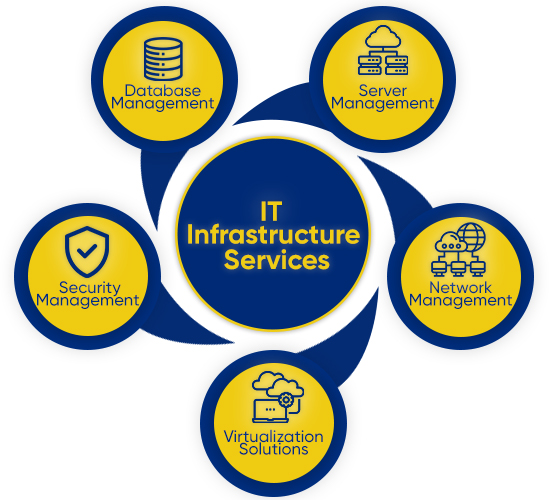
IT infrastructure services help organizations build, manage, and maintain the technology systems they rely on every day. These services can cover everything from computers and networks to cloud platforms, cybersecurity, and technical support. A well-managed infrastructure helps keep operations running smoothly, protect important information, and give teams the tools they need to work effectively.

What Are IT Infrastructure Services?

IT infrastructure includes the hardware, software, networks, and facilities that support an organization’s technology. IT infrastructure services are the professional services used to design, operate, secure, and improve those systems.

Services may be delivered by an internal IT team, an outside provider, or a combination of both. The right approach depends on an organization’s size, budget, technical requirements, and in-house expertise.

Common IT Infrastructure Services

Network Management

Network services help connect users, devices, offices, and applications. They can include network design, Wi-Fi setup, performance monitoring, troubleshooting, and management of routers, switches, and firewalls.

Cloud Services

Cloud infrastructure provides access to computing resources—such as servers, storage, and software—through online platforms. Services may include cloud migration, configuration, cost management, backups, and ongoing administration.

Server and Systems Administration

Servers and operating systems need regular maintenance to remain available and secure. Systems administration can include updates, user and access management, performance checks, configuration, and troubleshooting.

Cybersecurity

Security services help reduce the risk of unauthorized access, data loss, and service disruption. Depending on an organization’s needs, they may include security assessments, endpoint protection, identity and access controls, vulnerability management, and incident response planning.

Backup and Disaster Recovery

Backups create recoverable copies of important data. Disaster recovery planning outlines how systems and information can be restored after events such as hardware failure, cyberattacks, or natural disasters. Regular testing helps confirm that recovery procedures work as intended.

Help Desk and Technical Support

Support services help employees resolve technology issues, access accounts, and use workplace systems. A responsive help desk can reduce interruptions and give users a clear place to request assistance.

Why IT Infrastructure Services Matter

  • Reliability: Monitoring and maintenance can help identify problems before they cause extended interruptions.
  • Security: Consistent updates, access controls, and security practices help protect systems and data.
  • Scalability: Infrastructure can be adjusted as an organization adds employees, locations, or workloads.
  • Productivity: Reliable devices, networks, and applications help employees focus on their work.
  • Cost management: Planning and ongoing oversight can help organizations understand technology expenses and avoid unnecessary capacity.

Choosing an IT Infrastructure Provider

When evaluating a provider, start by identifying the systems that need support and the outcomes the organization wants to achieve. Ask how services are delivered, how support requests are handled, and what monitoring, documentation, and reporting are included. It is also useful to discuss security practices, backup and recovery procedures, response expectations, and how service costs are structured.

Look for a provider that communicates clearly and can explain its recommendations in terms of business needs—not just technology. Before signing an agreement, review the scope of services, responsibilities, service hours, data handling practices, and procedures for ending or changing the relationship.

Build an Infrastructure That Supports Your Goals

IT infrastructure is more than a collection of devices and software. It is the foundation that supports communication, customer service, daily operations, and future growth. With thoughtful planning and dependable management, IT infrastructure services can help organizations keep technology reliable, secure, and aligned with their goals.


5 Key Benefits of IT Infrastructure Services

  1. Improve system reliability and uptime.
  2. Strengthen cybersecurity and data protection.
  3. Support business growth and scalability.
  4. Reduce disruptions with proactive maintenance.
  5. Free teams to focus on core business priorities.


IT Infrastructure Services: Cost, Downtime, and Security Compliance Challenges

  1. Can be expensive to implement and maintain.
  2. Service disruptions may affect business operations.
  3. Managing security and compliance can be complex.

Improve system reliability and uptime.

IT infrastructure services help improve system reliability and uptime through proactive monitoring, routine maintenance, and timely troubleshooting. By identifying potential issues early and keeping hardware, software, and networks properly maintained, organizations can reduce unexpected outages and keep essential tools available. More dependable systems help employees stay productive and allow customers to access services with fewer interruptions.

Strengthen cybersecurity and data protection.

IT infrastructure services can strengthen cybersecurity and data protection by helping organizations secure networks, devices, and systems with safeguards such as access controls, software updates, threat monitoring, and data backups. Regular maintenance and security reviews can reveal vulnerabilities before they lead to bigger problems, while tested backup and recovery plans help restore important information after an incident. Together, these measures reduce risk and support business continuity.

Support business growth and scalability.

IT infrastructure services help businesses grow by making it easier to expand technology as needs change. Whether a company is adding employees, opening new locations, or handling more customers, its infrastructure can scale with demand through flexible cloud resources, reliable networks, and managed systems. This helps organizations avoid costly disruptions, support new opportunities, and invest in the technology they need without building everything from scratch.

Reduce disruptions with proactive maintenance.

Proactive maintenance helps reduce disruptions by identifying and addressing potential IT issues before they interrupt daily operations. Regular system updates, equipment checks, performance monitoring, and timely repairs can prevent small problems from becoming costly outages. With infrastructure maintained consistently, employees can work more reliably and organizations can minimize downtime.

Free teams to focus on core business priorities.

IT infrastructure services free internal teams to focus on core business priorities by taking routine technology tasks—such as system monitoring, maintenance, troubleshooting, and updates—off their plates. With infrastructure needs managed by dedicated specialists, employees can spend less time resolving IT issues and more time on work that supports customers, improves products, and grows the business.

Can be expensive to implement and maintain.

One potential drawback of IT infrastructure services is their cost. Implementing new systems can require significant upfront investment in hardware, software, migration, and setup. Ongoing expenses—such as maintenance, security updates, support, and cloud or licensing fees—can also add up over time. Careful planning and budgeting can help organizations choose services that meet their needs without overspending.

Service disruptions may affect business operations.

Service disruptions are a potential drawback of IT infrastructure services because outages or technical issues can interrupt access to essential systems, applications, and data. Even brief downtime may delay work, disrupt customer service, or affect sales, especially when businesses depend on connected technology for daily operations. Reliable monitoring, maintenance, backups, and recovery plans can help reduce the impact, but disruptions may still occur.

Managing security and compliance can be complex.

Managing security and compliance across IT infrastructure can be complex, especially when an organization uses a mix of cloud platforms, on-site systems, and third-party services. Teams must keep software updated, control access, protect sensitive data, monitor for threats, and meet changing industry or government requirements. Without clear processes and ongoing oversight, gaps can be difficult to spot and may lead to security incidents, audit issues, or costly penalties.

cs50ai

CS50AI: A Beginner’s Guide to Artificial Intelligence with Python

Exploring CS50AI: Harvard’s Introduction to Artificial Intelligence with Python

CS50AI is an innovative course offered by Harvard University that delves into the fascinating world of artificial intelligence (AI) using Python. As part of the broader CS50 series, which is renowned for its comprehensive approach to computer science education, CS50AI aims to equip students with a solid foundation in AI concepts and practical skills.

Course Overview

The course covers a wide range of topics within the realm of artificial intelligence, including:

  • Search Algorithms: Understanding how AI systems can navigate complex environments and make decisions based on available data.
  • Knowledge Representation: Learning how machines can represent and reason about information in a way that mimics human cognitive processes.
  • Machine Learning: Exploring supervised and unsupervised learning techniques that enable computers to learn from data and improve over time without explicit programming.
  • Natural Language Processing (NLP): Examining how AI can understand, interpret, and generate human language to facilitate communication between humans and machines.
  • Neural Networks: Delving into the architecture and functionality of neural networks that power many modern AI applications.

The Role of Python

The choice of Python as the primary programming language for CS50AI is strategic. Python’s simplicity and readability make it an ideal language for beginners while still being powerful enough for advanced AI applications. Throughout the course, students will engage in hands-on programming assignments that reinforce theoretical concepts and provide practical experience in building AI models.

Who Should Enroll?

CS50AI is designed for a diverse audience. Whether you are a computer science student looking to specialize in AI or an enthusiast eager to explore this cutting-edge field, this course offers valuable insights. While prior programming experience is beneficial, it is not strictly necessary, as the course provides ample resources to help learners at all levels succeed.

The Impact of CS50AI

The knowledge gained from CS50AI extends beyond academia. As AI continues to permeate various industries—from healthcare to finance—understanding its principles becomes increasingly important. By completing this course, students are better prepared to contribute meaningfully to technological advancements and address real-world challenges using AI solutions.

Conclusion

CS50AI represents a unique opportunity to explore the dynamic field of artificial intelligence within a structured educational framework. With Harvard’s esteemed faculty guiding learners through complex topics using Python, participants are well-equipped to harness the power of AI in their future endeavors. Whether pursuing further academic studies or entering the workforce, graduates of CS50AI carry with them valuable skills that are highly sought after in today’s tech-driven world.

If you’re ready to embark on an exciting journey into artificial intelligence, consider enrolling in CS50AI and discover how you can shape tomorrow’s technology today.


Frequently Asked Questions About CS50AI: Course Details, Enrollment, and More

  1. What is CS50AI?
  2. Is CS50AI free to take?
  3. What topics does CS50AI cover?
  4. Do I need programming experience before taking CS50AI?
  5. What programming language is used in CS50AI?
  6. How long does it take to complete CS50AI?
  7. How difficult is CS50AI?
  8. Does CS50AI offer a certificate?
  9. How do I enroll in CS50AI?

What is CS50AI?

CS50AI, officially titled “CS50’s Introduction to Artificial Intelligence with Python,” is a Harvard course that introduces core ideas and techniques in artificial intelligence through hands-on programming. Using Python, students explore topics such as search, knowledge representation, probability, optimization, machine learning, neural networks, and natural language processing while building projects that apply these concepts.

Is CS50AI free to take?

Yes, CS50AI is free to take through Harvard’s CS50 website and edX. You can access the course materials and complete the assignments at no cost. If you want a verified certificate through edX, a fee may apply; check the course page for current certificate options and pricing.

What topics does CS50AI cover?

CS50AI covers key concepts and techniques in artificial intelligence, including search algorithms, knowledge representation, inference under uncertainty, optimization, machine learning, neural networks, and natural language processing. Through hands-on projects in Python, students apply these ideas to problems such as solving puzzles, making decisions, recognizing patterns, and processing language.

Do I need programming experience before taking CS50AI?

Yes. CS50AI is designed for learners who already have a solid foundation in programming, typically through CS50x or about a year of experience with Python. You don’t need prior experience in artificial intelligence, but you should be comfortable writing and debugging Python code before starting.

What programming language is used in CS50AI?

CS50AI uses Python for its programming assignments and projects. The course applies Python to topics such as search, knowledge representation, machine learning, and natural language processing. Familiarity with Python is helpful, though the course also introduces the tools and concepts needed to get started.

How long does it take to complete CS50AI?

CS50AI is designed to be completed in about seven weeks, but the actual time depends on your schedule and experience with Python and computer science. The lectures and readings are only part of the workload; the programming projects can take additional time, so learners may choose to move faster or spread the course over a longer period.

How difficult is CS50AI?

CS50AI is challenging, especially if you’re new to programming or Python, because it combines programming assignments with concepts such as search, machine learning, and neural networks. The course is designed for learners with some prior programming experience—Harvard recommends completing CS50x or having comparable knowledge—so the projects can take significant time and problem-solving. With a solid programming foundation, steady practice, and patience, the material is manageable and rewarding.

Does CS50AI offer a certificate?

Yes. Students who complete the required CS50AI assignments and final project can earn a free CS50 Certificate. An optional paid edX Verified Certificate may also be available; check the course page for current requirements and details.

How do I enroll in CS50AI?

To enroll in CS50AI, visit the official course website at cs50.harvard.edu/ai and follow the instructions to access the course materials and submit assignments. The course is available online, and you can study at your own pace. Check the site for current options, including any platform-based enrollment or certificate details.

it infra service

IT Infra Service: Building a Reliable Technology Foundation

IT Infrastructure Services: The Foundation of a Reliable Business

Every modern organization depends on technology to communicate, serve customers, and get work done. Behind the applications employees use each day is an IT infrastructure: the hardware, software, networks, cloud platforms, and security systems that keep business operations running. IT infrastructure services help organizations build, manage, and improve that foundation.

What Are IT Infrastructure Services?

IT infrastructure services cover the planning, setup, monitoring, maintenance, and support of the technology an organization relies on. Services may be delivered by an internal IT team, an outside provider, or a combination of both.

The right mix depends on an organization’s size, goals, existing technology, and regulatory requirements. Some businesses need help maintaining office networks and servers, while others need cloud management, cybersecurity support, or a complete infrastructure strategy.

Common IT Infrastructure Services

  • Network services: Design, configuration, monitoring, and troubleshooting for wired and wireless networks, routers, switches, and secure remote access.
  • Cloud services: Support for cloud environments, including migration, configuration, cost management, and ongoing maintenance.
  • Server and storage management: Installation, updates, performance monitoring, capacity planning, and administration of systems that store and process business data.
  • Cybersecurity: Security assessments, access controls, endpoint protection, vulnerability management, and incident response planning.
  • Backup and disaster recovery: Backup systems and recovery plans designed to help restore data and services after an outage, cyberattack, or other disruption.
  • Help desk and technical support: Assistance with everyday technology problems, account access, devices, and business applications.
  • IT planning and consulting: Guidance on technology investments, infrastructure design, modernization, and long-term business needs.

Why Infrastructure Services Matter

A dependable IT infrastructure can help employees work efficiently and give customers a more consistent experience. Regular maintenance and monitoring can also help identify problems before they cause significant downtime.

Professional infrastructure support may help an organization:

  • Reduce service interruptions and improve system reliability.
  • Protect business data and manage security risks.
  • Support remote and hybrid work.
  • Scale technology as the organization grows.
  • Plan technology spending more effectively.
  • Free internal staff to focus on higher-priority work.

Managed Services or In-House IT?

Some organizations manage all technology internally. Others work with a managed service provider that monitors and supports their systems under an ongoing agreement. A blended approach is also common: internal staff handle business-specific needs while an outside provider supplies specialized expertise or around-the-clock monitoring.

When comparing options, consider the skills already available in-house, the complexity of the environment, support hours, security needs, and the level of control the organization wants to retain. It is also helpful to understand exactly what a service agreement includes, how support requests are handled, and how performance is measured.

How to Choose an IT Infrastructure Provider

A strong provider should take time to understand how the organization works before recommending solutions. Look for clear communication, relevant technical experience, documented processes, and a practical approach to security and continuity planning.

Ask potential providers about their service scope, response procedures, backup and recovery practices, reporting, and experience with the technologies your organization uses. A provider should explain recommendations in plain language and connect them to business goals—not simply propose technology for its own sake.

Build a Stronger Technology Foundation

IT infrastructure services are more than routine maintenance. They help organizations keep essential systems dependable, secure, and ready for change. With a clear plan and the right level of support, businesses can make better use of technology today while preparing for tomorrow’s needs.


9 Essential Tips for Reliable and Secure IT Infrastructure Services

  1. Monitor systems continuously.
  2. Patch servers regularly.
  3. Back up critical data.
  4. Test disaster recovery plans.
  5. Use strong access controls.
  6. Document your infrastructure.
  7. Track capacity and usage.
  8. Automate routine maintenance.
  9. Review security alerts promptly.

Monitor systems continuously.

Monitor systems continuously to spot performance issues, outages, and security threats before they disrupt your business. By tracking servers, networks, applications, and cloud services in real time, your IT team or service provider can investigate alerts quickly, resolve problems sooner, and keep essential systems reliable. Set clear alert thresholds and review monitoring reports regularly so recurring issues can be addressed at their source.

Patch servers regularly.

Regularly patching servers is a simple but essential part of maintaining a secure, reliable IT infrastructure. Software updates often fix known security vulnerabilities, resolve bugs, and improve system stability. Establish a consistent patching schedule, test updates when appropriate, and keep backups and rollback plans in place in case an update causes problems. Regular patch management helps reduce risk while keeping servers dependable and up to date.

Back up critical data.

Back up critical data regularly to protect your business from accidental deletion, hardware failure, cyberattacks, and other disruptions. Store backup copies in a secure location separate from your primary systems, and use automated schedules to keep them current. Test your backups periodically to confirm that files can be restored when needed.

Test disaster recovery plans.

Test your disaster recovery plans regularly to make sure your team can restore critical systems and data when an outage, cyberattack, or other disruption occurs. Simulated recovery exercises can reveal outdated procedures, missing backups, unclear responsibilities, and technology gaps before a real emergency happens. Document the results, address any issues, and update the plan as your IT infrastructure changes.

Use strong access controls.

Use strong access controls to ensure people can access only the systems and information they need for their jobs. Require unique accounts, strong passwords, and multifactor authentication, especially for administrator and remote access. Review permissions regularly, remove access promptly when someone changes roles or leaves, and avoid shared accounts whenever possible. These steps can reduce the risk of unauthorized access and help protect your IT infrastructure.

Document your infrastructure.

Documenting your IT infrastructure gives your team a clear, up-to-date record of how systems are connected and managed. Include details such as network diagrams, hardware and software inventories, cloud services, configurations, backup procedures, and vendor contacts. Good documentation makes troubleshooting faster, supports smoother onboarding, and helps the business recover more effectively from outages. Review it regularly so it stays accurate as your infrastructure changes.

Track capacity and usage.

Track capacity and usage across your IT infrastructure to spot growing demands before they affect performance. Regularly review metrics such as storage, network traffic, memory, and processing power to identify bottlenecks, unused resources, and trends over time. This information helps you plan upgrades, optimize costs, and keep services reliable as your organization grows.

Automate routine maintenance.

Automating routine IT maintenance—such as software updates, backups, system checks, and log reviews—helps keep infrastructure reliable while reducing repetitive work for IT teams. Well-planned automation can make tasks more consistent, catch potential issues earlier, and free staff to focus on higher-priority projects. Start with routine, low-risk tasks, test each workflow, and monitor the results to ensure automation is working as intended.

Review security alerts promptly.

Review security alerts as soon as they appear to help identify and contain potential threats before they disrupt your IT infrastructure. Confirm whether each alert indicates suspicious activity, follow your incident response procedures, and escalate serious or unclear issues to the appropriate security team or service provider. Timely investigation can reduce damage, protect sensitive data, and help keep business systems running securely.

microsoft cloud security

Microsoft Cloud Security: Essential Strategies for Protecting Your Data and Workloads

Microsoft Cloud Security: A Practical Guide

Microsoft cloud services—including Azure, Microsoft 365, and services built on the Microsoft cloud—offer organizations flexible ways to run applications, collaborate, and manage data. Protecting those environments takes more than turning on a security feature. It requires clear ownership, strong identity controls, thoughtful configuration, and ongoing monitoring.

Understand the Shared Responsibility Model

Cloud security is a shared responsibility between Microsoft and its customers. Microsoft secures the underlying cloud infrastructure, while customers remain responsible for areas such as user accounts, access permissions, data, and many service configurations. The exact division of responsibility depends on the service being used. For example, a managed software service generally requires less infrastructure management by the customer than a virtual machine running in Azure.

Before deploying a workload, identify what Microsoft manages and what your organization must secure. This helps prevent gaps in areas such as patching, backups, access control, and data protection.

Make Identity Your First Line of Defense

Compromised accounts are a common path into cloud environments, so identity protection should be a priority. Microsoft Entra ID provides identity and access management capabilities for Microsoft cloud services and other applications.

  • Require multifactor authentication, especially for administrators and remote access.
  • Use conditional access policies to evaluate factors such as user, device, location, and risk.
  • Apply least privilege: give users and applications only the access they need.
  • Use privileged identity management practices to limit standing administrator access.
  • Review inactive accounts, service principals, and access permissions regularly.

Strong identity controls can reduce the impact of stolen passwords and help limit an attacker’s ability to move through an environment.

Protect Azure Workloads and Configurations

Misconfigured cloud resources can expose systems or data even when the underlying platform is secure. In Azure, organizations should establish secure configuration standards for subscriptions, networks, storage, virtual machines, and databases. Azure Policy can help enforce organizational requirements, while Microsoft Defender for Cloud can provide security recommendations and threat protection capabilities for supported resources.

Important practices include restricting public access where it is not required, using network segmentation, securing administrative connections, encrypting sensitive data, and keeping workloads patched. Backups should be protected from accidental deletion and ransomware, and recovery plans should be tested rather than assumed to work.

Secure Microsoft 365 and Collaboration

Microsoft 365 brings together email, file storage, meetings, and collaboration tools. Security settings should reflect how people actually work while limiting unnecessary exposure. Review sharing defaults in services such as SharePoint and OneDrive, manage external collaboration, and establish retention and access policies appropriate to the organization.

Microsoft Defender for Office 365 can help protect against threats such as phishing and malicious attachments, depending on the plan and configuration. Security awareness training and clear procedures for reporting suspicious messages remain important because technical controls cannot prevent every social-engineering attempt.

Protect and Govern Data

Cloud security also depends on knowing what data an organization stores and who can access it. Microsoft Purview includes data governance, information protection, and compliance capabilities, with features varying by product and license. Organizations can use classification and sensitivity labels to help identify and protect important information, and apply data loss prevention policies to reduce inappropriate sharing.

Start by identifying sensitive data, defining who should be able to access it, and deciding how long it should be retained. Policies should be tested with users and business teams to avoid disrupting legitimate work.

Monitor, Detect, and Respond

Security controls are most effective when organizations can detect suspicious activity and respond quickly. Microsoft Defender products provide security capabilities across various environments, while Microsoft Sentinel is a cloud-based security information and event management (SIEM) and security orchestration, automation, and response (SOAR) platform. The tools an organization needs depend on its environment, risk profile, and licensing.

Establish a process for reviewing alerts, investigating incidents, and escalating serious findings. Keep audit logging enabled where appropriate, define incident-response roles, and practice response scenarios such as account compromise, data exposure, and ransomware. Monitoring without a clear response process can leave important alerts unattended.

Build a Sustainable Security Program

Microsoft cloud security is not a one-time setup. Services change, employees join and leave, and business requirements evolve. A sustainable program includes regular access reviews, configuration assessments, vulnerability management, backup testing, and updates to policies and incident-response plans.

Begin with the basics: secure administrator accounts, enable strong authentication, reduce excessive permissions, protect sensitive data, and establish reliable monitoring. Then use Microsoft’s security guidance and the controls available in your specific services to improve protection over time. Because features and licensing can change, verify current capabilities and requirements in Microsoft’s official documentation before designing or purchasing a solution.


Top 9 Benefits of Microsoft Cloud Security for Your Business

  1. Scales with your business needs
  2. Offers strong identity controls
  3. Supports multifactor authentication
  4. Helps protect data with encryption
  5. Provides built-in threat detection
  6. Integrates with Microsoft 365
  7. Enables centralized security management
  8. Supports compliance and governance
  9. Offers tools for monitoring and response


5 Challenges of Microsoft Cloud Security: Complexity, Costs, and Dependence

  1. Can be complex to configure and manage.
  2. Advanced security features may require costly licenses.
  3. Misconfigurations can expose data and services.
  4. Dependence on Microsoft can limit flexibility.
  5. Requires ongoing expertise and monitoring.

Scales with your business needs

Microsoft cloud security can scale alongside your business, helping you adjust protection as your team, data, and workloads grow or change. You can add security capabilities, expand coverage across cloud services, and adapt access controls and policies as new needs arise—without having to build and maintain all the supporting infrastructure yourself. This flexibility can help keep security aligned with your business while making it easier to manage changing requirements.

Offers strong identity controls

Microsoft cloud security offers strong identity controls that help organizations protect accounts, apps, and data. With tools such as Microsoft Entra ID, teams can require multifactor authentication, apply access policies based on user and device risk, and limit permissions to only what each person needs. These safeguards make it harder for unauthorized users to gain access and help reduce the impact of compromised credentials.

Supports multifactor authentication

Microsoft cloud security supports multifactor authentication (MFA), adding an extra layer of protection beyond a password. Users may be asked to confirm their identity with an authenticator app, a security key, or another approved method. This makes it harder for someone to access an account with a stolen or guessed password and helps organizations better protect email, files, and cloud resources.

Helps protect data with encryption

Microsoft cloud security helps protect data with encryption, making information harder to read if it is accessed without authorization. Encryption can safeguard data while it is stored and while it moves between services or devices. With appropriate configuration and key-management practices, organizations can add an important layer of protection for sensitive information across their cloud environments.

Provides built-in threat detection

Microsoft cloud security includes built-in threat detection capabilities that help identify suspicious activity across supported services, users, devices, and workloads. These tools can analyze signals and surface alerts about potential risks—such as unusual sign-ins or malicious behavior—so security teams can investigate and respond more quickly. When configured to fit an organization’s environment, built-in detection can strengthen visibility without requiring every monitoring capability to be assembled from scratch.

Integrates with Microsoft 365

Microsoft cloud security integrates seamlessly with Microsoft 365, helping organizations protect email, files, meetings, and user accounts within the tools employees already use. This integration can bring security policies, identity controls, and threat protection together across services such as Outlook, Teams, SharePoint, and OneDrive. As a result, administrators can manage access more consistently, respond to potential threats with greater visibility, and help safeguard sensitive information without disrupting everyday collaboration.

Enables centralized security management

Microsoft cloud security enables centralized security management by bringing key security settings, policies, alerts, and monitoring tools together across cloud services. This gives IT and security teams a clearer view of their environment and helps them apply consistent protections, manage access, and respond to potential threats more efficiently. Centralized oversight can also make it easier to identify gaps and coordinate security practices across users, devices, and workloads.

Supports compliance and governance

Microsoft cloud security supports compliance and governance by providing tools to help organizations protect sensitive information, manage access, apply data-retention policies, and monitor activity. Services such as Microsoft Purview can help classify and govern data, while built-in security and compliance features can support an organization’s efforts to meet applicable regulatory and internal requirements. The right controls depend on the Microsoft services in use, the organization’s configuration, and its specific compliance obligations.

Offers tools for monitoring and response

Microsoft cloud security offers tools that help organizations monitor activity, detect potential threats, and respond to incidents. Services such as Microsoft Defender and Microsoft Sentinel can bring security signals together, surface suspicious behavior, and support investigation and response workflows. With appropriate configuration and ongoing oversight, these tools can help teams identify problems sooner and coordinate a more effective response.

Can be complex to configure and manage.

One drawback of Microsoft cloud security is that it can be complex to configure and manage. Services such as Azure, Microsoft 365, and Microsoft Entra ID offer many security settings, policies, and tools, and the right setup depends on an organization’s needs and licensing. Misconfigured controls or unclear responsibilities can leave gaps in protection, so teams may need specialized expertise, ongoing training, and regular reviews to manage the environment effectively.

Advanced security features may require costly licenses.

Advanced security features in Microsoft cloud services can come at a significant additional cost. Capabilities such as enhanced threat detection, identity protection, compliance tools, and advanced data protection may require higher-tier subscriptions or separate licenses. For organizations with tight budgets, these costs can make it difficult to deploy the full set of recommended safeguards, so it’s important to compare licensing options and prioritize features based on risk and business needs.

Misconfigurations can expose data and services.

One potential drawback of Microsoft cloud security is that misconfigurations can expose sensitive data and services to unauthorized access. A storage account with overly permissive access, an exposed network endpoint, or an incorrectly assigned user role can create security gaps—even when the underlying Microsoft platform is operating securely. Preventing these issues requires careful setup, regular configuration reviews, and ongoing monitoring.

Dependence on Microsoft can limit flexibility.

Relying heavily on Microsoft’s cloud security tools can limit an organization’s flexibility. Teams may find it difficult or costly to switch providers, integrate competing products, or adapt workflows built around Microsoft-specific services. This dependence can also make it harder to respond to changing business needs or negotiate terms, so organizations should consider portability and interoperability when designing their cloud security strategy.

Requires ongoing expertise and monitoring.

Microsoft cloud security requires ongoing expertise and monitoring to remain effective. Services, threats, and security settings change over time, so organizations need knowledgeable staff to review configurations, manage access, investigate alerts, and respond to incidents. Without consistent oversight, misconfigurations or suspicious activity may go unnoticed, leaving sensitive data and systems at risk.