Microsoft Cloud Security: Essential Strategies for Protecting Your Data and Workloads
Microsoft Cloud Security: A Practical Guide
Microsoft cloud services—including Azure, Microsoft 365, and services built on the Microsoft cloud—offer organizations flexible ways to run applications, collaborate, and manage data. Protecting those environments takes more than turning on a security feature. It requires clear ownership, strong identity controls, thoughtful configuration, and ongoing monitoring.
Understand the Shared Responsibility Model
Cloud security is a shared responsibility between Microsoft and its customers. Microsoft secures the underlying cloud infrastructure, while customers remain responsible for areas such as user accounts, access permissions, data, and many service configurations. The exact division of responsibility depends on the service being used. For example, a managed software service generally requires less infrastructure management by the customer than a virtual machine running in Azure.
Before deploying a workload, identify what Microsoft manages and what your organization must secure. This helps prevent gaps in areas such as patching, backups, access control, and data protection.
Make Identity Your First Line of Defense
Compromised accounts are a common path into cloud environments, so identity protection should be a priority. Microsoft Entra ID provides identity and access management capabilities for Microsoft cloud services and other applications.
- Require multifactor authentication, especially for administrators and remote access.
- Use conditional access policies to evaluate factors such as user, device, location, and risk.
- Apply least privilege: give users and applications only the access they need.
- Use privileged identity management practices to limit standing administrator access.
- Review inactive accounts, service principals, and access permissions regularly.
Strong identity controls can reduce the impact of stolen passwords and help limit an attacker’s ability to move through an environment.
Protect Azure Workloads and Configurations
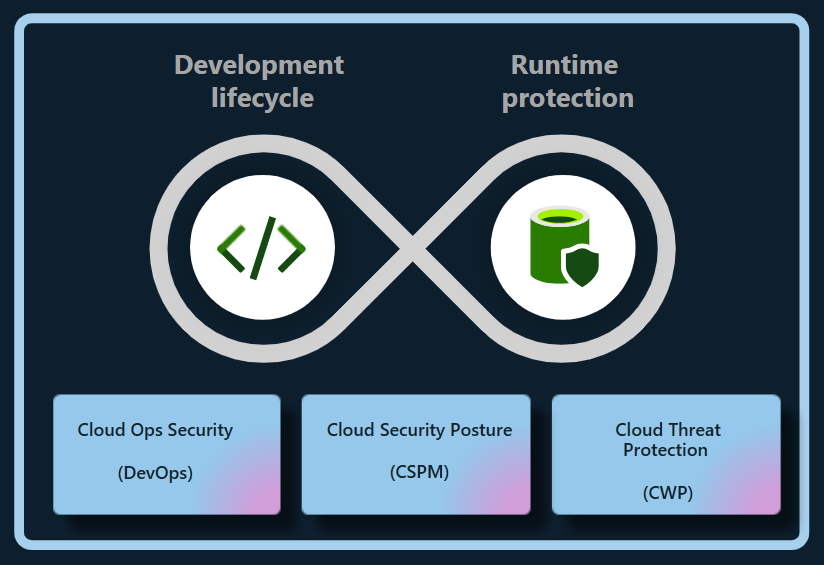
Misconfigured cloud resources can expose systems or data even when the underlying platform is secure. In Azure, organizations should establish secure configuration standards for subscriptions, networks, storage, virtual machines, and databases. Azure Policy can help enforce organizational requirements, while Microsoft Defender for Cloud can provide security recommendations and threat protection capabilities for supported resources.
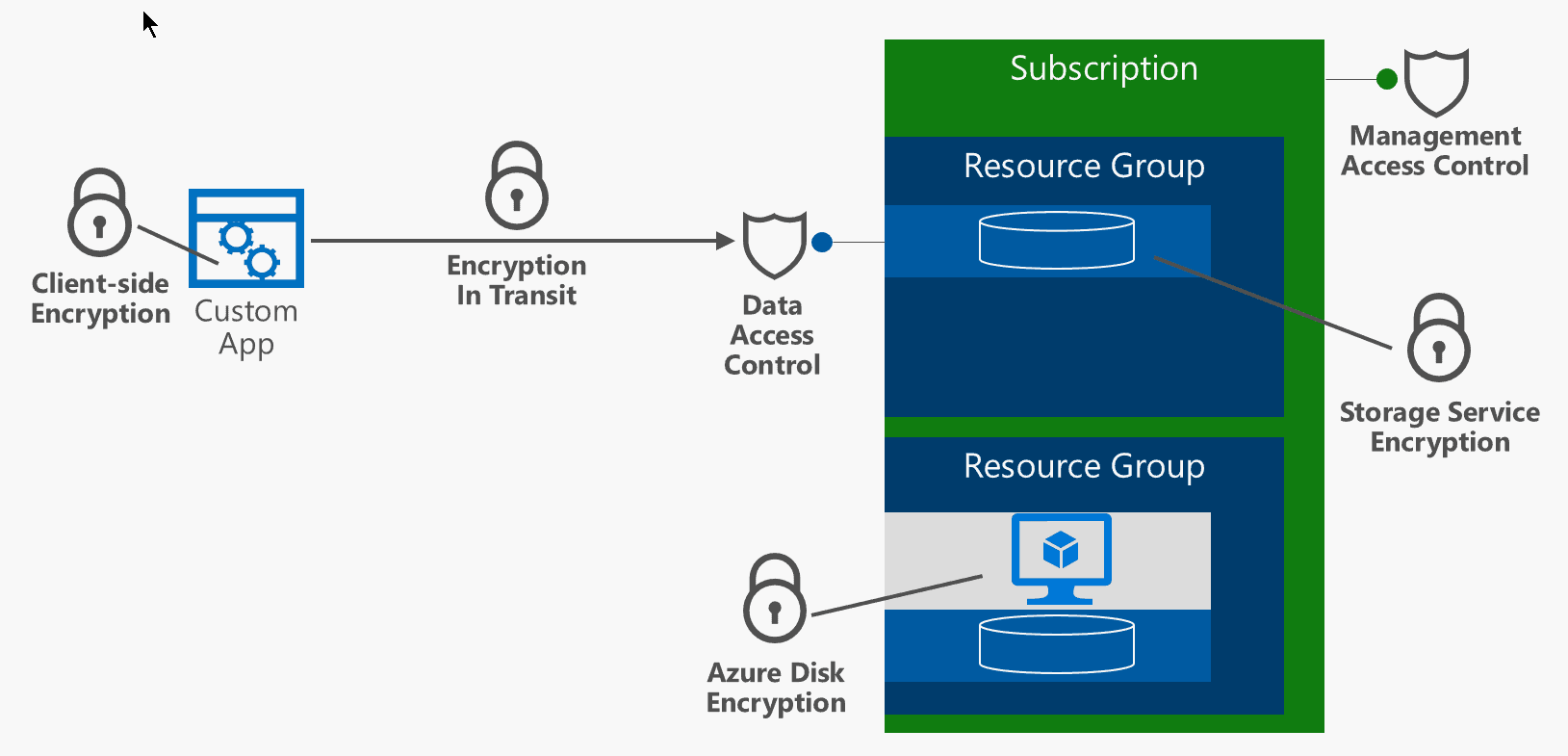
Important practices include restricting public access where it is not required, using network segmentation, securing administrative connections, encrypting sensitive data, and keeping workloads patched. Backups should be protected from accidental deletion and ransomware, and recovery plans should be tested rather than assumed to work.
Secure Microsoft 365 and Collaboration
Microsoft 365 brings together email, file storage, meetings, and collaboration tools. Security settings should reflect how people actually work while limiting unnecessary exposure. Review sharing defaults in services such as SharePoint and OneDrive, manage external collaboration, and establish retention and access policies appropriate to the organization.
Microsoft Defender for Office 365 can help protect against threats such as phishing and malicious attachments, depending on the plan and configuration. Security awareness training and clear procedures for reporting suspicious messages remain important because technical controls cannot prevent every social-engineering attempt.
Protect and Govern Data
Cloud security also depends on knowing what data an organization stores and who can access it. Microsoft Purview includes data governance, information protection, and compliance capabilities, with features varying by product and license. Organizations can use classification and sensitivity labels to help identify and protect important information, and apply data loss prevention policies to reduce inappropriate sharing.
Start by identifying sensitive data, defining who should be able to access it, and deciding how long it should be retained. Policies should be tested with users and business teams to avoid disrupting legitimate work.
Monitor, Detect, and Respond
Security controls are most effective when organizations can detect suspicious activity and respond quickly. Microsoft Defender products provide security capabilities across various environments, while Microsoft Sentinel is a cloud-based security information and event management (SIEM) and security orchestration, automation, and response (SOAR) platform. The tools an organization needs depend on its environment, risk profile, and licensing.
Establish a process for reviewing alerts, investigating incidents, and escalating serious findings. Keep audit logging enabled where appropriate, define incident-response roles, and practice response scenarios such as account compromise, data exposure, and ransomware. Monitoring without a clear response process can leave important alerts unattended.
Build a Sustainable Security Program
Microsoft cloud security is not a one-time setup. Services change, employees join and leave, and business requirements evolve. A sustainable program includes regular access reviews, configuration assessments, vulnerability management, backup testing, and updates to policies and incident-response plans.
Begin with the basics: secure administrator accounts, enable strong authentication, reduce excessive permissions, protect sensitive data, and establish reliable monitoring. Then use Microsoft’s security guidance and the controls available in your specific services to improve protection over time. Because features and licensing can change, verify current capabilities and requirements in Microsoft’s official documentation before designing or purchasing a solution.
Top 9 Benefits of Microsoft Cloud Security for Your Business
- Scales with your business needs
- Offers strong identity controls
- Supports multifactor authentication
- Helps protect data with encryption
- Provides built-in threat detection
- Integrates with Microsoft 365
- Enables centralized security management
- Supports compliance and governance
- Offers tools for monitoring and response
5 Challenges of Microsoft Cloud Security: Complexity, Costs, and Dependence
- Can be complex to configure and manage.
- Advanced security features may require costly licenses.
- Misconfigurations can expose data and services.
- Dependence on Microsoft can limit flexibility.
- Requires ongoing expertise and monitoring.
Scales with your business needs
Microsoft cloud security can scale alongside your business, helping you adjust protection as your team, data, and workloads grow or change. You can add security capabilities, expand coverage across cloud services, and adapt access controls and policies as new needs arise—without having to build and maintain all the supporting infrastructure yourself. This flexibility can help keep security aligned with your business while making it easier to manage changing requirements.
Offers strong identity controls
Microsoft cloud security offers strong identity controls that help organizations protect accounts, apps, and data. With tools such as Microsoft Entra ID, teams can require multifactor authentication, apply access policies based on user and device risk, and limit permissions to only what each person needs. These safeguards make it harder for unauthorized users to gain access and help reduce the impact of compromised credentials.
Supports multifactor authentication
Microsoft cloud security supports multifactor authentication (MFA), adding an extra layer of protection beyond a password. Users may be asked to confirm their identity with an authenticator app, a security key, or another approved method. This makes it harder for someone to access an account with a stolen or guessed password and helps organizations better protect email, files, and cloud resources.
Helps protect data with encryption
Microsoft cloud security helps protect data with encryption, making information harder to read if it is accessed without authorization. Encryption can safeguard data while it is stored and while it moves between services or devices. With appropriate configuration and key-management practices, organizations can add an important layer of protection for sensitive information across their cloud environments.
Provides built-in threat detection
Microsoft cloud security includes built-in threat detection capabilities that help identify suspicious activity across supported services, users, devices, and workloads. These tools can analyze signals and surface alerts about potential risks—such as unusual sign-ins or malicious behavior—so security teams can investigate and respond more quickly. When configured to fit an organization’s environment, built-in detection can strengthen visibility without requiring every monitoring capability to be assembled from scratch.
Integrates with Microsoft 365
Microsoft cloud security integrates seamlessly with Microsoft 365, helping organizations protect email, files, meetings, and user accounts within the tools employees already use. This integration can bring security policies, identity controls, and threat protection together across services such as Outlook, Teams, SharePoint, and OneDrive. As a result, administrators can manage access more consistently, respond to potential threats with greater visibility, and help safeguard sensitive information without disrupting everyday collaboration.
Enables centralized security management
Microsoft cloud security enables centralized security management by bringing key security settings, policies, alerts, and monitoring tools together across cloud services. This gives IT and security teams a clearer view of their environment and helps them apply consistent protections, manage access, and respond to potential threats more efficiently. Centralized oversight can also make it easier to identify gaps and coordinate security practices across users, devices, and workloads.
Supports compliance and governance
Microsoft cloud security supports compliance and governance by providing tools to help organizations protect sensitive information, manage access, apply data-retention policies, and monitor activity. Services such as Microsoft Purview can help classify and govern data, while built-in security and compliance features can support an organization’s efforts to meet applicable regulatory and internal requirements. The right controls depend on the Microsoft services in use, the organization’s configuration, and its specific compliance obligations.
Offers tools for monitoring and response
Microsoft cloud security offers tools that help organizations monitor activity, detect potential threats, and respond to incidents. Services such as Microsoft Defender and Microsoft Sentinel can bring security signals together, surface suspicious behavior, and support investigation and response workflows. With appropriate configuration and ongoing oversight, these tools can help teams identify problems sooner and coordinate a more effective response.
Can be complex to configure and manage.
One drawback of Microsoft cloud security is that it can be complex to configure and manage. Services such as Azure, Microsoft 365, and Microsoft Entra ID offer many security settings, policies, and tools, and the right setup depends on an organization’s needs and licensing. Misconfigured controls or unclear responsibilities can leave gaps in protection, so teams may need specialized expertise, ongoing training, and regular reviews to manage the environment effectively.
Advanced security features may require costly licenses.
Advanced security features in Microsoft cloud services can come at a significant additional cost. Capabilities such as enhanced threat detection, identity protection, compliance tools, and advanced data protection may require higher-tier subscriptions or separate licenses. For organizations with tight budgets, these costs can make it difficult to deploy the full set of recommended safeguards, so it’s important to compare licensing options and prioritize features based on risk and business needs.
Misconfigurations can expose data and services.
One potential drawback of Microsoft cloud security is that misconfigurations can expose sensitive data and services to unauthorized access. A storage account with overly permissive access, an exposed network endpoint, or an incorrectly assigned user role can create security gaps—even when the underlying Microsoft platform is operating securely. Preventing these issues requires careful setup, regular configuration reviews, and ongoing monitoring.
Dependence on Microsoft can limit flexibility.
Relying heavily on Microsoft’s cloud security tools can limit an organization’s flexibility. Teams may find it difficult or costly to switch providers, integrate competing products, or adapt workflows built around Microsoft-specific services. This dependence can also make it harder to respond to changing business needs or negotiate terms, so organizations should consider portability and interoperability when designing their cloud security strategy.
Requires ongoing expertise and monitoring.
Microsoft cloud security requires ongoing expertise and monitoring to remain effective. Services, threats, and security settings change over time, so organizations need knowledgeable staff to review configurations, manage access, investigate alerts, and respond to incidents. Without consistent oversight, misconfigurations or suspicious activity may go unnoticed, leaving sensitive data and systems at risk.