cfchris.com

Loading

www java com

www java com: A Guide to Java Downloads, Updates, and Support

What Is Java.com?

Java.com is the official website for Java software from Oracle. It provides information and resources for people who use Java on personal computers, including guidance on downloading, installing, and updating Java when it is needed to run certain applications.

What Is Java?

Java is a widely used programming language and software platform. Developers use it to build applications for many kinds of devices and systems. Some programs require Java components to be installed on a computer before they can run.

Java is distinct from JavaScript, despite the similar names. JavaScript is commonly used to add interactive features to websites, while Java is a separate programming language and platform.

What You Can Find on Java.com

Visitors can use Java.com to find Java-related downloads, installation instructions, troubleshooting help, and information about updates. The site is especially useful when a program specifically says that Java is required.

Not every computer needs Java installed. Many modern websites and applications work without it, so it is best to install Java only when a trusted application requires it. Before downloading software, check that you are visiting the official website and review the installation prompts carefully.

Keeping Java Up to Date

When Java is installed, keeping it updated can help address security issues and improve compatibility. Use the update tools included with the software or follow the instructions on Java.com. Avoid download links in unexpected pop-ups or messages, which may lead to unwanted or unsafe software.

Java for Developers

Java.com is aimed mainly at people who need Java for applications on their computers. Developers looking for programming tools, technical documentation, or enterprise products may need Oracle’s developer resources or other official Java project sites instead.

In Summary

Java.com is a starting point for learning about and obtaining Java software for compatible applications. If you need Java, use trusted sources, install only what is necessary, and keep the software updated.


Comprehensive Guide to Java: Download, Install, and Troubleshoot with Confidence

  1. Official source for Java downloads.
  2. Provides installation instructions.
  3. Offers update guidance.
  4. Includes troubleshooting resources.
  5. Explains Java’s purpose.
  6. Helps users check Java requirements.
  7. Supports safe, informed downloading.
  8. Easy starting point for Java users.


7 Drawbacks of Using www.java.com: Why It May Not Be Essential for Everyone

  1. Java is unnecessary for many users.
  2. Some Java apps require manual setup.
  3. Installation prompts may include extras.
  4. Java updates can interrupt workflows.
  5. Compatibility issues may affect older apps.
  6. The site focuses mainly on consumer Java downloads.
  7. Java is often confused with JavaScript.

Official source for Java downloads.

One key advantage of Java.com is that it provides an official source for Java downloads. Getting Java directly from the official website can help you avoid unofficial installers that may include unwanted software or outdated files. Before downloading, make sure Java is needed for the application you want to use, and follow the site’s installation and update instructions.

Provides installation instructions.

One useful feature of Java.com is its clear installation instructions. The site guides users through downloading and setting up Java, helping them follow the right steps for their computer and troubleshoot common issues along the way.

Offers update guidance.

Java.com offers clear guidance on checking for and installing Java updates. Keeping Java up to date can help improve compatibility and address security issues, while the site’s instructions make it easier to follow the recommended update process.

Includes troubleshooting resources.

One advantage of Java.com is that it includes troubleshooting resources to help users resolve common issues with downloading, installing, updating, or running Java. These guides can make it easier to find a solution and get back to using applications that rely on Java.

Explains Java’s purpose.

Java.com explains Java’s purpose in clear, accessible terms, helping visitors understand what the technology does and why certain applications may require it. This makes the site a useful starting point for people who want to learn the basics before deciding whether they need to download or use Java.

Helps users check Java requirements.

Java.com helps users check whether their computer meets the requirements for Java and whether Java is installed and working properly. This can make it easier to troubleshoot applications that depend on Java and determine whether an update or installation is needed.

Supports safe, informed downloading.

Java.com supports safe, informed downloading by providing official Java software alongside installation guidance and helpful information. Users can check what they’re downloading, follow clear setup instructions, and avoid relying on unfamiliar third-party download sites.

Easy starting point for Java users.

Java.com is an easy starting point for anyone who needs Java on a computer. The site brings together helpful information about downloading, installing, and updating Java, so users can quickly find the guidance they need without sorting through technical resources designed for developers.

Java is unnecessary for many users.

One drawback of Java.com is that many users may not need Java at all. Most modern websites and everyday applications run without it, so installing Java when no program requires it can add unnecessary software to a computer. Users should check whether a trusted application specifically needs Java before downloading or installing it.

Some Java apps require manual setup.

Some Java applications require manual setup before they work properly. You may need to adjust settings, install a specific version, or follow extra steps, which can be confusing if you’re not familiar with Java.

Installation prompts may include extras.

One potential drawback of www.java.com is that installation prompts may offer optional extras alongside Java. These offers can be easy to overlook, so review each screen carefully and decline anything you don’t want before continuing.

Java updates can interrupt workflows.

Java updates can interrupt workflows, especially when they appear during important tasks or require a browser or application restart. Downloads, installation steps, and compatibility checks may take time, while changes to Java settings can affect applications that depend on a particular version. Scheduling updates for a convenient time and checking that essential programs remain compatible can help reduce disruption.

Compatibility issues may affect older apps.

Compatibility issues may affect older apps that rely on specific Java versions or features. Updating Java can sometimes cause these applications to behave differently or stop working, so check the app’s requirements before installing a new version. Older software may also need updates or help from its developer to run properly.

The site focuses mainly on consumer Java downloads.

One drawback of Java.com is that it focuses mainly on Java downloads and support for everyday users, so developers may not find the technical documentation, development tools, or enterprise resources they need. They may have to look elsewhere on Oracle’s developer sites or other Java community resources.

Java is often confused with JavaScript.

A common drawback of Java.com is that Java is often confused with JavaScript because their names are so similar. Despite the resemblance, they are different technologies used for different purposes, and installing Java does not enable JavaScript in a web browser. This confusion can make it harder for users to find the right information or software for their needs.

simple java program

Simple Java Program: A Beginner’s Guide to Writing and Running Your First Code

How to Write a Simple Java Program

Java is a popular programming language used to build desktop, web, and mobile applications. A good way to get started is to write a small program that displays a message on the screen.

Your First Java Program

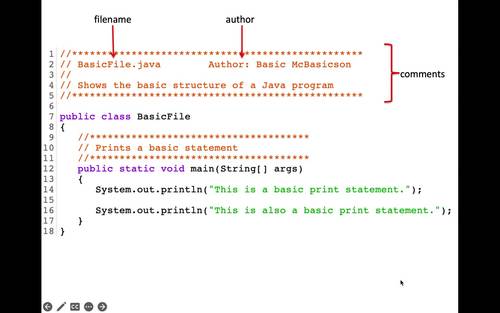
The program below prints “Hello, World!” in the console:

public class HelloWorld {

public static void main(String[] args) {

System.out.println("Hello, World!");

}

}

Understanding the Code

  • public class HelloWorld defines a class named HelloWorld. In Java, the class name should match the file name, so save the program as HelloWorld.java.
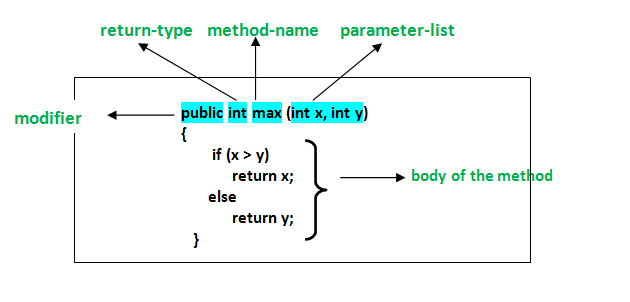
  • public static void main(String[] args) defines the main method. Java starts running the program from this method.
  • System.out.println() displays text in the console. The text to display goes inside the parentheses and quotation marks.
  • Braces, { }, mark the beginning and end of the class and method.
  • The semicolon at the end of the print statement tells Java that the instruction is complete.

Compile and Run the Program

Install a Java Development Kit (JDK), then open a terminal or command prompt in the folder containing HelloWorld.java. Compile the program with:

javac HelloWorld.java

If compilation succeeds, Java creates a file named HelloWorld.class. Run the program with:

java HelloWorld

The output will be:

Hello, World!

Try a Small Change

Replace the message inside System.out.println() with your own text. For example:

System.out.println("Java is fun to learn!");

Save the file, compile it again, and run it to see the new output. This simple example introduces the basic structure of a Java program and gives you a starting point for exploring variables, input, and other programming concepts.


7 Essential Tips for Writing Simple Java Programs

  1. Use `public static void main(String[] args)` as the program’s entry point.
  2. Save the file with the same name as its public class.
  3. Use `System.out.println()` to display text.
  4. End most statements with a semicolon.
  5. Match every opening brace with a closing brace.
  6. Compile with `javac` and run with `java`.
  7. Keep variable names clear and descriptive.

Use `public static void main(String[] args)` as the program’s entry point.

In a simple Java program, `public static void main(String[] args)` is the entry point—the method Java looks for to begin running your code. Place the statements you want the program to execute inside its braces. The method signature must be written with the correct spelling and capitalization, or Java won’t recognize it as the program’s starting point.

Save the file with the same name as its public class.

In Java, save your source file with the same name as its public class, including matching capitalization, and add the .java extension. For example, if your public class is HelloWorld, name the file HelloWorld.java. This naming rule helps the Java compiler locate and compile the class correctly.

Use `System.out.println()` to display text.

Use `System.out.println()` to display text in a Java program’s console. Place the text inside quotation marks within the parentheses, as in `System.out.println(“Hello, world!”);`. Java prints the message and then moves to a new line, making this method useful for showing greetings, results, and other output.

End most statements with a semicolon.

In Java, most statements end with a semicolon, which tells the compiler that an instruction is complete. For example, `System.out.println(“Hello, world!”);` needs a semicolon at the end. Forgetting one can cause a compile-time error, so check your statements when the compiler reports a problem. Some Java structures, such as class and method declarations, do not end with semicolons.

Match every opening brace with a closing brace.

In a simple Java program, every opening brace ({) must have a matching closing brace (}). Braces mark the beginning and end of code blocks, such as classes and methods, so a missing or misplaced brace can cause compilation errors or change how the program works. Indenting nested blocks consistently makes braces easier to match and your code easier to read.

Compile with `javac` and run with `java`.

To compile a simple Java program, open a terminal in the folder containing the `.java` file and run `javac FileName.java`, replacing `FileName` with the name of your file. After compilation succeeds, run the program with `java ClassName`—without the `.java` extension—to see its output.

Keep variable names clear and descriptive.

Use clear, descriptive variable names so your code is easier to read and understand. For example, studentAge is more informative than x, and totalPrice makes its purpose clearer than n. Meaningful names also make simple Java programs easier to update and help you spot mistakes as you learn.

java certification course

Java Certification Course: Build Your Skills and Prepare for the Exam

Java Certification Course: A Practical Guide to Getting Started

A Java certification course can help you build programming skills, prepare for a recognized credential, and demonstrate your knowledge to employers. Whether you’re new to software development or an experienced programmer looking to strengthen your résumé, the right course can provide a structured path to learning Java.

What Is a Java Certification Course?

A Java certification course teaches the concepts and skills covered by a particular Java certification exam or learning program. Courses may include video lessons, instructor-led classes, coding exercises, practice tests, and projects.

Course content varies, but commonly covers Java syntax, object-oriented programming, classes and interfaces, exception handling, collections, generics, and working with the Java development environment. More advanced courses may explore concurrency, database connectivity, APIs, and application development.

Who Should Consider Taking a Course?

Java certification courses may be useful for:

  • Beginners who want a guided introduction to programming
  • Students preparing for software development roles
  • Developers who use other languages and want to learn Java
  • Java programmers seeking to review core concepts
  • Professionals preparing for a specific certification exam

Before choosing a course, check its prerequisites. Some are designed for learners with no programming experience, while others expect familiarity with Java or general programming concepts.

Choosing the Right Java Course

Start by identifying your goal. If you want to learn programming, look for a beginner-friendly course with regular coding practice. If you’re preparing for an exam, confirm that the course aligns with the current exam objectives and Java version.

Consider these factors when comparing options:

  • Course level: Choose a course suited to your current experience.
  • Practice opportunities: Look for coding assignments, projects, and realistic questions.
  • Instructor support: Decide whether you prefer self-paced lessons or live instruction.
  • Current materials: Java and certification requirements can change, so check when the content was last updated.
  • Cost and schedule: Compare the total price, course length, and any additional exam fees.
  • Credential details: Verify who issues the certification and what completing the course actually provides.

Course Completion and Certification Are Not Always the Same

Completing a course may earn you a certificate of completion, but that is not necessarily the same as earning an industry certification. Some credentials require passing a separate exam. Review the certification provider’s official requirements, exam format, fees, and policies before enrolling in a preparation course.

Certification programs and exam details may change. Use the provider’s official website as the final source of information about available credentials and current requirements.

How to Prepare for a Java Certification Exam

A consistent study plan is usually more effective than cramming. Begin by reviewing the exam objectives and noting topics that are unfamiliar. Then combine instruction with hands-on practice: write small programs, test different inputs, and explain what the code does.

  1. Review the objectives. Use them to organize your study plan.
  2. Learn the fundamentals. Make sure you understand syntax, data types, control flow, and object-oriented principles.
  3. Code regularly. Practice in a development environment rather than relying only on videos or notes.
  4. Work through practice questions. Use them to find gaps in your understanding, not just to memorize answers.
  5. Build a small project. A practical project can help connect individual concepts.
  6. Review and adjust. Spend extra time on topics you find challenging.

Benefits of Learning Java

Java is used in a range of software applications, including business systems, web services, and Android development. Learning the language can help you understand programming fundamentals that transfer to other technologies. A certification may also give you a structured learning goal and a way to document your achievement.

However, a credential alone does not guarantee a job or prove practical ability. Employers may also look for problem-solving skills, project experience, communication, and familiarity with the tools used in their environment. Pairing coursework with hands-on projects can help you show what you can do.

Start with a Clear Goal

The best Java certification course is one that matches your experience, learning preferences, and career goals. Compare the course outline with the relevant exam objectives, confirm what credential—if any—you’ll earn, and make time for regular coding practice. With a realistic plan and steady effort, a course can be a useful step toward stronger Java skills.


9 Essential Tips for Mastering Your Java Certification Course

  1. Choose a course aligned with your Java certification exam.
  2. Check that the syllabus matches the latest exam objectives.
  3. Review Java fundamentals before starting advanced topics.
  4. Practice coding exercises regularly.
  5. Use mock exams to track your progress.
  6. Study core APIs and object-oriented programming.
  7. Ask instructors for help with difficult concepts.
  8. Set a consistent weekly study schedule.
  9. Review incorrect answers and learn from them.

Choose a course aligned with your Java certification exam.

Choose a course that aligns closely with the Java certification exam you plan to take. Exam objectives and Java versions can vary, so review the official exam outline and compare it with the course syllabus before enrolling. A well-matched course helps you focus your study time on relevant topics, practice the skills the exam measures, and avoid gaps in your preparation.

Check that the syllabus matches the latest exam objectives.

Before enrolling in a Java certification course, compare its syllabus with the certification provider’s latest exam objectives. Exam topics and requirements can change, so an outdated course may leave gaps in your preparation or spend time on material that’s no longer relevant. Check when the course was last updated and use the official exam page to confirm that the lessons cover the skills and topics you’ll be tested on.

Review Java fundamentals before starting advanced topics.

Before diving into advanced topics in a Java certification course, review the fundamentals, including data types, control flow, classes, objects, and methods. A strong grasp of these core concepts makes complex material easier to understand and helps you spot mistakes in your code. If anything feels rusty, spend time practicing with small programs before moving on.

Practice coding exercises regularly.

Practice coding exercises regularly to turn Java concepts into skills you can use confidently. Write programs from scratch, experiment with different solutions, and revisit topics such as loops, classes, collections, and exception handling. Consistent practice helps you spot gaps in your understanding, prepare for exam-style questions, and become more comfortable applying Java in real-world projects.

Use mock exams to track your progress.

Use mock exams to track your progress as you prepare for a Java certification. Taking practice tests under timed conditions can help you get comfortable with the exam format, identify topics that need more review, and see how your performance changes over time. After each test, review both incorrect answers and any questions you guessed on, then use those results to guide your next study sessions.

Study core APIs and object-oriented programming.

Focus on Java’s core APIs and object-oriented programming as you prepare for a certification course or exam. Practice using common classes and collections, and make sure you understand how classes, objects, inheritance, interfaces, and encapsulation work together. Writing small programs is a useful way to reinforce these concepts and recognize how they apply to real code.

Ask instructors for help with difficult concepts.

When a Java concept feels difficult, ask your instructor for help instead of letting confusion build. Describe what you’ve tried, share the code or error message you’re working with, and point out where you get stuck. An instructor can clarify the idea, suggest a different way to approach it, or recommend extra practice. Getting help early can make challenging topics easier to understand and keep you moving forward in your course.

Set a consistent weekly study schedule.

Set a consistent weekly study schedule to make steady progress in your Java certification course. Choose study times that fit your routine, then set aside regular blocks for lessons, coding practice, and reviewing challenging topics. Even a few focused sessions each week can help you retain concepts, build confidence, and avoid last-minute cramming.

Review incorrect answers and learn from them.

After each practice test, take time to review every incorrect answer and understand why your choice was wrong. Revisit the related Java concepts, check the official documentation or course materials, and try a few similar coding questions to reinforce what you’ve learned. This turns mistakes into useful feedback, helps reveal gaps in your understanding, and prepares you to handle unfamiliar questions on the certification exam.

cybersecurity as a service

Cybersecurity as a Service: A Practical Guide for Businesses

Cybersecurity as a Service: A Practical Guide for Businesses

Cybersecurity is no longer a one-time project. Threats change constantly, software needs regular updates, and even well-prepared organizations can face new risks. For many businesses, keeping up requires more time and specialized expertise than an in-house team can provide. Cybersecurity as a Service (CSaaS) offers another approach: access to ongoing security tools and expertise through an external provider.

What Is Cybersecurity as a Service?

Cybersecurity as a Service is a model in which an organization relies on a third-party provider for some or all of its security operations. Services are typically delivered on an ongoing basis and may be tailored to the organization’s size, systems, risk profile, and regulatory requirements.

Depending on the provider and service plan, CSaaS may include security monitoring, threat detection, vulnerability assessments, incident response support, employee training, and help with security policies. Some providers focus on a specific area, while others offer a broader managed security program.

Common Cybersecurity as a Service Offerings

  • Security monitoring: Reviewing activity across networks, devices, cloud environments, and applications to identify suspicious behavior.
  • Managed detection and response: Investigating potential threats and helping contain or remediate them. The exact level of response varies by provider and contract.
  • Vulnerability management: Identifying weaknesses in systems and helping prioritize fixes based on risk.
  • Endpoint protection: Managing security for computers, mobile devices, and servers.
  • Cloud security: Helping protect cloud accounts, workloads, data, and configurations.
  • Identity and access management: Supporting controls such as multifactor authentication, role-based access, and account reviews.
  • Security awareness training: Teaching employees how to recognize phishing, handle sensitive information, and report concerns.
  • Incident response planning: Preparing procedures and providing support when a security event occurs.

Why Businesses Choose CSaaS

Access to specialized expertise: Security providers may bring experience across different technologies and threat scenarios. This can be valuable for organizations that do not have a dedicated security team.

Ongoing coverage: Security risks do not follow business hours. Some services provide continuous monitoring or on-call support, depending on the agreement.

Predictable costs: A subscription or managed-services arrangement can make security spending easier to plan than building every capability internally. Costs and included services vary, so it is important to review the full scope.

Room to scale: Services can often be adjusted as an organization adds employees, locations, applications, or cloud systems.

More focus on core work: By delegating selected security tasks, internal staff may have more time for other business priorities. Outsourcing does not remove the organization’s responsibility for managing risk, however.

What CSaaS Does Not Do

Cybersecurity as a Service is not a guarantee that an organization will never experience a breach. No provider can eliminate every risk, and technology alone cannot prevent every incident. Effective security still depends on clear policies, reliable backups, timely software updates, appropriate access controls, and informed employees.

Responsibility is also shared. The provider may operate specific tools or monitor defined systems, while the customer remains responsible for decisions such as approving access, protecting business data, and following applicable legal or regulatory requirements. Those boundaries should be documented before service begins.

How to Choose a Provider

Start by identifying the problems the service needs to solve. A business seeking help with after-hours monitoring may need a different arrangement from one preparing for a compliance review or improving cloud security.

  • Define the scope: Confirm which systems, locations, users, and data are covered—and which are not.
  • Understand response procedures: Ask who investigates alerts, who can take action, how quickly the provider responds, and when the business will be contacted.
  • Review service levels: Look for clear commitments about availability, response times, reporting, and escalation. Check how those commitments are measured.
  • Ask about data handling: Understand what information the provider collects, where it is stored, who can access it, and how it is protected.
  • Check experience and references: Look for experience with organizations of a similar size, industry, and technology environment.
  • Clarify responsibilities: Establish who manages software updates, account permissions, investigations, backups, and incident communications.
  • Plan for continuity: Ask how service handoffs, data access, and security operations will work if the contract ends.

Making the Most of the Service

Before onboarding, create an accurate inventory of devices, applications, cloud services, and important data. Share existing policies and known risks with the provider, and identify internal contacts who can make decisions during an incident. Regularly review reports and hold meetings to discuss unresolved issues, changing business needs, and recommended improvements.

It is also important to test the relationship before an emergency. Tabletop exercises and incident-response drills can reveal unclear responsibilities and communication gaps while there is still time to address them.

Conclusion

Cybersecurity as a Service can help businesses access security expertise and ongoing support without building every capability in-house. The value depends on choosing services that match actual risks, defining responsibilities clearly, and staying actively involved. With a well-scoped agreement and sound internal practices, CSaaS can become a practical part of a broader cybersecurity program.


Top 5 Advantages of Cybersecurity as a Service for Your Business

  1. Access to specialized security expertise
  2. Continuous threat monitoring
  3. Predictable subscription costs
  4. Scales with business needs
  5. Frees staff to focus on core work


7 Potential Drawbacks of Cybersecurity as a Service: Costs, Control, and More

  1. Ongoing subscription costs can add up.
  2. Less direct control over security operations.
  3. Service quality varies between providers.
  4. Sensitive data may be shared with a vendor.
  5. Response times may depend on the service agreement.
  6. Integrating tools can be complex.
  7. Outsourcing does not eliminate business risk.

Access to specialized security expertise

Cybersecurity as a Service gives businesses access to specialized security expertise without requiring them to hire and maintain a large in-house team. Providers bring experience with evolving threats, security tools, and industry practices, helping organizations identify risks, strengthen defenses, and respond to potential incidents. This expertise can be especially valuable for small and midsize businesses that need knowledgeable support but may not have the resources to build a dedicated security department.

Continuous threat monitoring

Continuous threat monitoring helps organizations spot suspicious activity as it happens, rather than discovering it after significant damage has occurred. A cybersecurity provider can monitor networks, devices, and cloud systems around the clock, investigate alerts, and notify the right people when action is needed. This ongoing visibility can help businesses respond to emerging threats more quickly, even when their internal team is unavailable.

Predictable subscription costs

Cybersecurity as a Service can make security spending more predictable through a regular subscription fee. Instead of making large upfront investments in tools, hiring, and ongoing maintenance, businesses can budget for an agreed set of services each month or year. Costs depend on the provider and scope, so reviewing what’s included—and what may incur extra charges—helps avoid surprises.

Scales with business needs

Cybersecurity as a Service can scale as your business changes. You can adjust coverage as you add employees, open new locations, adopt cloud tools, or face new security requirements—without having to build an entirely new in-house security team. This flexibility helps keep protection aligned with your needs and budget as your organization grows.

Frees staff to focus on core work

Cybersecurity as a Service can free employees from time-consuming security tasks, such as monitoring alerts, managing tools, and tracking routine updates. With a specialized provider handling agreed-upon responsibilities, your team can spend more time on the work that directly supports your business goals. Outsourcing security does not eliminate the need for internal oversight, but it can help staff focus their attention where it matters most.

Ongoing subscription costs can add up.

Ongoing subscription costs for cybersecurity as a service can add up over time, especially as a business grows or adds more users, devices, and security features. What starts as a manageable monthly expense may become a significant part of the IT budget, so it’s important to review pricing, renewal terms, and potential add-on fees regularly. Compare the total long-term cost with the value and coverage provided to make sure the service continues to fit your needs.

Less direct control over security operations.

One potential drawback of cybersecurity as a service is having less direct control over day-to-day security operations. When an outside provider manages monitoring, tools, or incident response, your team may have limited visibility into how decisions are made or how quickly actions are taken. This can create challenges if the provider’s procedures do not align with your business priorities. To reduce the risk, define responsibilities, approval requirements, reporting expectations, and escalation procedures clearly in the service agreement.

Service quality varies between providers.

Service quality can vary significantly between cybersecurity providers, making it difficult to know what level of protection you’ll receive. Providers may differ in their expertise, monitoring capabilities, response times, communication, and the tools they use. A service that sounds comprehensive may also have important limits in its contract. Before choosing a provider, review exactly what’s included, ask how incidents are handled, and check references to ensure the service meets your organization’s needs.

Sensitive data may be shared with a vendor.

One potential drawback of cybersecurity as a service is that protecting your systems may require sharing sensitive data with an outside vendor. Depending on the service, the provider could access security logs, user information, system configurations, or other confidential details. This creates additional privacy and data-protection risks, especially if the vendor’s controls or practices are inadequate. Before signing an agreement, review what data will be collected, how it will be stored and protected, who can access it, and whether it will be shared with subcontractors.

Response times may depend on the service agreement.

Response times for cybersecurity as a service can depend on the terms of the service agreement. A provider may prioritize incidents according to severity, offer different response levels for different plans, or limit support to certain hours. If those details are unclear, a business could wait longer than expected for help during a security incident. Before signing, confirm response-time commitments, after-hours coverage, escalation procedures, and what actions the provider is authorized to take.

Integrating tools can be complex.

Integrating cybersecurity tools can be complex, especially when a provider’s platforms need to work with existing networks, cloud services, and business applications. Compatibility issues, duplicated alerts, or gaps in data sharing can make it harder to get a clear view of security risks. Setup may also require changes to workflows and access controls, so businesses should clarify integration requirements, responsibilities, and ongoing support before adopting a service.

Outsourcing does not eliminate business risk.

Outsourcing cybersecurity can add valuable expertise and support, but it does not eliminate a business’s responsibility for managing risk. The provider can only protect the systems, data, and processes covered by the agreement, and gaps in scope, communication, or internal practices may leave the organization exposed. Businesses still need to make informed security decisions, maintain sound policies, train employees, and understand who is responsible for each task—especially during an incident.

nydfs cybersecurity

Enhancing Financial Security: The Role of NYDFS in Cybersecurity

The Role of NYDFS in Cybersecurity

The Role of NYDFS in Cybersecurity

As cyber threats continue to evolve and become more sophisticated, the New York Department of Financial Services (NYDFS) plays a crucial role in ensuring the cybersecurity of financial institutions operating within the state.

The NYDFS has implemented stringent regulations and guidelines to safeguard sensitive financial data and protect consumers from cyber attacks. These regulations require financial institutions to establish robust cybersecurity programs, conduct regular risk assessments, and report any cybersecurity incidents promptly.

One of the key initiatives introduced by the NYDFS is the Cybersecurity Regulation (23 NYCRR 500), which sets forth minimum standards for cybersecurity practices that financial institutions must adhere to. This regulation includes requirements such as multi-factor authentication, encryption of sensitive data, and regular cybersecurity training for employees.

In addition to setting regulatory standards, the NYDFS actively monitors compliance with these regulations through examinations and assessments. Financial institutions are required to submit annual certifications of their compliance with the Cybersecurity Regulation, demonstrating their commitment to maintaining strong cybersecurity measures.

Furthermore, the NYDFS collaborates with other regulatory agencies and law enforcement authorities to share information on emerging cyber threats and coordinate responses to cyber incidents. By fostering a culture of information sharing and cooperation, the NYDFS aims to enhance the overall resilience of the financial sector against cyber threats.

In conclusion, the NYDFS plays a vital role in promoting cybersecurity within the financial industry and protecting both institutions and consumers from cyber risks. Through its proactive approach to regulation and oversight, the NYDFS helps ensure that New York remains at the forefront of cybersecurity best practices.


6 Essential Tips for Strengthening Cybersecurity Compliance with NYDFS Regulations

  1. Regularly update software and systems to protect against vulnerabilities.
  2. Implement strong password policies and multi-factor authentication.
  3. Train employees on cybersecurity best practices and how to identify phishing attempts.
  4. Encrypt sensitive data both in transit and at rest.
  5. Conduct regular security assessments and audits to identify weaknesses.
  6. Establish a an incident response plan to quickly respond to and mitigate cybersecurity incidents.

Regularly update software and systems to protect against vulnerabilities.

Regularly updating software and systems is a critical tip in NYDFS cybersecurity practices to safeguard against vulnerabilities. By staying current with software patches and system updates, financial institutions can address known security weaknesses and reduce the risk of exploitation by cyber attackers. This proactive approach helps ensure that systems remain resilient to emerging threats and maintain the integrity of sensitive financial data. Compliance with this best practice not only enhances cybersecurity posture but also demonstrates a commitment to maintaining a secure environment for both the institution and its customers as mandated by NYDFS regulations.

Implement strong password policies and multi-factor authentication.

To enhance cybersecurity measures in compliance with NYDFS regulations, it is crucial for financial institutions to implement strong password policies and multi-factor authentication. By enforcing complex password requirements and requiring an additional layer of verification through multi-factor authentication, institutions can significantly reduce the risk of unauthorized access to sensitive data. These practices not only bolster security but also demonstrate a commitment to safeguarding confidential information and meeting the stringent cybersecurity standards set forth by the NYDFS.

Train employees on cybersecurity best practices and how to identify phishing attempts.

Training employees on cybersecurity best practices is essential in strengthening an organization’s defense against cyber threats. By educating staff members on how to identify phishing attempts, such as suspicious emails or messages, companies can empower their workforce to act as the first line of defense against potential security breaches. Equipping employees with the knowledge and skills to recognize and report phishing attempts not only helps protect sensitive data but also contributes to creating a culture of cybersecurity awareness within the organization.

Encrypt sensitive data both in transit and at rest.

It is crucial for financial institutions under NYDFS regulation to encrypt sensitive data both in transit and at rest. Encrypting data in transit ensures that information remains secure while being transferred between systems or devices, protecting it from interception by malicious actors. Similarly, encrypting data at rest safeguards stored information from unauthorized access, adding an extra layer of security to prevent data breaches. By implementing robust encryption practices, financial institutions can enhance the protection of sensitive data and comply with NYDFS cybersecurity requirements effectively.

Conduct regular security assessments and audits to identify weaknesses.

Regular security assessments and audits are essential components of a comprehensive cybersecurity strategy recommended by the NYDFS. By conducting these assessments on a regular basis, financial institutions can proactively identify vulnerabilities and weaknesses in their systems and processes. This proactive approach allows organizations to address potential security gaps before they are exploited by cyber attackers, helping to strengthen overall cybersecurity defenses and protect sensitive data from unauthorized access or breaches.

Establish a an incident response plan to quickly respond to and mitigate cybersecurity incidents.

Establishing an incident response plan is a critical component of NYDFS cybersecurity guidelines. By having a well-defined plan in place, financial institutions can swiftly respond to and mitigate cybersecurity incidents, minimizing potential damages and disruptions. This proactive approach not only helps in containing the impact of security breaches but also demonstrates a commitment to effective risk management and compliance with regulatory requirements. Having an incident response plan ensures that organizations are prepared to handle cyber threats promptly and efficiently, safeguarding both their own operations and the sensitive data of their customers.

green tech solutions

Green Tech Solutions: Innovations for a Cleaner, More Sustainable Future

Green Tech Solutions: Building a More Sustainable Future

Green technology, often called green tech, uses innovation to reduce environmental impact and support more sustainable ways of living and working. From renewable energy systems to energy-efficient buildings, these solutions can help conserve resources, cut pollution, and address climate change.

What Are Green Tech Solutions?

Green tech includes products, services, and processes designed to use resources more efficiently or reduce harm to the environment. Some solutions replace high-emission technologies, while others help people and organizations track and lower their energy use, waste, and emissions.

Key Types of Green Technology

Renewable Energy

Solar, wind, geothermal, and hydropower systems generate electricity from renewable sources. Homeowners and businesses can install solar panels, while utilities can add large-scale renewable projects to the power grid. Battery storage can help make renewable electricity available when the sun is not shining or the wind is not blowing.

Energy-Efficient Buildings

Buildings can use less energy through better insulation, efficient windows, LED lighting, and high-efficiency heating and cooling systems. Smart thermostats and building-management systems can adjust energy use based on occupancy and weather conditions. These upgrades may also improve comfort and reduce utility costs.

Electric Transportation

Electric vehicles produce no tailpipe emissions and can reduce transportation-related pollution, particularly when charged with cleaner electricity. Public transit, electric buses, bike-sharing programs, and walking-friendly neighborhoods can further reduce reliance on single-occupancy vehicles. Charging access and responsible battery production remain important considerations as adoption grows.

Water Conservation

Green water technologies include leak detection, efficient irrigation, rainwater collection, and systems that reuse treated wastewater. These tools can help communities, farms, and businesses conserve water, especially in areas facing drought or pressure on local supplies.

Waste Reduction and the Circular Economy

Recycling is only one part of sustainable waste management. Green solutions also include designing products to last longer, repairing and reusing materials, composting organic waste, and recovering valuable resources. A circular approach aims to keep materials in use instead of sending them to landfills after a single use.

Benefits for Communities and Businesses

Green technology can deliver environmental, economic, and social benefits. Energy efficiency can lower operating costs, while renewable energy can diversify power sources. Cleaner transportation can improve local air quality, and water-saving measures can strengthen resilience during dry periods. Green industries can also create jobs in areas such as construction, engineering, manufacturing, and maintenance.

The benefits depend on how solutions are designed and implemented. For example, the full environmental impact of a product includes the materials used to make it, the energy required to operate it, and how it is handled at the end of its useful life.

Challenges to Consider

Upfront costs can make some green technologies difficult to adopt, even when they may provide savings over time. Other challenges include limited infrastructure, supply-chain impacts, access to skilled workers, and differences in local conditions. A solution that works well in one region may not be suitable for another.

Planning matters. Organizations and communities can compare options, assess long-term costs, consult qualified professionals, and consider the needs of the people who will use the technology. Government incentives and financing programs may also help make projects more accessible.

How to Get Started

  • Review energy, water, and waste use to identify the biggest opportunities for improvement.
  • Start with practical efficiency measures, such as sealing drafts, switching to LED lighting, or fixing leaks.
  • Explore renewable energy options that fit the local climate, property, and utility rules.
  • Choose durable products and look for repair, reuse, and recycling options.
  • Track results so improvements can be measured and adjusted over time.

Looking Ahead

Green tech solutions are most effective when they are part of a broader commitment to using resources wisely. Innovation can provide powerful tools, but thoughtful planning, responsible production, and everyday choices are also essential. By adopting solutions suited to local needs, households, businesses, and communities can help build a cleaner and more resilient future.


Understanding Green Tech Solutions: Common Questions and Answers

  1. What are green tech solutions?
  2. What are some examples of green technology?
  3. How can green tech solutions help reduce energy costs?
  4. Are green tech solutions affordable for homeowners and small businesses?
  5. How can I choose the right green tech solutions for my home or business?
  6. What are the environmental benefits and challenges of green technology?

What are green tech solutions?

Green tech solutions are products, services, and practices designed to reduce environmental impact and use resources more efficiently. They include renewable energy such as solar and wind power, energy-efficient appliances and buildings, electric transportation, water-saving systems, and ways to reduce waste through reuse and recycling. By lowering emissions and conserving resources, green tech can help households, businesses, and communities move toward a more sustainable future.

What are some examples of green technology?

Examples of green technology include solar panels and wind turbines that generate renewable electricity, energy-efficient appliances and LED lighting that reduce power use, and electric vehicles that can lower tailpipe emissions. Other examples include smart thermostats, battery storage, water-saving irrigation systems, rainwater collection, recycling and composting programs, and building materials designed to improve insulation or reduce waste.

How can green tech solutions help reduce energy costs?

Green tech solutions can help reduce energy costs by using less power and generating electricity from renewable sources. Energy-efficient lighting, appliances, insulation, and smart thermostats can lower consumption, while solar panels or other renewable systems can reduce reliance on utility electricity. Although some upgrades require an upfront investment, lower monthly bills and available incentives may help offset the cost over time.

Are green tech solutions affordable for homeowners and small businesses?

Green tech solutions can be affordable for homeowners and small businesses, especially when you start with lower-cost upgrades such as LED lighting, smart thermostats, improved insulation, or water-saving fixtures. Larger investments, such as solar panels, battery storage, and electric vehicle chargers, may have higher upfront costs but can reduce utility bills over time. The total cost depends on your location, energy use, and available incentives, rebates, or financing options. Comparing the expected long-term savings with installation and maintenance costs can help you choose a solution that fits your budget.

How can I choose the right green tech solutions for my home or business?

To choose the right green tech solutions for your home or business, start by reviewing your energy, water, and waste use to identify the biggest opportunities for improvement. Consider your goals, budget, building conditions, local climate, and available incentives, then compare options based on upfront and long-term costs, expected savings, environmental impact, and maintenance needs. A qualified energy auditor or sustainability professional can help assess your property and recommend solutions that fit your needs. Begin with practical upgrades, track the results, and expand your efforts over time.

What are the environmental benefits and challenges of green technology?

Green technology can reduce greenhouse gas emissions, air and water pollution, energy use, and waste while helping conserve natural resources. Renewable energy, efficient buildings, electric transportation, and water-saving systems can also support healthier communities and a more resilient climate. However, green technology has challenges: manufacturing solar panels, batteries, and electric vehicles requires energy and raw materials, and mining or disposal can harm ecosystems if not managed responsibly. High upfront costs, limited recycling options, and uneven access can also slow adoption. Considering a technology’s full life cycle helps maximize its benefits and reduce its drawbacks.

for java

A Beginner’s Guide to Programming for Java Apps

Getting Started with Java Programming

Java is a popular, general-purpose programming language used to build everything from web applications and business software to Android apps and large-scale systems. Its combination of readability, portability, and extensive tooling makes it a strong choice for both new programmers and experienced developers.

What Is Java?

Java is a class-based, object-oriented language. Developers write Java source code, which is compiled into bytecode. The Java Virtual Machine (JVM) runs that bytecode on compatible devices and operating systems. This approach helps Java programs run across different platforms without requiring a separate version of the source code for each one.

Why Learn Java?

  • Portability: Java applications can run on many platforms with a compatible JVM.
  • Versatility: Java is used in web services, enterprise applications, desktop software, and other fields.
  • Strong ecosystem: A wide range of libraries, frameworks, development tools, and learning resources is available.
  • Useful fundamentals: Learning Java introduces concepts such as classes, objects, types, and exception handling that apply to many programming languages.
  • Ongoing use: Organizations continue to use Java for applications that need to be maintained and expanded over time.

Your First Java Program

A simple Java program can display a message in the console:

public class Main {

public static void main(String[] args) {

System.out.println("Hello, Java!");

}

}

The main method is the entry point for this program. The System.out.println statement prints a line of text. Java’s syntax may look formal at first, but its structure encourages code that is organized and explicit.

Core Concepts to Explore

As you learn Java, start with variables and data types, conditional statements, loops, and methods. Then move on to object-oriented programming, including classes, objects, inheritance, and interfaces. Exceptions and collections are also important topics for writing practical programs.

Small projects are a useful way to practice. Try building a calculator, a to-do list, or a program that reads and summarizes information. Working through real examples helps connect language features to the problems they solve.

Tools for Java Development

To begin, install a Java Development Kit (JDK), which includes tools for compiling and running Java programs. You can write code in a basic text editor, but an integrated development environment (IDE) can make development easier with features such as code completion, debugging, and project management.

Keep Building Your Skills

Java is a substantial language, so there is no need to learn everything at once. Focus on the fundamentals, write code regularly, and read errors carefully when something does not work. With steady practice, you can use Java to create reliable applications and build a solid foundation for further software development.


8 Essential Tips for Writing Clean and Effective Java Code

  1. Use meaningful names for classes, methods, and variables.
  2. Keep methods small and focused on one task.
  3. Prefer interfaces when designing flexible APIs.
  4. Use try-with-resources to close files and streams.
  5. Handle exceptions specifically instead of catching everything.
  6. Use `equals()` to compare objects, not `==`.
  7. Choose collections based on how they’ll be used.
  8. Write unit tests for important behavior.

Use meaningful names for classes, methods, and variables.

Use meaningful names for Java classes, methods, and variables to make your code easier to understand and maintain. Choose names that clearly describe what each element represents or does, such as CustomerAccount, calculateTotal(), or orderCount. Clear, consistent naming helps you and other developers follow the logic, spot mistakes, and update the code with confidence.

Keep methods small and focused on one task.

Keep Java methods small and focused on one task. A method that does one thing is easier to understand, test, debug, and reuse. If a method starts handling several responsibilities—such as validating input, updating data, and formatting output—consider splitting those steps into separate methods with clear names. This keeps your code organized and makes future changes less likely to cause unexpected problems.

Prefer interfaces when designing flexible APIs.

When designing a flexible Java API, prefer accepting or returning interfaces rather than specific implementation classes. For example, use `List` instead of `ArrayList` when a method only needs list behavior. This keeps the API focused on what callers can do, lets implementations change without affecting users, and makes it easier to substitute alternatives such as `LinkedList` or custom implementations. Use a concrete class only when its specific behavior is essential.

Use try-with-resources to close files and streams.

Use Java’s try-with-resources statement to manage files and streams safely. It automatically closes any resource that implements `AutoCloseable` when the statement finishes, even if an exception occurs, helping prevent resource leaks and keeping your code concise. Declare resources in the parentheses after `try`, such as a `BufferedReader` or `InputStream`, and handle any exceptions that may be thrown while using them.

Handle exceptions specifically instead of catching everything.

In Java, handle exceptions as specifically as possible instead of catching every error with a broad catch (Exception e) block. Catching the expected exception types lets you respond appropriately—for example, by retrying a failed operation or showing a helpful message—while allowing unexpected problems to surface during testing and debugging. Avoid swallowing exceptions silently; log or otherwise handle them meaningfully so issues are easier to diagnose.

Use `equals()` to compare objects, not `==`.

When comparing Java objects, use `equals()` to check whether they have the same value, rather than `==`, which checks whether two references point to the exact same object. For example, two separate `String` objects can contain the same text but still evaluate as different with `==`. Calling `equals()` makes the comparison based on content, as long as the object’s class implements the method appropriately.

Choose collections based on how they’ll be used.

Choose Java collections based on how your data will be used. Use a List when order matters or you need to access items by index, a Set when you want to prevent duplicates, and a Map when you need to look up values by key. Also consider whether you need fast lookups, predictable iteration order, or thread safety, since different implementations—such as ArrayList, HashSet, and HashMap—make different tradeoffs. Matching the collection to the task can make your code clearer and more efficient.

Write unit tests for important behavior.

Write unit tests for the most important behavior in your Java applications. Tests help verify that methods produce the expected results, catch regressions when code changes, and make it easier to refactor with confidence. Focus first on core logic and edge cases, such as empty inputs, invalid values, or boundary conditions. Frameworks like JUnit make it straightforward to organize and run tests as part of your development workflow.

best java course

Mastering Java Programming: Discover the Best Java Course for Your Success

Best Java Course: Mastering Java Programming

The Best Java Course for Mastering Java Programming

Java is one of the most popular programming languages used in software development. Whether you are a beginner looking to start your coding journey or an experienced programmer aiming to enhance your skills, finding the best Java course is essential.

Why Learn Java?

Java is versatile, platform-independent, and widely used in various applications, from mobile apps to enterprise systems. Mastering Java can open up numerous opportunities in the tech industry and boost your career prospects.

Key Features of the Best Java Course

When choosing a Java course, consider the following key features:

  • Comprehensive Curriculum: Look for a course that covers core Java concepts, object-oriented programming principles, data structures, algorithms, and advanced topics like multithreading and GUI programming.
  • Hands-On Projects: Practical experience is crucial in learning programming. A good course should provide hands-on projects that allow you to apply your knowledge and skills in real-world scenarios.
  • Interactive Learning: Engaging lectures, quizzes, coding challenges, and interactive exercises can enhance your learning experience and retention of concepts.
  • Experienced Instructors: Learn from instructors with industry experience and expertise in Java programming. Their guidance and insights can help you grasp complex concepts more effectively.
  • Certification: Consider courses that offer certification upon completion. A recognized certification can validate your skills and knowledge to potential employers.

Top Recommendations for the Best Java Courses

If you are looking for recommendations on the best Java courses available online, here are some top picks:

  1. Java Programming Masterclass for Software Developers (Udemy)
  2. Java Programming and Software Engineering Fundamentals (Coursera)
  3. Learn Java (Codecademy)

Each of these courses offers a unique learning experience tailored to different levels of expertise. Choose the one that aligns with your goals and preferences to embark on your journey towards mastering Java programming.

In Conclusion

Selecting the best Java course is a significant step towards enhancing your programming skills and advancing your career in software development. Invest time and effort in exploring different courses to find the one that suits your learning style and objectives best. With dedication and practice, you can become proficient in Java programming and unlock exciting opportunities in the tech industry.


Top 5 FAQs About Choosing the Best Java Course and Career Path

  1. Which certification is best for a Java developer?
  2. What is Java salary?
  3. Which is best source to learn Java?
  4. Which is the best course in Java?
  5. Is C++ or Java harder?

Which certification is best for a Java developer?

When considering which certification is best for a Java developer, the Oracle Certified Professional, Java SE 11 Developer certification is often highly recommended. This certification validates a developer’s proficiency in Java programming and demonstrates their understanding of key concepts and skills required for Java development. Additionally, certifications from reputable platforms such as Coursera, Udemy, or Codecademy can also enhance a Java developer’s credentials and showcase their expertise to potential employers. Ultimately, the best certification for a Java developer may vary depending on individual career goals and the specific areas of Java development they wish to specialize in.

What is Java salary?

When individuals inquire about the average Java salary, they are often seeking insights into the earning potential within the field of Java programming. Salaries for Java developers can vary based on factors such as experience, location, company size, and specific job responsibilities. Generally, Java developers command competitive salaries due to the high demand for their skills in various industries, including software development, finance, and technology. Researching current market trends and consulting reputable sources can provide a more accurate understanding of typical Java salaries in different regions.

Which is best source to learn Java?

When seeking the best source to learn Java, it is essential to consider a variety of factors, including the comprehensiveness of the course content, the quality of instruction, hands-on learning opportunities, interactive elements such as quizzes and exercises, and the availability of certification upon completion. Online platforms like Udemy, Coursera, and Codecademy offer popular Java courses that cater to different learning styles and levels of expertise. Ultimately, the best source to learn Java is one that aligns with your learning goals and provides a structured yet engaging learning experience to help you master Java programming effectively.

Which is the best course in Java?

When seeking the best Java course, it is essential to consider various factors such as the course curriculum, hands-on learning opportunities, quality of instructors, interactivity of the course materials, and the availability of certification upon completion. Different individuals may have varying preferences and learning styles, so exploring multiple options and reading reviews from past learners can help in determining which Java course aligns best with one’s goals and skill level. Ultimately, the best Java course is subjective and depends on individual needs and preferences in terms of content delivery and learning outcomes.

Is C++ or Java harder?

When comparing the difficulty of C++ and Java, it ultimately depends on individual preferences and prior experience with programming languages. Both C++ and Java have their own unique features and complexities. C++ is known for its low-level programming capabilities and memory management, which can be challenging for beginners. On the other hand, Java is designed to be more user-friendly with automatic memory management and a simpler syntax. Some may find Java easier to learn due to its object-oriented approach, while others may prefer the control and performance optimization offered by C++. In the end, the perceived difficulty of C++ versus Java is subjective and varies based on personal learning styles and goals in programming.

java react

Mastering the Art of Java and React Integration for Modern Web Development

Java and React: A Powerful Combination for Modern Web Development

Java and React: A Powerful Combination for Modern Web Development

In the world of web development, Java and React have emerged as two powerful technologies that, when combined, offer a robust solution for building modern web applications. Let’s explore how Java and React work together seamlessly to create dynamic and interactive web experiences.

The Strengths of Java

Java is a versatile programming language known for its reliability, scalability, and performance. It is commonly used for backend development due to its strong typing system, extensive libraries, and platform independence. Java’s object-oriented approach makes it ideal for building complex applications that can handle high traffic and large datasets efficiently.

The Power of React

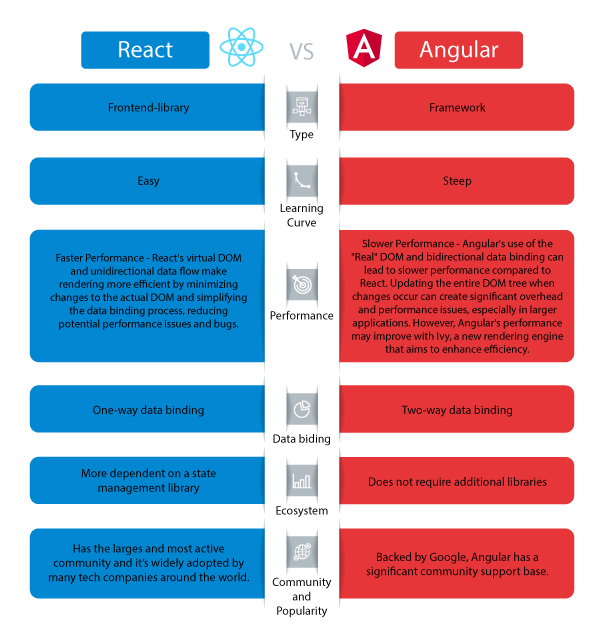
React is a popular JavaScript library developed by Facebook for building user interfaces. It allows developers to create interactive and responsive UI components that can be easily reused across different parts of an application. React’s virtual DOM (Document Object Model) enables efficient rendering of changes, resulting in faster performance and improved user experience.

Integration of Java with React

By combining Java on the backend with React on the frontend, developers can leverage the strengths of both technologies to create full-stack web applications. Java provides a robust server-side infrastructure for handling business logic, data processing, and database operations, while React handles the presentation layer with its declarative component-based architecture.

Through RESTful APIs or GraphQL endpoints, Java communicates with the React frontend to exchange data seamlessly between the client and server. This decoupled architecture enables developers to maintain clean code separation between the frontend and backend layers, making it easier to scale and maintain the application over time.

Benefits of Using Java and React Together

  • Scalability: Java’s scalability combined with React’s component-based architecture allows developers to build scalable web applications that can grow with user demand.
  • Performance: The efficient rendering mechanism of React paired with Java’s optimized backend processing results in high-performance web applications.
  • Maintainability: Separation of concerns between frontend and backend codebases simplifies maintenance tasks and facilitates code reusability.
  • User Experience: The interactive user interfaces created with React enhance the overall user experience of the application.

In Conclusion

The combination of Java and React offers a winning formula for developing modern web applications that are scalable, performant, maintainable, and user-friendly. By harnessing the strengths of these two technologies together, developers can deliver cutting-edge solutions that meet the demands of today’s dynamic digital landscape.


Exploring Java and React: Key FAQs for Web Development Integration

  1. What is Java?
  2. What is React?
  3. How can Java and React be used together?
  4. What are the advantages of using Java and React in web development?
  5. Are there any limitations or challenges when integrating Java with React?
  6. Can you provide examples of popular websites or applications built using Java and React?

What is Java?

Java is a versatile and robust programming language known for its reliability, scalability, and platform independence. It is widely used in backend development to build complex applications that can handle high traffic and large datasets efficiently. Java’s object-oriented approach, extensive libraries, and strong typing system make it a popular choice for developers looking to create secure and high-performance software solutions.

What is React?

React is a popular JavaScript library developed by Facebook for building user interfaces. It allows developers to create interactive and responsive UI components that can be easily reused across different parts of an application. React’s virtual DOM (Document Object Model) enables efficient rendering of changes, resulting in faster performance and improved user experience. With its declarative component-based architecture, React simplifies the process of building dynamic web interfaces and has become a go-to choice for frontend development in modern web applications.

How can Java and React be used together?

When it comes to integrating Java and React, developers can harness the strengths of both technologies to create powerful web applications. Java, with its robust backend capabilities, can handle business logic, data processing, and database operations effectively. On the other hand, React excels in building interactive and responsive user interfaces on the frontend. By establishing communication between Java backend services and React frontend components through APIs or other means, developers can achieve a seamless integration that ensures efficient data exchange and clean code separation. This collaborative approach allows for the development of scalable, high-performance web applications that deliver a superior user experience.

What are the advantages of using Java and React in web development?

When it comes to web development, leveraging Java and React offers a multitude of advantages. The combination of Java’s robust backend capabilities and React’s interactive frontend features results in a powerful synergy that enhances the development process. Java provides reliability, scalability, and performance on the server-side, while React simplifies the creation of dynamic user interfaces on the client-side. This integration allows for seamless communication between the frontend and backend components, enabling developers to build scalable, high-performance web applications with improved maintainability and enhanced user experience. By harnessing the strengths of both Java and React, developers can create modern web solutions that excel in functionality and performance.

Are there any limitations or challenges when integrating Java with React?

When integrating Java with React, developers may encounter certain limitations and challenges that need to be addressed. One common challenge is managing the communication between the frontend React components and the backend Java services effectively. Ensuring seamless data exchange through APIs and handling asynchronous operations can require careful coordination to maintain a smooth interaction between the two layers. Additionally, differences in programming paradigms between Java and React, such as object-oriented versus component-based approaches, may require developers to adapt their mindset and code structure to ensure compatibility and maintainability. Overall, while integrating Java with React offers numerous benefits, understanding and overcoming these limitations and challenges is crucial for a successful integration process.

Certainly! Several popular websites and applications have been built using the powerful combination of Java and React. One notable example is Facebook, which utilizes React for its frontend interface to deliver a seamless and interactive user experience, while Java powers its backend infrastructure to handle complex data processing and server-side operations. Another well-known platform that leverages Java and React is Airbnb, where Java manages the backend logic and data management, while React creates dynamic and responsive user interfaces for browsing listings and making bookings. These successful implementations showcase how Java and React work together harmoniously to create high-performance web applications that cater to millions of users worldwide.

it infrastructure management services

Optimizing Business Operations with IT Infrastructure Management Services

Article: IT Infrastructure Management Services

The Importance of IT Infrastructure Management Services

IT infrastructure is the backbone of any modern business. It encompasses all the technology components and systems that support the operations and data processing needs of an organization. Effective management of IT infrastructure is crucial for ensuring smooth business operations, data security, and scalability.

What Are IT Infrastructure Management Services?

IT infrastructure management services involve the monitoring, maintenance, and optimization of an organization’s IT systems and resources. These services are designed to enhance the performance, reliability, and security of the IT infrastructure while minimizing downtime and risks.

Key Components of IT Infrastructure Management Services

Some key components of IT infrastructure management services include:

  • Network Monitoring: Continuous monitoring of network performance to identify issues proactively and ensure optimal network operation.
  • Server Management: Managing servers to ensure their availability, security, and efficiency in handling data processing tasks.
  • Data Backup and Recovery: Implementing backup solutions to protect critical data from loss or corruption and enabling quick recovery in case of disasters.
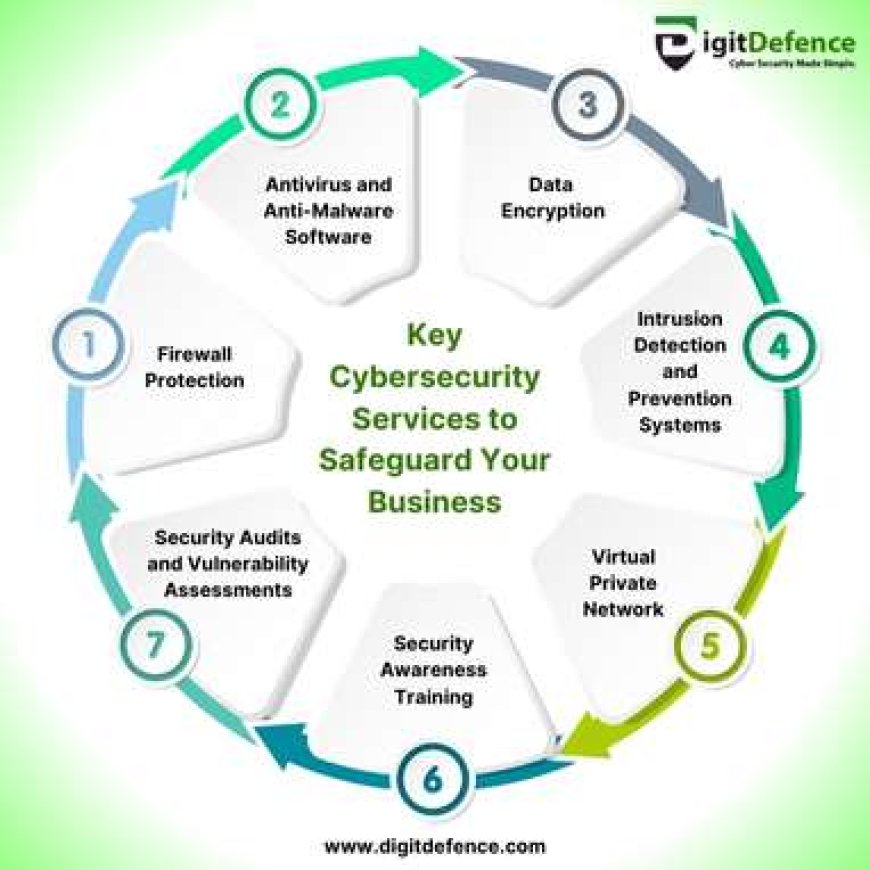
  • Security Management: Implementing security measures such as firewalls, antivirus software, intrusion detection systems, and access controls to safeguard the IT infrastructure from cyber threats.
  • Cloud Services Management: Managing cloud resources effectively to optimize costs, scalability, and performance while ensuring data integrity and compliance.

The Benefits of Outsourcing IT Infrastructure Management

Many organizations choose to outsource their IT infrastructure management to specialized service providers for several reasons:

  • Expertise: Outsourcing allows access to a team of experienced professionals with specialized skills in managing complex IT environments.
  • Cost Efficiency: Outsourcing can be more cost-effective than maintaining an in-house IT team and infrastructure due to economies of scale and flexible pricing models.
  • Focused Resources: By outsourcing IT infrastructure management, organizations can focus their internal resources on core business activities rather than routine maintenance tasks.
  • Risk Mitigation: Professional service providers have the expertise to implement robust security measures and disaster recovery plans to mitigate risks effectively.

In Conclusion

Effective management of IT infrastructure is essential for modern businesses looking to stay competitive in a rapidly evolving digital landscape. By leveraging professional IT infrastructure management services, organizations can enhance their operational efficiency, minimize risks, and focus on driving business growth while leaving the technical complexities to experts.


5 Essential Tips for Effective IT Infrastructure Management

  1. Regularly update software and hardware to ensure optimal performance and security.
  2. Implement robust data backup and recovery procedures to protect against data loss.
  3. Monitor network performance and security to quickly identify and address any issues or threats.
  4. Adopt cloud services for scalability, flexibility, and cost-efficiency in managing IT infrastructure.
  5. Document processes, configurations, and changes to facilitate troubleshooting and future upgrades.

Regularly update software and hardware to ensure optimal performance and security.

Regularly updating software and hardware is a crucial tip in IT infrastructure management services to maintain optimal performance and security. By staying current with updates, organizations can benefit from improved functionality, bug fixes, and enhanced security features that help safeguard against potential vulnerabilities and cyber threats. Updating software and hardware not only ensures that systems run smoothly but also contributes to the overall reliability and efficiency of the IT infrastructure, ultimately supporting business operations and data protection efforts.

Implement robust data backup and recovery procedures to protect against data loss.

Implementing robust data backup and recovery procedures is a critical aspect of IT infrastructure management services. By establishing reliable backup systems, organizations can safeguard their valuable data against potential loss due to unforeseen events such as hardware failures, cyber attacks, or natural disasters. These procedures ensure that businesses can quickly recover and restore their data in the event of an incident, minimizing downtime and potential disruptions to operations. Prioritizing data backup and recovery not only enhances data security but also provides peace of mind knowing that critical information is protected and accessible when needed.

Monitor network performance and security to quickly identify and address any issues or threats.

Monitoring network performance and security is a critical aspect of IT infrastructure management services. By keeping a close eye on network activities, organizations can swiftly detect any anomalies, potential threats, or performance issues. This proactive approach allows for timely intervention and resolution, helping to prevent disruptions, data breaches, or system failures. Regular monitoring not only ensures the smooth operation of the network but also enhances overall cybersecurity posture by identifying and addressing vulnerabilities promptly.

Adopt cloud services for scalability, flexibility, and cost-efficiency in managing IT infrastructure.

Adopting cloud services is a strategic move for enhancing scalability, flexibility, and cost-efficiency in managing IT infrastructure. By leveraging cloud solutions, organizations can easily scale resources up or down based on demand, ensuring optimal performance without overprovisioning. The flexibility offered by cloud services allows for agile deployment of new technologies and applications, enabling businesses to adapt quickly to changing market conditions. Moreover, the pay-as-you-go pricing model of cloud services helps in cost optimization by eliminating the need for upfront investments in hardware and infrastructure maintenance. Embracing cloud services empowers businesses to streamline IT operations and focus resources on innovation and growth initiatives.

Document processes, configurations, and changes to facilitate troubleshooting and future upgrades.

Documenting processes, configurations, and changes is a crucial tip in IT infrastructure management services. By maintaining detailed documentation, organizations can streamline troubleshooting processes, enhance system reliability, and pave the way for future upgrades. Clear documentation provides insights into the IT environment, making it easier to identify issues, track changes, and ensure consistency across systems. This proactive approach not only improves operational efficiency but also empowers IT teams to make informed decisions and adapt to evolving technology requirements seamlessly.