cfchris.com

Loading

google cloud analytics

Google Cloud Analytics: A Guide to Turning Data Into Actionable Insights

Google Cloud Analytics: Turning Data Into Better Decisions

Organizations collect data from websites, mobile apps, business applications, connected devices, and many other sources. The challenge is turning that information into insights people can use. Google Cloud analytics brings together cloud services for storing, processing, analyzing, and visualizing data—helping teams move from raw information to informed decisions.

What Is Google Cloud Analytics?

Google Cloud analytics is not a single product. It is an ecosystem of services that work together to support data analysis, business intelligence, streaming workloads, and machine learning. Organizations can use these tools to build data pipelines, query large datasets, create reports, and make data available to teams across the business.

It is also different from Google Analytics. Google Analytics is a product for measuring activity on websites and apps. Google Cloud provides a broader set of cloud infrastructure and data services, including tools that can store and analyze data from Google Analytics as well as other sources.

Key Google Cloud Analytics Services

BigQuery

BigQuery is Google Cloud’s data warehouse for analyzing large datasets with SQL. It is designed to reduce the operational work involved in managing traditional database infrastructure. Teams can use it to combine data from different systems, run analytical queries, and support reporting and data science projects.

BigQuery can also work with data stored in other locations, depending on how an organization configures its environment. This can help teams explore information without first moving every dataset into one place.

Looker

Looker helps organizations explore data and build dashboards, reports, and data-driven applications. It supports a governed approach to business intelligence, allowing teams to define shared business metrics so that different departments can work from consistent calculations.

For organizations that need self-service reporting, Looker can give users a way to explore approved data without requiring them to write every query themselves. Google Cloud also offers Looker Studio for creating and sharing reports, including reports that use data from a variety of sources.

Dataflow

Dataflow is a managed service for processing data in batch or in real time. It can be used to build pipelines that clean, transform, and move information between systems. For example, a company might use a pipeline to process incoming event data before making it available for analysis.

Pub/Sub

Pub/Sub is a messaging service that helps applications and systems exchange event data. It is often used to collect streams of information, such as application events or device readings, and pass them to downstream services for processing.

Dataproc

Dataproc is a managed service for running open-source data processing tools such as Apache Spark and Apache Hadoop. It can be useful for teams that already rely on these technologies or need to run compatible workloads in the cloud.

How the Pieces Work Together

A typical analytics workflow may begin with data from sales systems, websites, applications, or operational databases. Data can be collected through services such as Pub/Sub or imported from existing sources. Dataflow or Dataproc can then process and prepare it. The prepared information can be stored in BigQuery, where analysts and applications can query it. Finally, Looker or another reporting tool can present the results to decision-makers.

The exact architecture depends on the organization’s data, security requirements, existing technology, and goals. A small reporting project may need only a few services, while a real-time analytics platform may use a more extensive pipeline.

Benefits of Using Google Cloud for Analytics

  • Scalability: Cloud services can support changing workloads without requiring an organization to build and maintain all of its own data infrastructure.
  • Faster analysis: Managed services can help teams spend less time maintaining systems and more time working with data.
  • Flexible data processing: Organizations can choose tools for batch processing, streaming data, SQL analysis, and business intelligence.
  • Integration: Services can connect data collection, processing, storage, and reporting in a coordinated analytics environment.
  • Support for varied teams: Engineers, analysts, data scientists, and business users can work with data using tools suited to their roles.

What to Consider Before Getting Started

Cloud analytics can make data work more accessible, but a successful setup requires planning. Organizations should define the decisions they want to support, identify their data sources, and establish clear rules for data quality and ownership. They should also plan for access controls, privacy, regulatory requirements, and ongoing costs.

Costs can depend on factors such as the amount of data stored, the volume of data processed, query activity, and the services used. Monitoring usage and designing efficient data pipelines can help teams keep spending predictable. It is also important to consider how data will be documented and how users will know which reports and metrics are trustworthy.

Getting Started

A practical first step is to choose a focused use case, such as combining sales data from a few systems or building a dashboard for a specific team. Start with the minimum set of services needed, test the results with real users, and expand the solution as requirements become clearer. This approach helps organizations learn what works before committing to a large-scale platform.

Conclusion

Google Cloud analytics offers a collection of services for managing the full data journey—from collecting and processing information to querying it and sharing insights. With thoughtful planning, organizations can use these tools to make data more useful, improve reporting, and support better decisions across their business.


Google Cloud Analytics FAQ: Services, BigQuery, Pricing, Data Integration, and Security

  1. What is Google Cloud Analytics?
  2. How is Google Cloud Analytics different from Google Analytics?
  3. Which Google Cloud services are used for data analytics?
  4. How does BigQuery work with Google Cloud Analytics?
  5. How much does Google Cloud Analytics cost?
  6. How can I connect data sources to Google Cloud Analytics?
  7. Is Google Cloud Analytics secure for sensitive business data?

What is Google Cloud Analytics?

Google Cloud Analytics refers to the tools and services on Google Cloud that help organizations collect, process, store, analyze, and visualize data. It isn’t a single product: services such as BigQuery, Dataflow, and Looker can work together to support data pipelines, large-scale analysis, and reporting. Google Cloud Analytics is distinct from Google Analytics, which focuses specifically on measuring activity on websites and apps.

How is Google Cloud Analytics different from Google Analytics?

Google Cloud Analytics and Google Analytics serve different purposes. Google Analytics is a specific product that measures how people use websites and apps, helping teams understand traffic, engagement, and conversions. Google Cloud Analytics refers more broadly to Google Cloud’s data and analytics services—such as BigQuery and Looker—which can store, process, analyze, and visualize data from many sources, including Google Analytics. In short, Google Analytics collects and reports on digital behavior, while Google Cloud provides tools to work with that data alongside information from across an organization.

Which Google Cloud services are used for data analytics?

Google Cloud offers several services for data analytics, and the right combination depends on your needs. BigQuery is used to store and analyze large datasets with SQL, while Looker and Looker Studio help create dashboards and reports. Dataflow supports batch and real-time data processing, Pub/Sub handles streaming event data, and Dataproc runs managed Apache Spark and Hadoop workloads. Cloud Storage can store data files, and tools such as Dataform can help manage SQL-based data transformations.

How does BigQuery work with Google Cloud Analytics?

BigQuery is the data warehouse at the center of many Google Cloud analytics workflows. It lets teams store and analyze large datasets using SQL, then connect the results to tools such as Looker for dashboards and reporting. Data can be loaded into BigQuery from business applications, databases, and streaming pipelines, and services like Dataflow can prepare or transform it along the way. Together, these tools help organizations bring data into one place, explore it, and share useful insights.

How much does Google Cloud Analytics cost?

The cost of Google Cloud analytics depends on the services you use and how much data you store, process, and query. For example, BigQuery pricing can vary based on storage and query usage, while services such as Dataflow and Pub/Sub have their own pricing models. Google Cloud offers pricing calculators and detailed service pricing pages to help estimate expenses. To manage costs, start with a clear use case, monitor usage, and review your configuration regularly.

How can I connect data sources to Google Cloud Analytics?

You can connect data sources to Google Cloud analytics services such as BigQuery using built-in connectors, scheduled transfers, and data pipelines. For example, BigQuery Data Transfer Service can bring in data from supported Google products and external platforms, while APIs, database connectors, and partner tools can load data from other systems. For custom or real-time workflows, services such as Dataflow and Pub/Sub can collect, transform, and stream data into your analytics environment. The best option depends on where your data lives, how often it needs to update, and whether it requires processing before analysis.

Is Google Cloud Analytics secure for sensitive business data?

Google Cloud can be used to analyze sensitive business data, but security depends on the services you choose and how you configure them. Google Cloud provides security features such as encryption, access controls, and audit logging, along with compliance support for certain requirements. Your organization is still responsible for managing permissions, protecting credentials, configuring data storage and retention appropriately, and meeting applicable legal and industry obligations. Review the security and compliance documentation for each service, and consult your security team before placing sensitive data in a cloud analytics environment.


cloud software engineer

What Does a Cloud Software Engineer Do?

What Does a Cloud Software Engineer Do?

A cloud software engineer designs, builds, and maintains software that runs on cloud computing platforms. Instead of relying only on servers located in an office or data center, cloud-based applications use internet-connected infrastructure that can scale to meet changing needs.

Cloud software engineers combine software development with an understanding of cloud services, architecture, security, and operations. They help organizations build applications that are reliable, efficient, and easier to update.

What Is Cloud Software Engineering?

Cloud software engineering is the practice of creating and operating software using cloud platforms. These platforms provide services such as computing power, databases, storage, networking, and tools for deploying applications.

Applications may be built specifically for the cloud or adapted from systems that previously ran on local servers. In either case, engineers consider how the software will be deployed, scaled, monitored, and protected.

Typical Responsibilities

The day-to-day work of a cloud software engineer can vary by company and project. Common responsibilities include:

  • Designing and developing cloud-based applications and services
  • Building application programming interfaces (APIs) and connecting software components
  • Working with cloud infrastructure, databases, storage, and networking
  • Automating software builds, testing, and deployments
  • Monitoring applications and troubleshooting performance or reliability issues
  • Applying security practices to software, data, and cloud environments
  • Collaborating with software developers, operations teams, security specialists, and product managers
  • Reviewing cloud usage and looking for opportunities to improve efficiency and manage costs

Skills and Technologies

Cloud software engineers need a strong foundation in programming and software development. Common programming languages include Python, Java, JavaScript, C#, and Go. The best language to learn depends on the role, the organization, and the applications being developed.

Other useful skills and areas of knowledge include:

  • Cloud platforms: Amazon Web Services (AWS), Microsoft Azure, and Google Cloud
  • Containers: Docker and container orchestration tools such as Kubernetes
  • Infrastructure as code: Tools such as Terraform and cloud-specific deployment frameworks
  • Continuous integration and delivery: Automated processes for testing and releasing software
  • Databases: Relational and nonrelational database systems
  • Networking and security: Identity and access management, encryption, firewalls, and network fundamentals
  • Observability: Logging, metrics, tracing, and alerting

No single engineer needs to master every tool. Employers often look for solid fundamentals, practical experience, and the ability to learn technologies as project needs change.

Cloud Software Engineer vs. Cloud Engineer

The titles can overlap, but they often emphasize different responsibilities. A cloud software engineer typically focuses on designing and writing application code that runs in the cloud. A cloud engineer may focus more on infrastructure, networking, platform configuration, and cloud operations.

In many organizations, the responsibilities are shared across a team. Some roles combine application development and infrastructure work, especially in smaller companies.

How to Become a Cloud Software Engineer

There are several ways to prepare for this career. A degree in computer science or a related field can provide a useful foundation, but it is not the only route. Coursework, independent study, work experience, and project portfolios can also help build relevant skills.

  1. Learn programming fundamentals. Practice writing, testing, and maintaining code in one or more widely used languages.
  2. Build software projects. Create an application, connect it to a database, and document how it works.
  3. Learn cloud fundamentals. Explore how cloud computing, networking, storage, identity, and security fit together.
  4. Deploy an application. Practice publishing a project to a cloud platform and monitoring it after deployment.
  5. Study automation and containers. Learn how teams package applications and automate testing and releases.
  6. Develop a portfolio. Share project descriptions, source code where appropriate, and clear explanations of your decisions.

Cloud certifications can help demonstrate familiarity with a platform, particularly for people early in their careers. They are most valuable when paired with hands-on experience and a clear understanding of the concepts behind the tools.

Why the Role Matters

Cloud platforms give organizations access to computing resources without requiring them to manage every physical server themselves. This can help teams launch products, respond to changing demand, and support users in different locations. However, cloud services still require thoughtful engineering.

Cloud software engineers help make applications dependable, secure, and maintainable. Their work can affect how quickly a business delivers new features, how well its systems handle traffic, and how effectively it uses its technology budget.

Is Cloud Software Engineering a Good Career Fit?

This career may suit people who enjoy solving technical problems, building software, and learning new tools. It also involves collaboration and ongoing maintenance—not just writing code. Engineers may need to investigate failures, improve older systems, document their work, and balance competing priorities.

For anyone interested in software development and modern infrastructure, cloud software engineering offers a way to work across both areas. Strong programming skills, practical projects, and a willingness to keep learning can provide a solid starting point.


7 Advantages of Being a Cloud Software Engineer

  1. Builds scalable applications.
  2. Works with modern cloud technology.
  3. Solves challenging technical problems.
  4. Supports remote collaboration.
  5. Can work across diverse industries.
  6. Helps improve software reliability.
  7. Offers opportunities for continuous learning.


7 Cons of Being a Cloud Software Engineer

  1. Requires constant learning as cloud technologies change.
  2. Can involve on-call work and urgent troubleshooting.
  3. Cloud outages can disrupt applications and services.
  4. Security mistakes may expose sensitive data.
  5. Cloud costs can be difficult to control.
  6. Work often involves complex systems and configurations.
  7. Deadlines and production issues can be stressful.

Builds scalable applications.

Cloud software engineers build applications that can scale as demand changes. By using cloud services and thoughtful system design, they can help software handle more users, data, or requests without requiring a complete redesign. This flexibility allows organizations to support growth, manage traffic spikes, and make better use of computing resources.

Works with modern cloud technology.

Cloud software engineers work with modern cloud technology to build and improve applications using services for computing, storage, databases, and networking. This gives them hands-on experience with tools and practices that help software scale, deploy more efficiently, and adapt to changing needs. Because cloud platforms continue to evolve, the role also offers ongoing opportunities to learn and work with new technologies.

Solves challenging technical problems.

Cloud software engineers solve challenging technical problems by designing applications that can handle changing demands, work reliably across distributed systems, and protect sensitive data. They investigate issues such as slow performance, service outages, and complex integrations, then develop practical solutions using cloud platforms and modern tools. The work calls for curiosity, careful problem-solving, and a willingness to keep learning as technology evolves.

Supports remote collaboration.

Cloud software engineering supports remote collaboration by giving teams access to shared development environments, code repositories, and cloud-based tools from almost anywhere. Engineers can work together on the same applications, review changes, track issues, and deploy updates without needing to be in the same office. This flexibility helps distributed teams coordinate their work and keep projects moving across different locations and time zones.

Can work across diverse industries.

Cloud software engineers can work across a wide range of industries, including healthcare, finance, education, retail, and entertainment. Because organizations in nearly every field rely on cloud technology, engineers can apply their skills to different challenges—from protecting sensitive patient records to building online shopping platforms. This variety offers opportunities to explore new areas, learn how different businesses operate, and choose projects that match personal interests.

Helps improve software reliability.

Cloud software engineers help improve software reliability by designing systems that can handle failures and changing demand. They use practices such as automated testing, monitoring, backups, and scalable infrastructure to identify issues early and keep applications available. Their work helps businesses deliver a more consistent experience for users, even when traffic increases or individual services encounter problems.

Offers opportunities for continuous learning.

Cloud software engineering offers plenty of opportunities for continuous learning because cloud platforms, tools, and best practices are constantly evolving. Engineers can deepen their skills in areas such as security, automation, artificial intelligence, and distributed systems while exploring new services and technologies. This ongoing learning helps them stay current, solve new challenges, and grow their careers.

Requires constant learning as cloud technologies change.

One challenge of being a cloud software engineer is the need for constant learning. Cloud platforms regularly introduce new services, tools, and best practices, so engineers must keep updating their skills to stay effective. This ongoing learning can take time outside of day-to-day project work, but it also helps them build better, more secure, and more efficient solutions.

Can involve on-call work and urgent troubleshooting.

Cloud software engineering can involve on-call shifts, during which engineers must be available to respond to outages or other urgent issues outside regular business hours. Troubleshooting under time pressure can be stressful, especially when a problem affects customers or critical services. The frequency and impact of on-call work vary by employer, so it’s worth asking about shift schedules, incident response expectations, and team support when considering a role.

Cloud outages can disrupt applications and services.

One drawback of cloud software engineering is that cloud outages can disrupt applications and services. Even well-designed systems may become unavailable when a cloud provider experiences technical problems, affecting users and business operations. Engineers can reduce the impact with monitoring, backups, and recovery plans, but preventing every outage is not always possible.

Security mistakes may expose sensitive data.

A key challenge for cloud software engineers is preventing security mistakes that could expose sensitive data. Misconfigured storage, weak access controls, or coding errors can leave personal or business information vulnerable to unauthorized access. Engineers must follow security best practices, regularly review cloud settings, and test systems for weaknesses to help protect data and maintain user trust.

Cloud costs can be difficult to control.

Cloud costs can be difficult to control because usage may change quickly, and charges can come from many services, including computing, storage, data transfers, and managed tools. A cloud software engineer must understand how design choices affect spending, monitor usage, and help prevent waste from idle or oversized resources. Without clear budgets and regular reviews, costs can rise unexpectedly as an application grows.

Work often involves complex systems and configurations.

One challenge of working as a cloud software engineer is dealing with complex systems and configurations. Applications may rely on interconnected services, networks, databases, and security settings, so a small change can have unexpected effects elsewhere. Troubleshooting these issues takes patience, careful testing, and a strong understanding of how the different parts work together.

Deadlines and production issues can be stressful.

Cloud software engineers often work under tight deadlines, especially when launching new features or resolving problems that affect users. Production issues can arise unexpectedly, requiring quick investigation and careful decisions to restore service while minimizing disruption. This pressure can make the role stressful, particularly when systems are business-critical or teams are responding outside regular work hours.

cloud tech solutions

Cloud Tech Solutions: A Practical Guide for Modern Businesses

Cloud Tech Solutions: A Smarter Way to Work

Cloud technology has changed how businesses store information, run applications, and support their teams. Instead of relying only on equipment located in an office, organizations can use internet-based services to access computing resources when and where they need them. The result can be a more flexible, scalable approach to technology.

What Are Cloud Tech Solutions?

Cloud tech solutions are services and tools delivered over the internet. They may include data storage, software, servers, databases, networking, backup, and security tools. Businesses can use these services individually or combine them into a broader cloud environment.

Cloud services are commonly grouped into three categories:

  • Software as a Service (SaaS): Ready-to-use applications accessed online, such as email, collaboration tools, and customer management software.
  • Infrastructure as a Service (IaaS): On-demand computing resources, such as virtual servers, storage, and networking.
  • Platform as a Service (PaaS): Tools and environments developers use to build, test, and deploy applications.

Benefits of Cloud Technology

Scale as Needs Change

Cloud resources can often be increased or reduced as business demands shift. This flexibility can help organizations respond to seasonal changes, new projects, or growth without making every technology decision around a fixed set of in-house equipment.

Support Flexible Work

With the right setup, employees can securely access files and applications from different locations and devices. Cloud-based collaboration tools can also help teams share information and work together in real time.

Improve Business Continuity

Cloud backup and recovery services can help organizations restore important data and systems after an outage or other disruption. A well-designed continuity plan should define what needs protection, how often data is backed up, and how recovery will be tested.

Manage Costs More Effectively

Many cloud services use subscription or consumption-based pricing. This can reduce the need for large upfront hardware purchases, though costs should be monitored carefully. Unused resources, data transfers, and premium features can add up if they are not managed.

Security and Reliability Matter

Moving to the cloud does not automatically make systems secure. Providers typically protect their underlying infrastructure, while customers remain responsible for areas such as user access, data handling, application settings, and device security. Responsibilities vary by service, so it is important to understand the arrangement.

Good cloud security practices include using multifactor authentication, applying least-privilege access, encrypting sensitive data, keeping systems updated, and reviewing activity logs. Organizations should also consider compliance requirements and the location of their data before choosing services.

Choosing the Right Cloud Approach

There is no single cloud setup that works for every organization. Some businesses use a public cloud, where services are shared across customers. Others choose a private cloud for greater control, or a hybrid approach that combines cloud services with on-site systems.

Before selecting a solution, consider:

  • Which business problems the technology should address
  • How much storage, computing power, and availability are needed
  • Security, privacy, and compliance requirements
  • How the cloud service will connect with existing systems
  • Expected costs, including ongoing management and support
  • How data can be backed up, recovered, or moved in the future

Plan the Transition

A successful cloud transition starts with a clear plan. Begin by reviewing existing applications, data, and dependencies. Then prioritize workloads based on business value, risk, and complexity. Testing a small project first can reveal potential issues before a larger migration begins.

After migration, ongoing management is essential. Regularly review access permissions, performance, backup results, and spending. A cloud environment should evolve as the organization’s needs change.

Make Cloud Technology Work for Your Business

Cloud tech solutions can help organizations become more adaptable, support distributed teams, and access powerful tools without managing every part of the underlying infrastructure. The best results come from matching technology to real business needs and giving equal attention to planning, security, and ongoing oversight.


9 Essential Tips for Optimizing Your Cloud Technology Solutions

  1. Choose a cloud model that fits your needs.
  2. Set clear goals before migrating.
  3. Use multi-factor authentication.
  4. Encrypt data in transit and at rest.
  5. Automate backups and recovery tests.
  6. Monitor costs and set budget alerts.
  7. Scale resources to match demand.
  8. Review access permissions regularly.
  9. Plan for outages with redundancy.

Choose a cloud model that fits your needs.

Choose a cloud model that fits your needs by considering how much control, flexibility, and support your organization requires. A public cloud can be a cost-effective choice for scalable services, while a private cloud may suit businesses with strict security or compliance requirements. A hybrid cloud combines both, letting you keep sensitive workloads in a private environment while using public cloud resources for other tasks. Compare your options based on your budget, existing systems, security needs, and plans for growth.

Set clear goals before migrating.

Before moving to the cloud, define what you want the migration to achieve. Clear goals—such as improving application performance, supporting remote work, strengthening disaster recovery, or reducing infrastructure costs—help guide decisions about which services to choose and what to move first. Set measurable targets, identify potential risks, and agree on how success will be evaluated. With a well-defined plan, your team can keep the migration focused, manage costs, and confirm that the new cloud environment delivers real business value.

Use multi-factor authentication.

Use multi-factor authentication (MFA) to add an extra layer of protection to your cloud accounts. In addition to a password, MFA requires a second form of verification, such as an authenticator app, security key, or one-time code. This can help prevent unauthorized access even if a password is stolen or guessed. Enable MFA for all cloud services that support it, especially administrator and business accounts, and choose a secure verification method whenever possible.

Encrypt data in transit and at rest.

Encrypting data both in transit and at rest helps protect sensitive information from unauthorized access. Data in transit—such as information moving between a user’s device and a cloud service—should be protected with secure protocols like TLS. Data at rest, including files stored in cloud databases or backups, should also be encrypted. Use strong encryption settings, manage encryption keys carefully, and review your cloud provider’s security options to help keep information protected throughout its lifecycle.

Automate backups and recovery tests.

Automate backups and recovery tests to help protect important data and confirm it can be restored when needed. Set backups to run on a regular schedule, monitor them for failures, and test recovery procedures periodically. These checks can reveal missing files, outdated backup copies, or setup problems before an outage or cyberattack makes recovery urgent.

Monitor costs and set budget alerts.

Regularly monitoring cloud spending can help prevent small, unexpected charges from turning into a large bill. Review usage reports to spot idle resources, sudden increases, or services that are no longer needed, and set budget alerts to notify your team when spending approaches a chosen limit. Alerts won’t automatically stop charges, but they give you time to investigate and adjust before costs climb further.

Scale resources to match demand.

Scale cloud resources to match demand so your systems have the capacity they need without paying for more than necessary. During busy periods, you can add computing power or storage to maintain performance; when demand drops, scale back to reduce costs. Monitoring usage and setting clear scaling rules helps keep services responsive, efficient, and budget-friendly.

Review access permissions regularly.

Review access permissions regularly to make sure employees and vendors can access only the cloud resources they need. Remove accounts for people who have left the organization, update permissions when roles change, and check for inactive or overly privileged accounts. Routine reviews help reduce the risk of unauthorized access and keep sensitive data better protected.

Plan for outages with redundancy.

Plan for outages by building redundancy into your cloud environment. Use backups, failover systems, and resources in separate availability zones or regions so a single service disruption doesn’t bring critical operations to a halt. Test your recovery plan regularly, and make sure your team knows how to restore services and data quickly when an outage occurs.

saas application development services

Empowering Businesses with Cutting-Edge SaaS Application Development Services

SaaS Application Development Services

The Power of SaaS Application Development Services

In today’s digital age, Software as a Service (SaaS) has revolutionized the way businesses operate and deliver services to their customers. SaaS applications offer a cost-effective and efficient solution for companies looking to streamline their operations and enhance user experience.

Benefits of SaaS Application Development Services

Scalability: SaaS applications are highly scalable, allowing businesses to easily adjust resources and features based on their needs.

Cost-Effectiveness: With no need for upfront hardware investments and lower maintenance costs, SaaS applications provide a budget-friendly option for businesses of all sizes.

Accessibility: SaaS applications can be accessed from any device with an internet connection, enabling remote work capabilities and improving collaboration among teams.

Key Features of SaaS Applications

SaaS application development services focus on creating software solutions that offer the following key features:

  • Multi-Tenancy: Ability to serve multiple customers from a single instance of the software.
  • Automatic Updates: Regular updates and maintenance are handled by the service provider, ensuring users always have access to the latest features.
  • Data Security: Robust security measures are implemented to protect user data and maintain compliance with industry regulations.
  • Customization: Tailoring the application to meet specific business requirements and preferences.

Harnessing the Potential of SaaS Application Development

To leverage the full potential of SaaS application development services, businesses should partner with experienced software development companies that specialize in building scalable and secure cloud-based solutions. These experts can help businesses conceptualize, design, develop, and deploy custom SaaS applications that align with their strategic goals and drive growth.

In conclusion, investing in SaaS application development services can propel your business forward by enhancing operational efficiency, improving customer satisfaction, and staying ahead of the competition in today’s dynamic market landscape.


Top 8 FAQs About SaaS Application Development Services

  1. How much does it cost to build a SaaS application?
  2. Who develops SaaS software?
  3. What does a SaaS developer do?
  4. What is the SaaS process of software development?
  5. Which is the best technology for SaaS app development?
  6. What is SaaS application development?
  7. What is SaaS development services?
  8. Which is an example of a SaaS application?

How much does it cost to build a SaaS application?

When considering the cost of building a SaaS application, it is important to understand that the pricing can vary significantly depending on various factors such as the complexity of the application, desired features, scalability requirements, and development time. Custom SaaS applications are tailored to meet specific business needs, which can impact the overall cost. Additionally, factors like integration with third-party services, security measures, ongoing maintenance, and support services need to be taken into account when estimating the total cost of developing a SaaS application. It is recommended to consult with experienced software development professionals to get a detailed assessment and quote based on your unique requirements and objectives.

Who develops SaaS software?

SaaS software is typically developed by skilled software engineers, developers, and IT professionals who specialize in cloud-based technologies. These experts have the knowledge and expertise to design, build, and maintain SaaS applications that meet the specific needs and requirements of businesses and end-users. Collaboration between development teams, product managers, designers, and quality assurance specialists is essential in creating high-quality SaaS software that delivers a seamless user experience and provides value to customers. By entrusting the development of SaaS software to experienced professionals, businesses can ensure that their applications are robust, secure, scalable, and tailored to their unique business objectives.

What does a SaaS developer do?

A SaaS developer is responsible for designing, developing, and maintaining Software as a Service (SaaS) applications that are accessible to users over the internet. These developers work on creating cloud-based software solutions that offer scalability, security, and flexibility to meet the evolving needs of businesses and end-users. They collaborate with cross-functional teams to translate requirements into functional software, implement best practices in coding and testing, and ensure that the SaaS applications are user-friendly and efficient. Overall, a SaaS developer plays a crucial role in building innovative and reliable cloud-based solutions that drive digital transformation and enhance user experiences.

What is the SaaS process of software development?

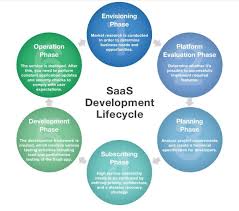
The SaaS process of software development involves a systematic approach to creating cloud-based applications that are accessible to users over the internet. It typically begins with defining the requirements and objectives of the SaaS application, followed by designing the user interface and architecture. Development teams then proceed with coding, testing, and deploying the software on a cloud infrastructure. Continuous monitoring, updates, and maintenance are essential parts of the SaaS development process to ensure optimal performance and security. Collaboration between developers, designers, and stakeholders is key to delivering a high-quality SaaS solution that meets the evolving needs of businesses and users.

Which is the best technology for SaaS app development?

When it comes to choosing the best technology for SaaS app development, there is no one-size-fits-all answer. The ideal technology stack for SaaS application development depends on various factors such as the specific requirements of the project, scalability needs, security considerations, and the expertise of the development team. Popular technologies often used for SaaS app development include JavaScript frameworks like React and Angular for front-end development, Node.js for backend services, and cloud platforms like AWS or Azure for hosting. Ultimately, selecting the best technology involves careful evaluation of your project goals and collaborating with experienced developers to determine the most suitable tools and technologies that align with your business objectives.

What is SaaS application development?

SaaS application development refers to the process of creating software applications that are delivered to users as a service through the cloud. In SaaS (Software as a Service) model, users can access the application over the internet without the need to install or maintain it on their local devices. SaaS application development involves designing, building, and deploying software solutions that offer scalability, accessibility, and cost-effectiveness to businesses. By outsourcing software development and maintenance to service providers, organizations can focus on their core operations while enjoying the benefits of innovative and customizable applications that enhance productivity and streamline processes.

What is SaaS development services?

SaaS development services refer to the process of creating and implementing Software as a Service applications that are hosted and maintained by a service provider. In SaaS development, software applications are accessed over the internet on a subscription basis, eliminating the need for users to install or manage the software locally. SaaS development services encompass designing, developing, and deploying cloud-based applications that offer scalability, accessibility, and cost-effectiveness to businesses seeking efficient solutions for their operational needs. By leveraging SaaS development services, organizations can streamline their workflows, enhance collaboration, and benefit from regular updates and maintenance provided by the service provider.

Which is an example of a SaaS application?

A prime example of a SaaS application is Salesforce, a popular customer relationship management (CRM) platform that is widely used by businesses of all sizes. Salesforce offers a comprehensive suite of tools and features accessible through a web browser, allowing users to manage customer interactions, sales processes, marketing campaigns, and more in a centralized cloud-based environment. By leveraging Salesforce as a SaaS application, businesses can enhance their productivity, streamline operations, and improve customer relationships without the need for complex on-premises infrastructure.

saas application development

Unlocking Business Potential: The Impact of SaaS Application Development

The Power of SaaS Application Development

The Power of SaaS Application Development

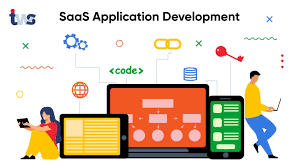
Software as a Service (SaaS) application development has revolutionized the way businesses operate in the digital age. SaaS applications are cloud-based software solutions that offer users access to applications via the internet, eliminating the need for costly hardware and software installations.

One of the key benefits of SaaS application development is its scalability. Businesses can easily scale their usage up or down based on their needs, making it a cost-effective solution for companies of all sizes. Additionally, SaaS applications are often subscription-based, providing a predictable pricing model for businesses.

Another advantage of SaaS application development is its accessibility. Users can access SaaS applications from any device with an internet connection, enabling remote work and increasing productivity. This flexibility is especially valuable in today’s fast-paced business environment.

Security is a top priority in SaaS application development. Providers invest heavily in robust security measures to protect user data and ensure compliance with industry regulations. This focus on security gives businesses peace of mind when entrusting their sensitive information to a SaaS provider.

SaaS application development also promotes collaboration and integration. Many SaaS applications offer seamless integration with other tools and services, allowing businesses to streamline their workflows and improve efficiency. Collaboration features enable teams to work together effectively, regardless of their physical location.

In conclusion, SaaS application development offers numerous benefits for businesses looking to modernize their operations and stay competitive in today’s digital landscape. With its scalability, accessibility, security, and collaboration capabilities, SaaS applications are a powerful tool for driving business growth and innovation.


Understanding SaaS Application Development: Key FAQs for Businesses

  1. What is SaaS application development?
  2. How does SaaS application development differ from traditional software development?
  3. What are the key benefits of SaaS applications for businesses?
  4. How secure are SaaS applications?
  5. Can SaaS applications be customized to fit specific business needs?
  6. What factors should businesses consider when choosing a SaaS application development provider?
  7. How scalable are SaaS applications as a business grows?
  8. What are the potential challenges or drawbacks of implementing a SaaS application?

What is SaaS application development?

SaaS application development refers to the process of creating cloud-based software solutions that are accessed over the internet on a subscription basis. In this model, users do not need to install or maintain the software on their local devices, as everything is hosted and managed by the SaaS provider. This approach offers businesses a cost-effective and scalable way to access powerful applications that can enhance productivity, collaboration, and efficiency. SaaS application development focuses on delivering secure, accessible, and feature-rich software that meets the evolving needs of modern businesses in a rapidly changing digital landscape.

How does SaaS application development differ from traditional software development?

SaaS application development differs from traditional software development in several key ways. Unlike traditional software that is installed and maintained on individual devices, SaaS applications are hosted in the cloud and accessed via the internet. This cloud-based approach eliminates the need for users to manage hardware or software updates, as these tasks are handled by the SaaS provider. Additionally, SaaS applications are typically subscription-based, offering a more flexible pricing model compared to one-time software purchases. The scalability, accessibility, and collaborative features of SaaS applications further distinguish them from traditional software, making them a popular choice for businesses seeking modern and efficient solutions.

What are the key benefits of SaaS applications for businesses?

SaaS applications offer several key benefits for businesses. Firstly, they provide cost-effective solutions by eliminating the need for expensive hardware and software installations, making them accessible to companies of all sizes. Additionally, SaaS applications are scalable, allowing businesses to easily adjust their usage based on their needs, leading to a more flexible and efficient operational model. The subscription-based pricing of SaaS applications also offers predictability and affordability for businesses. Furthermore, SaaS applications enhance accessibility by enabling users to access the software from any device with an internet connection, promoting remote work and increasing productivity. Overall, the key benefits of SaaS applications for businesses include cost-effectiveness, scalability, predictability in pricing, and enhanced accessibility.

How secure are SaaS applications?

SaaS applications prioritize security as a fundamental aspect of their development and operation. Providers implement robust security measures, such as data encryption, access controls, regular security audits, and compliance certifications, to ensure the protection of user data. By investing in state-of-the-art security technologies and practices, SaaS applications strive to maintain a high level of data security and privacy for their users. Additionally, many SaaS providers offer transparent information about their security protocols and compliance standards to build trust with their customers regarding the safety of their data within the SaaS environment.

Can SaaS applications be customized to fit specific business needs?

SaaS applications can indeed be customized to fit specific business needs. While many SaaS solutions offer standard features and functionalities out of the box, businesses often have unique requirements that may not be fully addressed by off-the-shelf software. In such cases, SaaS providers typically offer customization options to tailor the application to meet specific business needs. This customization may involve modifying existing features, adding new functionalities, or integrating with other systems to create a personalized solution that aligns with the business’s workflows and objectives. By offering customization capabilities, SaaS applications can adapt to the diverse requirements of different businesses, providing flexibility and scalability for optimal performance and efficiency.

What factors should businesses consider when choosing a SaaS application development provider?

When choosing a SaaS application development provider, businesses should consider several key factors to ensure they select the right partner for their needs. Firstly, evaluating the provider’s experience and expertise in developing SaaS applications is crucial. A track record of successful projects and a deep understanding of the latest technologies are indicators of a reliable provider. Additionally, businesses should assess the scalability and flexibility of the provider’s solutions to accommodate future growth and evolving requirements. Security measures, compliance with industry standards, data protection protocols, and disaster recovery plans are also essential considerations to safeguard sensitive information. Lastly, evaluating the provider’s customer support services, pricing models, and contract terms can help businesses make an informed decision that aligns with their budget and long-term goals.

How scalable are SaaS applications as a business grows?

SaaS applications demonstrate remarkable scalability as a business expands. One of the key advantages of SaaS is its ability to adjust seamlessly to the evolving needs of a growing business. Whether a company is adding new users, increasing data storage requirements, or expanding its operations globally, SaaS applications can easily scale up to accommodate these changes. This flexibility ensures that businesses can continue to leverage their SaaS solutions effectively without being hindered by limitations in capacity or performance.

What are the potential challenges or drawbacks of implementing a SaaS application?

Implementing a SaaS application can bring numerous benefits, but it also comes with potential challenges and drawbacks. One common challenge is data security and privacy concerns, as businesses need to trust the SaaS provider to safeguard their sensitive information. Integration issues with existing systems and customization limitations may also arise, impacting the seamless adoption of the SaaS application. Additionally, dependency on internet connectivity for access to the application can pose a risk if there are network disruptions. Lastly, ongoing subscription costs could accumulate over time, making it crucial for businesses to carefully evaluate the long-term financial implications of implementing a SaaS solution. Addressing these challenges proactively through thorough planning and communication with the SaaS provider can help mitigate potential drawbacks and ensure a successful implementation process.

saas application development company

Empowering Businesses: The Role of a SaaS Application Development Company

SaaS Application Development Company

The Rise of SaaS Application Development Companies

In recent years, Software as a Service (SaaS) has gained immense popularity among businesses looking for efficient and cost-effective software solutions. As a result, the demand for SaaS application development companies has skyrocketed.

These companies specialize in creating cloud-based applications that are accessible to users over the internet. By offering software on a subscription basis, SaaS companies provide flexibility and scalability to their clients.

Key Features of SaaS Application Development Companies:

  • Customization: SaaS application development companies tailor their solutions to meet the specific needs of each client. This customization ensures that the software aligns with the client’s business goals and processes.
  • Scalability: SaaS applications can easily scale up or down based on the client’s requirements. This flexibility allows businesses to adapt to changing market conditions without significant investments in infrastructure.
  • Security: Security is a top priority for SaaS application development companies. They implement robust security measures to protect sensitive data and ensure compliance with industry regulations.
  • Continuous Updates: SaaS companies regularly update their applications to add new features, improve performance, and address any security vulnerabilities. Clients benefit from these updates without having to manage the software themselves.
  • Support and Maintenance: SaaS application development companies provide ongoing support and maintenance services to ensure that their clients’ software runs smoothly at all times. This proactive approach minimizes downtime and maximizes productivity.

The Future of SaaS Application Development:

As businesses continue to embrace digital transformation, the demand for innovative SaaS solutions will only grow. SaaS application development companies play a crucial role in helping organizations streamline their operations, improve efficiency, and stay competitive in today’s fast-paced market.


Understanding SaaS: Key Questions About Application Development and Companies

  1. Is app development a SaaS?
  2. What is a SaaS development company?
  3. What does a SaaS company do?
  4. What is a SaaS-based application?

Is app development a SaaS?

When asking whether app development is a Software as a Service (SaaS), it’s important to distinguish between the two concepts. App development refers to the process of creating software applications, which can be done using various methods, including traditional software development approaches. On the other hand, SaaS is a software delivery model where applications are hosted in the cloud and accessed by users over the internet on a subscription basis. While app development can result in the creation of SaaS applications, not all app development projects lead to SaaS offerings. SaaS application development companies specialize in creating cloud-based software solutions that follow the subscription model, providing businesses with scalable and customizable applications accessible online.

What is a SaaS development company?

A SaaS development company is a specialized firm that focuses on creating Software as a Service (SaaS) applications. These companies design, develop, and deploy cloud-based software solutions that are accessible to users over the internet. By offering their services on a subscription basis, SaaS development companies provide businesses with cost-effective and scalable software solutions that can be customized to meet specific needs. These companies play a crucial role in helping organizations leverage the benefits of cloud technology, such as flexibility, security, and continuous updates, without the need for extensive infrastructure investments or maintenance.

What does a SaaS company do?

A SaaS company specializes in developing cloud-based software applications that are accessible to users over the internet. These companies offer software solutions on a subscription basis, allowing businesses to access and use the applications without the need for on-premises installation or maintenance. SaaS companies focus on creating customizable, scalable, and secure software that meets the specific needs of their clients. They provide continuous updates, robust security measures, and ongoing support to ensure that their clients’ software runs smoothly and efficiently. By leveraging SaaS solutions, businesses can streamline their operations, improve productivity, and stay competitive in today’s digital landscape.

What is a SaaS-based application?

A SaaS-based application, short for Software as a Service, is a cloud-based software solution that is hosted and maintained by a third-party provider. Users can access the application over the internet on a subscription basis, eliminating the need for on-premises installation and maintenance. SaaS applications are designed to be scalable, customizable, and secure, offering businesses flexibility in managing their software needs. With regular updates and support provided by the SaaS application development company, users can enjoy the latest features and functionalities without the hassle of managing the underlying infrastructure.

saas software development

Unlocking Innovation: The Evolution of SaaS Software Development

The Evolution of SaaS Software Development

The Evolution of SaaS Software Development

Software as a Service (SaaS) has revolutionized the way businesses and individuals access and use software applications. SaaS software development has seen significant growth and evolution over the years, shaping the digital landscape in profound ways.

What is SaaS?

SaaS is a cloud-based software delivery model where applications are hosted by a third-party provider and made available to users over the internet. This eliminates the need for users to install and maintain software on their own devices, offering greater convenience and scalability.

The Benefits of SaaS Software Development

SaaS software development offers numerous benefits, including:

  • Accessibility: Users can access SaaS applications from any device with an internet connection, enhancing flexibility and productivity.
  • Cost-Effectiveness: SaaS eliminates the need for upfront hardware and software investments, making it a more affordable option for businesses of all sizes.
  • Scalability: SaaS applications can easily scale up or down based on user demand, allowing businesses to adapt to changing needs quickly.
  • Automatic Updates: Providers handle maintenance and updates, ensuring that users always have access to the latest features and security enhancements.

The Evolution of SaaS Development

SaaS software development has evolved significantly since its inception. Early SaaS applications were often limited in functionality and customization options. However, advancements in technology have led to more sophisticated and feature-rich SaaS solutions.

Modern SaaS development practices emphasize agile methodologies, continuous integration, and deployment to deliver high-quality software efficiently. Developers leverage cloud infrastructure, microservices architecture, and containerization to build scalable and resilient applications that meet the demands of today’s dynamic business environment.

The Future of SaaS Software Development

The future of SaaS software development looks promising, with continued innovation driving new possibilities. Emerging technologies such as artificial intelligence, machine learning, and blockchain are being integrated into SaaS applications to enhance functionality and provide more personalized user experiences.

As businesses increasingly rely on cloud-based solutions for their operations, the demand for secure, reliable, and user-friendly SaaS applications will continue to grow. Developers will play a crucial role in shaping the future of SaaS by embracing new technologies and best practices to deliver cutting-edge solutions that meet evolving customer needs.


Top 6 Benefits of SaaS Software Development: Accessibility, Cost Savings, Scalability, and More

  1. Accessibility from any device with an internet connection
  2. Cost-effectiveness by eliminating upfront hardware and software investments
  3. Scalability to easily adjust resources based on user demand
  4. Automatic updates for the latest features and security enhancements
  5. Simplified maintenance as providers handle infrastructure management
  6. Global accessibility enabling users to access applications from anywhere


7 Drawbacks of SaaS Software Development: From Internet Dependency to Vendor Lock-In

  1. Dependency on Internet Connection
  2. Data Security Concerns
  3. Limited Customization
  4. Vendor Lock-In
  5. Cost Over Time
  6. Compliance Challenges
  7. Performance Dependency

Accessibility from any device with an internet connection

One of the key advantages of SaaS software development is its unparalleled accessibility, allowing users to access applications from any device with an internet connection. This flexibility empowers individuals and businesses to work seamlessly across various platforms, enhancing productivity and collaboration. Whether in the office, at home, or on the go, users can conveniently access SaaS applications without being tied to a specific device or location, making work more efficient and convenient.

Cost-effectiveness by eliminating upfront hardware and software investments

One of the key advantages of SaaS software development is its cost-effectiveness, achieved by eliminating the need for upfront hardware and software investments. Businesses can access and use SaaS applications without the burden of purchasing and maintaining expensive infrastructure, making it a more affordable option for organizations of all sizes. This cost-saving benefit allows businesses to allocate resources more efficiently, invest in other areas of their operations, and scale their software usage based on actual needs without incurring unnecessary expenses upfront.

Scalability to easily adjust resources based on user demand

One of the key advantages of SaaS software development is its scalability, allowing businesses to adjust resources based on user demand effortlessly. This flexibility enables organizations to efficiently scale their operations up or down in response to fluctuating needs, ensuring optimal performance and cost-effectiveness. By dynamically allocating resources as needed, SaaS applications can seamlessly accommodate varying levels of user activity, providing a responsive and adaptable solution for businesses of all sizes.

Automatic updates for the latest features and security enhancements

One of the key advantages of SaaS software development is the provision of automatic updates, ensuring that users always have access to the latest features and security enhancements. This feature eliminates the need for manual updates and maintenance, saving time and effort for both users and IT teams. By automatically delivering updates, SaaS applications can continuously improve functionality, performance, and security without causing disruptions to users’ workflow. This proactive approach to software maintenance enhances user experience and helps businesses stay competitive in a rapidly evolving digital landscape.

Simplified maintenance as providers handle infrastructure management

SaaS software development offers the advantage of simplified maintenance, as providers take on the responsibility of infrastructure management. This means that users can focus on utilizing the software without having to worry about maintaining servers, updating software, or handling technical issues related to the underlying infrastructure. By offloading these tasks to the provider, organizations can streamline their operations and ensure that their SaaS applications are always running smoothly and securely.

Global accessibility enabling users to access applications from anywhere

One key advantage of SaaS software development is its global accessibility, allowing users to access applications from anywhere with an internet connection. This feature enhances flexibility and convenience for individuals and businesses, enabling seamless collaboration and productivity across different locations. Whether working from home, traveling, or in a different time zone, users can easily access SaaS applications on various devices, ensuring continuous connectivity and efficient workflow management.

Dependency on Internet Connection

One significant drawback of SaaS software development is the heavy reliance on a stable internet connection for accessing applications. This dependency can pose challenges, especially in regions with poor connectivity or unreliable network infrastructure. Users may experience disruptions in service, slower performance, or even complete inability to access critical software functions when faced with internet outages or low bandwidth. The need for consistent and robust internet connectivity can hinder productivity and create frustration for users who rely on SaaS applications for their daily tasks.

Data Security Concerns

Data Security Concerns: Storing sensitive data on third-party servers raises security and privacy risks, especially if the provider experiences breaches. When businesses entrust their valuable information to SaaS providers, they run the risk of potential data leaks or unauthorized access, which could have severe consequences such as financial loss, reputational damage, and regulatory non-compliance. Maintaining control over data security becomes challenging when it is stored off-site, making it essential for organizations to carefully assess the security measures implemented by SaaS vendors to mitigate these risks effectively.

Limited Customization

SaaS software development faces the challenge of limited customization, which can be a significant drawback for some users. Unlike on-premises software that allows extensive customization to meet specific business needs, SaaS applications may offer limited flexibility in tailoring solutions. This restriction can hinder organizations that require highly customized software to align with their unique processes and requirements. The lack of customization options in SaaS applications may force users to adapt their workflows to fit the predefined features of the software, potentially impacting efficiency and overall user satisfaction.

Vendor Lock-In

Vendor lock-in is a significant drawback of SaaS software development, as it can hinder businesses from easily switching between providers. The process of migrating data from one SaaS platform to another can be complex and time-consuming, often resulting in compatibility issues and data loss. This lack of flexibility and interoperability can trap organizations into long-term contracts with a particular vendor, limiting their ability to adapt to changing needs or explore alternative solutions. The risk of vendor lock-in underscores the importance of carefully evaluating the terms and conditions of SaaS agreements to mitigate potential challenges in the future.

Cost Over Time

One significant con of SaaS software development is the cost over time. While SaaS solutions may offer lower initial costs compared to traditional software licenses, the cumulative effect of long-term subscription fees can result in higher expenses. Over time, these recurring costs can add up and potentially surpass the total cost of purchasing and owning traditional software outright. This ongoing financial commitment may pose challenges for businesses, especially if they do not fully anticipate or budget for the long-term expenses associated with SaaS subscriptions.

Compliance Challenges

Compliance Challenges: Meeting industry-specific compliance requirements can be complex when using SaaS solutions that may not offer customizable compliance features. Organizations operating in regulated industries such as healthcare or finance face the challenge of ensuring that their SaaS applications adhere to strict data security and privacy standards. Without the ability to customize compliance features within the SaaS software, businesses may struggle to meet all necessary regulatory requirements, potentially exposing themselves to legal risks and penalties. This con highlights the importance of carefully evaluating SaaS providers’ compliance capabilities to ensure alignment with industry-specific regulations and standards.

Performance Dependency

Performance Dependency is a significant con of SaaS software development as it introduces a reliance on the provider’s infrastructure and server capabilities, directly affecting the performance of the applications. Any limitations or issues with the provider’s servers can lead to slowdowns, downtime, or other performance-related issues that impact the overall user experience. This lack of control over the underlying infrastructure can be a concern for businesses that require consistent high performance from their software applications.