cfchris.com

Loading

cyber incident response companies

How Cyber Incident Response Companies Help Organizations Recover from Attacks

Cyber Incident Response Companies: What They Do and How to Choose One

When a cyberattack disrupts business operations, every minute matters. Cyber incident response companies help organizations investigate security events, limit damage, restore systems, and reduce the risk of a repeat attack. Engaging the right partner before an incident occurs can make response faster and more coordinated.

What Is a Cyber Incident Response Company?

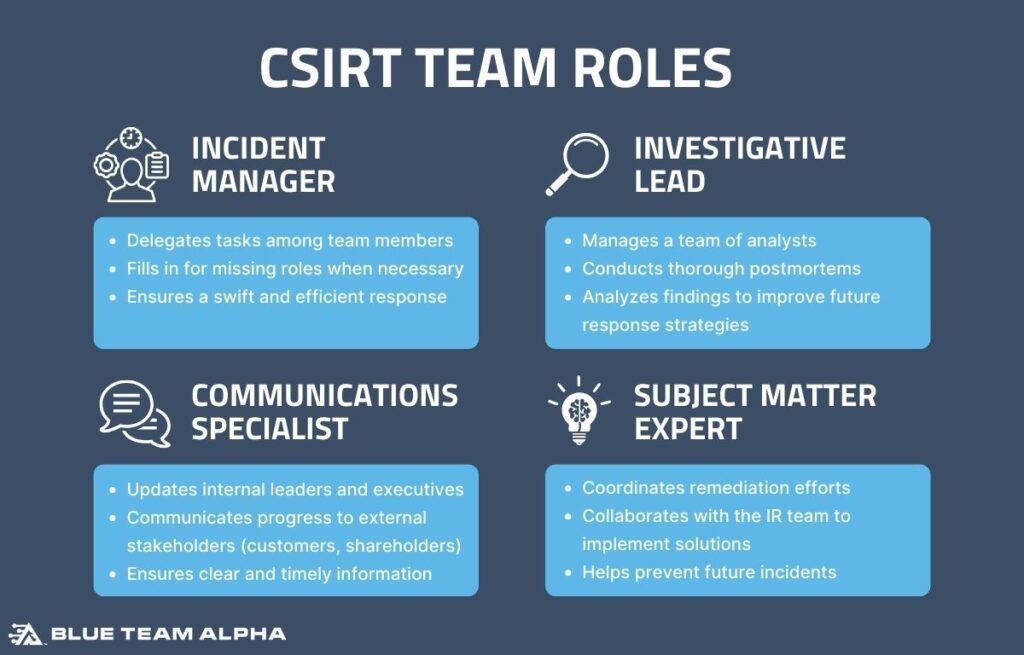
A cyber incident response company provides specialized support when an organization experiences—or suspects—a cybersecurity incident. These firms may work alongside an internal security team, an IT provider, legal counsel, and cyber insurance representatives.

Incident response is not limited to fixing compromised computers. It can involve identifying how an attacker gained access, determining which data or systems were affected, preserving evidence, and helping the organization make informed decisions under pressure.

Common Services

Services vary by provider, but many cyber incident response companies offer some combination of the following:

  • Emergency response: Rapid assistance to assess an active incident, contain threats, and coordinate immediate actions.
  • Digital forensics: Examination of computers, servers, cloud environments, and network activity to understand what happened.
  • Threat containment and eradication: Steps to isolate affected systems, remove malicious access, and address vulnerabilities.
  • Recovery support: Guidance for restoring systems and data safely, validating backups, and returning to normal operations.
  • Ransomware response: Analysis and containment of ransomware incidents, with support for evaluating recovery options. Outcomes depend on the circumstances; no provider can guarantee recovery or a particular result.
  • Incident coordination: Support in organizing communication among technical teams, executives, legal advisors, insurers, and other stakeholders.
  • Readiness planning: Development or review of incident response plans, playbooks, escalation procedures, and exercises.
  • Post-incident review: Recommendations to address security gaps and strengthen future response capabilities.

When to Contact a Response Firm

Organizations may contact a response provider after detecting ransomware, unauthorized account access, suspicious data transfers, business email compromise, malware, or unexplained system outages. A company may also seek help when it cannot determine whether an alert is a false alarm or a serious compromise.

It is often useful to establish a relationship before an emergency. Pre-arranged agreements can clarify how to reach responders, what services are covered, how access will be granted, and how fees are calculated. During an active incident, those details can otherwise slow down the response.

How to Choose a Cyber Incident Response Company

Look for relevant experience

Ask about the provider’s experience with incidents similar to those that could affect the organization, including its industry, technology environment, and regulatory obligations. Request examples of capabilities and processes without relying solely on marketing claims.

Confirm response availability

Incidents do not always occur during business hours. Ask whether emergency support is available around the clock, how quickly the company can begin work, and whether response is remote, on-site, or both. Clarify what “24/7” means in the service agreement.

Understand the scope and pricing

Review exactly what the engagement includes, such as initial triage, forensic analysis, containment advice, recovery assistance, and reporting. Ask about hourly rates, minimum charges, retainers, travel costs, and any expenses that may be billed separately.

Check independence and potential conflicts

Some providers also sell security products or ongoing services. That may be appropriate, but the organization should understand how recommendations are made and whether any conflicts of interest could affect the investigation.

Review confidentiality and evidence handling

Cyber investigations can involve sensitive business, employee, and customer information. Discuss data handling, access controls, retention, confidentiality, and how evidence will be preserved. Legal counsel can help determine what protections and procedures are appropriate.

Coordinate with insurers and legal counsel

Cyber insurance policies may specify reporting requirements or approved service providers. Before signing an agreement or beginning major response work, check the policy and consult the insurer and legal counsel when practical. Requirements differ by policy and jurisdiction.

Questions to Ask Before Hiring

  • What is the process for contacting the response team during an emergency?
  • How quickly can the team begin an assessment?
  • Which services are included in the proposed engagement?
  • How does the company preserve forensic evidence and document its work?
  • What information or access will the team need?
  • How will progress and urgent decisions be communicated?
  • Can the provider coordinate with internal IT, legal counsel, and the insurer?
  • What are the fees, billing rules, and cancellation terms?

Preparation Makes a Difference

A response company can provide specialized expertise, but effective incident management also depends on preparation inside the organization. Maintain current backups, protect administrative accounts with multifactor authentication, keep an accurate inventory of critical systems, and establish a clear way to report suspicious activity. Assign decision-makers and document how employees should reach them if email or other usual channels are unavailable.

Organizations should also review their incident response plan regularly and conduct exercises. A tabletop exercise can help leaders and technical staff practice decisions before an actual event creates time pressure.

Choosing a Partner Before an Emergency

Cyber incident response companies can help organizations navigate the technical and operational challenges of a security event. The best fit depends on the organization’s size, risks, technology, insurance requirements, and internal capabilities. Evaluating providers in advance—and agreeing on clear procedures—can help reduce confusion when a suspected incident needs immediate attention.


9 Tips for Choosing the Right Cyber Incident Response Company

  1. Check the company’s incident response experience.
  2. Verify 24/7 emergency availability.
  3. Ask about response times and service levels.
  4. Review certifications and staff expertise.
  5. Confirm experience in your industry.
  6. Check references and case studies.
  7. Clarify pricing and retainer terms.
  8. Ensure strong data confidentiality practices.
  9. Test communication and escalation plans.

Check the company’s incident response experience.

Check the company’s incident response experience before hiring. Ask whether it has handled incidents similar to yours, such as ransomware, data breaches, or business email compromise, and whether it understands your industry and technology environment. Look for clear examples of its response process, including how it investigates incidents, preserves evidence, communicates findings, and supports recovery. Relevant experience can help the team respond more effectively when time is critical.

Verify 24/7 emergency availability.

Before hiring a cyber incident response company, verify that its emergency support is truly available 24/7—not just through an after-hours voicemail or ticketing system. Ask how to reach an on-call responder, how quickly the team can begin triage, and whether support is available on weekends and holidays. Clarify whether rapid response, remote assistance, or on-site help is included in the agreement, so there are no surprises when every minute counts.

Ask about response times and service levels.

Ask potential cyber incident response companies about their response times and service levels before an incident occurs. Find out how quickly they can acknowledge an emergency, begin an investigation, and provide updates, including whether support is available 24/7. Review the service agreement for clear commitments, escalation procedures, and any conditions that could affect response. Knowing what to expect can help your organization choose a provider that meets its needs and act with greater confidence during a cyber incident.

Review certifications and staff expertise.

Review a cyber incident response company’s certifications and staff expertise before hiring. Relevant credentials can indicate that team members have demonstrated knowledge in areas such as digital forensics, incident handling, and cybersecurity, but certifications are only one part of the evaluation. Ask who would work on your case, what experience they have with incidents like yours, and how their skills match your organization’s systems and industry.

Confirm experience in your industry.

Confirm that a cyber incident response company has experience in your industry. Familiarity with your sector’s technology, common threats, regulatory requirements, and business operations can help the team assess an incident more efficiently and offer relevant guidance. Ask about similar cases they’ve handled and how they tailor their response to organizations like yours.

Check references and case studies.

Before hiring a cyber incident response company, check its references and case studies to understand how it has handled situations similar to yours. Look for clear examples of its process, communication, and results, and ask references about responsiveness, expertise, and any challenges during an engagement. Since every incident is different and client details may be confidential, treat case studies as useful context—not a guarantee of future outcomes.

Clarify pricing and retainer terms.

Clarify pricing and retainer terms before hiring a cyber incident response company. Ask what the retainer covers, whether it guarantees access to responders or a specific response time, and how unused hours are handled. Confirm rates for work beyond the retainer, minimum charges, after-hours fees, travel expenses, and any separate costs for forensic analysis or recovery support. A clear written agreement can prevent billing surprises and help your organization make faster decisions during an incident.

Ensure strong data confidentiality practices.

When choosing a cyber incident response company, make sure it follows strong data confidentiality practices. The provider may need access to sensitive business records, customer information, employee data, and forensic evidence, so ask how it controls access, encrypts and stores data, limits sharing, and handles information after the engagement ends. Review confidentiality terms, data retention policies, and breach notification procedures before work begins, and involve legal counsel when appropriate.

Test communication and escalation plans.

Test communication and escalation plans before an incident occurs so everyone knows whom to contact, what information to share, and who has authority to make key decisions. Include your cyber incident response company, internal IT and security teams, executives, legal counsel, and cyber insurer where appropriate. Practice backup communication methods in case email, phones, or other systems are unavailable, and update contact lists and procedures after each exercise.
it infra management

IT Infra Management: Building a Reliable Foundation for Your Business

IT Infrastructure Management: Building a Reliable Foundation for Your Business

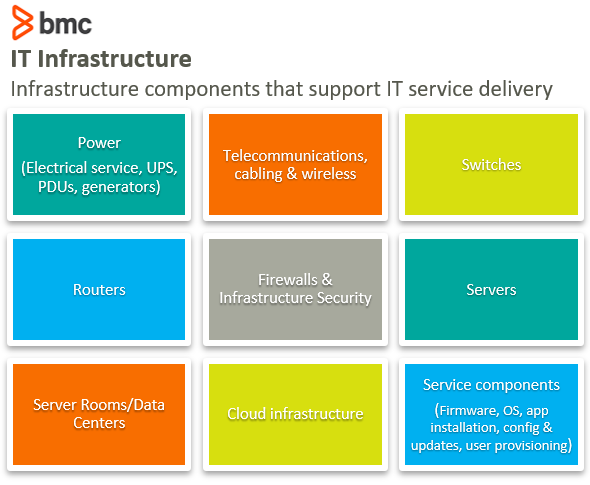
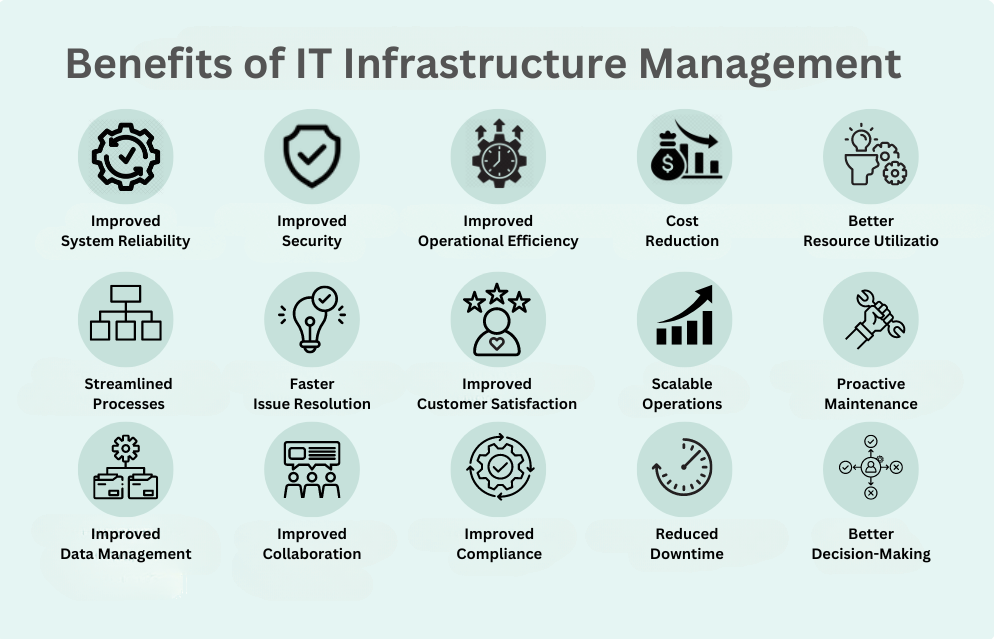
IT infrastructure management is the process of overseeing the technology systems an organization depends on every day. It includes managing hardware, software, networks, cloud services, data centers, and the security measures that protect them. When these components work together effectively, employees can do their jobs, customers can access services, and the business can adapt to change.

What Does IT Infrastructure Management Include?

An organization’s infrastructure may include both on-premises systems and cloud-based services. Managing it involves keeping each part reliable, secure, and aligned with business needs. Common responsibilities include:

  • Hardware management: Maintaining servers, computers, storage devices, and network equipment.
  • Network management: Monitoring connectivity, performance, capacity, and availability.
  • Software and systems management: Installing updates, maintaining operating systems, and managing business applications.
  • Cloud management: Coordinating cloud resources, access, costs, and configurations.
  • Security management: Applying safeguards such as access controls, patching, monitoring, and data protection.
  • Backup and recovery: Protecting important information and preparing to restore systems after an outage or incident.
  • Documentation and asset management: Tracking technology assets, configurations, warranties, and support requirements.

Why IT Infrastructure Management Matters

Technology problems can interrupt work, affect customer service, and expose an organization to security risks. Proactive infrastructure management helps reduce these disruptions by identifying issues before they become major incidents.

It also gives organizations a clearer picture of how their technology is being used. With accurate monitoring and documentation, teams can plan upgrades, control costs, improve performance, and make better decisions about future investments.

Core Practices for Effective Management

Monitor Systems Continuously

Monitoring tools can track availability, performance, storage, network traffic, and other indicators. Alerts help IT teams investigate unusual activity and address developing problems sooner. Monitoring works best when alerts are relevant, clearly assigned, and connected to a response process.

Keep Systems Updated

Operating systems, applications, and network devices need regular maintenance. A consistent patching process helps address known vulnerabilities and compatibility issues. Updates should be tested and scheduled appropriately, especially for systems that support critical business operations.

Plan for Backups and Recovery

Backups are useful only if they can be restored. Organizations should define what data and services need protection, how frequently backups should run, and how quickly systems must be restored. Regular recovery tests help confirm that plans work in practice.

Manage Access Carefully

Employees and service providers should have access only to the systems and information required for their roles. Reviewing permissions, removing access when it is no longer needed, and using multifactor authentication can reduce the risk of unauthorized activity.

Document the Environment

Clear documentation helps teams understand how systems are configured, how they depend on one another, and who is responsible for supporting them. It is especially valuable during troubleshooting, staff transitions, audits, and recovery efforts.

On-Premises, Cloud, and Hybrid Environments

Some organizations manage infrastructure in their own facilities, while others rely primarily on cloud providers. Many use a hybrid approach that combines on-premises equipment with cloud services. Each model has different requirements for security, cost management, availability, and support.

Cloud services can make it easier to scale resources, but they still require active oversight. Teams need to manage configurations, permissions, usage, and spending. In a hybrid environment, they also need to account for connections and dependencies between cloud and local systems.

Common Challenges

IT infrastructure can become difficult to manage when systems are added without a clear plan. Older equipment, incomplete documentation, inconsistent security practices, and limited visibility can make routine support more complicated. Rapid growth can create further pressure as infrastructure needs expand faster than budgets or staffing.

Addressing these challenges starts with understanding the current environment. An inventory of systems, applications, vendors, and dependencies can reveal gaps and help teams prioritize improvements based on business impact.

Measuring Success

Useful measures depend on an organization’s goals, but common indicators include system availability, incident response time, recurring outage frequency, backup recovery results, patching progress, and infrastructure spending. These measurements can help teams identify trends and explain the value of maintenance and modernization efforts.

Conclusion

IT infrastructure management is more than keeping equipment running. It is an ongoing effort to make technology dependable, secure, and ready to support the organization’s goals. Through consistent monitoring, maintenance, documentation, access controls, and recovery planning, businesses can reduce avoidable disruptions and build a stronger foundation for growth.


5 Essential Tips for Effective IT Infrastructure Management

  1. Document systems, dependencies, and owners.
  2. Automate routine updates and backups.
  3. Monitor performance and alerts continuously.
  4. Apply security patches promptly.
  5. Test disaster recovery plans regularly.

Document systems, dependencies, and owners.

Documenting systems, their dependencies, and their owners gives your team a clear picture of how the IT environment works and who is responsible for each part. Record key details such as configurations, integrations, support contacts, and connections between services. This information speeds up troubleshooting, helps teams assess the impact of changes, and makes onboarding and recovery easier. Keep documentation current by reviewing it whenever systems or responsibilities change.

Automate routine updates and backups.

Automating routine updates and backups helps keep IT systems secure and data protected without relying on manual reminders. Set updates to run during planned maintenance windows, and configure backups to follow a consistent schedule based on how often data changes and how quickly it would need to be restored. Monitor job results and test restoring files regularly to catch failures early and make sure your recovery plan works when it matters.

Monitor performance and alerts continuously.

Monitor IT infrastructure performance and alerts continuously to spot problems before they disrupt work. Track key indicators such as system availability, network latency, storage capacity, and resource usage, and configure alerts to flag unusual changes or emerging risks. Review alerts promptly, prioritize them by business impact, and fine-tune thresholds to reduce false alarms. A consistent monitoring process helps teams respond faster, maintain reliable services, and make informed decisions about capacity and maintenance.

Apply security patches promptly.

Apply security patches promptly to reduce the risk of attackers exploiting known vulnerabilities in your systems. Establish a process to monitor vendor updates, prioritize critical fixes, and test and deploy patches as quickly as practical. For essential or high-risk systems, plan maintenance windows and verify that updates install successfully. Regular patching helps protect your infrastructure, data, and business operations.

Test disaster recovery plans regularly.

Test disaster recovery plans regularly to make sure your organization can restore critical systems and data when an outage, cyberattack, or other emergency occurs. Practice realistic recovery scenarios, verify that backups work, and confirm that team members understand their roles. Record any gaps you discover, update the plan, and test again so recovery procedures stay reliable as your IT environment changes.

cyber security threats 2022

Cyber Security Threats 2022: Key Risks and How to Stay Protected

Cybersecurity Threats in 2022: What Businesses and Individuals Needed to Know

Cybersecurity remained a major challenge in 2022. Criminal groups and state-sponsored actors targeted organizations of every size, while everyday users faced scams, account theft, and data breaches. The year’s attacks showed that threats do not rely on a single weakness: attackers often combine stolen credentials, unpatched software, social engineering, and inadequate security practices to reach their goals.

Ransomware and Data Extortion

Ransomware continued to disrupt businesses, schools, hospitals, and government services in 2022. In many cases, attackers did more than encrypt files. They also stole sensitive information and threatened to publish it unless the victim paid. This “double extortion” approach put pressure on organizations even when they had reliable backups.

Ransomware incidents also affected organizations indirectly. An attack on a service provider or business partner could interrupt operations for customers who were not directly targeted. These incidents underscored the importance of maintaining tested backups and preparing a response plan before an attack occurs.

Phishing and Stolen Credentials

Phishing remained one of the most common ways attackers gained access to systems. Messages might impersonate an employer, supplier, bank, or popular online service, urging recipients to open an attachment, follow a link, or approve a login. Some scams were carefully tailored to a specific person or organization.

Stolen usernames and passwords were also valuable to attackers. Reusing passwords across sites made the problem worse: a password exposed in one breach could be used to attempt access to other accounts. Multi-factor authentication (MFA) helped reduce this risk, but attackers sometimes tried to defeat it through repeated approval requests or by tricking users into sharing verification codes.

Software Vulnerabilities and Supply-Chain Risks

Attackers looked for unpatched software and newly disclosed security flaws. Vulnerabilities in widely used products could expose many organizations at once, especially when systems were connected to the internet or updates were delayed. The continued exploitation of Log4Shell, first disclosed in late 2021, was one reminder that a vulnerability can remain a serious concern well beyond the year it is discovered.

Supply-chain attacks posed another challenge. Rather than targeting every victim individually, attackers could seek weaknesses in a software provider, service company, or other trusted partner. A compromise in one part of the supply chain could create risks for many downstream organizations.

Cloud and Remote-Work Security

Cloud services and remote work remained essential for many organizations, but they also expanded the number of accounts, devices, and systems that needed protection. Misconfigured storage, overly broad access permissions, weak account security, and unmanaged devices could expose sensitive data or provide attackers with a foothold.

Using a cloud service did not automatically make information secure. Organizations still needed to understand their responsibilities, configure services carefully, limit access to what each user required, and monitor accounts for unusual activity.

Cyber Activity Linked to Geopolitical Conflict

The war in Ukraine heightened concerns about cyber operations connected to geopolitical conflict. Wiper malware, which is designed to destroy data rather than demand payment, and other disruptive activity affected organizations in the region. The conflict also prompted warnings that attacks could have consequences beyond their intended targets, particularly when networks and service providers crossed national borders.

Practical Steps to Reduce Risk

No single tool can prevent every attack, but a combination of basic safeguards can make organizations and individuals more resilient:

  • Install security updates promptly, especially for internet-facing systems and business-critical software.
  • Use unique, strong passwords and store them in a reputable password manager.
  • Enable MFA, preferably with phishing-resistant methods where available, and never approve unexpected login requests.
  • Back up important information regularly, keep a protected copy separate from the main network, and test recovery procedures.
  • Train employees to recognize suspicious messages and provide a simple way to report them.
  • Limit user and application permissions to what is necessary, and remove access that is no longer needed.
  • Secure cloud settings, monitor important accounts, and review activity for signs of compromise.
  • Maintain an incident-response plan that identifies who to contact and how to restore essential services.

Lessons from 2022

Cybersecurity threats in 2022 highlighted the close connection between technology, people, and preparedness. Attackers exploited both technical weaknesses and human trust, while disruptions at suppliers and service providers showed how far the effects of one incident could spread. Regular patching, strong account protection, reliable backups, and practiced response plans remain essential defenses against these evolving risks.


9 Benefits of Understanding Cybersecurity Threats in 2022

  1. Raises awareness of evolving cyber risks.
  2. Encourages stronger passwords and MFA.
  3. Promotes timely software updates.
  4. Highlights the value of secure backups.
  5. Improves phishing awareness.
  6. Strengthens incident-response planning.
  7. Encourages careful cloud security.
  8. Reveals supply-chain vulnerabilities.
  9. Supports better cybersecurity investment.


6 Major Cybersecurity Threats and Their Impacts in 2022

  1. Ransomware disrupted essential services.
  2. Phishing scams stole passwords and data.
  3. Unpatched software exposed systems to attacks.
  4. Supply-chain breaches affected many organizations.
  5. Cloud misconfigurations exposed sensitive information.
  6. Cyberattacks caused costly downtime and recovery.

Raises awareness of evolving cyber risks.

One positive outcome of the cybersecurity threats seen in 2022 was increased awareness of how quickly online risks evolve. High-profile ransomware attacks, phishing scams, and software vulnerabilities encouraged individuals and organizations to take cybersecurity more seriously. Many began reviewing their security practices, updating software more promptly, using stronger authentication, and preparing plans for responding to incidents. This greater awareness helped make cybersecurity a more visible and ongoing priority.

Encourages stronger passwords and MFA.

One positive outcome of the cybersecurity threats seen in 2022 was greater awareness of the need for stronger account security. As phishing, data breaches, and stolen credentials continued to put accounts at risk, more people and organizations began using unique, complex passwords and password managers. Many also adopted multi-factor authentication (MFA), which adds an extra verification step beyond a password. While these measures cannot prevent every attack, they make it harder for criminals to access accounts with stolen or guessed credentials.

Promotes timely software updates.

One positive outcome of the cybersecurity threats seen in 2022 was greater awareness of the need for timely software updates. High-profile attacks that exploited known vulnerabilities showed how quickly unpatched systems can become targets. In response, organizations and individuals were encouraged to install security updates promptly, helping close vulnerabilities, protect sensitive information, and reduce the risk of disruption.

Highlights the value of secure backups.

The cybersecurity threats of 2022 highlighted the value of secure, regularly tested backups. Ransomware attacks often encrypted victims’ files and threatened to expose stolen data, disrupting businesses and critical services. Organizations with protected, up-to-date backups could restore important information and resume operations more quickly, reducing reliance on paying a ransom. Backups are not a complete defense, but keeping copies separate from everyday systems and testing recovery plans can make a major difference when an attack occurs.

Improves phishing awareness.

The cybersecurity threats seen in 2022 helped improve phishing awareness by making people more alert to suspicious emails, texts, and login requests. As phishing scams became more convincing and targeted, organizations increased employee training and encouraged users to verify unexpected messages before clicking links, opening attachments, or sharing sensitive information. This greater awareness can help people recognize common warning signs and reduce the risk of stolen credentials, financial loss, and data breaches.

Strengthens incident-response planning.

The cybersecurity threats of 2022 underscored the importance of preparing for incidents before they happen. Ransomware, phishing, and attacks on service providers showed how quickly a security issue can disrupt operations, expose data, or affect customers. In response, organizations strengthened incident-response plans by clarifying roles, improving communication, practicing recovery procedures, and testing backups. These preparations can help teams act faster, limit damage, and restore essential services when an incident occurs.

Encourages careful cloud security.

The cybersecurity threats of 2022 encouraged organizations to take a closer look at cloud security. As businesses relied more heavily on cloud services, incidents involving misconfigured storage, exposed accounts, and excessive access permissions showed that moving data online did not make it secure automatically. These risks prompted companies to review their cloud settings, strengthen authentication, limit access to sensitive information, and monitor accounts for suspicious activity. While the threats were serious, they helped make careful cloud security a higher priority.

Reveals supply-chain vulnerabilities.

One unexpected benefit of the cyberattacks seen in 2022 was that they exposed vulnerabilities across software and business supply chains. Incidents showed how a weakness in one provider, product, or service could put many connected organizations at risk. This greater awareness encouraged businesses to review third-party access, assess vendor security practices, and strengthen monitoring and response plans. While the attacks caused serious harm, the lessons helped organizations better understand and address risks that might otherwise have gone unnoticed.

Supports better cybersecurity investment.

The cybersecurity threats of 2022 highlighted the real costs of data breaches, ransomware, and service disruptions, encouraging many organizations to invest more in protecting their systems. In response, businesses strengthened security tools, improved employee training, updated outdated software, and developed more effective incident-response plans. Although the threats themselves were harmful, the increased awareness they created helped make cybersecurity a higher priority.

Ransomware disrupted essential services.

In 2022, ransomware attacks disrupted essential services, affecting organizations such as hospitals, schools, local governments, and critical infrastructure providers. When systems were locked or taken offline, staff could lose access to important records and tools, delaying services and forcing some operations to rely on manual work. These disruptions showed that ransomware can harm more than a company’s finances: it can interfere with services people depend on every day and create serious risks for communities.

Phishing scams stole passwords and data.

One major cybersecurity threat in 2022 was phishing, which tricked people into clicking deceptive links or sharing sensitive information. Fraudulent emails, text messages, and websites often impersonated trusted companies or coworkers to steal passwords, financial details, and personal data. Stolen credentials could then let criminals access accounts, expose confidential information, or launch further attacks.

Unpatched software exposed systems to attacks.

Unpatched software exposed systems to attacks in 2022 because known security flaws gave cybercriminals a way to break into devices, networks, and online services. When organizations delayed installing updates, attackers could exploit vulnerabilities to steal data, install malware, or disrupt operations. This risk was especially serious for internet-connected systems and widely used software, where a single unaddressed flaw could put many users at risk. Regularly applying security updates helps close these gaps before attackers can take advantage of them.

Supply-chain breaches affected many organizations.

Supply-chain breaches were a major cybersecurity concern in 2022 because attackers could compromise a software provider, contractor, or other trusted partner and potentially reach many organizations at once. Instead of attacking each victim directly, criminals exploited a shared service or product to spread malicious software, steal data, or disrupt operations across multiple customers. These incidents showed that an organization’s security depends not only on its own defenses, but also on the practices and resilience of the third parties it relies on.

Cloud misconfigurations exposed sensitive information.

In 2022, cloud misconfigurations exposed sensitive information when organizations left storage, databases, or other services improperly secured. Public access settings, weak permissions, and overlooked security controls could allow unauthorized people to view or download confidential data. These incidents highlighted that moving information to the cloud does not automatically make it secure; organizations must configure services carefully, regularly review access, and monitor for exposure.

Cyberattacks caused costly downtime and recovery.

Cyberattacks in 2022 often caused costly downtime and recovery for affected organizations. When ransomware, data breaches, or service disruptions made systems unavailable, businesses could lose sales, delay essential work, and struggle to serve customers. Recovery added further expenses, including restoring data, investigating the incident, hiring security specialists, and strengthening systems to prevent another attack. For some organizations, the disruption also damaged customer trust and interrupted relationships with suppliers and partners.

it infrastructure and services

IT Infrastructure and Services: Building a Reliable Foundation for Business Growth

IT Infrastructure and Services: The Foundation of a Modern Business

Reliable IT infrastructure helps businesses operate efficiently, protect important information, and adapt to change. From employee devices and business applications to networks and cloud platforms, each part of an organization’s technology environment plays a role in keeping work moving.

IT services help plan, manage, and support that environment. Together, infrastructure and services give businesses the tools they need to serve customers, collaborate, and grow.

What Is IT Infrastructure?

IT infrastructure is the collection of technology resources that supports an organization’s operations. It can include physical equipment, software, networks, cloud services, and the processes used to manage them.

  • Hardware: Computers, servers, storage systems, printers, and other devices.
  • Networks: Wired and wireless connections that link users, devices, and systems.
  • Software: Operating systems, business applications, databases, and collaboration tools.
  • Cloud platforms: Online computing, storage, and software services.
  • Security systems: Tools and controls that help protect accounts, devices, networks, and data.

These components work together. A problem with one part—such as an unreliable network or outdated software—can affect productivity across the organization.

What Do IT Services Include?

IT services cover the expertise and ongoing support needed to keep technology useful, secure, and dependable. The right mix depends on an organization’s size, goals, industry, and existing systems.

IT Planning and Consulting

Technology planning connects IT decisions to business priorities. A review of existing systems can help identify risks, unnecessary costs, and opportunities to improve performance. A practical IT plan can also guide upgrades and future investments.

Network Management

Network services help maintain the connections that employees rely on every day. This may include configuring equipment, monitoring performance, managing wireless access, and troubleshooting interruptions.

Cybersecurity

Cybersecurity combines technology, policies, and user awareness to reduce the risk of data loss and unauthorized access. Common measures include multifactor authentication, access controls, security updates, endpoint protection, and employee training.

Cloud Services

Cloud services can provide flexible access to computing resources, storage, and software. Moving workloads to the cloud may simplify some operations, but it requires careful planning. Businesses should consider security, costs, performance, data location, and how cloud systems will work with existing tools.

Backup and Recovery

Backups help organizations restore important data after accidental deletion, hardware failure, or a cyber incident. A backup plan should specify what gets backed up, how often backups run, where copies are stored, and how restoration is tested.

Help Desk and Technical Support

Support services help employees resolve technology issues and return to work quickly. Clear procedures for reporting problems, prioritizing requests, and communicating updates can make support more effective.

Why a Strong IT Foundation Matters

Well-managed IT infrastructure can support productivity, business continuity, and better decision-making. It can also help organizations:

  • Reduce disruptions and respond to technical issues more quickly.
  • Protect business information and manage access appropriately.
  • Support remote and hybrid work.
  • Keep systems updated and compatible.
  • Scale technology as business needs change.
  • Plan technology spending with fewer surprises.

Technology alone does not guarantee these results. Systems need to be configured, maintained, monitored, and reviewed over time.

Choosing the Right IT Services

Before selecting IT services, consider the organization’s current environment and priorities. Useful questions include:

  • Which systems are essential to daily operations?
  • Where are the largest security or reliability risks?
  • What support do employees need most often?
  • Are backups and recovery procedures tested regularly?
  • Which technology costs are predictable, and which are difficult to manage?
  • What changes are likely in the next one to three years?

Some organizations manage IT internally, while others work with outside specialists or use a combination of both. The best arrangement is one that provides the right expertise, response times, and oversight for the organization’s needs.

Build for Reliability and Growth

IT infrastructure is not a one-time project. Devices age, software changes, security threats evolve, and business requirements shift. Regular reviews help ensure that systems remain useful and that technology decisions continue to support organizational goals.

With thoughtful planning and dependable IT services, businesses can create a technology environment that is more secure, resilient, and ready for what comes next.


9 Essential Tips for Reliable and Secure IT Infrastructure and Services

  1. Document your infrastructure and keep it up to date.
  2. Back up critical data regularly and test restores.
  3. Use multi-factor authentication for administrative access.
  4. Apply security patches promptly.
  5. Monitor services for uptime, errors, and capacity.
  6. Automate repetitive deployment and maintenance tasks.
  7. Separate production, test, and development environments.
  8. Set clear recovery targets for critical services.
  9. Review access permissions regularly.

Document your infrastructure and keep it up to date.

Documenting your IT infrastructure gives your team a clear view of how systems, devices, networks, applications, and services fit together. Keep records of configurations, software versions, vendors, access details, dependencies, and recovery procedures, and update them whenever something changes. Accurate, current documentation makes troubleshooting faster, supports security and compliance efforts, and helps your organization recover more effectively from outages or staff transitions.

Back up critical data regularly and test restores.

Back up critical data regularly, and test your restore process to make sure files can be recovered when needed. A backup is only useful if it works, so verify that copies are complete, protected, and stored separately from your primary systems. Set a schedule based on how often your data changes, and periodically practice restoring files or systems to catch problems before an emergency.

Use multi-factor authentication for administrative access.

Use multi-factor authentication (MFA) for all administrative accounts to add an extra layer of protection to your IT infrastructure. Admin accounts have powerful permissions, so a stolen password could let an attacker change systems, access sensitive data, or create new accounts. MFA requires an additional verification step—such as an authenticator app or security key—making unauthorized access much harder, even if a password is compromised.

Apply security patches promptly.

Apply security patches promptly to fix known vulnerabilities before attackers can exploit them. Prioritize updates for internet-facing systems, operating systems, business applications, and security tools. Test critical patches when practical, then install them promptly and verify that updates were successful. For systems that cannot be patched right away, use temporary safeguards—such as restricting access or isolating the device—and track the remaining risk until the update is complete.

Monitor services for uptime, errors, and capacity.

Monitor IT services regularly for uptime, errors, and capacity to catch problems before they disrupt work. Uptime monitoring can reveal outages or slowdowns, error tracking can help pinpoint recurring issues, and capacity monitoring can show when systems are nearing their limits. Together, these insights help teams resolve issues sooner, plan upgrades, and keep services reliable as business needs grow.

Automate repetitive deployment and maintenance tasks.

Automating repetitive deployment and maintenance tasks can save time, reduce human error, and make IT operations more consistent. Scripts and automation tools can handle routine work such as provisioning systems, applying updates, running backups, and checking configurations. Start with well-documented processes, test automation in a safe environment, and monitor results so issues are caught quickly. With the right safeguards, teams can spend less time on manual upkeep and more time improving the services their organization depends on.

Separate production, test, and development environments.

Separating production, test, and development environments helps protect live systems while giving teams room to build and validate changes safely. Production should serve real users and use tightly controlled access, while development supports day-to-day coding and testing provides a place to check changes before release. Keeping these environments distinct—with appropriate permissions, configurations, and data safeguards—reduces the risk that unfinished work or experiments will disrupt business operations.

Set clear recovery targets for critical services.

Set clear recovery targets for critical services so everyone knows how quickly systems must be restored after an outage and how much data loss is acceptable. Define a recovery time objective (RTO) for the maximum downtime and a recovery point objective (RPO) for the maximum period of data that can be lost. Prioritize targets based on each service’s business impact, then make sure your backups, recovery plans, and available resources can meet them. Test the plan regularly to confirm those targets are realistic.

Review access permissions regularly.

Review access permissions regularly to make sure employees and service providers can reach only the systems and information they need. Remove access promptly when someone changes roles or leaves the organization, and review shared, administrative, and inactive accounts for unnecessary privileges. Regular permission checks help reduce the risk of accidental exposure, misuse, and unauthorized access.

thinking in java

Thinking in Java: A Practical Guide to Object-Oriented Programming

Thinking in Java: A Practical Approach to Object-Oriented Programming

Learning Java is about more than memorizing keywords and syntax. It also means learning how to break problems into manageable pieces, represent those pieces in code, and make them work together. That way of approaching software is often described as “thinking in Java.”

The phrase is also associated with Thinking in Java, a programming book by Bruce Eckel. The book has introduced many readers to Java and object-oriented programming. Whether you are studying the book or learning Java through another resource, its central challenge remains useful: understand the ideas behind the code, not just the code itself.

Start With the Problem

Before writing a class or choosing a data structure, clarify what the program needs to accomplish. Identify the inputs, the expected outputs, and any rules the program must follow. A clear problem statement makes it easier to decide what belongs in the software and what can be left out.

For example, a program that tracks library books might need to record each book’s title, author, and availability. It may also need to support actions such as checking out and returning a book. Thinking through those requirements first helps reveal the information and behavior the program should represent.

Use Objects to Model Concepts

Java is an object-oriented language. In object-oriented programming, classes define the structure and behavior of objects. A Book class, for instance, could hold a title and author, while methods could describe actions related to that book.

public class Book {

private String title;

private String author;

private boolean checkedOut;

public Book(String title, String author) {

this.title = title;

this.author = author;

this.checkedOut = false;

}

public void checkOut() {

checkedOut = true;

}

public boolean isCheckedOut() {

return checkedOut;

}

}

This example demonstrates encapsulation: the class keeps its data private and provides methods for interacting with it. Encapsulation helps protect an object’s state and gives the rest of the program a clear way to use it.

Choose Abstraction Carefully

Abstraction means focusing on the details that matter while hiding unnecessary complexity. A program that uses a book might need to know whether it is available, but it may not need to know every detail about how that status is stored internally.

Good abstractions make code easier to understand and change. Too little abstraction can leave a program tangled; too much can add layers that solve no real problem. The goal is not to create a class for every noun, but to give each part of the program a clear responsibility.

Favor Clear, Cohesive Design

A well-designed class has a focused purpose. If one class handles user input, stores data, formats reports, and communicates with a database, it may be doing too much. Separating responsibilities can make the program easier to test, maintain, and extend.

Readable names also matter. A method called checkOut() communicates more than one called process(). In Java, clear naming and consistent formatting are not merely cosmetic; they help developers reason about what a program does.

Understand Inheritance and Composition

Java supports inheritance, which lets one class extend another. Inheritance can be useful when a type truly is a specialized form of another type. For example, a PrintedBook might share common features with a general Book class.

However, inheritance should not be used just to reuse a few lines of code. Often, composition is a better choice: one object contains or uses another object to perform part of its work. Composition can keep relationships flexible and reduce dependencies between classes.

Learn Through Small Experiments

Java concepts become easier to understand when you test them in working programs. Write a small example, compile it, observe the result, and change one thing at a time. When an error appears, read the compiler message and trace the relevant values instead of changing code at random.

Useful practice projects include a number-guessing game, a simple contact list, a command-line expense tracker, or a basic library catalog. These projects provide opportunities to work with classes, collections, conditionals, loops, and exceptions without requiring a large application.

Build Good Habits Early

  • Use meaningful names for classes, methods, and variables.
  • Keep methods focused and avoid unnecessary complexity.
  • Use access modifiers such as private to control access to class data.
  • Handle errors deliberately, including situations that may produce exceptions.
  • Test behavior with normal inputs as well as unexpected ones.
  • Refactor code when a clearer design becomes apparent.

From Syntax to Problem Solving

Thinking in Java ultimately means treating programming as a process of modeling, design, and careful problem solving. Syntax tells the compiler how to read the program; sound design helps people understand and improve it. By practicing with small projects and paying attention to object responsibilities, encapsulation, and clarity, Java learners can move beyond writing code that merely runs toward writing code that is easier to maintain.


8 Tips for Thinking in Java: Write Clear, Object-Oriented Code

  1. Think in terms of objects and their responsibilities.
  2. Use classes to model clear, focused concepts.
  3. Prefer composition over deep inheritance.
  4. Keep fields private and expose only needed behavior.
  5. Use interfaces to reduce coupling.
  6. Handle exceptions deliberately and specifically.
  7. Choose collections based on how data is used.
  8. Write small tests to verify each class’s behavior.

Think in terms of objects and their responsibilities.

When thinking in Java, focus on the objects your program needs and the responsibilities each one should handle. A class should represent a clear concept and keep related data and behavior together—for example, a `Book` object can store a title and provide methods for checking its availability. Giving each object a focused role makes code easier to understand, test, and maintain, while reducing the temptation to put unrelated tasks into one class.

Use classes to model clear, focused concepts.

Use classes to model clear, focused concepts in your program. Each class should represent a meaningful idea and have a well-defined responsibility, such as a `Book` that stores book details or a `Library` that manages a collection of books. Keeping classes focused makes your code easier to understand, test, and update. If a class starts handling unrelated tasks, consider separating those responsibilities into smaller, cohesive classes.

Prefer composition over deep inheritance.

When designing Java programs, prefer composition over deep inheritance. Instead of building a long chain of subclasses, create focused classes that work together by holding references to other objects. Composition often makes code easier to understand, test, and change because each class can have a clear responsibility without depending on every detail of its parent classes. Use inheritance when a genuine “is-a” relationship exists, but choose composition when an object simply needs another object’s behavior.

Keep fields private and expose only needed behavior.

Keeping fields private is a core Java practice that protects an object’s internal state and prevents other parts of a program from changing it unexpectedly. Instead of exposing data directly, provide only the methods callers need to use the object, such as `checkOut()` or `isAvailable()`. This approach, called encapsulation, makes classes easier to maintain because internal details can change without forcing updates throughout the rest of the program. It also helps each class enforce its own rules and present a clear, focused interface.

Use interfaces to reduce coupling.

Use interfaces to reduce coupling by letting classes depend on shared behavior rather than specific implementations. For example, a service can accept a `PaymentProcessor` interface instead of depending directly on a credit card processor, making it easier to add another payment option or swap implementations without rewriting the service. This approach also simplifies testing, since a lightweight mock can stand in for the real implementation. Keep interfaces focused on meaningful capabilities, so they make your Java code more flexible without adding unnecessary complexity.

Handle exceptions deliberately and specifically.

Handle exceptions deliberately and specifically by catching only the errors your code can reasonably address. A broad catch-all can hide bugs and make failures harder to diagnose, while a focused catch lets you respond appropriately—for example, by asking for a valid file path when a file is missing or showing a clear message when input is invalid. When an exception cannot be handled meaningfully at that point, allow it to propagate or rethrow it with useful context, and avoid silently ignoring it.

Choose collections based on how data is used.

When thinking in Java, choose a collection based on how your data will be used, not just on what is familiar. Use a List when order matters or you need duplicates, a Set when you need unique values, and a Map when you need to look up values by a key. Also consider performance: for example, an ArrayList works well for frequent access by index, while a HashSet is useful for quick membership checks. Picking the right collection makes your code clearer and can improve its efficiency.

Write small tests to verify each class’s behavior.

Write small tests to verify each class’s behavior as you build your Java program. Focus each test on a specific responsibility, such as checking that a method returns the expected value or that an object updates its state correctly. These focused tests make bugs easier to find, help confirm that classes work as intended, and give you confidence to change or extend your code later.

Network Security Best Practices: Essential Steps to Protect Your Network

Network Security Best Practices

A secure network helps protect sensitive information, keep systems available, and reduce the risk of costly disruptions. Whether you manage a home network, a small business, or a large organization, network security works best as an ongoing process—not a one-time setup. The practices below can help you strengthen your defenses and respond more effectively to threats.

Keep Systems and Network Devices Updated

Install security updates for operating systems, applications, routers, firewalls, and other network equipment as soon as practical. Updates often fix vulnerabilities that attackers could otherwise exploit. Replace devices that no longer receive security support, and remove software or services that are no longer needed.

Where possible, enable automatic updates for routine security fixes. For business environments, test important updates before broad deployment and maintain a schedule for reviewing devices that may have been missed.

Use Strong Authentication

Change default usernames and passwords on routers, access points, and other equipment. Use long, unique passwords for every account, ideally stored in a reputable password manager. Avoid shared accounts when individual accounts are available, since personal accounts make it easier to track activity and revoke access when someone leaves.

Enable multifactor authentication (MFA) for administrative accounts, remote access, cloud services, and other important systems. MFA adds another verification step, making a stolen password less useful to an attacker.

Limit Access and Apply Least Privilege

Give users and devices only the access they need to do their work. Separate everyday user accounts from administrator accounts, and use elevated privileges only when necessary. Review permissions regularly, especially after job changes or departures.

Disable unused accounts, open ports, network services, and remote-access tools. Restrict administrative interfaces so they are reachable only from approved devices or trusted network locations.

Segment the Network

Network segmentation divides a network into smaller sections, limiting how far an intruder can move if one device or account is compromised. For example, organizations can separate employee computers, servers, guest Wi-Fi, and internet-connected devices such as cameras or printers.

Use firewall rules to control which sections can communicate and allow only the connections required for normal operations. Review these rules periodically to remove outdated or overly broad access.

Secure Wi-Fi and Remote Connections

Protect wireless networks with current encryption and a strong, unique passphrase. Change the access point’s default administrator credentials, keep its firmware updated, and use a separate guest network for visitors and personal devices. Avoid exposing the network’s administrative interface to the public internet.

For remote work, require secure connections through an approved VPN or other protected access method. Combine remote access with MFA, limit who can use it, and monitor for unusual sign-in activity. Do not rely on a VPN alone; remote devices should also be updated and protected.

Deploy Firewalls and Endpoint Protection

Firewalls help control traffic entering and leaving a network. Configure them to deny unnecessary connections by default, then allow only the traffic required for business or personal use. Check firewall logs and rules for unexpected changes or suspicious activity.

Install reputable endpoint protection on computers and servers, and keep it enabled and updated. Endpoint tools can help detect malicious files, suspicious behavior, and other threats that network controls may not catch.

Protect Data and Backups

Encrypt sensitive data when it is stored and when it travels across networks. Use secure protocols and avoid sending confidential information over untrusted connections without appropriate protection.

Maintain regular backups of important data and systems. Keep at least one backup isolated from the main network so malware or an intruder cannot easily alter or delete every copy. Test restores periodically; a backup is useful only if it can be recovered.

Monitor Activity and Prepare to Respond

Collect and review logs from firewalls, servers, endpoints, and important applications. Alerts can help identify unusual login attempts, unexpected data transfers, or changes to critical settings. Make sure logs are protected from unauthorized changes and retained long enough to support investigations.

Create an incident response plan that explains who to contact, how to isolate affected systems, how to preserve evidence, and how to restore operations. Practice the plan so that people know what to do under pressure.

Train Users and Review Security Regularly

People play an important role in network security. Teach users how to recognize phishing attempts, report suspicious messages, handle sensitive information, and use approved tools. Make reporting easy and respond constructively so potential problems are raised quickly.

Regularly review network diagrams, device inventories, access permissions, firewall rules, and security policies. Periodic vulnerability assessments can help identify weaknesses before they are exploited. Address findings according to their risk and verify that fixes have worked.

Make Security an Ongoing Practice

No single tool can protect every network from every threat. Strong security comes from combining updated systems, careful access controls, segmentation, monitoring, backups, and informed users. Start with the measures that address your most important risks, document your decisions, and revisit them as your network and needs change.


7 Essential Tips for Strengthening Your Network Security

  1. Use strong, unique passwords and enable multifactor authentication.
  2. Keep routers, firewalls, and devices updated.
  3. Use WPA3 or WPA2 encryption for Wi-Fi.
  4. Change default administrator usernames and passwords.
  5. Segment guest and smart-home devices from sensitive systems.
  6. Disable unused ports, services, and remote access.
  7. Monitor network logs and investigate unusual activity.

Use strong, unique passwords and enable multifactor authentication.

Use strong, unique passwords for every network account, especially administrator and remote-access accounts. Long passphrases are easier to remember and harder to guess, while a password manager can help you store them securely without reusing them. Enable multifactor authentication (MFA) wherever possible to add another layer of protection, so a stolen password alone is less likely to grant access.

Keep routers, firewalls, and devices updated.

Keep routers, firewalls, computers, and other connected devices updated with the latest security patches and firmware. Updates often fix vulnerabilities that attackers could exploit, so install them promptly and enable automatic updates when available. Replace devices that no longer receive security support, and remove outdated software or services you no longer use.

Use WPA3 or WPA2 encryption for Wi-Fi.

Use WPA3 encryption to protect your Wi-Fi network whenever your router and devices support it. If WPA3 isn’t available, choose WPA2-AES rather than outdated options such as WEP or WPA. Set a strong, unique Wi-Fi password, change the router’s default administrator credentials, and keep its firmware up to date to help prevent unauthorized access.

Change default administrator usernames and passwords.

Change the default administrator username and password on every router, access point, and network device you manage. Default credentials are often publicly documented, so attackers may try them to gain control of a device and alter its settings, intercept traffic, or access connected systems. Choose a unique, strong password for each device, change the administrator username if the device allows it, and store the credentials securely in a password manager.

Segment guest and smart-home devices from sensitive systems.

Place guest devices and smart-home equipment—such as TVs, cameras, and speakers—on a separate Wi-Fi network from computers, phones, and other systems that contain sensitive information. These devices may have weaker security or receive fewer updates, so separating them helps limit access if one is compromised. Use your router’s guest-network or network-segmentation feature, and allow only the connections each device needs.

Disable unused ports, services, and remote access.

Disable unused network ports, services, and remote-access tools to reduce the number of ways an attacker could reach your systems. Turn off features you don’t need, close unnecessary firewall ports, and limit administrative access to trusted devices or locations. Review these settings regularly, since old services and access rules can remain enabled long after they’re needed.

Monitor network logs and investigate unusual activity.

Monitor network logs regularly to spot unusual activity, such as repeated failed sign-in attempts, unexpected connections, or large transfers of data. Set alerts for suspicious patterns and investigate them promptly to determine whether they’re harmless or signs of a security issue. Keeping logs protected and retaining them long enough can also help identify what happened and support a faster response.

it software engineer

IT Software Engineer: Roles, Skills, and Career Opportunities

What Does an IT Software Engineer Do?

An IT software engineer designs, builds, tests, and maintains software that helps people and organizations solve problems. The role combines programming skills with engineering practices, such as planning, documentation, testing, and ongoing improvement. IT software engineers may create business applications, websites, mobile apps, cloud services, or tools that support an organization’s technology systems.

Key Responsibilities

A software engineer’s daily work depends on the team and project, but common responsibilities include:

  • Understanding user and business requirements
  • Designing software systems and choosing suitable technologies
  • Writing, reviewing, and improving code
  • Testing software to find and fix defects
  • Maintaining existing applications and resolving technical issues
  • Documenting code, systems, and development processes
  • Working with designers, project managers, IT teams, and other engineers

Skills and Tools

Programming is an important part of the job, but successful software engineering involves more than writing code. Engineers need problem-solving skills, attention to detail, clear communication, and the ability to collaborate. They also need to understand how software fits into a larger IT environment, including networks, databases, operating systems, and security practices.

Depending on their work, software engineers may use languages such as Java, Python, C#, JavaScript, or SQL. Common tools include version-control systems, code editors, cloud platforms, automated testing frameworks, and project-management software. The specific tools vary by employer and project.

Education and Career Paths

Many software engineers have a degree in computer science, software engineering, or a related field. Others enter the profession through technical programs, independent study, internships, or practical experience. A portfolio of projects can help demonstrate skills, especially for candidates who are building experience.

With experience, an engineer may specialize in areas such as cloud computing, cybersecurity, mobile development, data engineering, or artificial intelligence. Other career paths include senior engineer, technical lead, software architect, engineering manager, or IT consultant.

Why Software Engineering Matters

Software supports many aspects of modern life, from online services and business operations to healthcare, transportation, and communication. IT software engineers help make these systems useful, reliable, and secure. Their work often continues after a product launches, as software must be updated to fix issues, meet changing needs, and work with new technologies.

Is This Career a Good Fit?

Software engineering may suit people who enjoy solving puzzles, learning new technologies, and turning ideas into practical tools. The work can involve complex challenges and changing priorities, so curiosity, patience, and a willingness to keep learning are valuable. For those who enjoy building and improving technology, it can offer a wide range of opportunities across industries.


8 Essential Tips for Success as an IT Software Engineer

  1. Master core programming concepts.
  2. Practice problem-solving every day.
  3. Write clean, readable code.
  4. Use version control consistently.
  5. Learn to test your software.
  6. Communicate clearly with your team.
  7. Keep learning new tools and technologies.
  8. Ask for feedback and improve.

Master core programming concepts.

Mastering core programming concepts is essential for becoming a successful IT software engineer. Build a strong understanding of variables, data types, control flow, functions, data structures, algorithms, and object-oriented programming before focusing too heavily on specific tools or frameworks. These fundamentals make it easier to learn new languages, write clear and efficient code, troubleshoot problems, and design software that can grow and adapt over time. Practice regularly by building small projects and explaining how your code works.

Practice problem-solving every day.

Practice problem-solving every day to strengthen the skills you’ll use as an IT software engineer. Try a coding challenge, debug a small program, or break a real-world task into manageable steps. Focus on understanding why a solution works, not just getting the right answer. Over time, regular practice can help you think more logically, write clearer code, and tackle unfamiliar technical challenges with greater confidence.

Write clean, readable code.

Writing clean, readable code is an essential skill for an IT software engineer. Clear names, consistent formatting, and simple structure make code easier to understand, test, and maintain—not just for its author, but for teammates who may work on it later. Keep functions focused, avoid unnecessary complexity, and add comments when they clarify the reasoning behind a decision. Well-organized code helps teams find bugs faster and adapt software as requirements change.

Use version control consistently.

Use version control consistently to track changes, collaborate safely, and make it easier to recover from mistakes. Commit small, focused updates with clear messages so teammates can understand what changed and why. Whether working alone or on a team, a consistent version-control workflow helps keep code organized and makes software development more reliable.

Learn to test your software.

Learn to test your software so you can catch problems early and make your applications more reliable. Practice writing tests that check individual functions, how different parts of a system work together, and whether the finished product behaves as users expect. Automated tests can save time as your code changes, while hands-on testing can reveal usability issues that scripts may miss. Building testing into your workflow helps prevent regressions, makes debugging easier, and gives you greater confidence when releasing updates.

Communicate clearly with your team.

Clear communication helps IT software engineers collaborate effectively and keep projects moving. Share updates on your progress, explain technical issues in plain language, and ask questions when requirements are unclear. When discussing a problem, include relevant details and suggest possible next steps. Clear, respectful communication helps teammates coordinate their work, catch misunderstandings early, and build better software together.

Keep learning new tools and technologies.

IT software engineers should make continuous learning part of their routine because tools, programming languages, and best practices evolve quickly. Exploring new technologies through online courses, documentation, personal projects, or professional communities can help engineers work more efficiently and adapt to changing project needs. It’s not necessary to learn every new tool; focus on technologies that support your goals and solve real problems.

Ask for feedback and improve.

Ask for feedback regularly from teammates, mentors, and users, and treat their input as an opportunity to grow. Constructive feedback can reveal bugs, improve code quality, and help make software easier to use and maintain. Consider each suggestion thoughtfully, ask questions when something is unclear, and apply what you learn to your next project. Over time, this habit can strengthen both your technical skills and your ability to collaborate.

erp development

ERP Development: A Practical Guide to Building a System That Fits Your Business

ERP Development: Building a System Around the Way Your Business Works

Enterprise resource planning (ERP) development is the process of creating or customizing software that connects a company’s core operations in one system. Instead of relying on separate tools for accounting, inventory, sales, purchasing, and human resources, an ERP system brings key data and workflows together.

For many organizations, the goal is not simply to install new software. It is to make everyday work more consistent, improve visibility across departments, and give employees reliable information for making decisions. A thoughtfully developed ERP system can support those goals while adapting to the organization’s processes and future plans.

What Is ERP Development?

ERP development can include building a new system, extending an existing ERP platform, or integrating ERP software with other business applications. The right approach depends on the organization’s needs, budget, technical environment, and willingness to adapt its processes.

An ERP solution may connect functions such as:

  • Finance, billing, and accounting
  • Inventory and warehouse management
  • Purchasing and supplier management
  • Sales, customer service, and order processing
  • Manufacturing and production planning
  • Human resources and payroll
  • Reporting and business analytics

Not every business needs all of these capabilities. ERP development is most effective when the system is designed around the processes and information the organization actually needs.

Custom ERP Development or an Existing Platform?

Businesses typically choose between customizing an established ERP platform and developing a solution from the ground up. Neither option is right for every organization.

Customizing an Existing ERP

An established platform may offer proven features, regular updates, and a broad ecosystem of support. Customization can fill gaps in the standard product or connect it to specialized tools. This approach may reduce development time, but extensive modifications can make upgrades and maintenance more complicated.

Building a Custom ERP System

A custom system can be designed for distinctive workflows, industry requirements, or legacy environments. It may provide greater control over features and user experience. However, custom development requires careful planning and ongoing investment in security, support, hosting, and future enhancements.

Before choosing, compare the cost and flexibility of each option over its full lifecycle—not just the initial implementation. A platform that seems inexpensive at first may require costly customization, while a custom system may take longer to build and maintain.

Key Benefits of ERP Development

More Consistent Information

When departments work from separate spreadsheets and applications, information can become duplicated or out of date. An ERP system can create a shared source of information, helping teams coordinate around consistent records and processes.

Improved Operational Visibility

Integrated data can help managers understand what is happening across the business. For example, connecting sales, purchasing, and inventory information can make it easier to spot supply concerns or track orders.

Streamlined Workflows

ERP software can reduce repetitive data entry and automate routine steps, such as approval routing, notifications, and invoice processing. Automation should be introduced carefully: unclear or inefficient processes should be improved before they are built into software.

Better Reporting

With data organized across business functions, teams can create more useful reports and monitor performance. The value depends on accurate data, well-defined metrics, and reporting tools that answer real business questions.

Support for Growth

A well-planned ERP system can accommodate new locations, products, users, or workflows. Scalability requires more than adding server capacity; the system’s architecture and data model must also support change.

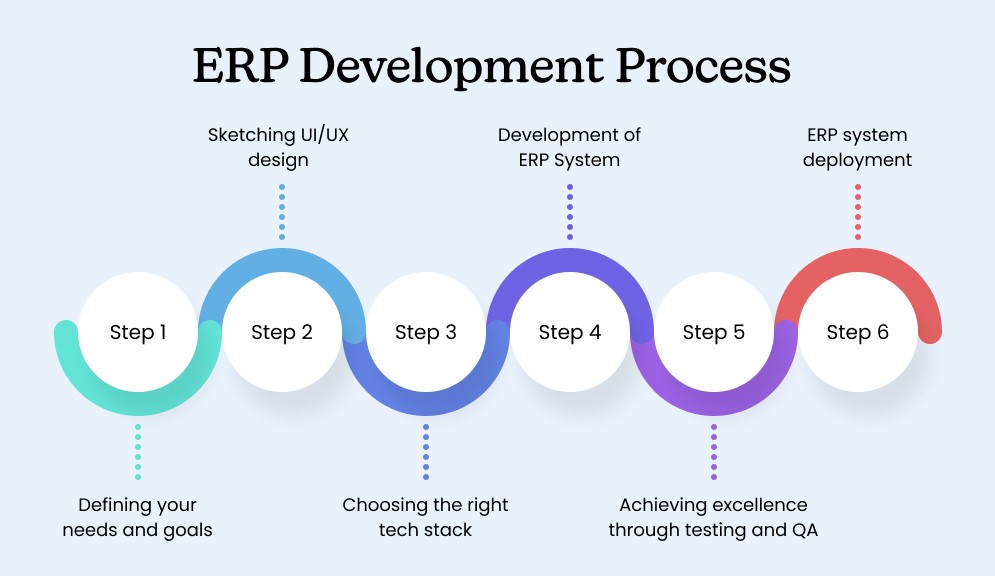
The ERP Development Process

Define Business Goals

Start by identifying the problems the system should solve. Goals might include reducing order processing time, improving inventory accuracy, or consolidating financial reporting. Clear outcomes help guide decisions and make it possible to evaluate the project.

Map Existing Processes

Document how work currently moves through the organization, including exceptions and manual workarounds. Involve employees who perform these tasks every day. Their feedback can reveal requirements that may not be visible to leadership or technical teams.

Set Requirements and Priorities

Separate essential requirements from features that can wait. Consider user roles, workflows, reports, integrations, regulatory needs, and data migration. A prioritized list helps control scope and focus the initial release on the most important capabilities.

Choose the Architecture and Technology

Decide whether the system will be cloud-based, hosted on company infrastructure, or use a hybrid approach. The choice affects access, performance, security, maintenance, and cost. Technical decisions should reflect the organization’s capabilities and long-term needs.

Design and Build in Stages

Developers and stakeholders can work together to create the system in manageable releases. Prototypes and frequent reviews make it easier to identify usability issues and adjust requirements before they become expensive to change.

Migrate and Validate Data

Data migration is one of the most important parts of an ERP project. Before transferring information, teams should identify duplicate, incomplete, or outdated records. Test migrations and reconciliation checks can help confirm that important data arrives accurately.

Test, Train, and Launch

Testing should cover individual features, integrations, security, performance, and complete business workflows. Training should be practical and role-specific, giving employees a chance to learn the tasks they will perform. A phased rollout may reduce disruption compared with launching every feature at once.

Maintain and Improve

After launch, the system needs monitoring, support, security updates, and a process for handling user feedback. Reviewing performance against the original goals can help determine which improvements should come next.

Important Considerations

  • Scope: Trying to replace every system and automate every process at once can increase risk. Prioritize the most valuable capabilities.
  • Integration: ERP software may need to exchange information with payment services, ecommerce platforms, shipping providers, or older applications. Plan how data will move and how errors will be handled.
  • Security: Use appropriate access controls, encryption, backups, and audit logs. Employees should only be able to view or change information needed for their roles.
  • Data quality: Poor-quality data can undermine reporting and automation. Establish ownership and rules for maintaining important records.
  • User adoption: A technically capable system can still fail if it is difficult to use or does not fit employees’ workflows. Include users throughout design, testing, and training.
  • Total cost: Account for implementation, licensing, development, data migration, training, hosting, support, and future upgrades.

Common ERP Development Challenges

ERP projects can become difficult when requirements are unclear, stakeholders are not involved, or customization grows without strong controls. Delayed decisions and underestimated data-cleanup work can also affect timelines and budgets.

These challenges can be reduced by assigning clear project ownership, agreeing on priorities, reviewing progress regularly, and making decisions based on business value. It is also important to plan for change management: new software often changes responsibilities and routines, not just screens and reports.

How to Measure ERP Success

Success should be measured against the goals established before development begins. Useful indicators may include:

  • Time required to complete key workflows
  • Inventory accuracy and order fulfillment performance
  • Rate of manual data entry or duplicate records
  • Reporting speed and data consistency
  • System availability and support requests
  • Employee adoption and user satisfaction

These measures should be reviewed over time. An ERP system is an ongoing business tool, and its value depends on how well it continues to support changing needs.

Conclusion

ERP development can help an organization connect its operations, improve access to business information, and create more consistent workflows. The best solution is not necessarily the largest or most customized one. It is the system that addresses clear business needs, fits the organization’s capabilities, and can be maintained as the business evolves.

By setting practical goals, involving employees, planning data and integrations carefully, and delivering the system in stages, organizations can make ERP development a more manageable and valuable investment.


9 ERP Development Tips for a Successful Implementation

  1. Map business processes before designing modules.
  2. Involve end users early and often.
  3. Keep customizations minimal and well documented.
  4. Prioritize data quality before migration.
  5. Plan integrations and APIs from the start.
  6. Build security into every workflow.
  7. Test edge cases and peak workloads.
  8. Train users with role-specific examples.
  9. Monitor performance and refine after launch.

Map business processes before designing modules.

Before designing ERP modules, map how work moves through your business—from the first request to the final outcome. Document each step, the people involved, the information required, and any exceptions or manual workarounds. This helps ensure the system reflects real operational needs rather than assumptions, reveals opportunities to simplify workflows, and prevents costly redesign later. Involve employees who perform the work every day so the finished modules are practical and easy to use.

Involve end users early and often.

Involving end users early and often helps ensure an ERP system reflects how work actually gets done. Employees who use the system every day can identify practical requirements, common bottlenecks, and potential usability problems that might otherwise be overlooked. Gather their input during planning, share prototypes for feedback, and include them in testing before launch. Ongoing communication and role-specific training can also build trust, encourage adoption, and reduce costly changes later in development.

Keep customizations minimal and well documented.

Keep ERP customizations to a minimum and document every change clearly. Excessive modifications can make upgrades, troubleshooting, and ongoing support more difficult, while undocumented changes may leave teams unsure how the system works. Whenever possible, use the platform’s standard features and configuration options, and record the purpose, owner, and impact of each customization so it can be reviewed and maintained over time.

Prioritize data quality before migration.

Prioritize data quality before migrating information into a new ERP system. Review existing records for duplicates, missing fields, outdated details, and inconsistent formats, then clean and standardize the data before transfer. Assign clear ownership for important records and test the migration with a sample set to verify accuracy. Starting with reliable data helps prevent errors in reports, workflows, and business decisions after launch.

Plan integrations and APIs from the start.

Plan integrations and APIs from the start of ERP development, not as an afterthought. Identify which systems need to exchange data—such as accounting tools, ecommerce platforms, payment services, or warehouse software—and define how that information will flow. Clear API standards, data formats, authentication, and error handling help ensure integrations are reliable and secure. Planning early can also prevent costly rework and make it easier to add or replace systems as business needs change.

Build security into every workflow.

Build security into every ERP workflow from the start, rather than treating it as a final check. Define role-based access so employees can view and change only the information they need, and protect sensitive actions with approval steps, validation, and audit logs. Secure data as it moves between the ERP and connected systems, and regularly review permissions as roles change. Making these safeguards part of everyday processes helps reduce errors, prevent unauthorized access, and protect business information without creating unnecessary friction for users.

Test edge cases and peak workloads.

Test edge cases and peak workloads before launching your ERP system. Check how it handles unusual inputs, missing or duplicate data, failed integrations, and unexpected user actions—not just routine workflows. Then simulate busy periods, such as month-end processing or a surge in orders, to uncover slowdowns and capacity limits. Finding these issues early helps protect data accuracy, maintain reliable performance, and prevent costly disruptions when the system is in everyday use.

Train users with role-specific examples.

Train users with role-specific examples so they can see how the ERP system supports the tasks they perform every day. Instead of giving every employee the same broad overview, tailor training to each team’s workflows—for example, show warehouse staff how to receive inventory, while finance staff practice reviewing invoices and reconciling payments. Hands-on, familiar scenarios make new features easier to understand, build confidence, and help users avoid mistakes when the system goes live.

Monitor performance and refine after launch.

After your ERP system launches, monitor its performance to make sure it’s meeting business goals and supporting day-to-day work. Track indicators such as system response times, workflow completion rates, data accuracy, and user feedback. Regularly review the results with employees and stakeholders, then prioritize improvements based on the issues and opportunities you uncover. Ongoing refinement helps keep the system reliable, useful, and aligned with changing business needs.

network security management

Network Security Management: A Practical Guide to Protecting Your Organization’s Network

Network Security Management: A Practical Guide

Network security management is the ongoing work of protecting an organization’s network, connected devices, and data from unauthorized access, disruption, and misuse. It combines policies, technologies, and operational practices to reduce risk while allowing employees and systems to communicate effectively.

Because networks change constantly—with new devices, cloud services, remote users, and evolving threats—security cannot be treated as a one-time setup. It requires regular monitoring, maintenance, and improvement.

Why Network Security Management Matters

A compromised network can expose sensitive information, interrupt business operations, and create significant costs. Threats may include phishing-related account takeovers, malware, ransomware, insider misuse, misconfigured devices, and attacks that exploit unpatched software.

Effective management helps organizations:

  • Protect confidential and regulated information
  • Limit unauthorized access to systems and services
  • Reduce the likelihood and impact of security incidents
  • Maintain availability of essential business systems
  • Meet contractual, legal, and regulatory requirements

Core Elements of Network Security Management

Asset Inventory and Network Visibility

Security begins with knowing what needs protection. Organizations should maintain an up-to-date inventory of network devices, servers, applications, cloud resources, user accounts, and data flows. Unknown or unmanaged devices can create blind spots that attackers may exploit.

Network diagrams and asset records should be reviewed regularly, especially after major infrastructure changes. Monitoring tools can help identify newly connected devices and unusual communication patterns.

Access Control

Access control determines who can connect to the network and what they can do once connected. A strong approach follows the principle of least privilege: users and services receive only the access needed to perform their tasks.

Useful practices include using multifactor authentication, removing access promptly when roles change, reviewing permissions periodically, and separating administrative accounts from everyday accounts. Network access controls can also help verify that devices meet security requirements before they are allowed to connect.

Network Segmentation

Network segmentation divides a network into smaller, controlled areas. For example, guest Wi-Fi, employee workstations, servers, and operational technology may be placed in separate segments with carefully defined rules for communication between them.

Segmentation can limit the spread of malware and reduce the damage caused by a compromised account or device. It is most effective when access between segments is explicitly controlled and regularly reviewed.

Firewalls and Secure Configuration

Firewalls help control traffic entering, leaving, and moving within a network. Their rules should reflect business needs and follow a default-deny approach where practical: permit required traffic and block everything else.

Security also depends on properly configuring routers, switches, wireless access points, servers, and cloud services. Unused services and accounts should be disabled, default credentials changed, and management interfaces restricted to authorized administrators.

Patching and Vulnerability Management

Software and firmware vulnerabilities can provide attackers with a route into the network. A vulnerability management process identifies affected systems, assesses risk, prioritizes fixes, and verifies that updates have been applied successfully.

Critical security updates should be addressed promptly, while planned maintenance helps ensure that routine patches are not overlooked. When a system cannot be patched immediately, temporary safeguards—such as restricting access or disabling an exposed service—may reduce risk.

Encryption and Secure Remote Access

Encryption helps protect information as it travels across networks and, when properly configured, while it is stored. Organizations should use current, well-supported encryption protocols and avoid obsolete configurations.

Remote access should be limited to approved users and devices. Secure connections, multifactor authentication, device security checks, and clear access policies can reduce the risk of compromised credentials being used to reach internal resources.

Monitoring and Incident Response

Continuous monitoring helps security teams spot unusual activity, such as unexpected connections, repeated login failures, or data transfers that differ from normal patterns. Logs from network devices, endpoints, identity systems, and cloud services can provide useful context when investigating an alert.

Monitoring is most valuable when alerts are reviewed and tied to a clear response process. An incident response plan should explain how to assess a threat, contain affected systems, preserve evidence, restore services, and communicate with relevant stakeholders.

Building an Effective Security Program

A practical network security management program can be developed in stages:

  1. Assess the environment: Identify critical systems, sensitive data, existing controls, and major risks.
  2. Set policies: Define requirements for access, device use, remote connections, updates, and incident reporting.
  3. Apply foundational controls: Prioritize multifactor authentication, secure configurations, patching, backups, and network segmentation.
  4. Monitor and test: Review security events, scan for vulnerabilities, and test incident response procedures.
  5. Improve continuously: Update controls as the organization, technology, and threat landscape change.

Standards and frameworks such as the NIST Cybersecurity Framework and ISO/IEC 27001 can help organizations structure their security efforts. The right approach depends on the organization’s size, industry, risk profile, and regulatory obligations.

Common Challenges

Organizations often struggle with incomplete asset inventories, outdated equipment, overly broad access permissions, and security tools that are not well integrated. Limited staffing can make it difficult to monitor alerts and maintain systems consistently. Cloud services and remote work can also expand the network beyond traditional office boundaries.

These challenges can be addressed by prioritizing the most important assets, documenting responsibilities, automating routine tasks where appropriate, and reviewing security controls on a regular schedule. Security measures should be practical enough to be followed and strong enough to reduce meaningful risks.

Conclusion

Network security management is a continuous process of understanding the environment, controlling access, reducing vulnerabilities, and responding effectively to threats. No single product can provide complete protection. A coordinated approach—supported by clear policies, reliable technology, and informed users—helps organizations protect their networks while keeping essential services available.


9 Key Benefits of Network Security Management

  1. Protects sensitive data
  2. Blocks unauthorized access
  3. Reduces cyberattack risks
  4. Limits malware spread
  5. Improves network reliability
  6. Supports regulatory compliance
  7. Enables safer remote access
  8. Detects threats earlier
  9. Strengthens business continuity


7 Drawbacks of Network Security Management

  1. Can be expensive to implement and maintain.
  2. Requires ongoing monitoring and updates.
  3. May need specialized staff and expertise.
  4. Can create complexity across systems.
  5. Strict controls may slow user workflows.
  6. False alarms can overwhelm security teams.
  7. No approach can eliminate all security risks.

Protects sensitive data

Network security management helps protect sensitive data—such as customer details, financial records, and confidential business information—from unauthorized access, theft, or exposure. By combining access controls, encryption, monitoring, and regular security updates, organizations can reduce the risk of data breaches and help ensure information is available only to authorized users.

Blocks unauthorized access

Network security management helps block unauthorized access by controlling who can connect to a network and which resources they can use. Measures such as strong authentication, access permissions, firewalls, and network segmentation make it harder for intruders to reach sensitive systems and data. Regularly reviewing accounts and security rules also helps close gaps before they can be exploited.

Reduces cyberattack risks

Network security management reduces cyberattack risks by identifying vulnerabilities and applying safeguards before attackers can exploit them. Regular software updates, access controls, network monitoring, and secure device configurations help block unauthorized access and detect suspicious activity early. These measures make it harder for threats such as malware, phishing, and ransomware to disrupt systems or expose sensitive information.

Limits malware spread

Network security management helps limit the spread of malware by separating systems into controlled network segments, restricting unnecessary connections, and monitoring traffic for suspicious activity. If a device is infected, these safeguards can help contain the threat before it reaches other computers, servers, or sensitive data. Regular updates, access controls, and a clear incident response plan further reduce the chance that malware will disrupt the entire organization.

Improves network reliability

Network security management improves network reliability by helping prevent malware, unauthorized access, and other disruptions that can slow or interrupt essential services. Regular monitoring, timely software updates, secure device configurations, and clear response plans help identify and address issues before they cause widespread downtime. As a result, employees and customers can rely on a more stable, available network.

Supports regulatory compliance

Network security management supports regulatory compliance by helping organizations protect sensitive data and demonstrate that appropriate safeguards are in place. Practices such as access controls, encryption, security monitoring, vulnerability management, and audit logging can help meet requirements under applicable laws and industry standards. Regular reviews also make it easier to identify gaps, keep records current, and provide evidence of compliance during audits.

Enables safer remote access

Network security management enables safer remote access by ensuring that employees and other authorized users can connect to company resources through protected, monitored channels. Controls such as multifactor authentication, encrypted connections, and device security checks help prevent unauthorized access and reduce the risk of exposing sensitive data. With clear access policies and ongoing monitoring, organizations can support flexible work while keeping their networks better protected.

Detects threats earlier

Network security management helps detect threats earlier by continuously monitoring network activity for unusual behavior, suspicious connections, and potential vulnerabilities. Early alerts give security teams more time to investigate and contain an incident before it spreads, helping reduce data loss, service disruptions, and recovery costs.

Strengthens business continuity

Network security management strengthens business continuity by helping prevent cyberattacks, outages, and unauthorized changes that can disrupt essential operations. Regular monitoring, timely software updates, secure backups, and a well-planned incident response process make it easier to detect problems, contain their impact, and restore systems quickly. As a result, employees can stay productive, critical services remain available, and the business is better prepared to serve customers during and after a security incident.

Can be expensive to implement and maintain.

Network security management can be expensive to implement and maintain, especially for organizations that need advanced tools, specialized staff, and ongoing training. Costs may include firewalls, monitoring software, security assessments, system upgrades, and incident response services. Smaller organizations may find it challenging to balance these expenses with other business priorities, but careful planning and a risk-based approach can help focus resources on the protections that matter most.

Requires ongoing monitoring and updates.

One challenge of network security management is that it requires ongoing monitoring and updates. Security teams must regularly review network activity, apply software and firmware patches, update access rules, and respond to new threats. This work takes time and resources, and falling behind can leave systems vulnerable to attacks.

May need specialized staff and expertise.

Network security management can require specialized staff with expertise in areas such as threat monitoring, access control, vulnerability assessment, and incident response. Hiring and retaining qualified professionals may be difficult and costly, especially for smaller organizations. Without the right skills, security tools may be misconfigured, alerts may go unanswered, and vulnerabilities may take longer to address, increasing the risk of a breach.

Can create complexity across systems.

Network security management can create complexity across systems, especially when an organization uses a mix of older infrastructure, cloud services, devices, and security tools. Keeping policies consistent, coordinating updates, and ensuring that systems work together can require significant time and expertise. If controls are poorly integrated or overly complicated, they may lead to configuration errors, slow down routine work, and make it harder for teams to identify and resolve security issues.

Strict controls may slow user workflows.

Strict network security controls can sometimes slow everyday workflows by adding extra steps, such as multifactor authentication, access approvals, or restrictions on certain websites and applications. These safeguards help protect sensitive systems and data, but if they are too complicated or poorly matched to employees’ needs, they can cause frustration, delays, and workarounds that introduce new risks. Regularly reviewing access policies and gathering user feedback can help organizations maintain strong security while keeping routine tasks efficient.

False alarms can overwhelm security teams.

False alarms can overwhelm security teams when monitoring tools repeatedly flag harmless activity as a potential threat. Investigating these alerts takes time away from genuine risks and can lead to alert fatigue, making it easier for important warnings to be missed. Fine-tuning detection rules, prioritizing alerts by severity, and regularly reviewing monitoring systems can help reduce unnecessary notifications.

No approach can eliminate all security risks.

No network security approach can eliminate every risk. New vulnerabilities, changing attack methods, human error, and unexpected system failures can still create opportunities for a security incident, even when strong controls are in place. Effective network security management is therefore about reducing the likelihood and impact of threats—not promising perfect protection—and continually reviewing defenses as the organization and its risks change.

app programmer

What Does an App Programmer Do? Skills, Responsibilities, and Career Insights

What Does an App Programmer Do?

An app programmer creates and maintains software applications for mobile devices, computers, and the web. They turn ideas and requirements into working features, writing code that helps people complete tasks, find information, communicate, and enjoy digital experiences.

App programming combines technical problem-solving with an understanding of how people use software. A successful app needs more than code: it should be useful, reliable, secure, and easy to navigate.

What App Programmers Work On

An app programmer’s work depends on the type of product they build. Common projects include:

  • Mobile apps: Applications for iOS and Android phones and tablets.
  • Web apps: Interactive software people access through a web browser.
  • Desktop apps: Programs designed for Windows, macOS, or Linux computers.
  • Cross-platform apps: Applications built to run on multiple platforms, often using a shared codebase.

Programmers may build an app from the ground up or improve an existing product. Their responsibilities can include adding features, fixing bugs, connecting the app to databases or online services, and updating it as operating systems and user needs change.

Typical Responsibilities

App programming is often a collaborative process. Depending on the project and team, an app programmer may:

  • Review project requirements and help plan how the app should work.
  • Write, test, and maintain code.
  • Build interfaces and connect them to application features.
  • Work with designers, product managers, and other developers.
  • Find and fix technical problems.
  • Improve performance, accessibility, and security.
  • Prepare updates and help publish the app.

Skills and Tools

The skills required depend on the platform and the project. Mobile programmers may use languages and frameworks such as Swift for Apple platforms, Kotlin for Android, or cross-platform tools such as Flutter and React Native. Web app programmers may work with JavaScript, TypeScript, and related frameworks. Other languages and tools are used for desktop software, back-end services, and data storage.

Alongside programming knowledge, app programmers benefit from skills such as:

  • Problem-solving: Breaking complex requirements into manageable steps.
  • Testing and debugging: Identifying problems and checking that changes work as expected.
  • Communication: Explaining technical choices and collaborating with a team.
  • Attention to detail: Catching errors that could affect usability or reliability.
  • Adaptability: Learning new tools and responding to changing project needs.
  • Security awareness: Helping protect user data and reduce common risks.

How an App Is Built

App development usually moves through several stages. The team first defines the problem the app should solve and identifies its intended users. Next, designers and developers plan the features and user experience. Programmers then build the software, test it, and refine it based on results and feedback.

After release, the work continues. Apps may need bug fixes, security updates, new features, and compatibility changes. Ongoing maintenance helps keep an app dependable as devices, platforms, and user expectations evolve.

Choosing an App Programmer

When hiring an app programmer or development team, start by describing the app’s purpose, audience, and essential features. Ask about relevant project experience, development practices, testing, security, and plans for maintenance. It is also helpful to discuss communication, timelines, and how changes will be handled during the project.

A clear project scope can make it easier to compare proposals and set realistic expectations. For larger projects, building a small first version can help test the idea before investing in additional features.

Why App Programmers Matter

App programmers help transform concepts into practical digital products. Their work supports everything from everyday tools to complex business systems. By combining coding skills with thoughtful planning and testing, they help create apps that are useful, dependable, and designed around the people who use them.


App Programmer FAQs: Roles, Career Paths, Languages, Salaries, and Hiring Costs

  1. What does an app programmer do?
  2. How do I become an app programmer?
  3. What programming languages do app programmers use?
  4. How much does an app programmer earn?
  5. What is the difference between an app programmer and an app developer?
  6. How much does it cost to hire an app programmer?

What does an app programmer do?

An app programmer designs, builds, tests, and maintains software applications for mobile devices, computers, or the web. They write code to create features, fix bugs, connect apps to databases and online services, and improve performance, security, and usability. App programmers often work with designers, project managers, and other developers to turn an idea into a reliable product and keep it updated over time.

How do I become an app programmer?

To become an app programmer, start by learning programming fundamentals, then choose a platform—such as iOS, Android, web, or cross-platform development—and study the languages and tools used for it. Build small projects to practice, create a portfolio that demonstrates your work, and learn essential skills like debugging, testing, and version control. Online courses, tutorials, formal education, and personal projects can all help you gain experience. As you progress, contribute to projects or pursue internships and entry-level roles, and keep learning as app technologies evolve.

What programming languages do app programmers use?

App programmers use different programming languages depending on the type of app and platform. For iOS apps, they commonly use Swift, while Android apps are often built with Kotlin or Java. Web apps may use JavaScript or TypeScript, and cross-platform apps can be developed with tools such as Flutter, which uses Dart, or React Native, which uses JavaScript or TypeScript. The right language depends on the app’s features, performance needs, and the devices it must support.

How much does an app programmer earn?

An app programmer’s earnings depend on experience, location, specialization, and whether they work as an employee or freelancer. In the U.S., many full-time app programmers earn roughly $70,000 to $150,000 per year, with senior developers and specialists in high-demand areas potentially earning more. Freelancers may charge hourly or project-based rates, which vary based on their skills and the scope of the work.

What is the difference between an app programmer and an app developer?

An app programmer primarily writes, tests, and maintains the code that makes an application work. An app developer often has a broader role, which may include planning features, designing the user experience, choosing technologies, coordinating development, and preparing the app for release. In everyday conversation, however, the terms are often used interchangeably, and responsibilities vary by company and project.

How much does it cost to hire an app programmer?

The cost to hire an app programmer depends on the app’s complexity, the platforms it needs to support, the programmer’s experience, and the project’s location and timeline. Programmers may charge by the hour or provide a fixed project estimate; a simple app usually costs less than a custom app with advanced features, integrations, or ongoing maintenance. Before hiring, outline your requirements and ask for a detailed estimate that explains what’s included, such as design, testing, launch, and post-launch support.