


Mobile App Builder Software: A Practical Guide to Choosing the Right Platform
Mobile App Builder Software: A Practical Guide
Mobile app builder software helps people and organizations create apps for smartphones and tablets without building every feature from scratch. Depending on the platform, users can design screens, connect data, add common functions, and publish an app with little or no coding. These tools can make app development more accessible, but the right choice depends on what the app needs to do and how it will be maintained.
What Is Mobile App Builder Software?
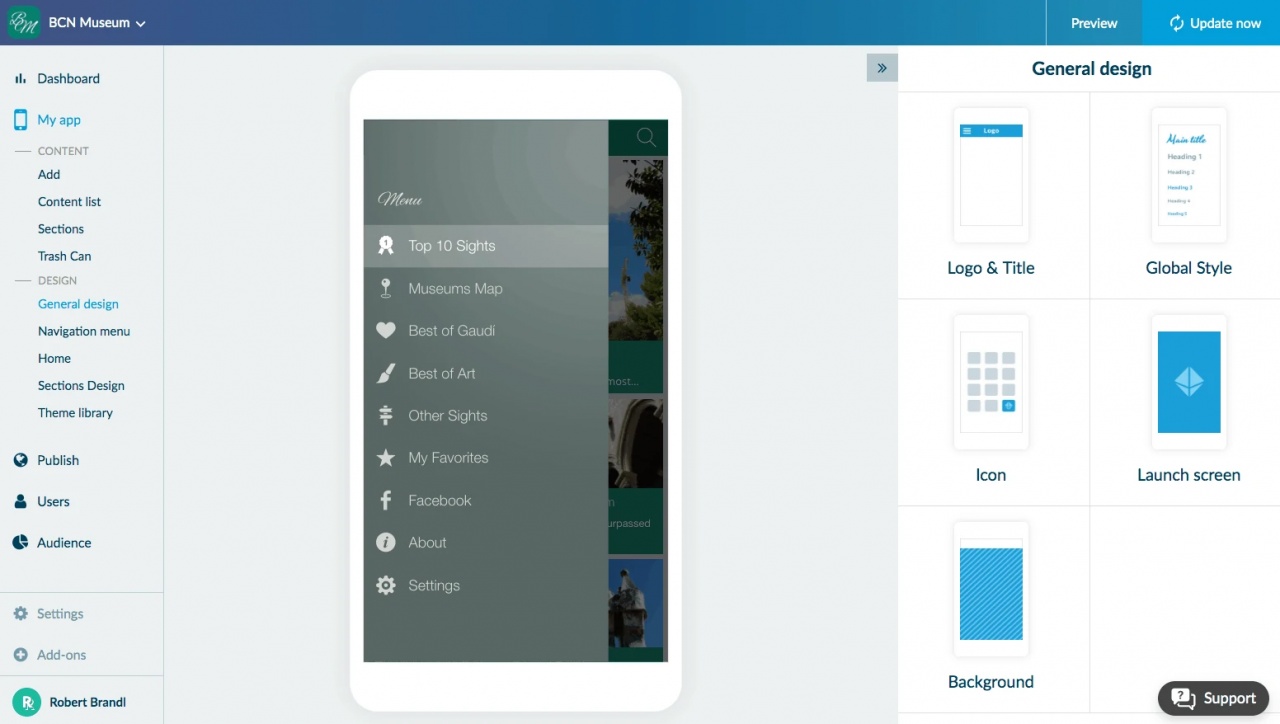
A mobile app builder is a platform for creating mobile applications through visual tools, reusable components, templates, or code-assisted workflows. Many builders offer a drag-and-drop editor, so users can arrange buttons, forms, menus, and other elements on a screen. Some also provide integrations for payments, customer databases, maps, notifications, and analytics.
App builders vary considerably. Some are designed for simple internal tools or content-based apps, while others support custom logic and more complex products. A platform may generate a native app, create a cross-platform app from a shared codebase, or deliver a web app that runs in a mobile browser.
Common Features
Although capabilities differ by provider, mobile app builder software may include:
- Visual design tools: Create screens and arrange interface elements without writing every line of code.
- Templates and components: Start with common layouts or add reusable elements such as forms, menus, and product listings.
- Data connections: Link the app to spreadsheets, databases, business systems, or cloud services.
- Workflow automation: Set up actions, approvals, and notifications based on user input or other events.
- Testing and previews: Check how the app looks and behaves on different screen sizes or devices.
- Publishing support: Prepare an app for distribution through an app store or an organization’s own channels.
- Analytics: Review usage data and app performance, depending on the platform’s built-in tools.
Benefits of Using an App Builder
Faster Development
Prebuilt components and templates can reduce the time needed to create common features. Teams may be able to build a prototype quickly, gather feedback, and refine the idea before investing in a larger development project.
More Accessible App Creation
Visual tools can help non-developers participate in app creation. Business teams, for example, may be able to assemble a basic workflow tool while working with IT on security and data requirements.
Lower Upfront Costs
For straightforward projects, an app builder may cost less initially than commissioning a fully custom application. The total cost still depends on subscription fees, required integrations, user limits, support, and future maintenance.
Quicker Iteration
Many builders make it easier to adjust screens and workflows as requirements change. This can be useful for prototypes, internal tools, event apps, and other projects where features may evolve over time.
Potential Limitations
App builders are not a perfect fit for every project. A platform may limit design flexibility, advanced functionality, or access to device features. Some tools also make it difficult to move an app to another provider, so it is important to understand how the app and its data can be exported.
Performance, security, accessibility, and maintenance also require attention. A visually appealing app still needs to work reliably, protect user information, and remain compatible with updated operating systems. Review the platform’s security practices, backup options, support model, and approach to updates before committing.
How to Choose the Right Software
Begin by defining the app’s purpose and audience. List the essential features, the types of data the app will use, and the devices or platforms it must support. Then compare providers using criteria such as:
- App type: Does the platform create native, cross-platform, or browser-based apps?
- Ease of use: Can the people who will build and maintain the app work effectively with the editor?
- Customization: Can the app support your design, workflows, and integrations?
- Security and compliance: Are the platform’s protections suitable for the information the app will handle?
- Ownership and portability: Can you export your data, code, or app if you switch providers?
- Pricing: What are the costs for publishing, storage, integrations, support, and additional users?
- Support and documentation: Are help resources available when you need to troubleshoot or expand the app?
Testing a small prototype is often the best way to evaluate a platform. Try the features that matter most, test the app on real devices, and ask intended users for feedback before building the full experience.
When to Consider Custom Development
A mobile app builder can be a practical choice for standard workflows, simple customer experiences, and early prototypes. Custom development may be a better option when the project requires highly specialized functionality, extensive integrations, strict performance requirements, or complete control over the code and infrastructure. In some cases, a hybrid approach works well: use a builder for routine features and custom code for specific needs.
Conclusion
Mobile app builder software can help teams turn an idea into a working app with less manual development. Its value depends on the match between the platform and the project. By defining requirements, checking costs and limitations, and testing a prototype, organizations can choose an approach that supports both their immediate goals and the app’s long-term needs.
Mobile App Builder Software: 6 Frequently Asked Questions
- Can you build a mobile app for free?
- How do I build my own mobile app?
- What is the best software for designing mobile apps?
- Can I build a mobile app by myself?
- Can you build your own mobile app?
- Can Chatgpt build me an app?
Can you build a mobile app for free?
Yes, you can build a mobile app for free using app builder software that offers a free plan or trial. Free plans often include basic design and development tools, but may limit features, storage, users, integrations, or app publishing—and may display the provider’s branding. Publishing on app stores can also involve separate developer account fees. Check the platform’s pricing and terms to understand what’s included before you begin.
How do I build my own mobile app?
To build your own mobile app, start by defining its purpose, audience, and essential features. Choose a mobile app builder that supports your needs, then use its templates or design tools to create screens and set up features such as forms, notifications, or payments. Add any required data and integrations, and test the app on different devices to catch usability or performance issues. When it’s ready, follow the builder’s steps to publish it through an app store or share it with your users. Plan to update the app regularly, address feedback, and protect user data.
What is the best software for designing mobile apps?
The best software for designing mobile apps depends on your goals, technical skills, budget, and the features you need. No-code and low-code app builders can be a good fit for beginners, prototypes, and straightforward business apps, while design tools such as Figma help teams create and test screen layouts before development. For apps that require custom functionality or more control, development frameworks and professional design software may be a better choice. Compare platforms based on ease of use, supported devices, customization, integrations, pricing, and how easily you can maintain or move your app later.
Can I build a mobile app by myself?
Yes, you can build a mobile app by yourself using mobile app builder software, even if you have little or no coding experience. Many platforms offer templates, drag-and-drop design tools, and step-by-step guides to help you create screens and add features. Start with a clear idea of what your app should do, then choose a builder that supports your needs and budget. More advanced apps may require coding skills or help from a developer, especially when they involve custom features, complex integrations, or stronger security requirements.
Can you build your own mobile app?
Yes, you can build your own mobile app using mobile app builder software. Many platforms offer templates and visual, drag-and-drop tools that let you create screens, add features, and connect data with little or no coding. The level of customization varies, so choose a builder that fits your app’s needs, and test the finished app on real devices before publishing it.
Can Chatgpt build me an app?
ChatGPT can help you plan and build an app by turning an idea into feature requirements, suggesting a design, generating code, and helping troubleshoot problems. It can also guide you through using mobile app builder software, but it does not automatically create, test, or publish a complete app on its own; you’ll typically need to use an app-building platform or development tools, review the results, and handle testing and app-store submission.