
cfchris.com

Loading

cloud based document management

Maximizing Efficiency: The Power of Cloud-Based Document Management

Cloud-Based Document Management

The Benefits of Cloud-Based Document Management

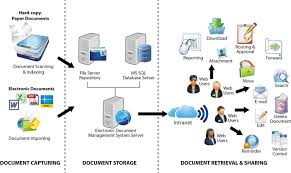
In today’s digital age, managing documents efficiently is crucial for businesses of all sizes. Cloud-based document management systems have revolutionized the way organizations handle their information. Instead of traditional paper-based methods or on-premises servers, cloud-based solutions offer numerous advantages that streamline processes and enhance collaboration.

Accessibility and Flexibility

One of the key benefits of cloud-based document management is the ability to access files from anywhere with an internet connection. This flexibility allows employees to work remotely, access important documents on-the-go, and collaborate in real-time without being tied to a specific location or device.

Cost-Effectiveness

Implementing a cloud-based document management system eliminates the need for physical storage space and reduces costs associated with printing, copying, and maintaining paper documents. Additionally, cloud solutions typically operate on a subscription basis, allowing businesses to scale their usage according to their needs without large upfront investments.

Data Security and Backup

Cloud-based document management systems offer robust security features such as encryption, access controls, and regular backups to protect sensitive information from unauthorized access or loss. Data stored in the cloud is often more secure than traditional on-premises storage due to advanced security protocols implemented by service providers.

Collaboration and Version Control

Collaboration is made seamless with cloud-based document management systems as multiple users can work on the same document simultaneously. Version control features ensure that everyone is working on the latest version of a file, reducing errors and confusion that may arise from outdated information.

Scalability and Integration

Cloud solutions are highly scalable, allowing businesses to expand their storage capacity or add new features as their needs evolve. Integration with other software applications such as customer relationship management (CRM) systems or project management tools further enhances efficiency by streamlining workflows and data sharing.

Conclusion

In conclusion, cloud-based document management offers a multitude of benefits that empower organizations to manage their information effectively in today’s fast-paced business environment. By leveraging the accessibility, cost-effectiveness, security, collaboration capabilities, scalability, and integration options provided by cloud solutions, businesses can optimize their document workflows and drive productivity across teams.


5 Essential Tips for Effective Cloud-Based Document Management

  1. Ensure data security by using encryption and access controls.
  2. Regularly back up your documents to prevent data loss.
  3. Implement version control to track changes and updates made to documents.
  4. Train employees on proper use of the cloud document management system to maximize efficiency.
  5. Integrate with other business tools for seamless workflow and collaboration.

Ensure data security by using encryption and access controls.

To enhance data security in cloud-based document management, it is vital to implement robust measures such as encryption and access controls. Encryption helps protect sensitive information by encoding data in a way that only authorized users can decipher, adding an extra layer of security against potential breaches. Access controls allow administrators to define who can view, edit, or share specific documents, ensuring that confidential data remains protected and only accessible to authorized personnel. By prioritizing encryption and access controls, organizations can safeguard their documents effectively in the cloud environment.

Regularly back up your documents to prevent data loss.

Regularly backing up your documents is a crucial aspect of effective cloud-based document management. By creating routine backups, you can safeguard your data against unexpected events such as system failures, cyber attacks, or accidental deletions. Ensuring that your documents are securely stored in multiple locations not only mitigates the risk of data loss but also provides peace of mind knowing that your valuable information is protected and easily recoverable when needed.

Implement version control to track changes and updates made to documents.

Implementing version control in a cloud-based document management system is essential for tracking changes and updates made to documents. By maintaining a history of revisions, users can easily review past edits, compare different versions, and identify who made specific changes. Version control not only enhances collaboration by ensuring everyone is working on the most recent document iteration but also provides a reliable audit trail for accountability and compliance purposes. This feature promotes accuracy, transparency, and efficiency in document management processes.

Train employees on proper use of the cloud document management system to maximize efficiency.

Training employees on the proper use of the cloud document management system is essential to maximize efficiency within an organization. By providing comprehensive training sessions, employees can learn how to leverage the system’s features effectively, ensuring that documents are stored, accessed, and shared efficiently. Proper training also helps in promoting best practices for data security, version control, and collaboration, ultimately leading to improved productivity and streamlined workflows across teams. Investing in employee training demonstrates a commitment to harnessing the full potential of cloud-based document management solutions for enhanced organizational success.

Integrate with other business tools for seamless workflow and collaboration.

To enhance workflow efficiency and foster seamless collaboration, it is recommended to integrate cloud-based document management systems with other essential business tools. By integrating document management with tools such as project management software, customer relationship management (CRM) systems, or communication platforms, organizations can streamline processes, facilitate information sharing, and ensure that all team members have access to up-to-date data. This integration not only improves productivity but also promotes better coordination and communication among team members, ultimately leading to more effective and agile business operations.
abc software development

Elevate Your Digital Presence with ABC Software Development Solutions

ABC Software Development

The World of ABC Software Development

Welcome to the exciting realm of ABC Software Development! In today’s digital age, software plays a crucial role in powering businesses, enhancing user experiences, and driving innovation. ABC Software Development is at the forefront of this dynamic industry, creating cutting-edge solutions that meet the evolving needs of our clients.

Our Approach

At ABC Software Development, we believe in the power of innovation and collaboration. Our team of talented developers, designers, and project managers work together seamlessly to bring ideas to life. We follow a structured development process that ensures efficiency, quality, and timely delivery of projects.

Services We Offer

Our range of services caters to a diverse clientele across various industries. Whether you need custom software development, mobile app development, web design, or e-commerce solutions, we have the expertise to turn your vision into reality. We also provide maintenance and support services to ensure that your software remains up-to-date and secure.

Technologies We Work With

ABC Software Development stays abreast of the latest technologies and trends in the industry. Our team is proficient in a wide array of programming languages, frameworks, and tools such as Java, Python, JavaScript, React Native, and more. This enables us to create scalable and robust solutions that align with modern best practices.

Client-Centric Approach

We prioritize client satisfaction above all else. From initial consultation to final delivery, we keep our clients informed and involved every step of the way. Our transparent communication channels ensure that your feedback is incorporated into the development process, resulting in tailor-made solutions that exceed expectations.

Contact Us

If you are ready to embark on a transformative software development journey with ABC Software Development or have any inquiries about our services, feel free to reach out to us. Our dedicated team is here to assist you in realizing your digital aspirations.


Top 5 Essential Tips for Effective ABC Software Development

  1. Break down tasks into smaller components for easier management.
  2. Use version control to track changes and collaborate with team members.
  3. Write clean and concise code for better readability and maintainability.
  4. Test your code thoroughly to ensure functionality and catch bugs early on.
  5. Stay updated with the latest trends and technologies in ABC software development.

Break down tasks into smaller components for easier management.

When engaging in ABC software development, a valuable tip is to break down tasks into smaller components. By dividing the project into manageable segments, it becomes easier to track progress, allocate resources effectively, and ensure timely completion. This approach not only simplifies project management but also enhances productivity and facilitates better collaboration among team members. Breaking down tasks into smaller components fosters a structured and organized development process, ultimately leading to successful outcomes in software development endeavors.

Use version control to track changes and collaborate with team members.

Utilizing version control is a crucial tip in ABC software development. By implementing version control systems, developers can effectively track changes made to the codebase, maintain a history of revisions, and collaborate seamlessly with team members. This practice not only ensures code integrity and consistency but also streamlines the development process by enabling efficient teamwork and facilitating easy integration of new features. Version control plays a vital role in enhancing productivity, code quality, and overall project success in the realm of software development.

Write clean and concise code for better readability and maintainability.

When engaging in ABC software development, it is essential to adhere to the tip of writing clean and concise code. By following this practice, developers can significantly enhance the readability and maintainability of their software projects. Clean and concise code is easier to understand, troubleshoot, and modify, leading to more efficient collaboration among team members and smoother project maintenance in the long run. Embracing this approach fosters a culture of clarity and efficiency within the development process, ultimately contributing to the overall success of software projects.

Test your code thoroughly to ensure functionality and catch bugs early on.

Testing your code thoroughly is a critical step in the ABC software development process. By conducting comprehensive testing, you can verify the functionality of your code and identify potential bugs at an early stage. This proactive approach not only helps in delivering a high-quality product but also saves time and resources by addressing issues before they escalate. At ABC Software Development, we emphasize the importance of thorough testing to ensure that our solutions meet the highest standards of performance and reliability.

To excel in ABC software development, it is crucial to stay updated with the latest trends and technologies shaping the industry. By keeping abreast of advancements in software development, including new tools, frameworks, and methodologies, professionals can enhance their skills, deliver innovative solutions, and remain competitive in a rapidly evolving landscape. Continuous learning and adaptation to emerging trends not only enrich one’s expertise but also contribute to the creation of cutting-edge software products that meet the ever-changing needs of clients and end-users.

mastering software development in r

Unlocking the Secrets of Mastering Software Development in R

Mastering Software Development in R

The Art of Mastering Software Development in R

Software development in R is a powerful skill that can open up a world of possibilities for data analysis, visualization, and statistical computing. Whether you are a beginner or an experienced programmer, mastering software development in R can take your abilities to the next level.

Understanding the Basics

R is a programming language and software environment commonly used for statistical computing and graphics. To master software development in R, it is essential to understand the basics of the language, such as data types, functions, and control structures.

Building Efficient Algorithms

One key aspect of mastering software development in R is the ability to build efficient algorithms to process and analyze data. By leveraging R’s built-in functions and packages, developers can create complex algorithms that operate quickly and accurately.

Utilizing Packages and Libraries

R boasts a vast ecosystem of packages and libraries that extend its functionality for various tasks. Mastering software development in R involves knowing how to leverage these packages effectively to streamline your coding process and enhance your capabilities.

Creating Interactive Visualizations

Data visualization is a crucial aspect of software development in R. By mastering tools like ggplot2 and shiny, developers can create interactive visualizations that communicate complex insights effectively to stakeholders.

Collaboration and Version Control

To truly master software development in R, it is essential to embrace collaboration tools like Git for version control. Working collaboratively on projects allows developers to track changes, manage code efficiently, and ensure project integrity.

Continuous Learning and Practice

Like any skill, mastering software development in R requires continuous learning and practice. Engage with the vibrant R community through forums, workshops, and online resources to stay updated on best practices and new developments in the field.

In Conclusion

Mastering software development in R is a rewarding journey that empowers developers to tackle complex data challenges with confidence. By honing your skills in algorithm design, package utilization, visualization creation, collaboration, and continuous learning, you can become a proficient R developer ready to make an impact in the world of data science.


Mastering Software Development in R: Key Insights into Its Effectiveness, Roles, Methods, and Specializations

  1. Is r good for software development?
  2. What does an R developer do?
  3. What are two methods of program development?
  4. What is r Specialization?

Is r good for software development?

When considering whether R is suitable for software development, it’s important to understand its strengths and limitations. R is primarily designed for statistical computing and data analysis, making it an excellent choice for tasks related to these fields. While R may not be as versatile as general-purpose programming languages like Python or Java, its extensive collection of packages and libraries cater to a wide range of data-related tasks. Therefore, if your focus is on statistical analysis, data visualization, and machine learning applications, mastering software development in R can be highly beneficial. It’s all about choosing the right tool for the job based on your specific needs and objectives.

What does an R developer do?

An R developer specializes in utilizing the R programming language and its associated tools to create software solutions for data analysis, statistical modeling, and visualization. R developers work on tasks such as writing code to manipulate and analyze data, creating custom functions and algorithms, building interactive visualizations, and developing statistical models. They collaborate with data scientists, analysts, and other team members to translate complex data into actionable insights. Additionally, R developers often contribute to open-source projects, share their knowledge within the R community, and continuously enhance their skills to stay abreast of the latest advancements in software development in R.

What are two methods of program development?

When it comes to mastering software development in R, understanding different methods of program development is crucial. Two common approaches are the waterfall model and the agile methodology. The waterfall model follows a sequential process, with each phase completed before moving on to the next. On the other hand, the agile methodology emphasizes iterative development, allowing for flexibility and adaptation throughout the project lifecycle. By familiarizing oneself with these two methods of program development, developers can choose the approach that best suits their project requirements and work effectively towards mastering software development in R.

What is r Specialization?

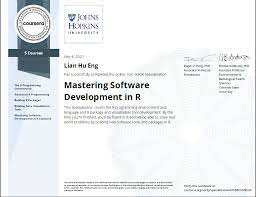
The R Specialization refers to a focused program or course designed to help individuals master software development in R, a programming language commonly used for statistical computing and data analysis. This specialized training typically covers various aspects of R programming, such as data manipulation, visualization, statistical modeling, and package development. By completing an R Specialization, participants can deepen their understanding of R’s capabilities and enhance their skills in using it effectively for advanced data tasks. This targeted learning approach equips individuals with the knowledge and expertise needed to excel in software development projects that require proficiency in R programming.

app coding software

Mastering App Coding Software: A Developer’s Guide to Efficient Development

The Power of App Coding Software

The Power of App Coding Software

In today’s digital age, the demand for mobile applications is ever-growing. Whether it’s for business, entertainment, education, or communication, apps have become an integral part of our daily lives. Behind every successful app lies a robust codebase created using specialized tools known as app coding software.

What is App Coding Software?

App coding software, also known as Integrated Development Environments (IDEs), are powerful tools that streamline the app development process. These software packages provide developers with a comprehensive set of features to write, test, and debug code efficiently.

Key Features of App Coding Software

Some key features of app coding software include:

  • Code Editor: A feature-rich text editor that provides syntax highlighting, auto-completion, and code navigation functionalities.
  • Debugger: Allows developers to identify and fix bugs in their code by stepping through it line by line.
  • Version Control: Integration with version control systems like Git for managing code changes and collaboration among team members.
  • Build Automation: Tools for automating the build process to compile code into executable applications.
  • Testing Frameworks: Support for testing frameworks to ensure the reliability and functionality of the developed apps.

The Benefits of Using App Coding Software

Utilizing app coding software offers several benefits to developers and organizations, including:

  • Increased Productivity: IDEs streamline the development process, allowing developers to write code faster and more efficiently.
  • Better Code Quality: Features like syntax checking and debugging tools help identify errors early in the development cycle, leading to higher-quality code.
  • Cross-Platform Development: Many IDEs support multiple platforms, enabling developers to create apps for various operating systems using a single tool.
  • Community Support: Most app coding software have active communities where developers can seek help, share knowledge, and collaborate on projects.

In Conclusion

The use of app coding software is essential for modern app development. By leveraging these powerful tools, developers can create feature-rich applications efficiently while maintaining high standards of quality and performance. Whether you’re a seasoned developer or just starting in the field, investing in a reliable IDE can significantly enhance your app development journey.


Top FAQs About Choosing the Best App Coding Software and Development Tools

  1. Which platform is best for app development?
  2. What is the best application software?
  3. What is the best tool for app development?
  4. How can I make app by coding?
  5. How do I code an app?
  6. Can I create my own app?

Which platform is best for app development?

When it comes to app development, the question of which platform is best often arises. The choice of platform depends on various factors such as the target audience, budget, features required, and development timeline. For native app development, platforms like iOS and Android offer unique advantages in terms of performance and user experience. Cross-platform frameworks like React Native and Flutter are popular choices for building apps that work on multiple platforms with a single codebase. Ultimately, the best platform for app development varies from project to project, and it’s essential to consider all factors carefully before making a decision.

What is the best application software?

When it comes to determining the best application software, the answer can vary depending on individual needs and preferences. The term “best” is subjective and can be influenced by factors such as functionality, user-friendliness, performance, cost-effectiveness, and compatibility with specific platforms. It’s essential for users to evaluate their requirements carefully and consider factors like intended use, features needed, scalability, and support options before selecting the most suitable application software for their needs. Conducting thorough research, reading reviews, and seeking recommendations from trusted sources can help in making an informed decision when choosing the best application software for a particular purpose.

What is the best tool for app development?

When it comes to app development, the question of the best tool is a common one among developers. The choice of the best tool for app development often depends on various factors such as the specific requirements of the project, the developer’s familiarity with the tool, and the target platform for the app. Some popular tools for app development include Android Studio for Android apps, Xcode for iOS apps, Visual Studio for cross-platform development, and React Native for building native-like apps using JavaScript. Ultimately, the best tool for app development is subjective and varies based on individual preferences and project needs. It’s essential to explore different tools, consider their features and capabilities, and choose one that aligns best with your development goals.

How can I make app by coding?

To create an app through coding, you can start by learning a programming language commonly used for app development, such as Java, Swift, or JavaScript. Once you have a good grasp of the language, you can use an Integrated Development Environment (IDE) to write and test your code. Begin by outlining the features and functionality you want your app to have, then start coding each component accordingly. It’s essential to follow best practices in coding and regularly test your app to ensure it functions as intended. Don’t hesitate to seek help from online resources, tutorials, and communities to guide you through the app development process. With dedication and practice, you can bring your app idea to life through coding.

How do I code an app?

When it comes to coding an app, the process typically involves several key steps. First, you need to have a clear understanding of the app’s purpose and target audience. Next, you will need to choose the appropriate app coding software or Integrated Development Environment (IDE) that best suits your needs. Once you have set up your development environment, you can start writing code using programming languages like Java, Swift, or JavaScript, depending on the platform you are targeting. It is essential to follow best practices in coding, such as organizing your code into manageable modules and conducting thorough testing to ensure the app functions as intended. Continuous learning and staying updated with the latest trends in app development are also crucial for creating successful and innovative apps.

Can I create my own app?

The frequently asked question, “Can I create my own app?” is a common query among individuals interested in app development. The answer is a resounding yes! With the availability of user-friendly app coding software and resources, anyone with a passion for creating apps can embark on their journey to develop their own applications. Whether you have a unique idea for a mobile app or simply want to learn the ropes of app development, there are ample opportunities and tools available to help you bring your vision to life. By leveraging these resources and dedicating time to learning and practicing app coding, you can certainly create your own app and explore the exciting world of mobile application development.

software development for dummies

Demystifying Software Development for Dummies: A Beginner’s Guide

Software Development for Dummies

Software Development for Dummies

Software development can seem like a complex and intimidating field, but it doesn’t have to be. Whether you’re a beginner or just looking to understand the basics, this guide will help demystify the world of software development.

What is Software Development?

Software development is the process of creating software applications that run on various devices, from computers to smartphones. It involves designing, coding, testing, and maintaining software to meet specific requirements and solve particular problems.

Key Concepts in Software Development

Here are some key concepts you should know:

  • Programming Languages: These are used to write code that tells the computer what to do.
  • Algorithms: These are step-by-step instructions for solving a problem or completing a task.
  • Data Structures: These organize and store data in a computer so that it can be accessed and used efficiently.
  • Testing: This is the process of checking software for errors and ensuring it works as intended.
  • Version Control: This helps manage changes to code and track different versions of the software.

The Software Development Process

The software development process typically follows these steps:

  1. Requirements Gathering: Understanding what the software needs to do and how it should work.
  2. Design: Planning how the software will be structured and function.
  3. Coding: Writing the actual code that makes the software work.
  4. Testing: Checking that the software behaves as expected and fixing any issues.
  5. Deployment: Releasing the software for users to use.

Tips for Beginners

If you’re new to software development, here are some tips to get started:

  • Pick a Language: Start with a beginner-friendly programming language like Python or JavaScript.
  • Tutorials & Courses: Take advantage of online tutorials and courses to learn coding basics.
  • Practice Regularly: The more you code, the better you’ll get. Practice is key!
  • Become Familiar with Tools: Get comfortable using code editors, version control systems, and other essential tools.
  • In conclusion, software development may seem daunting at first, but with dedication and practice, anyone can learn how to create amazing applications. Remember, even experienced developers were once beginners too!

    >


    Software Development for Beginners: Answers to 6 Common Questions

    1. What is software development?
    2. How do I start learning software development?
    3. What programming languages are best for beginners in software development?
    4. What are the key steps in the software development process?
    5. How can I improve my coding skills as a beginner?
    6. Are there any recommended resources or tutorials for beginners in software development?

    What is software development?

    Software development is the process of creating software applications that run on various devices, such as computers and smartphones. It involves designing, coding, testing, and maintaining software to meet specific requirements and solve particular problems. In essence, software development is all about turning ideas into functional programs that can perform tasks, automate processes, or provide solutions to users’ needs. It encompasses a wide range of activities, from planning and designing the software architecture to writing code and ensuring that the final product works as intended.

    How do I start learning software development?

    To start learning software development, beginners can follow a structured approach that includes familiarizing themselves with programming languages, understanding basic concepts such as algorithms and data structures, and practicing coding regularly. Online tutorials, courses, and coding exercises can provide a solid foundation for beginners. It’s essential to pick a beginner-friendly language like Python or JavaScript, explore resources that offer step-by-step guidance, and engage in hands-on projects to apply theoretical knowledge. By immersing oneself in the world of software development and seeking continuous learning opportunities, aspiring developers can gradually enhance their skills and build a successful career in this dynamic field.

    What programming languages are best for beginners in software development?

    When it comes to beginners in software development, choosing the right programming language can make a significant difference in their learning journey. Some of the best programming languages for beginners include Python, JavaScript, and Java. Python is known for its simplicity and readability, making it an excellent choice for those new to coding. JavaScript is widely used for web development and offers immediate feedback on code execution, which can be motivating for beginners. Java, with its strong typing system and widespread use in enterprise applications, provides a solid foundation for understanding object-oriented programming concepts. Ultimately, the best programming language for beginners depends on their interests and goals within the vast field of software development.

    What are the key steps in the software development process?

    Understanding the key steps in the software development process is crucial for beginners in the field. The software development process typically involves several essential steps, starting with requirements gathering to understand the software’s purpose and functionality. Designing the software structure and flow comes next, followed by coding to bring the design to life. Testing is a critical step to ensure that the software functions correctly and meets user expectations. Finally, deployment involves releasing the software for users to use. By grasping these key steps, beginners can gain a solid foundation in software development and navigate the process more effectively.

    How can I improve my coding skills as a beginner?

    For beginners looking to enhance their coding skills in software development, consistent practice is key. Start by choosing a programming language that interests you and work on small projects to apply what you’ve learned. Take advantage of online tutorials, coding challenges, and resources to deepen your understanding. Collaborating with other beginners or seeking feedback from experienced developers can also provide valuable insights and help you improve. Remember, patience and perseverance are essential as you progress on your coding journey.

    For beginners in software development, there are numerous recommended resources and tutorials available to help kickstart their learning journey. Online platforms like Codecademy, Coursera, and Udemy offer a wide range of courses covering programming languages, algorithms, and software development concepts. Additionally, websites like Stack Overflow and GitHub provide valuable resources, forums, and code repositories where beginners can seek guidance, ask questions, and collaborate with other developers. It’s also beneficial to explore books such as “Clean Code” by Robert C. Martin or “The Pragmatic Programmer” by Andrew Hunt and David Thomas for in-depth insights into best practices and principles in software development. By leveraging these resources and tutorials, beginners can build a strong foundation and enhance their skills in the field of software development.