
cfchris.com

Loading

it infra management

IT Infra Management: Building a Reliable Foundation for Your Business

IT Infrastructure Management: Building a Reliable Foundation for Your Business

IT infrastructure management is the process of overseeing the technology systems an organization depends on every day. It includes managing hardware, software, networks, cloud services, data centers, and the security measures that protect them. When these components work together effectively, employees can do their jobs, customers can access services, and the business can adapt to change.

What Does IT Infrastructure Management Include?

An organization’s infrastructure may include both on-premises systems and cloud-based services. Managing it involves keeping each part reliable, secure, and aligned with business needs. Common responsibilities include:

  • Hardware management: Maintaining servers, computers, storage devices, and network equipment.
  • Network management: Monitoring connectivity, performance, capacity, and availability.
  • Software and systems management: Installing updates, maintaining operating systems, and managing business applications.
  • Cloud management: Coordinating cloud resources, access, costs, and configurations.
  • Security management: Applying safeguards such as access controls, patching, monitoring, and data protection.
  • Backup and recovery: Protecting important information and preparing to restore systems after an outage or incident.
  • Documentation and asset management: Tracking technology assets, configurations, warranties, and support requirements.

Why IT Infrastructure Management Matters

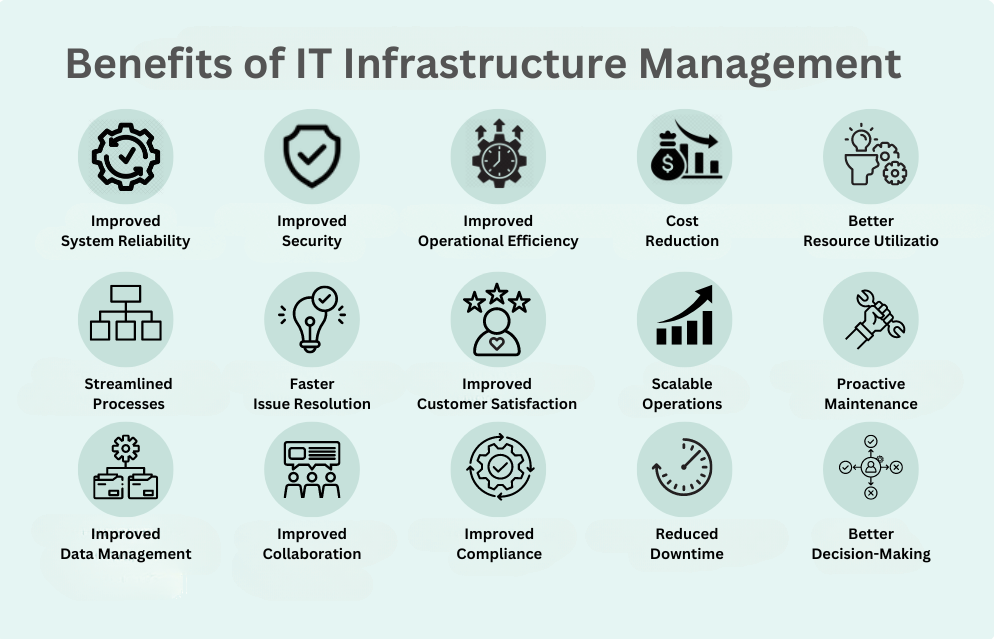
Technology problems can interrupt work, affect customer service, and expose an organization to security risks. Proactive infrastructure management helps reduce these disruptions by identifying issues before they become major incidents.

It also gives organizations a clearer picture of how their technology is being used. With accurate monitoring and documentation, teams can plan upgrades, control costs, improve performance, and make better decisions about future investments.

Core Practices for Effective Management

Monitor Systems Continuously

Monitoring tools can track availability, performance, storage, network traffic, and other indicators. Alerts help IT teams investigate unusual activity and address developing problems sooner. Monitoring works best when alerts are relevant, clearly assigned, and connected to a response process.

Keep Systems Updated

Operating systems, applications, and network devices need regular maintenance. A consistent patching process helps address known vulnerabilities and compatibility issues. Updates should be tested and scheduled appropriately, especially for systems that support critical business operations.

Plan for Backups and Recovery

Backups are useful only if they can be restored. Organizations should define what data and services need protection, how frequently backups should run, and how quickly systems must be restored. Regular recovery tests help confirm that plans work in practice.

Manage Access Carefully

Employees and service providers should have access only to the systems and information required for their roles. Reviewing permissions, removing access when it is no longer needed, and using multifactor authentication can reduce the risk of unauthorized activity.

Document the Environment

Clear documentation helps teams understand how systems are configured, how they depend on one another, and who is responsible for supporting them. It is especially valuable during troubleshooting, staff transitions, audits, and recovery efforts.

On-Premises, Cloud, and Hybrid Environments

Some organizations manage infrastructure in their own facilities, while others rely primarily on cloud providers. Many use a hybrid approach that combines on-premises equipment with cloud services. Each model has different requirements for security, cost management, availability, and support.

Cloud services can make it easier to scale resources, but they still require active oversight. Teams need to manage configurations, permissions, usage, and spending. In a hybrid environment, they also need to account for connections and dependencies between cloud and local systems.

Common Challenges

IT infrastructure can become difficult to manage when systems are added without a clear plan. Older equipment, incomplete documentation, inconsistent security practices, and limited visibility can make routine support more complicated. Rapid growth can create further pressure as infrastructure needs expand faster than budgets or staffing.

Addressing these challenges starts with understanding the current environment. An inventory of systems, applications, vendors, and dependencies can reveal gaps and help teams prioritize improvements based on business impact.

Measuring Success

Useful measures depend on an organization’s goals, but common indicators include system availability, incident response time, recurring outage frequency, backup recovery results, patching progress, and infrastructure spending. These measurements can help teams identify trends and explain the value of maintenance and modernization efforts.

Conclusion

IT infrastructure management is more than keeping equipment running. It is an ongoing effort to make technology dependable, secure, and ready to support the organization’s goals. Through consistent monitoring, maintenance, documentation, access controls, and recovery planning, businesses can reduce avoidable disruptions and build a stronger foundation for growth.


5 Essential Tips for Effective IT Infrastructure Management

  1. Document systems, dependencies, and owners.
  2. Automate routine updates and backups.
  3. Monitor performance and alerts continuously.
  4. Apply security patches promptly.
  5. Test disaster recovery plans regularly.

Document systems, dependencies, and owners.

Documenting systems, their dependencies, and their owners gives your team a clear picture of how the IT environment works and who is responsible for each part. Record key details such as configurations, integrations, support contacts, and connections between services. This information speeds up troubleshooting, helps teams assess the impact of changes, and makes onboarding and recovery easier. Keep documentation current by reviewing it whenever systems or responsibilities change.

Automate routine updates and backups.

Automating routine updates and backups helps keep IT systems secure and data protected without relying on manual reminders. Set updates to run during planned maintenance windows, and configure backups to follow a consistent schedule based on how often data changes and how quickly it would need to be restored. Monitor job results and test restoring files regularly to catch failures early and make sure your recovery plan works when it matters.

Monitor performance and alerts continuously.

Monitor IT infrastructure performance and alerts continuously to spot problems before they disrupt work. Track key indicators such as system availability, network latency, storage capacity, and resource usage, and configure alerts to flag unusual changes or emerging risks. Review alerts promptly, prioritize them by business impact, and fine-tune thresholds to reduce false alarms. A consistent monitoring process helps teams respond faster, maintain reliable services, and make informed decisions about capacity and maintenance.

Apply security patches promptly.

Apply security patches promptly to reduce the risk of attackers exploiting known vulnerabilities in your systems. Establish a process to monitor vendor updates, prioritize critical fixes, and test and deploy patches as quickly as practical. For essential or high-risk systems, plan maintenance windows and verify that updates install successfully. Regular patching helps protect your infrastructure, data, and business operations.

Test disaster recovery plans regularly.

Test disaster recovery plans regularly to make sure your organization can restore critical systems and data when an outage, cyberattack, or other emergency occurs. Practice realistic recovery scenarios, verify that backups work, and confirm that team members understand their roles. Record any gaps you discover, update the plan, and test again so recovery procedures stay reliable as your IT environment changes.
it infrastructure and services

IT Infrastructure and Services: Building a Reliable Foundation for Business Growth

IT Infrastructure and Services: The Foundation of a Modern Business

Reliable IT infrastructure helps businesses operate efficiently, protect important information, and adapt to change. From employee devices and business applications to networks and cloud platforms, each part of an organization’s technology environment plays a role in keeping work moving.

IT services help plan, manage, and support that environment. Together, infrastructure and services give businesses the tools they need to serve customers, collaborate, and grow.

What Is IT Infrastructure?

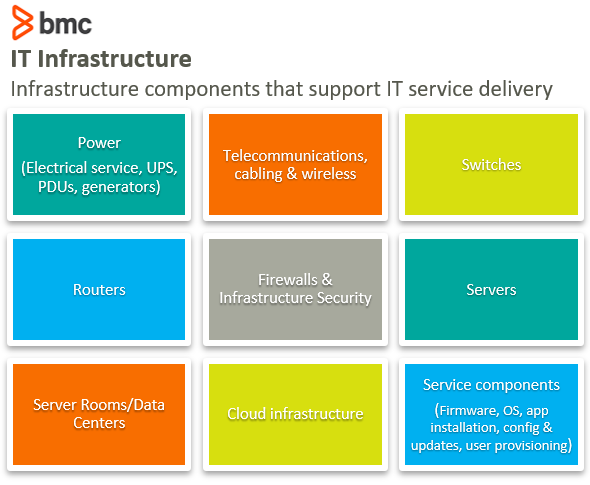
IT infrastructure is the collection of technology resources that supports an organization’s operations. It can include physical equipment, software, networks, cloud services, and the processes used to manage them.

  • Hardware: Computers, servers, storage systems, printers, and other devices.
  • Networks: Wired and wireless connections that link users, devices, and systems.
  • Software: Operating systems, business applications, databases, and collaboration tools.
  • Cloud platforms: Online computing, storage, and software services.
  • Security systems: Tools and controls that help protect accounts, devices, networks, and data.

These components work together. A problem with one part—such as an unreliable network or outdated software—can affect productivity across the organization.

What Do IT Services Include?

IT services cover the expertise and ongoing support needed to keep technology useful, secure, and dependable. The right mix depends on an organization’s size, goals, industry, and existing systems.

IT Planning and Consulting

Technology planning connects IT decisions to business priorities. A review of existing systems can help identify risks, unnecessary costs, and opportunities to improve performance. A practical IT plan can also guide upgrades and future investments.

Network Management

Network services help maintain the connections that employees rely on every day. This may include configuring equipment, monitoring performance, managing wireless access, and troubleshooting interruptions.

Cybersecurity

Cybersecurity combines technology, policies, and user awareness to reduce the risk of data loss and unauthorized access. Common measures include multifactor authentication, access controls, security updates, endpoint protection, and employee training.

Cloud Services

Cloud services can provide flexible access to computing resources, storage, and software. Moving workloads to the cloud may simplify some operations, but it requires careful planning. Businesses should consider security, costs, performance, data location, and how cloud systems will work with existing tools.

Backup and Recovery

Backups help organizations restore important data after accidental deletion, hardware failure, or a cyber incident. A backup plan should specify what gets backed up, how often backups run, where copies are stored, and how restoration is tested.

Help Desk and Technical Support

Support services help employees resolve technology issues and return to work quickly. Clear procedures for reporting problems, prioritizing requests, and communicating updates can make support more effective.

Why a Strong IT Foundation Matters

Well-managed IT infrastructure can support productivity, business continuity, and better decision-making. It can also help organizations:

  • Reduce disruptions and respond to technical issues more quickly.
  • Protect business information and manage access appropriately.
  • Support remote and hybrid work.
  • Keep systems updated and compatible.
  • Scale technology as business needs change.
  • Plan technology spending with fewer surprises.

Technology alone does not guarantee these results. Systems need to be configured, maintained, monitored, and reviewed over time.

Choosing the Right IT Services

Before selecting IT services, consider the organization’s current environment and priorities. Useful questions include:

  • Which systems are essential to daily operations?
  • Where are the largest security or reliability risks?
  • What support do employees need most often?
  • Are backups and recovery procedures tested regularly?
  • Which technology costs are predictable, and which are difficult to manage?
  • What changes are likely in the next one to three years?

Some organizations manage IT internally, while others work with outside specialists or use a combination of both. The best arrangement is one that provides the right expertise, response times, and oversight for the organization’s needs.

Build for Reliability and Growth

IT infrastructure is not a one-time project. Devices age, software changes, security threats evolve, and business requirements shift. Regular reviews help ensure that systems remain useful and that technology decisions continue to support organizational goals.

With thoughtful planning and dependable IT services, businesses can create a technology environment that is more secure, resilient, and ready for what comes next.


9 Essential Tips for Reliable and Secure IT Infrastructure and Services

  1. Document your infrastructure and keep it up to date.
  2. Back up critical data regularly and test restores.
  3. Use multi-factor authentication for administrative access.
  4. Apply security patches promptly.
  5. Monitor services for uptime, errors, and capacity.
  6. Automate repetitive deployment and maintenance tasks.
  7. Separate production, test, and development environments.
  8. Set clear recovery targets for critical services.
  9. Review access permissions regularly.

Document your infrastructure and keep it up to date.

Documenting your IT infrastructure gives your team a clear view of how systems, devices, networks, applications, and services fit together. Keep records of configurations, software versions, vendors, access details, dependencies, and recovery procedures, and update them whenever something changes. Accurate, current documentation makes troubleshooting faster, supports security and compliance efforts, and helps your organization recover more effectively from outages or staff transitions.

Back up critical data regularly and test restores.

Back up critical data regularly, and test your restore process to make sure files can be recovered when needed. A backup is only useful if it works, so verify that copies are complete, protected, and stored separately from your primary systems. Set a schedule based on how often your data changes, and periodically practice restoring files or systems to catch problems before an emergency.

Use multi-factor authentication for administrative access.

Use multi-factor authentication (MFA) for all administrative accounts to add an extra layer of protection to your IT infrastructure. Admin accounts have powerful permissions, so a stolen password could let an attacker change systems, access sensitive data, or create new accounts. MFA requires an additional verification step—such as an authenticator app or security key—making unauthorized access much harder, even if a password is compromised.

Apply security patches promptly.

Apply security patches promptly to fix known vulnerabilities before attackers can exploit them. Prioritize updates for internet-facing systems, operating systems, business applications, and security tools. Test critical patches when practical, then install them promptly and verify that updates were successful. For systems that cannot be patched right away, use temporary safeguards—such as restricting access or isolating the device—and track the remaining risk until the update is complete.

Monitor services for uptime, errors, and capacity.

Monitor IT services regularly for uptime, errors, and capacity to catch problems before they disrupt work. Uptime monitoring can reveal outages or slowdowns, error tracking can help pinpoint recurring issues, and capacity monitoring can show when systems are nearing their limits. Together, these insights help teams resolve issues sooner, plan upgrades, and keep services reliable as business needs grow.

Automate repetitive deployment and maintenance tasks.

Automating repetitive deployment and maintenance tasks can save time, reduce human error, and make IT operations more consistent. Scripts and automation tools can handle routine work such as provisioning systems, applying updates, running backups, and checking configurations. Start with well-documented processes, test automation in a safe environment, and monitor results so issues are caught quickly. With the right safeguards, teams can spend less time on manual upkeep and more time improving the services their organization depends on.

Separate production, test, and development environments.

Separating production, test, and development environments helps protect live systems while giving teams room to build and validate changes safely. Production should serve real users and use tightly controlled access, while development supports day-to-day coding and testing provides a place to check changes before release. Keeping these environments distinct—with appropriate permissions, configurations, and data safeguards—reduces the risk that unfinished work or experiments will disrupt business operations.

Set clear recovery targets for critical services.

Set clear recovery targets for critical services so everyone knows how quickly systems must be restored after an outage and how much data loss is acceptable. Define a recovery time objective (RTO) for the maximum downtime and a recovery point objective (RPO) for the maximum period of data that can be lost. Prioritize targets based on each service’s business impact, then make sure your backups, recovery plans, and available resources can meet them. Test the plan regularly to confirm those targets are realistic.

Review access permissions regularly.

Review access permissions regularly to make sure employees and service providers can reach only the systems and information they need. Remove access promptly when someone changes roles or leaves the organization, and review shared, administrative, and inactive accounts for unnecessary privileges. Regular permission checks help reduce the risk of accidental exposure, misuse, and unauthorized access.