cfchris.com

Loading

converged it infrastructure

Unlocking Efficiency: The Power of Converged IT Infrastructure

The Power of Converged IT Infrastructure

The Power of Converged IT Infrastructure

In today’s fast-paced digital world, businesses are constantly seeking ways to streamline their IT operations and enhance efficiency. One solution that has gained significant traction is converged IT infrastructure.

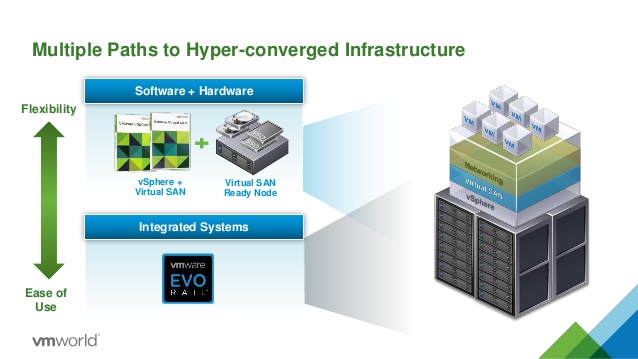
Converged IT infrastructure combines computing, storage, networking, and virtualization resources into a single, integrated system. This approach eliminates the need for separate silos of hardware and software, allowing for easier management and scalability.

Benefits of Converged IT Infrastructure

Simplified Management: With converged infrastructure, IT teams can manage all components from a single interface. This centralized management simplifies tasks such as provisioning, monitoring, and troubleshooting.

Cost Savings: By consolidating hardware and software resources into a unified system, businesses can reduce operational costs associated with maintenance, power consumption, and cooling.

Improved Scalability: Converged infrastructure is designed to be easily scalable. Businesses can quickly add or remove resources based on their evolving needs without the complexity of managing disparate systems.

Enhanced Performance: The integrated nature of converged infrastructure optimizes resource utilization and enhances performance across the entire IT environment. This results in faster processing speeds and improved application responsiveness.

Implementing Converged IT Infrastructure

When implementing converged IT infrastructure, businesses should consider factors such as their current IT environment, scalability requirements, security needs, and budget constraints. It is essential to work with experienced professionals to design and deploy a solution that aligns with the organization’s goals.

By embracing converged IT infrastructure, businesses can transform their operations by increasing agility, reducing complexity, and driving innovation. In an era where digital transformation is key to success, converged infrastructure offers a powerful foundation for future growth.


9 Key Benefits of Converged IT Infrastructure: Simplified Management, Cost Savings, and Enhanced Agility

  1. Simplified management through centralized interface
  2. Cost savings by reducing operational expenses
  3. Improved scalability for easy resource adjustments
  4. Enhanced performance with optimized resource utilization
  5. Faster deployment of new services and applications
  6. Streamlined IT operations for increased efficiency
  7. Reduced complexity in managing hardware and software
  8. Better integration of computing, storage, and networking resources
  9. Increased agility to adapt to changing business needs


7 Drawbacks of Converged IT Infrastructure: Costs, Complexity, and More

  1. Initial Cost
  2. Vendor Lock-In
  3. Complexity
  4. Scalability Limitations
  5. Single Point of Failure
  6. Upgrades and Compatibility
  7. Resource Utilization

Simplified management through centralized interface

One significant advantage of converged IT infrastructure is the simplified management it offers through a centralized interface. By consolidating computing, storage, networking, and virtualization resources into a single integrated system, IT teams can efficiently manage all components from a unified platform. This centralized approach streamlines tasks such as provisioning, monitoring, and troubleshooting, enabling IT professionals to oversee the entire infrastructure more effectively and with greater ease. The convenience of having a single interface for managing multiple aspects of the IT environment enhances operational efficiency and allows for quicker decision-making and problem resolution.

Cost savings by reducing operational expenses

One significant advantage of converged IT infrastructure is the cost savings it brings by reducing operational expenses. By consolidating hardware and software resources into a unified system, businesses can lower costs associated with maintenance, power consumption, and cooling. This streamlined approach not only leads to immediate cost reductions but also simplifies budgeting and forecasting for IT expenditures. Overall, the ability to minimize operational expenses through converged IT infrastructure allows organizations to allocate resources more efficiently and invest in strategic initiatives that drive growth and innovation.

Improved scalability for easy resource adjustments

Improved scalability is a key advantage of converged IT infrastructure, enabling businesses to easily adjust resources based on their evolving needs. With the ability to quickly add or remove computing, storage, and networking resources from a centralized system, organizations can efficiently scale their IT environment without the complexities associated with managing separate components. This flexibility not only enhances operational efficiency but also allows businesses to adapt to changing demands and optimize resource utilization effectively.

Enhanced performance with optimized resource utilization

Enhanced performance with optimized resource utilization is a significant advantage of converged IT infrastructure. By efficiently allocating computing, storage, and networking resources within a unified system, businesses can experience faster processing speeds and improved application responsiveness. This streamlined approach ensures that resources are utilized to their fullest potential, resulting in enhanced overall performance across the IT environment. The optimized resource utilization not only boosts efficiency but also allows organizations to meet the increasing demands of modern digital operations effectively.

Faster deployment of new services and applications

Converged IT infrastructure enables faster deployment of new services and applications by providing a unified platform that streamlines the process. With all essential resources integrated into a single system, IT teams can quickly provision and configure new services without the complexity of managing separate components. This efficiency not only accelerates the time-to-market for innovative solutions but also enhances overall agility, allowing businesses to adapt swiftly to changing market demands and stay ahead of the competition.

Streamlined IT operations for increased efficiency

Converged IT infrastructure offers the significant advantage of streamlining IT operations to enhance efficiency within organizations. By consolidating computing, storage, networking, and virtualization resources into a unified system, businesses can simplify management tasks and reduce operational complexities. This streamlined approach allows IT teams to allocate resources more effectively, optimize performance, and respond quickly to changing business needs. Ultimately, the increased efficiency gained from converged IT infrastructure empowers organizations to focus on innovation and strategic initiatives while maintaining a robust and agile IT environment.

Reduced complexity in managing hardware and software

One of the key advantages of converged IT infrastructure is the reduced complexity in managing hardware and software. By consolidating computing, storage, networking, and virtualization resources into a unified system, IT teams can streamline their operations and simplify management tasks. This integrated approach eliminates the need to deal with multiple silos of hardware and software, allowing for more efficient provisioning, monitoring, and troubleshooting processes. Ultimately, the reduction in complexity leads to increased productivity and cost savings for businesses leveraging converged IT infrastructure.

Better integration of computing, storage, and networking resources

Better integration of computing, storage, and networking resources is a key advantage of converged IT infrastructure. By combining these essential components into a unified system, businesses can achieve seamless communication and collaboration between different layers of their IT environment. This integrated approach enhances efficiency, reduces complexity, and improves overall performance by ensuring that computing, storage, and networking resources work together harmoniously to support the organization’s goals and operations.

Increased agility to adapt to changing business needs

Converged IT infrastructure provides businesses with increased agility to adapt to changing business needs swiftly and effectively. By consolidating computing, storage, networking, and virtualization resources into a unified system, organizations can quickly reallocate resources and scale up or down based on evolving requirements. This agility allows businesses to respond promptly to market shifts, technological advancements, or unforeseen challenges, ensuring that their IT environment remains flexible and responsive to changing demands.

Initial Cost

Converged IT infrastructure solutions, despite their numerous benefits, come with a significant drawback in the form of initial costs. Businesses considering the adoption of converged IT infrastructure must be prepared for substantial upfront expenses, encompassing hardware, software, and implementation costs. This financial investment can pose a challenge for organizations with budget constraints or those looking for immediate cost savings. Careful consideration and financial planning are essential to ensure that the long-term benefits of converged IT infrastructure outweigh the initial financial burden.

Vendor Lock-In

Adopting converged IT infrastructure may present the challenge of vendor lock-in, where businesses are constrained in their ability to select different vendors for specific components. This limitation can restrict flexibility and hinder the organization’s freedom to choose the best solutions tailored to their unique needs. Vendor lock-in can potentially result in dependency on a single vendor, making it challenging to switch providers or negotiate favorable terms in the future. Businesses considering converged infrastructure should carefully evaluate the implications of vendor lock-in and weigh this con against the benefits of streamlined management and integrated systems.

Complexity

Managing a converged IT environment can present a significant challenge due to its inherent complexity. IT teams may struggle with the specialized skills and training required to effectively oversee integrated systems. The learning curve associated with converged infrastructure can be steep, particularly for those unfamiliar with this approach. The need for additional training and expertise adds a layer of complexity that organizations must address when considering the adoption of converged IT infrastructure.

Scalability Limitations

Scalability Limitations can be a significant drawback of converged IT infrastructure. While these solutions are intended to be scalable, businesses may encounter constraints when trying to expand or customize the system to meet their specific needs. In some cases, the predefined configurations of converged infrastructure may not align perfectly with the organization’s unique requirements, limiting flexibility and hindering seamless growth. It is crucial for businesses to carefully assess the scalability limitations of a converged IT solution before implementation to ensure that it can effectively support their future growth and evolving demands.

Single Point of Failure

One significant drawback of converged IT infrastructure is the risk of a single point of failure. Due to the integration of all components into a unified system, a malfunction or breakdown in one part of the infrastructure can have far-reaching consequences, potentially affecting the entire environment. This vulnerability highlights the importance of implementing robust backup and disaster recovery plans to mitigate the impact of such failures and ensure business continuity in the face of unforeseen events.

Upgrades and Compatibility

When considering converged IT infrastructure, one significant challenge to be aware of is the issue of upgrades and compatibility. Upgrading individual components within a converged system or ensuring compatibility with new technologies can be complex and may pose difficulties. As technology evolves rapidly, ensuring that all components work seamlessly together and can support future upgrades becomes a critical concern for businesses adopting converged infrastructure. This challenge highlights the importance of thorough planning and careful consideration of compatibility issues to avoid potential disruptions in operations.

Resource Utilization

In the realm of converged IT infrastructure, a notable drawback lies in the aspect of resource utilization. At times, specific resources within a converged setup may face underutilization if they are not allocated or managed effectively. This inefficiency can lead to wasted capacity and potential performance bottlenecks, undermining the overall efficiency gains that converged infrastructure aims to deliver. It is crucial for organizations to carefully monitor and optimize resource allocation to ensure that all components operate at their full potential and contribute to the system’s optimal performance.

microsoft network monitor

Maximizing Network Efficiency with Microsoft Network Monitor

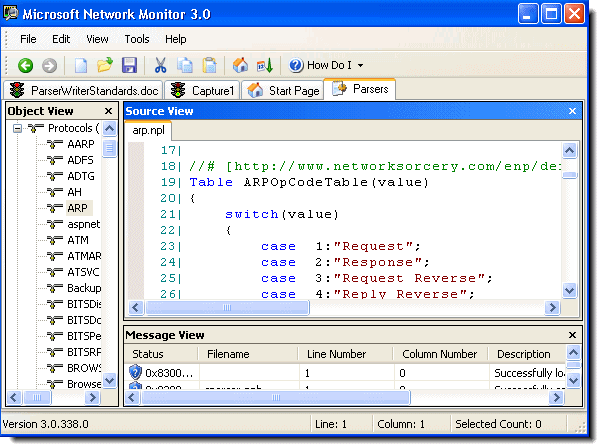
Microsoft Network Monitor is a powerful tool developed by Microsoft for monitoring and analyzing network traffic. It provides network administrators and IT professionals with valuable insights into the performance and behavior of their networks.

With Microsoft Network Monitor, users can capture and analyze network packets in real-time, allowing them to identify issues such as network congestion, latency, packet loss, and potential security threats. This tool is essential for troubleshooting network problems, optimizing network performance, and ensuring the overall health of a network infrastructure.

One of the key features of Microsoft Network Monitor is its user-friendly interface that displays captured data in an easy-to-understand format. Users can filter and search through captured packets to focus on specific information or troubleshoot particular issues effectively.

Moreover, Microsoft Network Monitor supports various protocols and provides detailed information about each packet, including source and destination IP addresses, port numbers, protocol type, packet size, and more. This level of granularity enables users to gain a comprehensive understanding of their network traffic patterns and behavior.

Whether you are managing a small local network or a large enterprise-level infrastructure, Microsoft Network Monitor is a valuable tool that empowers you to monitor, analyze, and optimize your network with precision and efficiency.

In conclusion, Microsoft Network Monitor is an indispensable tool for any organization looking to maintain a reliable and secure network environment. By leveraging its advanced features and capabilities, IT professionals can proactively manage their networks and ensure optimal performance at all times.


Top 7 Benefits of Microsoft Network Monitor for Enhanced Network Management

  1. Real-time network traffic monitoring
  2. User-friendly interface for easy data analysis
  3. Support for a wide range of network protocols
  4. Ability to capture and analyze packets efficiently
  5. Effective troubleshooting of network issues
  6. Detailed packet information for in-depth analysis
  7. Helps optimize network performance and security


Challenges of Using Microsoft Network Monitor: Limited Protocol Support, Steep Learning Curve, and Lack of Updates

  1. Limited protocol support compared to other network monitoring tools
  2. Steep learning curve for beginners due to its advanced features and technical nature
  3. Not actively maintained or updated by Microsoft, potentially leading to compatibility issues with newer operating systems

Real-time network traffic monitoring

Real-time network traffic monitoring is a significant advantage of Microsoft Network Monitor. This feature allows network administrators and IT professionals to capture and analyze network packets as they are transmitted, providing instant visibility into the current state of the network. By monitoring network traffic in real time, users can quickly detect and respond to issues such as performance bottlenecks, security breaches, or abnormal behavior. This proactive approach enables organizations to maintain optimal network performance, enhance security measures, and ensure uninterrupted operations. With real-time monitoring capabilities, Microsoft Network Monitor empowers users to make informed decisions promptly and effectively manage their network infrastructure.

User-friendly interface for easy data analysis

Microsoft Network Monitor offers a user-friendly interface that simplifies the process of analyzing network data. This intuitive interface allows users to efficiently navigate through captured packets, apply filters, and search for specific information with ease. By presenting data in a clear and organized manner, Microsoft Network Monitor streamlines the data analysis process, enabling network administrators and IT professionals to quickly identify issues, troubleshoot problems, and optimize network performance effectively.

Support for a wide range of network protocols

Microsoft Network Monitor offers a significant advantage with its support for a wide range of network protocols. This feature allows network administrators and IT professionals to monitor and analyze diverse types of network traffic effectively. Whether it’s Ethernet, TCP/IP, UDP, HTTP, or other protocols, Microsoft Network Monitor can capture and dissect packets across various network layers. This versatility enables users to gain comprehensive insights into their network infrastructure, troubleshoot issues across different protocols, and ensure the smooth operation of their networks with precision and flexibility.

Ability to capture and analyze packets efficiently

The standout feature of Microsoft Network Monitor lies in its exceptional ability to capture and analyze network packets efficiently. This capability allows network administrators and IT professionals to gain deep insights into network traffic, quickly pinpointing issues such as congestion, latency, or security threats. By efficiently capturing and analyzing packets in real-time, users can streamline the troubleshooting process, optimize network performance, and ensure the smooth operation of their network infrastructure. Microsoft Network Monitor’s robust packet analysis capabilities make it a valuable tool for maintaining a healthy and secure network environment.

Effective troubleshooting of network issues

Microsoft Network Monitor excels in facilitating effective troubleshooting of network issues. By capturing and analyzing network packets in real-time, this tool allows network administrators to pinpoint the root causes of problems such as network congestion, latency, packet loss, and security vulnerabilities. With its user-friendly interface and robust filtering capabilities, Microsoft Network Monitor enables users to isolate specific issues quickly and efficiently. This proactive approach to troubleshooting not only minimizes downtime but also helps in optimizing network performance and ensuring the overall health of the network infrastructure.

Detailed packet information for in-depth analysis

Microsoft Network Monitor offers a significant advantage with its capability to provide detailed packet information for in-depth analysis. This feature allows network administrators and IT professionals to delve deep into network traffic data, gaining valuable insights into the source, destination, protocol type, packet size, and other crucial details of each packet. By having access to such comprehensive information, users can conduct thorough analysis, identify potential issues or anomalies, troubleshoot network problems effectively, and make informed decisions to optimize network performance and security. The ability to perform in-depth analysis with detailed packet information sets Microsoft Network Monitor apart as a powerful tool for monitoring and managing network traffic with precision and efficiency.

Helps optimize network performance and security

Microsoft Network Monitor offers a significant advantage by helping optimize network performance and security. By capturing and analyzing network traffic in real-time, this tool enables network administrators to identify bottlenecks, latency issues, and potential security threats. With detailed insights into network behavior, administrators can make informed decisions to enhance performance, streamline operations, and strengthen security measures. The ability to proactively monitor and analyze network data empowers organizations to maintain a high level of efficiency and safeguard their networks against potential vulnerabilities.

Limited protocol support compared to other network monitoring tools

One significant drawback of Microsoft Network Monitor is its limited protocol support when compared to other network monitoring tools available in the market. While it provides essential functionality for capturing and analyzing network traffic, its support for a wide range of protocols may be lacking. This limitation could hinder network administrators and IT professionals who require in-depth analysis of specific or less common protocols, potentially leading them to seek alternative solutions with broader protocol coverage to meet their monitoring needs effectively.

Steep learning curve for beginners due to its advanced features and technical nature

For beginners, one significant drawback of Microsoft Network Monitor is its steep learning curve attributed to its advanced features and technical nature. The tool’s complexity may overwhelm novice users who are not familiar with network analysis concepts and protocols. Understanding how to effectively utilize the various functionalities and interpret the detailed packet information provided by the software can be challenging for those without prior experience in network monitoring. As a result, beginners may require additional time and effort to grasp the full capabilities of Microsoft Network Monitor, potentially hindering their ability to efficiently troubleshoot network issues and optimize performance.

Not actively maintained or updated by Microsoft, potentially leading to compatibility issues with newer operating systems

A significant drawback of Microsoft Network Monitor is that it is not actively maintained or updated by Microsoft, which can result in compatibility issues with newer operating systems. As technology evolves and operating systems undergo updates, the lack of ongoing support for Network Monitor may lead to functionality limitations or even incompatibility with the latest platforms. This can pose challenges for users who rely on the tool for network monitoring and analysis, as they may encounter issues when trying to run it on newer systems. It is essential for users to be aware of this con and consider alternative network monitoring solutions that receive regular updates and support to ensure seamless performance across different operating environments.

splunk cyber security

Enhancing Cyber Security with Splunk: A Comprehensive Solution

The Power of Splunk in Cyber Security

The Power of Splunk in Cyber Security

In today’s digital age, cyber security has become a critical concern for businesses and individuals alike. The constant threat of cyber attacks requires robust solutions to protect sensitive data and systems. This is where Splunk comes into play.

Splunk is a leading platform that offers powerful tools for monitoring, detecting, and responding to security threats. Its advanced capabilities enable organizations to gain real-time visibility into their IT infrastructure, analyze vast amounts of data, and take proactive measures to safeguard against cyber threats.

One of the key strengths of Splunk is its ability to centralize and correlate data from various sources, including logs, events, and network traffic. By aggregating this data in a single platform, organizations can detect anomalies, identify potential security incidents, and investigate them promptly.

Furthermore, Splunk’s machine learning algorithms enhance threat detection capabilities by analyzing patterns and trends in data to predict and prevent cyber attacks before they occur. This proactive approach helps organizations stay one step ahead of malicious actors.

Another valuable feature of Splunk is its customizable dashboards and reports that provide actionable insights for security teams. These visualizations enable quick decision-making and facilitate collaboration among team members to effectively respond to security incidents.

Overall, Splunk plays a crucial role in strengthening cyber security defenses by empowering organizations with the tools they need to monitor, analyze, and mitigate threats effectively. As cyber threats continue to evolve, leveraging the power of Splunk can make a significant difference in protecting valuable assets and maintaining a secure digital environment.


9 Essential Tips for Enhancing Cybersecurity with Splunk

  1. Regularly review and analyze logs to detect potential security threats
  2. Utilize Splunk’s correlation capabilities to identify patterns and anomalies in data
  3. Implement alerts and notifications for real-time threat detection
  4. Integrate threat intelligence feeds into Splunk for enhanced security monitoring
  5. Create dashboards to visualize security data and trends effectively
  6. Ensure proper access controls are in place for sensitive security information in Splunk
  7. Regularly update Splunk software and add-ons to leverage the latest security features
  8. Train staff on using Splunk effectively for cybersecurity purposes
  9. Consider leveraging machine learning capabilities in Splunk for advanced threat detection

Regularly review and analyze logs to detect potential security threats

Regularly reviewing and analyzing logs is a fundamental tip in Splunk cyber security practices. By diligently monitoring logs, organizations can detect potential security threats in their IT environment before they escalate into major incidents. Splunk’s robust log analysis capabilities enable security teams to identify suspicious activities, anomalies, and patterns that may indicate a breach or unauthorized access. This proactive approach allows for timely response and mitigation actions to be taken, ensuring the integrity and security of the organization’s data and systems.

Utilize Splunk’s correlation capabilities to identify patterns and anomalies in data

By leveraging Splunk’s correlation capabilities, organizations can effectively pinpoint patterns and anomalies within their data, enabling them to detect potential security threats and vulnerabilities in real-time. This feature allows security teams to proactively identify suspicious activities and take immediate action to mitigate risks before they escalate. Splunk’s advanced correlation tools provide valuable insights that help strengthen cyber security defenses and enhance overall threat detection capabilities.

Implement alerts and notifications for real-time threat detection

Implementing alerts and notifications for real-time threat detection is a crucial tip in leveraging Splunk for cyber security. By setting up customized alerts based on specific criteria and thresholds, organizations can receive immediate notifications when suspicious activities or potential security incidents occur. This proactive approach enables security teams to respond swiftly to threats, minimizing the impact of attacks and enhancing overall incident response capabilities. With real-time alerts in place, organizations can stay ahead of cyber threats and take timely actions to protect their systems and data effectively.

Integrate threat intelligence feeds into Splunk for enhanced security monitoring

Integrating threat intelligence feeds into Splunk can significantly enhance security monitoring capabilities. By leveraging real-time information on emerging threats and malicious activities, organizations can proactively identify and respond to potential security incidents more effectively. This integration enables Splunk to correlate external threat data with internal logs and events, providing a comprehensive view of the organization’s security posture. By staying informed about the latest cyber threats, organizations can strengthen their defenses and mitigate risks before they escalate.

Creating dashboards to visualize security data and trends effectively is a crucial tip in Splunk cyber security. Dashboards provide a comprehensive overview of key security metrics, alerts, and trends in a visually appealing format, making it easier for security teams to identify potential threats and take proactive measures. By customizing dashboards to display relevant information, organizations can enhance their situational awareness, streamline decision-making processes, and respond promptly to security incidents. Visualizing security data through dashboards not only improves operational efficiency but also enables organizations to stay ahead of cyber threats by gaining actionable insights from the data at a glance.

Ensure proper access controls are in place for sensitive security information in Splunk

Ensuring proper access controls are in place for sensitive security information in Splunk is essential to maintaining a secure environment. By carefully managing who has access to critical data within the platform, organizations can prevent unauthorized users from viewing or altering sensitive information. Implementing granular access controls based on roles and responsibilities helps minimize the risk of data breaches and ensures that only authorized personnel can access and manage sensitive security data. This proactive measure enhances data security, confidentiality, and integrity within Splunk, ultimately strengthening overall cyber security defenses.

Regularly update Splunk software and add-ons to leverage the latest security features

Regularly updating Splunk software and add-ons is crucial in enhancing cyber security measures. By staying current with the latest releases, organizations can leverage advanced security features that address emerging threats and vulnerabilities. These updates often include patches for known security issues, improvements in threat detection capabilities, and enhancements to overall system performance. By prioritizing regular updates, businesses can ensure that their Splunk deployment remains resilient against evolving cyber threats and maintains a strong defense posture in today’s dynamic threat landscape.

Train staff on using Splunk effectively for cybersecurity purposes

Training staff on effectively using Splunk for cybersecurity purposes is essential in maximizing the platform’s capabilities and enhancing overall security posture. By providing comprehensive training, organizations can ensure that their employees have the knowledge and skills to leverage Splunk’s features for monitoring, detecting, and responding to security threats efficiently. Equipping staff with the necessary expertise not only increases their effectiveness in utilizing Splunk but also strengthens the organization’s defense against cyber attacks by enabling proactive threat identification and mitigation. Continuous education and training on Splunk cybersecurity practices empower employees to contribute actively to maintaining a secure IT environment and safeguarding critical assets from potential breaches.

Consider leveraging machine learning capabilities in Splunk for advanced threat detection

When enhancing cyber security measures with Splunk, organizations can significantly benefit from leveraging its machine learning capabilities for advanced threat detection. By harnessing the power of machine learning algorithms within Splunk, businesses can proactively identify and mitigate potential security threats before they escalate. This advanced technology enables real-time analysis of data patterns and trends, empowering security teams to stay ahead of evolving cyber threats and enhance overall defense mechanisms effectively.

cloud security network

Ensuring Data Protection: The Crucial Role of Cloud Security Network

The Importance of Cloud Security Network

The Importance of Cloud Security Network

In today’s digital age, businesses are increasingly relying on cloud services to store and manage their data. While the cloud offers numerous benefits such as scalability, flexibility, and cost-efficiency, it also poses significant security risks. This is where a robust cloud security network comes into play.

Securing Your Data in the Cloud

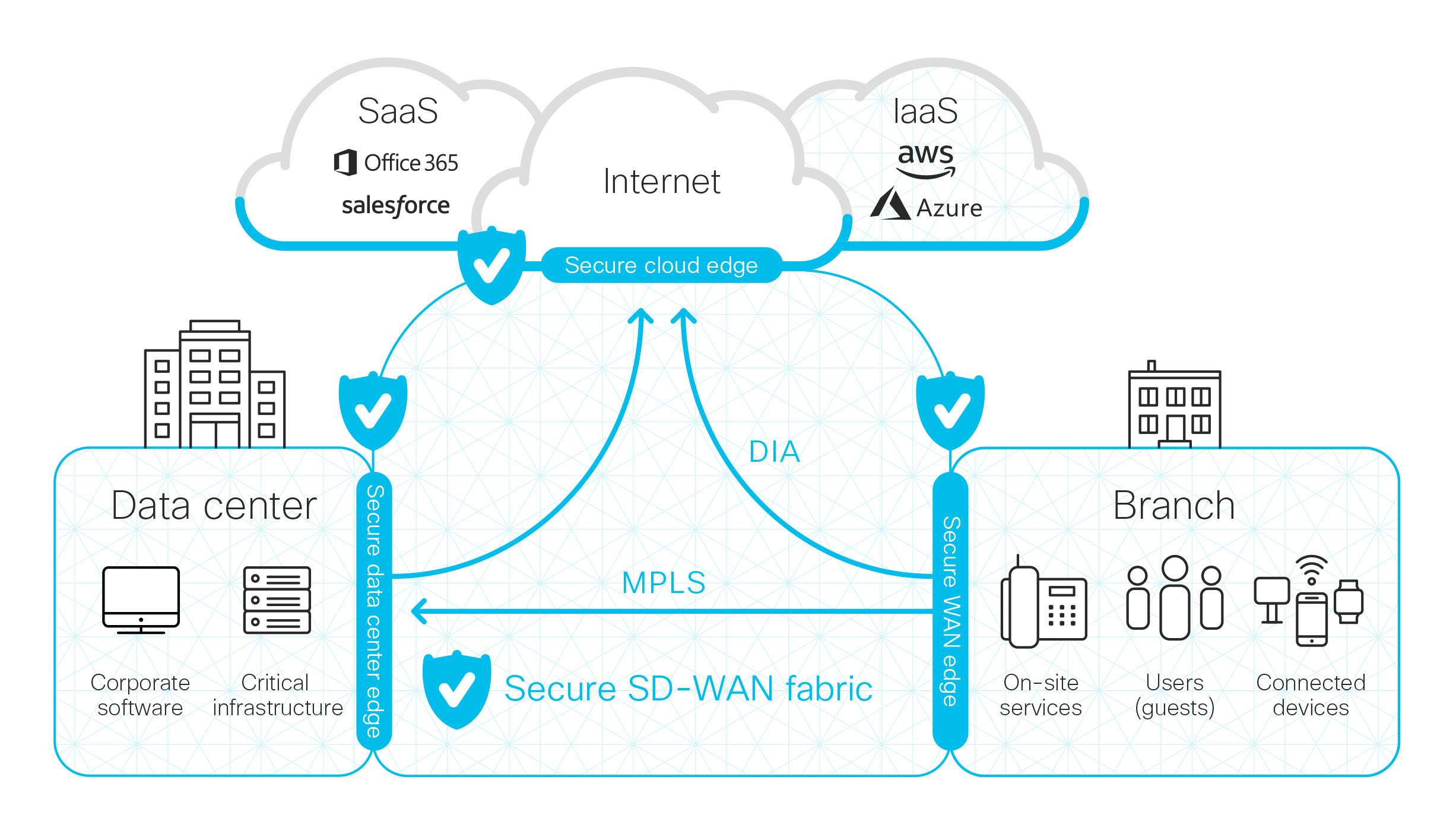
Cloud security network refers to the measures and protocols put in place to protect data stored in the cloud from unauthorized access, data breaches, and other cyber threats. With sensitive information being stored off-site on remote servers, it is crucial for businesses to implement strong security practices to safeguard their data.

The Role of Encryption

Encryption is a fundamental aspect of cloud security network. By encrypting data before it is uploaded to the cloud and decrypting it only upon retrieval, businesses can ensure that their information remains secure even if it is intercepted by hackers. Strong encryption algorithms provide an additional layer of protection against unauthorized access.

Access Control and Authentication

Another key component of cloud security network is access control and authentication. Businesses should implement strict access control policies to limit who can view, edit, or delete data stored in the cloud. Multi-factor authentication adds an extra layer of security by requiring users to verify their identity through multiple means.

Regular Monitoring and Updates

Continuous monitoring of the cloud infrastructure is essential to detect any suspicious activity or potential security breaches promptly. Regular software updates and patches should be applied to ensure that vulnerabilities are addressed promptly and that the system remains secure against evolving cyber threats.

Conclusion

In conclusion, a robust cloud security network is essential for businesses leveraging cloud services to protect their valuable data from cyber threats. By implementing strong encryption measures, access control policies, regular monitoring, and updates, businesses can mitigate risks and ensure that their data remains secure in the cloud.


5 Essential Tips for Enhancing Cloud Network Security

  1. Use strong, unique passwords for cloud accounts.
  2. Enable multi-factor authentication for an added layer of security.
  3. Regularly update and patch all cloud services and applications.
  4. Encrypt data both in transit and at rest within the cloud network.
  5. Implement strict access controls to limit who can interact with sensitive data.

Use strong, unique passwords for cloud accounts.

It is crucial to use strong, unique passwords for cloud accounts to enhance the security of your data stored in the cloud. By creating complex passwords that combine letters, numbers, and special characters, you can significantly reduce the risk of unauthorized access to your sensitive information. Using different passwords for each cloud account adds an extra layer of protection, ensuring that a breach in one account does not compromise others. Regularly updating and changing these passwords further strengthens the security of your cloud network and helps safeguard your data from potential cyber threats.

Enable multi-factor authentication for an added layer of security.

Enabling multi-factor authentication is a crucial tip for enhancing cloud security network. By requiring users to verify their identity through multiple means, such as a password and a unique code sent to their mobile device, businesses can significantly reduce the risk of unauthorized access to sensitive data stored in the cloud. This additional layer of security adds an extra barrier for potential attackers and strengthens the overall security posture of the cloud infrastructure.

Regularly update and patch all cloud services and applications.

Regularly updating and patching all cloud services and applications is a crucial aspect of maintaining a secure cloud security network. By staying up-to-date with the latest software updates and patches, businesses can address vulnerabilities promptly and ensure that their cloud infrastructure remains resilient against potential cyber threats. Failure to update regularly can leave systems exposed to exploitation by malicious actors, making it essential for organizations to prioritize proactive maintenance to enhance the overall security of their cloud environment.

Encrypt data both in transit and at rest within the cloud network.

Encrypting data both in transit and at rest within the cloud network is a crucial tip for enhancing cloud security. By encrypting data while it is being transferred between devices and servers (in transit) and also when it is stored on the cloud servers (at rest), businesses can ensure that their sensitive information remains secure from potential threats. This dual-layer encryption approach adds an extra level of protection, making it significantly harder for unauthorized users to access or intercept the data, thus safeguarding the confidentiality and integrity of the information stored in the cloud network.

Implement strict access controls to limit who can interact with sensitive data.

To enhance the security of your cloud network, it is crucial to implement strict access controls that restrict access to sensitive data only to authorized individuals. By limiting who can interact with this critical information, businesses can significantly reduce the risk of unauthorized access and data breaches. Implementing robust access control measures ensures that sensitive data remains protected and only accessible to those with the necessary permissions, thereby strengthening the overall security of the cloud network.

managed security services

Maximizing Security with Managed Security Services: Protecting Your Digital Assets

Article: Managed Security Services

The Importance of Managed Security Services

Managed Security Services (MSS) have become essential in today’s digital landscape where cyber threats are constantly evolving and becoming more sophisticated. Organizations, both large and small, are increasingly turning to MSS providers to protect their sensitive data and ensure the security of their IT infrastructure.

What are Managed Security Services?

Managed Security Services involve outsourcing the monitoring and management of security devices and systems to a third-party provider. These services typically include round-the-clock monitoring, threat detection, incident response, vulnerability assessments, and security updates.

The Benefits of Managed Security Services

Enhanced Security: MSS providers utilize advanced tools and technologies to detect and respond to security incidents in real-time, reducing the risk of data breaches.

Cost-Effectiveness: Outsourcing security operations to an MSS provider can be more cost-effective than maintaining an in-house security team, especially for small and medium-sized businesses.

Expertise: MSS providers employ cybersecurity experts who stay up-to-date with the latest threats and best practices in the industry, ensuring that your organization receives top-notch security services.

Choosing the Right MSS Provider

When selecting an MSS provider, consider factors such as their experience, reputation, range of services offered, compliance with industry standards, and scalability to accommodate your organization’s growth.

In Conclusion

Managed Security Services play a crucial role in safeguarding organizations against cyber threats and ensuring compliance with data protection regulations. By partnering with a reputable MSS provider, organizations can focus on their core business activities with the peace of mind that their digital assets are secure.


7 Benefits of Managed Security Services: Boosting Protection and Efficiency for Your Business

  1. Enhanced security through 24/7 monitoring
  2. Access to advanced cybersecurity tools and technologies
  3. Cost-effective compared to maintaining an in-house security team
  4. Expertise of cybersecurity professionals
  5. Quick incident response and threat detection
  6. Scalability to accommodate business growth
  7. Compliance with industry standards and regulations


7 Drawbacks of Managed Security Services: Cost, Dependency, and More

  1. Cost
  2. Dependency
  3. Integration Challenges
  4. Limited Customization
  5. Response Time
  6. Data Privacy Concerns
  7. Regulatory Compliance Risks

Enhanced security through 24/7 monitoring

Enhanced security through 24/7 monitoring is a key advantage of managed security services. With round-the-clock monitoring by dedicated cybersecurity experts, organizations can have peace of mind knowing that their IT infrastructure is continuously being monitored for any potential threats or vulnerabilities. This proactive approach allows for real-time threat detection and immediate response to security incidents, minimizing the risk of data breaches and ensuring that critical systems remain protected at all times.

Access to advanced cybersecurity tools and technologies

Access to advanced cybersecurity tools and technologies is a significant advantage of managed security services. By partnering with an MSS provider, organizations can leverage state-of-the-art security solutions that may be costly to acquire and maintain in-house. These advanced tools enable proactive threat detection, rapid incident response, and continuous monitoring of IT systems, enhancing overall cybersecurity posture and reducing the risk of data breaches. With access to cutting-edge technologies through managed security services, businesses can stay ahead of evolving cyber threats and better protect their sensitive information.

Cost-effective compared to maintaining an in-house security team

One significant advantage of opting for Managed Security Services is their cost-effectiveness when compared to the expenses involved in maintaining an in-house security team. By outsourcing security operations to a specialized provider, organizations can benefit from expert cybersecurity services without the overhead costs associated with hiring and training dedicated security personnel. This approach proves particularly advantageous for small and medium-sized businesses seeking robust security solutions within a budget-friendly framework.

Expertise of cybersecurity professionals

The expertise of cybersecurity professionals is a significant advantage of managed security services. These professionals are highly trained and experienced in identifying, mitigating, and responding to a wide range of cyber threats. By leveraging the knowledge and skills of these experts, organizations can enhance their security posture and stay ahead of evolving cyber risks. The specialized expertise of cybersecurity professionals within managed security services ensures that organizations receive proactive and effective protection against potential security breaches, ultimately safeguarding their sensitive data and IT infrastructure.

Quick incident response and threat detection

Quick incident response and threat detection are key benefits of managed security services. By outsourcing these functions to a specialized provider, organizations can leverage advanced tools and expertise to swiftly identify and address security incidents. This proactive approach helps minimize the impact of potential threats, reducing the risk of data breaches and downtime. With round-the-clock monitoring and real-time alerts, managed security services enable organizations to respond promptly to emerging threats, enhancing their overall cybersecurity posture.

Scalability to accommodate business growth

Managed Security Services offer the significant advantage of scalability to accommodate business growth. As organizations expand and evolve, their security needs also change. MSS providers can adjust their services and resources to meet the increasing demands of a growing business, ensuring that security measures remain effective and aligned with the organization’s evolving IT infrastructure. This flexibility allows businesses to scale up their security solutions seamlessly without compromising on protection or performance, providing peace of mind as they navigate through periods of expansion and transformation.

Compliance with industry standards and regulations

Ensuring compliance with industry standards and regulations is a significant advantage of managed security services. MSS providers have the expertise and resources to help organizations navigate the complex landscape of regulatory requirements, such as GDPR, HIPAA, or PCI DSS. By partnering with an MSS provider that is well-versed in these standards, businesses can mitigate the risk of non-compliance penalties, protect sensitive data, and maintain trust with their customers and stakeholders.

Cost

Managed security services can present a significant con in terms of cost, particularly for small businesses operating on limited budgets. The expense associated with outsourcing security operations to a managed service provider can sometimes be prohibitive for smaller organizations. This financial burden may pose a challenge for businesses looking to enhance their cybersecurity posture but facing constraints in allocating resources to manage security effectively. As a result, small businesses may need to carefully weigh the costs and benefits of engaging managed security services to ensure that their investment aligns with their overall security needs and financial capabilities.

Dependency

Relying on an external provider for security, as is the case with Managed Security Services, can introduce a significant con in the form of dependency. Organizations may feel a loss of control over their security measures and operations, as they are entrusting a third-party provider to safeguard their sensitive data and IT infrastructure. This dependency on an external entity can lead to concerns about responsiveness, customization, and decision-making autonomy in addressing security incidents and implementing tailored security solutions that align closely with the organization’s specific needs and risk profile.

Integration Challenges

Integrating managed security services with existing IT systems and processes can pose a significant challenge for organizations. The complexity and time-consuming nature of this integration process can disrupt operations and require careful planning and coordination. Ensuring seamless compatibility between the managed security services and the existing infrastructure is crucial to avoid potential conflicts or gaps in security coverage. Organizations must allocate resources and expertise to effectively navigate these integration challenges to fully leverage the benefits of managed security services while minimizing disruptions to their IT environment.

Limited Customization

Some MSS providers present a con in the form of limited customization, as they may provide standardized solutions that do not entirely align with the specific security requirements of an organization. This lack of customization can result in gaps in security coverage and leave certain aspects of an organization’s IT infrastructure vulnerable to potential threats. Organizations seeking tailored security measures may find themselves constrained by the off-the-shelf nature of some managed security services, necessitating a careful evaluation of provider capabilities to ensure comprehensive protection against evolving cyber risks.

Response Time

Delays in response time from Managed Security Services (MSS) providers can pose a significant challenge for organizations relying on swift incident response and threat mitigation. When incidents occur, every moment is crucial in containing the potential damage and minimizing risks. A delayed response can allow threats to escalate, leading to more severe consequences for the organization’s security posture. It is essential for organizations to carefully evaluate the responsiveness and service level agreements of MSS providers to ensure timely and effective incident management.

Data Privacy Concerns

Entrusting sensitive data to a third-party provider raises concerns about data privacy and confidentiality. Organizations may worry about the security measures implemented by the managed security services provider to safeguard their data from unauthorized access or breaches. The potential risk of data exposure or misuse can be a significant deterrent for businesses, especially those operating in highly regulated industries where compliance with strict data protection laws is paramount. Data privacy concerns highlight the importance of thorough vetting and due diligence when selecting a managed security services provider to ensure that data remains secure and protected at all times.

Regulatory Compliance Risks

One significant con of managed security services is the regulatory compliance risks associated with them. Organizations need to meticulously verify that their MSS provider adheres to all relevant regulations and standards to mitigate the potential compliance risks and penalties. Failure to ensure compliance with data protection laws and industry regulations could lead to severe consequences, including legal actions, fines, and reputational damage for the organization. It is crucial for businesses to thoroughly assess the regulatory compliance practices of their MSS provider before entrusting them with the security of sensitive data and IT infrastructure.

computer security service

Enhancing Cyber Defense: The Vital Role of Computer Security Services

Article: Computer Security Service

The Importance of Computer Security Service

In today’s digital age, where almost every aspect of our lives is connected to the internet, ensuring the security of our computers and networks has become more critical than ever. Cyber threats continue to evolve, becoming more sophisticated and widespread, making it essential for individuals and businesses to invest in reliable computer security services.

Protecting Against Cyber Threats

Computer security services encompass a range of measures designed to protect systems, networks, and data from unauthorized access, cyber attacks, and other potential risks. These services employ advanced technologies and strategies to safeguard sensitive information and prevent security breaches that could result in data loss, financial damage, or reputational harm.

The Role of Computer Security Service Providers

Professional computer security service providers play a crucial role in helping individuals and organizations defend against cyber threats. These experts have the knowledge and experience to assess vulnerabilities, implement security protocols, monitor for suspicious activities, and respond swiftly to any security incidents that may occur.

Key Components of Computer Security Services

Effective computer security services typically include:

  • Firewall Protection: Setting up firewalls to monitor and control incoming and outgoing network traffic.
  • Antivirus Software: Installing antivirus programs to detect and remove malware infections.
  • Intrusion Detection Systems (IDS): Deploying IDS to identify potential intrusions or attacks on the network.
  • Data Encryption: Encrypting sensitive data to prevent unauthorized access in case of a breach.
  • Regular Security Updates: Ensuring that systems are up-to-date with the latest security patches and updates.

Conclusion

Investing in professional computer security services is not just a proactive measure but a necessary step in safeguarding your digital assets against cyber threats. By partnering with experienced providers who understand the complexities of cybersecurity, individuals and businesses can mitigate risks, protect their information assets, and maintain a secure online environment for themselves and their customers.


Top 8 FAQs About Computer Security Services: Costs, Options, and More

  1. What are computer security services?
  2. What is computer security service?
  3. How much should you pay for computer security?
  4. What is the best computer security service?
  5. What are the 5 security services?
  6. What is a computer security service?
  7. How much should I pay for computer security?
  8. Does CISA still exist?

What are computer security services?

Computer security services encompass a comprehensive range of measures and solutions aimed at safeguarding computer systems, networks, and data from potential cyber threats and unauthorized access. These services include implementing security protocols, monitoring for suspicious activities, conducting risk assessments, deploying firewalls and antivirus software, managing encryption mechanisms, and ensuring system updates are current. By engaging with computer security services, individuals and businesses can enhance their cybersecurity posture, mitigate risks of data breaches or cyber attacks, and maintain a secure digital environment for their operations.

What is computer security service?

Computer security service refers to a comprehensive set of measures and protocols designed to protect computers, networks, and data from unauthorized access, cyber attacks, and other potential threats. This essential service involves the implementation of advanced technologies, such as firewalls, antivirus software, intrusion detection systems, and data encryption, to ensure the confidentiality, integrity, and availability of digital assets. By employing computer security services, individuals and organizations can proactively defend against evolving cyber threats and safeguard their sensitive information from malicious actors seeking to exploit vulnerabilities in their systems.

How much should you pay for computer security?

When considering the cost of computer security services, it is essential to understand that pricing can vary depending on several factors, including the level of protection needed, the size of the network or system being secured, and the specific services included in the package. Some computer security services may offer basic protection at a lower cost, while more comprehensive solutions with advanced features and round-the-clock monitoring may come at a higher price point. It is crucial to assess your security requirements carefully and work with reputable providers to determine a budget that aligns with your needs and provides adequate protection against potential cyber threats. Remember that investing in robust computer security is an investment in safeguarding your valuable data and maintaining a secure digital environment.

What is the best computer security service?

When it comes to the best computer security service, the answer may vary depending on individual needs and preferences. The ideal computer security service should offer a comprehensive suite of features, including robust antivirus protection, firewall defense, intrusion detection systems, data encryption, and regular security updates. Additionally, the best service provider should have a proven track record of reliability, expertise in cybersecurity practices, responsive customer support, and a commitment to staying ahead of emerging threats. Ultimately, choosing the best computer security service involves evaluating specific requirements and selecting a provider that aligns with your security goals and budget constraints.

What are the 5 security services?

When it comes to computer security services, there are five essential components that form the foundation of a robust security strategy. These key security services include firewall protection, antivirus software, intrusion detection systems (IDS), data encryption, and regular security updates. Each of these services plays a crucial role in safeguarding systems, networks, and data from cyber threats and unauthorized access. By implementing these security measures effectively, individuals and organizations can enhance their overall security posture and mitigate the risks associated with potential security breaches.

What is a computer security service?

A computer security service refers to a comprehensive set of measures and protocols designed to protect computer systems, networks, and data from unauthorized access, cyber attacks, and potential security breaches. These services encompass a range of technologies and strategies aimed at safeguarding sensitive information, preventing data loss, and mitigating risks associated with evolving cyber threats. Computer security services typically include the deployment of firewalls, antivirus software, intrusion detection systems, data encryption, and regular security updates to ensure the integrity and confidentiality of digital assets. By engaging with professional computer security service providers, individuals and organizations can enhance their cyber defenses and maintain a secure online environment in the face of increasing cybersecurity challenges.

How much should I pay for computer security?

When considering the cost of computer security services, it is essential to understand that pricing can vary depending on the level of protection required, the size of the network or system being secured, and the specific services included in the package. Factors such as ongoing monitoring, threat detection, incident response, and compliance requirements can also influence pricing. It is advisable to consult with reputable computer security service providers to assess your needs and receive customized quotes that align with your budget and security objectives. Remember that investing in robust computer security is a proactive measure to safeguard against potential cyber threats and protect your valuable data and assets in the long run.

Does CISA still exist?

The Cybersecurity and Infrastructure Security Agency (CISA) continues to exist as a key federal agency responsible for enhancing the security and resilience of the nation’s critical infrastructure. Established in 2018, CISA plays a vital role in safeguarding against cyber threats and coordinating cybersecurity efforts across government and private sectors. With its focus on protecting critical infrastructure, promoting cybersecurity awareness, and responding to incidents, CISA remains an essential entity in the ongoing efforts to strengthen national cybersecurity defenses.

network security in cloud computing

Enhancing Network Security in Cloud Computing: Best Practices and Challenges

Network Security in Cloud Computing

The Importance of Network Security in Cloud Computing

Cloud computing has revolutionized the way businesses operate by offering scalable and flexible solutions for data storage, processing, and access. However, with the convenience of cloud services comes the critical need for robust network security measures to protect sensitive information from cyber threats.

Challenges in Network Security for Cloud Computing

One of the main challenges in ensuring network security in cloud computing is the shared responsibility model between cloud service providers and users. While cloud providers are responsible for securing the infrastructure, users must implement proper security measures to protect their data and applications.

Moreover, the dynamic nature of cloud environments makes it challenging to monitor and control network traffic effectively. Virtualized networks, multi-tenant environments, and remote access further complicate network security management in the cloud.

Best Practices for Network Security in Cloud Computing

To enhance network security in cloud computing, organizations should implement the following best practices:

  • Encryption: Encrypting data both at rest and in transit helps prevent unauthorized access to sensitive information.
  • Access Control: Implement strict access control policies to limit user permissions and prevent unauthorized access to resources.
  • Intrusion Detection Systems (IDS) and Intrusion Prevention Systems (IPS): Deploy IDS and IPS solutions to detect and mitigate potential security breaches in real-time.
  • Regular Auditing and Monitoring: Conduct regular audits of network activity and monitor for any suspicious behavior that could indicate a security threat.
  • Data Loss Prevention (DLP): Implement DLP solutions to prevent data leakage and ensure compliance with regulatory requirements.

The Future of Network Security in Cloud Computing

As cyber threats continue to evolve, organizations must stay vigilant and proactive in implementing robust network security measures in their cloud environments. Emerging technologies such as artificial intelligence (AI) and machine learning (ML) are being leveraged to enhance threat detection capabilities and improve overall network security posture.

By prioritizing network security in cloud computing, businesses can safeguard their data, maintain customer trust, and ensure continuity of operations in an increasingly digital world.


8 Essential Tips for Enhancing Network Security in Cloud Computing

  1. Implement strong access controls and authentication mechanisms.
  2. Encrypt data both in transit and at rest.
  3. Regularly update and patch all software and systems.
  4. Monitor network traffic for any suspicious activities or anomalies.
  5. Use multi-factor authentication to enhance security.
  6. Backup data regularly and store it securely offsite.
  7. Implement network segmentation to limit access to sensitive information.
  8. Educate employees on best practices for network security in cloud computing.

Implement strong access controls and authentication mechanisms.

Implementing strong access controls and authentication mechanisms is crucial in ensuring network security in cloud computing. By enforcing strict user permissions and robust authentication processes, organizations can effectively prevent unauthorized access to sensitive data and resources stored in the cloud. Strong access controls help mitigate the risk of data breaches and insider threats, enhancing overall security posture in the cloud environment. Prioritizing access control measures is essential for maintaining the integrity and confidentiality of information, safeguarding against potential cyber threats and ensuring compliance with regulatory requirements.

Encrypt data both in transit and at rest.

To enhance network security in cloud computing, it is crucial to encrypt data both in transit and at rest. Encrypting data while it is being transmitted between systems and when it is stored on servers helps protect sensitive information from unauthorized access. By implementing strong encryption protocols, organizations can ensure that data remains secure even if intercepted during transmission or compromised at rest. This practice adds an extra layer of protection to safeguard valuable data assets in the cloud environment.

Regularly update and patch all software and systems.

Regularly updating and patching all software and systems is a crucial tip for maintaining strong network security in cloud computing. By staying current with software updates, organizations can address known vulnerabilities and ensure that their systems are equipped with the latest security patches to defend against potential cyber threats. Neglecting to update software leaves systems susceptible to exploitation by malicious actors, highlighting the importance of proactive maintenance to bolster overall network security in the cloud environment.

Monitor network traffic for any suspicious activities or anomalies.

Monitoring network traffic for any suspicious activities or anomalies is a crucial tip in ensuring robust network security in cloud computing. By continuously analyzing network traffic, organizations can detect unauthorized access attempts, unusual data transfers, or other signs of potential security breaches. Prompt identification of suspicious activities allows for immediate response and mitigation measures to prevent data loss or system compromise. Monitoring network traffic not only helps in maintaining a secure cloud environment but also enhances overall cybersecurity posture by proactively addressing threats before they escalate.

Use multi-factor authentication to enhance security.

Utilizing multi-factor authentication is a crucial tip to bolster network security in cloud computing. By requiring users to provide multiple forms of verification before accessing sensitive data or applications, organizations can significantly reduce the risk of unauthorized access and potential data breaches. This added layer of security not only enhances protection against cyber threats but also ensures that only authorized individuals can gain entry, strengthening overall network security in the cloud environment.

Backup data regularly and store it securely offsite.

It is crucial to backup data regularly and store it securely offsite as a key tip for network security in cloud computing. By maintaining up-to-date backups of critical data and ensuring they are stored in a separate, secure location, organizations can mitigate the risk of data loss due to cyber attacks, hardware failures, or natural disasters. This practice not only helps in data recovery but also ensures business continuity and minimizes potential disruptions to operations in the event of unforeseen incidents.

Implement network segmentation to limit access to sensitive information.

Implementing network segmentation is a crucial tip in enhancing network security in cloud computing. By dividing the network into separate segments, organizations can control and restrict access to sensitive information, reducing the risk of unauthorized breaches. This proactive approach helps contain potential security threats within isolated areas, making it harder for attackers to move laterally across the network. Network segmentation not only strengthens data protection but also improves overall network performance and simplifies security management by focusing on specific security requirements for each segment.

Educate employees on best practices for network security in cloud computing.

It is crucial to educate employees on best practices for network security in cloud computing to mitigate risks and enhance overall cybersecurity posture. By providing training and guidance on topics such as data encryption, access control, and recognizing phishing attempts, organizations can empower their staff to make informed decisions that protect sensitive information stored in the cloud. Educated employees serve as a critical line of defense against cyber threats, helping to create a culture of security awareness within the organization.

network management

Mastering Network Management: Enhancing Efficiency and Security

The Importance of Effective Network Management

In today’s digital age, networks form the backbone of almost every organization’s operations. From small businesses to large corporations, having a well-managed network is crucial for ensuring smooth communication, data sharing, and overall efficiency.

What is Network Management?

Network management refers to the process of overseeing and administering computer networks. It involves tasks such as monitoring network performance, ensuring security protocols are in place, managing software and hardware components, and troubleshooting any issues that may arise.

The Benefits of Efficient Network Management

Effective network management offers numerous benefits to organizations:

  • Improved Performance: Properly managed networks lead to faster data transfer speeds and reduced downtime, resulting in increased productivity.
  • Enhanced Security: A well-maintained network reduces the risk of cyber threats and unauthorized access to sensitive information.
  • Cost Savings: Proactive network management helps identify potential issues before they escalate into costly problems, saving organizations time and money.
  • Scalability: Managed networks can easily adapt to changes in an organization’s size or requirements, allowing for seamless growth.

The Role of Network Management Tools

To effectively manage complex networks, organizations often utilize specialized network management tools. These tools provide features such as real-time monitoring, automated alerts for anomalies, configuration management, and performance analysis.

Challenges in Network Management

Despite its importance, network management can pose challenges for organizations. Common issues include network congestion, security vulnerabilities, compatibility problems between devices and software, and the need for continuous updates to keep up with evolving technologies.

Conclusion

In conclusion, effective network management is essential for any organization looking to optimize its operations and ensure a secure and reliable IT infrastructure. By investing in proper network management practices and utilizing advanced tools, businesses can stay ahead in today’s competitive digital landscape.


Understanding Network Management: Key Areas, Examples, and Types

  1. What are the four 4 areas of network management?
  2. What is an example of network management?
  3. What are the 5 different types of network management?

What are the four 4 areas of network management?

Network management encompasses four key areas that are essential for maintaining a well-functioning network infrastructure. These areas include fault management, performance management, configuration management, and security management. Fault management involves detecting, isolating, and resolving network issues to minimize downtime. Performance management focuses on optimizing network performance by monitoring and analyzing data traffic, bandwidth usage, and response times. Configuration management ensures that network devices are correctly configured and updated to meet operational requirements. Lastly, security management involves implementing measures to safeguard the network from unauthorized access, cyber threats, and data breaches. Each of these areas plays a critical role in ensuring the reliability, efficiency, and security of a network system.

What is an example of network management?

An example of network management is the use of a network monitoring tool to oversee the performance and security of a company’s computer network. This tool collects data on various network parameters, such as bandwidth usage, device connectivity, and traffic patterns, allowing IT administrators to identify potential issues proactively. By monitoring the network in real-time and generating alerts for anomalies or breaches, network management tools help ensure smooth operations, optimize resource allocation, and maintain a secure environment for data transmission within the organization.

What are the 5 different types of network management?

Network management encompasses various types of management practices to ensure the smooth operation of computer networks. The five different types of network management include fault management, performance management, configuration management, security management, and accounting management. Fault management focuses on identifying and resolving network issues promptly. Performance management involves monitoring and optimizing network performance to meet desired standards. Configuration management deals with maintaining accurate records of network configurations. Security management aims to protect networks from unauthorized access and cyber threats. Lastly, accounting management involves tracking network resource usage for cost allocation and billing purposes. Each type plays a crucial role in maintaining a robust and secure network infrastructure.