cfchris.com

Loading

java server pages

Exploring the Power of Java Server Pages in Web Development

Java Server Pages (JSP) – A Comprehensive Guide

Java Server Pages (JSP) – A Comprehensive Guide

Java Server Pages (JSP) is a technology that helps developers create dynamic web pages based on HTML, XML, or other document types. It allows for the separation of logic and presentation in web development, making it easier to maintain and update websites.

How JSP Works

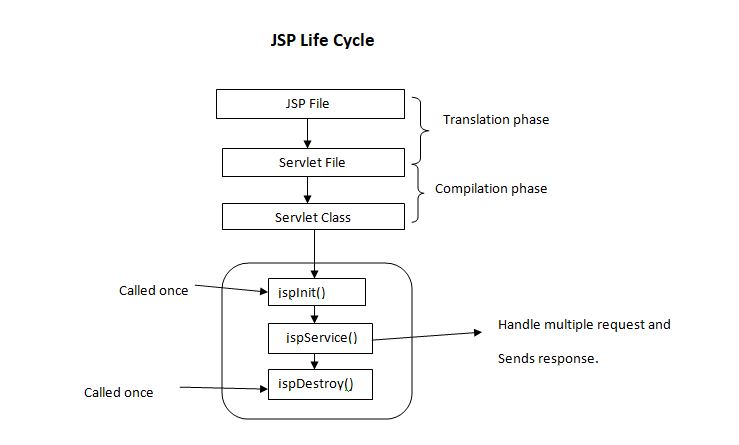
JSP pages contain a mix of HTML and Java code. When a client requests a JSP page, the server processes the Java code within the page to generate dynamic content. This content is then combined with the static elements of the page to produce the final output sent to the client’s browser.

Benefits of Using JSP

  • Easy Integration: JSP can be seamlessly integrated with Java code, allowing developers to leverage existing Java libraries and frameworks.
  • Reusable Components: JSP allows for the creation of reusable components that can be included in multiple pages, promoting code reusability and maintainability.
  • Rapid Development: With its familiar syntax and built-in tags, JSP enables developers to quickly build dynamic web applications without extensive coding.
  • Scalability: JSP applications can easily scale to accommodate increased traffic and user demands by leveraging Java’s robust scalability features.

JSP Tags

JSP provides a set of predefined tags that simplify common tasks such as displaying data, iterating over collections, and controlling flow. These tags help streamline development and improve code readability.

Conclusion

Java Server Pages (JSP) is a powerful technology for building dynamic web applications. By combining HTML with Java code, developers can create interactive and responsive websites that meet modern user expectations. Whether you are new to web development or an experienced developer, mastering JSP can enhance your skills and enable you to create sophisticated web solutions.


7 Essential Tips for Effective Java Server Pages (JSP) Development

  1. Use JSP for dynamic content generation in web applications.
  2. Separate Java code from presentation logic by using JSP scriptlets, expressions, and declarations.
  3. Utilize JSP standard actions like
  4. Avoid embedding complex Java logic directly within JSP pages to maintain readability and maintainability.
  5. Employ JSTL (JavaServer Pages Standard Tag Library) for simplifying common tasks in JSP development.
  6. Ensure proper error handling in JSP to provide meaningful feedback to users in case of exceptions.
  7. Optimize performance by minimizing the use of scriptlets and utilizing tag libraries efficiently.

Use JSP for dynamic content generation in web applications.

Utilizing Java Server Pages (JSP) for dynamic content generation in web applications is a highly efficient approach. By leveraging JSP, developers can seamlessly integrate Java code with HTML to create interactive and personalized web pages. This enables the generation of dynamic content based on user input, database queries, or other external factors, enhancing the overall user experience. JSP’s versatility and ease of use make it a valuable tool for building responsive and engaging web applications that meet the evolving demands of modern users.

Separate Java code from presentation logic by using JSP scriptlets, expressions, and declarations.

To enhance the maintainability and readability of Java Server Pages (JSP), it is recommended to separate Java code from presentation logic effectively. This can be achieved by utilizing JSP scriptlets, expressions, and declarations. By employing these features, developers can keep the presentation layer clean and focused on displaying content, while the Java code handles the underlying logic. This practice not only improves code organization but also makes it easier to troubleshoot and update the application in the future.

Utilize JSP standard actions like

When working with Java Server Pages (JSP), it is beneficial to utilize JSP standard actions like to modularize your code and promote reusability. By incorporating these standard actions, you can efficiently include external files or components within your JSP pages, making it easier to manage and maintain your web application. This practice not only enhances the organization of your code but also simplifies the development process by allowing you to focus on specific functionalities within each included file.

Avoid embedding complex Java logic directly within JSP pages to maintain readability and maintainability.

To ensure readability and maintainability in Java Server Pages (JSP), it is advisable to avoid embedding complex Java logic directly within the JSP pages. By separating the presentation layer from the business logic, developers can create cleaner and more organized code that is easier to understand and update. Instead, encapsulating complex Java logic in separate classes or scripts and invoking them from the JSP pages can improve code structure and facilitate future modifications without compromising code clarity.

Employ JSTL (JavaServer Pages Standard Tag Library) for simplifying common tasks in JSP development.

Employing JSTL (JavaServer Pages Standard Tag Library) in Java Server Pages development is a valuable tip for simplifying common tasks. By utilizing the predefined tags provided by JSTL, developers can streamline tasks such as iteration, conditionals, and data formatting within JSP pages. This not only enhances code readability but also reduces the need for extensive Java code, making development more efficient and maintainable. Embracing JSTL empowers developers to leverage its powerful features and accelerate the creation of dynamic and robust web applications.

Ensure proper error handling in JSP to provide meaningful feedback to users in case of exceptions.

Proper error handling in Java Server Pages (JSP) is crucial to provide users with meaningful feedback in case of exceptions. By implementing robust error handling mechanisms, developers can effectively communicate issues to users and guide them on how to proceed. This not only enhances the user experience but also helps in troubleshooting and resolving issues promptly, ensuring a smoother interaction between users and the web application.

Optimize performance by minimizing the use of scriptlets and utilizing tag libraries efficiently.

To optimize performance in Java Server Pages (JSP), it is recommended to minimize the use of scriptlets and instead utilize tag libraries efficiently. By reducing the reliance on scriptlets, which embed Java code directly into the JSP page, developers can improve code readability and maintainability. Tag libraries provide a cleaner and more structured way to incorporate dynamic functionality into JSP pages, leading to better performance and scalability of web applications. Efficient utilization of tag libraries not only enhances code organization but also helps streamline development processes and boost overall application performance.

java w3 schools

Unlocking Java Mastery with W3Schools

Exploring Java with W3Schools

Exploring Java with W3Schools

Java is a versatile and powerful programming language that is widely used for developing a variety of applications, from web and mobile apps to enterprise systems. For beginners and experienced developers alike, W3Schools offers a comprehensive resource for learning and mastering Java.

Why Choose W3Schools for Java?

W3Schools provides easy-to-understand tutorials, examples, and exercises that cover all aspects of Java programming. Whether you are just starting out or looking to enhance your skills, W3Schools offers a structured learning path that caters to your needs.

Key Features of W3Schools Java Resources

  • Interactive Java tutorials with live examples
  • Hands-on exercises to practice coding skills
  • Detailed explanations of Java concepts and syntax
  • Reference guides for Java libraries and frameworks
  • Quizzes to test your knowledge and reinforce learning

Benefits of Learning Java with W3Schools

By using W3Schools for learning Java, you can:

  • Gain a solid foundation in Java programming principles
  • Develop real-world applications using Java technologies
  • Stay updated on the latest trends and best practices in Java development
  • Connect with a community of learners and experts for support and collaboration

Start Your Journey with W3Schools Today!

No matter your level of expertise, W3Schools offers the resources you need to excel in Java programming. Dive into the world of Java with confidence and unleash your creativity with the help of W3Schools.

“Java is to JavaScript what Car is to Carpet.” – Chris Heilmann

© 2021 ExploringJavaWithW3Schools.com. All rights reserved.


Essential FAQs for Learning Java on W3Schools

  1. 1. What is Java and why is it important?
  2. 2. How can I start learning Java on W3Schools?
  3. 3. Are the Java tutorials on W3Schools suitable for beginners?
  4. 4. Can I practice coding exercises in Java on W3Schools?
  5. 5. Does W3Schools provide certification or assessments for Java proficiency?
  6. 6. Are there interactive tools available for learning Java concepts on W3Schools?
  7. 7. How can I get help or support while learning Java with W3Schools?

1. What is Java and why is it important?

Java is a versatile and robust programming language that is widely used for developing a variety of applications, ranging from web and mobile apps to enterprise systems. It is important due to its platform independence, which allows Java programs to run on any device that has a Java Virtual Machine (JVM). Java’s object-oriented nature, strong memory management, and rich set of libraries make it a popular choice for building scalable and secure software solutions. Its versatility, performance, and community support have solidified Java’s position as a key player in the world of programming languages.

2. How can I start learning Java on W3Schools?

To start learning Java on W3Schools, beginners can follow a structured approach that includes interactive tutorials, hands-on exercises, and comprehensive explanations of Java concepts and syntax. By navigating to the Java section on the W3Schools website, users can access a wealth of resources designed to help them build a solid foundation in Java programming. Starting with the basics and gradually progressing through more advanced topics, learners can engage with live examples, practice coding skills through exercises, and test their understanding with quizzes. W3Schools provides a user-friendly platform for individuals to kickstart their Java learning journey effectively and efficiently.

3. Are the Java tutorials on W3Schools suitable for beginners?

The Java tutorials available on W3Schools are highly suitable for beginners looking to learn Java programming. These tutorials are designed to be beginner-friendly, providing clear explanations, step-by-step instructions, and interactive examples that make it easy for novices to grasp Java concepts. Whether you are new to programming or transitioning from another language, the structured approach of W3Schools’ Java tutorials ensures that beginners can build a solid foundation and progress at their own pace in mastering Java development.

4. Can I practice coding exercises in Java on W3Schools?

Yes, you can practice coding exercises in Java on W3Schools. W3Schools offers a range of interactive coding exercises specifically designed to help you enhance your Java programming skills. These exercises provide hands-on practice opportunities that allow you to apply the concepts you’ve learned in a practical setting. By engaging with these coding exercises, you can reinforce your understanding of Java syntax, logic, and problem-solving techniques, ultimately improving your proficiency in Java programming.

5. Does W3Schools provide certification or assessments for Java proficiency?

W3Schools does not provide certification or assessments for Java proficiency. While W3Schools offers comprehensive tutorials, examples, and exercises to help users learn Java programming, they do not offer formal certification programs or assessments to test proficiency in Java. Users can utilize the resources provided by W3Schools to enhance their skills and knowledge in Java but will need to seek certification through other avenues if desired.

6. Are there interactive tools available for learning Java concepts on W3Schools?

Yes, W3Schools provides interactive tools that are invaluable for learning Java concepts. These tools allow learners to practice coding in real-time, experiment with different scenarios, and reinforce their understanding of Java programming principles. By engaging with these interactive resources, users can gain hands-on experience and enhance their skills in a dynamic and engaging way. Whether you are a beginner or an experienced developer, the interactive tools on W3Schools offer a practical and effective way to master Java concepts.

7. How can I get help or support while learning Java with W3Schools?

If you ever find yourself needing assistance or support while learning Java with W3Schools, there are several avenues available to you. W3Schools offers a community forum where you can ask questions, seek advice, and engage with fellow learners and experts. Additionally, you can explore the extensive documentation and tutorials on the website to clarify any doubts or confusion you may have. W3Schools prioritizes user support and strives to ensure that learners have access to the resources they need to succeed in their Java learning journey.

java jdk download

Streamline Your Development Process with Java JDK Download

Article: Java JDK Download

The Importance of Java JDK Download

Java Development Kit (JDK) is a crucial tool for Java developers as it provides the necessary components to develop, compile, and run Java applications. Whether you are a beginner or an experienced developer, having the JDK installed on your system is essential for Java programming.

Downloading the Java JDK

To download the latest version of Java JDK, visit the official Oracle website or use a trusted source like OpenJDK. Make sure to select the appropriate version based on your operating system (Windows, macOS, Linux) and architecture (32-bit or 64-bit).

Installation Process

Once you have downloaded the JDK installer, follow the installation instructions provided by Oracle or OpenJDK. The installation process typically involves setting up environment variables and configuring your IDE (Integrated Development Environment) to recognize the JDK.

Benefits of Using Java JDK

  • Development Tools: JDK includes tools like javac (Java Compiler), java (Java Runtime Environment), and javadoc (Java Documentation Generator) that are essential for Java development.
  • Compatibility: By using the official Java JDK, you ensure compatibility with various Java libraries, frameworks, and tools.
  • Security Updates: Oracle regularly releases security updates and patches for the JDK to protect against vulnerabilities and ensure a secure development environment.
  • Performance Optimization: The JDK is optimized for performance, providing efficient execution of Java code and improved runtime performance.

In Conclusion

Downloading and installing the Java Development Kit is a fundamental step for anyone looking to develop Java applications. By having access to the tools and libraries provided by the JDK, developers can create robust and efficient software solutions that leverage the power of Java programming language.


8 Essential Tips for Downloading and Installing Java JDK Safely and Effectively

  1. Ensure you download the JDK from the official Oracle website to avoid potential security risks.
  2. Check your system requirements before downloading to ensure compatibility with your operating system.
  3. Select the appropriate JDK version based on your project requirements and Java development needs.
  4. Consider downloading the JDK bundled with an Integrated Development Environment (IDE) for a more streamlined development experience.
  5. Verify the integrity of the downloaded JDK file by comparing its checksum with the one provided on the official website.
  6. Follow installation instructions carefully to ensure a successful setup of the JDK on your system.
  7. Keep track of JDK updates and consider setting up automatic updates to stay current with security patches and new features.
  8. Explore additional resources such as tutorials and documentation to maximize your usage of the Java Development Kit.

Ensure you download the JDK from the official Oracle website to avoid potential security risks.

When downloading the Java JDK, it is crucial to ensure that you obtain it from the official Oracle website to mitigate potential security risks. By obtaining the JDK from a trusted and verified source like Oracle, you can be confident that you are getting a genuine and secure version of the software. This precaution helps safeguard your system against any malicious threats or vulnerabilities that may be present in unauthorized or counterfeit versions of the JDK. Prioritizing security when downloading software is essential for maintaining a safe and reliable development environment.

Check your system requirements before downloading to ensure compatibility with your operating system.

Before downloading the Java JDK, it is essential to check your system requirements to ensure compatibility with your operating system. By verifying that your system meets the necessary specifications, you can avoid installation issues and ensure a smooth setup process. Taking this precautionary step will help you download the correct version of the JDK that is compatible with your operating system, enabling you to start developing Java applications without any compatibility-related obstacles.

Select the appropriate JDK version based on your project requirements and Java development needs.

When downloading the Java JDK, it is crucial to select the appropriate version that aligns with your project requirements and Java development needs. Choosing the right JDK version ensures compatibility with your development environment and allows you to leverage the features and enhancements that best suit your programming goals. Whether you are working on a specific project or exploring new Java functionalities, selecting the right JDK version sets the foundation for successful and efficient Java development practices.

Consider downloading the JDK bundled with an Integrated Development Environment (IDE) for a more streamlined development experience.

When downloading the Java Development Kit (JDK), it is advisable to consider opting for a version bundled with an Integrated Development Environment (IDE) for a more streamlined development experience. By choosing a JDK package that includes an IDE, developers can benefit from having all the necessary tools in one integrated platform, facilitating coding, debugging, and testing processes within a cohesive environment. This approach can enhance productivity and efficiency in Java application development by providing a seamless workflow for software creation and deployment.

Verify the integrity of the downloaded JDK file by comparing its checksum with the one provided on the official website.

It is highly recommended to verify the integrity of the downloaded Java JDK file by comparing its checksum with the one provided on the official website. This additional step ensures that the file has not been tampered with or corrupted during the download process. By confirming the checksum, you can have peace of mind knowing that you have obtained a genuine and secure copy of the JDK, reducing the risk of potential issues during installation and development.

Follow installation instructions carefully to ensure a successful setup of the JDK on your system.

It is crucial to follow the installation instructions carefully when downloading the Java JDK to guarantee a successful setup on your system. By adhering to the provided guidelines, you can avoid potential errors and ensure that the JDK is properly configured for your development environment. Paying attention to each step of the installation process will help you leverage the full capabilities of the JDK and streamline your Java development workflow effectively.

Keep track of JDK updates and consider setting up automatic updates to stay current with security patches and new features.

It is crucial to stay informed about Java JDK updates to ensure your development environment remains secure and up-to-date. Consider enabling automatic updates for the JDK to receive timely security patches and access new features as they become available. By actively managing JDK updates, you can enhance the performance, stability, and security of your Java applications while staying aligned with the latest advancements in the Java ecosystem.

Explore additional resources such as tutorials and documentation to maximize your usage of the Java Development Kit.

To maximize your usage of the Java Development Kit, it is highly recommended to explore additional resources such as tutorials and documentation. By delving into these supplementary materials, developers can gain a deeper understanding of the JDK’s features and functionalities, enabling them to harness its full potential in their Java development projects. Tutorials can provide practical guidance on using specific tools within the JDK, while documentation offers comprehensive insights into various aspects of Java programming. Embracing these resources not only enhances proficiency but also empowers developers to create more robust and efficient Java applications.