cfchris.com

Loading

netbeans java

Mastering Java Development with NetBeans IDE

Exploring NetBeans for Java Development

Exploring NetBeans for Java Development

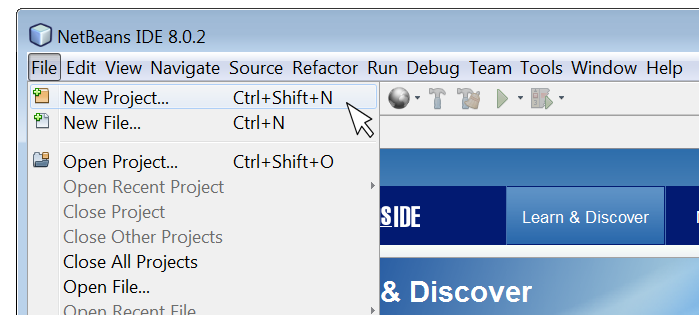
NetBeans is a powerful integrated development environment (IDE) that is widely used by Java developers around the world. It provides a comprehensive set of tools and features to streamline the development process and enhance productivity.

Key Features of NetBeans for Java Development:

  • Code Editor: NetBeans offers a sophisticated code editor with features like syntax highlighting, code completion, and refactoring tools to help developers write clean and efficient code.
  • Project Management: The IDE allows developers to manage their projects effectively, organize files, and navigate through code seamlessly.
  • Debugging Tools: NetBeans comes with robust debugging tools that enable developers to troubleshoot and fix issues in their Java applications quickly.
  • Version Control Integration: Developers can easily integrate version control systems like Git into NetBeans to manage code changes efficiently.
  • User-Friendly Interface: The intuitive interface of NetBeans makes it easy for both beginners and experienced developers to work comfortably within the IDE.
  • Support for Plugins: NetBeans supports a wide range of plugins that extend its functionality and cater to specific development needs.

The Benefits of Using NetBeans for Java Development:

Developers choose NetBeans for Java development due to its numerous benefits, including:

  • Productivity Boost: With its efficient tools and features, NetBeans helps developers write code faster and with fewer errors.
  • Cross-Platform Support: NetBeans is compatible with multiple operating systems, allowing developers to work on different platforms seamlessly.
  • Community Support: The vibrant community around NetBeans provides resources, tutorials, and forums for developers to seek help and share knowledge.
  • Ease of Integration: NetBeans integrates well with other technologies and frameworks commonly used in Java development projects.
  • Ongoing Development: The continuous updates and enhancements made to NetBeans ensure that developers have access to the latest tools and features in the IDE.

In conclusion, NetBeans is a versatile IDE that offers a rich set of features tailored for Java development. Whether you are a beginner learning Java programming or an experienced developer working on complex projects, NetBeans can be your go-to tool for efficient coding and project management.


Maximize Your Java Coding Efficiency: 9 Essential Tips for Using NetBeans

  1. Use keyboard shortcuts to speed up coding tasks.
  2. Take advantage of code templates to write code more efficiently.
  3. Utilize the debugger for identifying and fixing errors in your code.
  4. Customize the NetBeans IDE layout to suit your preferences and workflow.
  5. Install useful plugins to enhance functionality and productivity.
  6. Familiarize yourself with version control features for better project management.
  7. Explore the profiler tool for optimizing performance of your Java applications.
  8. Make use of integrated Maven support for managing project dependencies effectively.
  9. Stay updated with the latest NetBeans releases and updates for new features and improvements.

Use keyboard shortcuts to speed up coding tasks.

By utilizing keyboard shortcuts in NetBeans Java, developers can significantly enhance their coding efficiency. These shortcuts allow for quick navigation, selection, and execution of various commands without the need to rely on the mouse or navigate through menus. By memorizing and incorporating these keyboard shortcuts into their workflow, developers can streamline coding tasks, boost productivity, and focus more on writing high-quality code rather than getting bogged down by manual actions.

Take advantage of code templates to write code more efficiently.

By utilizing code templates in NetBeans for Java development, developers can significantly enhance their coding efficiency. These pre-defined snippets of code allow for quick insertion of commonly used structures, reducing the time and effort required to write repetitive code segments. By leveraging code templates effectively, developers can streamline their workflow, maintain consistency in coding practices, and focus more on the logic and functionality of their Java applications.

Utilize the debugger for identifying and fixing errors in your code.

Utilizing the debugger in NetBeans for Java development is a valuable tip for identifying and fixing errors in your code efficiently. By setting breakpoints, inspecting variables, and stepping through code execution, developers can pinpoint the root cause of issues and debug their applications effectively. The debugger tool in NetBeans provides real-time insights into the behavior of the code, helping developers troubleshoot complex problems and ensure the reliability and stability of their Java applications.

Customize the NetBeans IDE layout to suit your preferences and workflow.

Customizing the layout of the NetBeans IDE allows you to tailor the workspace to align with your specific preferences and workflow. By rearranging panels, adjusting toolbars, and organizing windows according to your needs, you can create a more efficient and personalized development environment. This flexibility not only enhances your productivity but also ensures that you have easy access to the tools and features that are most important to you during Java programming tasks.

Install useful plugins to enhance functionality and productivity.

To enhance functionality and productivity while using NetBeans for Java development, it is highly recommended to install useful plugins. These plugins can extend the capabilities of the IDE, providing additional tools and features that cater to specific development needs. By incorporating relevant plugins into NetBeans, developers can streamline their workflow, improve code quality, and boost overall efficiency in their Java projects. Investing time in selecting and integrating the right plugins can significantly enhance the development experience within NetBeans, ultimately leading to more effective and successful coding endeavors.

Familiarize yourself with version control features for better project management.

Familiarizing yourself with the version control features in NetBeans for Java development is essential for enhancing project management efficiency. By utilizing version control tools like Git within NetBeans, developers can easily track changes, collaborate with team members, and revert to previous versions when needed. This practice not only ensures better organization of code but also promotes seamless collaboration and helps maintain a structured development workflow. Mastering version control features in NetBeans can significantly improve project management processes and contribute to the overall success of Java development projects.

Explore the profiler tool for optimizing performance of your Java applications.

By utilizing the profiler tool in NetBeans for Java development, developers can delve into the performance metrics of their applications to identify bottlenecks and optimize code efficiency. This powerful feature allows users to analyze resource usage, memory allocation, and execution times, enabling them to fine-tune their Java applications for optimal performance. By exploring the profiler tool within NetBeans, developers can enhance the overall speed and responsiveness of their Java applications, ensuring a seamless user experience.

Make use of integrated Maven support for managing project dependencies effectively.

By utilizing the integrated Maven support in NetBeans for managing project dependencies, developers can streamline the process of handling external libraries and dependencies within their Java projects. Maven simplifies the management of project builds, dependencies, and configurations, making it easier to maintain a structured and organized development environment. Leveraging this feature in NetBeans enhances efficiency and allows developers to focus more on coding and less on managing dependencies manually.

Stay updated with the latest NetBeans releases and updates for new features and improvements.

Staying updated with the latest NetBeans releases and updates is crucial for Java developers to leverage new features and improvements. By keeping abreast of the latest developments in the IDE, developers can enhance their productivity, streamline their workflow, and take advantage of any enhancements that can make their coding experience more efficient and effective. Regularly updating NetBeans ensures that developers have access to the most up-to-date tools and capabilities, helping them stay competitive in the ever-evolving world of Java development.

codingbat java

Mastering Java Programming with CodingBat Challenges

CodingBat Java: Enhance Your Java Programming Skills

CodingBat Java: Enhance Your Java Programming Skills

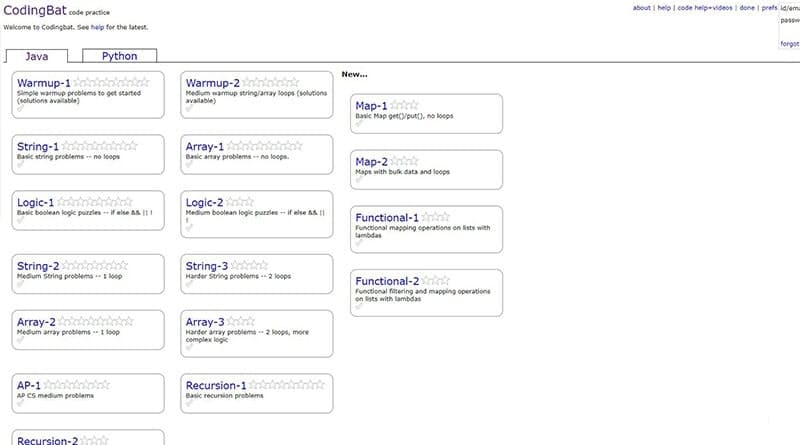
CodingBat is a popular platform that offers a wide range of coding exercises and challenges to help programmers improve their Java skills. Whether you are a beginner looking to learn the basics of Java programming or an experienced developer aiming to enhance your problem-solving abilities, CodingBat has something for everyone.

Features of CodingBat Java

Here are some key features that make CodingBat an excellent resource for Java enthusiasts:

  • Interactive Coding Exercises: CodingBat provides a hands-on learning experience with its interactive coding exercises. You can practice writing Java code directly on the platform and receive instant feedback on your solutions.
  • Varied Difficulty Levels: From simple warm-up exercises to more complex challenges, CodingBat offers coding problems of varying difficulty levels. This allows you to gradually progress and strengthen your Java programming skills.
  • Focus on Problem-Solving: The exercises on CodingBat are designed to test your problem-solving abilities and logical thinking. By tackling these challenges, you can sharpen your coding techniques and become a more efficient programmer.
  • Immediate Feedback: One of the highlights of CodingBat is its immediate feedback system. As soon as you submit your solution, the platform evaluates it and provides feedback on whether it is correct or incorrect. This real-time feedback helps you learn from your mistakes and improve your coding proficiency.

How to Get Started with CodingBat Java

If you’re ready to dive into the world of Java programming with CodingBat, follow these simple steps to get started:

  1. Create an account on the CodingBat website.
  2. Select the “Java” section to access the collection of Java coding exercises.
  3. Choose an exercise that interests you and start working on solving it using Java code.
  4. Submit your solution and review the feedback provided by CodingBat.
  5. Continue practicing with more exercises to hone your skills and expand your knowledge of Java programming.

CodingBat is not just a platform for practicing coding; it is a community where programmers can learn from each other, share insights, and grow together. Join CodingBat today and take your Java programming skills to new heights!


8 Essential Tips for Mastering Java on CodingBat

  1. Start with the warm-up exercises to build your confidence and understanding of basic Java concepts.
  2. Read the problem statement carefully before attempting to solve it.
  3. Break down the problem into smaller, manageable tasks to make it easier to solve.
  4. Test your code with different inputs to ensure that it works correctly in all scenarios.
  5. Don’t hesitate to look at the provided solutions if you get stuck, but try to understand them before moving on.
  6. Use meaningful variable names and comments to make your code more readable and maintainable.
  7. Practice regularly on CodingBat to improve your coding skills and speed.
  8. Help others in the CodingBat community by providing clear explanations for your solutions.

Start with the warm-up exercises to build your confidence and understanding of basic Java concepts.

To enhance your Java programming skills on CodingBat, it is advisable to begin with the warm-up exercises. These introductory challenges serve as a solid foundation, helping you build confidence and grasp fundamental Java concepts. By starting with the warm-up exercises, you can gradually familiarize yourself with essential programming techniques and boost your understanding of Java basics. This approach sets a strong groundwork for tackling more complex coding problems effectively and efficiently.

Read the problem statement carefully before attempting to solve it.

To maximize your success on CodingBat Java, it is crucial to read the problem statement carefully before diving into solving it. Understanding the requirements and constraints outlined in the problem statement ensures that you approach the coding exercise with clarity and precision. By taking the time to comprehend the problem thoroughly, you can effectively strategize your solution and avoid potential misunderstandings that may lead to errors. Remember, a solid grasp of the problem statement is the foundation for crafting accurate and efficient code solutions on CodingBat.

Break down the problem into smaller, manageable tasks to make it easier to solve.

Breaking down the problem into smaller, manageable tasks is a valuable tip when working on coding exercises in Java on CodingBat. By dividing the problem into smaller components, programmers can tackle each task individually, making the overall problem-solving process more approachable and less overwhelming. This approach allows for a more systematic and organized way of addressing complex challenges, leading to more efficient and effective solutions. Breaking down the problem helps programmers focus on one aspect at a time, leading to clearer logic and better code structure in their Java solutions.

Test your code with different inputs to ensure that it works correctly in all scenarios.

It is essential to test your Java code with various inputs to verify its functionality across different scenarios. By testing your code with a range of inputs, you can ensure that it behaves correctly under diverse conditions and edge cases. This practice helps identify and address potential bugs or errors, ultimately leading to more robust and reliable Java programs. Testing with different inputs is a crucial step in the development process to enhance the quality and performance of your code.

Don’t hesitate to look at the provided solutions if you get stuck, but try to understand them before moving on.

When tackling coding exercises on CodingBat Java, it is advisable not to hesitate to refer to the provided solutions if you encounter difficulties. However, it is essential to take the time to comprehend these solutions thoroughly before progressing further. By understanding the provided solutions, you not only overcome the immediate challenge but also gain valuable insights into different problem-solving approaches and coding techniques. This practice enhances your learning experience and equips you with a deeper understanding of Java programming concepts.

Use meaningful variable names and comments to make your code more readable and maintainable.

Using meaningful variable names and adding comments to your code on CodingBat Java can significantly enhance its readability and maintainability. By choosing descriptive names for your variables, functions, and classes, you make it easier for yourself and others to understand the purpose of each component in your code. Additionally, incorporating comments to explain complex logic or provide context can help future developers navigate through the codebase with ease. These practices not only improve the clarity of your code but also contribute to its long-term sustainability and scalability.

Practice regularly on CodingBat to improve your coding skills and speed.

Regular practice on CodingBat is key to enhancing your coding skills and increasing your coding speed in Java. By consistently working on the coding exercises provided on the platform, you can sharpen your problem-solving abilities, familiarize yourself with various Java concepts, and develop a quicker and more efficient coding style. The more you practice, the more confident and proficient you will become in writing Java code, ultimately paving the way for greater success in your programming endeavors.

Help others in the CodingBat community by providing clear explanations for your solutions.

In the CodingBat Java community, it is essential to help others by offering clear explanations for your solutions. By providing detailed insights into your coding approach and reasoning behind your solutions, you not only assist fellow programmers in understanding complex problems but also contribute to a collaborative learning environment. Clear explanations not only showcase your problem-solving skills but also foster a sense of community where knowledge sharing and mutual support are valued. Embracing this practice on CodingBat can lead to meaningful interactions, improved coding proficiency, and a stronger sense of camaraderie among members of the community.

website making software

Empowering Your Online Presence: The Evolution of Website Making Software

Article: Website Making Software

The Evolution of Website Making Software

Creating a website used to be a complex and time-consuming task that required advanced coding skills. However, with the advent of website making software, the process has been revolutionized, making it accessible to individuals and businesses of all levels of technical expertise.

Features of Modern Website Making Software

Modern website making software comes with a range of features that simplify the website creation process:

  • Drag-and-Drop Interface: Many website builders offer intuitive drag-and-drop interfaces, allowing users to design their websites visually without any coding knowledge.
  • Templates and Themes: Users can choose from a variety of pre-designed templates and themes to customize the look and feel of their websites.
  • Responsive Design: Website making software ensures that websites are optimized for viewing on various devices, including desktops, tablets, and smartphones.
  • E-Commerce Functionality: Some platforms include built-in e-commerce tools for users to create online stores and sell products or services.
  • SEO Optimization: Users can optimize their websites for search engines using built-in SEO tools that help improve visibility online.

The Benefits of Using Website Making Software

There are several advantages to using website making software for creating a website:

  • User-Friendly: Website builders are designed for ease of use, allowing individuals without technical skills to create professional-looking websites.
  • Cost-Effective: Building a website with software is often more affordable than hiring a web developer or agency for custom development.
  • Rapid Development: With ready-made templates and drag-and-drop functionality, users can create websites quickly and efficiently.
  • No Maintenance Required: Website making software typically includes hosting and maintenance services, relieving users of the need to manage technical aspects themselves.

In Conclusion

The availability of modern website making software has democratized the process of creating websites, empowering individuals and businesses to establish their online presence with ease. Whether you’re a small business owner, an entrepreneur, or an aspiring blogger, website building tools offer an accessible solution for bringing your ideas to life on the web.


7 Essential Tips for Choosing the Right Website Building Software

  1. Choose a website making software that fits your skill level and needs.
  2. Consider the scalability of the software as your website grows.
  3. Look for responsive design features to ensure your site looks good on all devices.
  4. Check for SEO tools to help optimize your website for search engines.
  5. Ensure the software offers good customer support in case you run into any issues.
  6. Review pricing plans to find one that fits your budget and offers necessary features.
  7. Take advantage of free trials or demos before committing to a website making software.

Choose a website making software that fits your skill level and needs.

When selecting a website making software, it is essential to choose one that aligns with your skill level and specific requirements. Opting for a platform that matches your expertise ensures a smoother website creation process, allowing you to leverage the software’s features effectively. By considering your needs and capabilities, you can maximize the potential of the website making software and create a professional and tailored online presence that meets your objectives.

Consider the scalability of the software as your website grows.

When selecting website making software, it is crucial to consider the scalability of the platform as your website expands and evolves. Ensuring that the software can accommodate the growth of your website in terms of traffic, content, and functionality is essential for long-term success. Scalability allows you to seamlessly integrate new features, handle increased traffic loads, and maintain optimal performance as your online presence grows. By choosing a scalable website making software, you can future-proof your website and avoid potential limitations down the line.

Look for responsive design features to ensure your site looks good on all devices.

When selecting website making software, it is crucial to prioritize platforms that offer responsive design features. Ensuring that your website looks visually appealing and functions seamlessly across various devices, including desktops, tablets, and smartphones, is essential for providing a positive user experience. Responsive design not only enhances the accessibility of your site but also contributes to its overall professionalism and credibility in the competitive online landscape. By incorporating responsive design features into your website creation process, you can reach a broader audience and maximize engagement across different devices.

Check for SEO tools to help optimize your website for search engines.

When selecting website making software, it is essential to check for built-in SEO tools that can assist in optimizing your website for search engines. These tools can help improve the visibility of your site online by guiding you in implementing key SEO strategies such as meta tags, keyword optimization, and site structure. By leveraging SEO tools within the website builder, you can enhance your website’s search engine rankings and attract more organic traffic to your site.

Ensure the software offers good customer support in case you run into any issues.

When selecting website making software, it is crucial to ensure that the platform provides reliable customer support to assist you in case you encounter any challenges or issues during the website creation process. Good customer support can make a significant difference in resolving technical difficulties promptly and ensuring a smooth experience while building your website. Prioritizing software with excellent customer service can help you navigate any obstacles effectively and ultimately achieve your desired online presence without unnecessary setbacks.

Review pricing plans to find one that fits your budget and offers necessary features.

When exploring website making software options, it is essential to review pricing plans carefully to identify one that aligns with your budget while providing the necessary features for your website project. By comparing different pricing tiers and evaluating the features included in each plan, you can make an informed decision that ensures you get the most value for your investment. Prioritizing a balance between affordability and functionality will help you select a website building tool that meets your needs effectively.

Take advantage of free trials or demos before committing to a website making software.

Before committing to a website making software, it is advisable to take advantage of free trials or demos that many platforms offer. By exploring these trial versions, users can get a hands-on experience of the software’s features, usability, and suitability for their specific needs. This allows individuals and businesses to make an informed decision and ensure that the chosen website making software aligns with their requirements before making a financial commitment.

javascript tutorial

Mastering JavaScript: A Comprehensive Tutorial for Beginners

JavaScript Tutorial

JavaScript Tutorial: A Beginner’s Guide

JavaScript is a powerful programming language that is widely used for creating dynamic and interactive web pages. Whether you are a beginner or have some experience with coding, this tutorial will help you understand the basics of JavaScript.

What is JavaScript?

JavaScript is a lightweight, interpreted programming language that adds interactivity to web pages. It runs on the client-side, meaning it is executed on the user’s browser rather than the server. JavaScript can be used to create animations, validate forms, manipulate HTML elements, and much more.

Getting Started with JavaScript

To start using JavaScript in your web projects, you can include it directly in your HTML code using the <script> tag. You can also link an external JavaScript file to your HTML document.

Syntax and Features

JavaScript syntax is similar to other programming languages like Java and C. It uses variables, data types, functions, loops, and conditional statements to control the flow of a program. Understanding these basic concepts is essential for writing effective JavaScript code.

Common Use Cases

Some common use cases of JavaScript include form validation, creating interactive maps, image sliders, responsive menus, and much more. With JavaScript’s versatility, the possibilities are endless for enhancing user experience on websites.

Resources for Learning

If you want to dive deeper into JavaScript programming, there are plenty of resources available online such as tutorials, documentation, forums, and online courses. Websites like MDN Web Docs and W3Schools offer comprehensive guides for learning JavaScript from scratch.

Conclusion

JavaScript is an essential skill for web developers looking to create dynamic and engaging websites. By mastering the fundamentals of JavaScript programming, you can unlock endless possibilities for building interactive web applications.

Start your journey with JavaScript today and unleash your creativity in web development!


Essential FAQs for Beginners: Understanding and Learning JavaScript for Web Development

  1. 1. What is JavaScript and why is it important for web development?
  2. 2. How can I start learning JavaScript as a beginner?
  3. 3. What are the key concepts to understand in JavaScript programming?
  4. 4. Are there any recommended resources or tutorials for learning JavaScript?
  5. 5. What are some common use cases of JavaScript in web development?

1. What is JavaScript and why is it important for web development?

JavaScript is a versatile and essential programming language for web development. It is primarily used to add interactivity and dynamic elements to websites, making them more engaging and user-friendly. JavaScript allows developers to create features such as interactive forms, animations, dynamic content updates, and much more. Its importance in web development lies in its ability to enhance the user experience by providing functionality that goes beyond static HTML and CSS. By mastering JavaScript, developers can create modern and responsive websites that cater to the evolving needs of users in the digital age.

2. How can I start learning JavaScript as a beginner?

For beginners looking to start learning JavaScript, there are several recommended steps to take. First, familiarize yourself with basic programming concepts such as variables, data types, loops, and functions. Next, explore online resources like tutorials, interactive coding platforms, and JavaScript documentation to gain a foundational understanding of the language. Practice writing simple scripts and experiment with code examples to reinforce your learning. Additionally, consider enrolling in beginner-friendly JavaScript courses or joining coding communities to seek guidance and support from experienced developers. By taking these initial steps and staying consistent in your learning journey, you can gradually build your skills and confidence in mastering JavaScript programming.

3. What are the key concepts to understand in JavaScript programming?

To excel in JavaScript programming, it is crucial to grasp key concepts such as variables, data types, functions, loops, and conditional statements. Understanding how to manipulate these elements effectively allows developers to control the flow of their programs and create dynamic and interactive web applications. Mastery of these fundamental concepts forms the backbone of JavaScript programming and empowers developers to write efficient and robust code that enhances user experience on websites.

For those seeking to learn JavaScript, there are numerous recommended resources and tutorials available to help you master the language. Websites like MDN Web Docs, W3Schools, Codecademy, and freeCodeCamp offer comprehensive guides and interactive lessons for beginners and advanced learners alike. Additionally, online platforms such as Udemy, Coursera, and Pluralsight provide structured courses taught by industry professionals to deepen your understanding of JavaScript programming concepts. Whether you prefer written tutorials, video lessons, or hands-on coding exercises, these resources offer a wealth of knowledge to support your learning journey in mastering JavaScript.

5. What are some common use cases of JavaScript in web development?

In web development, JavaScript is utilized in various common use cases to enhance user experience and add interactivity to websites. Some of the typical scenarios where JavaScript is employed include form validation to ensure data input accuracy, creating dynamic and interactive maps for better navigation, implementing image sliders for showcasing content in a visually appealing manner, developing responsive menus that adapt to different screen sizes, and enabling real-time updates without needing to reload the entire webpage. JavaScript’s versatility makes it a valuable tool for web developers looking to create engaging and functional websites.

Revolutionizing Technology: The Impact of AI Deep Learning

Understanding AI Deep Learning

Understanding AI Deep Learning

Artificial Intelligence (AI) has been a transformative force in the modern world, with deep learning being one of its most powerful subsets. Deep learning, a type of machine learning, mimics the workings of the human brain to process data and create patterns for decision making.

What is Deep Learning?

Deep learning involves neural networks with three or more layers. These neural networks attempt to simulate the behavior of the human brain—albeit far from matching its ability—allowing it to “learn” from large amounts of data. While a neural network with a single layer can still make approximate predictions, additional hidden layers can help optimize accuracy.

How Does It Work?

The core concept behind deep learning is its ability to automatically extract features from raw data without manual feature engineering. This is achieved through multiple layers of neurons that progressively extract higher-level features from the raw input.

  • Input Layer: The initial layer that receives all input data.
  • Hidden Layers: Intermediate layers where computations are performed and features are extracted.
  • Output Layer: Produces the final prediction or classification result.

The network learns by adjusting weights through backpropagation—a method used to minimize error by propagating backward through the network and updating weights accordingly. This process is repeated until the model achieves an acceptable level of accuracy.

Applications of Deep Learning

The applicability of deep learning spans across various industries due to its ability to handle vast amounts of unstructured data effectively:

  1. Healthcare: Used in medical imaging for detecting diseases like cancer through pattern recognition in images.
  2. Automotive: Powers autonomous vehicles by processing sensor data for navigation and obstacle detection.
  3. E-commerce: Enhances recommendation systems by analyzing user behavior and preferences.
  4. NLP (Natural Language Processing): Facilitates language translation, sentiment analysis, and chatbots by understanding context and semantics in text.

The Future of Deep Learning

The future looks promising as deep learning continues to evolve. Researchers are constantly working on improving algorithms, reducing computational costs, and addressing ethical concerns around AI deployment. As technology advances, deep learning models will become more efficient and accessible, paving the way for even broader applications across different sectors.

The potential for AI deep learning is vast, promising innovations that could redefine industries and improve quality of life globally. As we continue to explore this frontier, it’s crucial to balance technological advancement with ethical considerations to ensure responsible use.


6 Essential Tips for Mastering AI Deep Learning

  1. Understand the fundamentals of neural networks
  2. Explore different deep learning architectures
  3. Collect and preprocess high-quality data for training
  4. Regularly update and fine-tune your model
  5. Experiment with hyperparameters to optimize performance
  6. Stay updated on the latest research and advancements in AI deep learning

Understand the fundamentals of neural networks

Understanding the fundamentals of neural networks is crucial for anyone delving into AI deep learning. Neural networks are the backbone of deep learning models, consisting of interconnected layers of nodes or “neurons” that process data and learn patterns. By grasping how these networks function, including concepts like input layers, hidden layers, and output layers, one can appreciate how they mimic human brain processes to recognize patterns and make decisions. Comprehending the mechanisms of forward propagation and backpropagation is essential as well, as these are the processes through which neural networks learn and refine their accuracy over time. A solid foundation in these principles not only aids in building more efficient models but also enhances one’s ability to troubleshoot and innovate within the field.

Explore different deep learning architectures

Exploring different deep learning architectures is crucial for maximizing the potential of AI models. Each architecture has unique strengths and is suited to specific types of problems. For instance, Convolutional Neural Networks (CNNs) excel in image processing tasks due to their ability to capture spatial hierarchies, while Recurrent Neural Networks (RNNs) are better suited for sequential data like time series or language modeling because they can maintain information across time steps. Experimenting with architectures such as Transformers, which have revolutionized natural language processing with their attention mechanisms, can also lead to significant improvements in performance. By understanding and applying various architectures, one can tailor solutions more effectively to the problem at hand, ultimately leading to more accurate and efficient AI models.

Collect and preprocess high-quality data for training

In the realm of AI deep learning, the importance of collecting and preprocessing high-quality data cannot be overstated. High-quality data serves as the foundation upon which robust and accurate models are built. When training deep learning models, having a well-curated dataset ensures that the model learns relevant patterns and features, leading to better generalization on unseen data. Preprocessing steps such as normalization, handling missing values, and augmenting data can significantly enhance the dataset’s quality by reducing noise and inconsistencies. This careful preparation not only improves the model’s performance but also accelerates the training process by providing cleaner input, allowing for more efficient learning. Ultimately, investing time in collecting and preprocessing high-quality data is crucial for developing reliable and effective AI solutions.

Regularly update and fine-tune your model

Regularly updating and fine-tuning your AI deep learning model is essential to maintaining its accuracy and effectiveness. As new data becomes available, it can introduce patterns or trends that the original model was not trained on, potentially leading to decreased performance over time. By periodically retraining the model with fresh data, you ensure it remains relevant and capable of making accurate predictions. Fine-tuning also allows for adjustments to the model’s parameters, optimizing its performance based on recent developments or shifts in the underlying data distribution. This ongoing process not only enhances the model’s adaptability but also ensures it continues to meet evolving business needs and technological advancements.

Experiment with hyperparameters to optimize performance

Experimenting with hyperparameters is crucial for optimizing the performance of deep learning models. Hyperparameters, unlike model parameters, are set before the learning process begins and can significantly influence the training process and model performance. Common hyperparameters include learning rate, batch size, number of epochs, and the architecture of neural networks such as the number of layers and units per layer. By systematically adjusting these hyperparameters, one can improve model accuracy, reduce overfitting, and enhance generalization to new data. Techniques like grid search and random search are often used to explore different combinations of hyperparameters. Additionally, more sophisticated methods like Bayesian optimization can be employed for efficient hyperparameter tuning. In essence, careful experimentation with hyperparameters is a key step in developing robust deep learning models that perform well across various tasks.

Stay updated on the latest research and advancements in AI deep learning

Staying updated on the latest research and advancements in AI deep learning is crucial for anyone involved in the field, whether they’re a seasoned professional or a newcomer. This rapidly evolving area of technology constantly introduces new methodologies, tools, and applications that can significantly enhance the effectiveness and efficiency of AI models. By keeping abreast of current developments, individuals can adopt cutting-edge techniques that improve model performance, reduce computational costs, and open up new possibilities for innovation. Additionally, understanding recent breakthroughs helps professionals anticipate future trends and challenges, enabling them to make informed decisions about their projects and strategies. Engaging with academic journals, attending conferences, participating in online forums, and following influential researchers are effective ways to stay informed and maintain a competitive edge in this dynamic landscape.

java 8

Mastering Java 8: Unlocking the Power of Modern Java Features

Exploring Java 8: Features and Benefits

Exploring Java 8: Features and Benefits

Java 8, released by Oracle in March 2014, introduced several groundbreaking features that revolutionized the way developers write code in Java. Let’s delve into some of the key features and benefits of Java 8:

Lambda Expressions

One of the most significant additions to Java 8 is lambda expressions. This feature allows developers to write more concise and readable code by enabling functional programming constructs in Java.

Stream API

The Stream API introduced in Java 8 provides a powerful way to work with collections. Streams allow for efficient processing of data through pipelines of operations such as filter, map, and reduce, making code more expressive and easier to parallelize.

Date and Time API

Prior to Java 8, working with dates and times in Java was cumbersome. The new Date and Time API simplifies date and time manipulation by providing classes like LocalDate, LocalTime, LocalDateTime, and ZonedDateTime.

Optional Class

The Optional class in Java 8 helps developers handle null values more effectively. By encouraging the use of Optional, developers can write cleaner code that explicitly handles scenarios where a value may be absent.

Default Methods

In interfaces, Java 8 introduced default methods that allow interfaces to have method implementations. This feature enables backward compatibility with existing code while still evolving interfaces with new methods.

Performance Improvements

Java 8 also brought performance improvements through features like parallel streams that leverage multi-core processors for faster execution of stream operations on large datasets.

In conclusion, Java 8 has significantly enhanced the Java programming language by introducing modern features that improve developer productivity, code readability, and performance. Embracing these features can lead to more efficient and maintainable codebases for Java applications.


Mastering Java 8: 7 Essential Tips for Modern Java Development

  1. Utilize lambda expressions to write more concise code.
  2. Explore the Stream API for processing collections in a functional style.
  3. Use default methods in interfaces to add new methods without breaking existing implementations.
  4. Leverage Optional to handle potentially null values more effectively.
  5. Learn about the new Date and Time API for improved date and time manipulation.
  6. Understand method references to simplify code that just calls an existing method.
  7. Experiment with parallel streams for concurrent processing of data.

Utilize lambda expressions to write more concise code.

By utilizing lambda expressions in Java 8, developers can significantly enhance the readability and conciseness of their code. Lambda expressions allow for a more streamlined way of defining anonymous functions, making the code more expressive and easier to understand. This feature enables developers to write functions in a more functional programming style, reducing boilerplate code and improving overall code efficiency. Incorporating lambda expressions in Java 8 can lead to more concise and readable code, ultimately enhancing the development process and making maintenance tasks easier in the long run.

Explore the Stream API for processing collections in a functional style.

By exploring the Stream API in Java 8, developers can leverage functional programming principles to process collections in a more efficient and expressive manner. The Stream API allows for seamless chaining of operations like filter, map, and reduce, enabling developers to write code that is both concise and easy to parallelize. Embracing the Stream API not only simplifies collection processing but also paves the way for writing more robust and maintainable code in Java applications.

Use default methods in interfaces to add new methods without breaking existing implementations.

By utilizing default methods in interfaces in Java 8, developers can seamlessly introduce new methods without disrupting the functionality of existing implementations. This feature allows for the evolution of interfaces by providing method implementations within the interface itself, ensuring backward compatibility with classes that already implement the interface. By leveraging default methods, developers can extend interfaces with additional functionality while maintaining the integrity of the codebase and facilitating smoother transitions during software updates or enhancements.

Leverage Optional to handle potentially null values more effectively.

By leveraging the Optional class in Java 8, developers can handle potentially null values more effectively. Optional encourages explicit handling of scenarios where a value may be absent, promoting cleaner and more robust code practices. This approach not only enhances code readability but also helps prevent null pointer exceptions, leading to more reliable and maintainable Java applications.

Learn about the new Date and Time API for improved date and time manipulation.

To enhance your Java programming skills with Java 8, it is highly recommended to explore the new Date and Time API. This feature offers a more streamlined approach to handling dates and times, providing developers with a set of classes like LocalDate, LocalTime, LocalDateTime, and ZonedDateTime for improved date and time manipulation. By mastering the Date and Time API in Java 8, you can simplify complex date-related operations and create more robust and efficient applications.

Understand method references to simplify code that just calls an existing method.

Understanding method references in Java 8 is a powerful technique that simplifies code by allowing developers to directly reference existing methods. Instead of writing verbose lambda expressions to call a method, method references provide a concise and clear way to invoke functions. This not only enhances code readability but also promotes reusability and maintainability by streamlining the syntax and reducing boilerplate code. By grasping the concept of method references, developers can optimize their Java 8 codebase and make it more efficient and elegant.

Experiment with parallel streams for concurrent processing of data.

When working with Java 8, a valuable tip is to experiment with parallel streams for concurrent processing of data. By utilizing parallel streams, developers can take advantage of multi-core processors to enhance the performance of stream operations on large datasets. This approach can lead to faster data processing and improved efficiency in handling computationally intensive tasks. However, it is essential to carefully design and test parallel stream usage to ensure thread safety and avoid potential concurrency issues. Overall, exploring parallel streams in Java 8 can offer a powerful tool for optimizing data processing workflows and achieving better performance in applications.

magento ecommerce development

Mastering Magento Ecommerce Development: Building Your Online Store with Power and Precision

The Power of Magento Ecommerce Development

The Power of Magento Ecommerce Development

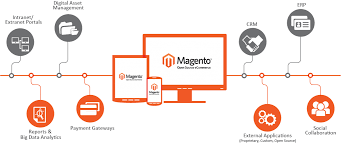
Magento is a powerful and versatile platform for building robust ecommerce websites. With its wide range of features and flexibility, Magento has become one of the most popular choices for businesses looking to establish a strong online presence.

Why Choose Magento for Ecommerce Development?

Here are some key reasons why Magento stands out as a top choice for ecommerce development:

  • Scalability: Magento can easily scale to accommodate the growth of your business, whether you are a small startup or a large enterprise.
  • Customization: With its modular architecture, Magento allows for extensive customization to meet your specific business needs and branding requirements.
  • SEO-Friendly: Magento is designed with search engine optimization (SEO) in mind, making it easier for your online store to rank higher in search engine results.
  • Mobile Responsiveness: In today’s mobile-driven world, Magento offers responsive design capabilities to ensure seamless user experience across all devices.
  • Rich Features: From product catalog management to secure payment gateways, Magento provides a comprehensive set of features to enhance your ecommerce website’s functionality.

The Process of Magento Ecommerce Development

The process of developing an ecommerce website with Magento typically involves the following steps:

  1. Planning: Define your goals, target audience, and desired features for the ecommerce site.
  2. Design: Create a visually appealing and user-friendly design that reflects your brand identity.
  3. Development: Implement custom functionalities, integrate payment gateways, and optimize performance for seamless user experience.
  4. Testing: Conduct thorough testing to ensure that the website functions properly across different devices and browsers.
  5. Launch & Maintenance: Deploy the website live and continue to monitor performance, make updates, and provide ongoing support as needed.

In Conclusion

Magento ecommerce development offers businesses a powerful platform to create engaging online shopping experiences for their customers. With its flexibility, scalability, and rich feature set, Magento continues to be a top choice for businesses looking to thrive in the competitive world of ecommerce.


8 Essential FAQs About Magento Ecommerce Development: From Features to Finding the Right Developer

  1. What is Magento ecommerce development?
  2. How does Magento help businesses create online stores?
  3. What are the key features of Magento for ecommerce development?
  4. Is Magento suitable for small businesses or only large enterprises?
  5. Can Magento be customized to meet specific business needs?
  6. Does Magento support mobile responsiveness for ecommerce websites?
  7. What are the SEO capabilities of Magento for improving online visibility?
  8. How can I find a reliable developer for Magento ecommerce development projects?

What is Magento ecommerce development?

Magento ecommerce development refers to the process of creating online stores and ecommerce websites using the Magento platform. Magento is a popular and powerful open-source ecommerce solution that offers a wide range of features and customization options for businesses looking to establish a strong online presence. With Magento ecommerce development, businesses can build secure, scalable, and feature-rich online stores that provide a seamless shopping experience for customers. From product catalog management to payment gateway integration, Magento ecommerce development enables businesses to create customized and visually appealing online stores that drive sales and enhance customer engagement.

How does Magento help businesses create online stores?

Magento helps businesses create online stores by providing a robust and versatile platform that enables customization, scalability, and rich features. With Magento’s modular architecture, businesses can tailor their online stores to meet specific branding and functionality requirements. The platform’s scalability allows for seamless growth as businesses expand their online presence. Additionally, Magento offers a wide range of features, from product catalog management to secure payment gateways, that enhance the overall shopping experience for customers. Overall, Magento empowers businesses to build engaging and successful online stores that drive growth and profitability.

What are the key features of Magento for ecommerce development?

Magento offers a plethora of key features that make it a top choice for ecommerce development. Some of the standout features include its scalability, allowing businesses to easily expand their online presence as they grow. Magento’s customization capabilities enable businesses to tailor their ecommerce websites to meet specific branding and functionality requirements. The platform’s SEO-friendly design helps improve search engine rankings, while its mobile responsiveness ensures a seamless shopping experience across various devices. Additionally, Magento provides robust features for product catalog management, secure payment gateways, and overall enhanced user experience, making it a comprehensive solution for successful ecommerce development.

Is Magento suitable for small businesses or only large enterprises?

When considering Magento for ecommerce development, a frequently asked question is whether it is suitable for small businesses or only large enterprises. The answer lies in Magento’s flexibility and scalability, making it a viable option for businesses of all sizes. While Magento is robust enough to meet the complex needs of large enterprises with high transaction volumes and extensive product catalogs, it also offers a streamlined version, Magento Open Source (formerly known as Magento Community Edition), which is more budget-friendly and suitable for small to medium-sized businesses. With its modular architecture and customizable features, Magento can be tailored to fit the specific requirements of any business, making it a versatile solution for both small startups and established enterprises looking to establish a strong online presence.

Can Magento be customized to meet specific business needs?

Magento is highly customizable, allowing businesses to tailor their ecommerce websites to meet specific needs effectively. With its modular architecture and extensive range of customization options, Magento empowers businesses to create unique online stores that align with their branding, functionality requirements, and target audience preferences. Whether it’s customizing product pages, integrating third-party extensions, or implementing specialized features, Magento provides the flexibility and scalability needed to adapt to diverse business needs seamlessly. By leveraging Magento’s customization capabilities, businesses can create a personalized and optimized ecommerce experience that drives engagement, conversions, and long-term success.

Does Magento support mobile responsiveness for ecommerce websites?

Magento is well-known for its robust support of mobile responsiveness for ecommerce websites. With the increasing trend of mobile shopping, Magento ensures that online stores built on its platform are optimized for mobile devices. This means that Magento ecommerce websites automatically adjust their layout and design to provide a seamless and user-friendly shopping experience on smartphones and tablets. By incorporating responsive design capabilities, Magento empowers businesses to reach a wider audience and cater to the growing number of mobile shoppers, ultimately enhancing customer engagement and driving conversions.

What are the SEO capabilities of Magento for improving online visibility?

Magento offers robust SEO capabilities to enhance online visibility and improve search engine rankings for ecommerce websites. With features such as customizable URLs, meta tags, sitemaps, and rich snippets, Magento provides the tools necessary to optimize website content for search engines. Additionally, Magento’s responsive design and fast loading times contribute to a positive user experience, which is a key factor in SEO rankings. By leveraging Magento’s SEO capabilities effectively, businesses can increase their online visibility and attract more organic traffic to their ecommerce websites.

How can I find a reliable developer for Magento ecommerce development projects?

Finding a reliable developer for Magento ecommerce development projects is crucial for the success of your online business. To ensure you partner with a skilled professional, consider looking for developers with proven experience in Magento development, a strong portfolio showcasing their past projects, and positive client testimonials. Additionally, you can explore online platforms specializing in connecting businesses with qualified developers or seek recommendations from industry peers. Conducting thorough interviews and discussing project requirements in detail can help you assess the developer’s expertise and communication skills, ultimately leading to a successful collaboration on your Magento ecommerce development project.

rapid application

Unlocking Speed and Flexibility: The Power of Rapid Application Development

The Power of Rapid Application Development

The Power of Rapid Application Development

Rapid Application Development (RAD) is a software development approach that prioritizes speed and flexibility in creating applications. In today’s fast-paced digital world, the ability to quickly develop and deploy applications can give businesses a competitive edge.

One of the key benefits of RAD is its iterative and incremental nature. Instead of following a linear development process, RAD allows for quick prototyping and feedback loops. This means that changes can be implemented rapidly based on user input, resulting in faster delivery of functional software.

RAD also encourages collaboration between developers, designers, and end-users. By involving stakeholders throughout the development process, RAD ensures that the final product meets the needs and expectations of its intended users.

Another advantage of RAD is its focus on reusability. Developers can leverage existing components and frameworks to accelerate development without compromising quality. This not only speeds up the development process but also reduces costs associated with building applications from scratch.

Furthermore, RAD promotes a more flexible approach to project management. By breaking down projects into smaller modules or features, teams can prioritize tasks based on their importance and complexity. This allows for greater adaptability to changing requirements and market conditions.

In conclusion, Rapid Application Development offers a streamlined and efficient way to create software applications in a fast-paced environment. By emphasizing collaboration, reusability, and flexibility, RAD empowers businesses to innovate quickly and stay ahead of the competition.


5 Essential Tips for Accelerating Application Development Success

  1. Define clear objectives and requirements before starting development.
  2. Use rapid prototyping to quickly visualize ideas and gather feedback.
  3. Prioritize essential features to deliver a minimum viable product (MVP) faster.
  4. Implement agile development practices for flexibility and adaptability.
  5. Regularly test and iterate on the application to improve functionality and user experience.

Define clear objectives and requirements before starting development.

Before diving into rapid application development, it is crucial to define clear objectives and requirements. By establishing a solid foundation at the outset, developers can ensure that the project stays on track and meets the desired outcomes. Clear objectives help align the team’s efforts and provide a roadmap for development, while well-defined requirements serve as a guide for implementing features that are essential to the success of the application. Taking the time to clarify objectives and requirements upfront can prevent costly rework later on and ultimately lead to a more efficient and successful development process.

Use rapid prototyping to quickly visualize ideas and gather feedback.

Using rapid prototyping is a valuable tip in the realm of rapid application development as it allows developers to swiftly bring ideas to life and gather essential feedback. By creating prototypes that provide a visual representation of the proposed application, stakeholders can better understand the concept and provide input early in the development process. This iterative approach not only accelerates the design phase but also ensures that the final product aligns with user expectations and requirements, ultimately leading to a more successful and user-friendly application.

Prioritize essential features to deliver a minimum viable product (MVP) faster.

When adopting Rapid Application Development, it is crucial to prioritize essential features to deliver a minimum viable product (MVP) faster. By focusing on the core functionalities that provide the most value to users, developers can streamline the development process and get a functional product into the hands of users sooner. This approach not only accelerates time-to-market but also allows for early feedback and validation, enabling teams to make informed decisions and iterate on the product efficiently.

Implement agile development practices for flexibility and adaptability.

Implementing agile development practices is essential for leveraging the benefits of rapid application development. By embracing agile methodologies, such as iterative development, continuous feedback, and adaptive planning, teams can enhance flexibility and adaptability in their software projects. Agile allows for quick adjustments to changing requirements and market conditions, ensuring that the final product meets user needs effectively. This approach promotes collaboration, transparency, and a customer-centric mindset, ultimately leading to the successful delivery of high-quality applications within shorter timeframes.

Regularly test and iterate on the application to improve functionality and user experience.

Regularly testing and iterating on the application is crucial in enhancing its functionality and user experience. By conducting frequent tests and gathering feedback from users, developers can identify areas for improvement and make necessary adjustments to ensure a seamless and user-friendly application. This iterative process not only helps in fixing bugs and issues but also allows for continuous enhancement of features based on user preferences and behavior. Ultimately, prioritizing regular testing and iteration leads to a more refined and efficient application that meets the evolving needs of its users.

app designing software

Mastering the Art of App Designing Software: A Guide to Creating Stunning Mobile Applications

The Power of App Designing Software

The Power of App Designing Software

App designing software has revolutionized the way developers create mobile applications. These powerful tools provide a user-friendly interface and a wide range of features that make the app design process efficient and effective.

Benefits of Using App Designing Software:

  • Drag-and-Drop Functionality: Many app designing software offer drag-and-drop functionality, allowing designers to easily place elements on the screen and arrange them as needed.
  • Pre-built Templates: These tools often come with pre-built templates that designers can use as a starting point for their projects, saving time and effort in the design process.
  • Interactive Prototyping: App designing software allows designers to create interactive prototypes of their apps, enabling them to test functionality and user experience before finalizing the design.
  • Cross-Platform Compatibility: Some app designing software support cross-platform development, allowing designers to create apps that work seamlessly on both iOS and Android devices.
  • Collaboration Features: Many app designing tools offer collaboration features that enable team members to work together on a project in real-time, streamlining the design process.

Popular App Designing Software:

Some popular app designing software in the market include Adobe XD, Sketch, Figma, InVision Studio, and Axure RP. Each tool has its unique features and capabilities that cater to different design requirements.

Conclusion

App designing software has become an indispensable tool for developers looking to create visually appealing and functional mobile applications. By leveraging the power of these tools, designers can bring their ideas to life and deliver exceptional user experiences through their apps.


Understanding App Designing Software: Key Features, Best Options for Beginners, and Cross-Platform Capabilities

  1. What is app designing software and what does it do?
  2. Which app designing software is best for beginners?
  3. How can app designing software help streamline the design process?
  4. Are there any free app designing software available in the market?
  5. Can app designing software be used to create both iOS and Android apps?

What is app designing software and what does it do?

App designing software refers to specialized tools that enable developers and designers to create mobile applications with ease and efficiency. These software applications provide a range of features such as drag-and-drop functionality, pre-built templates, interactive prototyping, and collaboration tools. By using app designing software, users can design the layout, user interface, and user experience of their mobile apps effectively. These tools streamline the app design process, allowing designers to visualize their ideas, test functionality, and create high-quality mobile applications that meet the needs of modern users.

Which app designing software is best for beginners?

When it comes to choosing the best app designing software for beginners, there are several options available that cater to different skill levels and preferences. Some popular choices among beginners include Adobe XD, Sketch, and Figma. These tools offer intuitive interfaces, extensive online resources, and community support, making them ideal for those new to app design. Beginners can explore these software options to find the one that aligns with their learning style and design goals, helping them kickstart their journey into the world of app designing with confidence and ease.

How can app designing software help streamline the design process?

App designing software plays a crucial role in streamlining the design process by offering a range of features that enhance efficiency and productivity. These tools provide designers with intuitive interfaces, drag-and-drop functionality, and pre-built templates that expedite the creation of app layouts and designs. By enabling interactive prototyping, designers can quickly visualize and test different design elements, ensuring a seamless user experience. Additionally, collaboration features in app designing software facilitate real-time teamwork among team members, allowing for swift feedback and iteration. Overall, app designing software simplifies complex design tasks, accelerates development timelines, and ultimately helps create polished mobile applications efficiently.

Are there any free app designing software available in the market?

Yes, there are several free app designing software options available in the market that cater to designers looking to create mobile applications without incurring additional costs. These tools often provide basic design functionalities and templates that can help users get started with their app design projects. Some popular free app designing software includes Figma, Adobe XD Starter Plan, and Sketch (with limitations). While these free versions may have certain restrictions compared to their paid counterparts, they still offer valuable features for designers to explore and create prototypes or simple apps.

Can app designing software be used to create both iOS and Android apps?

App designing software can indeed be used to create both iOS and Android apps. Many app designing tools offer cross-platform compatibility, allowing designers to develop applications that can run seamlessly on both iOS and Android devices. By utilizing these tools, designers can streamline the app development process and ensure consistent design elements across different platforms. This flexibility enables developers to reach a broader audience and deliver a cohesive user experience regardless of the operating system used.