cfchris.com

Loading

What Does a C++ Engineer Do? Skills, Responsibilities, and Career Paths

What Does a C++ Engineer Do?

A C++ engineer designs, builds, tests, and maintains software using C++, a versatile programming language known for its performance and control. C++ is used in systems where speed, reliability, and efficient use of resources matter—from operating systems and game engines to embedded devices, financial platforms, and scientific applications.

Core Responsibilities

The day-to-day work of a C++ engineer varies by industry and project. Common responsibilities include:

  • Designing and implementing software features in modern C++
  • Debugging issues and improving application performance
  • Writing tests and reviewing code for quality and reliability
  • Working with existing codebases, libraries, and development tools
  • Collaborating with engineers, product managers, and other teams
  • Documenting technical decisions and maintaining software over time

Skills That Matter

Strong C++ engineers understand the language beyond its basic syntax. They are familiar with concepts such as object-oriented and generic programming, memory management, pointers and references, templates, and the Standard Template Library. Knowledge of modern C++ features can help engineers write clearer and safer code.

Other valuable skills include data structures and algorithms, operating systems, concurrency, networking, and software design. Depending on the role, engineers may also work with tools such as Git, build systems, debuggers, profilers, and automated testing frameworks.

Where C++ Engineers Work

C++ remains important across many fields. In game development, it helps power engines and performance-critical gameplay systems. In embedded software, it can run on devices with limited memory or processing power. C++ is also used in robotics, telecommunications, browsers, databases, simulation software, and high-performance computing.

The specific technologies and expectations differ from one role to another. A job focused on embedded systems may emphasize hardware interfaces and real-time constraints, while a game-engine role may prioritize graphics, physics, and optimization.

How to Become a C++ Engineer

A degree in computer science, software engineering, or a related field can provide a useful foundation, but practical experience is essential. Aspiring engineers can build that experience by creating projects, contributing to open-source software, solving programming problems, and learning how to test and debug their work.

It also helps to study the fundamentals behind the code: how programs use memory, how operating systems manage processes, and how algorithms affect performance. A portfolio that explains the challenges behind a project can show employers more than a list of programming languages alone.

Why Choose a Career in C++?

C++ offers the opportunity to work close to a computer’s hardware while building complex, high-performance software. The language has a long history, a broad ecosystem, and continued use in applications where efficiency is important. For engineers who enjoy problem-solving and understanding how software works beneath the surface, it can be a rewarding career path.

Conclusion

A C++ engineer combines programming knowledge with careful problem-solving to create software that is fast, reliable, and maintainable. By developing strong language fundamentals, practicing with real projects, and learning the tools used in their chosen field, engineers can prepare for a wide range of opportunities in modern software development.


Exploring the Role of a C++ Engineer: Skills, Career Path, and Opportunities

  1. What does a C++ engineer do?
  2. What skills does a C++ engineer need?
  3. How do you become a C++ engineer?
  4. What programming languages and tools should a C++ engineer know?
  5. How much does a C++ engineer make?
  6. Where do C++ engineers work?
  7. Is C++ engineering a good career?

What does a C++ engineer do?

A C++ engineer designs, develops, tests, and maintains software using the C++ programming language. Depending on the role, they may build applications for areas such as video games, embedded devices, operating systems, robotics, or financial systems. Their work often includes writing efficient code, fixing bugs, improving performance, reviewing code, and collaborating with other engineers to deliver reliable software.

What skills does a C++ engineer need?

A C++ engineer needs a strong grasp of modern C++ fundamentals, including object-oriented and generic programming, memory management, templates, and the Standard Template Library. Skills in data structures, algorithms, debugging, testing, and performance optimization are also essential. Depending on the role, knowledge of operating systems, concurrency, networking, embedded systems, or graphics may be valuable. Clear communication, teamwork, and the ability to understand and maintain complex codebases help engineers succeed as well.

How do you become a C++ engineer?

To become a C++ engineer, build a strong foundation in programming, computer science, and modern C++ concepts such as memory management, data structures, algorithms, and object-oriented design. Practice by creating projects, contributing to open-source software, and learning tools like Git, debuggers, and build systems. A degree in computer science or a related field can help, but practical experience and a portfolio demonstrating your problem-solving skills are valuable too. As you gain experience, focus on an area such as game development, embedded systems, or high-performance computing.

What programming languages and tools should a C++ engineer know?

A C++ engineer should know modern C++ and its standard library, along with foundational languages such as C and, depending on the role, Python or scripting languages used for automation and testing. Useful tools include Git for version control, build systems such as CMake, compilers such as GCC, Clang, or MSVC, and debuggers and profilers for finding bugs and performance issues. Familiarity with testing frameworks, code review workflows, and development environments is also valuable; the specific tools vary by field, such as game development, embedded systems, or high-performance computing.

How much does a C++ engineer make?

In the U.S., a C++ engineer’s salary varies by experience, location, industry, and the demands of the role. Many earn roughly $100,000 to $160,000 a year, while entry-level positions may pay less and senior or specialized roles—such as those in finance, game development, or embedded systems—can pay more, especially when bonuses or equity are included. For the most accurate estimate, compare current job listings in your area and consider the full compensation package, not just base salary.

Where do C++ engineers work?

C++ engineers work in a wide range of industries where performance, reliability, or direct hardware control is important. They may build game engines and graphics software, develop embedded systems for cars and consumer devices, or work on operating systems, browsers, databases, robotics, telecommunications, financial platforms, and scientific applications. Their workplaces can include technology companies, game studios, automotive and aerospace firms, research organizations, and startups.

Is C++ engineering a good career?

Yes, C++ engineering can be a rewarding career for people who enjoy solving complex problems and building high-performance software. C++ is used in fields such as game development, embedded systems, robotics, finance, and scientific computing, creating opportunities across a range of industries. Demand and salaries vary by location, experience, and specialty, and some roles require a strong understanding of memory management, algorithms, and computer systems. With ongoing learning and hands-on experience, C++ engineers can build a versatile career working on critical, performance-focused technology.


c++ software engineer

C++ Software Engineer: Roles, Skills, and Career Paths

What Does a C++ Software Engineer Do?

A C++ software engineer designs, builds, tests, and maintains software using C++, a powerful programming language known for its performance and flexibility. C++ is used in systems where speed, reliability, and control over computer resources matter—from game engines and desktop applications to embedded devices and financial platforms.

Key Responsibilities

The day-to-day work of a C++ software engineer depends on the product and industry, but often includes:

  • Writing and reviewing clear, efficient C++ code
  • Designing software components and application architecture
  • Finding and fixing bugs, performance issues, and memory problems
  • Creating automated tests and maintaining existing test suites
  • Working with other engineers, designers, and product teams
  • Documenting technical decisions and supporting software releases

Because C++ gives developers significant control over memory and system resources, engineers must consider how their code behaves—not just whether it produces the right result. Careful testing and code review help make software dependable and easier to maintain.

Where C++ Engineers Work

C++ is used across a wide range of industries. Engineers may work on:

  • Games and entertainment: Game engines, graphics, physics, and real-time systems
  • Embedded software: Code for vehicles, appliances, robotics, and industrial equipment
  • Operating systems and infrastructure: System tools, databases, browsers, and networking software
  • Finance: Applications that need low-latency processing and predictable performance
  • Scientific computing: Simulations and data-intensive applications

Skills That Matter

Strong C++ fundamentals are essential, including familiarity with object-oriented and generic programming, the standard library, and modern language features. Engineers also benefit from understanding data structures, algorithms, concurrency, debugging, and performance profiling.

Knowledge of tools and related technologies can be valuable, too. Depending on the role, a C++ engineer might use build systems, version control, testing frameworks, integrated development environments, and platforms such as Linux or Windows. Experience with graphics APIs, networking, databases, or embedded hardware may be important for specialized positions.

Technical ability is only part of the job. Communication, collaboration, curiosity, and the ability to explain tradeoffs help engineers contribute effectively to a team.

How to Become a C++ Software Engineer

Many C++ engineers study computer science, software engineering, or a related field, but there are multiple ways to build the skills needed for the role. A practical learning path might include:

  1. Learn programming fundamentals and core C++ concepts.
  2. Practice writing small programs, then build larger projects.
  3. Study data structures, algorithms, and software design.
  4. Learn to use debugging, testing, and version-control tools.
  5. Create a portfolio that demonstrates problem-solving and code quality.
  6. Apply for internships, entry-level positions, or projects that provide hands-on experience.

Personal projects can make learning more concrete. Building a small game, command-line utility, simulation, or embedded project gives aspiring engineers a chance to practice design, testing, and debugging in a realistic setting.

Why Choose a Career in C++?

C++ remains relevant because many applications require high performance, precise resource management, or close interaction with hardware. The language also offers opportunities to work in varied fields, from game development to robotics and infrastructure software.

The work can be challenging. C++ has a large feature set, and writing safe, maintainable code requires care. But for people who enjoy understanding how software works beneath the surface and solving complex technical problems, a C++ software engineering career can be both engaging and rewarding.

Conclusion

A C++ software engineer combines programming expertise with problem-solving and careful engineering practices. Whether developing real-time applications, embedded systems, or performance-critical software, these professionals help build technology that is efficient, reliable, and capable of meeting demanding requirements.


Top 9 Frequently Asked Questions About C++ Software Engineering Careers

  1. What is the salary of C programmer?
  2. What engineer makes $500,000 a year?
  3. Can I be a software engineer with C++?
  4. How is C++ used in software engineering?
  5. Is C++ good for software engineering?
  6. What is the difference between C and C++ developer?
  7. Are C programmers rare?
  8. Do I need C++ to be a software engineer?
  9. Is a C++ Developer a software Engineer?

What is the salary of C programmer?

In the United States, a C programmer’s salary can vary widely, but many roles pay roughly $70,000 to $130,000 per year. Pay depends on experience, location, industry, and the complexity of the work; engineers specializing in areas such as embedded systems, operating systems, or performance-critical software may earn more. Because employers often group C programming with broader software engineering roles, job titles and responsibilities can affect salary comparisons.

What engineer makes $500,000 a year?

Engineers who earn $500,000 a year are typically highly experienced specialists or senior leaders, such as principal or distinguished software engineers at major technology companies, or quantitative software engineers at hedge funds and trading firms. These figures usually refer to total compensation—including salary, bonuses, and stock—not base salary alone, and they are uncommon and depend on the employer, location, performance, and market conditions. C++ expertise can be valuable in areas such as trading systems, game engines, and infrastructure, but knowing C++ alone does not guarantee this level of pay.

Can I be a software engineer with C++?

Yes, you can become a software engineer with C++. It’s widely used to build games, desktop applications, operating systems, embedded software, and other performance-critical systems. Learn core C++ concepts alongside data structures, algorithms, testing, debugging, and software design, then apply those skills in projects that demonstrate your abilities. Depending on the role, employers may also value experience with tools such as Git, build systems, and Linux.

How is C++ used in software engineering?

C++ is used in software engineering to build fast, reliable applications that need strong performance and control over system resources. C++ software engineers use it to develop game engines, operating systems, embedded software, browsers, databases, financial platforms, and scientific applications. Its speed and ability to work close to hardware make it a good fit for complex, resource-intensive systems, while its broad range of features supports large-scale software development.

Is C++ good for software engineering?

Yes, C++ is a strong choice for software engineering, especially when performance, efficiency, and direct control over system resources are important. It’s widely used in areas such as game development, embedded systems, operating systems, financial technology, and other performance-critical applications. C++ can have a steeper learning curve than some languages, so it may not be the best fit for every project, but its versatility and mature ecosystem make it a valuable skill for software engineers.

What is the difference between C and C++ developer?

A C developer primarily works with C, a procedural language often used for operating systems, embedded devices, and other low-level software. A C++ developer uses C++, which supports procedural programming as well as object-oriented and generic programming, making it common in areas such as game development, desktop applications, and performance-critical systems. The languages share some syntax and concepts, but C++ has additional features, libraries, and design approaches. In practice, the difference depends on the role: both developers may work close to hardware, while C++ positions often emphasize classes, templates, and larger software architectures.

Are C programmers rare?

C programmers aren’t necessarily rare, but roles requiring deep, specialized C expertise are less common than general software development jobs. C remains important in embedded systems, operating systems, device drivers, and other performance-critical software, so experienced C programmers are valued in those fields. Many developers also know C alongside C++ or other languages, which can make it harder to judge how many are dedicated C specialists.

Do I need C++ to be a software engineer?

No, you don’t need to know C++ to become a software engineer. Many engineers work primarily with languages such as Python, Java, JavaScript, C#, or Swift, depending on the products they build. C++ is especially useful for performance-critical software, game engines, embedded systems, and other applications that require close control over hardware and memory. Choose a language based on your interests and career goals, then focus on core skills like problem-solving, data structures, testing, and writing maintainable code.

Is a C++ Developer a software Engineer?

Yes, a C++ developer can be a software engineer, but the titles aren’t always interchangeable. “C++ developer” usually describes someone who builds software primarily with C++, while “software engineer” often emphasizes the broader process of designing, testing, and maintaining reliable software systems. In practice, many C++ developers perform software engineering work, and the exact title depends on the employer and responsibilities.

it software engineer

IT Software Engineer: Roles, Skills, and Career Opportunities

What Does an IT Software Engineer Do?

An IT software engineer designs, builds, tests, and maintains software that helps people and organizations solve problems. The role combines programming skills with engineering practices, such as planning, documentation, testing, and ongoing improvement. IT software engineers may create business applications, websites, mobile apps, cloud services, or tools that support an organization’s technology systems.

Key Responsibilities

A software engineer’s daily work depends on the team and project, but common responsibilities include:

  • Understanding user and business requirements
  • Designing software systems and choosing suitable technologies
  • Writing, reviewing, and improving code
  • Testing software to find and fix defects
  • Maintaining existing applications and resolving technical issues
  • Documenting code, systems, and development processes
  • Working with designers, project managers, IT teams, and other engineers

Skills and Tools

Programming is an important part of the job, but successful software engineering involves more than writing code. Engineers need problem-solving skills, attention to detail, clear communication, and the ability to collaborate. They also need to understand how software fits into a larger IT environment, including networks, databases, operating systems, and security practices.

Depending on their work, software engineers may use languages such as Java, Python, C#, JavaScript, or SQL. Common tools include version-control systems, code editors, cloud platforms, automated testing frameworks, and project-management software. The specific tools vary by employer and project.

Education and Career Paths

Many software engineers have a degree in computer science, software engineering, or a related field. Others enter the profession through technical programs, independent study, internships, or practical experience. A portfolio of projects can help demonstrate skills, especially for candidates who are building experience.

With experience, an engineer may specialize in areas such as cloud computing, cybersecurity, mobile development, data engineering, or artificial intelligence. Other career paths include senior engineer, technical lead, software architect, engineering manager, or IT consultant.

Why Software Engineering Matters

Software supports many aspects of modern life, from online services and business operations to healthcare, transportation, and communication. IT software engineers help make these systems useful, reliable, and secure. Their work often continues after a product launches, as software must be updated to fix issues, meet changing needs, and work with new technologies.

Is This Career a Good Fit?

Software engineering may suit people who enjoy solving puzzles, learning new technologies, and turning ideas into practical tools. The work can involve complex challenges and changing priorities, so curiosity, patience, and a willingness to keep learning are valuable. For those who enjoy building and improving technology, it can offer a wide range of opportunities across industries.


8 Essential Tips for Success as an IT Software Engineer

  1. Master core programming concepts.
  2. Practice problem-solving every day.
  3. Write clean, readable code.
  4. Use version control consistently.
  5. Learn to test your software.
  6. Communicate clearly with your team.
  7. Keep learning new tools and technologies.
  8. Ask for feedback and improve.

Master core programming concepts.

Mastering core programming concepts is essential for becoming a successful IT software engineer. Build a strong understanding of variables, data types, control flow, functions, data structures, algorithms, and object-oriented programming before focusing too heavily on specific tools or frameworks. These fundamentals make it easier to learn new languages, write clear and efficient code, troubleshoot problems, and design software that can grow and adapt over time. Practice regularly by building small projects and explaining how your code works.

Practice problem-solving every day.

Practice problem-solving every day to strengthen the skills you’ll use as an IT software engineer. Try a coding challenge, debug a small program, or break a real-world task into manageable steps. Focus on understanding why a solution works, not just getting the right answer. Over time, regular practice can help you think more logically, write clearer code, and tackle unfamiliar technical challenges with greater confidence.

Write clean, readable code.

Writing clean, readable code is an essential skill for an IT software engineer. Clear names, consistent formatting, and simple structure make code easier to understand, test, and maintain—not just for its author, but for teammates who may work on it later. Keep functions focused, avoid unnecessary complexity, and add comments when they clarify the reasoning behind a decision. Well-organized code helps teams find bugs faster and adapt software as requirements change.

Use version control consistently.

Use version control consistently to track changes, collaborate safely, and make it easier to recover from mistakes. Commit small, focused updates with clear messages so teammates can understand what changed and why. Whether working alone or on a team, a consistent version-control workflow helps keep code organized and makes software development more reliable.

Learn to test your software.

Learn to test your software so you can catch problems early and make your applications more reliable. Practice writing tests that check individual functions, how different parts of a system work together, and whether the finished product behaves as users expect. Automated tests can save time as your code changes, while hands-on testing can reveal usability issues that scripts may miss. Building testing into your workflow helps prevent regressions, makes debugging easier, and gives you greater confidence when releasing updates.

Communicate clearly with your team.

Clear communication helps IT software engineers collaborate effectively and keep projects moving. Share updates on your progress, explain technical issues in plain language, and ask questions when requirements are unclear. When discussing a problem, include relevant details and suggest possible next steps. Clear, respectful communication helps teammates coordinate their work, catch misunderstandings early, and build better software together.

Keep learning new tools and technologies.

IT software engineers should make continuous learning part of their routine because tools, programming languages, and best practices evolve quickly. Exploring new technologies through online courses, documentation, personal projects, or professional communities can help engineers work more efficiently and adapt to changing project needs. It’s not necessary to learn every new tool; focus on technologies that support your goals and solve real problems.

Ask for feedback and improve.

Ask for feedback regularly from teammates, mentors, and users, and treat their input as an opportunity to grow. Constructive feedback can reveal bugs, improve code quality, and help make software easier to use and maintain. Consider each suggestion thoughtfully, ask questions when something is unclear, and apply what you learn to your next project. Over time, this habit can strengthen both your technical skills and your ability to collaborate.

airbnb software engineer

Airbnb Software Engineer: Role, Skills, and Interview Preparation

What Does an Airbnb Software Engineer Do?

An Airbnb software engineer helps build and maintain the technology behind Airbnb’s travel marketplace. The work can include developing features for guests and hosts, improving search and booking experiences, strengthening platform reliability, and creating tools that support Airbnb’s operations.

The exact responsibilities depend on the team, level, and role. Airbnb’s engineering work spans areas such as web and mobile applications, backend services, data infrastructure, payments, trust and safety, and machine learning.

Common Responsibilities

Software engineers at a company like Airbnb may contribute to the full development lifecycle, from understanding a problem to shipping and supporting a solution. Typical responsibilities can include:

  • Designing, building, testing, and maintaining software
  • Developing reliable services and user-facing features
  • Collaborating with product managers, designers, data scientists, and other engineers
  • Reviewing code and helping maintain engineering standards
  • Investigating bugs and improving performance, scalability, and security
  • Using data and user feedback to evaluate product improvements

For example, an engineer working on search might help guests find relevant stays, while someone on a host-facing team could develop tools that make it easier to manage listings and reservations.

Skills and Experience

Requirements vary by opening, so candidates should review each job description carefully. Many software engineering roles call for a strong foundation in programming, software design, data structures, and algorithms. Depending on the position, employers may also look for experience with distributed systems, mobile development, web technologies, databases, or cloud infrastructure.

Technical skills matter, but so do communication and collaboration. Engineers often work across teams and need to explain tradeoffs, incorporate feedback, and make thoughtful decisions about how a change may affect users and the broader platform.

How to Prepare for an Airbnb Software Engineer Interview

Interview formats can change and may differ by role and seniority. The recruiter or hiring team should provide the most accurate information about a specific process. In general, preparation may include:

  • Reviewing fundamentals: Practice solving coding problems and explaining your approach, including its time and space complexity.
  • Practicing system design: Be ready to discuss how you would design a reliable, scalable service and explain the tradeoffs involved.
  • Preparing project examples: Describe your role, the challenge, the decisions you made, and the outcome. Be clear about what you personally contributed.
  • Thinking about users: Consider how product and engineering choices affect guests, hosts, and other people who use the platform.
  • Preparing questions: Ask about the team’s goals, technical challenges, collaboration practices, and expectations for the role.

Working as a Software Engineer at Airbnb

Airbnb’s products serve people across many markets, so engineering decisions can involve complex technical and real-world considerations. Teams may need to balance usability, reliability, safety, privacy, and the needs of different users. The details of the work and workplace experience depend on the organization, team, location, and position.

Candidates can learn more by reviewing Airbnb’s current careers site, reading individual job descriptions, and asking recruiters about team responsibilities and interview expectations. Because openings and requirements change, current listings are the best source for role-specific information.

Is an Airbnb Software Engineering Role Right for You?

An Airbnb software engineering role may appeal to developers who enjoy solving challenging technical problems and building products used by a broad community. A strong candidate can pair solid engineering fundamentals with curiosity, clear communication, and an ability to collaborate across disciplines.


Top 8 FAQs About Becoming a Software Engineer at Airbnb

  1. How much Airbnb pays software developers?
  2. Is it difficult to get hired at Airbnb?
  3. What engineer makes $500,000 a year?
  4. Is it hard to get a job at Airbnb?
  5. How do I become a software engineer for Airbnb?
  6. Can Airbnb be a full time job?
  7. Can you make $500,000 as a Software Engineer?
  8. How much do software engineers at Airbnb make?

How much Airbnb pays software developers?

Airbnb does not pay software developers one fixed salary: compensation depends on role, level, location, and experience. In the U.S., total compensation may include base salary, an annual bonus, and stock-based compensation, so reported figures can differ significantly from base pay alone. For the most accurate estimate, check the salary range in the specific job posting and confirm the compensation details with Airbnb’s recruiter.

Is it difficult to get hired at Airbnb?

Yes, getting hired as a software engineer at Airbnb can be competitive. The process may assess coding fundamentals, problem-solving, system design, communication, and relevant experience, with expectations varying by role and seniority. Strong preparation helps: review the job description, practice explaining your technical decisions, and be ready to discuss your impact on past projects. Hiring requirements and interview steps can change, so check the current listing and confirm details with the recruiter.

What engineer makes $500,000 a year?

At Airbnb, an annual compensation package of $500,000 or more may be possible for some highly experienced senior, staff, or principal software engineers, particularly when stock and bonuses are included. That figure is not a typical salary or guaranteed pay: compensation varies by level, role, location, performance, and the value of equity over time. For a specific estimate, check current job listings and reliable compensation data, and distinguish base salary from total compensation.

Is it hard to get a job at Airbnb?

Getting a job at Airbnb can be competitive, as roles may attract many qualified candidates and the hiring process can assess technical skills, problem-solving, communication, and relevant experience. The level of difficulty depends on the position, team, location, and your background. Preparing thoroughly—by reviewing the job requirements, practicing role-specific interview questions, and clearly describing your past work—can help you present your strengths.

How do I become a software engineer for Airbnb?

To become a software engineer at Airbnb, build strong programming and computer science fundamentals, then develop practical experience by creating projects, contributing to open-source software, or working in engineering roles. Review Airbnb’s current job postings to find positions that match your skills and experience, and tailor your résumé to highlight relevant accomplishments. Prepare for the interview process by practicing coding, system design (for applicable roles), and clear explanations of your past projects. Requirements and interview steps vary by position, so use the job listing and guidance from the recruiting team as your most reliable sources.

Can Airbnb be a full time job?

Yes, working as a software engineer at Airbnb can be a full-time job. Airbnb hires full-time engineers for a range of teams and specialties, though role availability, location, and employment terms vary. Check Airbnb’s current careers page for open positions and review each listing for details about the role, schedule, and work arrangement.

Can you make $500,000 as a Software Engineer?

Yes, it’s possible for a software engineer to earn $500,000 or more in total annual compensation, but it’s uncommon and typically reflects a senior or staff-level role at a high-paying technology company. Total compensation may include salary, bonuses, and stock, whose value can change over time; it also varies by level, location, experience, and market conditions. At Airbnb, as elsewhere, pay depends on the specific role and offer, so check current job listings and reliable compensation data rather than treating $500,000 as a typical salary.

How much do software engineers at Airbnb make?

Software engineer compensation at Airbnb varies by role, experience level, and work location. Total pay may include base salary, stock-based compensation, and a bonus, so reported figures can differ substantially. For the most accurate estimate, check the salary range in the specific job listing and compare recent compensation reports for the same level and location.

freecodecamp java

FreeCodeCamp Java: A Beginner’s Guide to Learning Java for Free

Learning Java with freeCodeCamp: A Beginner’s Guide

Java is a popular, general-purpose programming language used to build everything from Android apps and business software to web services and large-scale systems. For beginners looking for a place to start, freeCodeCamp offers free learning resources that can help explain Java fundamentals and provide a foundation for further study.

What Is freeCodeCamp?

freeCodeCamp is a nonprofit educational platform known for free programming lessons, projects, and video courses. Its learning materials are available online, making it possible to study at your own pace. Java content may appear in video tutorials, articles, and other resources, so learners should check freeCodeCamp’s website and YouTube channel for the latest offerings.

What You Can Learn

A Java beginner course typically introduces the core ideas and tools needed to write simple programs. Topics may include:

  • Installing and using a Java development environment
  • Java syntax, variables, and data types
  • Operators and expressions
  • Conditional statements and loops
  • Methods and basic program structure
  • Classes, objects, and object-oriented programming
  • Arrays and collections
  • Exception handling and debugging

The specific topics depend on the course or tutorial. Some resources focus on absolute beginners, while others move more quickly or explore a particular Java tool or project.

How to Study Java Effectively

Watching a lesson can help explain a concept, but writing code is what builds practical skill. After each section, try the examples yourself, change the code, and observe what happens. Small experiments can make ideas such as loops, methods, and objects easier to understand.

It also helps to build projects as you learn. A calculator, a number-guessing game, or a simple task tracker can give you practice combining several concepts. When a program fails, read the error message carefully and investigate the cause instead of simply copying a fix. Debugging is an important part of programming.

Is freeCodeCamp’s Java Content Enough?

FreeCodeCamp resources can be a useful starting point, but no single course is likely to cover every part of Java development. After learning the basics, continue with regular practice, documentation, and projects. Depending on your goals, you may also want to study topics such as data structures, testing, databases, web development, or Android development.

Java tools and recommended practices can change over time, so check the publication date of a tutorial and compare instructions with current documentation when needed. A course is most valuable as a guided introduction—not as a substitute for continued learning.

Getting Started

To begin, search freeCodeCamp’s website or YouTube channel for Java lessons, choose a course that matches your experience level, and set aside time to code along. Install a current Java Development Kit (JDK) and a suitable code editor or integrated development environment, then use the course exercises to write and run your own programs.

With consistent practice, freeCodeCamp’s free Java resources can help you take the first steps toward understanding the language. Keep building, keep experimenting, and use each project as an opportunity to strengthen your skills.


freeCodeCamp Java FAQ: Free Courses, Beginner Tips, Certificates, and Next Steps

  1. Does freeCodeCamp offer a Java course for beginners?
  2. Is freeCodeCamp’s Java course completely free?
  3. What topics are covered in freeCodeCamp’s Java tutorials?
  4. Do I need prior programming experience to learn Java with freeCodeCamp?
  5. How long does it take to learn Java through freeCodeCamp?
  6. Does freeCodeCamp provide a Java certificate?
  7. Can I practice Java coding directly on the freeCodeCamp website?
  8. What should I learn after completing a freeCodeCamp Java tutorial?

Does freeCodeCamp offer a Java course for beginners?

Yes. freeCodeCamp offers free, beginner-friendly Java tutorials that introduce fundamentals such as syntax, variables, loops, methods, and object-oriented programming. You can learn at your own pace and practice by coding along, though the exact course offerings may change over time.

Is freeCodeCamp’s Java course completely free?

Yes. freeCodeCamp’s Java lessons and course materials are free to access, with no subscription or course fee required. You’ll need an internet connection and a computer to follow along, and some tutorials may ask you to install Java development tools, which are also available for free. Check the course page for details about any certificates or additional resources.

What topics are covered in freeCodeCamp’s Java tutorials?

FreeCodeCamp’s Java tutorials typically cover the fundamentals of the language, including variables and data types, operators, conditionals, loops, methods, arrays, and object-oriented programming concepts such as classes and objects. Depending on the tutorial, they may also introduce debugging, exception handling, and hands-on projects. Topics vary by course, so check the tutorial’s description for its specific coverage.

Do I need prior programming experience to learn Java with freeCodeCamp?

No prior programming experience is required to start learning Java with freeCodeCamp. Beginner-friendly lessons can introduce basic concepts such as variables, data types, conditionals, and loops step by step. If you’re new to programming, take your time, practice by writing code alongside the lessons, and revisit concepts as needed.

How long does it take to learn Java through freeCodeCamp?

How long it takes to learn Java through freeCodeCamp depends on your experience, study schedule, and goals. If you’re new to programming, expect to spend several weeks or months learning the fundamentals through lessons and regular practice. You may pick up basic syntax sooner, but becoming comfortable building projects takes longer. Set aside consistent time to code, revisit challenging concepts, and work on small projects; completing a course is a starting point, not a measure of mastery.

Does freeCodeCamp provide a Java certificate?

freeCodeCamp does not currently offer a dedicated Java certification. It provides Java tutorials and other learning resources, but its certificates are awarded for completing specific certification curricula on the platform, not for studying Java through a tutorial alone. Check freeCodeCamp’s current certification page for the latest offerings.

Can I practice Java coding directly on the freeCodeCamp website?

FreeCodeCamp’s Java resources may include lessons and guided examples, but Java coding practice is not generally built into the website as an interactive, browser-based coding environment. You can follow along by writing and running code on your computer with a Java Development Kit (JDK) and a code editor or IDE, or use a separate online Java compiler. Check the specific course or lesson for its current setup and practice options.

What should I learn after completing a freeCodeCamp Java tutorial?

After completing a freeCodeCamp Java tutorial, reinforce what you’ve learned by building small projects, such as a calculator, quiz, or task tracker. Then deepen your understanding of object-oriented programming, collections, data structures and algorithms, debugging, and testing. Once you’re comfortable with the fundamentals, choose a direction—such as backend development, Android apps, or enterprise software—and learn the tools and frameworks used in that area. Keep practicing, consult the official Java documentation, and take on projects that gradually become more challenging.

java geeksforgeeks

Java GeeksforGeeks: A Guide to Learning and Practicing Java

Learning Java with GeeksforGeeks

Java is one of the most widely used programming languages, known for its portability, object-oriented design, and broad ecosystem. For people learning Java or looking to strengthen their skills, GeeksforGeeks offers tutorials, examples, and practice problems covering topics from basic syntax to advanced programming concepts.

What Is Java?

Java is a general-purpose programming language designed to run on many different platforms. Java code is typically compiled into bytecode, which runs on the Java Virtual Machine (JVM). This helps make Java programs portable across systems with a compatible JVM.

Java is used in a variety of areas, including backend services, enterprise software, Android development, and data-processing applications. Its strong community and extensive libraries make it a practical language for both beginners and experienced developers.

What Can You Learn on GeeksforGeeks?

GeeksforGeeks organizes Java learning material into lessons and reference articles. Depending on your experience level, you can explore topics such as:

  • Java fundamentals: Variables, data types, operators, input and output, and control flow.
  • Object-oriented programming: Classes, objects, inheritance, polymorphism, encapsulation, and abstraction.
  • Core Java concepts: Strings, arrays, exceptions, collections, generics, and file handling.
  • Data structures and algorithms: Common techniques and problems implemented in Java.
  • Interview preparation: Practice questions and explanations for frequently tested programming concepts.

How to Use the Tutorials Effectively

Reading explanations is a useful starting point, but programming skills grow through practice. Try typing out the examples rather than simply copying them. Change the code, test different inputs, and observe how the results change.

  1. Start with the basics. Make sure you understand variables, conditionals, loops, and methods before moving on to more complex topics.
  2. Compile and run examples. Use a local Java development environment or an online compiler to experiment with code.
  3. Practice regularly. Solve problems that match your current skill level, then gradually take on more challenging exercises.
  4. Review the reasoning. When studying a solution, focus on why it works, not just on the final code.
  5. Build small projects. A calculator, a basic task tracker, or a simple text-based game can help connect separate concepts.

Benefits and Limitations

A major benefit of using GeeksforGeeks is the variety of its programming material. Learners can move from introductory explanations to code examples and practice questions in one place. This makes it a convenient resource for reviewing concepts or exploring a new topic.

However, no single tutorial site should be your only learning resource. Some topics may require additional explanation, and examples can vary in style or depth. Compare what you learn with the official Java documentation, and make sure you understand the language features you use.

Getting Started with Java

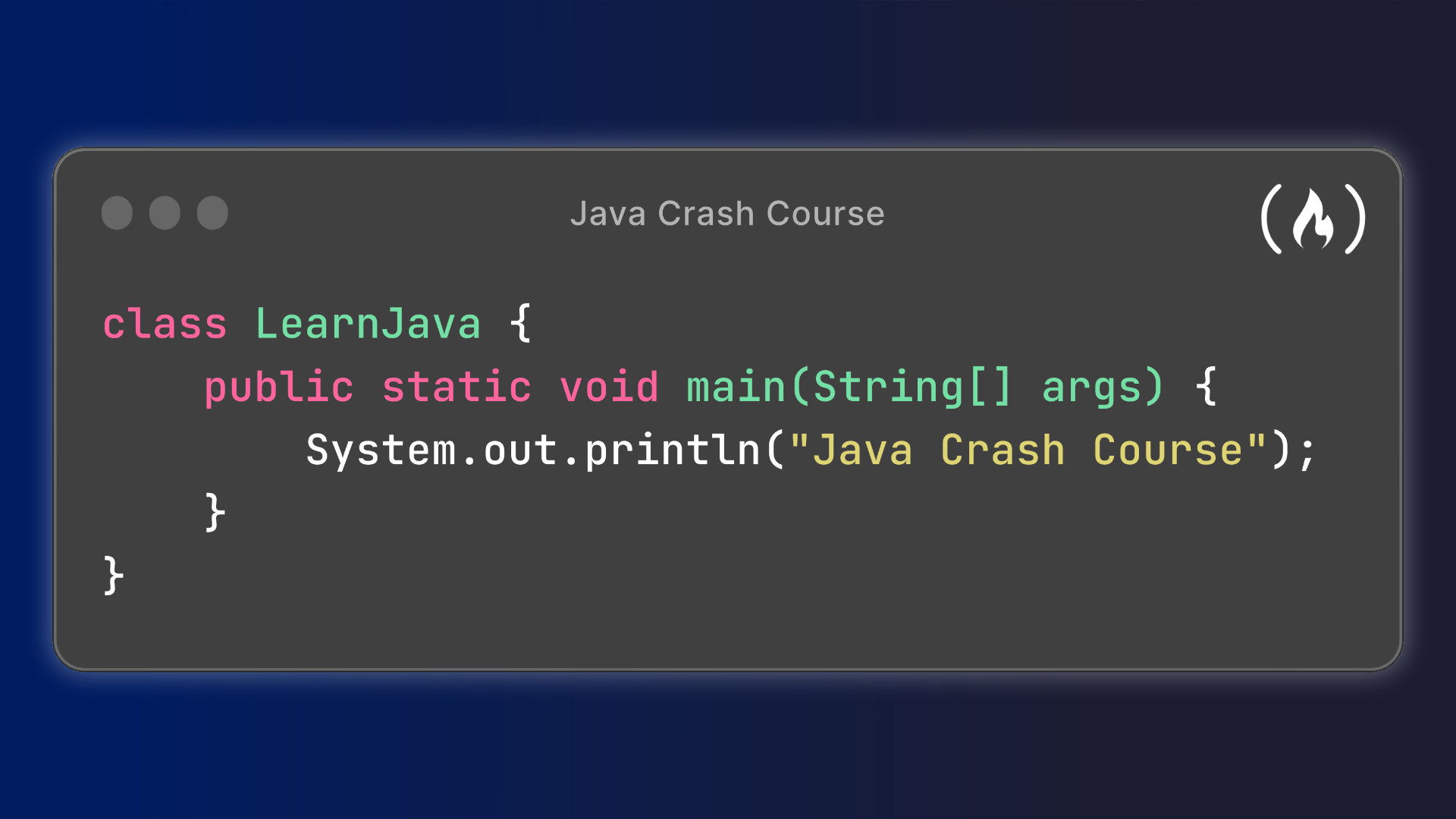
A simple Java program includes a class and a main method, which is the usual entry point for a standalone application:

public class Main {

public static void main(String[] args) {

System.out.println("Hello, Java!");

}

}

Once you can compile and run a basic program, continue with variables, conditionals, loops, and methods. From there, explore classes and objects, then practice applying those ideas to small programs.

Conclusion

GeeksforGeeks can be a helpful resource for learning Java, reviewing core concepts, and practicing programming problems. Pair its tutorials with hands-on coding, careful review, and documentation to build a stronger understanding. With consistent practice, Java learners can progress from simple programs to more substantial applications.


7 Tips to Master Java with GeeksforGeeks

  1. Start with Java basics on GeeksforGeeks.
  2. Practice syntax with small programs.
  3. Study object-oriented programming concepts.
  4. Solve Java coding problems regularly.
  5. Review collections and data structures.
  6. Run examples to understand their output.
  7. Use quizzes to check your progress.

Start with Java basics on GeeksforGeeks.

Start learning Java with the beginner-friendly tutorials on GeeksforGeeks, where you can explore essential concepts such as variables, data types, operators, conditionals, loops, and methods. Work through each topic in order, try the code examples yourself, and experiment with small changes to see how they affect the results. Building a solid foundation in these basics will make it easier to understand object-oriented programming and more advanced Java topics later on.

Practice syntax with small programs.

Practice Java syntax by writing small programs that focus on one concept at a time, such as variables, loops, conditionals, or methods. For example, create a temperature converter or a program that counts from 1 to 10. These short exercises help you remember Java’s rules, spot errors, and build confidence before taking on larger projects. Use GeeksforGeeks examples for guidance, then modify them and experiment with your own solutions.

Study object-oriented programming concepts.

Study object-oriented programming (OOP) concepts to build a strong foundation in Java. Focus on classes and objects, encapsulation, inheritance, polymorphism, and abstraction, and practice using each concept in small programs. GeeksforGeeks offers explanations and examples that can help you understand how these ideas organize code, encourage reuse, and make Java applications easier to maintain.

Solve Java coding problems regularly.

Solve Java coding problems regularly to build confidence and turn concepts into practical skills. Start with exercises on fundamentals such as loops, arrays, and strings, then gradually work toward data structures and algorithms. After solving each problem, review your approach, test edge cases, and compare it with other solutions on GeeksforGeeks to discover clearer or more efficient techniques.

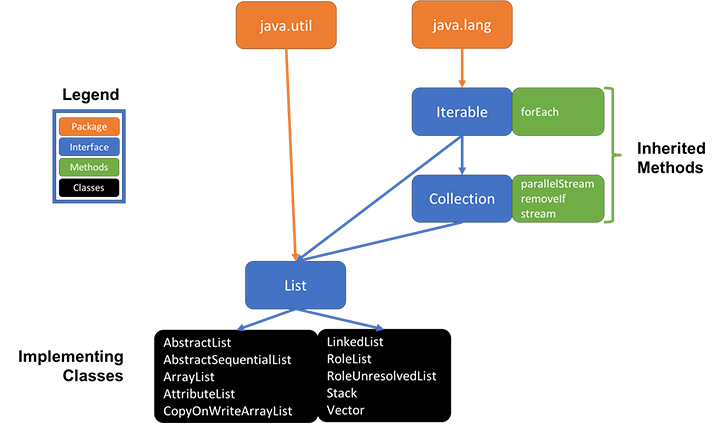
Review collections and data structures.

Reviewing collections and data structures is an important step in learning Java, and GeeksforGeeks offers tutorials and examples to help you understand when to use tools such as lists, sets, maps, queues, and stacks. Focus on how each structure stores and retrieves data, its performance tradeoffs, and the problems it is best suited to solve. Then reinforce your understanding by writing small Java programs and comparing different approaches.

Run examples to understand their output.

When learning Java with GeeksforGeeks, run each example yourself to see how the code works and understand its output. Try changing values or modifying a statement, then run the program again to observe what changes. This hands-on practice helps connect Java concepts to real results, makes errors easier to spot, and builds confidence as you learn.

Use quizzes to check your progress.

Use quizzes on GeeksforGeeks to check your progress as you learn Java. They can help you spot gaps in your understanding of topics such as syntax, object-oriented programming, and collections. After each quiz, review any incorrect answers and revisit the related lessons before trying again. Regular self-checks make it easier to track what you’ve mastered and decide what to study next.

java geeks for geeks

Java Geeks for Geeks: A Guide to Learning Java and Coding Skills

Learning Java with GeeksforGeeks

Java is one of the most widely used programming languages in the world. It powers everything from web applications and enterprise software to Android development and large-scale systems. For people learning Java or looking to sharpen their skills, GeeksforGeeks offers a broad collection of tutorials, explanations, examples, and practice problems.

What Is GeeksforGeeks?

GeeksforGeeks is an online learning resource focused on computer science and programming. Its Java content ranges from introductory lessons to advanced topics, making it useful for beginners, students, and experienced developers reviewing specific concepts.

What You Can Learn

Java learners can explore topics such as:

  • Java fundamentals: variables, data types, operators, control flow, and input and output
  • Object-oriented programming: classes, objects, inheritance, polymorphism, abstraction, and encapsulation
  • Core Java: strings, arrays, collections, exceptions, and file handling
  • Advanced concepts: multithreading, generics, streams, and Java’s concurrency features
  • Problem solving: coding exercises that help develop logic and prepare for technical interviews

Why Use GeeksforGeeks to Study Java?

A key benefit of GeeksforGeeks is the range of material available in one place. A learner can read an explanation, review code examples, and then practice related problems. This makes the site a handy reference when studying a new concept or revisiting a topic.

Many articles also connect Java concepts to broader computer science subjects, including data structures and algorithms. That can be especially useful for students preparing for exams or developers practicing for coding interviews.

How to Make the Most of the Tutorials

Reading tutorials is a useful starting point, but Java is best learned through hands-on practice. Try this approach:

  1. Begin with the fundamentals and write small programs as you go.
  2. Run the examples yourself, then modify them to see how the code behaves.
  3. Practice one concept at a time, such as loops, classes, or collections.
  4. Build a small project, such as a calculator, contact list, or simple text-based game.
  5. Use multiple references when a topic is unclear, and consult official Java documentation for details about the language and its libraries.

A Helpful Resource, Not a Substitute for Practice

GeeksforGeeks can support a Java learning journey, but no tutorial site can replace writing, testing, and debugging code. Some topics may also depend on the Java version or the context of an example, so check that information when applying what you learn.

With consistent practice and a structured learning plan, GeeksforGeeks can be a useful companion for learning Java—from the first “Hello, World!” program to more advanced programming challenges.


Learning Java on GeeksforGeeks: 8 Frequently Asked Questions

  1. What is GeeksforGeeks, and how can it help me learn Java?
  2. Is GeeksforGeeks good for beginners learning Java?
  3. How do I start learning Java on GeeksforGeeks?
  4. Are GeeksforGeeks Java tutorials and courses free?
  5. Does GeeksforGeeks provide Java practice problems and coding exercises?
  6. Can I use GeeksforGeeks to prepare for Java interviews?
  7. What Java topics should I study on GeeksforGeeks?
  8. Are GeeksforGeeks Java examples compatible with the latest Java version?

What is GeeksforGeeks, and how can it help me learn Java?

GeeksforGeeks is an online learning resource with tutorials, code examples, and practice problems covering Java and other computer science topics. It can help you learn Java step by step, from basic syntax and object-oriented programming to collections, data structures, and algorithms. To get the most out of it, try the examples yourself, write your own programs, and practice solving problems as you learn.

Is GeeksforGeeks good for beginners learning Java?

Yes, GeeksforGeeks can be a helpful resource for beginners learning Java. It offers tutorials and code examples covering fundamentals such as variables, loops, methods, and object-oriented programming, along with practice problems to reinforce what you learn. For the best results, work through topics in order, write and run the examples yourself, and build small projects rather than relying on reading alone.

How do I start learning Java on GeeksforGeeks?

To start learning Java on GeeksforGeeks, begin with its Java basics tutorials, covering topics such as variables, data types, operators, and control flow. Work through the lessons in order, try the code examples in your own editor, and practice related problems to reinforce each concept. Once you’re comfortable with the fundamentals, move on to object-oriented programming, collections, and data structures, building small projects along the way to apply what you’ve learned.

Are GeeksforGeeks Java tutorials and courses free?

Many GeeksforGeeks Java tutorials and learning resources are available for free, including articles and coding examples. Some structured courses or premium features may require payment, so check the specific course page for current pricing and access details.

Does GeeksforGeeks provide Java practice problems and coding exercises?

Yes. GeeksforGeeks offers Java practice problems and coding exercises covering topics such as basic syntax, object-oriented programming, data structures, and algorithms. You can use them to apply what you’ve learned, improve your problem-solving skills, and prepare for coding interviews.

Can I use GeeksforGeeks to prepare for Java interviews?

Yes, GeeksforGeeks can be a useful resource for preparing for Java interviews. You can review core Java concepts, practice data structures and algorithms, and work through coding problems commonly used in technical interviews. For the best results, write and test solutions yourself, review the reasoning behind each answer, and supplement your study with mock interviews and questions tailored to the role you’re pursuing.

What Java topics should I study on GeeksforGeeks?

On GeeksforGeeks, start with Java fundamentals such as variables, data types, operators, loops, and methods, then move on to object-oriented programming concepts like classes, inheritance, polymorphism, and encapsulation. Next, study core topics including strings, arrays, collections, exception handling, and file I/O. As you gain confidence, explore multithreading, generics, streams, and Java’s concurrency features, while practicing data structures and algorithms to strengthen your problem-solving skills.

Are GeeksforGeeks Java examples compatible with the latest Java version?

GeeksforGeeks Java examples are generally useful across many Java versions, but compatibility with the latest release can vary by article and feature. Basic syntax and long-established APIs often work without changes, while examples that use newer language features may require a specific Java version. Check the article’s publication date and any version notes, then verify the code with the JDK you plan to use. If an example doesn’t compile, consult the official Java documentation for version-specific changes.

java course for beginners

Java Course for Beginners: Learn the Fundamentals and Build Your First Programs

Java Course for Beginners: A Practical Guide to Getting Started

Java is a popular programming language used to build everything from business applications and web services to Android apps and large-scale software systems. Its clear structure, broad ecosystem, and strong community make it a useful language for people learning to code. A well-designed Java course for beginners can help you move from basic concepts to building programs of your own.

Why Learn Java?

Java is designed to run on many types of computers. Java programs are typically compiled into bytecode, which runs on the Java Virtual Machine (JVM). This approach helps the same program work across different operating systems, provided a compatible JVM is available.

Java is also widely used in professional software development. Learning it can introduce you to essential programming ideas—including variables, loops, methods, and object-oriented programming—that apply to many other languages as well.

What a Beginner Java Course Should Cover

You do not need previous programming experience to begin. A good introductory course explains each idea step by step and gives you opportunities to practice it. Look for a course that includes these core topics:

  • Setting up your tools: Install a Java Development Kit (JDK) and choose a code editor or integrated development environment (IDE).
  • Your first program: Learn how to write, compile, and run a simple Java application.
  • Variables and data types: Store information using types such as int, double, boolean, and String.
  • Operators and expressions: Perform calculations and compare values.
  • Conditionals: Use if, else, and switch statements to make decisions.
  • Loops: Repeat tasks with for and while loops.
  • Methods: Organize code into reusable blocks.
  • Arrays and collections: Work with groups of values.
  • Object-oriented programming: Create classes and objects, and learn about fields, constructors, and methods.
  • Debugging and errors: Read compiler messages, find mistakes, and improve your code.

How to Choose the Right Course

Beginner courses come in many formats, including online lessons, classroom instruction, books, and self-paced tutorials. The best choice depends on how you like to learn and how much time you can set aside. Before enrolling, check that the course:

  • Clearly identifies itself as suitable for beginners.
  • Uses current Java tools and explains how to install them.
  • Includes coding exercises, not just videos or lectures.
  • Builds concepts gradually and explains unfamiliar terms.
  • Offers small projects that let you apply what you have learned.

A course does not have to teach every Java feature at once. A strong foundation in the basics is more valuable than rushing through advanced topics before you are ready.

Practice with Small Projects

Writing code regularly is one of the best ways to make progress. After learning the fundamentals, try projects that are simple enough to finish but flexible enough to expand. For example, you could create:

  • A temperature or unit converter
  • A basic calculator
  • A number-guessing game
  • A to-do list for the command line
  • A program that tracks books, movies, or personal expenses

Start with a basic version, then add features as your skills improve. A number-guessing game, for instance, can begin with a random number and a loop. Later, you can add input validation, a limited number of guesses, and a way to play again.

Tips for Learning Java Successfully

Set a manageable learning schedule. Short, frequent practice sessions often work better than trying to learn everything in one sitting. Type out examples yourself, change them, and observe what happens. When you encounter an error, read the message carefully and test one possible fix at a time.

It is also normal to revisit concepts. Object-oriented programming and other topics may take time to feel comfortable. Keep your early programs, review them later, and notice how your understanding has grown.

What Comes After the Basics?

Once you can write small programs and understand how classes and objects work, you can explore topics such as exception handling, file input and output, generics, testing, and common data structures. Your next steps can depend on your goals. For example, you might study web development, Android development, or backend application development.

Start Building with Java

A Java course for beginners can give you a clear path into programming, but progress comes from applying what you learn. Choose a course with hands-on exercises, practice consistently, and build small projects along the way. With patience and regular effort, you can develop the skills to create useful Java applications and continue learning more advanced programming concepts.


Top FAQs About Starting a Java Course for Beginners

  1. Which is the best Java course for beginners?
  2. How can I learn Java as a beginner?
  3. Is 1 month enough to learn Java?
  4. How do I start studying Java?

Which is the best Java course for beginners?

The best Java course for beginners is one that assumes no prior programming experience, teaches concepts step by step, and gives you plenty of hands-on practice. Look for lessons covering Java basics, problem-solving, and object-oriented programming, along with exercises and small projects that help you apply what you learn. The right choice also depends on your learning style, schedule, and budget, so preview a lesson or two before committing.

How can I learn Java as a beginner?

Beginners can learn Java by starting with the basics: installing the JDK and a code editor, then practicing variables, data types, conditionals, loops, methods, and classes. Follow a structured beginner course with hands-on exercises, and write code regularly rather than only watching lessons. Small projects—such as a calculator or number-guessing game—help reinforce new concepts. When errors come up, read the messages carefully and use them as clues; steady practice is more effective than trying to learn everything at once.

Is 1 month enough to learn Java?

One month is enough to learn Java’s fundamentals if you study consistently and practice regularly, but it’s usually not enough to master the language or become job-ready. In that time, you can learn basic syntax, variables, conditionals, loops, methods, and introductory object-oriented programming, then apply them in small projects. Your progress will depend on your prior experience and the time you can dedicate each day. Continue practicing after the first month to strengthen your skills and explore more advanced topics.

How do I start studying Java?

To start studying Java, install the latest Java Development Kit (JDK) and choose a beginner-friendly editor or IDE, such as IntelliJ IDEA or Visual Studio Code. Then follow a structured introductory course that covers basic syntax, variables, conditionals, loops, methods, and classes. Write and run small programs as you learn—such as a calculator or number-guessing game—and practice regularly. When you encounter errors, read the messages carefully and use them to understand how your code works.

algorithms in java

Mastering Algorithms in Java: A Developer’s Guide

Algorithms in Java

The Power of Algorithms in Java

Algorithms play a crucial role in the world of programming and software development. They are the step-by-step procedures used to solve problems efficiently and effectively. When it comes to implementing algorithms in Java, developers have a powerful tool at their disposal.

Why Use Java for Algorithms?

Java is a popular programming language known for its simplicity, versatility, and platform independence. These characteristics make it an ideal choice for implementing algorithms. With Java’s rich standard library and extensive community support, developers can leverage a wide range of data structures and algorithms to tackle complex problems.

Data Structures in Java

Java provides built-in data structures such as arrays, lists, stacks, queues, trees, and maps that are essential for implementing algorithms. These data structures offer efficient ways to store and manipulate data, enabling developers to optimize the performance of their algorithms.

Sorting and Searching Algorithms

In Java, developers can easily implement various sorting and searching algorithms such as bubble sort, quicksort, merge sort, binary search, and more. These algorithms are fundamental building blocks used in many applications to organize data and retrieve information quickly.

Graph Algorithms

Java also supports graph algorithms like breadth-first search (BFS), depth-first search (DFS), Dijkstra’s algorithm, and minimum spanning tree algorithms. These algorithms are essential for solving problems related to networks, routing, pathfinding, and optimization.

Conclusion

Algorithms form the backbone of computer science and software development. By leveraging the capabilities of Java’s programming language and its rich ecosystem of libraries and tools, developers can implement sophisticated algorithms efficiently. Whether you are working on data analysis, machine learning, or software engineering projects, mastering algorithms in Java is key to unlocking new possibilities.


Top 5 Tips for Mastering Algorithms in Java

  1. Understand the problem thoroughly before choosing an algorithm.
  2. Choose the most efficient algorithm for the specific problem.
  3. Implement algorithms using Java’s built-in data structures and libraries.
  4. Optimize algorithms by reducing time complexity through proper data structures.
  5. Test algorithms rigorously to ensure correctness and efficiency.

Understand the problem thoroughly before choosing an algorithm.

Before diving into implementing algorithms in Java, it is crucial to first understand the problem thoroughly. Choosing the right algorithm requires a clear comprehension of the problem statement, constraints, and desired outcomes. By taking the time to analyze and dissect the problem, developers can make informed decisions on selecting the most appropriate algorithm that will efficiently solve the problem at hand. This initial step of understanding lays a solid foundation for successful algorithm implementation in Java.

Choose the most efficient algorithm for the specific problem.

When working with algorithms in Java, it is essential to choose the most efficient algorithm for the specific problem at hand. By selecting the right algorithm, developers can optimize performance and achieve better results in terms of speed and resource utilization. Understanding the characteristics of different algorithms and their suitability for different types of problems is key to writing efficient and effective code in Java. By carefully evaluating the requirements of the problem and selecting the most appropriate algorithm, developers can enhance the overall performance and scalability of their Java applications.

Implement algorithms using Java’s built-in data structures and libraries.

To optimize algorithm performance in Java, it is recommended to leverage the language’s built-in data structures and libraries. By utilizing Java’s array, list, stack, queue, tree, and map implementations, developers can efficiently store and manipulate data within their algorithms. Additionally, tapping into Java’s extensive standard library and community-contributed libraries provides access to a wide range of pre-built algorithms for sorting, searching, graph traversal, and more. This approach not only streamlines algorithm implementation but also ensures code reliability and scalability.

Optimize algorithms by reducing time complexity through proper data structures.

To optimize algorithms in Java, it is essential to focus on reducing time complexity by selecting and implementing proper data structures. By choosing the most suitable data structures for a specific problem, developers can significantly improve the efficiency of their algorithms. Utilizing data structures like arrays, lists, trees, and maps effectively can help streamline operations and enhance the overall performance of algorithms in Java. Properly designed data structures play a crucial role in minimizing processing time and resource usage, ultimately leading to more efficient and scalable solutions.

Test algorithms rigorously to ensure correctness and efficiency.

To maximize the effectiveness of algorithms in Java, it is essential to rigorously test them to verify both correctness and efficiency. Thorough testing helps identify and rectify any errors or inefficiencies in the algorithm’s implementation, ensuring that it produces accurate results and operates optimally. By conducting comprehensive tests, developers can have confidence in the reliability and performance of their algorithms, ultimately leading to more robust and effective software solutions.

head first java

Dive into Java Programming with ‘Head First Java’: A Beginner’s Guide

Head First Java: A Beginner’s Guide to Java Programming

If you’re looking to dive into the world of Java programming, “Head First Java” is the perfect book to get you started. Written by Kathy Sierra and Bert Bates, this book is designed for beginners who want to learn Java in a fun and engaging way.

What sets “Head First Java” apart from other programming books is its unique approach to teaching. Instead of overwhelming readers with technical jargon and complex concepts, the book uses a conversational and interactive style that makes learning Java feel like a breeze.

The book covers all the essential topics you need to know to become proficient in Java, including object-oriented programming, data structures, GUI programming, and more. Each chapter is filled with real-world examples, exercises, puzzles, and brain teasers that help reinforce your understanding of the material.

One of the highlights of “Head First Java” is its focus on visual learning. The book is packed with illustrations, diagrams, and charts that make complex concepts easy to grasp. Whether you’re a visual learner or someone who struggles with traditional programming books, “Head First Java” caters to all learning styles.

By the time you finish reading “Head First Java,” you’ll have a solid foundation in Java programming and be ready to tackle more advanced topics. Whether you’re looking to build desktop applications, web applications, or Android apps, this book will equip you with the knowledge and skills you need to succeed.

So if you’re ready to embark on your journey into the world of Java programming, pick up a copy of “Head First Java” today and get ready to unlock your full potential as a developer.


Discover Java: Engaging Lessons, Real-World Examples, and Interactive Learning for Beginners

  1. Engaging and interactive writing style makes learning Java fun
  2. Real-world examples help reinforce understanding of Java concepts
  3. Visual learning approach with illustrations and diagrams aids comprehension
  4. Covers essential topics like object-oriented programming and GUI programming
  5. Includes exercises, puzzles, and brain teasers to enhance learning
  6. Provides a solid foundation in Java programming for beginners


7 Drawbacks of ‘Head First Java’: A Beginner’s Guide with Limitations

  1. May not cover advanced Java topics in depth
  2. Focuses more on beginner-level concepts
  3. Some readers may find the writing style too casual or quirky
  4. Exercises and puzzles may not appeal to all learners
  5. Not a comprehensive reference guide for Java programming
  6. Limited coverage of specific Java frameworks or libraries
  7. Could benefit from more real-world project examples

Engaging and interactive writing style makes learning Java fun

The engaging and interactive writing style of “Head First Java” transforms the learning experience into a fun and enjoyable journey. By presenting complex Java concepts in a conversational tone and incorporating interactive elements like puzzles and exercises, the book effectively captivates readers’ attention and keeps them actively engaged throughout the learning process. This unique approach not only makes learning Java more enjoyable but also enhances comprehension and retention, making it easier for beginners to grasp fundamental programming principles in a dynamic and entertaining way.

Real-world examples help reinforce understanding of Java concepts

Real-world examples play a crucial role in reinforcing the understanding of Java concepts in “Head First Java.” By illustrating how Java is used in practical scenarios, readers can see the relevance and application of the concepts they are learning. These examples provide valuable insights into how Java programming is applied in the real world, making the learning experience more engaging and impactful. Through hands-on exposure to real-world situations, readers can better grasp the intricacies of Java programming and gain a deeper understanding of how to utilize these concepts effectively in their own projects.

Visual learning approach with illustrations and diagrams aids comprehension

The visual learning approach employed in “Head First Java,” complete with illustrations and diagrams, significantly enhances comprehension for readers. By presenting complex programming concepts in a visual format, the book makes it easier for learners to grasp and retain information. The use of visuals not only breaks down abstract ideas into tangible representations but also caters to different learning styles, making the learning experience more engaging and effective.

Covers essential topics like object-oriented programming and GUI programming

“Head First Java” excels in covering essential topics such as object-oriented programming and GUI programming. By providing a comprehensive understanding of these fundamental concepts, the book equips readers with the necessary knowledge and skills to develop robust Java applications. The clear explanations and practical examples make learning object-oriented programming principles and creating graphical user interfaces accessible and engaging for beginners and experienced programmers alike.

Includes exercises, puzzles, and brain teasers to enhance learning

One of the standout features of “Head First Java” is its inclusion of exercises, puzzles, and brain teasers that are designed to enhance the learning experience. By actively engaging readers in hands-on activities and challenges, the book not only reinforces key concepts but also encourages critical thinking and problem-solving skills. These interactive elements make learning Java fun and effective, ensuring that readers can apply their knowledge in practical scenarios.

Provides a solid foundation in Java programming for beginners

For beginners embarking on their Java programming journey, “Head First Java” shines by providing a solid foundation in the language. Through its engaging and interactive approach, the book effectively introduces fundamental Java concepts, ensuring that newcomers grasp essential programming principles with ease. By focusing on building a strong base of knowledge, “Head First Java” equips beginners with the confidence and skills needed to navigate more advanced topics in Java development successfully.

May not cover advanced Java topics in depth

One potential drawback of “Head First Java” is that it may not delve deeply into advanced Java topics. While the book provides a solid foundation for beginners and covers essential concepts effectively, readers looking for in-depth discussions on more complex Java features may find the coverage lacking. As a result, those seeking comprehensive knowledge of advanced Java programming techniques may need to supplement their learning with additional resources to further expand their skills beyond the scope of the book.

Focuses more on beginner-level concepts

While “Head First Java” is praised for its beginner-friendly approach, one potential drawback is its heavy focus on introductory concepts. Advanced users or experienced programmers may find that the book spends a significant amount of time covering basic Java topics, which could be repetitive or less engaging for those looking to deepen their knowledge of the language. However, for individuals new to programming or Java specifically, this emphasis on foundational principles can be beneficial in building a strong understanding of the language from the ground up.

Some readers may find the writing style too casual or quirky

Some readers may find the writing style of “Head First Java” too casual or quirky for their taste. While the conversational tone and interactive approach can make learning Java more engaging for many, others who prefer a more formal or traditional style of technical writing may find it distracting. However, it’s important to note that the unique style of “Head First Java” is intentional and aims to make complex programming concepts more accessible and enjoyable for a broader audience.

Exercises and puzzles may not appeal to all learners

While “Head First Java” excels in its interactive and engaging approach to teaching programming, one potential downside is that the exercises and puzzles included in the book may not appeal to all learners. Some individuals may prefer a more traditional or structured learning format and could find the interactive elements distracting or less effective for their learning style. However, for those who enjoy hands-on activities and challenges, the exercises in “Head First Java” can be a valuable tool for reinforcing concepts and enhancing understanding of Java programming principles.

Not a comprehensive reference guide for Java programming

One con of “Head First Java” is that it is not a comprehensive reference guide for Java programming. While the book does an excellent job of introducing beginners to Java concepts in an engaging manner, it may not cover every advanced topic or detail that experienced programmers may be looking for. As a result, readers who are seeking an in-depth and exhaustive reference guide for Java programming may find “Head First Java” lacking in certain areas. It is important to supplement your learning with additional resources if you require a more comprehensive understanding of Java programming beyond the scope of this book.

Limited coverage of specific Java frameworks or libraries

One potential drawback of “Head First Java” is its limited coverage of specific Java frameworks or libraries. While the book provides a solid foundation in Java programming fundamentals, it may not delve deeply into the intricacies of popular frameworks or libraries used in real-world Java development. This could be a limitation for readers looking to specialize in a particular framework or seeking detailed guidance on incorporating specific tools into their Java projects. Supplementing the knowledge gained from “Head First Java” with additional resources focused on these frameworks or libraries may be necessary for those aiming to expand their expertise in specialized areas of Java development.

Could benefit from more real-world project examples

One potential drawback of “Head First Java” is that it could benefit from more real-world project examples to further reinforce the concepts learned throughout the book. While the exercises and puzzles provided are valuable for understanding Java fundamentals, practical application through hands-on projects can enhance the learning experience. Including more real-world project examples would not only help readers see how the concepts are applied in practice but also prepare them for real-world programming scenarios they may encounter in their careers.