
cfchris.com

Loading

sun java

Exploring the Timeless Legacy of Sun Java in Modern Technology

The Legacy of Sun Java

The Legacy of Sun Java

Sun Java, formerly known as Java, is a powerful and versatile programming language that has left a lasting impact on the world of technology. Developed by Sun Microsystems in the mid-1990s, Java was designed to be platform-independent, allowing developers to write code that could run on any device with a Java Virtual Machine (JVM).

One of the key strengths of Sun Java is its “write once, run anywhere” philosophy. This feature revolutionized software development by enabling programmers to create applications that could be deployed on various operating systems without modification. This portability made Java an ideal choice for building enterprise-level applications and web services.

In addition to its cross-platform compatibility, Sun Java gained popularity for its robust security features and scalability. The language’s strict syntax rules and built-in memory management system helped developers create stable and secure applications.

Over the years, Sun Java evolved to include a rich set of libraries and frameworks that simplified complex tasks such as networking, database access, and user interface design. These tools empowered developers to build sophisticated applications with ease.

Despite Oracle’s acquisition of Sun Microsystems in 2010 and subsequent rebranding of the language as Oracle Java, the legacy of Sun Java lives on in countless software systems and applications around the world. From mobile apps to enterprise solutions, Java continues to be a cornerstone of modern software development.

As technology advances and new programming languages emerge, the influence of Sun Java remains undeniable. Its elegant design principles, performance optimization techniques, and vast ecosystem continue to inspire developers to push the boundaries of what is possible in the digital realm.


9 Advantages of Sun Java: A Platform-Independent Powerhouse for Secure and Scalable Software Development

  1. Platform-independent
  2. Write once, run anywhere philosophy simplifies cross-platform development.
  3. Robust security features ensure secure application development.
  4. Scalable for building applications of varying sizes and complexities.
  5. Rich set of libraries and frameworks for easier development.
  6. Strict syntax rules help maintain code quality and consistency.
  7. Built-in memory management system reduces the risk of memory leaks.
  8. Empowers developers to create stable and reliable software solutions.
  9. Continues to be a cornerstone of modern software development.


Exploring the Drawbacks of Java: Performance, Complexity, and Licensing Challenges

  1. Java applications can be memory-intensive, leading to potential performance issues on resource-constrained devices.
  2. Java’s platform independence comes at the cost of slower execution speed compared to natively compiled languages.
  3. The Java Virtual Machine (JVM) startup time can be relatively slow, affecting application launch speed.
  4. Managing dependencies in Java projects can be complex and may lead to version conflicts and compatibility issues.
  5. Java’s verbose syntax can make code longer and harder to read compared to more concise languages.
  6. Oracle’s licensing changes for commercial use of Java have raised concerns about cost implications for businesses.

Platform-independent

Sun Java’s platform independence is a remarkable pro that allows applications written in Java to run seamlessly on any device equipped with a Java Virtual Machine (JVM). This feature eliminates the need for developers to create separate versions of their software for different operating systems, making Java an ideal choice for building versatile and widely compatible applications. The ability to write code once and deploy it across various platforms not only saves time and effort but also ensures a consistent user experience across different devices, highlighting the unparalleled flexibility and convenience offered by Sun Java.

Write once, run anywhere philosophy simplifies cross-platform development.

The “write once, run anywhere” philosophy of Sun Java simplifies cross-platform development by allowing programmers to write code that can be executed on different operating systems without the need for extensive modifications. This approach streamlines the development process and reduces the complexity of creating applications for multiple platforms, ultimately saving time and effort for developers. Sun Java’s platform independence empowers developers to focus on building robust and feature-rich applications while ensuring compatibility across a wide range of devices and systems.

Robust security features ensure secure application development.

Robust security features in Sun Java play a crucial role in ensuring secure application development. By incorporating stringent security measures, Java provides developers with the tools needed to create applications that are resilient against potential cyber threats. From encryption capabilities to secure coding practices, Sun Java empowers developers to build applications with a strong defense against vulnerabilities, safeguarding sensitive data and enhancing overall cybersecurity posture. This focus on security not only protects users and their information but also instills confidence in the reliability and integrity of Java-based software solutions.

Scalable for building applications of varying sizes and complexities.

Sun Java’s scalability makes it a standout choice for developers looking to build applications of varying sizes and complexities. Whether creating a small utility tool or a large-scale enterprise system, Sun Java’s architecture allows for seamless expansion and adaptation to meet the specific needs of any project. This flexibility not only streamlines the development process but also ensures that applications remain efficient and performant as they grow in scope and functionality.

Rich set of libraries and frameworks for easier development.

Sun Java offers a significant advantage with its rich set of libraries and frameworks, which greatly facilitate development processes. These extensive resources provide developers with pre-built components and tools that streamline the creation of applications, saving time and effort. By leveraging these libraries and frameworks, developers can focus on implementing core functionalities rather than reinventing the wheel, resulting in faster development cycles and higher-quality software solutions. The availability of such a comprehensive ecosystem within Sun Java contributes to increased productivity and efficiency in software development projects.

Strict syntax rules help maintain code quality and consistency.

Strict syntax rules in Sun Java play a crucial role in maintaining code quality and consistency. By enforcing a standardized structure and format for writing code, developers can easily read, understand, and debug Java programs. This adherence to strict syntax rules promotes cleaner, more organized code, reducing the likelihood of errors and improving overall code quality. Consistent coding practices also facilitate collaboration among team members, ensuring that everyone follows the same conventions and standards when working on a project. Ultimately, the emphasis on maintaining code quality through strict syntax rules in Sun Java contributes to the reliability and efficiency of software development processes.

Built-in memory management system reduces the risk of memory leaks.

The built-in memory management system in Sun Java is a significant advantage that helps reduce the risk of memory leaks. By automatically handling memory allocation and deallocation, Java’s memory management system prevents common programming errors that can lead to memory leaks, where unused memory is not released properly. This feature enhances the reliability and stability of Java applications, allowing developers to focus on creating robust software without the need to manually manage memory resources.

Empowers developers to create stable and reliable software solutions.

Sun Java empowers developers to create stable and reliable software solutions by providing a robust set of tools and features that prioritize security, scalability, and performance. With its strict syntax rules, built-in memory management system, and extensive libraries, Sun Java enables developers to write code that is less prone to errors and vulnerabilities. By offering a solid foundation for building applications, Sun Java instills confidence in developers that their software will operate smoothly and consistently across different platforms, ultimately leading to the delivery of high-quality solutions to end users.

Continues to be a cornerstone of modern software development.

Sun Java’s enduring strength as a cornerstone of modern software development lies in its unparalleled versatility and reliability. With its platform independence, robust security features, and extensive libraries, Java remains a go-to choice for developers seeking to build scalable and efficient applications across diverse environments. Its widespread adoption and proven track record make it a trusted tool for creating everything from enterprise solutions to mobile apps, ensuring that Sun Java’s legacy continues to shape the landscape of software development well into the future.

Java applications can be memory-intensive, leading to potential performance issues on resource-constrained devices.

Java applications have been criticized for their memory-intensive nature, which can result in performance issues on devices with limited resources. Due to the Java Virtual Machine’s memory management system and the overhead associated with running Java applications, resource-constrained devices may struggle to allocate sufficient memory for optimal performance. This drawback has prompted developers to carefully consider the memory footprint of their Java applications and implement efficient coding practices to mitigate potential performance challenges on devices with constrained resources.

Java’s platform independence comes at the cost of slower execution speed compared to natively compiled languages.

Java’s platform independence, a hallmark feature of the language, does come with a trade-off in terms of execution speed. Due to its reliance on the Java Virtual Machine (JVM) for running code, Java applications can be slower in execution compared to programs written in natively compiled languages. The JVM’s intermediate step of translating Java bytecode into machine code at runtime can introduce overhead that impacts performance, especially in scenarios where high-speed processing is crucial. Developers often need to optimize their Java code and leverage advanced techniques to mitigate the performance gap when compared to natively compiled languages.

The Java Virtual Machine (JVM) startup time can be relatively slow, affecting application launch speed.

One notable drawback of Sun Java is the relatively slow startup time of the Java Virtual Machine (JVM), which can impact the speed at which applications launch. Due to the JVM’s initialization process and the time required to load and execute bytecode, users may experience delays when starting Java-based applications. This issue can be frustrating for both developers and end-users who value quick and seamless application performance. Efforts have been made to optimize JVM startup times, but this remains a challenge that developers need to address when working with Java applications.

Managing dependencies in Java projects can be complex and may lead to version conflicts and compatibility issues.

Managing dependencies in Java projects can be a challenging aspect of development, as it often involves dealing with a complex ecosystem of libraries and frameworks. One common con of Sun Java is the potential for version conflicts and compatibility issues that can arise when integrating multiple dependencies into a project. Ensuring that all components work seamlessly together and are compatible with the project’s requirements can be time-consuming and require careful attention to detail. Failure to address these issues effectively may result in runtime errors, performance issues, or even project failures.

Java’s verbose syntax can make code longer and harder to read compared to more concise languages.

Java’s verbose syntax can be a significant drawback for developers, as it often leads to longer and more complex code compared to more concise programming languages. This verbosity can make Java code harder to read and maintain, increasing the risk of errors and reducing overall code efficiency. Developers may find themselves spending more time writing boilerplate code in Java, detracting from the clarity and conciseness that other languages offer. Despite its robust features and widespread adoption, the verbosity of Java’s syntax remains a notable con that developers must navigate when working with the language.

Oracle’s licensing changes for commercial use of Java have raised concerns about cost implications for businesses.

The con of Oracle’s licensing changes for commercial use of Java has raised significant concerns within the business community regarding potential cost implications. As Oracle transitioned from Sun Java to Oracle Java, the new licensing model introduced by Oracle has left many businesses worried about increased expenses associated with using Java for their commercial applications. The shift in licensing terms has prompted organizations to reevaluate their software development strategies and budget allocations, as they navigate the financial impact of these changes on their operations.
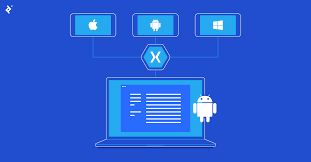

the xamarin cross platform development software is owned by

Xamarin: The Cross-Platform Development Software Owned by Microsoft

Xamarin, a popular cross-platform development software, is owned by Microsoft. The acquisition of Xamarin by Microsoft in 2016 marked a significant milestone in the world of mobile app development. Xamarin allows developers to create native applications for iOS, Android, and Windows using a single codebase, making it a valuable tool for businesses and individual developers alike.

With Xamarin, developers can leverage their existing C# skills and codebase to build high-performance apps that offer a native user experience on each platform. This not only streamlines the development process but also ensures consistency across different operating systems.

Microsoft’s ownership of Xamarin has further strengthened its integration with Visual Studio, providing developers with a comprehensive suite of tools for building, testing, and deploying cross-platform applications. The collaboration between Microsoft and Xamarin continues to drive innovation in the realm of mobile app development, empowering developers to create cutting-edge solutions for a diverse range of devices.

Overall, Xamarin’s ownership by Microsoft underscores the commitment to empowering developers with powerful tools and resources to succeed in today’s competitive app market.


Frequently Asked Questions About Xamarin Cross-Platform Development and Its Ownership

  1. What is Xamarin cross-platform?
  2. Is Xamarin supported by Microsoft?
  3. Is Xamarin a .NET framework?
  4. Is Xamarin a Microsoft product?
  5. Which companies uses Xamarin?

What is Xamarin cross-platform?

Xamarin cross-platform development refers to the practice of using Xamarin, a software owned by Microsoft, to build mobile applications that can run on multiple operating systems such as iOS, Android, and Windows. By utilizing Xamarin’s technology, developers can write code once in C# and deploy it across different platforms, saving time and effort compared to developing separate native apps for each operating system. Xamarin ensures that the final applications maintain a native look and feel on each platform, providing users with a seamless experience regardless of the device they are using. This approach to cross-platform development streamlines the process for developers and allows them to reach a wider audience with their apps.

Is Xamarin supported by Microsoft?

Yes, Xamarin is supported by Microsoft. Microsoft acquired Xamarin in 2016, integrating it into its suite of development tools and services. This acquisition has strengthened Xamarin’s capabilities and its integration with Microsoft’s ecosystem, particularly Visual Studio. As a result, developers using Xamarin can benefit from the support and resources provided by Microsoft, ensuring that they have access to the latest updates, features, and technical assistance to create high-quality cross-platform applications efficiently.

Is Xamarin a .NET framework?

Xamarin is closely associated with the .NET framework, as it allows developers to use C# and .NET to build cross-platform applications. Xamarin extends the capabilities of the .NET framework by enabling developers to create native mobile apps for iOS, Android, and Windows platforms using a shared codebase. This integration with .NET framework not only simplifies the development process but also ensures that developers can leverage their existing skills and knowledge to create high-quality, performant apps across multiple platforms.

Is Xamarin a Microsoft product?

Yes, Xamarin is indeed a Microsoft product. Microsoft acquired Xamarin in 2016, a move that solidified its position in the cross-platform development space. By bringing Xamarin under its umbrella, Microsoft has been able to enhance its offerings for developers looking to create native applications for multiple platforms using a single codebase. The integration of Xamarin with Microsoft’s existing tools and services has further streamlined the development process and provided developers with a comprehensive solution for building high-quality cross-platform apps.

Which companies uses Xamarin?

Several prominent companies across various industries utilize Xamarin for their cross-platform development needs. Companies such as UPS, Alaska Airlines, and Siemens have leveraged Xamarin to create robust and high-performing mobile applications that cater to their specific business requirements. By adopting Xamarin, these companies benefit from the ability to streamline their development processes, reduce time-to-market, and maintain a consistent user experience across multiple platforms. The versatility and efficiency of Xamarin make it an attractive choice for organizations looking to deliver innovative and seamless mobile solutions to their customers while maximizing development resources.

app coding software

Mastering App Coding Software: A Developer’s Guide to Efficient Development

The Power of App Coding Software

The Power of App Coding Software

In today’s digital age, the demand for mobile applications is ever-growing. Whether it’s for business, entertainment, education, or communication, apps have become an integral part of our daily lives. Behind every successful app lies a robust codebase created using specialized tools known as app coding software.

What is App Coding Software?

App coding software, also known as Integrated Development Environments (IDEs), are powerful tools that streamline the app development process. These software packages provide developers with a comprehensive set of features to write, test, and debug code efficiently.

Key Features of App Coding Software

Some key features of app coding software include:

  • Code Editor: A feature-rich text editor that provides syntax highlighting, auto-completion, and code navigation functionalities.
  • Debugger: Allows developers to identify and fix bugs in their code by stepping through it line by line.
  • Version Control: Integration with version control systems like Git for managing code changes and collaboration among team members.
  • Build Automation: Tools for automating the build process to compile code into executable applications.
  • Testing Frameworks: Support for testing frameworks to ensure the reliability and functionality of the developed apps.

The Benefits of Using App Coding Software

Utilizing app coding software offers several benefits to developers and organizations, including:

  • Increased Productivity: IDEs streamline the development process, allowing developers to write code faster and more efficiently.
  • Better Code Quality: Features like syntax checking and debugging tools help identify errors early in the development cycle, leading to higher-quality code.
  • Cross-Platform Development: Many IDEs support multiple platforms, enabling developers to create apps for various operating systems using a single tool.
  • Community Support: Most app coding software have active communities where developers can seek help, share knowledge, and collaborate on projects.

In Conclusion

The use of app coding software is essential for modern app development. By leveraging these powerful tools, developers can create feature-rich applications efficiently while maintaining high standards of quality and performance. Whether you’re a seasoned developer or just starting in the field, investing in a reliable IDE can significantly enhance your app development journey.


Top FAQs About Choosing the Best App Coding Software and Development Tools

  1. Which platform is best for app development?
  2. What is the best application software?
  3. What is the best tool for app development?
  4. How can I make app by coding?
  5. How do I code an app?
  6. Can I create my own app?

Which platform is best for app development?

When it comes to app development, the question of which platform is best often arises. The choice of platform depends on various factors such as the target audience, budget, features required, and development timeline. For native app development, platforms like iOS and Android offer unique advantages in terms of performance and user experience. Cross-platform frameworks like React Native and Flutter are popular choices for building apps that work on multiple platforms with a single codebase. Ultimately, the best platform for app development varies from project to project, and it’s essential to consider all factors carefully before making a decision.

What is the best application software?

When it comes to determining the best application software, the answer can vary depending on individual needs and preferences. The term “best” is subjective and can be influenced by factors such as functionality, user-friendliness, performance, cost-effectiveness, and compatibility with specific platforms. It’s essential for users to evaluate their requirements carefully and consider factors like intended use, features needed, scalability, and support options before selecting the most suitable application software for their needs. Conducting thorough research, reading reviews, and seeking recommendations from trusted sources can help in making an informed decision when choosing the best application software for a particular purpose.

What is the best tool for app development?

When it comes to app development, the question of the best tool is a common one among developers. The choice of the best tool for app development often depends on various factors such as the specific requirements of the project, the developer’s familiarity with the tool, and the target platform for the app. Some popular tools for app development include Android Studio for Android apps, Xcode for iOS apps, Visual Studio for cross-platform development, and React Native for building native-like apps using JavaScript. Ultimately, the best tool for app development is subjective and varies based on individual preferences and project needs. It’s essential to explore different tools, consider their features and capabilities, and choose one that aligns best with your development goals.

How can I make app by coding?

To create an app through coding, you can start by learning a programming language commonly used for app development, such as Java, Swift, or JavaScript. Once you have a good grasp of the language, you can use an Integrated Development Environment (IDE) to write and test your code. Begin by outlining the features and functionality you want your app to have, then start coding each component accordingly. It’s essential to follow best practices in coding and regularly test your app to ensure it functions as intended. Don’t hesitate to seek help from online resources, tutorials, and communities to guide you through the app development process. With dedication and practice, you can bring your app idea to life through coding.

How do I code an app?

When it comes to coding an app, the process typically involves several key steps. First, you need to have a clear understanding of the app’s purpose and target audience. Next, you will need to choose the appropriate app coding software or Integrated Development Environment (IDE) that best suits your needs. Once you have set up your development environment, you can start writing code using programming languages like Java, Swift, or JavaScript, depending on the platform you are targeting. It is essential to follow best practices in coding, such as organizing your code into manageable modules and conducting thorough testing to ensure the app functions as intended. Continuous learning and staying updated with the latest trends in app development are also crucial for creating successful and innovative apps.

Can I create my own app?

The frequently asked question, “Can I create my own app?” is a common query among individuals interested in app development. The answer is a resounding yes! With the availability of user-friendly app coding software and resources, anyone with a passion for creating apps can embark on their journey to develop their own applications. Whether you have a unique idea for a mobile app or simply want to learn the ropes of app development, there are ample opportunities and tools available to help you bring your vision to life. By leveraging these resources and dedicating time to learning and practicing app coding, you can certainly create your own app and explore the exciting world of mobile application development.

android app development software

Exploring Top Android App Development Software Tools for Innovative Apps

The Best Android App Development Software for Creating Innovative Apps

The Best Android App Development Software for Creating Innovative Apps

Android app development has become a crucial aspect of the digital world, with millions of apps available on the Google Play Store. To create innovative and user-friendly apps, developers rely on various software tools that streamline the development process. Here are some of the best Android app development software tools that can help you bring your app ideas to life:

Android Studio

Android Studio is the official Integrated Development Environment (IDE) for Android app development. It offers a comprehensive set of tools for designing, coding, testing, and debugging Android apps. With features like code completion, visual layout editor, and built-in emulators, Android Studio is a favorite among developers.

Xamarin

Xamarin is a cross-platform development tool that allows developers to create native Android apps using C# and .NET. It provides a single codebase that can be shared across multiple platforms, saving time and effort in app development. Xamarin also offers excellent performance and native user interface design.

Unity

Unity is a popular game development platform that can also be used to create interactive 3D and 2D apps for Android. With its easy-to-use interface and powerful graphics engine, Unity is ideal for developing visually appealing and engaging apps. It supports multiple programming languages like C# and JavaScript.

IntelliJ IDEA

IntelliJ IDEA is another powerful IDE that supports Android app development through plugins like Android Studio Plugin. It offers advanced code analysis tools, intelligent code completion, and seamless integration with version control systems. IntelliJ IDEA is known for its high performance and developer-friendly features.

React Native

React Native is a JavaScript framework for building cross-platform mobile apps, including Android apps. Developers can write code once and deploy it on both iOS and Android platforms, reducing development time significantly. React Native provides a rich set of components and libraries for creating dynamic mobile applications.

These are just a few examples of the best Android app development software available in the market today. Each tool has its unique features and advantages, catering to different needs and preferences of developers. By choosing the right software tool based on your project requirements, you can create innovative and successful Android apps that stand out in the competitive app market.


Top 6 Advantages of Android App Development Software

  1. 1. Wide Variety of Tools
  2. 2. Cross-Platform Compatibility
  3. 3. Rich Libraries and Frameworks
  4. 4. Robust Testing Capabilities
  5. 5. Community Support
  6. 6. Regular Updates and Improvements


Challenges in Android App Development: Navigating Learning Curves, Fragmentation, and Performance Optimization

  1. Steep Learning Curve
  2. Fragmentation
  3. Performance Optimization

1. Wide Variety of Tools

Android app development software stands out for its wide variety of tools that cater to developers’ diverse needs. From design to testing, these tools are designed to streamline the development process and boost productivity. Whether developers are looking for code editors, emulators, debugging tools, or performance optimization utilities, the vast array of tools available ensures that every aspect of app development is covered. This abundance of resources empowers developers to create high-quality Android apps efficiently and effectively.

2. Cross-Platform Compatibility

One significant advantage of Android app development software is its cross-platform compatibility feature. With many Android app development tools supporting cross-platform development, developers can create apps that run on multiple operating systems, expanding their reach and user base. This capability not only saves time and effort by enabling the reuse of code across different platforms but also ensures a consistent user experience across various devices, making it a valuable asset for developers looking to maximize the impact of their apps.

3. Rich Libraries and Frameworks

One significant advantage of Android app development software is the availability of rich libraries and frameworks. These tools offer developers access to a wide range of pre-built components and functionalities that can simplify coding tasks and accelerate the app development process. By leveraging these libraries and frameworks, developers can focus more on implementing unique features and user experiences, rather than reinventing the wheel with repetitive coding tasks. This not only enhances productivity but also enables developers to create high-quality apps efficiently.

4. Robust Testing Capabilities

One significant advantage of Android app development software is its robust testing capabilities. These features enable developers to thoroughly test their apps for quality and performance before deploying them to users. By utilizing these testing tools, developers can identify and fix any potential issues or bugs, resulting in a smoother and more reliable user experience. This proactive approach to testing ultimately leads to higher-quality apps that meet user expectations and contribute to the overall success of the application.

5. Community Support

Developers utilizing Android app development software enjoy the advantage of robust community support. These tools foster active online communities where developers can seek assistance, exchange knowledge, and engage in collaborative efforts with like-minded individuals in the industry. This communal environment not only provides valuable resources for troubleshooting and problem-solving but also promotes continuous learning and networking opportunities, enhancing the overall development experience for app creators.

6. Regular Updates and Improvements

Android app development software offers the benefit of regular updates and improvements, ensuring that developers have access to the latest features, enhancements, and bug fixes. By staying current with evolving technologies, developers can create cutting-edge apps that meet the demands of users and stay competitive in the dynamic app market. The continuous updates also help in enhancing the overall performance and functionality of the development tools, making the app development process smoother and more efficient.

Steep Learning Curve

Some Android app development software tools present a significant con in the form of a steep learning curve. Developers using these tools may find themselves needing to dedicate considerable time and effort to fully grasp and master the platform. The complexity of the software can pose challenges for beginners or those transitioning from other development environments, potentially slowing down the app development process and requiring additional resources for training and skill-building.

Fragmentation

Fragmentation in the Android ecosystem poses a significant challenge for developers due to the diverse range of devices running different versions of the operating system. This variation can result in compatibility issues during app development, as developers need to ensure that their apps function seamlessly across multiple devices with varying specifications and OS versions. Managing fragmentation requires extra effort and resources to test and optimize apps for a wide array of devices, impacting the overall development process and potentially affecting user experience.

Performance Optimization

Performance optimization in Android app development poses a significant challenge due to the need to ensure optimal performance on a diverse array of Android devices. Developers face the task of testing and optimizing their apps for various hardware configurations, which can vary greatly in terms of processing power, memory, and screen size. This variability makes it complex to deliver consistent performance across all devices, requiring developers to invest additional time and effort in fine-tuning their apps to provide a seamless user experience regardless of the device being used.