cfchris.com

Loading

java code compiler

Understanding the Role of a Java Code Compiler in Software Development

The Role of a Java Code Compiler

The Role of a Java Code Compiler

Java, a popular programming language used for developing a wide range of applications, relies on a crucial component known as the Java code compiler. This tool plays a vital role in the software development process by translating human-readable Java code into machine-readable instructions that can be executed by the Java Virtual Machine (JVM).

How Does a Java Code Compiler Work?

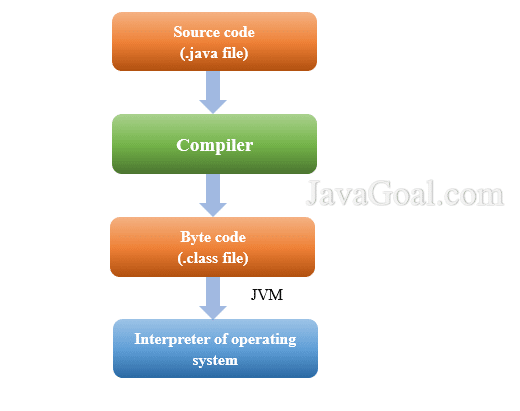
When a developer writes Java code, they use a text editor to create files with the “.java” extension. These files contain the source code that defines the logic and behavior of the application. However, computers cannot directly understand this source code; it needs to be converted into bytecode, which is a set of instructions that the JVM can interpret.

This is where the Java code compiler comes into play. The compiler reads the source code written by the developer and checks it for syntax errors and other issues. If no errors are found, the compiler translates the source code into bytecode files with a “.class” extension.

Benefits of Using a Java Code Compiler

Using a Java code compiler offers several advantages to developers:

  • Error Detection: The compiler helps identify syntax errors and other issues in the code before it is executed.
  • Efficient Execution: By converting source code into bytecode, the compiler optimizes performance and ensures efficient execution on different platforms.
  • Platform Independence: The bytecode generated by the compiler can run on any system with a JVM installed, making Java applications platform-independent.
  • Enhanced Security: Compiling code adds an extra layer of security by preventing direct access to the source code.

In Conclusion

The Java code compiler is an essential tool in the development of Java applications. It simplifies the process of converting human-readable source code into machine-readable bytecode, enabling developers to create robust and efficient software solutions. By leveraging the capabilities of a reliable compiler, developers can streamline their development workflow and build high-quality applications that meet user requirements.


Understanding Java Code Compilers: FAQs and Resources

  1. What is a Java code compiler?
  2. How does a Java code compiler work?
  3. What are the benefits of using a Java code compiler?
  4. Which tools are commonly used as Java code compilers?
  5. Can you recommend any resources for learning more about Java code compilation?

What is a Java code compiler?

A Java code compiler is a fundamental component in the Java programming language that translates human-readable Java source code into machine-readable bytecode. It plays a crucial role in the software development process by checking the syntax of the code, detecting errors, and converting it into executable instructions for the Java Virtual Machine (JVM). The compiler ensures that the code is correctly structured and free of mistakes before it is executed, ultimately facilitating the creation of robust and efficient Java applications across different platforms.

How does a Java code compiler work?

When exploring the question “How does a Java code compiler work?” it’s important to understand that the Java code compiler plays a crucial role in software development. Essentially, the Java compiler reads the human-readable Java source code written by developers and translates it into bytecode, which is a set of instructions that the Java Virtual Machine (JVM) can execute. This process involves checking the syntax of the code for errors and converting it into a format that can be understood and executed by computers. By performing this translation, the Java code compiler facilitates efficient execution of Java applications on various platforms while also providing error detection and optimization benefits to developers.

What are the benefits of using a Java code compiler?

When considering the benefits of using a Java code compiler, developers can appreciate its crucial role in the software development process. The compiler aids in error detection by identifying syntax issues and other errors before execution, ensuring a smoother coding experience. Additionally, it optimizes performance by converting source code into bytecode, making Java applications efficient and platform-independent. The enhanced security provided by compiling code adds an extra layer of protection to intellectual property, making it a valuable tool for developers seeking reliable and secure software solutions.

Which tools are commonly used as Java code compilers?

In the realm of Java programming, several tools are commonly utilized as Java code compilers to translate source code into bytecode for execution by the Java Virtual Machine (JVM). Some popular choices among developers include the official Java Compiler (javac), Eclipse Compiler for Java (ECJ) integrated within the Eclipse IDE, Apache Ant with its built-in compiler tasks, and JetBrains’ IntelliJ IDEA compiler. These tools offer various features and functionalities to aid in error detection, optimization, and platform independence, empowering developers to efficiently compile their Java code and build robust applications.

Can you recommend any resources for learning more about Java code compilation?

For individuals seeking to deepen their understanding of Java code compilation, there are numerous valuable resources available that can enhance their knowledge and skills in this area. Online platforms like Java documentation, tutorials on reputable websites such as Oracle, JetBrains Academy, or Codecademy, and books like “Effective Java” by Joshua Bloch provide comprehensive insights into the intricacies of Java code compilation. Additionally, participating in online forums and communities dedicated to Java programming can offer practical advice and real-world experiences from seasoned developers. By exploring these resources, aspiring programmers can gain a solid foundation in Java code compilation and advance their proficiency in software development.

introduction to java programming

An Introduction to Java Programming: Building a Strong Foundation in Software Development

Introduction to Java Programming

Introduction to Java Programming

Java is a widely-used programming language known for its versatility, portability, and robustness. Developed by Sun Microsystems (now owned by Oracle Corporation), Java has become one of the most popular languages in the world, used in a wide range of applications from web development to mobile apps and enterprise systems.

Key Features of Java

One of the key features that sets Java apart is its platform independence. Java programs are compiled into bytecode that can run on any device with a Java Virtual Machine (JVM). This “write once, run anywhere” capability has made Java a favorite among developers.

Java is also known for its object-oriented programming (OOP) approach. Everything in Java is an object, allowing developers to create modular and scalable applications. In addition, Java provides built-in libraries and tools that simplify development tasks and promote code reusability.

Getting Started with Java

To start programming in Java, you need to install the Java Development Kit (JDK) on your computer. The JDK includes the tools necessary for compiling and running Java programs. Once you have set up your development environment, you can write your first “Hello, World!” program in Java:

public class HelloWorld {

public static void main(String[] args) {

System.out.println("Hello, World!");

}

}

This simple program demonstrates the basic structure of a Java program. You define a class with a main method where the execution starts. The System.out.println() statement prints the message “Hello, World!” to the console.

Learning More

If you are new to programming or transitioning to Java from another language, there are many resources available to help you learn. Online tutorials, books, and courses can guide you through the fundamentals of Java programming and introduce you to advanced topics such as multi-threading, networking, and GUI development.

By mastering Java programming, you open doors to endless possibilities in software development. Whether you aspire to build web applications, mobile games, or enterprise solutions, Java provides a solid foundation for turning your ideas into reality.


7 Essential Tips for Beginners in Java Programming

  1. Understand the basic syntax of Java, such as data types, variables, and loops.
  2. Learn about object-oriented programming concepts like classes and objects.
  3. Practice writing simple programs to get familiar with Java’s structure.
  4. Explore the Java standard library for ready-to-use functions and classes.
  5. Understand the importance of error handling and debugging in Java programming.
  6. Get comfortable using Integrated Development Environments (IDEs) like Eclipse or IntelliJ IDEA.
  7. Join online communities or forums to seek help and learn from experienced Java programmers.

Understand the basic syntax of Java, such as data types, variables, and loops.

To excel in Java programming, it is crucial to grasp the fundamental syntax elements, including data types, variables, and loops. Data types define the kind of values a variable can hold, such as integers, strings, or booleans. Variables serve as containers for storing data that can be manipulated throughout the program. Loops are essential for executing repetitive tasks efficiently by iterating over a block of code until a certain condition is met. Mastering these basic concepts lays a strong foundation for writing clear and concise Java code that performs effectively.

Learn about object-oriented programming concepts like classes and objects.

To excel in Java programming, it is essential to understand key object-oriented programming concepts such as classes and objects. In Java, classes act as blueprints for creating objects, which are instances of those classes. By grasping the relationship between classes and objects, developers can design modular, reusable code that enhances the efficiency and scalability of their Java applications. Mastering these fundamental concepts lays a strong foundation for building sophisticated software solutions using Java.

Practice writing simple programs to get familiar with Java’s structure.

To master the basics of Java programming, it is crucial to practice writing simple programs to become familiar with Java’s structure. By consistently working on coding exercises that involve creating basic applications or solving small problems, you can gain a better understanding of Java syntax, classes, methods, and overall program flow. This hands-on approach not only helps solidify your knowledge but also boosts your confidence in tackling more complex programming challenges as you progress in your Java learning journey.

Explore the Java standard library for ready-to-use functions and classes.

When delving into Java programming, it is highly beneficial to explore the Java standard library, which offers a plethora of ready-to-use functions and classes. By leveraging the resources available in the standard library, developers can streamline their coding process, enhance efficiency, and reduce the need to reinvent the wheel. Whether you are looking for solutions related to data structures, input/output operations, networking, or other common tasks, the Java standard library provides a rich set of tools that can simplify your development workflow and help you build robust applications more effectively.

Understand the importance of error handling and debugging in Java programming.

Understanding the importance of error handling and debugging in Java programming is crucial for developing reliable and robust applications. Error handling allows developers to anticipate and address potential issues that may arise during program execution, ensuring smooth operation and preventing crashes. Debugging, on the other hand, is a systematic process of identifying and resolving errors in the code, helping programmers trace the root cause of problems and improve code quality. By mastering error handling and debugging techniques in Java, developers can create more stable software that meets user expectations and delivers a seamless user experience.

Get comfortable using Integrated Development Environments (IDEs) like Eclipse or IntelliJ IDEA.

To excel in Java programming, it is essential to become proficient in using Integrated Development Environments (IDEs) such as Eclipse or IntelliJ IDEA. These powerful tools streamline the development process by providing features like code completion, debugging tools, and project management capabilities. By mastering an IDE, developers can enhance their productivity, write code more efficiently, and easily navigate through complex projects. Embracing IDEs not only simplifies Java programming tasks but also fosters a more organized and effective coding workflow.

Join online communities or forums to seek help and learn from experienced Java programmers.

Joining online communities or forums is a valuable tip for anyone diving into Java programming. These platforms offer a wealth of knowledge and support from experienced Java programmers who are eager to share their expertise. By actively participating in these communities, you can seek help with coding challenges, troubleshoot issues, and learn best practices that can enhance your Java programming skills. Engaging with a community of like-minded individuals not only accelerates your learning but also fosters connections that can lead to collaboration and mentorship opportunities in the exciting world of Java development.

java compiler

Understanding the Role of a Java Compiler in Software Development

The Role of a Java Compiler in Software Development

The Role of a Java Compiler in Software Development

Java, as a popular programming language, relies on a crucial component known as the Java compiler. The Java compiler plays a fundamental role in the software development process, translating human-readable Java code into machine-readable bytecode that can be executed by the Java Virtual Machine (JVM).

Compilation Process

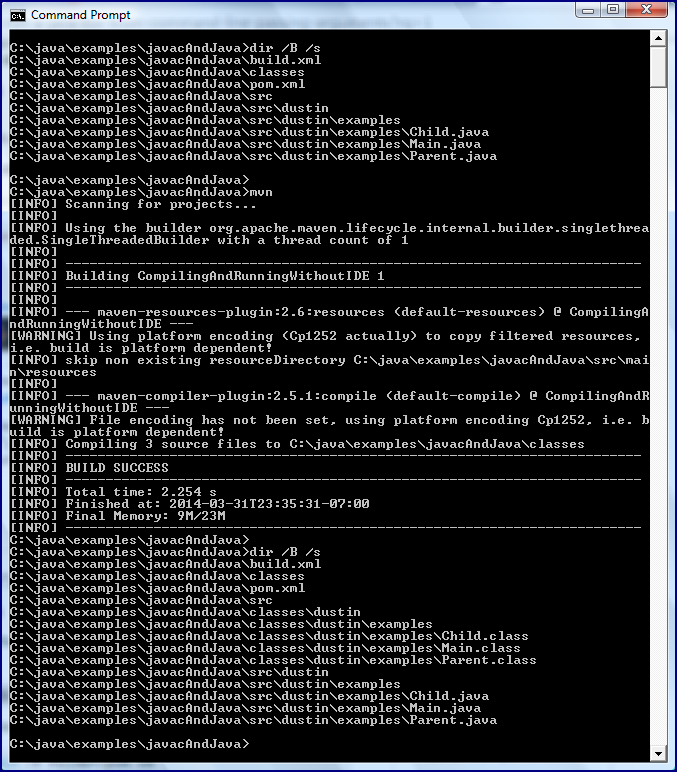
When a developer writes Java code, they create files with a .java extension. These files contain the source code that needs to be compiled into bytecode. The Java compiler, javac, is responsible for this translation process. It reads the .java files and checks them for syntax errors and other issues.

Generating Bytecode

Once the Java compiler verifies that the code is error-free, it generates bytecode files with a .class extension. These bytecode files contain instructions that are specific to the JVM. The bytecode is platform-independent, allowing it to run on any system that has a compatible JVM installed.

Optimizations and Enhancements

In addition to translating code into bytecode, modern Java compilers often perform optimizations and enhancements to improve the efficiency and performance of the resulting executable code. These optimizations can include inlining methods, removing dead code, and reordering instructions for better execution speed.

Debugging Support

Java compilers also provide support for debugging tools by including metadata in the compiled bytecode that helps developers trace back issues to specific lines of source code. This feature is essential for identifying and fixing bugs during software development.

Conclusion

In conclusion, the Java compiler is an indispensable tool in the software development process. It converts human-readable Java code into machine-readable bytecode that can be executed by the JVM. By performing optimizations, generating platform-independent bytecode, and supporting debugging capabilities, the Java compiler contributes significantly to creating efficient and reliable Java applications.


Understanding the Java Compiler: Key FAQs Answered

  1. What is a Java compiler?
  2. How does the Java compiler work?
  3. What is the role of the Java compiler in software development?
  4. Which tool is used to compile Java code?
  5. Can you explain the compilation process in Java?
  6. What are bytecode files generated by the Java compiler?
  7. Does the Java compiler perform optimizations on code?
  8. How does the Java compiler support debugging?

What is a Java compiler?

A Java compiler is a crucial component in the software development process that translates human-readable Java code into machine-readable bytecode. Essentially, it takes the source code written by developers in .java files and compiles it into executable .class files that can be run on the Java Virtual Machine (JVM). The Java compiler checks the syntax of the code for errors, generates platform-independent bytecode, and often performs optimizations to enhance the efficiency and performance of the resulting executable code. Overall, a Java compiler plays a vital role in converting Java programs into a format that can be executed on various platforms with the help of the JVM.

How does the Java compiler work?

The Java compiler, known as javac, functions by taking human-readable Java source code files with a .java extension as input and translating them into machine-readable bytecode files with a .class extension. During the compilation process, the Java compiler checks the syntax of the code for errors and generates bytecode instructions that are specific to the Java Virtual Machine (JVM). This bytecode is platform-independent, allowing Java programs to run on any system with a compatible JVM. Additionally, modern Java compilers often perform optimizations to enhance the efficiency and performance of the compiled code. Debugging support is also provided by including metadata in the bytecode to assist developers in identifying and fixing issues during software development.

What is the role of the Java compiler in software development?

The role of the Java compiler in software development is pivotal as it serves as the essential tool for translating human-readable Java code into machine-readable bytecode. By converting .java source files into .class bytecode files, the Java compiler ensures that the code is error-free and ready for execution on the Java Virtual Machine (JVM). Additionally, modern Java compilers often optimize and enhance the generated bytecode to improve performance and efficiency. With its debugging support and ability to produce platform-independent bytecode, the Java compiler plays a crucial role in facilitating the development of reliable and efficient Java applications.

Which tool is used to compile Java code?

The tool commonly used to compile Java code is the Java compiler, known as javac. The Java compiler reads the human-readable Java source code files with a .java extension and translates them into platform-independent bytecode files with a .class extension. This bytecode can be executed by the Java Virtual Machine (JVM) on any system that has a compatible JVM installed. The Java compiler plays a crucial role in the software development process by ensuring that the code is error-free, generating optimized bytecode, and supporting debugging capabilities for developers.

Can you explain the compilation process in Java?

The compilation process in Java is a crucial step in software development that involves translating human-readable Java code into machine-readable bytecode. When a developer writes Java code in .java files, the Java compiler, javac, checks the code for syntax errors and other issues. If the code is error-free, the compiler generates bytecode files with a .class extension. These bytecode files contain instructions specific to the Java Virtual Machine (JVM) and are platform-independent, allowing them to run on any system with a compatible JVM. Additionally, modern Java compilers often perform optimizations to enhance the efficiency and performance of the resulting executable code. This compilation process is essential for converting Java source code into executable programs that can be executed by the JVM.

What are bytecode files generated by the Java compiler?

Bytecode files generated by the Java compiler are intermediary files that contain instructions in a format that is understood by the Java Virtual Machine (JVM). These files have a .class extension and are produced after the Java compiler translates human-readable Java source code into machine-readable bytecode. Bytecode files are platform-independent, allowing them to be executed on any system with a compatible JVM. They serve as a crucial link between the high-level Java code written by developers and the low-level machine code that computers can understand, enabling Java programs to run efficiently and consistently across different environments.

Does the Java compiler perform optimizations on code?

The Java compiler is equipped to perform optimizations on code during the compilation process. It goes beyond simply translating Java code into bytecode for the JVM; it also applies various optimization techniques to enhance the efficiency and performance of the resulting executable code. These optimizations can include inlining methods, eliminating dead code, and reordering instructions to improve execution speed. By optimizing the code, the Java compiler helps developers create more efficient and streamlined applications that deliver better performance.

How does the Java compiler support debugging?

The Java compiler supports debugging by including metadata in the compiled bytecode that aids developers in tracing back issues to specific lines of source code. This metadata allows debugging tools to map the bytecode instructions back to the original Java source code, enabling developers to identify and fix bugs more efficiently. By providing this essential support for debugging, the Java compiler enhances the development process by facilitating thorough testing and troubleshooting of Java applications.