
cfchris.com

Loading

Category software development

saas application development

Unlocking Business Potential: The Impact of SaaS Application Development

The Power of SaaS Application Development

The Power of SaaS Application Development

Software as a Service (SaaS) application development has revolutionized the way businesses operate in the digital age. SaaS applications are cloud-based software solutions that offer users access to applications via the internet, eliminating the need for costly hardware and software installations.

One of the key benefits of SaaS application development is its scalability. Businesses can easily scale their usage up or down based on their needs, making it a cost-effective solution for companies of all sizes. Additionally, SaaS applications are often subscription-based, providing a predictable pricing model for businesses.

Another advantage of SaaS application development is its accessibility. Users can access SaaS applications from any device with an internet connection, enabling remote work and increasing productivity. This flexibility is especially valuable in today’s fast-paced business environment.

Security is a top priority in SaaS application development. Providers invest heavily in robust security measures to protect user data and ensure compliance with industry regulations. This focus on security gives businesses peace of mind when entrusting their sensitive information to a SaaS provider.

SaaS application development also promotes collaboration and integration. Many SaaS applications offer seamless integration with other tools and services, allowing businesses to streamline their workflows and improve efficiency. Collaboration features enable teams to work together effectively, regardless of their physical location.

In conclusion, SaaS application development offers numerous benefits for businesses looking to modernize their operations and stay competitive in today’s digital landscape. With its scalability, accessibility, security, and collaboration capabilities, SaaS applications are a powerful tool for driving business growth and innovation.


Understanding SaaS Application Development: Key FAQs for Businesses

  1. What is SaaS application development?
  2. How does SaaS application development differ from traditional software development?
  3. What are the key benefits of SaaS applications for businesses?
  4. How secure are SaaS applications?
  5. Can SaaS applications be customized to fit specific business needs?
  6. What factors should businesses consider when choosing a SaaS application development provider?
  7. How scalable are SaaS applications as a business grows?
  8. What are the potential challenges or drawbacks of implementing a SaaS application?

What is SaaS application development?

SaaS application development refers to the process of creating cloud-based software solutions that are accessed over the internet on a subscription basis. In this model, users do not need to install or maintain the software on their local devices, as everything is hosted and managed by the SaaS provider. This approach offers businesses a cost-effective and scalable way to access powerful applications that can enhance productivity, collaboration, and efficiency. SaaS application development focuses on delivering secure, accessible, and feature-rich software that meets the evolving needs of modern businesses in a rapidly changing digital landscape.

How does SaaS application development differ from traditional software development?

SaaS application development differs from traditional software development in several key ways. Unlike traditional software that is installed and maintained on individual devices, SaaS applications are hosted in the cloud and accessed via the internet. This cloud-based approach eliminates the need for users to manage hardware or software updates, as these tasks are handled by the SaaS provider. Additionally, SaaS applications are typically subscription-based, offering a more flexible pricing model compared to one-time software purchases. The scalability, accessibility, and collaborative features of SaaS applications further distinguish them from traditional software, making them a popular choice for businesses seeking modern and efficient solutions.

What are the key benefits of SaaS applications for businesses?

SaaS applications offer several key benefits for businesses. Firstly, they provide cost-effective solutions by eliminating the need for expensive hardware and software installations, making them accessible to companies of all sizes. Additionally, SaaS applications are scalable, allowing businesses to easily adjust their usage based on their needs, leading to a more flexible and efficient operational model. The subscription-based pricing of SaaS applications also offers predictability and affordability for businesses. Furthermore, SaaS applications enhance accessibility by enabling users to access the software from any device with an internet connection, promoting remote work and increasing productivity. Overall, the key benefits of SaaS applications for businesses include cost-effectiveness, scalability, predictability in pricing, and enhanced accessibility.

How secure are SaaS applications?

SaaS applications prioritize security as a fundamental aspect of their development and operation. Providers implement robust security measures, such as data encryption, access controls, regular security audits, and compliance certifications, to ensure the protection of user data. By investing in state-of-the-art security technologies and practices, SaaS applications strive to maintain a high level of data security and privacy for their users. Additionally, many SaaS providers offer transparent information about their security protocols and compliance standards to build trust with their customers regarding the safety of their data within the SaaS environment.

Can SaaS applications be customized to fit specific business needs?

SaaS applications can indeed be customized to fit specific business needs. While many SaaS solutions offer standard features and functionalities out of the box, businesses often have unique requirements that may not be fully addressed by off-the-shelf software. In such cases, SaaS providers typically offer customization options to tailor the application to meet specific business needs. This customization may involve modifying existing features, adding new functionalities, or integrating with other systems to create a personalized solution that aligns with the business’s workflows and objectives. By offering customization capabilities, SaaS applications can adapt to the diverse requirements of different businesses, providing flexibility and scalability for optimal performance and efficiency.

What factors should businesses consider when choosing a SaaS application development provider?

When choosing a SaaS application development provider, businesses should consider several key factors to ensure they select the right partner for their needs. Firstly, evaluating the provider’s experience and expertise in developing SaaS applications is crucial. A track record of successful projects and a deep understanding of the latest technologies are indicators of a reliable provider. Additionally, businesses should assess the scalability and flexibility of the provider’s solutions to accommodate future growth and evolving requirements. Security measures, compliance with industry standards, data protection protocols, and disaster recovery plans are also essential considerations to safeguard sensitive information. Lastly, evaluating the provider’s customer support services, pricing models, and contract terms can help businesses make an informed decision that aligns with their budget and long-term goals.

How scalable are SaaS applications as a business grows?

SaaS applications demonstrate remarkable scalability as a business expands. One of the key advantages of SaaS is its ability to adjust seamlessly to the evolving needs of a growing business. Whether a company is adding new users, increasing data storage requirements, or expanding its operations globally, SaaS applications can easily scale up to accommodate these changes. This flexibility ensures that businesses can continue to leverage their SaaS solutions effectively without being hindered by limitations in capacity or performance.

What are the potential challenges or drawbacks of implementing a SaaS application?

Implementing a SaaS application can bring numerous benefits, but it also comes with potential challenges and drawbacks. One common challenge is data security and privacy concerns, as businesses need to trust the SaaS provider to safeguard their sensitive information. Integration issues with existing systems and customization limitations may also arise, impacting the seamless adoption of the SaaS application. Additionally, dependency on internet connectivity for access to the application can pose a risk if there are network disruptions. Lastly, ongoing subscription costs could accumulate over time, making it crucial for businesses to carefully evaluate the long-term financial implications of implementing a SaaS solution. Addressing these challenges proactively through thorough planning and communication with the SaaS provider can help mitigate potential drawbacks and ensure a successful implementation process.

ecommerce software development

Empowering Your Online Business: The Impact of Ecommerce Software Development

Ecommerce Software Development

The Importance of Ecommerce Software Development in Today’s Digital Economy

In the fast-paced world of online retail, having a robust ecommerce platform is crucial for businesses to succeed. Ecommerce software development plays a key role in creating and maintaining these platforms, providing the necessary tools and features to facilitate seamless online transactions.

One of the primary benefits of investing in ecommerce software development is the ability to customize your online store to meet the unique needs of your business. Whether you are a small boutique or a large enterprise, tailored ecommerce solutions can help you stand out in a crowded marketplace and provide a superior shopping experience for your customers.

Furthermore, ecommerce software development enables businesses to integrate various payment gateways, shipping options, and inventory management systems into their online stores. This integration streamlines the purchasing process for customers and enhances operational efficiency for merchants.

Security is another critical aspect of ecommerce software development. With the increasing threat of cyber attacks and data breaches, it is essential for online retailers to prioritize the protection of sensitive customer information. By implementing robust security measures such as encryption protocols and secure payment gateways, businesses can build trust with their customers and safeguard their digital assets.

As consumer preferences continue to evolve, ecommerce software development must also adapt to meet changing demands. Features such as mobile responsiveness, personalized recommendations, and omnichannel integration are becoming increasingly important in providing a seamless shopping experience across multiple devices and touchpoints.

In conclusion, ecommerce software development is an indispensable component of modern retail operations. By investing in tailored solutions that prioritize customization, security, and innovation, businesses can stay ahead of the competition and thrive in today’s digital economy.


9 Essential Tips for Successful Ecommerce Software Development

  1. Choose a reliable ecommerce platform that aligns with your business needs.
  2. Focus on creating a user-friendly interface for seamless customer experience.
  3. Implement secure payment gateways to ensure safe transactions.
  4. Optimize your website for mobile devices to reach a wider audience.
  5. Utilize data analytics to make informed decisions and improve performance.
  6. Integrate social media platforms for effective marketing and customer engagement.
  7. Regularly update and maintain your ecommerce software to enhance security and functionality.
  8. Provide multiple shipping options to accommodate different customer preferences.
  9. Offer responsive customer support to address inquiries and issues promptly.

Choose a reliable ecommerce platform that aligns with your business needs.

When embarking on ecommerce software development, it is essential to select a dependable ecommerce platform that aligns seamlessly with your business requirements. By choosing a reliable platform tailored to your specific needs, you can ensure a smooth and efficient online shopping experience for your customers. A well-suited ecommerce platform not only enhances user satisfaction but also simplifies backend operations, ultimately contributing to the success and growth of your online business.

Focus on creating a user-friendly interface for seamless customer experience.

When delving into ecommerce software development, it is crucial to prioritize the creation of a user-friendly interface to ensure a seamless customer experience. By focusing on intuitive design and easy navigation, businesses can enhance user engagement and drive conversions. A well-crafted interface that simplifies the shopping process, provides clear product information, and offers convenient checkout options can significantly impact customer satisfaction and loyalty. Investing in user-centric design principles not only improves usability but also sets the foundation for building long-lasting relationships with customers in the competitive online retail landscape.

Implement secure payment gateways to ensure safe transactions.

Implementing secure payment gateways is a crucial step in ecommerce software development to guarantee safe and protected transactions for both businesses and customers. By integrating encryption protocols and robust security measures, online retailers can instill trust and confidence in their payment processes, safeguarding sensitive financial information from potential threats. Prioritizing secure payment gateways not only enhances data protection but also establishes a solid foundation for a reliable and secure online shopping experience, ultimately contributing to customer loyalty and satisfaction.

Optimize your website for mobile devices to reach a wider audience.

To maximize your online presence and engage a broader customer base, it is crucial to optimize your ecommerce website for mobile devices. In today’s mobile-centric world, a significant portion of online shopping occurs on smartphones and tablets. By ensuring that your website is responsive and user-friendly on mobile devices, you can provide a seamless shopping experience for on-the-go customers, enhance accessibility, and ultimately reach a wider audience. Prioritizing mobile optimization in your ecommerce software development strategy can lead to increased traffic, improved conversions, and greater customer satisfaction.

Utilize data analytics to make informed decisions and improve performance.

Utilizing data analytics in ecommerce software development is essential for making informed decisions and enhancing performance. By analyzing customer behavior, sales trends, and website metrics, businesses can gain valuable insights that drive strategic decision-making. Data-driven approaches enable companies to optimize marketing strategies, personalize customer experiences, and identify areas for improvement. With the power of data analytics, businesses can stay competitive in the ever-evolving ecommerce landscape by continuously refining their online platforms to meet the changing needs and preferences of their target audience.

Integrate social media platforms for effective marketing and customer engagement.

Integrating social media platforms into your ecommerce software development strategy is a powerful way to enhance marketing efforts and engage with customers on a more personal level. By seamlessly connecting your online store with popular social networks, you can leverage the vast reach and targeting capabilities of platforms like Facebook, Instagram, and Twitter to promote your products, drive traffic to your website, and interact with your audience in real-time. This integration not only expands your brand’s online presence but also fosters a sense of community and trust among customers, ultimately leading to increased sales and customer loyalty.

Regularly update and maintain your ecommerce software to enhance security and functionality.

Regularly updating and maintaining your ecommerce software is essential to enhance both security and functionality. By staying current with software updates, you can ensure that your online store is protected against potential security vulnerabilities and cyber threats. Additionally, keeping your ecommerce platform up-to-date allows you to take advantage of new features and improvements that can enhance the user experience for your customers. Prioritizing regular maintenance not only helps safeguard sensitive customer data but also ensures that your online business operates smoothly and efficiently.

Provide multiple shipping options to accommodate different customer preferences.

In ecommerce software development, it is essential to provide multiple shipping options to accommodate different customer preferences. Offering a range of shipping choices, such as standard, expedited, and same-day delivery, allows customers to select the option that best suits their needs in terms of speed and cost. By providing flexibility in shipping methods, businesses can enhance the overall shopping experience for customers and increase satisfaction levels, ultimately leading to improved customer loyalty and retention.

Offer responsive customer support to address inquiries and issues promptly.

To enhance the effectiveness of ecommerce software development, it is essential to offer responsive customer support to address inquiries and issues promptly. By providing timely assistance to customers, businesses can build trust and loyalty, leading to improved customer satisfaction and retention rates. Responsive customer support not only resolves concerns efficiently but also demonstrates a commitment to delivering exceptional service, ultimately contributing to the success of an ecommerce platform.

best software for web development

Exploring the Top Software Tools for Web Development

Best Software for Web Development

The Best Software for Web Development

Web development is a dynamic and ever-evolving field that requires the right tools to create stunning websites and web applications. Choosing the best software can significantly impact your productivity and the quality of your work. Here are some of the top software tools that every web developer should consider:

Text Editors:

Text editors are essential for writing code efficiently. Some popular text editors among web developers include:

  • Sublime Text: Known for its speed and versatility.
  • Visual Studio Code: A powerful editor with a wide range of extensions.
  • Atom: Highly customizable and beginner-friendly.

Integrated Development Environments (IDEs):

IDEs provide a comprehensive environment for web development, offering features like code completion, debugging, and version control integration. Some popular IDEs for web development are:

  • WebStorm: Ideal for JavaScript development with smart coding assistance.
  • PHPStorm: Specifically designed for PHP development with advanced features.
  • Eclipse: A versatile IDE supporting multiple programming languages.

Version Control Systems:

A version control system is crucial for managing changes to your codebase efficiently. Git is the most widely used version control system in web development, and platforms like GitHub and Bitbucket offer hosting services for repositories.

Graphic Design Software:

To create visually appealing websites, graphic design software plays a vital role. Adobe Photoshop and Sketch are popular choices among web developers for designing website layouts, logos, and other graphics.

Browser Developer Tools:

Browsers come equipped with developer tools that allow you to inspect elements, debug JavaScript, analyze network activity, and optimize website performance. Chrome DevTools and Firefox Developer Tools are widely used by web developers.

Choosing the right software tools can streamline your workflow, enhance collaboration with team members, and improve the overall quality of your web projects. Experiment with different tools to find what works best for you and stay updated on new technologies shaping the field of web development.


Top Software and Tools for Web Development: FAQs Answered

  1. What software do most web developers use?
  2. What is the best software to build a website?
  3. Which tool is best for web development?
  4. Which platform is best for website development?

What software do most web developers use?

When it comes to the software that most web developers use, there are several popular tools that have become industry standards. Text editors like Sublime Text, Visual Studio Code, and Atom are widely favored for their efficiency and versatility in writing code. Integrated Development Environments (IDEs) such as WebStorm, PHPStorm, and Eclipse offer comprehensive features for coding, debugging, and version control. Git is the dominant version control system embraced by most developers for managing code changes effectively. Additionally, graphic design software like Adobe Photoshop and browser developer tools such as Chrome DevTools are commonly utilized to create visually appealing websites and optimize performance. Overall, these tools form the backbone of a web developer’s toolkit, enabling them to build innovative and functional web solutions efficiently.

What is the best software to build a website?

When it comes to building a website, the choice of software depends on various factors such as the complexity of the site, your familiarity with different tools, and your specific requirements. There isn’t a one-size-fits-all answer to the question of the best software for website development. Popular options include content management systems like WordPress for beginners looking for a user-friendly platform, while more advanced developers may prefer using frameworks like React or Angular for building dynamic web applications. Ultimately, the best software for building a website is one that aligns with your skill level, project goals, and desired features to create a successful and functional website.

Which tool is best for web development?

When it comes to the frequently asked question of which tool is best for web development, the answer often depends on individual preferences, project requirements, and familiarity with different software. Text editors like Sublime Text, Visual Studio Code, and Atom are popular choices for their speed and versatility. Integrated Development Environments (IDEs) such as WebStorm, PHPStorm, and Eclipse offer comprehensive features for coding and debugging. Version control systems like Git are essential for managing code changes effectively. Graphic design software such as Adobe Photoshop and Sketch can enhance website visuals. Ultimately, the best tool for web development is one that aligns with your workflow, enhances productivity, and helps you achieve your project goals efficiently.

Which platform is best for website development?

When it comes to choosing the best platform for website development, there is no one-size-fits-all answer. The choice of platform largely depends on the specific requirements of the project, the expertise of the development team, and the scalability needs of the website. Popular platforms like WordPress, Joomla, Drupal, and Magento offer user-friendly interfaces and extensive customization options for content management systems. For more customized web applications, developers often opt for frameworks like Laravel, React.js, AngularJS, or Ruby on Rails. Ultimately, selecting the best platform involves evaluating factors such as ease of use, flexibility, security features, and community support to ensure a successful website development process.

best app making software

Discover the Best App Making Software for Your Next Project

Article: Best App Making Software

The Best App Making Software to Bring Your Ideas to Life

In today’s digital age, creating a mobile app has become more accessible than ever. Whether you’re a seasoned developer or a beginner looking to turn your innovative idea into reality, choosing the right app making software is crucial for success.

Key Features to Look for in App Making Software:

  • User-Friendly Interface: The software should have an intuitive interface that allows users of all skill levels to navigate and build apps easily.
  • Customization Options: Look for software that offers a wide range of customization options for design elements, functionalities, and user experience.
  • Multi-Platform Support: Opt for software that allows you to create apps for both iOS and Android platforms without extensive rework.
  • Integration Capabilities: Choose software that supports seamless integration with third-party services and APIs to enhance your app’s functionality.
  • Testing and Debugging Tools: Ensure the software provides robust testing and debugging tools to identify and fix issues during the development process.
  • Scalability: Select software that can accommodate the growth of your app and handle increased user traffic without compromising performance.

The Top App Making Software in 2022:

Flutter: A popular open-source framework by Google that allows developers to build natively compiled applications for mobile, web, and desktop from a single codebase.

Xcode: Apple’s integrated development environment (IDE) for creating apps exclusively for iOS and macOS platforms, offering powerful tools and resources for developers.

Android Studio: Google’s official IDE for Android app development, providing a comprehensive suite of tools to design, build, and test Android applications.

Mendix:A low-code platform that enables users to visually develop cross-platform mobile applications with minimal coding required, ideal for rapid prototyping and deployment.

No matter which app making software you choose, remember that innovation and creativity are key ingredients in crafting successful mobile applications that resonate with users worldwide. Embrace the power of technology and bring your app ideas to life!


Top Questions About the Best App-Making Software: Finding the Right Tools and Resources

  1. What is the best software to build an app?
  2. Which programming is best for app?
  3. Can I build my own app for free?
  4. Which app maker is the best?

What is the best software to build an app?

When it comes to selecting the best software for building an app, the answer largely depends on your specific needs and preferences. There are several top contenders in the market, each offering unique features and capabilities. Some popular choices include Flutter, Xcode, Android Studio, and Mendix. Flutter is favored for its versatility in creating natively compiled applications across multiple platforms from a single codebase. Xcode is renowned for its robust tools tailored for iOS and macOS app development. Android Studio stands out as Google’s official IDE for building Android applications with comprehensive resources. Mendix, on the other hand, offers a low-code platform ideal for rapid prototyping and deployment of cross-platform mobile apps with minimal coding required. Ultimately, the best software for building an app is one that aligns with your project goals, technical expertise, and desired outcomes.

Which programming is best for app?

When considering the best programming language for app development, it’s essential to assess various factors such as the specific requirements of the app, target platforms, developer expertise, and scalability needs. Different programming languages offer unique advantages and are suitable for different types of applications. For example, Java is commonly used for Android app development, while Swift is preferred for iOS apps. JavaScript frameworks like React Native and Flutter provide cross-platform compatibility. Ultimately, the best programming language for an app depends on the project’s objectives and constraints, with no one-size-fits-all answer. It’s crucial to evaluate each language’s strengths and weaknesses in relation to the app’s goals to make an informed decision.

Can I build my own app for free?

When it comes to building your own app for free, there are several options available that offer varying degrees of functionality and customization. Many app making software platforms provide free versions with limited features, making it possible for individuals with basic app development needs to create simple applications without incurring costs. However, for more advanced features and customization options, upgrading to a paid plan or investing in premium app development tools may be necessary. It’s essential to assess your requirements and budget carefully to determine the most suitable approach for building your app while considering the trade-offs between cost, functionality, and ease of use.

Which app maker is the best?

When it comes to determining the best app maker, it ultimately depends on your specific needs and preferences. Different app making software options offer varying features, customization capabilities, ease of use, and compatibility with different platforms. Some popular choices include Flutter, Xcode, Android Studio, and Mendix, each catering to different development requirements. It’s essential to evaluate factors such as user interface intuitiveness, customization options, multi-platform support, integration capabilities, testing tools, and scalability before selecting the app maker that best aligns with your project goals. Conducting thorough research and considering your project’s unique requirements will help you identify the best app maker for your development endeavors.

best app building software

The Ultimate Guide to Finding the Best App Building Software in 2021

Exploring the Best App Building Software in 2021

Exploring the Best App Building Software in 2021

In today’s digital age, having a mobile app for your business or idea is crucial. However, not everyone has the coding skills to develop an app from scratch. This is where app building software comes into play, offering intuitive tools and features to help you create your own mobile applications without extensive programming knowledge.

Appy Pie

Appy Pie is a popular app building platform that allows users to create apps for various platforms, including iOS, Android, and Windows. With its drag-and-drop interface and customizable templates, Appy Pie makes app development accessible to everyone.

BuildFire

BuildFire is another top choice for app building software. It offers a range of features such as push notifications, analytics, and customization options. BuildFire caters to both small businesses and enterprises looking to create high-quality mobile apps.

Xamarin

Xamarin is known for its cross-platform development capabilities, allowing developers to build apps that work seamlessly on different operating systems. With Xamarin’s robust tools and libraries, you can create native-like apps with a single codebase.

AppSheet

AppSheet stands out for its no-code approach to app development. By connecting data sources like Google Sheets or Excel files, users can easily build functional apps without writing a single line of code. AppSheet is ideal for prototyping and creating simple business applications.

Adobe PhoneGap

Adobe PhoneGap is an open-source framework that enables developers to build cross-platform mobile apps using web technologies like HTML, CSS, and JavaScript. With its extensive plugin library and strong community support, PhoneGap simplifies the app development process.

These are just a few examples of the best app building software available in 20

Whether you’re a beginner looking to create your first app or an experienced developer seeking efficient tools, there’s a solution out there to suit your needs.

Explore these platforms and start turning your app ideas into reality today!


Top 7 FAQs About Choosing the Best App Building Software

  1. Which programming is best for app?
  2. What is the best program to make an app?
  3. What software is the best to building an app?
  4. Which platform is best for application development?
  5. What is the best free app building software?
  6. What is the best way to develop mobile apps?
  7. Can I build an app myself?

Which programming is best for app?

When it comes to choosing the best programming language for app development, there isn’t a one-size-fits-all answer. The ideal programming language largely depends on the specific requirements of the app, the platform(s) it will run on, and the developer’s familiarity with the language. Some popular programming languages for app development include Java, Swift, Kotlin, and JavaScript. Java is commonly used for Android apps, while Swift and Kotlin are preferred for iOS app development. JavaScript is versatile and widely used for building web and mobile apps across different platforms. Ultimately, selecting the best programming language involves considering factors such as performance, scalability, community support, and ease of development to ensure a successful app creation process.

What is the best program to make an app?

When it comes to creating mobile applications, one of the frequently asked questions is, “What is the best program to make an app?” The answer to this question can vary depending on individual needs and preferences. There are several popular app building software options available, each offering unique features and capabilities. Some of the top choices include platforms like Appy Pie, BuildFire, Xamarin, AppSheet, and Adobe PhoneGap. These programs provide intuitive tools and templates that cater to different levels of expertise, making app development accessible to a wide range of users. Ultimately, the best program to make an app is one that aligns with your specific requirements and goals for your mobile application project.

What software is the best to building an app?

When it comes to choosing the best software for building an app, there are several options available to cater to different needs and skill levels. Popular choices include platforms like Appy Pie, BuildFire, Xamarin, AppSheet, and Adobe PhoneGap. Each of these tools offers unique features and benefits, such as drag-and-drop interfaces, cross-platform development capabilities, no-code app creation, and open-source frameworks. The best software for building an app ultimately depends on factors like your project requirements, technical expertise, and desired functionalities. It’s essential to explore these options thoroughly to find the right fit for turning your app idea into a reality.

Which platform is best for application development?

When considering which platform is best for application development, it ultimately depends on the specific needs and goals of the project. Different platforms offer unique features and capabilities that cater to various requirements. For instance, if you are looking for a user-friendly interface and quick app deployment, platforms like Appy Pie or BuildFire may be suitable choices. On the other hand, if you prioritize cross-platform compatibility and native-like performance, Xamarin or Adobe PhoneGap could be more appropriate options. It’s essential to evaluate factors such as target audience, budget, technical expertise, and desired functionalities to determine the best platform for your application development endeavors.

What is the best free app building software?

When it comes to finding the best free app building software, there are several options available that cater to different needs and skill levels. Some popular choices include platforms like MIT App Inventor, Thunkable, and Appy Pie. These tools offer intuitive interfaces and drag-and-drop functionality, making app development accessible to beginners without requiring coding expertise. While each software has its own strengths and limitations, exploring these free options can be a great starting point for individuals looking to create mobile applications without breaking the bank.

What is the best way to develop mobile apps?

When it comes to developing mobile apps, one of the best ways for individuals and businesses to create their own applications is by using app building software. These platforms offer intuitive tools and features that simplify the app development process, making it accessible to a wide range of users, regardless of their coding expertise. With app building software, users can leverage customizable templates, drag-and-drop interfaces, and various functionalities to design and deploy mobile apps for different platforms such as iOS and Android. This approach not only streamlines the development process but also allows for quicker iterations and updates, enabling creators to bring their app ideas to life efficiently.

Can I build an app myself?

Yes, you can build an app yourself even if you don’t have coding experience, thanks to the availability of user-friendly app building software. These platforms offer intuitive interfaces, drag-and-drop tools, and pre-designed templates that make the app development process accessible to beginners. By utilizing such software, individuals with no programming background can create customized mobile applications for various purposes, whether it’s for a business, personal project, or idea. With a bit of creativity and patience, anyone can embark on the journey of app development and bring their vision to life without relying on professional developers.

Exploring the Realm of Android Development Software: Tools, Resources, and Innovation

Article: Android Development Software

The World of Android Development Software

Android development software plays a crucial role in creating innovative and user-friendly mobile applications for the ever-expanding Android platform. With a wide range of tools and resources available, developers have the opportunity to unleash their creativity and build cutting-edge apps that cater to diverse user needs.

Key Features of Android Development Software:

Integrated Development Environments (IDEs): IDEs like Android Studio provide a comprehensive set of tools for coding, debugging, and testing Android applications. These platforms streamline the development process and offer features such as code completion, real-time error checking, and easy integration with other tools.

Emulators and Simulators: Android development software includes emulators and simulators that allow developers to test their apps on virtual devices with different screen sizes, resolutions, and hardware configurations. This helps ensure that the app functions seamlessly across various devices.

Libraries and Frameworks: Developers can leverage libraries and frameworks like Retrofit, Glide, and RxJava to simplify common tasks, enhance app performance, and accelerate development time. These resources provide pre-built functionalities that can be easily integrated into the app.

Popular Android Development Software Tools:

Android Studio: Developed by Google, Android Studio is the official IDE for Android app development. It offers a rich set of features tailored specifically for building high-quality apps for the Android platform.

IntelliJ IDEA: While not exclusive to Android development, IntelliJ IDEA is a powerful IDE that supports Java programming language – a key component in building Android apps. It provides advanced coding assistance and productivity tools for developers.

Genymotion: Genymotion is a popular emulator used by developers to test their apps on a variety of virtual devices with different configurations. It offers fast performance and easy setup for efficient testing.

The Future of Android Development Software:

The landscape of Android development software continues to evolve with advancements in technology and changing user expectations. Developers are constantly exploring new tools and techniques to create innovative apps that stand out in the competitive app market.

In conclusion, android development software empowers developers to bring their creative ideas to life by providing robust tools, resources, and support throughout the app development process. With continuous innovation in this field, we can expect even more exciting developments in the world of Android app creation.


Top 6 Advantages of Android Development Software for Creating Versatile Apps

  1. 1. Rich Integrated Development Environments (IDEs) like Android Studio streamline coding and testing processes.
  2. 2. Emulators and simulators help developers test apps on various virtual devices for comprehensive compatibility checks.
  3. 3. Libraries and frameworks simplify common tasks and enhance app performance.
  4. 4. Access to a vast array of tools and resources tailored specifically for Android app development.
  5. 5. Regular updates and support from the Android development community ensure developers stay current with industry trends.
  6. 6. Flexibility to create diverse, user-friendly mobile applications that cater to a wide range of user needs.


Top 5 Challenges in Android Development: Navigating Learning Curves, Fragmentation, and More

  1. Steep Learning Curve
  2. Fragmentation Challenges
  3. Resource Intensive
  4. Complex Debugging Process
  5. Market Saturation

1. Rich Integrated Development Environments (IDEs) like Android Studio streamline coding and testing processes.

Rich Integrated Development Environments (IDEs) such as Android Studio play a pivotal role in simplifying the coding and testing processes involved in Android app development. These advanced tools offer a comprehensive set of features that streamline the entire development workflow, from writing code to debugging and testing. With functionalities like code completion, real-time error checking, and seamless integration with other tools, developers can enhance their productivity and efficiency, ultimately leading to the creation of high-quality and reliable Android applications.

2. Emulators and simulators help developers test apps on various virtual devices for comprehensive compatibility checks.

Emulators and simulators in Android development software offer a significant advantage by enabling developers to thoroughly test their apps on a wide range of virtual devices. This capability allows developers to conduct comprehensive compatibility checks, ensuring that their apps function seamlessly across different screen sizes, resolutions, and hardware configurations. By simulating real-world conditions, developers can identify and address potential issues early in the development process, leading to higher quality and more user-friendly Android applications.

3. Libraries and frameworks simplify common tasks and enhance app performance.

Libraries and frameworks in Android development software play a vital role in simplifying common tasks and boosting app performance. By leveraging these resources such as Retrofit, Glide, and RxJava, developers can streamline their workflow and focus on building innovative features rather than reinventing the wheel. These pre-built functionalities not only save time but also improve the overall performance of the app by optimizing code efficiency and reducing potential errors. With the help of libraries and frameworks, developers can create robust and efficient Android applications that provide a seamless user experience.

4. Access to a vast array of tools and resources tailored specifically for Android app development.

Access to a vast array of tools and resources tailored specifically for Android app development is a significant advantage of using Android development software. Developers have access to a wide range of specialized tools, such as integrated development environments (IDEs), emulators, libraries, and frameworks designed to streamline the app creation process. These resources not only enhance productivity but also enable developers to leverage pre-built functionalities, optimize performance, and ensure compatibility across various Android devices. This abundance of tailored tools empowers developers to efficiently bring their app ideas to fruition while maintaining high standards of quality and user experience.

Regular updates and support from the Android development community play a crucial role in ensuring that developers stay current with industry trends. By staying connected to the community, developers can access the latest tools, resources, and best practices that help them enhance their skills and adapt to the ever-evolving landscape of Android app development. This continuous support fosters a collaborative environment where knowledge sharing and innovation thrive, ultimately empowering developers to create cutting-edge applications that meet the demands of today’s tech-savvy users.

6. Flexibility to create diverse, user-friendly mobile applications that cater to a wide range of user needs.

One of the key advantages of Android development software is its flexibility to create diverse, user-friendly mobile applications that cater to a wide range of user needs. Developers have the freedom to design and customize apps that address specific requirements and preferences, ensuring a personalized user experience. This flexibility empowers developers to innovate and adapt their creations to meet the ever-changing demands of a diverse user base, ultimately leading to the development of highly versatile and engaging mobile applications on the Android platform.

Steep Learning Curve

One significant drawback of Android development software is its steep learning curve, which can pose a challenge for beginners entering the field. Mastering the intricacies of these tools demands considerable time and effort, making it a daunting task for those new to app development. The complexity of the software may deter individuals from pursuing Android development as a career path, highlighting the need for accessible resources and support to help aspiring developers navigate this learning curve effectively.

Fragmentation Challenges

Fragmentation Challenges: The wide variety of Android devices with different screen sizes, resolutions, and hardware configurations can pose challenges in ensuring app compatibility. Developers often face the daunting task of optimizing their apps to perform seamlessly across a diverse range of devices, which can lead to increased development time and resources. This fragmentation in the Android ecosystem can result in inconsistencies in user experience and functionality, making it crucial for developers to carefully consider device compatibility during the app development process to provide a consistent and satisfactory user experience across all platforms.

Resource Intensive

Some Android development tools may pose a challenge due to their resource-intensive nature, demanding high-performance hardware specifications to operate efficiently. This can be a drawback for developers working on less powerful devices or those with limited access to robust computing resources. The need for advanced hardware can lead to increased costs and potential limitations for developers who may not have the means to invest in top-tier equipment, hindering their ability to work seamlessly with certain Android development software.

Complex Debugging Process

One significant drawback of Android development software is the complex debugging process it entails. Debugging Android apps can prove challenging due to the platform’s diverse ecosystem and the necessity to test applications on a wide range of devices with varying specifications. This complexity can lead to difficulties in identifying and resolving issues efficiently, potentially prolonging the development timeline and increasing the overall workload for developers.

Market Saturation

Market saturation is a significant challenge in the world of Android development software. With millions of apps already available on the Google Play Store, new developers face an uphill battle in gaining recognition and visibility for their creations. The sheer volume of apps makes it difficult for newcomers to stand out and attract users, leading to intense competition and a struggle to make a mark in the crowded marketplace. This con highlights the importance of strategic marketing, unique app features, and innovative ideas to break through the saturation and capture the attention of potential users.

sdlc in software engineering

Understanding the Significance of SDLC in Software Engineering

Software Development Life Cycle (SDLC) in Software Engineering

The Importance of Software Development Life Cycle (SDLC) in Software Engineering

Software Development Life Cycle (SDLC) is a systematic process used by software engineers to design, develop, and test high-quality software applications. It is a crucial framework that ensures the successful completion of software projects while meeting customer requirements and quality standards.

Phases of SDLC:

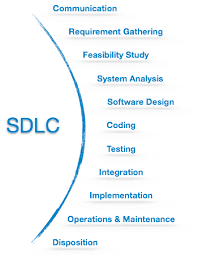
  1. Planning: In this phase, project requirements are gathered, analyzed, and documented. The project scope, timeline, and resources are determined.
  2. Analysis: This phase involves a detailed study of the system requirements. It helps in understanding the functionalities expected from the software.
  3. Design: The design phase focuses on creating a blueprint for the software based on the requirements gathered in the previous phases. It includes architectural design, database design, and user interface design.
  4. Implementation: In this phase, the actual coding of the software takes place. Developers write code according to the design specifications and guidelines.
  5. Testing: The testing phase involves identifying defects or bugs in the software and fixing them. Various testing methods like unit testing, integration testing, and system testing are performed to ensure that the software functions correctly.
  6. Deployment: Once the software is tested and approved, it is deployed to production environments for end-users to use.
  7. Maintenance: The maintenance phase involves updating or modifying the software to meet changing user needs or address any issues that arise post-deployment.

The Benefits of SDLC:

  • Better Planning: SDLC helps in proper planning and organization of resources for efficient project management.
  • Quality Assurance: By following a structured approach like SDLC, software engineers can ensure high-quality deliverables that meet customer expectations.
  • Risk Management: SDLC allows for early identification and mitigation of risks throughout the development process.
  • Cycle Repeatability: SDLC provides a repeatable process that can be applied to future projects for consistent results.

In conclusion, Software Development Life Cycle (SDLC) plays a vital role in ensuring successful software development projects by providing a structured approach from inception to deployment. By following SDLC methodologies, software engineers can deliver reliable and high-quality software solutions that meet user needs effectively.


Understanding the Software Development Life Cycle (SDLC): Key Stages and Phases Explained

  1. What are the 7 steps in software testing life cycle?
  2. What are the 7 stages of an SDLC?
  3. What is SDLC design phase?
  4. What are the 5 stages SDLC?

What are the 7 steps in software testing life cycle?

In software engineering, the Software Testing Life Cycle (STLC) consists of seven essential steps that guide the testing process to ensure the quality and reliability of software applications. These steps include requirements analysis, test planning, test case development, environment setup, test execution, defect reporting and tracking, and test closure. Each step in the STLC is crucial for identifying defects early in the development cycle, ensuring that the software meets user requirements, and delivering a high-quality product to end-users. By following these seven steps diligently, software development teams can enhance the efficiency and effectiveness of their testing efforts while maintaining a focus on delivering superior software solutions.

What are the 7 stages of an SDLC?

In software engineering, the Software Development Life Cycle (SDLC) consists of seven key stages that guide the development process from planning to deployment and maintenance. These stages are essential for ensuring a systematic and structured approach to software development. The seven stages of an SDLC include Planning, Analysis, Design, Implementation, Testing, Deployment, and Maintenance. Each stage plays a crucial role in the overall success of a software project by defining requirements, creating designs, writing code, testing functionality, deploying the software for use, and maintaining it post-deployment. Following these stages helps software engineers manage projects effectively and deliver high-quality software solutions that meet user needs.

What is SDLC design phase?

The Software Development Life Cycle (SDLC) design phase is a critical stage in software engineering where the blueprint for the software system is created based on the requirements gathered during the planning and analysis phases. In this phase, software architects and designers define the overall structure of the software, including its architecture, database design, user interface layout, and other technical specifications. The design phase serves as a foundation for the development team to follow while coding the software application. It ensures that the final product aligns with customer needs and quality standards by translating requirements into a detailed technical design that guides the implementation process effectively.

What are the 5 stages SDLC?

In software engineering, the Software Development Life Cycle (SDLC) consists of five essential stages that guide the development process of software applications. These stages are Planning, Analysis, Design, Implementation, and Testing. Each stage plays a crucial role in ensuring the successful completion of a software project while meeting customer requirements and quality standards. The Planning stage involves gathering project requirements and defining scope, followed by Analysis to study system requirements in detail. Design focuses on creating a blueprint for the software, Implementation involves coding based on design specifications, and Testing is crucial for identifying and fixing defects. These five stages of SDLC provide a structured framework for software engineers to follow throughout the development lifecycle.

offshore software development

Unlocking Success: The Power of Offshore Software Development

Offshore Software Development

The Advantages of Offshore Software Development

Offshore software development has become a popular trend in the tech industry, with many companies opting to outsource their software development needs to offshore teams. This practice involves hiring a team of developers located in a different country to work on various software projects. While some may have reservations about this approach, there are several advantages to offshore software development that make it a viable option for businesses.

Cost-Effectiveness

One of the primary reasons companies choose offshore software development is cost-effectiveness. Hiring developers from countries with lower labor costs can significantly reduce the overall expenses associated with software development projects. This cost savings can be substantial and allow companies to allocate their resources more efficiently.

Access to Global Talent Pool

Offshore software development provides access to a diverse pool of talented developers from around the world. Companies can leverage the expertise and skills of professionals in different countries, ensuring that they have access to the best talent for their projects. This global talent pool offers a wide range of capabilities and experiences that can enhance the quality of the final product.

Faster Time-to-Market

By outsourcing software development offshore, companies can accelerate their time-to-market for new products and services. Offshore teams often work around the clock, allowing for continuous progress on projects and faster delivery times. This speed can give businesses a competitive edge by getting their products to market more quickly than if they were developed in-house.

Focus on Core Business Activities

Offshore software development allows companies to focus on their core business activities while leaving the technical aspects of software development to external teams. By outsourcing these tasks, organizations can free up internal resources and concentrate on strategic initiatives that drive growth and innovation.

Risk Mitigation

Offshore software development also helps mitigate risks associated with project delays or resource constraints. By working with offshore teams, companies can distribute project responsibilities across different locations, reducing dependency on a single team or location. This diversification minimizes risks and ensures continuity in case of unforeseen circumstances.

In conclusion, offshore software development offers numerous benefits that make it an attractive option for businesses looking to streamline their operations and enhance their competitiveness in the market. By leveraging global talent, reducing costs, accelerating time-to-market, and mitigating risks, companies can achieve greater efficiency and success in their software development endeavors.


7 Essential Tips for Successful Offshore Software Development

  1. Clearly define project requirements and goals before starting development.
  2. Choose an experienced offshore development team with a proven track record.
  3. Establish effective communication channels to ensure smooth collaboration.
  4. Set up regular progress updates and milestone reviews to monitor the project’s status.
  5. Ensure that intellectual property rights and data security measures are clearly defined in the contract.
  6. Consider time zone differences when planning meetings and deadlines.
  7. Be prepared for cultural differences and be respectful of diverse working styles.

Clearly define project requirements and goals before starting development.

To ensure the success of offshore software development projects, it is crucial to clearly define project requirements and goals before initiating the development process. By establishing a comprehensive understanding of what needs to be achieved and outlining specific objectives from the outset, both the offshore team and the client can align their efforts towards a common vision. This clarity helps minimize misunderstandings, enhances communication, and sets a solid foundation for a productive collaboration that leads to the delivery of high-quality software solutions that meet the desired outcomes.

Choose an experienced offshore development team with a proven track record.

When engaging in offshore software development, it is crucial to select an experienced team with a proven track record. By choosing a seasoned offshore development team, you can ensure that your project is in capable hands. An experienced team will have the expertise and knowledge to handle complex software projects efficiently and deliver high-quality results. Their proven track record demonstrates their reliability and ability to meet deadlines, ensuring a smooth and successful development process. Investing in an experienced offshore development team is a strategic decision that can lead to the successful execution of your software project.

Establish effective communication channels to ensure smooth collaboration.

Establishing effective communication channels is crucial in offshore software development to ensure smooth collaboration between teams located in different regions. Clear and open lines of communication help bridge the gap created by physical distance and time zone differences, enabling team members to share information, discuss project requirements, address issues promptly, and align on project goals. By leveraging various communication tools such as video conferencing, messaging platforms, and project management software, teams can foster transparency, build trust, and work cohesively towards successful project outcomes. Effective communication channels promote collaboration, enhance productivity, and ultimately contribute to the overall success of offshore software development projects.

Set up regular progress updates and milestone reviews to monitor the project’s status.

Setting up regular progress updates and milestone reviews is crucial when engaging in offshore software development. By establishing a structured communication process, businesses can closely monitor the project’s status, track milestones, and ensure that the development is on track. These updates provide transparency and accountability, allowing both the offshore team and the client to stay informed about the project’s progress, address any issues promptly, and make necessary adjustments to meet project goals effectively. Regular reviews help maintain alignment between all stakeholders involved in the development process and promote a collaborative environment for successful project completion.

Ensure that intellectual property rights and data security measures are clearly defined in the contract.

When engaging in offshore software development, it is crucial to ensure that intellectual property rights and data security measures are clearly defined in the contract. By clearly outlining these aspects in the agreement, both parties can establish a framework for protecting sensitive information and proprietary technology. This step helps mitigate risks related to data breaches, unauthorized use of intellectual property, and other security concerns, providing a solid foundation for a trustworthy and secure collaboration between the client and the offshore development team.

Consider time zone differences when planning meetings and deadlines.

When engaging in offshore software development, it is crucial to consider time zone differences when scheduling meetings and setting deadlines. Understanding the time variances between your local team and the offshore team can help ensure effective communication and collaboration. By planning meetings at times that accommodate both teams’ working hours and setting realistic deadlines that account for potential delays due to time zone disparities, you can enhance productivity and project efficiency in the offshore software development process.

Be prepared for cultural differences and be respectful of diverse working styles.

When engaging in offshore software development, it is crucial to be prepared for cultural differences and to show respect for diverse working styles. Different countries have unique cultural norms, communication styles, and work practices that may differ from what you are accustomed to. By acknowledging and embracing these differences, you can foster a positive working relationship with your offshore team, promote effective collaboration, and ensure the success of your software development projects. Open-mindedness, flexibility, and a willingness to learn from each other can lead to a harmonious partnership that leverages the strengths of diverse perspectives for mutual benefit.

software development project management

Optimizing Software Development Project Management for Success

Software Development Project Management

The Importance of Software Development Project Management

Software development project management is a crucial aspect of ensuring the successful delivery of software projects. It involves planning, organizing, and overseeing the various tasks and resources required to develop software applications efficiently.

Key Components of Software Development Project Management:

  • Planning: This phase involves defining project scope, objectives, timeline, and resources required for the project.
  • Resource Allocation: Assigning tasks to team members based on their skills and availability to ensure efficient utilization of resources.
  • Risk Management: Identifying potential risks that may impact the project and developing strategies to mitigate them.
  • Communication: Maintaining open communication channels among team members, stakeholders, and clients to ensure everyone is aligned with project goals.
  • Quality Assurance: Implementing processes to monitor and evaluate the quality of deliverables throughout the project lifecycle.

Benefits of Effective Software Development Project Management:

An effective software development project management approach offers several benefits, including:

  • Improved Efficiency: Proper planning and resource allocation lead to increased productivity and faster delivery of software projects.
  • Better Risk Mitigation: Proactive risk management helps in identifying and addressing potential issues before they escalate, reducing project delays.
  • Enhanced Communication: Clear communication ensures that all stakeholders are informed about project progress, changes, and challenges, fostering collaboration.
  • Higher Quality Deliverables: Quality assurance processes help in maintaining high standards throughout the development process, resulting in robust software products.

In Conclusion

In today’s competitive market, effective software development project management is essential for delivering successful projects on time and within budget. By implementing best practices in planning, resource allocation, risk management, communication, and quality assurance, organizations can streamline their software development processes and achieve greater success in their projects.


5 Essential Tips for Effective Software Development Project Management

  1. Clearly define project requirements and objectives at the beginning.
  2. Break down the project into smaller tasks for better management.
  3. Establish a realistic timeline and set achievable milestones.
  4. Communicate effectively with team members and stakeholders throughout the project.
  5. Regularly review and adjust the project plan as needed to ensure successful completion.

Clearly define project requirements and objectives at the beginning.

Clear and precise definition of project requirements and objectives at the outset is a fundamental tip in software development project management. By establishing a solid foundation from the start, teams can align their efforts, resources, and timelines towards a common goal. This clarity helps minimize misunderstandings, reduces scope creep, and ensures that the project stays on track throughout its lifecycle. When everyone involved understands what needs to be achieved and why, it paves the way for a more efficient and successful project delivery.

Break down the project into smaller tasks for better management.

Breaking down the project into smaller tasks is a valuable tip in software development project management. By dividing the project into manageable components, teams can better allocate resources, track progress, and identify potential bottlenecks early on. This approach enhances efficiency, promotes clearer communication among team members, and allows for more accurate estimation of timelines and budgets. Ultimately, breaking down the project into smaller tasks facilitates better management and increases the likelihood of successfully delivering high-quality software within the specified timeframe.

Establish a realistic timeline and set achievable milestones.

Establishing a realistic timeline and setting achievable milestones is a crucial tip in software development project management. By defining clear timelines and breaking down the project into manageable milestones, teams can effectively track progress, identify potential bottlenecks early on, and ensure that the project stays on track for successful completion. This approach not only helps in managing resources efficiently but also boosts team morale by providing a sense of accomplishment as milestones are reached, ultimately leading to the timely delivery of high-quality software solutions.

Communicate effectively with team members and stakeholders throughout the project.

Effective communication with team members and stakeholders is a cornerstone of successful software development project management. By maintaining open and transparent communication channels throughout the project lifecycle, team members can stay aligned with project goals, address any challenges promptly, and ensure that stakeholders are informed about progress and potential changes. Clear communication fosters collaboration, builds trust among team members, and ultimately leads to smoother project execution and successful delivery of software projects.

Regularly review and adjust the project plan as needed to ensure successful completion.

Regularly reviewing and adjusting the project plan is a critical tip in software development project management to ensure successful completion. By periodically assessing the project’s progress, identifying potential bottlenecks, and adapting the plan as needed, teams can stay on track and address any challenges that may arise during the development process. This proactive approach allows project managers to make informed decisions, reallocate resources effectively, and maintain alignment with project goals, ultimately increasing the chances of delivering high-quality software within the specified timeline.

best app development software

Discover the Top Picks: Best App Development Software for Creating Stellar Applications

Best App Development Software

The Best App Development Software for Creating Innovative Applications

App development software plays a crucial role in bringing creative ideas to life and reaching a wide audience through mobile applications. With the increasing demand for mobile apps across various industries, it’s essential to choose the right tools to streamline the development process and deliver exceptional user experiences.

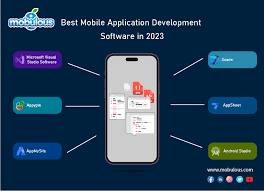
Android Studio

Android Studio is the official integrated development environment (IDE) for Android app development. It offers a comprehensive set of tools for designing, coding, and testing Android apps. With features like code templates, virtual device emulation, and real-time profilers, Android Studio simplifies the development of high-quality Android applications.

Xcode

Xcode is the IDE for building apps on Apple platforms, including iOS, macOS, watchOS, and tvOS. It provides a user-friendly interface and powerful tools like Interface Builder for designing interfaces visually and Instruments for performance analysis. Xcode also supports Swift programming language, making it a preferred choice for iOS app developers.

Visual Studio

Visual Studio is a popular IDE developed by Microsoft that supports app development for Windows, Android, iOS, and web platforms. It offers a rich set of features such as code editing, debugging, and collaboration tools. Visual Studio’s extensibility allows developers to customize their workflow with plugins and extensions.

Flutter

Flutter is Google’s open-source UI toolkit for building natively compiled applications for mobile, web, and desktop from a single codebase. With Flutter’s hot reload feature, developers can quickly see changes in real-time without restarting the app. Flutter’s expressive UI components enable developers to create visually appealing interfaces across different platforms.

React Native

React Native is a JavaScript framework for building cross-platform mobile applications using React.js library. By sharing code between iOS and Android platforms, React Native accelerates the app development process while maintaining native performance and user experience standards. Its modular architecture allows developers to reuse components efficiently.

In conclusion, choosing the right app development software is essential for creating innovative and successful applications that meet users’ expectations. Whether you’re developing apps for Android or iOS platforms or targeting multiple platforms simultaneously, these top app development tools provide the necessary features and capabilities to bring your ideas to life effectively.


Top FAQs About Choosing the Best App Development Software

  1. What is the best app development software for Android?
  2. Which app development software is recommended for iOS?
  3. What are the key features to look for in app development software?
  4. Is there app development software that supports cross-platform development?
  5. How can I choose the right app development software for my project?
  6. Are there any free or open-source options available for app development software?

What is the best app development software for Android?

When it comes to developing apps for Android, one of the most highly recommended software is Android Studio. As the official integrated development environment (IDE) for Android app development, Android Studio offers a comprehensive suite of tools tailored specifically for creating high-quality Android applications. With features like code templates, virtual device emulation, and real-time profilers, Android Studio simplifies the development process and helps developers design and test their apps efficiently. Its robust set of features and seamless integration with the Android platform make it a top choice for building innovative and user-friendly apps for the vast Android user base.

When it comes to app development software for iOS, Xcode is highly recommended as the preferred choice. Xcode is the official integrated development environment (IDE) for building apps on Apple platforms, offering a comprehensive set of tools and features tailored specifically for iOS app development. With its user-friendly interface, powerful tools like Interface Builder, and support for the Swift programming language, Xcode enables developers to create high-quality iOS applications efficiently and effectively. Its seamless integration with Apple’s ecosystem and robust debugging capabilities make it a top choice for developers looking to build innovative and successful apps for iOS devices.

What are the key features to look for in app development software?

When considering the best app development software, it’s important to look for key features that can streamline the development process and enhance the quality of the final product. Some essential features to consider include an intuitive user interface for easy navigation, robust debugging tools for identifying and fixing errors efficiently, support for multiple platforms to reach a broader audience, integration with third-party APIs for added functionality, real-time collaboration tools for team projects, and regular updates and support from the software provider to stay current with industry trends and technologies. By prioritizing these key features, developers can choose app development software that meets their specific needs and enables them to create innovative and successful applications.

Is there app development software that supports cross-platform development?

Many app development software options support cross-platform development, allowing developers to create applications that can run on multiple operating systems and devices with a single codebase. Tools like Flutter, React Native, Xamarin, and PhoneGap enable developers to streamline the app development process by writing code once and deploying it across various platforms such as iOS, Android, and web. These cross-platform development solutions offer cost-effective and efficient ways to reach a broader audience while maintaining consistent user experiences across different devices.

How can I choose the right app development software for my project?

When selecting the right app development software for your project, it is essential to consider several factors to ensure a successful outcome. Firstly, assess the specific requirements of your project, such as target platforms (iOS, Android, web), desired features, and expected user experience. Evaluate the scalability and flexibility of the software to accommodate future updates and enhancements. Consider the learning curve and support resources available for the chosen software to streamline the development process. Additionally, look for tools that offer robust testing capabilities to ensure the quality and performance of your app. By carefully weighing these considerations and aligning them with your project goals, you can choose app development software that best suits your needs and maximizes your chances of creating a successful application.

Are there any free or open-source options available for app development software?

When it comes to app development software, there are several free and open-source options available that cater to developers looking for cost-effective solutions. Platforms like Android Studio, Visual Studio Code, and Flutter provide robust tools and features without requiring a hefty investment. Open-source frameworks like React Native and Apache Cordova offer flexibility and customization options for building cross-platform applications. These free or open-source options empower developers to create high-quality apps while minimizing expenses, making them popular choices in the app development community.