


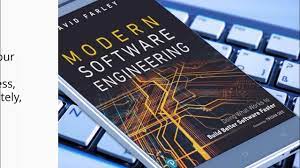
Modern Software Engineering: Practices for Building Reliable, Secure, and Adaptable Software
Modern Software Engineering: Building Better Software in a Changing World
Modern software engineering is about more than writing code. It brings together people, processes, and technology to build software that is useful, reliable, secure, and adaptable. As organizations depend on digital services in nearly every part of their operations, engineering teams must deliver new capabilities while keeping existing systems healthy.
From Coding to End-to-End Engineering
Traditional views of software development often focused on programming as a standalone activity. Modern engineering takes a broader approach. Teams consider a product’s full life cycle: understanding user needs, designing a solution, writing and testing code, deploying it, monitoring its performance, and improving it over time.
This end-to-end perspective encourages developers, designers, product managers, security specialists, and operations teams to work together. When these groups share responsibility, problems can be identified earlier and decisions can account for both user needs and technical realities.
Agile, Lean, and Continuous Improvement
Many teams use Agile practices to deliver work in small, manageable increments. Rather than waiting for a large project to be completed before gathering feedback, teams release useful improvements regularly and learn from how people use them. Planning, demonstrations, and retrospectives help teams adjust their priorities and ways of working.
Agile is not a fixed set of ceremonies or a promise that every project will move faster. Its value comes from improving communication, shortening feedback loops, and making it easier to respond when requirements change. Lean principles support this approach by encouraging teams to reduce unnecessary work and focus on outcomes that matter to users.
Automation and DevOps
Modern software teams rely on automation to make development and delivery more consistent. Continuous integration practices automatically build and test code as changes are made. Continuous delivery processes help teams prepare software for release frequently, while deployment automation can reduce manual effort and the risk of human error.
DevOps extends this collaboration across development and operations. Instead of treating deployment and system maintenance as separate responsibilities, DevOps teams share ownership of the software in production. Monitoring, logging, and alerting provide feedback about how applications behave, helping teams respond to issues and plan improvements.
Cloud-Native Architecture
Cloud platforms give teams access to computing, storage, databases, and other services without requiring them to manage every piece of physical infrastructure. Cloud-native development builds on these capabilities with techniques such as containers, managed services, and infrastructure as code.
Some organizations also use microservices, which divide an application into smaller services that can be developed and deployed independently. This can help large teams work on different parts of a system, but it also adds complexity. Service communication, data consistency, monitoring, and operational costs all require careful attention. A well-designed application does not need to use the newest architecture simply because it is available.
Security and Reliability by Design
Security is most effective when it is part of everyday engineering work rather than a final inspection. Teams can reduce risk by reviewing dependencies, protecting secrets, validating input, limiting access, and testing for common vulnerabilities. Threat modeling can help identify likely risks before a system is built or changed.
Reliability also requires deliberate design. Engineers consider how software will behave when a database is unavailable, traffic suddenly increases, or a third-party service fails. Backups, recovery plans, sensible timeouts, and clear error handling can help systems fail safely and recover more quickly. The goal is not to prevent every incident, but to limit its impact and learn from what happens.
Quality Through Testing and Review
Software quality depends on more than passing a single test. Teams often combine unit tests, integration tests, and end-to-end tests to check behavior at different levels. Code reviews help share knowledge and catch issues that automated tests may miss. Accessibility, performance, and usability testing can reveal problems that are not obvious from the code alone.
Testing should be proportionate to the risks involved. A small internal tool and a system that handles financial or health information may need different levels of verification. Thoughtful testing helps teams make changes with confidence without turning quality assurance into an obstacle to progress.
AI as a Tool for Engineers
AI-powered tools can assist with tasks such as drafting code, explaining unfamiliar functions, generating test ideas, and summarizing technical documentation. Used carefully, they may help engineers move through routine work more efficiently.
These tools do not replace engineering judgment. Generated code can be incorrect, insecure, or difficult to maintain, and sensitive information should not be shared with tools that are not approved for that use. Engineers remain responsible for understanding, reviewing, testing, and maintaining the software they deliver.
People and Maintainability Matter
Software is written and maintained by people, so clear communication is an engineering skill. Readable code, useful documentation, consistent conventions, and well-defined interfaces make it easier for teammates to understand a system and contribute safely. These practices are especially important as teams grow or as the original authors move on to other work.
Modern engineering also recognizes that developer experience affects the quality and pace of delivery. Reliable development environments, fast feedback, and manageable workloads help teams focus on solving problems rather than fighting their tools.
Conclusion
Modern software engineering combines sound technical practices with collaboration, continuous learning, and attention to real-world outcomes. Its tools and methods will continue to change, but the central challenge remains the same: build software that serves people and can be trusted over time. Teams that balance speed with quality, security, and maintainability are better positioned to meet that challenge.
7 Essential Tips for Effective Modern Software Engineering
- Write small, readable functions.
- Automate tests in your CI pipeline.
- Keep dependencies updated and reviewed.
- Design APIs around clear contracts.
- Use observability to catch issues early.
- Document decisions that affect future work.
- Prioritize security from the start.
Write small, readable functions.
Writing small, readable functions makes software easier to understand, test, and maintain. Each function should focus on one clear task, use descriptive names, and avoid unnecessary complexity. When a function is easy to follow, teammates can spot bugs more quickly and make changes with greater confidence. Small functions also make it simpler to reuse useful logic and test individual behaviors without untangling unrelated code.
Automate tests in your CI pipeline.
Automate tests in your continuous integration (CI) pipeline so every code change is checked quickly and consistently. Run appropriate tests—such as unit, integration, and security checks—when developers submit changes, and make failures easy to find and fix. Fast, reliable feedback helps catch defects before they reach production, reduces repetitive manual work, and gives the team greater confidence when merging and releasing software.
Keep dependencies updated and reviewed.
Keep dependencies updated and reviewed to reduce security risks, fix bugs, and benefit from improvements in the libraries and tools your software relies on. Regularly check for new releases, review changelogs and security advisories, and test updates before deploying them. Avoid upgrading blindly: confirm that each dependency is still needed, comes from a trusted source, and is compatible with your application. A consistent review process helps prevent outdated packages from becoming a hidden source of technical debt or security vulnerabilities.
Design APIs around clear contracts.
Design APIs around clear contracts so that every consumer knows exactly what to expect. Define request and response formats, required fields, error behavior, authentication rules, and compatibility expectations, then document them in a way developers can easily follow. Consistent contracts reduce misunderstandings, make integrations easier to test, and allow teams to update services with less risk. When an API needs to change, versioning and clear migration guidance help consumers adapt without unexpected breakage.
Use observability to catch issues early.
Use observability to catch issues early by collecting and connecting the signals that show how your software is behaving. Logs provide details about events, metrics reveal trends such as rising error rates or response times, and traces help follow a request across services. Set alerts around meaningful changes so the team can investigate before a small problem affects more users. Regularly reviewing these signals also helps engineers spot patterns, understand root causes, and improve reliability over time.
Document decisions that affect future work.
Document decisions that could affect future work so teammates can understand not only what was chosen, but why. A brief record of the options considered, key tradeoffs, and relevant constraints can prevent repeated debates and help future engineers make informed changes. Keep decision notes close to the project documentation, and update them when circumstances change.
Prioritize security from the start.
Prioritize security from the start by making it part of every stage of software development—not a final check before launch. Identify potential threats during planning, use secure design practices, protect sensitive data, review third-party dependencies, and test for vulnerabilities throughout development. Building security in early helps prevent costly fixes later and creates software users can trust.