

IT Infra Service: Building a Reliable Technology Foundation
IT Infrastructure Services: The Foundation of a Reliable Business
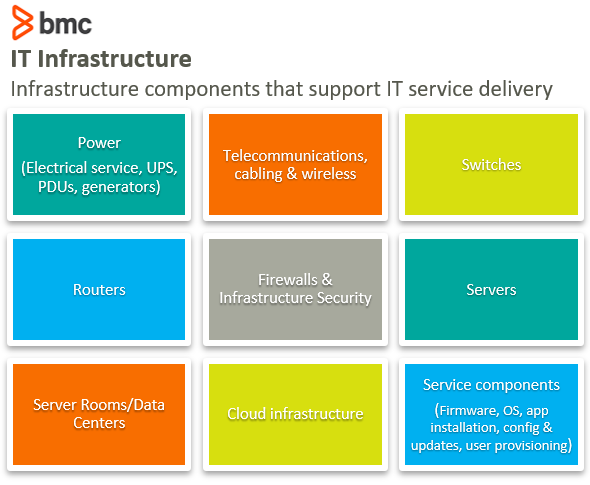
Every modern organization depends on technology to communicate, serve customers, and get work done. Behind the applications employees use each day is an IT infrastructure: the hardware, software, networks, cloud platforms, and security systems that keep business operations running. IT infrastructure services help organizations build, manage, and improve that foundation.
What Are IT Infrastructure Services?
IT infrastructure services cover the planning, setup, monitoring, maintenance, and support of the technology an organization relies on. Services may be delivered by an internal IT team, an outside provider, or a combination of both.
The right mix depends on an organization’s size, goals, existing technology, and regulatory requirements. Some businesses need help maintaining office networks and servers, while others need cloud management, cybersecurity support, or a complete infrastructure strategy.
Common IT Infrastructure Services
- Network services: Design, configuration, monitoring, and troubleshooting for wired and wireless networks, routers, switches, and secure remote access.
- Cloud services: Support for cloud environments, including migration, configuration, cost management, and ongoing maintenance.
- Server and storage management: Installation, updates, performance monitoring, capacity planning, and administration of systems that store and process business data.
- Cybersecurity: Security assessments, access controls, endpoint protection, vulnerability management, and incident response planning.
- Backup and disaster recovery: Backup systems and recovery plans designed to help restore data and services after an outage, cyberattack, or other disruption.
- Help desk and technical support: Assistance with everyday technology problems, account access, devices, and business applications.
- IT planning and consulting: Guidance on technology investments, infrastructure design, modernization, and long-term business needs.
Why Infrastructure Services Matter
A dependable IT infrastructure can help employees work efficiently and give customers a more consistent experience. Regular maintenance and monitoring can also help identify problems before they cause significant downtime.
Professional infrastructure support may help an organization:
- Reduce service interruptions and improve system reliability.
- Protect business data and manage security risks.
- Support remote and hybrid work.
- Scale technology as the organization grows.
- Plan technology spending more effectively.
- Free internal staff to focus on higher-priority work.
Managed Services or In-House IT?
Some organizations manage all technology internally. Others work with a managed service provider that monitors and supports their systems under an ongoing agreement. A blended approach is also common: internal staff handle business-specific needs while an outside provider supplies specialized expertise or around-the-clock monitoring.
When comparing options, consider the skills already available in-house, the complexity of the environment, support hours, security needs, and the level of control the organization wants to retain. It is also helpful to understand exactly what a service agreement includes, how support requests are handled, and how performance is measured.
How to Choose an IT Infrastructure Provider
A strong provider should take time to understand how the organization works before recommending solutions. Look for clear communication, relevant technical experience, documented processes, and a practical approach to security and continuity planning.
Ask potential providers about their service scope, response procedures, backup and recovery practices, reporting, and experience with the technologies your organization uses. A provider should explain recommendations in plain language and connect them to business goals—not simply propose technology for its own sake.
Build a Stronger Technology Foundation
IT infrastructure services are more than routine maintenance. They help organizations keep essential systems dependable, secure, and ready for change. With a clear plan and the right level of support, businesses can make better use of technology today while preparing for tomorrow’s needs.
9 Essential Tips for Reliable and Secure IT Infrastructure Services
- Monitor systems continuously.
- Patch servers regularly.
- Back up critical data.
- Test disaster recovery plans.
- Use strong access controls.
- Document your infrastructure.
- Track capacity and usage.
- Automate routine maintenance.
- Review security alerts promptly.
Monitor systems continuously.
Monitor systems continuously to spot performance issues, outages, and security threats before they disrupt your business. By tracking servers, networks, applications, and cloud services in real time, your IT team or service provider can investigate alerts quickly, resolve problems sooner, and keep essential systems reliable. Set clear alert thresholds and review monitoring reports regularly so recurring issues can be addressed at their source.
Patch servers regularly.
Regularly patching servers is a simple but essential part of maintaining a secure, reliable IT infrastructure. Software updates often fix known security vulnerabilities, resolve bugs, and improve system stability. Establish a consistent patching schedule, test updates when appropriate, and keep backups and rollback plans in place in case an update causes problems. Regular patch management helps reduce risk while keeping servers dependable and up to date.
Back up critical data.
Back up critical data regularly to protect your business from accidental deletion, hardware failure, cyberattacks, and other disruptions. Store backup copies in a secure location separate from your primary systems, and use automated schedules to keep them current. Test your backups periodically to confirm that files can be restored when needed.
Test disaster recovery plans.
Test your disaster recovery plans regularly to make sure your team can restore critical systems and data when an outage, cyberattack, or other disruption occurs. Simulated recovery exercises can reveal outdated procedures, missing backups, unclear responsibilities, and technology gaps before a real emergency happens. Document the results, address any issues, and update the plan as your IT infrastructure changes.
Use strong access controls.
Use strong access controls to ensure people can access only the systems and information they need for their jobs. Require unique accounts, strong passwords, and multifactor authentication, especially for administrator and remote access. Review permissions regularly, remove access promptly when someone changes roles or leaves, and avoid shared accounts whenever possible. These steps can reduce the risk of unauthorized access and help protect your IT infrastructure.
Document your infrastructure.
Documenting your IT infrastructure gives your team a clear, up-to-date record of how systems are connected and managed. Include details such as network diagrams, hardware and software inventories, cloud services, configurations, backup procedures, and vendor contacts. Good documentation makes troubleshooting faster, supports smoother onboarding, and helps the business recover more effectively from outages. Review it regularly so it stays accurate as your infrastructure changes.
Track capacity and usage.
Track capacity and usage across your IT infrastructure to spot growing demands before they affect performance. Regularly review metrics such as storage, network traffic, memory, and processing power to identify bottlenecks, unused resources, and trends over time. This information helps you plan upgrades, optimize costs, and keep services reliable as your organization grows.
Automate routine maintenance.
Automating routine IT maintenance—such as software updates, backups, system checks, and log reviews—helps keep infrastructure reliable while reducing repetitive work for IT teams. Well-planned automation can make tasks more consistent, catch potential issues earlier, and free staff to focus on higher-priority projects. Start with routine, low-risk tasks, test each workflow, and monitor the results to ensure automation is working as intended.
Review security alerts promptly.
Review security alerts as soon as they appear to help identify and contain potential threats before they disrupt your IT infrastructure. Confirm whether each alert indicates suspicious activity, follow your incident response procedures, and escalate serious or unclear issues to the appropriate security team or service provider. Timely investigation can reduce damage, protect sensitive data, and help keep business systems running securely.