
cfchris.com

Loading

simple java program

Simple Java Program: A Beginner’s Guide to Writing and Running Your First Code

How to Write a Simple Java Program

Java is a popular programming language used to build desktop, web, and mobile applications. A good way to get started is to write a small program that displays a message on the screen.

Your First Java Program

The program below prints “Hello, World!” in the console:

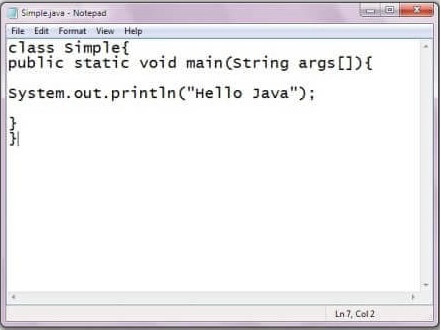
public class HelloWorld {

public static void main(String[] args) {

System.out.println("Hello, World!");

}

}

Understanding the Code

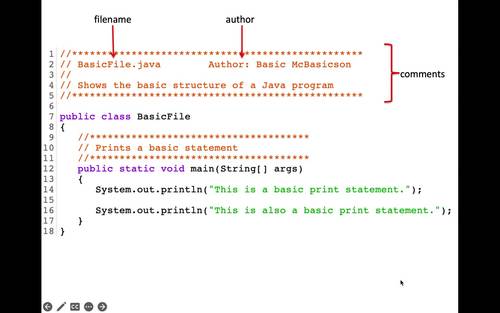
  • public class HelloWorld defines a class named HelloWorld. In Java, the class name should match the file name, so save the program as HelloWorld.java.
  • public static void main(String[] args) defines the main method. Java starts running the program from this method.
  • System.out.println() displays text in the console. The text to display goes inside the parentheses and quotation marks.
  • Braces, { }, mark the beginning and end of the class and method.
  • The semicolon at the end of the print statement tells Java that the instruction is complete.

Compile and Run the Program

Install a Java Development Kit (JDK), then open a terminal or command prompt in the folder containing HelloWorld.java. Compile the program with:

javac HelloWorld.java

If compilation succeeds, Java creates a file named HelloWorld.class. Run the program with:

java HelloWorld

The output will be:

Hello, World!

Try a Small Change

Replace the message inside System.out.println() with your own text. For example:

System.out.println("Java is fun to learn!");

Save the file, compile it again, and run it to see the new output. This simple example introduces the basic structure of a Java program and gives you a starting point for exploring variables, input, and other programming concepts.


7 Essential Tips for Writing Simple Java Programs

  1. Use `public static void main(String[] args)` as the program’s entry point.
  2. Save the file with the same name as its public class.
  3. Use `System.out.println()` to display text.
  4. End most statements with a semicolon.
  5. Match every opening brace with a closing brace.
  6. Compile with `javac` and run with `java`.
  7. Keep variable names clear and descriptive.

Use `public static void main(String[] args)` as the program’s entry point.

In a simple Java program, `public static void main(String[] args)` is the entry point—the method Java looks for to begin running your code. Place the statements you want the program to execute inside its braces. The method signature must be written with the correct spelling and capitalization, or Java won’t recognize it as the program’s starting point.

Save the file with the same name as its public class.

In Java, save your source file with the same name as its public class, including matching capitalization, and add the .java extension. For example, if your public class is HelloWorld, name the file HelloWorld.java. This naming rule helps the Java compiler locate and compile the class correctly.

Use `System.out.println()` to display text.

Use `System.out.println()` to display text in a Java program’s console. Place the text inside quotation marks within the parentheses, as in `System.out.println(“Hello, world!”);`. Java prints the message and then moves to a new line, making this method useful for showing greetings, results, and other output.

End most statements with a semicolon.

In Java, most statements end with a semicolon, which tells the compiler that an instruction is complete. For example, `System.out.println(“Hello, world!”);` needs a semicolon at the end. Forgetting one can cause a compile-time error, so check your statements when the compiler reports a problem. Some Java structures, such as class and method declarations, do not end with semicolons.

Match every opening brace with a closing brace.

In a simple Java program, every opening brace ({) must have a matching closing brace (}). Braces mark the beginning and end of code blocks, such as classes and methods, so a missing or misplaced brace can cause compilation errors or change how the program works. Indenting nested blocks consistently makes braces easier to match and your code easier to read.

Compile with `javac` and run with `java`.

To compile a simple Java program, open a terminal in the folder containing the `.java` file and run `javac FileName.java`, replacing `FileName` with the name of your file. After compilation succeeds, run the program with `java ClassName`—without the `.java` extension—to see its output.

Keep variable names clear and descriptive.

Use clear, descriptive variable names so your code is easier to read and understand. For example, studentAge is more informative than x, and totalPrice makes its purpose clearer than n. Meaningful names also make simple Java programs easier to update and help you spot mistakes as you learn.
java basic programs

Mastering Java Basic Programs: A Beginner’s Guide to Essential Java Coding

Article: Java Basic Programs

Exploring Java Basic Programs

Java is a versatile and widely-used programming language that is known for its simplicity and flexibility. It is a popular choice for beginners due to its readability and ease of learning. In this article, we will explore some basic programs in Java that can help you understand the fundamentals of the language.

Hello World Program

The classic “Hello World” program is often the first program beginners write when learning a new programming language. In Java, it looks like this:


public class HelloWorld {

public static void main(String[] args) {

System.out.println("Hello, World!");

}

}

This program simply prints out “Hello, World!” to the console when executed. It demonstrates the basic structure of a Java program, including classes, methods, and statements.

Sum of Two Numbers Program

Another common beginner program is one that calculates the sum of two numbers. Here’s an example in Java:


public class SumOfTwoNumbers {

public static void main(String[] args) {

int num1 = 5;

int num2 = 10;

int sum = num1 + num2;

System.out.println("The sum of " + num1 + " and " + num2 + " is: " + sum);

}

}

This program declares two integer variables, adds them together, and then prints out the result.

Conclusion

These are just a few examples of basic programs in Java. By practicing writing and running these programs, you can gain a solid foundation in Java programming. Remember to experiment with different variations and explore more complex programs as you progress in your learning journey.


7 Common Questions About Getting Started with Basic Java Programs

  1. What is the basic program of Java?
  2. Is C++ or Java harder?
  3. Is Java easy for beginners?
  4. What is the simplest Java program?
  5. What is Java basics for beginners?
  6. How to write a simple program in Java for beginners?
  7. What are the basic programs in Java?

What is the basic program of Java?

One of the frequently asked questions regarding Java basic programs is, “What is the basic program of Java?” The most fundamental program in Java that beginners often start with is the “Hello World” program. This simple yet essential program showcases the basic structure of a Java program, including classes, methods, and statements. By printing out the phrase “Hello, World!” to the console, this introductory program helps newcomers grasp the foundational concepts of Java programming and sets a solid starting point for further exploration into the language’s capabilities.

Is C++ or Java harder?

When comparing C++ and Java in terms of difficulty, the answer can vary depending on individual preferences and background. Both languages have their own complexities and learning curves. C++ is known for its low-level capabilities and memory management, which can be challenging for beginners. On the other hand, Java is often considered more beginner-friendly due to its simpler syntax and automatic memory management. Ultimately, the perceived difficulty of C++ or Java will depend on factors such as prior programming experience, personal learning style, and the specific goals of the programmer.

Is Java easy for beginners?

When it comes to beginners learning programming, Java is often considered a suitable language due to its relatively straightforward syntax and extensive documentation. While Java may have a steeper learning curve compared to some other beginner-friendly languages, its strict structure and strong typing can help new programmers develop good coding habits early on. Additionally, the vast community support and abundance of online resources make it easier for beginners to find help and guidance as they navigate their Java learning journey. Ultimately, with dedication and practice, many beginners find that Java can be a rewarding language to learn and master.

What is the simplest Java program?

When it comes to Java programming, one of the most frequently asked questions is, “What is the simplest Java program?” The simplest Java program that beginners often start with is the “Hello World” program. This basic program typically consists of just a few lines of code that print out the phrase “Hello, World!” to the console. Despite its simplicity, the “Hello World” program serves as an essential introduction to Java syntax and structure, making it an ideal starting point for those new to the language.

What is Java basics for beginners?

For beginners, Java basics encompass the fundamental concepts and syntax of the Java programming language. It includes understanding key components such as variables, data types, operators, control structures (like loops and conditional statements), methods, classes, and objects. Java basics also involve learning how to write simple programs to perform common tasks, like printing messages to the console or performing basic arithmetic operations. Mastering these foundational concepts is essential for beginners to build a strong understanding of Java programming and pave the way for more advanced learning and development in the language.

How to write a simple program in Java for beginners?

For beginners looking to write a simple program in Java, the key is to start with a basic structure that includes a class and a main method. A common starting point is the “Hello World” program, which involves creating a class with a main method that prints out the phrase “Hello, World!” to the console. By understanding this foundational structure and syntax, beginners can gradually expand their knowledge and skills by exploring more complex programs and concepts in Java programming.

What are the basic programs in Java?

One frequently asked question in the realm of Java programming is, “What are the basic programs in Java?” This question often arises from beginners looking to grasp the fundamental concepts of Java programming. Basic programs in Java typically include the classic “Hello World” program, which serves as an introduction to the syntax and structure of Java code. Additionally, programs that perform simple tasks like calculating the sum of two numbers or displaying basic arithmetic operations are commonly explored by novice programmers to solidify their understanding of Java fundamentals. By starting with these basic programs, learners can build a strong foundation in Java programming and gradually progress to more complex applications.