

cfchris.com

Loading

js code

Unleashing the Power of JS Code: Transforming the Web Experience

The Power of JavaScript Code: Transforming the Web

JavaScript, often abbreviated as JS, is a powerful programming language that has revolutionized the way websites and web applications are developed. Originally created to add interactivity to web pages, JavaScript has evolved into a versatile language that can handle complex tasks and create dynamic user experiences.

One of the key strengths of JavaScript is its ability to manipulate HTML elements and CSS styles on a webpage. With just a few lines of code, developers can change the content of a webpage, animate elements, validate forms, and much more. This dynamic nature of JavaScript makes websites more engaging and interactive for users.

Another important feature of JavaScript is its support for asynchronous programming through AJAX (Asynchronous JavaScript and XML). This allows web pages to fetch data from servers in the background without reloading the entire page. As a result, users experience faster and more responsive websites.

JavaScript is also widely used in building web applications. Frameworks like React, Angular, and Vue.js leverage the power of JavaScript to create single-page applications that provide a seamless user experience similar to desktop applications. These frameworks simplify complex tasks like state management, routing, and data binding, enabling developers to build robust applications efficiently.

Furthermore, JavaScript has expanded beyond the web browser with the introduction of Node.js. Node.js allows developers to run JavaScript on the server-side, opening up new possibilities for building scalable and high-performance web applications. With Node.js, developers can use JavaScript throughout the entire web development stack.

In conclusion, JavaScript code plays a crucial role in transforming the web by enabling dynamic interactions, asynchronous communication, and sophisticated web applications. Its versatility and widespread adoption make it an essential tool for modern web development.


7 Essential Tips for Writing Clean and Efficient JavaScript Code

  1. Use meaningful variable and function names for better code readability.
  2. Follow consistent coding style and indentation to improve code maintainability.
  3. Comment your code to explain complex logic or functionality.
  4. Avoid global variables to prevent variable conflicts and unexpected behavior.
  5. Use built-in methods and libraries whenever possible to write efficient code.
  6. Regularly test your code for bugs and errors using debugging tools or testing frameworks.
  7. Keep your code modular by breaking it into smaller functions or modules for easier troubleshooting.

Use meaningful variable and function names for better code readability.

When writing JavaScript code, it is essential to use meaningful variable and function names to enhance code readability. By choosing descriptive names that accurately reflect the purpose of each variable or function, developers can easily understand the logic of the code without needing to decipher cryptic abbreviations or unclear identifiers. This practice not only improves the readability of the code but also makes it more maintainable and easier for other developers to collaborate on the project effectively.

Follow consistent coding style and indentation to improve code maintainability.

Following a consistent coding style and indentation practices in JavaScript code is essential for improving code maintainability. By adhering to a set of guidelines for formatting and structuring code, developers can enhance readability, facilitate collaboration, and reduce the likelihood of errors. Consistent coding style ensures that all team members follow the same conventions, making it easier to understand and modify code in the future. Proper indentation also helps in visually organizing the code, making it more accessible and manageable. Overall, maintaining a uniform coding style and indentation standard leads to more maintainable and sustainable JavaScript codebases.

Comment your code to explain complex logic or functionality.

Commenting your JavaScript code is essential, especially when dealing with complex logic or functionality. By adding comments to your code, you provide valuable insights into the purpose of each section, making it easier for other developers (or even your future self) to understand how the code works. Clear and concise comments can clarify the reasoning behind specific decisions, outline the expected behavior of functions, and highlight any potential pitfalls. In addition, well-documented code fosters collaboration among team members and ensures that the codebase remains maintainable and scalable over time. Remember, commenting your code is not just a good practice—it’s a necessity for effective communication and efficient development.

Avoid global variables to prevent variable conflicts and unexpected behavior.

To ensure smooth functioning and prevent unexpected behavior in JavaScript code, it is advisable to avoid using global variables. Global variables can lead to variable conflicts and unintended consequences, especially in larger codebases or when collaborating with other developers. By encapsulating variables within functions or modules, developers can limit the scope of variables and reduce the risk of conflicts, ultimately improving code maintainability and reliability.

Use built-in methods and libraries whenever possible to write efficient code.

When writing JavaScript code, it is advisable to utilize built-in methods and libraries whenever feasible to ensure the efficiency of your code. By leveraging the existing functionality provided by JavaScript’s built-in methods and popular libraries, developers can streamline their coding process, improve performance, and reduce the likelihood of errors. These resources are often optimized for speed and reliability, allowing developers to focus on implementing solutions rather than reinventing the wheel. Embracing built-in methods and libraries in JavaScript coding not only enhances productivity but also promotes best practices in software development.

Regularly test your code for bugs and errors using debugging tools or testing frameworks.

Regularly testing your JavaScript code for bugs and errors using debugging tools or testing frameworks is essential to ensure the reliability and performance of your applications. By identifying and fixing issues early in the development process, you can prevent potential problems from impacting the user experience. Debugging tools like Chrome DevTools provide valuable insights into code execution, variable values, and network activity, helping you pinpoint and resolve issues efficiently. Testing frameworks such as Jest or Mocha enable you to automate the testing process, ensuring that your code functions as intended across different scenarios. Prioritizing thorough testing practices not only improves the quality of your code but also enhances overall software stability and user satisfaction.

Keep your code modular by breaking it into smaller functions or modules for easier troubleshooting.

To improve the maintainability and troubleshooting of your JavaScript code, it is essential to keep it modular by breaking it into smaller functions or modules. By dividing your code into smaller, self-contained units, you can isolate specific functionalities and make it easier to identify and fix issues when they arise. Modular code also promotes reusability, as individual functions or modules can be used in different parts of your application without duplicating code. This approach not only enhances the readability of your code but also streamlines the debugging process, ultimately leading to more efficient development and better-performing applications.
open source software development

Exploring the Impact of Open Source Software Development

Article: Open Source Software Development

The Power of Open Source Software Development

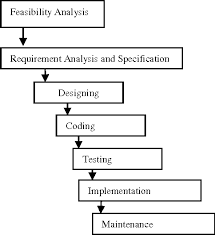
Open source software development has revolutionized the way we create and use technology. Unlike proprietary software, open source software is built collaboratively by a community of developers who openly share their code and contribute to its improvement.

One of the key benefits of open source software is its transparency. Anyone can access the source code, modify it, and distribute it freely. This fosters innovation and allows for rapid development cycles as developers around the world can collectively work on enhancing the software.

Moreover, open source software promotes inclusivity and diversity in the tech industry. Developers from different backgrounds and skill levels can participate in projects, learn from each other, and build a more inclusive community.

Key Principles of Open Source Software Development:

  • Collaboration: Developers work together to create and improve software.
  • Transparency: The source code is accessible to all, promoting trust and accountability.
  • Innovation: Rapid iteration and feedback lead to innovative solutions.
  • Inclusivity: Open source projects welcome contributions from diverse communities.
  • Community: A sense of belonging and shared purpose drives open source development.

In recent years, many successful projects have emerged from the open source community, including popular web browsers like Mozilla Firefox, operating systems like Linux, and programming languages like Python. These projects have not only gained widespread adoption but have also influenced proprietary software development practices.

As we look to the future of technology, open source software development continues to play a crucial role in driving innovation, collaboration, and accessibility in the digital landscape. By embracing the principles of openness and community-driven development, we can create a more sustainable and inclusive tech ecosystem for generations to come.


Understanding Open Source Software Development: Key FAQs

  1. What is meant by open source development?
  2. What are examples of open source software?
  3. What are open source development tools?
  4. How is open source software developed?
  5. How do I become an open source software developer?
  6. Does open source software have a developer?
  7. What software is built on open source?

What is meant by open source development?

Open source development refers to the collaborative process of creating software where the source code is made freely available to the public. In open source development, programmers from around the world can view, modify, and distribute the code, fostering a community-driven approach to software creation. This model promotes transparency, innovation, and inclusivity by allowing developers of varying backgrounds to contribute to projects and improve the software collectively. Open source development has revolutionized the tech industry by democratizing access to technology and encouraging a culture of sharing and collaboration among developers.

What are examples of open source software?

Open source software encompasses a wide range of applications across various domains. Some prominent examples of open source software include the Linux operating system, which powers a significant portion of servers and embedded devices worldwide. Additionally, popular web browsers like Mozilla Firefox and Chromium are open source projects that prioritize user privacy and customization. Development tools such as the Apache web server, MySQL database management system, and the programming language Python are also well-known examples of open source software that have gained widespread adoption in the tech industry. These examples highlight the diversity and impact of open source software in enabling innovation and collaboration within the global developer community.

What are open source development tools?

Open source development tools are software applications specifically designed to support and streamline the process of creating open source projects. These tools encompass a wide range of functionalities, including code editors, version control systems, build automation tools, testing frameworks, and project management platforms. By utilizing open source development tools, developers can collaborate more efficiently, track changes in the codebase, automate repetitive tasks, ensure code quality through testing, and manage project timelines effectively. These tools not only enhance productivity but also promote transparency and accessibility in the development process by enabling contributors to work together seamlessly on open source projects.

How is open source software developed?

Open source software development follows a collaborative and transparent process where developers from around the world contribute to creating and improving software. Typically, an open source project starts with an idea or a need identified by an individual or a group of developers. The source code is made available to the public, allowing anyone to view, modify, and enhance it. Developers can collaborate through online platforms like GitHub, where they can submit code changes, report issues, and discuss improvements with the community. This iterative process of feedback, contribution, and review results in the continuous development of open source software that is accessible to all and benefits from diverse perspectives and expertise.

How do I become an open source software developer?

To become an open source software developer, one can start by selecting a project that aligns with their interests and skills. Engaging with the open source community through forums, mailing lists, and code repositories can provide valuable insights and networking opportunities. Contributing to projects by fixing bugs, adding new features, or improving documentation is a great way to gain experience and build a reputation within the community. Continuous learning and collaboration with other developers are key aspects of becoming a successful open source software developer.

Does open source software have a developer?

In the realm of open source software development, the question of whether open source software has a developer is a common inquiry. Unlike proprietary software where a single entity typically owns and controls the development process, open source software projects often have multiple developers contributing to the codebase. These developers can come from diverse backgrounds and may collaborate on the project voluntarily or as part of a community effort. The decentralized nature of open source development allows for greater innovation, transparency, and inclusivity as developers work together to enhance and maintain the software for the benefit of all users.

What software is built on open source?

Many popular software applications are built on open source technologies. Examples include web browsers like Mozilla Firefox and Google Chrome, operating systems such as Linux distributions like Ubuntu and Fedora, content management systems like WordPress and Joomla, programming languages like Python and PHP, and development tools like Git and Apache. These software products leverage the collaborative efforts of the open source community to deliver reliable, secure, and innovative solutions to users worldwide. By utilizing open source components, developers can benefit from a wealth of resources and expertise while contributing to the advancement of technology in a transparent and inclusive manner.

cloud solutions

Unleashing the Potential: Harnessing the Power of Cloud Solutions for Business Success

The Power of Cloud Solutions

The Power of Cloud Solutions

In today’s digital age, businesses are increasingly turning to cloud solutions to streamline their operations, enhance collaboration, and improve efficiency. Cloud computing offers a wide range of benefits that can revolutionize the way organizations work and grow.

Scalability and Flexibility

One of the key advantages of cloud solutions is their scalability. Businesses can easily adjust their storage and computing resources based on their current needs, allowing for flexibility in managing workload fluctuations. Whether you are a small startup or a large enterprise, cloud services can scale up or down to accommodate your requirements.

Cost-Effectiveness

Cloud solutions eliminate the need for businesses to invest in expensive hardware and infrastructure. With a pay-as-you-go model, organizations only pay for the resources they use, reducing capital expenditure and operational costs. This cost-effectiveness makes cloud computing an attractive option for businesses looking to optimize their budget without compromising on performance.

Enhanced Collaboration

Collaboration is essential in today’s interconnected world, and cloud solutions facilitate seamless communication and teamwork among employees. With cloud-based tools such as file sharing platforms and project management software, teams can collaborate in real-time regardless of their physical location. This level of connectivity boosts productivity and innovation within organizations.

Data Security and Reliability

Cloud service providers invest heavily in security measures to protect data stored on their platforms. From encryption protocols to regular backups, cloud solutions offer robust security features that safeguard sensitive information from cyber threats. Additionally, cloud infrastructure is designed for high availability and reliability, ensuring that businesses can access their data anytime, anywhere without interruptions.

Conclusion

Cloud solutions have become indispensable for modern businesses seeking agility, cost savings, and competitive advantage in the digital landscape. By leveraging the power of cloud computing, organizations can transform their operations, drive innovation, and achieve sustainable growth in today’s dynamic business environment.


Top 9 Frequently Asked Questions About Cloud Solutions for Businesses

  1. What is cloud computing?
  2. How secure is data stored in the cloud?
  3. What are the benefits of using cloud solutions for businesses?
  4. How does cloud storage differ from traditional storage methods?
  5. What types of cloud services are available to businesses?
  6. Can I integrate existing IT infrastructure with cloud solutions?
  7. How does scalability work in cloud computing?
  8. What are the potential risks of migrating to the cloud?
  9. How can businesses ensure compliance and data governance when using cloud solutions?

What is cloud computing?

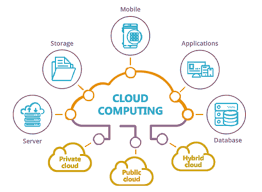
Cloud computing refers to the delivery of computing services, including storage, processing power, and applications over the internet. Instead of relying on local servers or personal devices to handle data and applications, cloud computing allows users to access resources remotely through a network of servers hosted in data centers. This model offers scalability, flexibility, and cost-effectiveness by enabling businesses to pay only for the resources they use. With cloud computing, organizations can streamline their operations, enhance collaboration, and improve efficiency while benefiting from enhanced security measures and high availability of services.

How secure is data stored in the cloud?

The security of data stored in the cloud is a common concern among individuals and businesses considering cloud solutions. Cloud service providers implement robust security measures to protect data from unauthorized access, breaches, and other cyber threats. Encryption protocols, access controls, regular security audits, and compliance certifications are some of the mechanisms used to ensure the confidentiality, integrity, and availability of data in the cloud. By adhering to industry best practices and standards, cloud providers strive to create a secure environment for storing sensitive information, giving users peace of mind regarding the safety of their data in the cloud.

What are the benefits of using cloud solutions for businesses?

Businesses can reap a multitude of benefits by leveraging cloud solutions. From enhanced scalability and flexibility to cost-effectiveness and improved collaboration, cloud computing offers a versatile toolkit for optimizing operations. By utilizing cloud services, organizations can easily adjust their resources to meet changing demands, reduce infrastructure costs, foster seamless teamwork among employees, and ensure robust data security and reliability. Embracing cloud solutions empowers businesses to streamline processes, drive innovation, and stay competitive in today’s fast-paced digital landscape.

How does cloud storage differ from traditional storage methods?

Cloud storage differs from traditional storage methods in several key ways. Unlike traditional storage, which typically involves storing data on physical hardware within an organization’s premises, cloud storage utilizes remote servers maintained by a third-party provider. This means that with cloud storage, data is stored off-site and accessed over the internet, offering greater flexibility and scalability. Additionally, cloud storage allows for easier data backup and recovery, as well as seamless collaboration among users from different locations. The pay-as-you-go model of cloud storage also makes it a cost-effective solution for businesses of all sizes. Overall, cloud storage offers enhanced accessibility, security, and efficiency compared to traditional storage methods.

What types of cloud services are available to businesses?

Businesses have access to a variety of cloud services tailored to meet their specific needs and requirements. The main types of cloud services include Infrastructure as a Service (IaaS), Platform as a Service (PaaS), and Software as a Service (SaaS). IaaS provides businesses with virtualized computing resources such as servers, storage, and networking infrastructure, allowing for greater flexibility and scalability. PaaS offers a platform for developers to build, deploy, and manage applications without the complexity of underlying infrastructure. SaaS delivers software applications over the internet on a subscription basis, enabling businesses to access productivity tools and business applications without the need for installation or maintenance. Each type of cloud service offers distinct advantages and can be customized to support various aspects of business operations.

Can I integrate existing IT infrastructure with cloud solutions?

Yes, integrating existing IT infrastructure with cloud solutions is a common practice that many organizations undertake to leverage the benefits of cloud computing while maintaining their current systems. By adopting a hybrid approach, businesses can seamlessly connect on-premises infrastructure with cloud services, allowing for increased flexibility, scalability, and efficiency. This integration enables companies to optimize their resources, enhance data accessibility, and improve overall performance across their IT ecosystem. With proper planning and implementation, organizations can successfully integrate their existing infrastructure with cloud solutions to create a unified and cohesive IT environment that meets their evolving needs and strategic objectives.

How does scalability work in cloud computing?

Scalability in cloud computing refers to the ability of a system to handle varying workloads efficiently by adjusting resources accordingly. Cloud solutions offer scalability through features like auto-scaling, which automatically allocates more resources when demand increases and releases them when demand decreases. This dynamic resource allocation ensures that businesses can scale their IT infrastructure up or down seamlessly without manual intervention, allowing for optimal performance and cost-efficiency. Scalability in cloud computing empowers organizations to adapt to changing needs quickly and effectively, making it a fundamental aspect of leveraging cloud technology for business growth and innovation.

What are the potential risks of migrating to the cloud?

When considering migrating to the cloud, it is essential to be aware of the potential risks associated with this transition. One common concern is data security and privacy, as storing sensitive information on a third-party server may raise apprehensions about unauthorized access or data breaches. Another risk is the possibility of service outages or downtime, which could impact business operations and result in financial losses. Additionally, compliance and regulatory issues must be carefully addressed to ensure that data handling practices align with industry standards and legal requirements. Despite these risks, proactive risk management strategies and thorough assessment of cloud service providers can help mitigate potential challenges and ensure a smooth migration process.

How can businesses ensure compliance and data governance when using cloud solutions?

Ensuring compliance and data governance when utilizing cloud solutions is a critical concern for businesses in today’s digital landscape. To address this challenge effectively, organizations can implement a comprehensive strategy that includes thorough vetting of cloud service providers’ security and compliance certifications, establishing clear data governance policies and procedures, conducting regular audits to monitor compliance with regulatory requirements, encrypting sensitive data both in transit and at rest, and providing employee training on data security best practices. By adopting a proactive approach to compliance and data governance in the cloud, businesses can mitigate risks, protect sensitive information, and maintain regulatory adherence while leveraging the benefits of cloud technology.