


Cyber Security Monitoring: A Practical Guide to Detecting and Responding to Threats
Cybersecurity Monitoring: A Practical Guide for Organizations
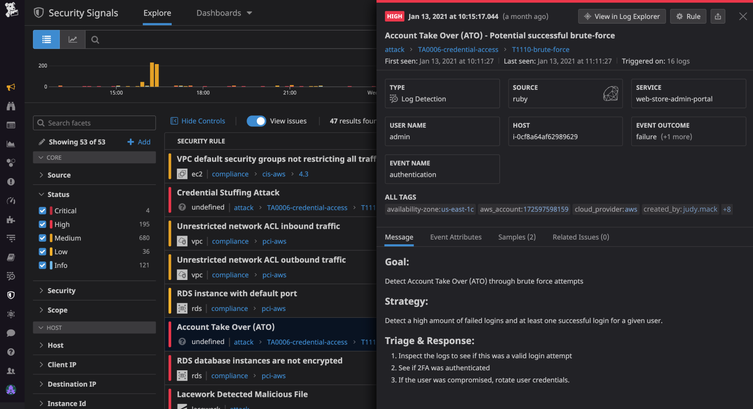
Cybersecurity threats can emerge at any time, and even well-protected systems may have vulnerabilities. Cybersecurity monitoring helps organizations spot suspicious activity, investigate potential incidents, and respond before a problem causes serious damage. It is an ongoing process—not a one-time security check.
What Is Cybersecurity Monitoring?
Cybersecurity monitoring is the continuous review of activity across an organization’s computers, networks, applications, cloud services, and user accounts. Security teams look for signs of unauthorized access, malware, data theft, unusual behavior, and other possible threats.
Monitoring may rely on automated tools, human analysis, or a combination of both. For example, software might flag a login from an unfamiliar location, while an analyst determines whether it is a legitimate employee or a compromised account.
Why Is Monitoring Important?
Many attacks do not cause immediate, obvious disruption. An intruder may quietly explore a network, steal credentials, or access sensitive information over time. Continuous monitoring can help reduce the time between the start of an attack and its detection.
Effective monitoring can help organizations:
- Identify suspicious activity earlier
- Limit the impact of security incidents
- Protect sensitive and customer data
- Investigate events with useful system records
- Meet security, privacy, or regulatory obligations
- Understand recurring weaknesses and improve defenses
What Should Organizations Monitor?
A useful monitoring program considers the systems and information most important to the organization. Common sources of security data include:
- Network traffic: Connections between devices, unusual data transfers, and attempts to reach suspicious destinations.
- User accounts: Login patterns, failed sign-in attempts, changes to permissions, and activity involving privileged accounts.
- Endpoints: Activity on laptops, desktops, servers, and mobile devices, including unexpected software or processes.
- Applications and cloud services: Access to files, configuration changes, administrative actions, and unusual use of cloud resources.
- Security tools: Alerts from firewalls, endpoint protection, email security, and identity systems.
How Cybersecurity Monitoring Works
Monitoring typically involves several connected activities:
- Collect data: Gather relevant logs and alerts from devices, services, and security tools.
- Analyze activity: Compare events with known threat indicators, established rules, and normal patterns of use.
- Prioritize alerts: Assess the likelihood and potential impact of each event to help teams focus on the most urgent risks.
- Investigate: Review related events and available evidence to determine whether an alert is a real incident.
- Respond: Take appropriate steps, such as disabling a compromised account, isolating a device, or blocking malicious traffic.
- Improve: Use lessons from incidents and near misses to refine security controls and response procedures.
Tools and Services
Organizations use a range of technologies to support monitoring. Security information and event management (SIEM) platforms collect and correlate data from multiple sources. Endpoint detection and response (EDR) tools help identify and investigate activity on individual devices. Network monitoring tools examine traffic, while identity and access management systems record account activity.
Some organizations operate an internal security operations center (SOC). Others use a managed security service provider to monitor systems and help investigate alerts. The right approach depends on an organization’s size, risk, budget, and available expertise. Tools can help process large volumes of data, but they still need thoughtful configuration and qualified people to interpret results.
Best Practices for an Effective Program
- Start with important assets. Identify critical systems, sensitive data, and accounts that would cause significant harm if compromised.
- Set clear priorities. Define which events require immediate attention and who is responsible for responding.
- Protect and retain logs. Limit access to security records and keep them for a period that supports investigations and applicable requirements.
- Reduce alert fatigue. Tune rules to minimize irrelevant alerts without overlooking meaningful warning signs.
- Use multiple signals. A single unusual event may have an innocent explanation; related events can provide better context.
- Prepare response procedures. Document how to report, investigate, contain, and recover from common incident types.
- Test and review. Practice incident response and periodically check whether monitoring covers new systems, services, and risks.
- Respect privacy. Establish appropriate policies for collecting and reviewing employee and customer data, and follow applicable laws.
Measuring Success
Counting alerts alone does not show whether a monitoring program is effective. Organizations can also assess how quickly they detect and respond to incidents, whether high-priority systems are covered, how often alerts are false positives, and whether investigations lead to practical improvements. These measures should support better decisions rather than encourage teams to chase a single target.
Conclusion
Cybersecurity monitoring gives organizations a clearer view of activity across their digital environments. When paired with sound security controls, trained responders, and a tested incident response plan, it can help detect threats sooner and reduce their impact. The strongest programs are continually reviewed and adapted as technology, business needs, and risks change.
6 Essential Tips for Effective Cybersecurity Monitoring
- Monitor network traffic for unusual patterns.
- Enable alerts for suspicious login attempts.
- Review security logs regularly.
- Use endpoint detection on all devices.
- Investigate alerts promptly.
- Test monitoring tools and response plans.
Monitor network traffic for unusual patterns.
Monitor network traffic for unusual patterns, such as unexpected data transfers, connections to unfamiliar destinations, or spikes in activity outside normal business hours. These changes may signal compromised accounts, malware, or unauthorized access. Set a baseline for typical network behavior, use monitoring tools to flag anomalies, and investigate alerts promptly to determine whether they’re legitimate or require a response.
Enable alerts for suspicious login attempts.
Enable alerts for suspicious login attempts so your team can quickly investigate potential account compromise. Configure notifications for patterns such as repeated failed sign-ins, logins from unusual locations or devices, and attempts to access privileged accounts. Pair alerts with a clear response process, such as verifying the activity with the user, requiring a password reset, or temporarily locking the account when appropriate. Tune alert settings regularly to reduce false alarms while ensuring genuinely risky activity receives prompt attention.
Review security logs regularly.
Review security logs regularly to spot unusual activity before it becomes a bigger problem. Check records from systems such as user accounts, servers, applications, and firewalls for unexpected logins, repeated failed sign-in attempts, unfamiliar devices, or unusual data transfers. Set a consistent review schedule, prioritize alerts involving sensitive systems, and investigate anything that doesn’t match normal activity. Regular reviews can help your team detect threats sooner and respond with better information.
Use endpoint detection on all devices.
Use endpoint detection and response (EDR) on every device that accesses your organization’s data, including laptops, desktops, and servers. EDR tools monitor device activity for signs of malware or other suspicious behavior and can help security teams investigate and contain threats quickly. Keep the software enabled and up to date, and make sure alerts are reviewed and acted on promptly.
Investigate alerts promptly.
Investigate security alerts promptly to determine whether they indicate a real threat and limit potential damage. Prioritize alerts based on their severity and the systems involved, then review relevant logs and activity for context. If an alert appears credible, follow your incident response plan—such as securing an account or isolating a device—and document what happened and how it was handled.
Test monitoring tools and response plans.
Regularly test your cybersecurity monitoring tools and response plans to make sure they work when an incident occurs. Run practice scenarios, such as a compromised account or suspicious data transfer, to confirm that alerts reach the right people and responders understand what to do. Use the results to fix gaps, update procedures, and ensure your tools are configured to detect the threats most relevant to your organization.