
cfchris.com

Loading

microsoft network monitor

Maximizing Network Efficiency with Microsoft Network Monitor

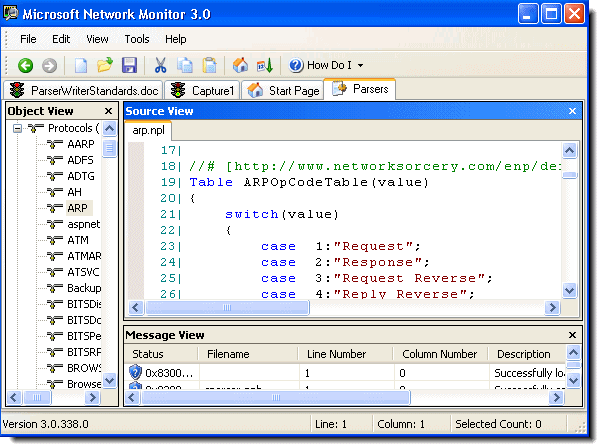
Microsoft Network Monitor is a powerful tool developed by Microsoft for monitoring and analyzing network traffic. It provides network administrators and IT professionals with valuable insights into the performance and behavior of their networks.

With Microsoft Network Monitor, users can capture and analyze network packets in real-time, allowing them to identify issues such as network congestion, latency, packet loss, and potential security threats. This tool is essential for troubleshooting network problems, optimizing network performance, and ensuring the overall health of a network infrastructure.

One of the key features of Microsoft Network Monitor is its user-friendly interface that displays captured data in an easy-to-understand format. Users can filter and search through captured packets to focus on specific information or troubleshoot particular issues effectively.

Moreover, Microsoft Network Monitor supports various protocols and provides detailed information about each packet, including source and destination IP addresses, port numbers, protocol type, packet size, and more. This level of granularity enables users to gain a comprehensive understanding of their network traffic patterns and behavior.

Whether you are managing a small local network or a large enterprise-level infrastructure, Microsoft Network Monitor is a valuable tool that empowers you to monitor, analyze, and optimize your network with precision and efficiency.

In conclusion, Microsoft Network Monitor is an indispensable tool for any organization looking to maintain a reliable and secure network environment. By leveraging its advanced features and capabilities, IT professionals can proactively manage their networks and ensure optimal performance at all times.


Top 7 Benefits of Microsoft Network Monitor for Enhanced Network Management

  1. Real-time network traffic monitoring
  2. User-friendly interface for easy data analysis
  3. Support for a wide range of network protocols
  4. Ability to capture and analyze packets efficiently
  5. Effective troubleshooting of network issues
  6. Detailed packet information for in-depth analysis
  7. Helps optimize network performance and security


Challenges of Using Microsoft Network Monitor: Limited Protocol Support, Steep Learning Curve, and Lack of Updates

  1. Limited protocol support compared to other network monitoring tools
  2. Steep learning curve for beginners due to its advanced features and technical nature
  3. Not actively maintained or updated by Microsoft, potentially leading to compatibility issues with newer operating systems

Real-time network traffic monitoring

Real-time network traffic monitoring is a significant advantage of Microsoft Network Monitor. This feature allows network administrators and IT professionals to capture and analyze network packets as they are transmitted, providing instant visibility into the current state of the network. By monitoring network traffic in real time, users can quickly detect and respond to issues such as performance bottlenecks, security breaches, or abnormal behavior. This proactive approach enables organizations to maintain optimal network performance, enhance security measures, and ensure uninterrupted operations. With real-time monitoring capabilities, Microsoft Network Monitor empowers users to make informed decisions promptly and effectively manage their network infrastructure.

User-friendly interface for easy data analysis

Microsoft Network Monitor offers a user-friendly interface that simplifies the process of analyzing network data. This intuitive interface allows users to efficiently navigate through captured packets, apply filters, and search for specific information with ease. By presenting data in a clear and organized manner, Microsoft Network Monitor streamlines the data analysis process, enabling network administrators and IT professionals to quickly identify issues, troubleshoot problems, and optimize network performance effectively.

Support for a wide range of network protocols

Microsoft Network Monitor offers a significant advantage with its support for a wide range of network protocols. This feature allows network administrators and IT professionals to monitor and analyze diverse types of network traffic effectively. Whether it’s Ethernet, TCP/IP, UDP, HTTP, or other protocols, Microsoft Network Monitor can capture and dissect packets across various network layers. This versatility enables users to gain comprehensive insights into their network infrastructure, troubleshoot issues across different protocols, and ensure the smooth operation of their networks with precision and flexibility.

Ability to capture and analyze packets efficiently

The standout feature of Microsoft Network Monitor lies in its exceptional ability to capture and analyze network packets efficiently. This capability allows network administrators and IT professionals to gain deep insights into network traffic, quickly pinpointing issues such as congestion, latency, or security threats. By efficiently capturing and analyzing packets in real-time, users can streamline the troubleshooting process, optimize network performance, and ensure the smooth operation of their network infrastructure. Microsoft Network Monitor’s robust packet analysis capabilities make it a valuable tool for maintaining a healthy and secure network environment.

Effective troubleshooting of network issues

Microsoft Network Monitor excels in facilitating effective troubleshooting of network issues. By capturing and analyzing network packets in real-time, this tool allows network administrators to pinpoint the root causes of problems such as network congestion, latency, packet loss, and security vulnerabilities. With its user-friendly interface and robust filtering capabilities, Microsoft Network Monitor enables users to isolate specific issues quickly and efficiently. This proactive approach to troubleshooting not only minimizes downtime but also helps in optimizing network performance and ensuring the overall health of the network infrastructure.

Detailed packet information for in-depth analysis

Microsoft Network Monitor offers a significant advantage with its capability to provide detailed packet information for in-depth analysis. This feature allows network administrators and IT professionals to delve deep into network traffic data, gaining valuable insights into the source, destination, protocol type, packet size, and other crucial details of each packet. By having access to such comprehensive information, users can conduct thorough analysis, identify potential issues or anomalies, troubleshoot network problems effectively, and make informed decisions to optimize network performance and security. The ability to perform in-depth analysis with detailed packet information sets Microsoft Network Monitor apart as a powerful tool for monitoring and managing network traffic with precision and efficiency.

Helps optimize network performance and security

Microsoft Network Monitor offers a significant advantage by helping optimize network performance and security. By capturing and analyzing network traffic in real-time, this tool enables network administrators to identify bottlenecks, latency issues, and potential security threats. With detailed insights into network behavior, administrators can make informed decisions to enhance performance, streamline operations, and strengthen security measures. The ability to proactively monitor and analyze network data empowers organizations to maintain a high level of efficiency and safeguard their networks against potential vulnerabilities.

Limited protocol support compared to other network monitoring tools

One significant drawback of Microsoft Network Monitor is its limited protocol support when compared to other network monitoring tools available in the market. While it provides essential functionality for capturing and analyzing network traffic, its support for a wide range of protocols may be lacking. This limitation could hinder network administrators and IT professionals who require in-depth analysis of specific or less common protocols, potentially leading them to seek alternative solutions with broader protocol coverage to meet their monitoring needs effectively.

Steep learning curve for beginners due to its advanced features and technical nature

For beginners, one significant drawback of Microsoft Network Monitor is its steep learning curve attributed to its advanced features and technical nature. The tool’s complexity may overwhelm novice users who are not familiar with network analysis concepts and protocols. Understanding how to effectively utilize the various functionalities and interpret the detailed packet information provided by the software can be challenging for those without prior experience in network monitoring. As a result, beginners may require additional time and effort to grasp the full capabilities of Microsoft Network Monitor, potentially hindering their ability to efficiently troubleshoot network issues and optimize performance.

Not actively maintained or updated by Microsoft, potentially leading to compatibility issues with newer operating systems

A significant drawback of Microsoft Network Monitor is that it is not actively maintained or updated by Microsoft, which can result in compatibility issues with newer operating systems. As technology evolves and operating systems undergo updates, the lack of ongoing support for Network Monitor may lead to functionality limitations or even incompatibility with the latest platforms. This can pose challenges for users who rely on the tool for network monitoring and analysis, as they may encounter issues when trying to run it on newer systems. It is essential for users to be aware of this con and consider alternative network monitoring solutions that receive regular updates and support to ensure seamless performance across different operating environments.


mob programming

Enhancing Team Collaboration Through Mob Programming Practices

The Power of Mob Programming in Software Development

The Power of Mob Programming in Software Development

Mob programming is a collaborative approach to software development where the entire team works on the same task at the same time. This practice involves a group of developers, designers, and testers coming together to collectively work on a single piece of code.

One of the key benefits of mob programming is improved communication and knowledge sharing among team members. By working together in real-time, team members can discuss ideas, solve problems, and learn from each other’s expertise. This leads to increased collaboration and a deeper understanding of the project as a whole.

Another advantage of mob programming is increased productivity. With multiple minds focused on a single task, issues can be identified and resolved more quickly. Additionally, mob programming helps reduce bottlenecks by ensuring that all team members are actively engaged in the development process.

Furthermore, mob programming promotes a sense of shared ownership and accountability within the team. Because everyone is involved in the decision-making process and responsible for the outcome, there is a greater sense of unity and commitment to delivering high-quality results.

It’s important to note that mob programming may not be suitable for every project or team. Some individuals may prefer working independently or in smaller groups. However, for teams looking to enhance collaboration, communication, and productivity, mob programming can be a valuable strategy to consider.

In conclusion, mob programming offers numerous benefits for software development teams seeking to improve their efficiency and effectiveness. By fostering collaboration, knowledge sharing, and shared ownership, mob programming can help teams deliver better results faster.


Understanding Mob Programming: Answers to 9 Common Questions

  1. What is mob programming?
  2. How does mob programming differ from pair programming?
  3. What are the benefits of mob programming?
  4. Is mob programming suitable for all types of projects?
  5. How many people typically participate in a mob programming session?
  6. What tools are commonly used in mob programming?
  7. How do team dynamics change in a mob programming environment?
  8. What challenges may arise when implementing mob programming?
  9. Are there any best practices for successful mob programming?

What is mob programming?

Mob programming is a collaborative approach to software development where the entire team works together on the same task simultaneously. This practice involves multiple team members, including developers, designers, and testers, coming together to collectively work on a single piece of code. By working as a group in real-time, team members can share ideas, solve problems, and leverage each other’s expertise to deliver high-quality results efficiently. Mob programming promotes communication, knowledge sharing, and a sense of shared ownership within the team, making it a powerful strategy for enhancing collaboration and productivity in software development projects.

How does mob programming differ from pair programming?

Mob programming and pair programming are both collaborative approaches in software development, but they differ in terms of team size and dynamics. In pair programming, two developers work together on a single task, with one typing and the other reviewing in real-time. This setup allows for close collaboration and immediate feedback between the pair. On the other hand, mob programming involves a larger group of developers, designers, and testers working together simultaneously on the same piece of code. This collective effort encourages knowledge sharing, problem-solving discussions, and a shared understanding of the project among team members. While pair programming focuses on the synergy between two individuals, mob programming emphasizes collaboration among multiple team members to enhance productivity and quality in software development processes.

What are the benefits of mob programming?

One of the frequently asked questions about mob programming is, “What are the benefits of mob programming?” Mob programming offers several advantages, including improved communication and knowledge sharing among team members. By working together on the same task simultaneously, team members can collaborate in real-time, discuss ideas, solve problems collectively, and leverage each other’s expertise. This practice leads to enhanced collaboration, a deeper understanding of the project, increased productivity through quicker issue identification and resolution, reduced bottlenecks, and a sense of shared ownership and accountability within the team. Overall, the benefits of mob programming encompass better teamwork, efficiency, and quality outcomes in software development projects.

Is mob programming suitable for all types of projects?

When considering whether mob programming is suitable for all types of projects, it’s important to recognize that the applicability of this collaborative approach may vary depending on the nature of the project and the preferences of team members. While mob programming can be highly beneficial for enhancing communication, productivity, and shared ownership in software development, some projects or individuals may find it more challenging to adapt to this method. Factors such as project complexity, team dynamics, and individual working styles should be taken into account when determining the suitability of mob programming for a particular project. Ultimately, while mob programming can offer significant advantages, teams should assess its compatibility with their specific project requirements before fully embracing this approach.

How many people typically participate in a mob programming session?

In a mob programming session, the number of participants can vary depending on the team’s size and preferences. Typically, a mob programming session involves around five to seven team members, including developers, designers, testers, and other relevant stakeholders. However, some teams may choose to have more or fewer participants based on the complexity of the task at hand and the dynamics of the team. The key is to ensure that there are enough individuals to contribute diverse perspectives and skills while maintaining effective communication and collaboration throughout the session.

What tools are commonly used in mob programming?

In mob programming, teams often rely on a variety of tools to facilitate seamless collaboration and productivity. Commonly used tools include screen-sharing applications like Zoom or Microsoft Teams, which allow team members to view and interact with the same code in real-time. Version control systems such as Git are essential for managing code changes and ensuring that all team members are working on the latest version. Integrated development environments (IDEs) like Visual Studio Code or IntelliJ IDEA provide a unified platform for writing and testing code together. Additionally, communication tools such as Slack or Discord help team members stay connected and communicate effectively while working together in a mob programming session. By leveraging these tools, teams can streamline their workflow and maximize the benefits of mob programming.

How do team dynamics change in a mob programming environment?

In a mob programming environment, team dynamics undergo significant transformations as individuals come together to work collaboratively on a shared task. The traditional hierarchy often diminishes as all team members have an equal voice and contribute actively to the decision-making process. Communication becomes more open and transparent, fostering a culture of sharing ideas and knowledge. Team members learn to respect each other’s perspectives and expertise, leading to a stronger sense of camaraderie and mutual trust. As roles blur in a mob programming setting, individuals focus more on the collective goal rather than individual achievements, creating a cohesive and highly productive team dynamic based on collaboration and cooperation.

What challenges may arise when implementing mob programming?

When implementing mob programming, several challenges may arise that teams need to address. One common challenge is ensuring that all team members are actively engaged and contributing to the task at hand. It can be challenging to maintain focus and involvement from everyone in the group, especially if there are differing opinions or skill levels within the team. Additionally, communication can become a challenge in mob programming, as coordinating multiple voices and ideas in real-time can lead to potential conflicts or misunderstandings. Another challenge is finding a balance between individual creativity and collaboration within the group dynamic. Overcoming these challenges requires open communication, clear guidelines, and a supportive team environment that values diversity of thought and mutual respect among members.

Are there any best practices for successful mob programming?

When it comes to successful mob programming, there are several best practices that teams can follow to maximize the benefits of this collaborative approach. Communication is key in mob programming, so establishing clear guidelines for how team members interact and share information can help streamline the process. Setting specific goals and objectives for each session can keep the team focused and ensure that everyone is working towards a common purpose. Additionally, rotating roles within the mob can help prevent burnout and encourage a diverse range of perspectives to be considered. Embracing a culture of respect, open-mindedness, and continuous learning is also essential for creating a positive and productive mob programming environment.

nike software engineer

Innovating Sports Technology: The Role of a Nike Software Engineer

Nike Software Engineer: Innovating in the World of Sports Technology

Nike Software Engineer: Innovating in the World of Sports Technology

When you think of Nike, you probably envision their iconic swoosh logo and innovative athletic apparel. But behind the scenes, a team of talented software engineers plays a crucial role in shaping the future of sports technology.

As a Nike software engineer, you are not just writing code – you are revolutionizing the way athletes train, compete, and connect with their fans. From developing cutting-edge mobile apps to designing advanced data analytics platforms, Nike engineers are at the forefront of innovation.

One key area where Nike software engineers excel is in wearable technology. By creating smart devices that track performance metrics in real-time, engineers help athletes optimize their training routines and achieve peak performance.

Moreover, Nike engineers are constantly exploring new ways to enhance the overall sports experience. Whether it’s creating immersive virtual reality training simulations or building interactive social media platforms for fans, these professionals are always pushing boundaries.

Collaboration is at the heart of Nike’s engineering culture. Engineers work closely with designers, product managers, and athletes to ensure that every digital solution meets the highest standards of quality and usability.

For aspiring software engineers looking to make an impact in the world of sports technology, a career at Nike offers endless possibilities for growth and innovation. Joining this dynamic team means being part of a global brand that is dedicated to empowering athletes worldwide.

In conclusion, being a Nike software engineer is not just a job – it’s an opportunity to shape the future of sports technology and inspire athletes to reach new heights. If you have a passion for coding and a love for sports, consider joining Nike’s team of talented engineers today.


Exploring Nike Software Engineer Roles: Salaries, Responsibilities, and Potential Earnings

  1. What is highest salary for software engineer?
  2. What do Nike software engineers do?
  3. How much does a Software Engineer II make at NIKE?
  4. Can you be a millionaire from software engineer?
  5. What software does Nike use?
  6. Can you make $500,000 as a Software Engineer?

What is highest salary for software engineer?

In the realm of software engineering, the question of the highest salary often arises, especially for professionals seeking lucrative opportunities in the field. At Nike, software engineers can expect competitive compensation packages that reflect their skills, experience, and contributions. While specific salary figures may vary based on factors such as location, level of expertise, and additional benefits, Nike is known to offer attractive remuneration to top-tier software engineers who bring innovative solutions to the table. As a sought-after employer in the tech industry, Nike values its software engineers and recognizes their pivotal role in driving technological advancements within the realm of sports technology.

What do Nike software engineers do?

Nike software engineers play a pivotal role in leveraging technology to enhance the sports experience for athletes and fans alike. Their primary responsibilities include developing innovative mobile applications, creating cutting-edge wearable technology, designing data analytics platforms, and exploring new ways to improve training methods through virtual reality simulations. By collaborating with cross-functional teams and staying at the forefront of technological advancements, Nike software engineers strive to push boundaries and revolutionize the intersection of sports and technology.

How much does a Software Engineer II make at NIKE?

The salary range for a Software Engineer II at Nike can vary depending on factors such as experience, location, and specific job responsibilities. Generally, Glassdoor reports that the average base salary for a Software Engineer II at Nike is around $115,000 per year. However, this figure may be higher or lower based on individual qualifications and negotiations. Nike typically offers competitive compensation packages to attract top talent in the software engineering field.

Can you be a millionaire from software engineer?

Many people wonder if it is possible to become a millionaire as a software engineer, and the answer is a resounding yes. Software engineering is a lucrative field with high earning potential, especially for those who excel in their careers and continuously seek opportunities for growth and advancement. With the demand for skilled software engineers on the rise, coupled with the potential for lucrative positions at top tech companies like Nike, achieving millionaire status is within reach for ambitious individuals in this profession. Hard work, dedication, and staying current with industry trends can pave the way to financial success as a software engineer.

What software does Nike use?

Nike utilizes a variety of software tools and technologies across its engineering teams to drive innovation and create cutting-edge solutions for athletes. From developing mobile applications to designing data analytics platforms, Nike engineers leverage a range of programming languages such as Java, JavaScript, C#, and more. Additionally, Nike incorporates industry-standard software development tools like Git for version control, Jira for project management, and Jenkins for continuous integration. By utilizing a diverse set of software resources, Nike ensures that its engineers have the necessary tools to deliver high-quality digital experiences that enhance the performance and enjoyment of athletes worldwide.

Can you make $500,000 as a Software Engineer?

Aspiring software engineers often wonder if it’s possible to earn $500,000 in the field. While this salary is achievable for some experienced professionals in high-demand industries or specialized roles, such as those in tech giants or leadership positions, it may not be typical for entry-level or mid-level software engineers. Salaries can vary based on factors like location, company size, level of experience, and specific skills. It’s essential for software engineers to focus on continuous learning, skill development, and seeking opportunities for advancement to increase their earning potential over time.