cfchris.com

Loading

groovy java

Unleashing the Groovy Power of Java: A Dynamic Duo for Modern Development

The Power of Groovy Java

The Power of Groovy Java

When it comes to programming languages, Java has long been a staple in the world of software development. However, there’s another language that adds a touch of “grooviness” to Java – Groovy.

Groovy is a dynamic language that runs on the Java Virtual Machine (JVM), making it seamlessly compatible with Java. It’s often referred to as a “scripting language for Java” due to its concise and expressive syntax that simplifies coding tasks.

Features of Groovy:

  • Dynamic Typing: Groovy allows developers to skip explicit type declarations, making code more flexible and readable.
  • Closures: Closures in Groovy provide powerful functionality for handling tasks like callbacks and event handling.
  • Integration with Java: Groovy can easily interact with existing Java code, libraries, and frameworks.
  • Metaprogramming: Developers can extend or modify the behavior of classes at runtime using metaprogramming features.

Benefits of Using Groovy with Java:

Groovy complements Java by offering additional features and simplifying common programming tasks. Some benefits include:

  • Rapid Development: Groovy’s concise syntax and dynamic nature enable developers to write code quickly and efficiently.
  • Better Readability: The expressive syntax of Groovy makes code easier to read and understand compared to traditional Java code.
  • Increased Productivity: By leveraging Groovy’s features, developers can streamline development processes and focus on delivering high-quality software.

Getting Started with Groovy Java:

To start using Groovy in your Java projects, you can simply include the necessary dependencies in your build tool (such as Maven or Gradle) and begin writing Groovy scripts alongside your existing Java code. The seamless integration between the two languages allows for a smooth transition.

Whether you’re a seasoned Java developer looking to enhance your skills or a newcomer interested in exploring new programming languages, incorporating Groovy into your projects can open up a world of possibilities.

In conclusion, the combination of Java and Groovy offers developers a powerful toolkit for building robust and efficient software applications. Embrace the “grooviness” of this dynamic duo and take your coding adventures to new heights!


Unlocking Efficiency: 6 Advantages of Using Groovy with Java

  1. Seamless integration with Java ecosystem
  2. Dynamic typing for flexible and concise code
  3. Powerful metaprogramming capabilities
  4. Enhanced readability compared to traditional Java syntax
  5. Simplified common programming tasks
  6. Increased productivity and rapid development


Challenges of Using Groovy with Java: Navigating the Learning Curve, Performance Overhead, and Tooling Support

  1. Learning Curve
  2. Performance Overhead
  3. Tooling Support

Seamless integration with Java ecosystem

One of the standout advantages of Groovy is its seamless integration with the Java ecosystem. As a language that runs on the Java Virtual Machine (JVM), Groovy effortlessly interacts with existing Java code, libraries, and frameworks. This compatibility allows developers to leverage the vast resources available in the Java ecosystem while taking advantage of Groovy’s dynamic features and concise syntax to enhance their programming experience. The ability to seamlessly combine Groovy with Java empowers developers to build robust and efficient applications without any barriers between the two languages, making it a versatile choice for software development projects.

Dynamic typing for flexible and concise code

Dynamic typing in Groovy Java allows developers to write code without the need for explicit type declarations, providing a more flexible and concise coding experience. This feature simplifies the development process by allowing variables to be assigned without specifying their types, making the code easier to read and maintain. With dynamic typing, developers can focus on solving problems and implementing solutions efficiently, enhancing productivity and creativity in software development projects.

Powerful metaprogramming capabilities

Groovy Java stands out with its powerful metaprogramming capabilities, allowing developers to extend or modify the behavior of classes at runtime. This feature enables dynamic and flexible coding practices, empowering developers to adapt and enhance their codebase on-the-fly. By leveraging metaprogramming in Groovy, programmers can achieve greater efficiency and customization in their software development process, making it a valuable asset for building versatile and adaptable applications.

Enhanced readability compared to traditional Java syntax

Groovy Java offers enhanced readability compared to traditional Java syntax, making code easier to understand and maintain. The concise and expressive nature of Groovy allows developers to write more readable code with fewer lines, reducing complexity and improving overall clarity. By leveraging Groovy’s syntax features, such as optional semicolons and simplified type declarations, programmers can create code that is not only easier to comprehend but also more efficient to work with during the development process. Ultimately, the enhanced readability of Groovy Java contributes to better code quality and increased productivity for developers.

Simplified common programming tasks

One of the key advantages of Groovy Java is its ability to simplify common programming tasks. With its concise and expressive syntax, Groovy streamlines the coding process, making it easier for developers to write clean and efficient code. By eliminating boilerplate code and providing built-in features like closures and dynamic typing, Groovy enables programmers to focus on solving problems rather than getting bogged down in repetitive tasks. This simplification not only enhances productivity but also improves code readability, making maintenance and collaboration more straightforward in software development projects.

Increased productivity and rapid development

By leveraging the dynamic features and concise syntax of Groovy Java, developers can experience a significant boost in productivity and achieve rapid development of software applications. The seamless integration between Groovy and Java allows for quick and efficient coding, enabling developers to focus on delivering high-quality solutions in a timely manner. This increased productivity not only streamlines the development process but also empowers developers to explore new possibilities and innovate effectively within their projects.

Learning Curve

For developers accustomed to Java, transitioning to Groovy can present a significant hurdle due to its dynamic typing and unique syntax. The shift from Java’s static typing to Groovy’s dynamic nature may require a period of adjustment, potentially resulting in a steep learning curve for those seeking to master the language. Understanding the intricacies of Groovy’s syntax and embracing its dynamic features may pose challenges for developers initially, but with dedication and practice, overcoming this obstacle is certainly achievable.

Performance Overhead

In certain scenarios, one notable drawback of using Groovy in conjunction with Java is the potential performance overhead it introduces. Groovy’s dynamic nature can result in higher runtime overhead compared to statically typed languages such as Java. This difference in performance can be a concern for applications where speed and efficiency are critical factors, as the added overhead may impact overall performance levels. Developers need to carefully consider the trade-offs between Groovy’s flexibility and the potential performance implications when deciding whether to incorporate it into their projects.

Tooling Support

One drawback of using Groovy with Java is the potential limitation in tooling support. While Groovy boasts seamless integration with Java tools, some Integrated Development Environments (IDEs) may not offer as comprehensive support for editing and debugging Groovy code. This disparity in tooling capabilities can pose challenges for developers who rely heavily on IDE features for efficient coding and troubleshooting, potentially leading to a less streamlined development experience when working with Groovy Java projects.
java server pages

Exploring the Power of Java Server Pages in Web Development

Java Server Pages (JSP) – A Comprehensive Guide

Java Server Pages (JSP) – A Comprehensive Guide

Java Server Pages (JSP) is a technology that helps developers create dynamic web pages based on HTML, XML, or other document types. It allows for the separation of logic and presentation in web development, making it easier to maintain and update websites.

How JSP Works

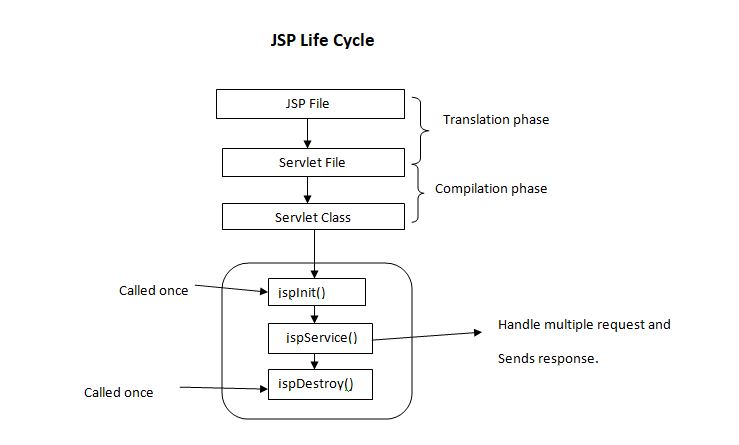
JSP pages contain a mix of HTML and Java code. When a client requests a JSP page, the server processes the Java code within the page to generate dynamic content. This content is then combined with the static elements of the page to produce the final output sent to the client’s browser.

Benefits of Using JSP

  • Easy Integration: JSP can be seamlessly integrated with Java code, allowing developers to leverage existing Java libraries and frameworks.
  • Reusable Components: JSP allows for the creation of reusable components that can be included in multiple pages, promoting code reusability and maintainability.
  • Rapid Development: With its familiar syntax and built-in tags, JSP enables developers to quickly build dynamic web applications without extensive coding.
  • Scalability: JSP applications can easily scale to accommodate increased traffic and user demands by leveraging Java’s robust scalability features.

JSP Tags

JSP provides a set of predefined tags that simplify common tasks such as displaying data, iterating over collections, and controlling flow. These tags help streamline development and improve code readability.

Conclusion

Java Server Pages (JSP) is a powerful technology for building dynamic web applications. By combining HTML with Java code, developers can create interactive and responsive websites that meet modern user expectations. Whether you are new to web development or an experienced developer, mastering JSP can enhance your skills and enable you to create sophisticated web solutions.


7 Essential Tips for Effective Java Server Pages (JSP) Development

  1. Use JSP for dynamic content generation in web applications.
  2. Separate Java code from presentation logic by using JSP scriptlets, expressions, and declarations.
  3. Utilize JSP standard actions like
  4. Avoid embedding complex Java logic directly within JSP pages to maintain readability and maintainability.
  5. Employ JSTL (JavaServer Pages Standard Tag Library) for simplifying common tasks in JSP development.
  6. Ensure proper error handling in JSP to provide meaningful feedback to users in case of exceptions.
  7. Optimize performance by minimizing the use of scriptlets and utilizing tag libraries efficiently.

Use JSP for dynamic content generation in web applications.

Utilizing Java Server Pages (JSP) for dynamic content generation in web applications is a highly efficient approach. By leveraging JSP, developers can seamlessly integrate Java code with HTML to create interactive and personalized web pages. This enables the generation of dynamic content based on user input, database queries, or other external factors, enhancing the overall user experience. JSP’s versatility and ease of use make it a valuable tool for building responsive and engaging web applications that meet the evolving demands of modern users.

Separate Java code from presentation logic by using JSP scriptlets, expressions, and declarations.

To enhance the maintainability and readability of Java Server Pages (JSP), it is recommended to separate Java code from presentation logic effectively. This can be achieved by utilizing JSP scriptlets, expressions, and declarations. By employing these features, developers can keep the presentation layer clean and focused on displaying content, while the Java code handles the underlying logic. This practice not only improves code organization but also makes it easier to troubleshoot and update the application in the future.

Utilize JSP standard actions like

When working with Java Server Pages (JSP), it is beneficial to utilize JSP standard actions like to modularize your code and promote reusability. By incorporating these standard actions, you can efficiently include external files or components within your JSP pages, making it easier to manage and maintain your web application. This practice not only enhances the organization of your code but also simplifies the development process by allowing you to focus on specific functionalities within each included file.

Avoid embedding complex Java logic directly within JSP pages to maintain readability and maintainability.

To ensure readability and maintainability in Java Server Pages (JSP), it is advisable to avoid embedding complex Java logic directly within the JSP pages. By separating the presentation layer from the business logic, developers can create cleaner and more organized code that is easier to understand and update. Instead, encapsulating complex Java logic in separate classes or scripts and invoking them from the JSP pages can improve code structure and facilitate future modifications without compromising code clarity.

Employ JSTL (JavaServer Pages Standard Tag Library) for simplifying common tasks in JSP development.

Employing JSTL (JavaServer Pages Standard Tag Library) in Java Server Pages development is a valuable tip for simplifying common tasks. By utilizing the predefined tags provided by JSTL, developers can streamline tasks such as iteration, conditionals, and data formatting within JSP pages. This not only enhances code readability but also reduces the need for extensive Java code, making development more efficient and maintainable. Embracing JSTL empowers developers to leverage its powerful features and accelerate the creation of dynamic and robust web applications.

Ensure proper error handling in JSP to provide meaningful feedback to users in case of exceptions.

Proper error handling in Java Server Pages (JSP) is crucial to provide users with meaningful feedback in case of exceptions. By implementing robust error handling mechanisms, developers can effectively communicate issues to users and guide them on how to proceed. This not only enhances the user experience but also helps in troubleshooting and resolving issues promptly, ensuring a smoother interaction between users and the web application.

Optimize performance by minimizing the use of scriptlets and utilizing tag libraries efficiently.

To optimize performance in Java Server Pages (JSP), it is recommended to minimize the use of scriptlets and instead utilize tag libraries efficiently. By reducing the reliance on scriptlets, which embed Java code directly into the JSP page, developers can improve code readability and maintainability. Tag libraries provide a cleaner and more structured way to incorporate dynamic functionality into JSP pages, leading to better performance and scalability of web applications. Efficient utilization of tag libraries not only enhances code organization but also helps streamline development processes and boost overall application performance.

app building software

Mastering the Art of App Building Software: A Guide to Creating Your Own Mobile Apps

The Power of App Building Software

The Power of App Building Software

In today’s digital age, the demand for mobile applications is higher than ever. Businesses, entrepreneurs, and individuals are constantly looking for ways to reach their audience through mobile devices. This is where app building software plays a crucial role.

App building software provides users with the tools and resources needed to create customized mobile applications without the need for extensive coding knowledge. These platforms offer a user-friendly interface that allows individuals to design, develop, and deploy apps quickly and efficiently.

Benefits of Using App Building Software:

  • Cost-Effective: App building software eliminates the need to hire expensive developers, making app development more affordable for businesses of all sizes.
  • Rapid Development: With pre-built templates and drag-and-drop features, users can create apps in a fraction of the time it would take with traditional development methods.
  • No Coding Required: Even individuals with no coding experience can create functional and visually appealing apps using app building software.
  • Customization: Users have the flexibility to customize every aspect of their app, from design elements to functionality, to suit their specific needs.
  • Cross-Platform Compatibility: Many app building platforms support cross-platform development, allowing users to create apps that work seamlessly on both iOS and Android devices.

Whether you’re a small business looking to expand your online presence or an entrepreneur with a groundbreaking app idea, app building software can help you bring your vision to life. By leveraging the power of these tools, you can create innovative mobile applications that engage users and drive business growth.


Top 7 FAQs About Choosing and Using App Building Software

  1. Which software is best for making apps?
  2. How can I create my own app?
  3. Which software is best for app design?
  4. Can I build my own app for free?
  5. How do I build an app?
  6. What is the best program to build an app?
  7. Can you build an app for free?

Which software is best for making apps?

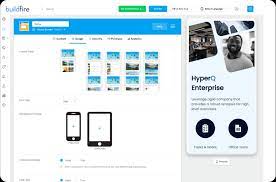
When it comes to choosing the best software for making apps, the answer largely depends on individual needs and preferences. There are various app building platforms available in the market, each offering unique features and capabilities. Some popular options include Appy Pie, BuildFire, Thunkable, and Adobe PhoneGap. It’s essential to consider factors such as ease of use, customization options, pricing, and compatibility with your desired platforms before selecting the software that best suits your app development requirements. Conducting thorough research and possibly trying out demo versions can help you determine which software aligns most closely with your specific app-building goals.

How can I create my own app?

Creating your own app has never been easier with the availability of user-friendly app building software. To create your own app, you can start by choosing a suitable app building platform that aligns with your requirements and skill level. These platforms often provide intuitive interfaces, drag-and-drop functionality, and pre-built templates that simplify the app development process. By following step-by-step guides and tutorials offered by the software, even individuals with no coding experience can design, customize, and deploy their own apps across various platforms. With a clear idea of your app’s purpose and target audience, along with the right app building tools at your disposal, you can bring your app idea to life efficiently and effectively.

Which software is best for app design?

When it comes to app design, choosing the best software depends on your specific needs and skill level. There are several popular tools available for app design, each with its own strengths and features. Some commonly recommended software for app design includes Adobe XD, Sketch, Figma, and InVision Studio. These tools offer intuitive interfaces, robust design capabilities, and collaboration features that cater to both beginners and experienced designers. Ultimately, the best software for app design is the one that aligns with your workflow, project requirements, and personal preferences to help you create visually stunning and user-friendly mobile applications.

Can I build my own app for free?

Many individuals often wonder, “Can I build my own app for free?” The answer is yes, with the availability of various app building software tools that offer free plans or trials. These platforms provide users with the resources to create basic mobile applications without incurring any costs. While free app building software may have limitations in terms of features and customization options compared to paid versions, they still enable individuals to explore app development and bring their ideas to life without a significant financial investment.

How do I build an app?

Building an app can seem like a daunting task, but with the right tools and resources, it can be a straightforward process. One popular approach is to use app building software, which provides a user-friendly platform for creating customized mobile applications without the need for extensive coding knowledge. By following simple steps such as selecting a template, customizing design elements, adding desired features, and testing the app before deployment, individuals can bring their app ideas to life efficiently. With the accessibility and flexibility offered by app building software, anyone can build an app tailored to their specific needs and goals.

What is the best program to build an app?

When it comes to the frequently asked question, “What is the best program to build an app?” the answer can vary depending on individual needs and preferences. There are several popular app building software options available in the market, each offering unique features and capabilities. Some of the top programs for building apps include platforms like Appy Pie, BuildFire, Xamarin, and Adobe PhoneGap. It’s essential to consider factors such as ease of use, customization options, pricing, support for various platforms, and integration capabilities when choosing the best program to build an app that aligns with your specific requirements and goals.

Can you build an app for free?

When it comes to the frequently asked question, “Can you build an app for free?” the answer lies in the availability of various app building software options that offer free plans or trials. While some app building platforms provide basic features for free, users may encounter limitations in terms of functionality, branding, or customization. However, these free options can still be a great starting point for individuals or businesses looking to explore app development without a significant financial investment. It’s important to assess your specific needs and goals to determine whether a free app building solution aligns with your requirements or if investing in a paid plan would better suit your long-term objectives.

app making software

Crafting Innovative Solutions with App Making Software

The Power of App Making Software

The Power of App Making Software

In today’s digital age, mobile applications have become an essential part of our daily lives. Whether it’s for communication, entertainment, productivity, or business purposes, apps play a significant role in how we interact with technology.

Creating a mobile app used to be a complex and expensive process that required specialized coding skills. However, with the advent of app making software, the landscape has changed dramatically.

What is App Making Software?

App making software is a tool that allows individuals and businesses to design, develop, and deploy mobile applications without the need for extensive programming knowledge. These platforms typically provide a user-friendly interface with drag-and-drop functionality, pre-built templates, and customization options.

The Benefits of Using App Making Software

There are several advantages to using app making software:

  • Cost-Effective: Building an app with software is often more affordable than hiring a team of developers.
  • User-Friendly: Most app making tools are designed for non-technical users, making it accessible to a wider audience.
  • Rapid Development: With ready-made templates and features, you can create an app in a fraction of the time it would take with traditional development methods.
  • No Coding Required: You can create fully functional apps without writing a single line of code.

Popular App Making Software Options

There are numerous app making software options available in the market today. Some popular choices include:

  • Appy Pie: A no-code platform that allows users to create apps for iOS and Android devices.
  • BuildFire: A customizable app builder suitable for businesses looking to develop branded applications.
  • Mendix: A low-code platform that enables users to build enterprise-grade apps with advanced functionalities.

In Conclusion

App making software has democratized the process of app development, empowering individuals and businesses to bring their ideas to life without breaking the bank. Whether you’re looking to create a personal project or launch a business venture, these tools offer a convenient and efficient way to enter the world of mobile applications.


Top 6 Benefits of Using App Making Software for Easy and Affordable Development

  1. Cost-effective solution for app development
  2. User-friendly interface suitable for non-technical users
  3. Rapid development with pre-built templates and features
  4. No coding skills required to create functional apps
  5. Customization options to tailor apps to specific needs
  6. Empowers individuals and businesses to bring their app ideas to life


7 Drawbacks of Using App-Making Software: From Limited Customization to Performance Issues

  1. Limited Customization
  2. Template-Based Design
  3. Dependency on Platform
  4. Lack of Scalability
  5. Subscription Costs
  6. Less Control Over Code
  7. Performance Limitations

Cost-effective solution for app development

App making software provides a cost-effective solution for app development by offering a more affordable alternative to traditional development methods. With these tools, individuals and businesses can create mobile applications without the need to hire expensive developers or invest in extensive coding resources. This cost-efficient approach allows for greater accessibility to app creation, enabling a wider range of users to bring their ideas to life in the digital space without breaking the bank.

User-friendly interface suitable for non-technical users

The user-friendly interface of app making software is a game-changer for non-technical users looking to create mobile applications. With intuitive drag-and-drop functionality and pre-built templates, individuals without coding expertise can easily navigate the platform and bring their app ideas to life. This accessibility empowers a broader audience to participate in the app development process, opening up new opportunities for creativity and innovation in the digital landscape.

Rapid development with pre-built templates and features

One of the key advantages of app making software is the ability to achieve rapid development through the use of pre-built templates and features. By leveraging these ready-made resources, users can significantly expedite the app creation process, saving time and effort that would otherwise be spent on building functionalities from scratch. This streamlined approach not only accelerates development timelines but also ensures a more efficient and cost-effective way to bring innovative mobile applications to market.

No coding skills required to create functional apps

One of the key advantages of app making software is that it eliminates the need for coding skills to develop functional applications. This feature opens up app development to a wider audience, allowing individuals and businesses without programming expertise to bring their ideas to life in the form of mobile apps. By offering intuitive interfaces and drag-and-drop tools, app making software enables users to create fully operational applications with ease, saving time and resources typically associated with traditional coding methods.

Customization options to tailor apps to specific needs

App making software offers a significant advantage through its customization options, allowing users to tailor apps to specific needs. This flexibility empowers individuals and businesses to create personalized solutions that align perfectly with their unique requirements. By customizing features, design elements, and functionalities, users can ensure that the app meets their exact specifications, enhancing user experience and maximizing utility. This pro of app making software not only streamlines the development process but also enables the creation of highly tailored and effective mobile applications that cater precisely to the intended audience.

Empowers individuals and businesses to bring their app ideas to life

One of the key advantages of app making software is its ability to empower both individuals and businesses to transform their app concepts into reality. By providing user-friendly tools and templates, app making software eliminates the barriers of technical complexity, allowing creative ideas to be easily implemented and deployed as functional mobile applications. This accessibility enables aspiring app creators to explore their innovative visions without the need for extensive coding knowledge or significant financial resources, ultimately fostering a more inclusive and dynamic app development landscape.

Limited Customization

When using certain app making software, a notable drawback is the limitation in customization capabilities. These platforms may impose constraints on the extent of customization options available, thereby restricting the incorporation of unique features into your app. This can hinder your ability to tailor the app to specific requirements or branding preferences, potentially compromising the overall user experience and functionality of the final product.

Template-Based Design

One drawback of app making software is its template-based design approach, which can lead to a lack of uniqueness in the final product. By relying on pre-built templates, there is a risk that apps created with the same software may have a similar look and feel. This limitation can hinder the ability to create a truly distinctive and original app that stands out in a crowded marketplace. Customization options within these templates may be limited, making it challenging for developers to achieve a fully personalized and innovative design for their app.

Dependency on Platform

One significant drawback of using app making software is the dependency on the platform chosen for app development. The functionality and features of your app may be constrained by the limitations of the specific app making software you opt for. This can restrict your ability to implement certain advanced functionalities or unique design elements that are not supported by the platform. As a result, your app may not fully realize your vision or meet all your requirements, leading to potential compromises in the final product’s quality and user experience.

Lack of Scalability

A significant drawback of app making software is the lack of scalability it presents. While these tools offer convenience and ease of use for creating basic apps, they may fall short when it comes to handling the growth and complexity of a more advanced application. As your app evolves and demands more intricate features, you may find that the limitations of certain app making tools hinder your ability to scale effectively. This can result in the need to transition to more robust development methods or platforms to accommodate the expanding requirements of your app.

Subscription Costs

Many app making software solutions come with the con of subscription costs. While these tools offer convenience and efficiency in app development, the requirement for ongoing subscription fees can be a significant drawback for users. The accumulation of these costs over time can become a financial burden, especially for individuals or small businesses with limited budgets. It is essential for users to carefully consider the long-term financial implications of subscription-based app making software before committing to a particular platform.

Less Control Over Code

For developers seeking complete control over their app’s code, one significant drawback of app making software is the limited customization options it offers. With these platforms, users may find themselves restricted in their ability to fine-tune and optimize the code to meet specific requirements or implement advanced functionalities. This lack of control over the underlying code can be a hindrance for developers accustomed to working directly with programming languages and frameworks, as they may prefer a more hands-on approach to ensure the precise execution of their vision.

Performance Limitations

One significant drawback of utilizing certain app making software is the performance limitations that can arise. Apps created through these platforms may not exhibit the same level of efficiency or smooth operation as those painstakingly developed using traditional coding techniques. The inherent constraints within the app making software can sometimes result in suboptimal performance, impacting user experience and overall functionality of the application. Developers may face challenges in optimizing performance due to limitations imposed by the software’s framework, potentially leading to slower responsiveness and decreased reliability in comparison to custom-coded apps.