
cfchris.com

Loading

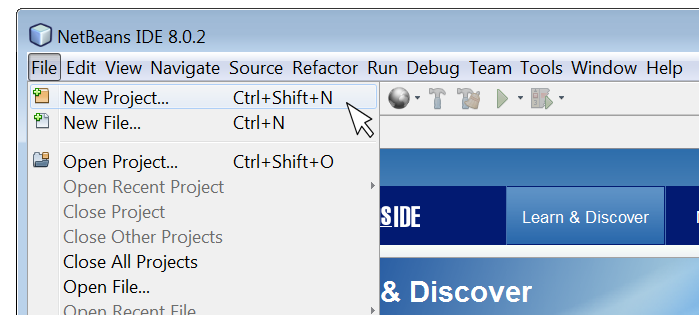
netbeans java

Mastering Java Development with NetBeans IDE

Exploring NetBeans for Java Development

Exploring NetBeans for Java Development

NetBeans is a powerful integrated development environment (IDE) that is widely used by Java developers around the world. It provides a comprehensive set of tools and features to streamline the development process and enhance productivity.

Key Features of NetBeans for Java Development:

  • Code Editor: NetBeans offers a sophisticated code editor with features like syntax highlighting, code completion, and refactoring tools to help developers write clean and efficient code.
  • Project Management: The IDE allows developers to manage their projects effectively, organize files, and navigate through code seamlessly.
  • Debugging Tools: NetBeans comes with robust debugging tools that enable developers to troubleshoot and fix issues in their Java applications quickly.
  • Version Control Integration: Developers can easily integrate version control systems like Git into NetBeans to manage code changes efficiently.
  • User-Friendly Interface: The intuitive interface of NetBeans makes it easy for both beginners and experienced developers to work comfortably within the IDE.
  • Support for Plugins: NetBeans supports a wide range of plugins that extend its functionality and cater to specific development needs.

The Benefits of Using NetBeans for Java Development:

Developers choose NetBeans for Java development due to its numerous benefits, including:

  • Productivity Boost: With its efficient tools and features, NetBeans helps developers write code faster and with fewer errors.
  • Cross-Platform Support: NetBeans is compatible with multiple operating systems, allowing developers to work on different platforms seamlessly.
  • Community Support: The vibrant community around NetBeans provides resources, tutorials, and forums for developers to seek help and share knowledge.
  • Ease of Integration: NetBeans integrates well with other technologies and frameworks commonly used in Java development projects.
  • Ongoing Development: The continuous updates and enhancements made to NetBeans ensure that developers have access to the latest tools and features in the IDE.

In conclusion, NetBeans is a versatile IDE that offers a rich set of features tailored for Java development. Whether you are a beginner learning Java programming or an experienced developer working on complex projects, NetBeans can be your go-to tool for efficient coding and project management.


Maximize Your Java Coding Efficiency: 9 Essential Tips for Using NetBeans

  1. Use keyboard shortcuts to speed up coding tasks.
  2. Take advantage of code templates to write code more efficiently.
  3. Utilize the debugger for identifying and fixing errors in your code.
  4. Customize the NetBeans IDE layout to suit your preferences and workflow.
  5. Install useful plugins to enhance functionality and productivity.
  6. Familiarize yourself with version control features for better project management.
  7. Explore the profiler tool for optimizing performance of your Java applications.
  8. Make use of integrated Maven support for managing project dependencies effectively.
  9. Stay updated with the latest NetBeans releases and updates for new features and improvements.

Use keyboard shortcuts to speed up coding tasks.

By utilizing keyboard shortcuts in NetBeans Java, developers can significantly enhance their coding efficiency. These shortcuts allow for quick navigation, selection, and execution of various commands without the need to rely on the mouse or navigate through menus. By memorizing and incorporating these keyboard shortcuts into their workflow, developers can streamline coding tasks, boost productivity, and focus more on writing high-quality code rather than getting bogged down by manual actions.

Take advantage of code templates to write code more efficiently.

By utilizing code templates in NetBeans for Java development, developers can significantly enhance their coding efficiency. These pre-defined snippets of code allow for quick insertion of commonly used structures, reducing the time and effort required to write repetitive code segments. By leveraging code templates effectively, developers can streamline their workflow, maintain consistency in coding practices, and focus more on the logic and functionality of their Java applications.

Utilize the debugger for identifying and fixing errors in your code.

Utilizing the debugger in NetBeans for Java development is a valuable tip for identifying and fixing errors in your code efficiently. By setting breakpoints, inspecting variables, and stepping through code execution, developers can pinpoint the root cause of issues and debug their applications effectively. The debugger tool in NetBeans provides real-time insights into the behavior of the code, helping developers troubleshoot complex problems and ensure the reliability and stability of their Java applications.

Customize the NetBeans IDE layout to suit your preferences and workflow.

Customizing the layout of the NetBeans IDE allows you to tailor the workspace to align with your specific preferences and workflow. By rearranging panels, adjusting toolbars, and organizing windows according to your needs, you can create a more efficient and personalized development environment. This flexibility not only enhances your productivity but also ensures that you have easy access to the tools and features that are most important to you during Java programming tasks.

Install useful plugins to enhance functionality and productivity.

To enhance functionality and productivity while using NetBeans for Java development, it is highly recommended to install useful plugins. These plugins can extend the capabilities of the IDE, providing additional tools and features that cater to specific development needs. By incorporating relevant plugins into NetBeans, developers can streamline their workflow, improve code quality, and boost overall efficiency in their Java projects. Investing time in selecting and integrating the right plugins can significantly enhance the development experience within NetBeans, ultimately leading to more effective and successful coding endeavors.

Familiarize yourself with version control features for better project management.

Familiarizing yourself with the version control features in NetBeans for Java development is essential for enhancing project management efficiency. By utilizing version control tools like Git within NetBeans, developers can easily track changes, collaborate with team members, and revert to previous versions when needed. This practice not only ensures better organization of code but also promotes seamless collaboration and helps maintain a structured development workflow. Mastering version control features in NetBeans can significantly improve project management processes and contribute to the overall success of Java development projects.

Explore the profiler tool for optimizing performance of your Java applications.

By utilizing the profiler tool in NetBeans for Java development, developers can delve into the performance metrics of their applications to identify bottlenecks and optimize code efficiency. This powerful feature allows users to analyze resource usage, memory allocation, and execution times, enabling them to fine-tune their Java applications for optimal performance. By exploring the profiler tool within NetBeans, developers can enhance the overall speed and responsiveness of their Java applications, ensuring a seamless user experience.

Make use of integrated Maven support for managing project dependencies effectively.

By utilizing the integrated Maven support in NetBeans for managing project dependencies, developers can streamline the process of handling external libraries and dependencies within their Java projects. Maven simplifies the management of project builds, dependencies, and configurations, making it easier to maintain a structured and organized development environment. Leveraging this feature in NetBeans enhances efficiency and allows developers to focus more on coding and less on managing dependencies manually.

Stay updated with the latest NetBeans releases and updates for new features and improvements.

Staying updated with the latest NetBeans releases and updates is crucial for Java developers to leverage new features and improvements. By keeping abreast of the latest developments in the IDE, developers can enhance their productivity, streamline their workflow, and take advantage of any enhancements that can make their coding experience more efficient and effective. Regularly updating NetBeans ensures that developers have access to the most up-to-date tools and capabilities, helping them stay competitive in the ever-evolving world of Java development.

spark java

Mastering Web Development with Spark Java: A Lightweight Framework for Java Applications

Exploring Spark Java: A Powerful Framework for Web Applications

Exploring Spark Java: A Powerful Framework for Web Applications

Spark Java is a lightweight web framework that allows developers to quickly create web applications in Java with minimal effort. Despite its simplicity, Spark Java is powerful and versatile, making it a popular choice for building RESTful APIs, web services, and more.

Key Features of Spark Java:

  • Simplicity: Spark Java follows a simple and intuitive syntax, making it easy to learn and use.
  • Minimalistic: The framework provides just the essentials for building web applications without unnecessary complexity.
  • Embedded Server: Spark Java comes with an embedded Jetty server, eliminating the need for external server setups.
  • Routing: Developers can define routes easily using expressive syntax for handling HTTP requests.
  • Extensibility: Spark Java supports plugins and middleware to extend its functionality as needed.

Getting Started with Spark Java:

To start building web applications with Spark Java, developers can add the framework as a dependency in their project using tools like Maven or Gradle. They can then create routes, handle requests, and define responses using the framework’s API.

An Example of Using Spark Java:

import static spark.Spark.*;

public class HelloWorld {

public static void main(String[] args) {

get("/hello", (req, res) -> "Hello World");

}

}

In this simple example, a GET request to “/hello” will return the text “Hello World.” This demonstrates how concise and straightforward it is to create routes in Spark Java.

The Future of Spark Java:

Despite facing competition from other popular frameworks like Spring Boot and Micronaut, Spark Java continues to be favored by developers who value its simplicity and efficiency. The community around Spark Java remains active, providing support and updates to keep the framework relevant in the ever-evolving landscape of web development.

In conclusion, Spark Java offers a refreshing approach to building web applications in Java. Its minimalist design and powerful features make it an excellent choice for developers looking to streamline their development process without sacrificing functionality.

© 2023 – Exploring Spark Java


6 Essential Tips for Mastering Spark Java in Web Development

  1. Use Spark Java’s simple and intuitive syntax to quickly create web applications.
  2. Take advantage of Spark Java’s lightweight nature for fast development and deployment.
  3. Utilize the built-in web server in Spark Java for easy testing of your applications.
  4. Explore the various plugins available for extending the functionality of Spark Java.
  5. Follow best practices such as organizing routes and handling exceptions effectively in Spark Java applications.
  6. Stay updated with the latest releases and community support to make the most of Spark Java.

Use Spark Java’s simple and intuitive syntax to quickly create web applications.

By leveraging Spark Java’s simple and intuitive syntax, developers can efficiently build web applications with ease. The framework’s straightforward approach allows for rapid development, enabling users to focus on creating robust solutions without getting bogged down by unnecessary complexities. Spark Java’s user-friendly syntax empowers developers to streamline the application development process, making it an ideal choice for those seeking a hassle-free yet powerful framework for web development projects.

Take advantage of Spark Java’s lightweight nature for fast development and deployment.

Take advantage of Spark Java’s lightweight nature for fast development and deployment. With its minimalistic design and powerful features, Spark Java allows developers to quickly create web applications without unnecessary complexity. By leveraging the framework’s simplicity and efficiency, developers can streamline their development process, leading to rapid prototyping and deployment of web applications. Spark Java’s lightweight nature not only speeds up development but also ensures that the resulting applications are agile and performant, making it an ideal choice for projects that require quick turnaround times and scalable solutions.

Utilize the built-in web server in Spark Java for easy testing of your applications.

By utilizing the built-in web server in Spark Java, developers can easily test their applications without the need for external server setups. This feature streamlines the testing process, allowing developers to quickly validate their code and functionality within the framework itself. The convenience of the built-in web server in Spark Java enhances the overall development experience and ensures efficient testing of web applications.

Explore the various plugins available for extending the functionality of Spark Java.

Explore the various plugins available for extending the functionality of Spark Java. By leveraging these plugins, developers can enhance the capabilities of their web applications and streamline development processes. Whether it’s adding authentication mechanisms, integrating with databases, or optimizing performance, utilizing plugins in Spark Java opens up a world of possibilities to tailor applications to specific needs and requirements.

Follow best practices such as organizing routes and handling exceptions effectively in Spark Java applications.

In Spark Java applications, it is crucial to follow best practices such as organizing routes and handling exceptions effectively. By structuring routes logically and handling exceptions gracefully, developers can enhance the maintainability and reliability of their applications. Properly organizing routes helps in improving code readability and scalability, making it easier to manage different endpoints efficiently. Additionally, effective exception handling ensures that errors are caught and managed appropriately, preventing unexpected crashes and providing a better user experience. Adhering to these best practices in Spark Java development contributes to building robust and well-structured web applications.

Stay updated with the latest releases and community support to make the most of Spark Java.

Staying updated with the latest releases and actively engaging with the community support are crucial steps to maximize the potential of Spark Java. By keeping abreast of new features, enhancements, and bug fixes in each release, developers can take advantage of improved functionalities and performance optimizations. Additionally, being part of the vibrant community surrounding Spark Java provides valuable insights, best practices, and solutions to common challenges, ultimately empowering developers to leverage the full capabilities of the framework in their web applications.

best android development software

The Best Android Development Software: Tools for Building Exceptional Mobile Apps

Best Android Development Software

The Best Android Development Software for Building Mobile Apps

Android development software plays a crucial role in creating innovative and user-friendly mobile applications for the vast Android user base. Whether you are a beginner or an experienced developer, choosing the right tools can significantly impact your app development process. Here are some of the best Android development software options available:

Android Studio

Android Studio is the official integrated development environment (IDE) for Android app development, provided by Google. It offers a comprehensive set of tools for designing, building, and testing Android apps. With features like code editing, debugging, and performance profiling, Android Studio is a favorite among developers.

IntelliJ IDEA

IntelliJ IDEA is a powerful IDE that supports Android app development through plugins like Android Development Tools (ADT). It provides advanced coding assistance and productivity tools to streamline the development process. Developers appreciate its intelligent code completion and refactoring capabilities.

Xamarin

Xamarin is a popular cross-platform development tool that allows developers to build native Android apps using C#. It provides a single codebase for multiple platforms, enabling faster app development and easier maintenance. Xamarin’s integration with Visual Studio makes it a preferred choice for many developers.

React Native

React Native is an open-source framework developed by Facebook for building native mobile apps using JavaScript and React. It enables developers to create high-performance apps with a rich user interface. React Native’s hot reloading feature allows real-time updates during the development process.

Flutter

Flutter is Google’s UI toolkit for building natively compiled applications across mobile, web, and desktop from a single codebase. With Flutter’s expressive and flexible design system, developers can create visually stunning apps that run smoothly on various devices. Its hot reload feature enhances productivity during app development.

Choosing the right Android development software depends on your project requirements, programming skills, and personal preferences. Each tool offers unique features and benefits that cater to different developer needs.

Whether you opt for the official Android Studio or explore cross-platform solutions like Xamarin or React Native, investing in quality development software is essential for creating successful Android applications that engage users and deliver exceptional experiences.


Top FAQs About Choosing the Best Android Development Software

  1. What is the best Android development software for beginners?
  2. Which Android development software offers the most advanced features for experienced developers?
  3. Is there a cross-platform development tool recommended for building Android apps?
  4. What are the key factors to consider when choosing Android development software?
  5. How does pricing vary among different Android development software options?
  6. Are there any community-supported or open-source Android development tools available?

What is the best Android development software for beginners?

When it comes to beginners in Android app development, a popular choice for the best Android development software is Android Studio. As the official integrated development environment (IDE) for Android app creation by Google, Android Studio offers a user-friendly interface and a wide range of tools tailored to support newcomers in the field. Its intuitive design, comprehensive documentation, and vast community support make it an ideal starting point for beginners looking to dive into Android app development. With features like code templates, visual layout editor, and instant run functionality, Android Studio simplifies the learning curve and enables beginners to create their first mobile applications with ease.

Which Android development software offers the most advanced features for experienced developers?

For experienced developers seeking advanced features in Android development software, Android Studio stands out as the top choice. As the official integrated development environment (IDE) for Android app development by Google, Android Studio provides a comprehensive set of tools and functionalities that cater to the needs of seasoned developers. With advanced features such as code editing, debugging, performance profiling, and seamless integration with other Google services, Android Studio offers a robust platform for experienced developers to create sophisticated and high-performance Android applications efficiently.

When it comes to building Android apps efficiently across multiple platforms, one of the highly recommended cross-platform development tools is Xamarin. Xamarin allows developers to create native Android apps using C# and a single codebase, which can significantly reduce development time and effort. Its seamless integration with Visual Studio and robust features make it a popular choice for those looking to streamline their app development process while maintaining high-quality performance and user experience on Android devices.

What are the key factors to consider when choosing Android development software?

When selecting Android development software, several key factors should be considered to ensure a smooth and efficient app development process. Firstly, compatibility with your project requirements is crucial. Evaluate whether the software supports the features and functionalities you need for your app. Secondly, consider the learning curve and ease of use of the tool, especially if you are a beginner developer. A user-friendly interface and comprehensive documentation can significantly impact your productivity. Additionally, look into the community support and updates provided by the software developer to stay current with industry trends and best practices. Lastly, consider factors such as cost, scalability, performance optimization tools, and integration capabilities when making your decision on the best Android development software for your project.

How does pricing vary among different Android development software options?

The pricing of Android development software varies significantly among different options available in the market. Some tools, like Android Studio and IntelliJ IDEA, are free to use as they are provided by Google and JetBrains, respectively. On the other hand, platforms like Xamarin and Flutter may offer free versions with limited features but require a paid subscription for full functionality or enterprise-level support. The cost structure can also depend on factors such as licensing models, additional plugins or integrations, and support services offered by the software providers. Developers should carefully evaluate their budget, project requirements, and long-term goals to choose an Android development software that aligns with their needs while considering the associated pricing implications.

Are there any community-supported or open-source Android development tools available?

When it comes to Android development tools, there are several community-supported and open-source options available for developers. These tools not only provide cost-effective solutions but also foster collaboration and innovation within the developer community. Platforms like Apache Cordova, PhoneGap, and React Native offer open-source frameworks that empower developers to create cross-platform mobile applications efficiently. Additionally, tools like Android Asset Studio and Genymotion provide valuable resources for app design and testing, supported by active user communities that contribute to their continuous improvement. Embracing community-supported and open-source Android development tools can enhance creativity, flexibility, and accessibility in the app development process.