
cfchris.com

Loading

simple java program

Simple Java Program: A Beginner’s Guide to Writing and Running Your First Code

How to Write a Simple Java Program

Java is a popular programming language used to build desktop, web, and mobile applications. A good way to get started is to write a small program that displays a message on the screen.

Your First Java Program

The program below prints “Hello, World!” in the console:

public class HelloWorld {

public static void main(String[] args) {

System.out.println("Hello, World!");

}

}

Understanding the Code

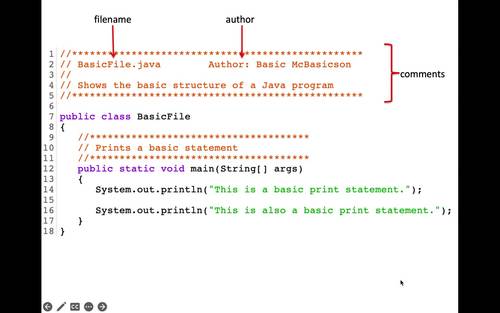
  • public class HelloWorld defines a class named HelloWorld. In Java, the class name should match the file name, so save the program as HelloWorld.java.
  • public static void main(String[] args) defines the main method. Java starts running the program from this method.
  • System.out.println() displays text in the console. The text to display goes inside the parentheses and quotation marks.
  • Braces, { }, mark the beginning and end of the class and method.
  • The semicolon at the end of the print statement tells Java that the instruction is complete.

Compile and Run the Program

Install a Java Development Kit (JDK), then open a terminal or command prompt in the folder containing HelloWorld.java. Compile the program with:

javac HelloWorld.java

If compilation succeeds, Java creates a file named HelloWorld.class. Run the program with:

java HelloWorld

The output will be:

Hello, World!

Try a Small Change

Replace the message inside System.out.println() with your own text. For example:

System.out.println("Java is fun to learn!");

Save the file, compile it again, and run it to see the new output. This simple example introduces the basic structure of a Java program and gives you a starting point for exploring variables, input, and other programming concepts.


7 Essential Tips for Writing Simple Java Programs

  1. Use `public static void main(String[] args)` as the program’s entry point.
  2. Save the file with the same name as its public class.
  3. Use `System.out.println()` to display text.
  4. End most statements with a semicolon.
  5. Match every opening brace with a closing brace.
  6. Compile with `javac` and run with `java`.
  7. Keep variable names clear and descriptive.

Use `public static void main(String[] args)` as the program’s entry point.

In a simple Java program, `public static void main(String[] args)` is the entry point—the method Java looks for to begin running your code. Place the statements you want the program to execute inside its braces. The method signature must be written with the correct spelling and capitalization, or Java won’t recognize it as the program’s starting point.

Save the file with the same name as its public class.

In Java, save your source file with the same name as its public class, including matching capitalization, and add the .java extension. For example, if your public class is HelloWorld, name the file HelloWorld.java. This naming rule helps the Java compiler locate and compile the class correctly.

Use `System.out.println()` to display text.

Use `System.out.println()` to display text in a Java program’s console. Place the text inside quotation marks within the parentheses, as in `System.out.println(“Hello, world!”);`. Java prints the message and then moves to a new line, making this method useful for showing greetings, results, and other output.

End most statements with a semicolon.

In Java, most statements end with a semicolon, which tells the compiler that an instruction is complete. For example, `System.out.println(“Hello, world!”);` needs a semicolon at the end. Forgetting one can cause a compile-time error, so check your statements when the compiler reports a problem. Some Java structures, such as class and method declarations, do not end with semicolons.

Match every opening brace with a closing brace.

In a simple Java program, every opening brace ({) must have a matching closing brace (}). Braces mark the beginning and end of code blocks, such as classes and methods, so a missing or misplaced brace can cause compilation errors or change how the program works. Indenting nested blocks consistently makes braces easier to match and your code easier to read.

Compile with `javac` and run with `java`.

To compile a simple Java program, open a terminal in the folder containing the `.java` file and run `javac FileName.java`, replacing `FileName` with the name of your file. After compilation succeeds, run the program with `java ClassName`—without the `.java` extension—to see its output.

Keep variable names clear and descriptive.

Use clear, descriptive variable names so your code is easier to read and understand. For example, studentAge is more informative than x, and totalPrice makes its purpose clearer than n. Meaningful names also make simple Java programs easier to update and help you spot mistakes as you learn.
java main

Exploring the Significance of the Java Main Method

The Importance of Java Main Method

The Importance of Java Main Method

When it comes to Java programming, the main method plays a crucial role. It is the entry point of any Java program, where the execution begins. Understanding the main method is essential for every Java developer.

What is the Main Method?

In Java, the main method is defined as:

public static void main(String[] args) {

// Program logic goes here

}

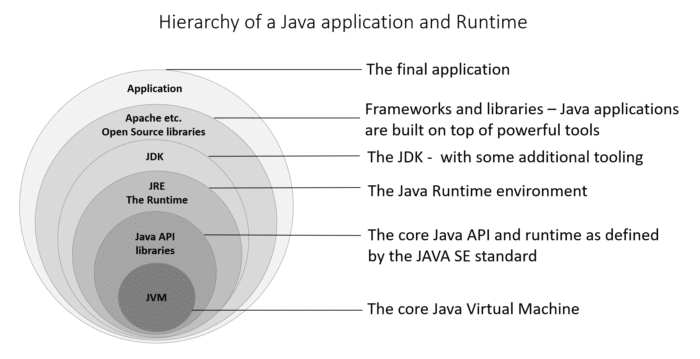
The main method is where the program starts its execution. When you run a Java application, the JVM (Java Virtual Machine) looks for the main method and starts executing from there.

Key Points about the Main Method:

  • The main method must be declared as public static void.
  • It must have a parameter of type String[] args, which allows command-line arguments to be passed to the program.
  • The return type of the main method is void, indicating that it does not return any value.

Why is the Main Method Important?

The main method serves as a starting point for your Java program. It allows you to define what actions should be taken when the program is executed. You can initialize variables, call other methods, and control the flow of your application from within the main method.

Furthermore, understanding how to work with command-line arguments passed to the main method can make your programs more flexible and versatile.

Conclusion

In conclusion, the main method in Java is a fundamental concept that every programmer should grasp. By mastering how to write and utilize the main method effectively, you can create robust and functional Java applications that meet your specific requirements.


9 Essential Tips for Understanding the Java Main Method

  1. The main method in Java serves as the entry point for a Java application.
  2. The main method must be declared as public, static, and void.
  3. The main method takes an array of Strings (String[]) as its parameter, which can be used to pass command line arguments.
  4. The main method is where the execution of a Java program begins.
  5. You can only have one main method in a class in Java.
  6. The signature of the main method must be exactly
  7. It is common practice to put the actual logic of your program in other methods and call them from the main method.
  8. ‘System.out.println()’ statements are often used within the main method for outputting information to the console.
  9. Remember that any code outside of the main method will not be executed automatically.

The main method in Java serves as the entry point for a Java application.

The main method in Java serves as the entry point for a Java application. It is where the program’s execution begins, and the Java Virtual Machine (JVM) starts running the code. Understanding and correctly implementing the main method is crucial for developers as it allows them to define the initial actions to be taken when the program is launched. By grasping the significance of the main method, programmers can effectively structure their Java applications and control their flow from the very start.

The main method must be declared as public, static, and void.

In Java programming, it is essential to ensure that the main method is declared with the modifiers “public,” “static,” and “void.” The “public” modifier allows the main method to be accessed from outside the class, making it the entry point of the program. The “static” modifier indicates that the main method belongs to the class itself rather than an instance of the class. Lastly, the “void” return type specifies that the main method does not return any value upon completion. By adhering to these requirements, developers can effectively define and execute their Java programs with clarity and consistency.

The main method takes an array of Strings (String[]) as its parameter, which can be used to pass command line arguments.

In Java programming, the main method is a critical component that serves as the entry point for executing a program. One key aspect to note is that the main method accepts an array of Strings (String[]) as its parameter. This feature allows developers to pass command line arguments to the program, enabling greater flexibility and customization in how the Java application behaves based on external inputs. By leveraging this capability effectively, developers can create dynamic and interactive programs that respond to varying input parameters provided at runtime.

The main method is where the execution of a Java program begins.

The main method in Java serves as the starting point for the execution of a Java program. It is the entry point where the JVM (Java Virtual Machine) begins running the program’s code. Understanding the significance of the main method is crucial for Java developers, as it allows them to define the initial actions and logic that set the program in motion. By grasping the role of the main method, programmers can effectively structure their Java applications and control how they function from the very beginning of execution.

You can only have one main method in a class in Java.

In Java, it is important to note that you can only have one main method in a class. This restriction is a fundamental rule in Java programming, as the main method serves as the entry point for executing a Java program. Having multiple main methods within the same class would create ambiguity for the JVM (Java Virtual Machine) to determine which main method to execute. By adhering to this rule and having a single main method in a class, you ensure clarity and consistency in your Java applications, allowing for smooth execution and proper control of program flow.

The signature of the main method must be exactly

In Java, it is crucial to adhere to the specific signature requirements of the main method. The signature of the main method must be exactly as follows: “public static void main(String[] args)”. Any deviation from this precise format can lead to errors and prevent the Java Virtual Machine (JVM) from recognizing the entry point of the program. Therefore, ensuring that the main method’s signature matches this exact structure is essential for the successful execution of a Java application.

It is common practice to put the actual logic of your program in other methods and call them from the main method.

In Java programming, it is a common practice to separate the actual logic of your program into other methods and then call these methods from the main method. By doing so, you can achieve better organization and maintainability of your code. This approach allows you to break down the functionality of your program into smaller, more manageable parts, making it easier to understand and debug. Additionally, it promotes code reusability and modularity, enabling you to easily modify or expand your program in the future without affecting the overall structure.

‘System.out.println()’ statements are often used within the main method for outputting information to the console.

In Java programming, the main method serves as the entry point for executing a program. One common practice within the main method is to use the ‘System.out.println()’ statement for outputting information to the console. This statement allows developers to display messages, variables, or any other relevant data during program execution. By incorporating ‘System.out.println()’ statements effectively within the main method, developers can provide valuable insights and feedback to users, making their Java applications more informative and user-friendly.

Remember that any code outside of the main method will not be executed automatically.

In Java, it is important to remember that any code outside of the main method will not be executed automatically. The main method serves as the entry point for the program, and only code written within this method will be executed when the program is run. Any additional logic or functions placed outside of the main method will need to be explicitly called from within the main method in order to be executed. Understanding this concept is crucial for structuring Java programs effectively and ensuring that all intended actions are carried out during program execution.