Exploring AWT in Java: Building GUI Applications with Java’s Abstract Window Toolkit
The Basics of AWT in Java
AWT, which stands for Abstract Window Toolkit, is a set of classes provided by Java to create graphical user interfaces (GUIs). It is one of the oldest GUI toolkits in Java and forms the foundation for Swing and JavaFX.
Components of AWT
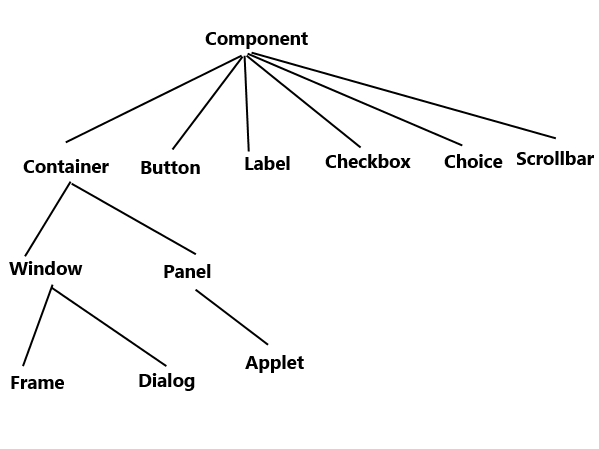
AWT provides a wide range of components that can be used to build GUI applications. Some common components include:
- Buttons
- Labels
- Textfields
- Checkboxes
- Radio buttons
- List boxes
- Menus
- Dialog boxes
Event Handling in AWT
In AWT, event handling is done through listeners. Components generate events when certain actions occur, such as clicking a button or typing in a text field. Event listeners are used to capture these events and respond accordingly.
Layout Managers in AWT
AWT provides layout managers that help arrange components within a container. Some common layout managers include:
- FlowLayout: Arranges components in a row or column.
- BorderLayout: Divides the container into five regions – North, South, East, West, and Center.
- GridLayout: Organizes components in a grid-like fashion.
The Future of AWT
While AWT is still supported in Java, Swing and JavaFX have become more popular choices for building modern GUI applications due to their enhanced features and flexibility. However, understanding AWT can provide a solid foundation for working with more advanced GUI libraries in Java.
5 Advantages of Using AWT for Java GUI Development
- 1. AWT is part of the Java standard library, so no additional downloads or dependencies are required.
- 2. AWT provides a simple and straightforward way to create GUI applications in Java.
- 3. AWT components have a native look and feel, making them consistent across different platforms.
- 4. AWT supports event handling through listeners, allowing for interactive user interfaces.
- 5. AWT’s layout managers help in organizing and positioning components within containers efficiently.
Challenges of Using AWT in Java: Exploring Limitations and Drawbacks
- Limited Look and Feel
- Less Customization
- Complex Event Handling
- Limited Component Set
- Performance Issues
- Lack of Support for Accessibility Features
1. AWT is part of the Java standard library, so no additional downloads or dependencies are required.
One significant advantage of AWT in Java is that it is a core component of the Java standard library, eliminating the need for additional downloads or dependencies. This inherent integration makes it convenient for developers to start building GUI applications without having to manage external libraries, ensuring a streamlined development process and easier deployment of Java applications that utilize AWT components.
2. AWT provides a simple and straightforward way to create GUI applications in Java.
One of the key advantages of AWT in Java is its ability to provide a simple and straightforward approach to building GUI applications. With AWT, developers can easily create graphical user interfaces using a set of intuitive classes and components. This simplicity allows for quick prototyping and development of GUI applications without the need for complex coding or external libraries, making AWT a convenient choice for beginners and those looking for a straightforward solution to their GUI needs in Java programming.
3. AWT components have a native look and feel, making them consistent across different platforms.
One significant advantage of AWT components in Java is their native look and feel, which ensures consistency across various platforms. By leveraging the native graphical elements of the underlying operating system, AWT components seamlessly blend into the user interface environment, providing a familiar and intuitive experience for users regardless of the platform they are using. This feature not only enhances the aesthetic appeal of applications but also contributes to a more cohesive and user-friendly interface design.
4. AWT supports event handling through listeners, allowing for interactive user interfaces.
One notable advantage of AWT in Java is its robust support for event handling through listeners. By utilizing event listeners, developers can create interactive user interfaces that respond to user actions such as button clicks, mouse movements, and key presses. This feature enables the development of dynamic and engaging GUI applications that enhance the overall user experience by providing real-time feedback and interactivity.
5. AWT’s layout managers help in organizing and positioning components within containers efficiently.
AWT’s layout managers play a crucial role in facilitating the organization and positioning of components within containers in a highly efficient manner. By utilizing layout managers, developers can easily control the arrangement of GUI elements without having to manually calculate their positions. This feature not only saves time and effort but also ensures that the graphical interface remains consistent across different screen sizes and resolutions. The flexibility offered by AWT’s layout managers empowers developers to create visually appealing and user-friendly applications with ease.
Limited Look and Feel
One significant drawback of AWT in Java is its limited look and feel. AWT components heavily depend on the native platform’s GUI elements, leading to a lack of uniformity in appearance across various operating systems. This inconsistency can create challenges for developers aiming to deliver a cohesive user experience, as the graphical interface may vary significantly depending on the user’s operating system.
Less Customization
One drawback of AWT in Java is its limited customization capabilities. AWT components offer fewer options for customization when compared to newer GUI libraries such as Swing or JavaFX. This limitation can restrict developers from creating highly tailored and visually appealing user interfaces that meet modern design standards. As a result, developers may find themselves constrained by the lack of flexibility in AWT when aiming to create sophisticated and interactive GUI applications.
Complex Event Handling
One significant drawback of AWT in Java is its complex event handling mechanism. Event handling in AWT can be more convoluted and verbose when compared to the newer event models present in Swing and JavaFX. Managing events in AWT requires a deeper understanding of listeners and handling mechanisms, which can make the code harder to read and maintain. This complexity can hinder the development process and make it more challenging for developers to create responsive and interactive GUI applications efficiently.
Limited Component Set
One significant drawback of AWT in Java is its limited component set. AWT offers a fundamental collection of components that may fall short in meeting the demands of intricate GUI applications. This limitation can hinder developers who require more advanced and specialized components to create sophisticated user interfaces. As a result, developers often turn to alternative GUI libraries like Swing and JavaFX, which offer a broader range of components and features to address the needs of modern GUI development.
Performance Issues
The heavyweight component architecture of AWT in Java can present a significant drawback in terms of performance. Due to its design, AWT’s approach to handling GUI components can result in performance issues, particularly noticeable in large-scale applications. The heavyweight nature of AWT components can lead to increased resource consumption and slower rendering times, impacting the overall responsiveness and efficiency of the application. Developers need to be mindful of these performance considerations when working with AWT to ensure optimal user experience and system performance.
Lack of Support for Accessibility Features
One significant drawback of AWT in Java is its lack of support for accessibility features. AWT does not provide built-in mechanisms for ensuring that GUI applications are accessible to users with disabilities. This limitation can pose challenges for developers who need to adhere to accessibility standards and ensure that their applications can be used by all individuals, regardless of their physical abilities. As a result, developers may need to implement custom solutions or consider alternative GUI libraries like Swing or JavaFX that offer more robust support for accessibility features.