cfchris.com

Loading

java main

Exploring the Significance of the Java Main Method

The Importance of Java Main Method

The Importance of Java Main Method

When it comes to Java programming, the main method plays a crucial role. It is the entry point of any Java program, where the execution begins. Understanding the main method is essential for every Java developer.

What is the Main Method?

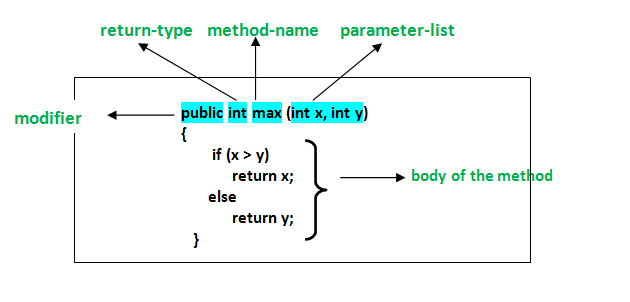
In Java, the main method is defined as:

public static void main(String[] args) {

// Program logic goes here

}

The main method is where the program starts its execution. When you run a Java application, the JVM (Java Virtual Machine) looks for the main method and starts executing from there.

Key Points about the Main Method:

  • The main method must be declared as public static void.
  • It must have a parameter of type String[] args, which allows command-line arguments to be passed to the program.
  • The return type of the main method is void, indicating that it does not return any value.

Why is the Main Method Important?

The main method serves as a starting point for your Java program. It allows you to define what actions should be taken when the program is executed. You can initialize variables, call other methods, and control the flow of your application from within the main method.

Furthermore, understanding how to work with command-line arguments passed to the main method can make your programs more flexible and versatile.

Conclusion

In conclusion, the main method in Java is a fundamental concept that every programmer should grasp. By mastering how to write and utilize the main method effectively, you can create robust and functional Java applications that meet your specific requirements.


9 Essential Tips for Understanding the Java Main Method

  1. The main method in Java serves as the entry point for a Java application.
  2. The main method must be declared as public, static, and void.
  3. The main method takes an array of Strings (String[]) as its parameter, which can be used to pass command line arguments.
  4. The main method is where the execution of a Java program begins.
  5. You can only have one main method in a class in Java.
  6. The signature of the main method must be exactly
  7. It is common practice to put the actual logic of your program in other methods and call them from the main method.
  8. ‘System.out.println()’ statements are often used within the main method for outputting information to the console.
  9. Remember that any code outside of the main method will not be executed automatically.

The main method in Java serves as the entry point for a Java application.

The main method in Java serves as the entry point for a Java application. It is where the program’s execution begins, and the Java Virtual Machine (JVM) starts running the code. Understanding and correctly implementing the main method is crucial for developers as it allows them to define the initial actions to be taken when the program is launched. By grasping the significance of the main method, programmers can effectively structure their Java applications and control their flow from the very start.

The main method must be declared as public, static, and void.

In Java programming, it is essential to ensure that the main method is declared with the modifiers “public,” “static,” and “void.” The “public” modifier allows the main method to be accessed from outside the class, making it the entry point of the program. The “static” modifier indicates that the main method belongs to the class itself rather than an instance of the class. Lastly, the “void” return type specifies that the main method does not return any value upon completion. By adhering to these requirements, developers can effectively define and execute their Java programs with clarity and consistency.

The main method takes an array of Strings (String[]) as its parameter, which can be used to pass command line arguments.

In Java programming, the main method is a critical component that serves as the entry point for executing a program. One key aspect to note is that the main method accepts an array of Strings (String[]) as its parameter. This feature allows developers to pass command line arguments to the program, enabling greater flexibility and customization in how the Java application behaves based on external inputs. By leveraging this capability effectively, developers can create dynamic and interactive programs that respond to varying input parameters provided at runtime.

The main method is where the execution of a Java program begins.

The main method in Java serves as the starting point for the execution of a Java program. It is the entry point where the JVM (Java Virtual Machine) begins running the program’s code. Understanding the significance of the main method is crucial for Java developers, as it allows them to define the initial actions and logic that set the program in motion. By grasping the role of the main method, programmers can effectively structure their Java applications and control how they function from the very beginning of execution.

You can only have one main method in a class in Java.

In Java, it is important to note that you can only have one main method in a class. This restriction is a fundamental rule in Java programming, as the main method serves as the entry point for executing a Java program. Having multiple main methods within the same class would create ambiguity for the JVM (Java Virtual Machine) to determine which main method to execute. By adhering to this rule and having a single main method in a class, you ensure clarity and consistency in your Java applications, allowing for smooth execution and proper control of program flow.

The signature of the main method must be exactly

In Java, it is crucial to adhere to the specific signature requirements of the main method. The signature of the main method must be exactly as follows: “public static void main(String[] args)”. Any deviation from this precise format can lead to errors and prevent the Java Virtual Machine (JVM) from recognizing the entry point of the program. Therefore, ensuring that the main method’s signature matches this exact structure is essential for the successful execution of a Java application.

It is common practice to put the actual logic of your program in other methods and call them from the main method.

In Java programming, it is a common practice to separate the actual logic of your program into other methods and then call these methods from the main method. By doing so, you can achieve better organization and maintainability of your code. This approach allows you to break down the functionality of your program into smaller, more manageable parts, making it easier to understand and debug. Additionally, it promotes code reusability and modularity, enabling you to easily modify or expand your program in the future without affecting the overall structure.

‘System.out.println()’ statements are often used within the main method for outputting information to the console.

In Java programming, the main method serves as the entry point for executing a program. One common practice within the main method is to use the ‘System.out.println()’ statement for outputting information to the console. This statement allows developers to display messages, variables, or any other relevant data during program execution. By incorporating ‘System.out.println()’ statements effectively within the main method, developers can provide valuable insights and feedback to users, making their Java applications more informative and user-friendly.

Remember that any code outside of the main method will not be executed automatically.

In Java, it is important to remember that any code outside of the main method will not be executed automatically. The main method serves as the entry point for the program, and only code written within this method will be executed when the program is run. Any additional logic or functions placed outside of the main method will need to be explicitly called from within the main method in order to be executed. Understanding this concept is crucial for structuring Java programs effectively and ensuring that all intended actions are carried out during program execution.

introduction to java

An Introduction to Java Programming: Exploring the Basics of Java Development

Introduction to Java

Introduction to Java

Java is a high-level, object-oriented programming language developed by Sun Microsystems in the mid-1990s. It is known for its portability, versatility, and robustness, making it one of the most popular programming languages in the world.

Key Features of Java:

  • Platform Independence: Java programs can run on any platform that has a Java Virtual Machine (JVM) installed, making it highly portable.
  • Object-Oriented: Java follows an object-oriented programming paradigm, allowing developers to create modular and reusable code.
  • Syntax Simplicity: Java syntax is easy to read and understand, making it a beginner-friendly language.
  • Automatic Memory Management: Java handles memory management automatically through its built-in garbage collector, reducing the risk of memory leaks.
  • Rich Standard Library: Java comes with a vast standard library that provides pre-built functionality for common tasks, saving developers time and effort.

Main Components of Java:

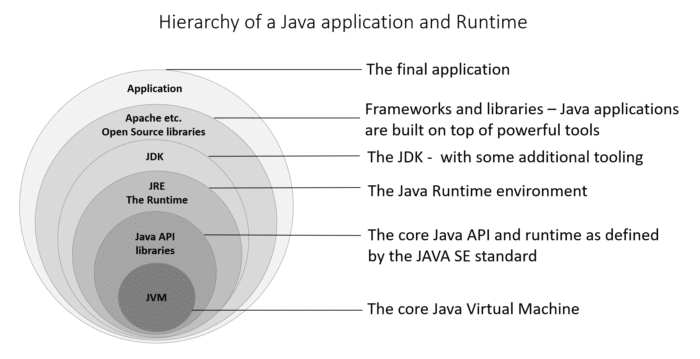
  1. JVM (Java Virtual Machine): The JVM is an essential component of the Java platform that executes compiled Java code.
  2. JRE (Java Runtime Environment): The JRE includes the JVM and other libraries necessary for running Java applications.
  3. JDK (Java Development Kit): The JDK is a software development kit that includes tools for developing, debugging, and monitoring Java applications.

Hello World Example in Java:

“`java

public class HelloWorld {

public static void main(String[] args) {

System.out.println(“Hello, World!”);

}

}

“`

The above code snippet demonstrates a simple “Hello World” program in Java. It defines a class named `HelloWorld` with a `main` method that prints “Hello, World!” to the console.

In conclusion, Java’s versatility and ease of use make it an ideal choice for developing various types of applications, from web applications to mobile apps. Whether you are a beginner or an experienced developer, learning Java can open up numerous opportunities in the world of programming.


5 Key Advantages of Learning Java: Platform Independence, Object-Oriented Design, Simplicity, Memory Management, and a Robust Standard Library

  1. Java is platform-independent, allowing programs to run on different operating systems with a Java Virtual Machine (JVM).
  2. Java is object-oriented, promoting code reusability and modular development.
  3. Java has a simple syntax that is easy to read and understand, making it beginner-friendly.
  4. Java features automatic memory management through garbage collection, reducing the risk of memory leaks.
  5. Java offers a rich standard library with pre-built functionality for common tasks, saving developers time and effort.


6 Drawbacks to Consider When Learning Java for Beginners

  1. Java can be verbose, requiring more lines of code compared to other languages.
  2. Learning Java syntax and concepts may be challenging for beginners with no prior programming experience.
  3. Java’s performance may not be as fast as some lower-level languages like C or C++.
  4. Managing memory in Java can be complex, especially when dealing with large-scale applications.
  5. Java’s strict typing system can lead to longer development times due to the need for explicit type declarations.
  6. Java updates and versions may introduce compatibility issues with existing codebases.

Java is platform-independent, allowing programs to run on different operating systems with a Java Virtual Machine (JVM).

Java’s platform independence is a significant advantage that sets it apart from many other programming languages. By utilizing the Java Virtual Machine (JVM), Java programs can be executed on various operating systems without the need for recompilation. This cross-platform compatibility simplifies software development and deployment, making Java an ideal choice for creating applications that can run seamlessly across different environments.

Java is object-oriented, promoting code reusability and modular development.

Java’s object-oriented nature is a significant advantage, as it fosters code reusability and modular development. By structuring programs around objects and classes, Java enables developers to create reusable components that can be easily integrated into different parts of a project. This approach not only streamlines the development process but also enhances the maintainability and scalability of Java applications, making them more efficient and adaptable to changing requirements.

Java has a simple syntax that is easy to read and understand, making it beginner-friendly.

Java’s simple syntax sets it apart as a beginner-friendly programming language, as it is designed to be easy to read and understand. This feature of Java allows new programmers to grasp the fundamentals quickly and start writing code with confidence. The straightforward syntax of Java contributes to its popularity among beginners and experienced developers alike, making it an excellent choice for those looking to enter the world of programming.

Java features automatic memory management through garbage collection, reducing the risk of memory leaks.

Java’s automatic memory management through garbage collection is a significant advantage that sets it apart from many other programming languages. By handling memory allocation and deallocation automatically, Java reduces the risk of memory leaks, a common issue in manual memory management languages. This feature not only simplifies the development process but also enhances the reliability and stability of Java applications by ensuring efficient memory usage.

Java offers a rich standard library with pre-built functionality for common tasks, saving developers time and effort.

Java’s rich standard library is a standout feature that significantly benefits developers by providing pre-built functionality for common tasks. This extensive library not only saves developers valuable time but also reduces the effort required to implement basic functionalities in their applications. By leveraging the ready-to-use components within the standard library, Java developers can focus more on solving complex problems and building innovative solutions rather than reinventing the wheel for routine tasks.

Java can be verbose, requiring more lines of code compared to other languages.

Java’s verbosity is often cited as a drawback, as it typically requires more lines of code compared to some other programming languages. This can lead to increased development time and potentially make the codebase harder to maintain. While Java’s explicit syntax can enhance readability and maintainability in some cases, developers may find themselves writing more boilerplate code than desired, which can be seen as a downside, especially when working on projects with tight deadlines.

Learning Java syntax and concepts may be challenging for beginners with no prior programming experience.

Learning Java syntax and concepts may pose a challenge for beginners with no prior programming experience. Java, being an object-oriented language, introduces new concepts such as classes, objects, inheritance, and polymorphism that may require a steep learning curve for those unfamiliar with programming principles. Additionally, Java syntax can be strict and verbose compared to some other languages, demanding attention to detail and precision in coding practices. However, with dedication, practice, and the right resources, beginners can overcome these initial hurdles and gradually build a solid foundation in Java programming.

Java’s performance may not be as fast as some lower-level languages like C or C++.

Java’s performance may not always match the speed of lower-level languages such as C or C++. Due to its design as a high-level language with automatic memory management and platform independence, Java may introduce some overhead that can impact its execution speed compared to more optimized, lower-level languages. While Java offers advantages in terms of portability and ease of development, developers working on performance-critical applications may need to carefully consider the trade-offs between these benefits and the potential performance limitations of the language.

Managing memory in Java can be complex, especially when dealing with large-scale applications.

Managing memory in Java can be complex, especially when dealing with large-scale applications. One of the challenges developers face is ensuring efficient memory usage to prevent issues like memory leaks or excessive garbage collection pauses. In large-scale applications, the sheer volume of objects created and the complexity of their interactions can make it challenging to optimize memory allocation and deallocation effectively. This complexity requires careful planning and implementation of memory management strategies to maintain application performance and stability.

Java’s strict typing system can lead to longer development times due to the need for explicit type declarations.

Java’s strict typing system, while beneficial for ensuring code integrity and reducing errors at runtime, can sometimes result in longer development times. The requirement for explicit type declarations in Java means that developers need to specify the data types of variables, parameters, and return values throughout their code. This level of detail can add complexity to the development process, especially when compared to dynamically typed languages where type inference is more flexible. Despite this potential drawback, the strict typing system in Java ultimately contributes to code reliability and maintainability in the long run.

Java updates and versions may introduce compatibility issues with existing codebases.

Java updates and new versions can sometimes pose a challenge for developers due to potential compatibility issues with existing codebases. When Java introduces changes or deprecates certain features, it may require modifications to the code to ensure that it functions correctly with the latest version. This can be a time-consuming process, especially for large projects with extensive codebases, as developers need to carefully assess and update their code to maintain compatibility and take advantage of new Java features. Despite this con, staying up-to-date with Java versions is essential for security patches, performance improvements, and access to new functionalities in the language.

java python

Exploring the Java and Python Programming Languages: A Comparative Analysis

Java vs Python: A Comparison of Two Popular Programming Languages

Java vs Python: A Comparison of Two Popular Programming Languages

Java and Python are two of the most widely used programming languages in the world. Each language has its own strengths and weaknesses, making them suitable for different types of projects and applications.

Java

Java is a versatile, high-level programming language known for its portability and scalability. It is commonly used for developing enterprise-level applications, web applications, mobile apps, and more. Java follows the principle of “write once, run anywhere,” meaning that Java code can run on any platform that has a Java Virtual Machine (JVM) installed.

Key Features of Java:

  • Strongly typed language with static typing
  • Object-oriented programming (OOP) paradigm
  • Rich set of libraries and frameworks (e.g., Spring, Hibernate)
  • Excellent performance and scalability
  • Robust security features

Python

Python is a dynamic, interpreted programming language known for its simplicity and readability. It is widely used in various domains such as web development, data science, artificial intelligence, automation, and more. Python’s syntax is clean and easy to understand, making it an ideal choice for beginners as well as experienced developers.

Key Features of Python:

  • Dynamically typed language with automatic memory management
  • Supports multiple programming paradigms (e.g., OOP, functional programming)
  • Extensive standard library with built-in modules for various tasks
  • Rapid development cycle due to its simplicity
  • Broad community support and active ecosystem

Which Language Should You Choose?

The choice between Java and Python depends on your specific requirements and project goals. If you need a highly performant language for building large-scale applications with strict security requirements, Java may be the better option. On the other hand, if you prioritize readability, ease of use, and rapid development cycles, Python could be the right choice.

In conclusion, both Java and Python have their strengths and are valuable tools in a developer’s toolkit. Whether you choose Java or Python ultimately depends on the nature of your project and your personal preferences as a developer.


Top 5 Tips for Mastering Java and Python Programming

  1. Practice regularly to improve your skills in Java and Python.
  2. Utilize online resources such as tutorials, forums, and documentation for learning Java and Python.
  3. Join coding communities or clubs to collaborate with others and learn from their experiences in Java and Python.
  4. Break down complex problems into smaller tasks when working on projects in Java and Python.
  5. Stay updated with the latest features and updates in both Java and Python programming languages.

Practice regularly to improve your skills in Java and Python.

To enhance your proficiency in Java and Python, it is crucial to engage in consistent practice. Regular practice not only helps reinforce your understanding of the languages but also allows you to explore new concepts and refine your coding skills. By dedicating time each day to coding exercises, projects, or challenges in Java and Python, you can steadily improve your programming abilities and stay updated with the latest developments in both languages. Remember, practice makes progress, so make it a habit to code regularly to sharpen your skills in Java and Python.

Utilize online resources such as tutorials, forums, and documentation for learning Java and Python.

To enhance your proficiency in Java and Python, make the most of online resources like tutorials, forums, and documentation. These valuable tools provide a wealth of knowledge and support to help you grasp the intricacies of both programming languages. By actively engaging with these resources, you can deepen your understanding, troubleshoot challenges effectively, and stay updated on the latest developments in Java and Python programming.

Join coding communities or clubs to collaborate with others and learn from their experiences in Java and Python.

Joining coding communities or clubs is a valuable tip for aspiring programmers looking to enhance their skills in Java and Python. By collaborating with like-minded individuals, you can gain insights and learn from the experiences of others. These communities provide a platform for sharing knowledge, discussing best practices, and working on projects together, ultimately helping you grow as a developer in both Java and Python.

Break down complex problems into smaller tasks when working on projects in Java and Python.

When working on projects in Java and Python, it is essential to break down complex problems into smaller tasks. By dividing the problem into manageable components, developers can tackle each task more effectively and efficiently. This approach not only helps in maintaining clarity and focus but also makes it easier to debug and test the code. Breaking down complex problems into smaller tasks enables developers to approach the project systematically, leading to better organization and ultimately a more successful outcome.

Stay updated with the latest features and updates in both Java and Python programming languages.

It is essential to stay updated with the latest features and updates in both Java and Python programming languages. By keeping abreast of new developments, enhancements, and best practices in these languages, developers can leverage the full potential of Java and Python to create efficient, secure, and innovative solutions. Continuous learning and adaptation to the evolving landscape of programming languages ensure that developers remain competitive and equipped to tackle modern challenges in software development.

java app

Mastering Java App Development: Building Powerful Applications with Java

The Power of Java Applications

The Power of Java Applications

Java is a versatile programming language that has gained immense popularity for its ability to create robust and scalable applications. Java applications are used in a wide range of industries, from web development to mobile apps and enterprise software solutions.

One of the key strengths of Java applications is their platform independence. This means that a Java application can run on any device or operating system that has a Java Virtual Machine (JVM) installed. This portability makes Java an ideal choice for developing cross-platform applications that reach a larger audience.

Java’s rich set of libraries and frameworks provide developers with the tools they need to build complex and feature-rich applications efficiently. Whether you are developing a simple desktop application or a sophisticated web-based system, Java offers the flexibility and scalability required to meet your project’s demands.

Furthermore, Java’s strong emphasis on security makes it a popular choice for developing secure applications. With built-in features like automatic memory management and strong type checking, Java helps developers write code that is less prone to common vulnerabilities such as buffer overflows or memory leaks.

Java’s community support is another factor that contributes to its popularity. The vast community of Java developers worldwide ensures that there are plenty of resources, tutorials, and forums available for developers looking to enhance their skills or troubleshoot issues they encounter during development.

In conclusion, Java applications offer unparalleled versatility, portability, security, and community support. Whether you are a seasoned developer or just starting your programming journey, exploring the world of Java applications can open up a world of possibilities for creating innovative and powerful software solutions.


9 Essential Tips for Building Robust and Maintainable Java Applications

  1. 1. Write clean and readable code to improve maintainability.
  2. 2. Follow naming conventions to enhance code consistency.
  3. 3. Use meaningful comments to explain complex logic or algorithms.
  4. 4. Break down large functions into smaller, reusable methods for better organization.
  5. 5. Implement error handling to gracefully manage exceptions and prevent crashes.
  6. 6. Optimize performance by avoiding unnecessary loops or operations.
  7. 7. Utilize design patterns to solve common problems effectively.
  8. 8. Test your application thoroughly with unit tests and integration tests.
  9. 9. Keep learning and stay updated with the latest Java features and best practices.

1. Write clean and readable code to improve maintainability.

Writing clean and readable code is crucial when developing Java applications to enhance maintainability. By following best practices and adhering to coding standards, developers can ensure that their code is easy to understand and modify in the future. Clean code not only makes it simpler for other team members to collaborate on the project but also reduces the chances of introducing bugs during maintenance. Prioritizing readability in code can lead to more efficient debugging, faster updates, and overall smoother development processes for Java applications.

2. Follow naming conventions to enhance code consistency.

Following naming conventions is a crucial practice in Java application development as it enhances code consistency and readability. By adhering to established naming conventions, developers can create code that is easier to understand and maintain. Consistent naming of classes, methods, variables, and other elements not only improves the overall quality of the codebase but also promotes collaboration among team members. When everyone follows the same naming conventions, it becomes simpler to navigate through the code, identify functionalities, and make modifications without confusion. This simple tip can have a significant impact on the efficiency and effectiveness of Java application development projects.

3. Use meaningful comments to explain complex logic or algorithms.

When developing a Java application, it is crucial to utilize meaningful comments to elucidate intricate logic or algorithms. By incorporating clear and concise comments within the codebase, developers can enhance the readability and maintainability of the application. These comments serve as valuable documentation for understanding the purpose behind complex logic, facilitating collaboration among team members, and aiding in future troubleshooting and modifications. Embracing this practice not only promotes code clarity but also contributes to the overall efficiency and effectiveness of the Java application development process.

4. Break down large functions into smaller, reusable methods for better organization.

Breaking down large functions into smaller, reusable methods is a valuable tip in Java application development. By dividing complex tasks into smaller, more manageable chunks, developers can improve the organization and maintainability of their code. This practice not only enhances readability but also promotes code reusability, making it easier to maintain and update the application in the future. Additionally, breaking down functions into smaller methods allows for better testing and debugging, as issues can be isolated and addressed more effectively. Overall, adopting this approach leads to more efficient and structured Java applications.

5. Implement error handling to gracefully manage exceptions and prevent crashes.

Implementing error handling is a crucial aspect of developing Java applications to ensure smooth operation and prevent unexpected crashes. By gracefully managing exceptions, developers can anticipate potential errors and handle them appropriately, maintaining the application’s stability and enhancing the user experience. Proper error handling not only helps in identifying issues promptly but also allows for effective troubleshooting and debugging, leading to more robust and reliable Java applications.

6. Optimize performance by avoiding unnecessary loops or operations.

To optimize the performance of a Java application, it is crucial to avoid unnecessary loops or operations. By minimizing the number of loops and streamlining operations within the code, developers can significantly improve the efficiency and speed of their application. Unnecessary loops can lead to increased processing time and resource consumption, impacting the overall performance of the software. Therefore, by carefully assessing and optimizing the logic within loops and operations, developers can enhance the performance of their Java application and deliver a more responsive user experience.

7. Utilize design patterns to solve common problems effectively.

Utilizing design patterns in Java applications is a valuable strategy to solve common problems effectively. By leveraging established design patterns such as Singleton, Factory, or Observer, developers can streamline their code structure, improve maintainability, and enhance scalability. Design patterns provide proven solutions to recurring design challenges, allowing developers to write cleaner and more efficient code while promoting best practices in software development. Incorporating design patterns in Java applications not only enhances code quality but also fosters a deeper understanding of software architecture principles among developers.

8. Test your application thoroughly with unit tests and integration tests.

Testing your Java application thoroughly with unit tests and integration tests is crucial for ensuring its reliability and functionality. Unit tests allow you to test individual components of your code in isolation, verifying that each part works as intended. On the other hand, integration tests help you assess how different parts of your application work together as a whole. By conducting both types of tests diligently, you can identify and address any issues early in the development process, leading to a more robust and stable Java application in the end.

9. Keep learning and stay updated with the latest Java features and best practices.

To ensure the success of your Java applications, it is crucial to continuously expand your knowledge and stay informed about the latest Java features and best practices. By keeping up with advancements in the Java ecosystem, you can leverage new tools, techniques, and optimizations to enhance the performance, security, and scalability of your applications. Embracing a mindset of lifelong learning in Java development not only sharpens your skills but also empowers you to adapt to industry trends and deliver cutting-edge solutions that meet evolving user needs.

java development kit

Mastering Java Development Kit: Essential Tools for Java Programmers

The Java Development Kit (JDK): Everything You Need to Know

The Java Development Kit (JDK): Everything You Need to Know

Java is a popular programming language used for developing a wide range of applications, from simple desktop tools to complex enterprise systems. At the core of Java development is the Java Development Kit (JDK), a crucial set of tools that every Java developer needs to have.

What is the JDK?

The JDK is a software development kit that provides all the necessary tools and libraries for developing Java applications. It includes the Java Runtime Environment (JRE), which is required for running Java programs, as well as development tools such as the Java compiler, debugger, and other utilities.

Key Components of the JDK

Some of the key components of the JDK include:

  • Java Compiler: The javac compiler converts Java source code into bytecode that can be executed by the JVM.
  • Java Virtual Machine (JVM): The JVM is responsible for executing Java bytecode on different platforms.
  • Java Class Library: A collection of pre-written classes and interfaces that provide core functionality for Java applications.
  • Development Tools: Tools like Javadoc for generating API documentation, JAR for packaging applications, and more.

Why Use the JDK?

The JDK is essential for Java developers because it provides everything needed to write, compile, debug, and run Java applications. By using the JDK, developers can ensure that their code is compatible with different platforms and environments thanks to the JVM’s portability.

Getting Started with the JDK

To start using the JDK, developers can download it from Oracle’s website or other authorized sources. Installation instructions are typically provided with the download package, making it easy to set up and start developing in Java.

Conclusion

The JDK plays a vital role in Java development by providing developers with all the necessary tools and libraries to create powerful and scalable applications. Whether you are a beginner or an experienced developer, having a solid understanding of the JDK is essential for success in Java programming.


8 Key Advantages of the Java Development Kit for Developers

  1. Comprehensive set of tools for Java development
  2. Includes the Java compiler for converting source code to bytecode
  3. Provides a rich collection of libraries for building robust applications
  4. Cross-platform compatibility with the Java Virtual Machine (JVM)
  5. Supports object-oriented programming principles
  6. Integrated development environment (IDE) support for coding convenience
  7. Regular updates and improvements from Oracle and the Java community
  8. Extensive documentation and resources available online for learning and troubleshooting


Challenges of the Java Development Kit: Size, Complexity, Resource Demands, and Compatibility Issues

  1. Large Size
  2. Complexity
  3. Resource Intensive
  4. Updates and Compatibility

Comprehensive set of tools for Java development

The Java Development Kit (JDK) stands out for its comprehensive set of tools tailored for Java development. From the Java compiler to debugging utilities and class libraries, the JDK equips developers with everything they need to efficiently write, compile, and debug Java applications. This extensive toolkit not only streamlines the development process but also ensures that developers have access to a wide array of resources to tackle various aspects of Java programming effectively.

Includes the Java compiler for converting source code to bytecode

The Java Development Kit (JDK) offers a significant advantage by including the Java compiler, a crucial tool for converting source code into bytecode. This feature simplifies the development process for Java programmers, allowing them to write code in a human-readable format and then compile it into bytecode that can be executed by the Java Virtual Machine (JVM). By bundling the compiler with the JDK, developers can seamlessly transition from writing code to testing and running their applications without the need for additional tools or configurations.

Provides a rich collection of libraries for building robust applications

The Java Development Kit (JDK) stands out for its ability to provide a rich collection of libraries that empower developers to build robust applications with ease. These libraries offer a wide range of pre-written classes and interfaces that cover various functionalities, saving developers time and effort in coding from scratch. By leveraging the extensive library support within the JDK, developers can enhance the functionality and performance of their applications while ensuring scalability and reliability in their software projects.

Cross-platform compatibility with the Java Virtual Machine (JVM)

The Java Development Kit (JDK) offers a significant advantage with its cross-platform compatibility through the Java Virtual Machine (JVM). This feature allows Java applications to run on various operating systems without the need for recompilation, ensuring seamless deployment across different platforms. By leveraging the JVM, developers can write code once and have it executed on Windows, macOS, Linux, and other supported environments, making Java a versatile choice for creating applications that reach a wide audience.

Supports object-oriented programming principles

Java Development Kit (JDK) offers a significant advantage by supporting object-oriented programming principles. Object-oriented programming allows developers to organize code into reusable and modular components, enhancing code readability, maintainability, and scalability. With the JDK’s support for object-oriented programming, developers can easily create complex applications by leveraging concepts such as classes, objects, inheritance, and polymorphism, leading to more efficient and robust software development processes.

Integrated development environment (IDE) support for coding convenience

The Java Development Kit (JDK) offers integrated development environment (IDE) support, providing developers with a user-friendly platform for coding convenience. With IDE tools tailored for Java development, programmers can benefit from features like code completion, syntax highlighting, debugging capabilities, and project management tools. This support streamlines the coding process, enhances productivity, and helps developers write high-quality Java applications efficiently.

Regular updates and improvements from Oracle and the Java community

Regular updates and improvements from Oracle and the Java community ensure that the Java Development Kit (JDK) remains a cutting-edge tool for developers. By staying current with the latest advancements, developers can benefit from enhanced performance, security patches, and new features that help streamline their development process and keep their applications up-to-date with industry standards. This commitment to continuous improvement demonstrates the dedication of both Oracle and the Java community to support developers in creating robust and innovative Java applications.

Extensive documentation and resources available online for learning and troubleshooting

Java Development Kit (JDK) offers a significant advantage with its extensive documentation and abundant online resources available for learning and troubleshooting. Whether you are a novice Java developer looking to grasp the basics or an experienced programmer seeking solutions to complex issues, the wealth of online materials ensures that you have the support and guidance needed to enhance your Java development skills effectively. The comprehensive documentation and resources associated with JDK empower developers to overcome challenges, explore new features, and continuously improve their proficiency in Java programming.

Large Size

The Java Development Kit (JDK) has a notable downside in its large size, which can demand a considerable amount of storage space on your system. Due to its extensive collection of tools, libraries, and resources, the JDK’s size may pose a challenge for users with limited storage capacity, potentially impacting the availability of space for other applications or files on the system. This aspect of the JDK’s size underscores the importance of considering storage requirements when installing and using this development kit for Java programming projects.

Complexity

Java development using the JDK can present a significant challenge in terms of complexity, particularly for beginners. The extensive toolset provided by the JDK can be overwhelming for those new to Java programming, making it difficult to grasp all the functionalities and how they interact. Navigating through the various tools and libraries within the JDK may require a steep learning curve, potentially slowing down the development process and causing frustration for inexperienced developers.

Resource Intensive

One significant drawback of using the Java Development Kit (JDK) is its resource-intensive nature. Running Java applications developed with the JDK may demand higher system resources compared to applications built with other programming languages. This increased resource requirement can lead to higher memory consumption and slower performance on devices with limited capabilities, potentially affecting the overall efficiency and responsiveness of the application.

Updates and Compatibility

Keeping up with JDK updates and ensuring compatibility with different versions can be challenging for Java developers. As new updates are released regularly to enhance performance, security, and features, developers need to stay vigilant in updating their development environments and ensuring that their code remains compatible with the latest JDK versions. This process can be time-consuming and may require adjustments to existing codebases to avoid potential compatibility issues. Additionally, managing dependencies and third-party libraries to align with JDK updates adds another layer of complexity to the development process.

java runtime

Exploring the Significance of Java Runtime Environment in Application Development

The Importance of Java Runtime Environment (JRE)

The Importance of Java Runtime Environment (JRE)

Java Runtime Environment (JRE) is a crucial component for running Java applications on your computer. It provides the necessary environment for executing Java programs by including the Java Virtual Machine (JVM), class libraries, and other supporting files.

One of the key benefits of JRE is its platform independence. Java programs compiled into bytecode can run on any device with a compatible JRE installed, regardless of the underlying operating system. This makes Java a popular choice for developing cross-platform applications.

Furthermore, JRE ensures that Java applications are executed securely within a controlled environment. The JVM manages memory allocation, garbage collection, and other important tasks to prevent unauthorized access or malicious activities.

Updating your JRE is essential to maintain compatibility with the latest Java applications and security patches. By keeping your JRE up-to-date, you can ensure optimal performance and protection against potential vulnerabilities.

In conclusion, Java Runtime Environment plays a vital role in enabling the seamless execution of Java applications across different platforms while ensuring security and reliability. It is an indispensable component for anyone using Java-based software.


Understanding Java Runtime: Answers to 8 Frequently Asked Questions

  1. Is Java runtime still relevant today?
  2. What is the difference between Java Runtime and JDK?
  3. What is JRE vs JDK?
  4. How to install a Java Runtime?
  5. How do I get Java runtime?
  6. Is Java Runtime still needed?
  7. What does Java Runtime do?
  8. What is the Java runtime?

Is Java runtime still relevant today?

In today’s rapidly evolving technological landscape, the relevance of Java runtime remains significant. Despite the emergence of new programming languages and frameworks, Java continues to be a popular choice for developing robust and scalable applications. Its platform independence, strong community support, and extensive libraries make it a versatile tool for a wide range of projects. Many enterprise-level systems and critical applications still rely on Java runtime for their functionality, highlighting its enduring importance in the software development industry. As long as there is a need for reliable, cross-platform solutions, Java runtime will continue to play a vital role in modern software development practices.

What is the difference between Java Runtime and JDK?

When discussing the difference between Java Runtime and JDK, it is important to understand their distinct roles in Java development. The Java Runtime Environment (JRE) is responsible for running Java applications by providing the necessary environment, including the Java Virtual Machine (JVM) and class libraries. On the other hand, the Java Development Kit (JDK) is a comprehensive package that includes tools for developing, debugging, and monitoring Java applications in addition to the components of JRE. While JRE is essential for executing Java programs, JDK is required for developing and compiling them. In summary, JRE enables running Java applications, while JDK encompasses the entire development process from coding to deployment.

What is JRE vs JDK?

In the realm of Java development, a common question that arises is the distinction between Java Runtime Environment (JRE) and Java Development Kit (JDK). The JRE is essential for running Java applications as it includes the Java Virtual Machine (JVM) and class libraries needed for execution. On the other hand, the JDK is a comprehensive package that not only contains the JRE components but also includes development tools such as compilers and debuggers for creating Java applications. While JRE is sufficient for end-users who only need to run Java programs, developers require the JDK to write, compile, and debug their own Java code. Understanding the differences between JRE and JDK is fundamental for anyone involved in Java software development.

How to install a Java Runtime?

To install Java Runtime Environment (JRE) on your system, you can follow these simple steps. First, visit the official Oracle website and navigate to the Java SE Downloads page. Choose the appropriate JRE version for your operating system (Windows, macOS, or Linux) and click on the download link. Once the download is complete, run the installer and follow the on-screen instructions to complete the installation process. After successful installation, you may need to set up environment variables to ensure that Java is properly configured on your system. Finally, verify the installation by opening a command prompt or terminal window and typing “java -version” to check if Java Runtime has been installed correctly.

How do I get Java runtime?

To obtain the Java Runtime Environment (JRE), you can easily download it from the official website of Oracle, the company that develops Java. Simply visit the Oracle website, navigate to the Java downloads section, and select the appropriate JRE version for your operating system. Follow the on-screen instructions to complete the download and installation process. It is important to regularly update your JRE to ensure compatibility with new Java applications and to benefit from the latest security enhancements provided by Oracle.

Is Java Runtime still needed?

In today’s digital landscape, the question of whether Java Runtime is still necessary remains a common inquiry among users. Despite advancements in technology and the emergence of alternative programming languages, Java Runtime continues to be a fundamental component for running Java applications efficiently. Many software programs and web applications still rely on Java, making the presence of Java Runtime essential for seamless execution. Moreover, Java’s platform independence and robust security features reinforce the importance of having a functional Java Runtime Environment to support various applications across different operating systems. Thus, while the relevance of Java Runtime may vary depending on individual needs, its significance in facilitating the operation of Java-based software remains undeniable in many contexts.

What does Java Runtime do?

Java Runtime Environment (JRE) is responsible for executing Java applications on a computer system. It includes the Java Virtual Machine (JVM), class libraries, and other necessary components to run Java programs smoothly. Essentially, Java Runtime creates a controlled environment where Java applications can be executed securely and efficiently. It ensures that the bytecode generated by Java compilers can be interpreted and run on various platforms without the need for recompilation, making Java a versatile and widely used programming language for developing cross-platform applications.

What is the Java runtime?

The Java runtime, also known as Java Runtime Environment (JRE), is a crucial component necessary for running Java applications on a computer system. It consists of the Java Virtual Machine (JVM), class libraries, and other essential files that provide the environment needed to execute Java programs. The JRE ensures that Java applications can run smoothly and securely by handling tasks such as memory management and garbage collection. It plays a key role in enabling the platform independence of Java, allowing programs to be executed on various devices with different operating systems as long as they have a compatible JRE installed.

learn java

Master Java Programming: Learn Java Like a Pro

Learn Java: A Comprehensive Guide

Learn Java: A Comprehensive Guide

Java is a versatile and widely-used programming language that powers countless applications, from mobile apps to enterprise software. Whether you are a beginner or an experienced developer looking to expand your skills, learning Java can open up a world of opportunities for you.

Why Learn Java?

Java is known for its platform independence, meaning that once you write a Java program, it can run on any device that has a Java Virtual Machine (JVM). This makes Java a popular choice for developing cross-platform applications.

In addition, Java’s robust libraries and frameworks make it easier to build complex applications efficiently. Its strong community support and vast resources also make learning Java more accessible and enjoyable.

Getting Started with Java

If you are new to programming, don’t worry! Java’s syntax is relatively easy to learn compared to other languages. You can start by installing the Java Development Kit (JDK) on your computer and using an Integrated Development Environment (IDE) like Eclipse or IntelliJ IDEA to write and run your code.

Begin with the basics, such as variables, data types, loops, and conditional statements. As you progress, dive into object-oriented programming concepts like classes, objects, inheritance, and polymorphism.

Advanced Topics in Java

Once you have a solid understanding of the fundamentals, you can explore more advanced topics in Java like multithreading, exception handling, database connectivity using JDBC, GUI programming with Swing or JavaFX, and web development with frameworks like Spring or Hibernate.

Practice Makes Perfect

To truly master Java programming, practice is key. Challenge yourself with coding exercises on platforms like LeetCode or HackerRank. Build small projects to apply what you have learned and gain hands-on experience working with real-world problems.

Conclusion

Learning Java can be a rewarding journey that opens up endless possibilities in the world of software development. Whether you aspire to be a mobile app developer, web developer, or software engineer, mastering Java will equip you with the skills needed to succeed in today’s tech-driven world.


Top 8 FAQs About Learning Java: A Guide for Beginners

  1. What is Java and why should I learn it?
  2. Is Java difficult to learn for beginners?
  3. What are the basic concepts I need to understand in Java?
  4. How can I start learning Java programming?
  5. Are there any recommended resources or tutorials for learning Java?
  6. What are the key features of Java that make it a popular programming language?
  7. Can I become a successful programmer by learning Java?
  8. What career opportunities are available for those who know Java?

What is Java and why should I learn it?

Java is a versatile and powerful programming language that is widely used in various domains, from mobile app development to enterprise software solutions. Learning Java is beneficial for several reasons. Firstly, Java’s platform independence allows programs to run on any device with a Java Virtual Machine (JVM), making it ideal for cross-platform development. Additionally, Java’s extensive libraries and frameworks simplify the process of building complex applications. Its strong community support and vast resources also make it an accessible language for beginners and experienced developers alike. Overall, mastering Java opens up a world of opportunities in the tech industry and equips you with valuable skills that are in high demand.

Is Java difficult to learn for beginners?

For beginners, learning Java may seem challenging at first due to its syntax and object-oriented programming concepts. However, with dedication and practice, Java can become more manageable to grasp. Many resources, tutorials, and online courses are available to help beginners understand Java effectively. Breaking down the learning process into smaller steps and focusing on practical applications can make learning Java less intimidating for newcomers. Ultimately, while Java may present some initial hurdles, the rewards of mastering this versatile language are well worth the effort for aspiring programmers.

What are the basic concepts I need to understand in Java?

To effectively learn Java, it is essential to grasp the basic concepts that form the foundation of the language. Understanding fundamental concepts such as variables, data types, control structures (like loops and conditional statements), methods, classes, and objects is crucial. Object-oriented programming principles like inheritance, encapsulation, polymorphism, and abstraction are also key components to comprehend. By mastering these core concepts, learners can build a strong understanding of Java programming and pave the way for more advanced topics in software development.

How can I start learning Java programming?

To start learning Java programming, it is recommended to begin by installing the Java Development Kit (JDK) on your computer and selecting an Integrated Development Environment (IDE) such as Eclipse or IntelliJ IDEA. Familiarize yourself with basic concepts like variables, data types, loops, and conditional statements. Utilize online resources, tutorials, and practice exercises to reinforce your understanding. As you progress, delve into object-oriented programming principles and gradually explore more advanced topics in Java to enhance your skills and knowledge. Remember that consistent practice and hands-on experience are key to mastering Java programming effectively.

When it comes to learning Java, one of the most frequently asked questions is about recommended resources or tutorials. There are numerous high-quality resources available for beginners and experienced developers alike. Online platforms like Codecademy, Udemy, and Coursera offer comprehensive Java courses with interactive lessons and hands-on projects. Additionally, websites like Oracle’s Java Tutorials, Baeldung, and Java Code Geeks provide in-depth articles, tutorials, and code examples to help learners enhance their Java skills. Books such as “Head First Java” by Kathy Sierra and Bert Bates or “Effective Java” by Joshua Bloch are also highly recommended for those looking to deepen their understanding of the language. With a wealth of resources at your disposal, embarking on your journey to learn Java has never been more accessible and rewarding.

Java’s popularity as a programming language can be attributed to its key features that set it apart from others. One of the main reasons for Java’s widespread adoption is its platform independence, allowing developers to write code once and run it on any device with a Java Virtual Machine (JVM). Additionally, Java’s robust standard library and extensive ecosystem of frameworks simplify the development process, making it easier to build complex applications efficiently. Its strong emphasis on security, scalability, and performance further solidify Java’s position as a top choice for a wide range of applications across different industries.

Can I become a successful programmer by learning Java?

Many aspiring programmers wonder if learning Java can lead them to success in the field. The answer is a resounding yes. Java is a powerful and versatile programming language widely used in various domains, making it a valuable skill to possess. By mastering Java, you not only gain proficiency in a popular language but also develop problem-solving abilities and a strong foundation in object-oriented programming. With dedication, practice, and continuous learning, becoming a successful programmer through Java is not only achievable but also opens up numerous opportunities in the ever-evolving tech industry.

What career opportunities are available for those who know Java?

Java is a highly sought-after programming language in the tech industry, offering a wide range of career opportunities for those who master it. Professionals proficient in Java can explore roles such as Java developer, software engineer, web developer, mobile app developer, system architect, and more. With Java’s versatility and widespread use in various domains like finance, healthcare, e-commerce, and gaming, individuals skilled in Java have the advantage of pursuing diverse career paths and securing rewarding positions in the ever-evolving field of technology.

java compiler

Understanding the Role of a Java Compiler in Software Development

The Role of a Java Compiler in Software Development

The Role of a Java Compiler in Software Development

Java, as a popular programming language, relies on a crucial component known as the Java compiler. The Java compiler plays a fundamental role in the software development process, translating human-readable Java code into machine-readable bytecode that can be executed by the Java Virtual Machine (JVM).

Compilation Process

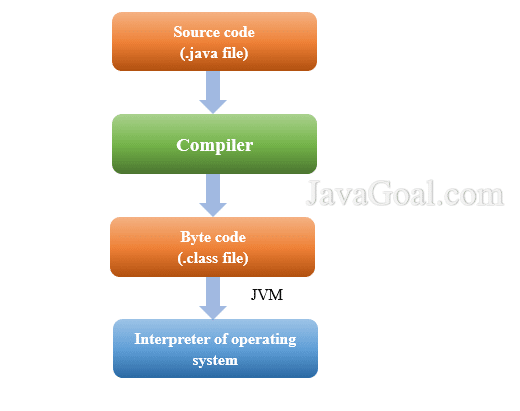
When a developer writes Java code, they create files with a .java extension. These files contain the source code that needs to be compiled into bytecode. The Java compiler, javac, is responsible for this translation process. It reads the .java files and checks them for syntax errors and other issues.

Generating Bytecode

Once the Java compiler verifies that the code is error-free, it generates bytecode files with a .class extension. These bytecode files contain instructions that are specific to the JVM. The bytecode is platform-independent, allowing it to run on any system that has a compatible JVM installed.

Optimizations and Enhancements

In addition to translating code into bytecode, modern Java compilers often perform optimizations and enhancements to improve the efficiency and performance of the resulting executable code. These optimizations can include inlining methods, removing dead code, and reordering instructions for better execution speed.

Debugging Support

Java compilers also provide support for debugging tools by including metadata in the compiled bytecode that helps developers trace back issues to specific lines of source code. This feature is essential for identifying and fixing bugs during software development.

Conclusion

In conclusion, the Java compiler is an indispensable tool in the software development process. It converts human-readable Java code into machine-readable bytecode that can be executed by the JVM. By performing optimizations, generating platform-independent bytecode, and supporting debugging capabilities, the Java compiler contributes significantly to creating efficient and reliable Java applications.


Understanding the Java Compiler: Key FAQs Answered

  1. What is a Java compiler?
  2. How does the Java compiler work?
  3. What is the role of the Java compiler in software development?
  4. Which tool is used to compile Java code?
  5. Can you explain the compilation process in Java?
  6. What are bytecode files generated by the Java compiler?
  7. Does the Java compiler perform optimizations on code?
  8. How does the Java compiler support debugging?

What is a Java compiler?

A Java compiler is a crucial component in the software development process that translates human-readable Java code into machine-readable bytecode. Essentially, it takes the source code written by developers in .java files and compiles it into executable .class files that can be run on the Java Virtual Machine (JVM). The Java compiler checks the syntax of the code for errors, generates platform-independent bytecode, and often performs optimizations to enhance the efficiency and performance of the resulting executable code. Overall, a Java compiler plays a vital role in converting Java programs into a format that can be executed on various platforms with the help of the JVM.

How does the Java compiler work?

The Java compiler, known as javac, functions by taking human-readable Java source code files with a .java extension as input and translating them into machine-readable bytecode files with a .class extension. During the compilation process, the Java compiler checks the syntax of the code for errors and generates bytecode instructions that are specific to the Java Virtual Machine (JVM). This bytecode is platform-independent, allowing Java programs to run on any system with a compatible JVM. Additionally, modern Java compilers often perform optimizations to enhance the efficiency and performance of the compiled code. Debugging support is also provided by including metadata in the bytecode to assist developers in identifying and fixing issues during software development.

What is the role of the Java compiler in software development?

The role of the Java compiler in software development is pivotal as it serves as the essential tool for translating human-readable Java code into machine-readable bytecode. By converting .java source files into .class bytecode files, the Java compiler ensures that the code is error-free and ready for execution on the Java Virtual Machine (JVM). Additionally, modern Java compilers often optimize and enhance the generated bytecode to improve performance and efficiency. With its debugging support and ability to produce platform-independent bytecode, the Java compiler plays a crucial role in facilitating the development of reliable and efficient Java applications.

Which tool is used to compile Java code?

The tool commonly used to compile Java code is the Java compiler, known as javac. The Java compiler reads the human-readable Java source code files with a .java extension and translates them into platform-independent bytecode files with a .class extension. This bytecode can be executed by the Java Virtual Machine (JVM) on any system that has a compatible JVM installed. The Java compiler plays a crucial role in the software development process by ensuring that the code is error-free, generating optimized bytecode, and supporting debugging capabilities for developers.

Can you explain the compilation process in Java?

The compilation process in Java is a crucial step in software development that involves translating human-readable Java code into machine-readable bytecode. When a developer writes Java code in .java files, the Java compiler, javac, checks the code for syntax errors and other issues. If the code is error-free, the compiler generates bytecode files with a .class extension. These bytecode files contain instructions specific to the Java Virtual Machine (JVM) and are platform-independent, allowing them to run on any system with a compatible JVM. Additionally, modern Java compilers often perform optimizations to enhance the efficiency and performance of the resulting executable code. This compilation process is essential for converting Java source code into executable programs that can be executed by the JVM.

What are bytecode files generated by the Java compiler?

Bytecode files generated by the Java compiler are intermediary files that contain instructions in a format that is understood by the Java Virtual Machine (JVM). These files have a .class extension and are produced after the Java compiler translates human-readable Java source code into machine-readable bytecode. Bytecode files are platform-independent, allowing them to be executed on any system with a compatible JVM. They serve as a crucial link between the high-level Java code written by developers and the low-level machine code that computers can understand, enabling Java programs to run efficiently and consistently across different environments.

Does the Java compiler perform optimizations on code?

The Java compiler is equipped to perform optimizations on code during the compilation process. It goes beyond simply translating Java code into bytecode for the JVM; it also applies various optimization techniques to enhance the efficiency and performance of the resulting executable code. These optimizations can include inlining methods, eliminating dead code, and reordering instructions to improve execution speed. By optimizing the code, the Java compiler helps developers create more efficient and streamlined applications that deliver better performance.

How does the Java compiler support debugging?

The Java compiler supports debugging by including metadata in the compiled bytecode that aids developers in tracing back issues to specific lines of source code. This metadata allows debugging tools to map the bytecode instructions back to the original Java source code, enabling developers to identify and fix bugs more efficiently. By providing this essential support for debugging, the Java compiler enhances the development process by facilitating thorough testing and troubleshooting of Java applications.

java software

Unlocking the Potential of Java Software: A Comprehensive Guide

The Power of Java Software

The Power of Java Software

Java software has become a cornerstone in the world of technology, powering a wide range of applications and systems. Its versatility, reliability, and scalability make it a popular choice for developers and businesses alike.

What is Java?

Java is a high-level programming language that was developed by Sun Microsystems in the mid-1990s. It is known for its “write once, run anywhere” philosophy, which means that Java programs can run on any platform that has a Java Virtual Machine (JVM) installed.

Features of Java Software

One of the key features of Java software is its portability. This allows developers to create applications that can be deployed on various operating systems without any modifications. Additionally, Java is known for its robust security features, making it a popular choice for developing secure applications.

Applications of Java Software

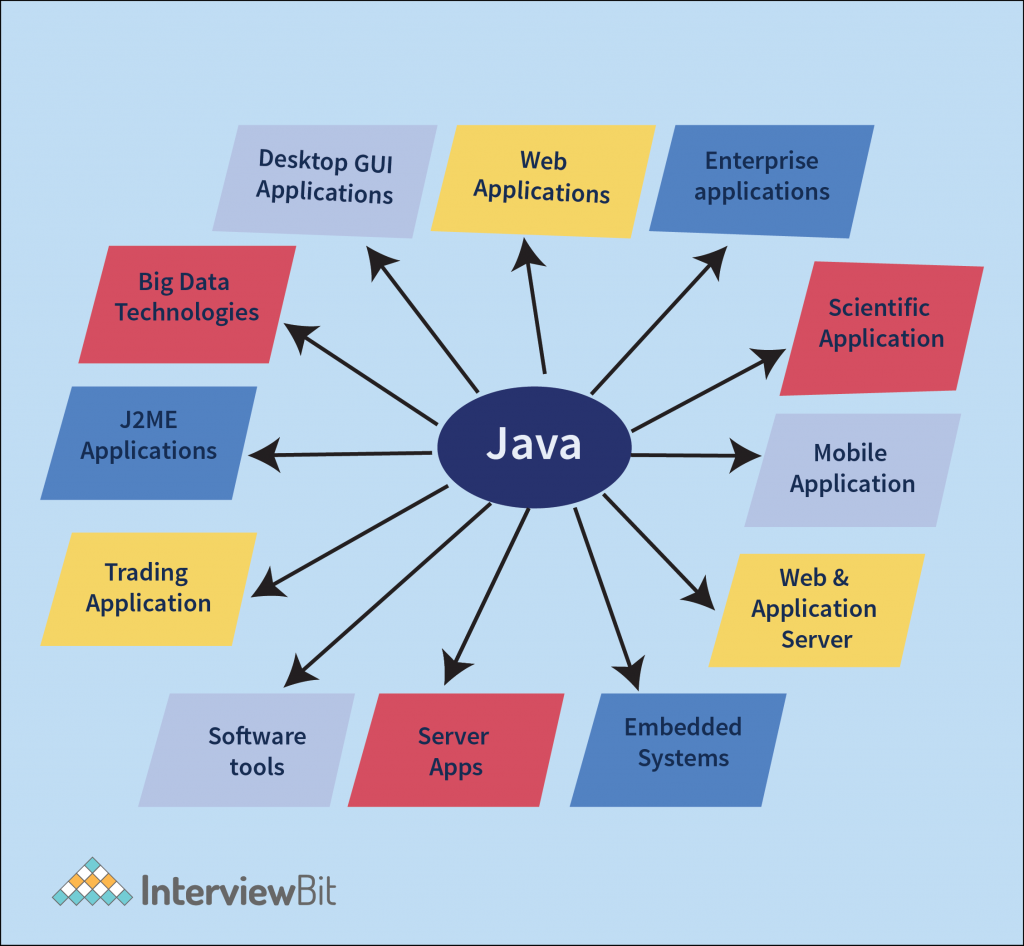
Java software is used in a wide range of applications, including:

  • Enterprise applications
  • Web applications
  • Mobile applications
  • Gaming applications
  • Embedded systems
  • Big data technologies

The Future of Java Software

Despite the emergence of new programming languages and technologies, Java continues to be a popular choice for developers due to its stability and performance. With ongoing updates and improvements, Java software remains relevant in today’s rapidly evolving tech landscape.


6 Essential Tips for Writing Clean and Effective Java Software

  1. Use meaningful variable names to improve code readability.
  2. Follow Java naming conventions for classes, methods, and variables.
  3. Break down complex tasks into smaller methods for better maintainability.
  4. Document your code using comments to explain its purpose and functionality.
  5. Make use of Java’s built-in libraries and frameworks to avoid reinventing the wheel.
  6. Regularly test your code using unit tests to ensure its correctness.

Use meaningful variable names to improve code readability.

Using meaningful variable names is a crucial tip in Java software development as it significantly enhances code readability. By choosing descriptive and relevant names for variables, developers can easily understand the purpose and function of each variable within the code. This practice not only makes the code more readable for the original developer but also for anyone else who may need to work on or maintain the code in the future. Clear and meaningful variable names help streamline the coding process, improve collaboration among team members, and ultimately contribute to creating more maintainable and efficient Java software applications.

Follow Java naming conventions for classes, methods, and variables.

It is essential to adhere to Java naming conventions when naming classes, methods, and variables in your code. By following these conventions, such as using camelCase for method and variable names and PascalCase for class names, you ensure consistency and readability throughout your codebase. Consistent naming practices make it easier for other developers to understand your code and maintain it effectively. Additionally, following Java naming conventions helps in promoting good coding practices and standards within the Java development community.

Break down complex tasks into smaller methods for better maintainability.

When working with Java software, it is essential to break down complex tasks into smaller methods to enhance maintainability. By dividing a large task into smaller, more manageable chunks, developers can improve code readability, reusability, and ease of maintenance. This approach also facilitates debugging and troubleshooting processes, as each method focuses on a specific functionality or aspect of the overall task. Overall, breaking down complex tasks into smaller methods is a best practice that promotes efficient development and long-term sustainability of Java software projects.

Document your code using comments to explain its purpose and functionality.

Documenting your code using comments is a crucial practice when working with Java software. By adding comments to explain the purpose and functionality of your code, you not only make it easier for yourself to understand and maintain the code in the future but also for other developers who may collaborate on the project. Clear and concise comments can provide valuable insights into the logic behind the code, making it more readable and maintainable. In addition, well-documented code helps in troubleshooting and debugging, saving time and effort in identifying and fixing issues.

Make use of Java’s built-in libraries and frameworks to avoid reinventing the wheel.

When working with Java software, it is highly beneficial to leverage Java’s built-in libraries and frameworks to avoid reinventing the wheel. Java offers a rich collection of libraries and frameworks that provide ready-made solutions for common programming tasks, such as data manipulation, networking, and user interface development. By utilizing these resources, developers can streamline their workflow, improve efficiency, and focus on implementing unique features rather than writing code from scratch. This approach not only saves time and effort but also ensures that the software benefits from well-tested and optimized components.

Regularly test your code using unit tests to ensure its correctness.

Regularly testing your code using unit tests is a crucial practice in Java software development to ensure its correctness and reliability. By writing and running unit tests, developers can verify the behavior of individual components of their code, identifying bugs and errors early in the development process. This proactive approach not only helps in maintaining the quality of the code but also streamlines the debugging process and enhances overall code stability. Incorporating unit testing as a routine part of the development cycle promotes code maintainability and fosters a culture of continuous improvement in software development practices.