cfchris.com

Loading

awt in java

Exploring AWT in Java: Building GUI Applications with Java’s Abstract Window Toolkit

Understanding AWT in Java

The Basics of AWT in Java

AWT, which stands for Abstract Window Toolkit, is a set of classes provided by Java to create graphical user interfaces (GUIs). It is one of the oldest GUI toolkits in Java and forms the foundation for Swing and JavaFX.

Components of AWT

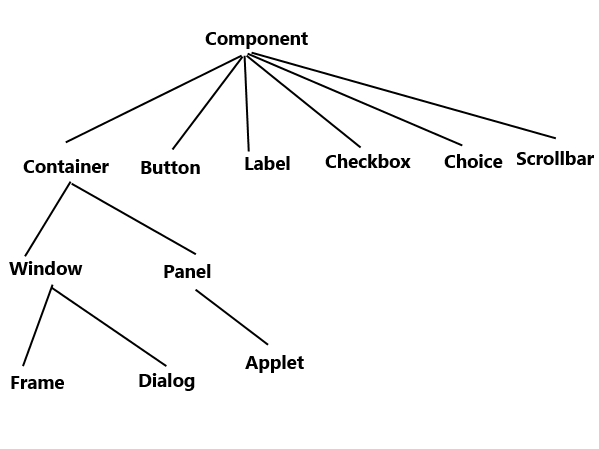
AWT provides a wide range of components that can be used to build GUI applications. Some common components include:

  • Buttons
  • Labels
  • Textfields
  • Checkboxes
  • Radio buttons
  • List boxes
  • Menus
  • Dialog boxes

Event Handling in AWT

In AWT, event handling is done through listeners. Components generate events when certain actions occur, such as clicking a button or typing in a text field. Event listeners are used to capture these events and respond accordingly.

Layout Managers in AWT

AWT provides layout managers that help arrange components within a container. Some common layout managers include:

  • FlowLayout: Arranges components in a row or column.
  • BorderLayout: Divides the container into five regions – North, South, East, West, and Center.
  • GridLayout: Organizes components in a grid-like fashion.

The Future of AWT

While AWT is still supported in Java, Swing and JavaFX have become more popular choices for building modern GUI applications due to their enhanced features and flexibility. However, understanding AWT can provide a solid foundation for working with more advanced GUI libraries in Java.


5 Advantages of Using AWT for Java GUI Development

  1. 1. AWT is part of the Java standard library, so no additional downloads or dependencies are required.
  2. 2. AWT provides a simple and straightforward way to create GUI applications in Java.
  3. 3. AWT components have a native look and feel, making them consistent across different platforms.
  4. 4. AWT supports event handling through listeners, allowing for interactive user interfaces.
  5. 5. AWT’s layout managers help in organizing and positioning components within containers efficiently.


Challenges of Using AWT in Java: Exploring Limitations and Drawbacks

  1. Limited Look and Feel
  2. Less Customization
  3. Complex Event Handling
  4. Limited Component Set
  5. Performance Issues
  6. Lack of Support for Accessibility Features

1. AWT is part of the Java standard library, so no additional downloads or dependencies are required.

One significant advantage of AWT in Java is that it is a core component of the Java standard library, eliminating the need for additional downloads or dependencies. This inherent integration makes it convenient for developers to start building GUI applications without having to manage external libraries, ensuring a streamlined development process and easier deployment of Java applications that utilize AWT components.

2. AWT provides a simple and straightforward way to create GUI applications in Java.

One of the key advantages of AWT in Java is its ability to provide a simple and straightforward approach to building GUI applications. With AWT, developers can easily create graphical user interfaces using a set of intuitive classes and components. This simplicity allows for quick prototyping and development of GUI applications without the need for complex coding or external libraries, making AWT a convenient choice for beginners and those looking for a straightforward solution to their GUI needs in Java programming.

3. AWT components have a native look and feel, making them consistent across different platforms.

One significant advantage of AWT components in Java is their native look and feel, which ensures consistency across various platforms. By leveraging the native graphical elements of the underlying operating system, AWT components seamlessly blend into the user interface environment, providing a familiar and intuitive experience for users regardless of the platform they are using. This feature not only enhances the aesthetic appeal of applications but also contributes to a more cohesive and user-friendly interface design.

4. AWT supports event handling through listeners, allowing for interactive user interfaces.

One notable advantage of AWT in Java is its robust support for event handling through listeners. By utilizing event listeners, developers can create interactive user interfaces that respond to user actions such as button clicks, mouse movements, and key presses. This feature enables the development of dynamic and engaging GUI applications that enhance the overall user experience by providing real-time feedback and interactivity.

5. AWT’s layout managers help in organizing and positioning components within containers efficiently.

AWT’s layout managers play a crucial role in facilitating the organization and positioning of components within containers in a highly efficient manner. By utilizing layout managers, developers can easily control the arrangement of GUI elements without having to manually calculate their positions. This feature not only saves time and effort but also ensures that the graphical interface remains consistent across different screen sizes and resolutions. The flexibility offered by AWT’s layout managers empowers developers to create visually appealing and user-friendly applications with ease.

Limited Look and Feel

One significant drawback of AWT in Java is its limited look and feel. AWT components heavily depend on the native platform’s GUI elements, leading to a lack of uniformity in appearance across various operating systems. This inconsistency can create challenges for developers aiming to deliver a cohesive user experience, as the graphical interface may vary significantly depending on the user’s operating system.

Less Customization

One drawback of AWT in Java is its limited customization capabilities. AWT components offer fewer options for customization when compared to newer GUI libraries such as Swing or JavaFX. This limitation can restrict developers from creating highly tailored and visually appealing user interfaces that meet modern design standards. As a result, developers may find themselves constrained by the lack of flexibility in AWT when aiming to create sophisticated and interactive GUI applications.

Complex Event Handling

One significant drawback of AWT in Java is its complex event handling mechanism. Event handling in AWT can be more convoluted and verbose when compared to the newer event models present in Swing and JavaFX. Managing events in AWT requires a deeper understanding of listeners and handling mechanisms, which can make the code harder to read and maintain. This complexity can hinder the development process and make it more challenging for developers to create responsive and interactive GUI applications efficiently.

Limited Component Set

One significant drawback of AWT in Java is its limited component set. AWT offers a fundamental collection of components that may fall short in meeting the demands of intricate GUI applications. This limitation can hinder developers who require more advanced and specialized components to create sophisticated user interfaces. As a result, developers often turn to alternative GUI libraries like Swing and JavaFX, which offer a broader range of components and features to address the needs of modern GUI development.

Performance Issues

The heavyweight component architecture of AWT in Java can present a significant drawback in terms of performance. Due to its design, AWT’s approach to handling GUI components can result in performance issues, particularly noticeable in large-scale applications. The heavyweight nature of AWT components can lead to increased resource consumption and slower rendering times, impacting the overall responsiveness and efficiency of the application. Developers need to be mindful of these performance considerations when working with AWT to ensure optimal user experience and system performance.

Lack of Support for Accessibility Features

One significant drawback of AWT in Java is its lack of support for accessibility features. AWT does not provide built-in mechanisms for ensuring that GUI applications are accessible to users with disabilities. This limitation can pose challenges for developers who need to adhere to accessibility standards and ensure that their applications can be used by all individuals, regardless of their physical abilities. As a result, developers may need to implement custom solutions or consider alternative GUI libraries like Swing or JavaFX that offer more robust support for accessibility features.

java gui

Mastering Java GUI Development: A Comprehensive Guide

Exploring Java GUI Development

Exploring Java GUI Development

Graphical User Interfaces (GUIs) play a crucial role in making software applications user-friendly and visually appealing. In the world of Java programming, creating GUIs is a common task that developers often encounter. Let’s delve into the realm of Java GUI development and explore its key concepts and components.

What is Java GUI?

Java GUI refers to the Graphical User Interface components and frameworks available in the Java programming language. With Java’s rich set of libraries and tools, developers can create interactive and visually engaging user interfaces for their applications.

Swing vs. JavaFX

In Java, two main frameworks are commonly used for GUI development: Swing and JavaFX. Swing is an older toolkit that provides a wide range of components for building desktop applications. On the other hand, JavaFX is a newer framework that offers more modern features and capabilities, including support for multimedia and 3D graphics.

Key Components of a Java GUI

Some essential components of a Java GUI include:

  • Containers: Containers are used to hold other components, such as panels or frames.
  • Components: Components are the building blocks of a GUI, including buttons, text fields, labels, and more.
  • Layout Managers: Layout managers help organize the placement of components within a container.
  • Event Handling: Event handling allows developers to define actions in response to user interactions with the GUI components.

Creating a Simple Java GUI Application

To create a basic Java GUI application using Swing, developers typically follow these steps:

  1. Create a JFrame (main window) for the application.
  2. Add various components to the JFrame, such as buttons or text fields.
  3. Set up event listeners to handle user interactions with the components.
  4. Display the JFrame to show the GUI to users.

Conclusion

In conclusion, mastering Java GUI development opens up endless possibilities for creating intuitive and visually appealing applications. Whether you choose Swing or JavaFX, understanding the key components and best practices is essential for building successful GUIs in Java programming.


Top 5 Frequently Asked Questions About Java GUI: Tools, Components, and Best Practices

  1. Is Java good for GUI?
  2. How to make a GUI using Java?
  3. Which is better, JavaFX or Swing?
  4. What are the 6 GUI components in Java?
  5. Which GUI is best for Java?

Is Java good for GUI?

When it comes to creating Graphical User Interfaces (GUIs), Java is considered a solid choice by many developers. With its robust libraries like Swing and JavaFX, Java provides a comprehensive set of tools for building interactive and visually appealing user interfaces. While some may argue that other languages offer more modern GUI frameworks, Java’s stability, cross-platform compatibility, and extensive community support make it a reliable option for GUI development. Ultimately, the decision of whether Java is good for GUI depends on the specific requirements of the project and the developer’s familiarity with the language and its GUI frameworks.

How to make a GUI using Java?

Creating a GUI using Java involves several key steps. First, developers typically choose between frameworks like Swing or JavaFX to design the graphical interface. Next, they create a main window (JFrame) and add various components such as buttons, text fields, and labels to it. Layout managers are then used to organize the placement of these components within the window. Event handling is crucial for defining actions in response to user interactions with the GUI elements. Finally, developers display the JFrame to showcase the GUI to users. By following these steps and leveraging Java’s rich libraries and tools, developers can craft interactive and visually appealing GUIs for their Java applications.

Which is better, JavaFX or Swing?

When considering whether JavaFX or Swing is better for GUI development in Java, it ultimately depends on the specific requirements and goals of the project. JavaFX offers more modern features and capabilities, such as support for multimedia and 3D graphics, making it a preferred choice for applications that require advanced visual effects. On the other hand, Swing, being a more established toolkit, provides a wide range of components for building desktop applications and may be more suitable for projects where compatibility with older systems is a priority. Both frameworks have their strengths and weaknesses, so developers should evaluate their project needs carefully to determine which one aligns best with their objectives.

What are the 6 GUI components in Java?

In Java GUI programming, developers commonly work with six fundamental GUI components. These components include buttons, labels, text fields, checkboxes, radio buttons, and lists. Buttons enable users to trigger actions, labels display text or images, text fields allow user input, checkboxes provide options for selection, radio buttons offer mutually exclusive choices, and lists present selectable items in a list format. Understanding and effectively utilizing these essential GUI components are key to creating interactive and user-friendly Java applications with intuitive interfaces.

Which GUI is best for Java?

When it comes to choosing the best GUI framework for Java, developers often debate between Swing and JavaFX. Swing, being a mature and robust toolkit, offers a wide range of components for building desktop applications. On the other hand, JavaFX provides more modern features and capabilities, such as multimedia support and 3D graphics. The choice between Swing and JavaFX ultimately depends on the specific requirements of the project, with developers weighing factors like ease of use, performance, and desired user experience to determine which GUI framework is best suited for their Java application.

learn java

Master Java Programming: Learn Java Like a Pro

Learn Java: A Comprehensive Guide

Learn Java: A Comprehensive Guide

Java is a versatile and widely-used programming language that powers countless applications, from mobile apps to enterprise software. Whether you are a beginner or an experienced developer looking to expand your skills, learning Java can open up a world of opportunities for you.

Why Learn Java?

Java is known for its platform independence, meaning that once you write a Java program, it can run on any device that has a Java Virtual Machine (JVM). This makes Java a popular choice for developing cross-platform applications.

In addition, Java’s robust libraries and frameworks make it easier to build complex applications efficiently. Its strong community support and vast resources also make learning Java more accessible and enjoyable.

Getting Started with Java

If you are new to programming, don’t worry! Java’s syntax is relatively easy to learn compared to other languages. You can start by installing the Java Development Kit (JDK) on your computer and using an Integrated Development Environment (IDE) like Eclipse or IntelliJ IDEA to write and run your code.

Begin with the basics, such as variables, data types, loops, and conditional statements. As you progress, dive into object-oriented programming concepts like classes, objects, inheritance, and polymorphism.

Advanced Topics in Java

Once you have a solid understanding of the fundamentals, you can explore more advanced topics in Java like multithreading, exception handling, database connectivity using JDBC, GUI programming with Swing or JavaFX, and web development with frameworks like Spring or Hibernate.

Practice Makes Perfect

To truly master Java programming, practice is key. Challenge yourself with coding exercises on platforms like LeetCode or HackerRank. Build small projects to apply what you have learned and gain hands-on experience working with real-world problems.

Conclusion

Learning Java can be a rewarding journey that opens up endless possibilities in the world of software development. Whether you aspire to be a mobile app developer, web developer, or software engineer, mastering Java will equip you with the skills needed to succeed in today’s tech-driven world.


Top 8 FAQs About Learning Java: A Guide for Beginners

  1. What is Java and why should I learn it?
  2. Is Java difficult to learn for beginners?
  3. What are the basic concepts I need to understand in Java?
  4. How can I start learning Java programming?
  5. Are there any recommended resources or tutorials for learning Java?
  6. What are the key features of Java that make it a popular programming language?
  7. Can I become a successful programmer by learning Java?
  8. What career opportunities are available for those who know Java?

What is Java and why should I learn it?

Java is a versatile and powerful programming language that is widely used in various domains, from mobile app development to enterprise software solutions. Learning Java is beneficial for several reasons. Firstly, Java’s platform independence allows programs to run on any device with a Java Virtual Machine (JVM), making it ideal for cross-platform development. Additionally, Java’s extensive libraries and frameworks simplify the process of building complex applications. Its strong community support and vast resources also make it an accessible language for beginners and experienced developers alike. Overall, mastering Java opens up a world of opportunities in the tech industry and equips you with valuable skills that are in high demand.

Is Java difficult to learn for beginners?

For beginners, learning Java may seem challenging at first due to its syntax and object-oriented programming concepts. However, with dedication and practice, Java can become more manageable to grasp. Many resources, tutorials, and online courses are available to help beginners understand Java effectively. Breaking down the learning process into smaller steps and focusing on practical applications can make learning Java less intimidating for newcomers. Ultimately, while Java may present some initial hurdles, the rewards of mastering this versatile language are well worth the effort for aspiring programmers.

What are the basic concepts I need to understand in Java?

To effectively learn Java, it is essential to grasp the basic concepts that form the foundation of the language. Understanding fundamental concepts such as variables, data types, control structures (like loops and conditional statements), methods, classes, and objects is crucial. Object-oriented programming principles like inheritance, encapsulation, polymorphism, and abstraction are also key components to comprehend. By mastering these core concepts, learners can build a strong understanding of Java programming and pave the way for more advanced topics in software development.

How can I start learning Java programming?

To start learning Java programming, it is recommended to begin by installing the Java Development Kit (JDK) on your computer and selecting an Integrated Development Environment (IDE) such as Eclipse or IntelliJ IDEA. Familiarize yourself with basic concepts like variables, data types, loops, and conditional statements. Utilize online resources, tutorials, and practice exercises to reinforce your understanding. As you progress, delve into object-oriented programming principles and gradually explore more advanced topics in Java to enhance your skills and knowledge. Remember that consistent practice and hands-on experience are key to mastering Java programming effectively.

When it comes to learning Java, one of the most frequently asked questions is about recommended resources or tutorials. There are numerous high-quality resources available for beginners and experienced developers alike. Online platforms like Codecademy, Udemy, and Coursera offer comprehensive Java courses with interactive lessons and hands-on projects. Additionally, websites like Oracle’s Java Tutorials, Baeldung, and Java Code Geeks provide in-depth articles, tutorials, and code examples to help learners enhance their Java skills. Books such as “Head First Java” by Kathy Sierra and Bert Bates or “Effective Java” by Joshua Bloch are also highly recommended for those looking to deepen their understanding of the language. With a wealth of resources at your disposal, embarking on your journey to learn Java has never been more accessible and rewarding.

Java’s popularity as a programming language can be attributed to its key features that set it apart from others. One of the main reasons for Java’s widespread adoption is its platform independence, allowing developers to write code once and run it on any device with a Java Virtual Machine (JVM). Additionally, Java’s robust standard library and extensive ecosystem of frameworks simplify the development process, making it easier to build complex applications efficiently. Its strong emphasis on security, scalability, and performance further solidify Java’s position as a top choice for a wide range of applications across different industries.

Can I become a successful programmer by learning Java?

Many aspiring programmers wonder if learning Java can lead them to success in the field. The answer is a resounding yes. Java is a powerful and versatile programming language widely used in various domains, making it a valuable skill to possess. By mastering Java, you not only gain proficiency in a popular language but also develop problem-solving abilities and a strong foundation in object-oriented programming. With dedication, practice, and continuous learning, becoming a successful programmer through Java is not only achievable but also opens up numerous opportunities in the ever-evolving tech industry.

What career opportunities are available for those who know Java?

Java is a highly sought-after programming language in the tech industry, offering a wide range of career opportunities for those who master it. Professionals proficient in Java can explore roles such as Java developer, software engineer, web developer, mobile app developer, system architect, and more. With Java’s versatility and widespread use in various domains like finance, healthcare, e-commerce, and gaming, individuals skilled in Java have the advantage of pursuing diverse career paths and securing rewarding positions in the ever-evolving field of technology.