cfchris.com

Loading

java source code

Java Source Code: A Beginner’s Guide to Writing and Running Programs

Understanding Java Source Code

Java source code is the human-readable text developers write to create Java applications. It contains instructions, data definitions, and logic that describe how a program should work. Before a Java program can run, its source code is typically compiled into bytecode, which runs on the Java Virtual Machine (JVM).

What Is a Java Source File?

Java source files usually have the .java extension. A source file can contain classes, interfaces, methods, variables, and comments. For example, a simple program might look like this:

public class HelloWorld {

public static void main(String[] args) {

System.out.println("Hello, world!");

}

}

In this example, HelloWorld is a class. The main method is the program’s entry point, and System.out.println displays a line of text.

From Source Code to a Running Program

Java uses a two-stage process to turn source code into a running application:

  1. Compilation: The Java compiler, javac, checks the source code and converts it into bytecode. The result is commonly saved in a .class file.
  2. Execution: The JVM runs the bytecode. Because JVMs are available for many operating systems, the same compiled program can often run on different platforms.

A typical command-line workflow is:

javac HelloWorld.java

java HelloWorld

The first command compiles the source file. The second starts the program.

Key Parts of Java Source Code

  • Classes and interfaces: These define the structure and behavior of a Java program.
  • Methods: Methods contain instructions that perform tasks.
  • Variables: Variables store values, such as numbers, text, or object references.
  • Packages and imports: Packages organize related code, while import statements make other classes available.
  • Comments: Comments explain code to readers and are ignored by the compiler.

Java is case-sensitive, so total and Total are different names. In conventional Java projects, class names use PascalCase, while method and variable names usually use camelCase.

Why Source Code Matters

Readable source code is easier to maintain, test, and improve. Clear names, consistent formatting, and focused methods help developers understand how a program works. Comments are useful when they explain intent or important decisions, but well-written code should also communicate its purpose through its structure and naming.

Java source code is also the foundation for collaboration. Teams use version control systems to track changes, review updates, and coordinate work. Automated tests and build tools can help verify that changes behave as expected.

Getting Started

To begin writing Java source code, install a Java Development Kit (JDK), choose a text editor or integrated development environment, and create a file with a .java extension. Start with a small program, compile it, and run it. As you learn, explore variables, conditionals, loops, methods, classes, and exception handling.

Learning to read and write Java source code takes practice. By building small projects and reviewing clear examples, beginners can develop a solid understanding of how Java programs are structured and how they run.


Understanding Java Source Code: Common Questions Answered

  1. Is Java source code human-readable?
  2. Is Java a source code?
  3. Is Java outdated in 2026?
  4. Is Java built on C or C++?
  5. What is the source code of Java?

Is Java source code human-readable?

Yes, Java source code is human-readable: it uses familiar words, symbols, and a structured syntax that developers can write and understand. For example, a Java statement such as System.out.println("Hello, world!"); clearly indicates that text will be displayed. Although some programs can become complex, clear naming, formatting, and comments make Java source code easier to read and maintain.

Is Java a source code?

No. Java is a programming language, not source code itself. Source code is the human-readable set of instructions a programmer writes using Java, usually saved in files with the .java extension. A Java compiler then converts that source code into bytecode that can run on the Java Virtual Machine (JVM).

Is Java outdated in 2026?

No, Java is not outdated in 2026. It remains widely used for enterprise software, backend services, Android development, and large-scale systems, with ongoing updates to the language and its ecosystem. While newer languages may suit some projects better, Java continues to be a practical choice when long-term support, mature tools, performance, and a large developer community matter.

Is Java built on C or C++?

Java is not built on C or C++, though its syntax was influenced by both languages, especially C and C++. Java was designed as a separate programming language, with features such as automatic memory management and a bytecode-based runtime. Its compiler and runtime have been implemented in different languages over time, so Java itself is not simply a version of C or C++.

What is the source code of Java?

Java source code is the human-readable set of instructions written by developers to create Java programs, typically saved in files with the .java extension. A Java compiler translates this code into bytecode, which the Java Virtual Machine (JVM) executes. If you mean the source code used to build the Java platform itself, much of it is available in the OpenJDK project.
java se development kit 8

Java SE Development Kit 8: Features, Benefits, and Getting Started

Java SE Development Kit 8: Features, Uses, and Legacy Support

The Java SE Development Kit 8, commonly called JDK 8 or Java 8, is a toolkit for developing and running Java applications. Released in March 2014, it introduced major language and library improvements that shaped modern Java development. Many organizations still use JDK 8 to maintain established applications, even as newer Java releases are available.

What Is the JDK?

The JDK provides the tools developers need to build Java programs. It includes the Java compiler, runtime components, standard libraries, and utilities for tasks such as debugging and packaging applications. The compiler, javac, converts Java source files into bytecode that runs on a compatible Java Virtual Machine (JVM).

JDK 8 implements the Java SE 8 platform. It is distinct from the Java Runtime Environment (JRE), which is intended for running Java applications rather than developing them. In JDK 8, the required runtime components are included with the development kit.

Notable Features in Java 8

Lambda Expressions

Lambda expressions let developers write concise implementations of functional interfaces—interfaces with a single abstract method. They can make event handling, callbacks, and collection processing easier to read.

names.forEach(name -> System.out.println(name));

Streams

The Streams API provides a way to process collections through operations such as filtering, mapping, and sorting. Stream pipelines can reduce repetitive iteration code and can be run sequentially or, where appropriate, in parallel.

List<String> longNames = names.stream()

.filter(name -> name.length() > 5)

.collect(Collectors.toList());

Default and Static Interface Methods

Java 8 allows interfaces to include default method implementations and static methods. This made it possible to extend interfaces with new behavior while helping existing implementations remain compatible.

Optional

The Optional class represents a value that may or may not be present. It can make the possibility of a missing result more explicit and encourage code to handle that case deliberately.

Modern Date and Time API

The java.time package introduced a more comprehensive date and time API than the older Date and Calendar classes. Types such as LocalDate, Instant, and ZonedDateTime help represent common date and time values clearly.

Other Changes

JDK 8 also introduced the Nashorn JavaScript engine and removed the PermGen memory area, replacing it with Metaspace. Nashorn was later removed from the JDK, so applications that depended on it may need an alternative when being updated.

Getting Started

To use JDK 8, choose a distribution that suits your project and operating system. Oracle and other OpenJDK vendors have offered JDK builds; licensing, update policies, and support terms can differ. Check the vendor’s current documentation before downloading or using a distribution, especially for commercial systems.

After installation, confirm that the tools are available from a terminal:

java -version

javac -version

A simple program can be saved as HelloWorld.java, compiled, and run with these commands:

javac HelloWorld.java

java HelloWorld

When Does JDK 8 Make Sense?

JDK 8 can be a practical choice when maintaining software that was built for Java 8 or when compatibility with an established environment is essential. Its language features remain useful, and its large user base means many teams are familiar with it.

For new projects, consider whether a newer Java release better fits the application’s requirements. Newer releases include additional language and platform improvements, and selecting a supported version can simplify security and maintenance planning.

Security and Support Considerations

JDK 8 is an older platform, so the availability of updates depends on the vendor, distribution, and support arrangement. Before deploying it, confirm that the chosen build receives appropriate security updates and that its license permits the intended use. Keep the JDK patched, limit unnecessary network exposure, and plan a migration path if the application can move to a newer Java version.

Conclusion

Java SE Development Kit 8 remains an important release in Java’s history. Lambdas, streams, the modern date and time API, and other additions made Java development more expressive and convenient. It continues to serve legacy applications, but teams should evaluate vendor support, licensing, and security needs before choosing it for ongoing use.


Essential Tips for Mastering Java SE Development Kit 8

  1. Use `javac` to compile and `java` to run programs.
  2. Set `JAVA_HOME` to your JDK 8 installation.
  3. Use lambdas and streams to simplify collection processing.
  4. Use try-with-resources to close files and other resources safely.
  5. Keep JDK 8 updated with the latest available security patches.

Use `javac` to compile and `java` to run programs.

Use `javac` to compile your Java source files into bytecode, then use `java` to run the program. For example, compile `HelloWorld.java` with `javac HelloWorld.java`, then launch it with `java HelloWorld`—without adding the `.java` extension to the class name.

Set `JAVA_HOME` to your JDK 8 installation.

Set the `JAVA_HOME` environment variable to the directory where JDK 8 is installed so development tools can find the correct Java version. For example, point it to the JDK’s root folder—not its `bin` subfolder—and add `%JAVA_HOME%\bin` to `Path` on Windows or `$JAVA_HOME/bin` to `PATH` on macOS and Linux. After updating the variables, open a new terminal and verify the setup with `java -version` and `javac -version`.

Use lambdas and streams to simplify collection processing.

In Java SE Development Kit 8, lambdas and streams can make collection processing more concise and readable. Instead of writing a loop to filter, transform, or sort items, you can describe the operations directly—for example, use a stream’s filter method to select matching elements and map to transform them. Lambdas provide the small pieces of behavior those operations need, helping reduce boilerplate while keeping the processing steps clear.

Use try-with-resources to close files and other resources safely.

Use try-with-resources in Java 8 to manage files and other resources that implement the AutoCloseable interface. Declare the resource inside the try statement, and Java will close it automatically when the block ends—even if an exception occurs. This helps prevent resource leaks and keeps code simpler than manually closing resources in a finally block.

Keep JDK 8 updated with the latest available security patches.

Keep JDK 8 updated with the latest security patches available from your chosen vendor. Updates can fix vulnerabilities that may put applications and systems at risk, so review the vendor’s release notes and apply relevant patches promptly. Because support and update availability vary by distribution and license, verify that your JDK build still receives security updates and plan a move to a supported Java version when appropriate.

java course for beginners

Java Course for Beginners: Learn the Fundamentals and Build Your First Programs

Java Course for Beginners: A Practical Guide to Getting Started

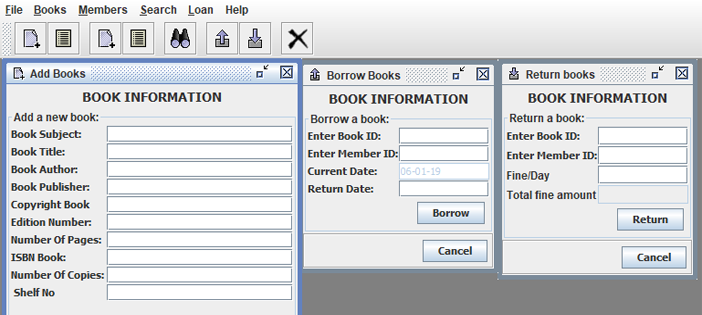
Java is a popular programming language used to build everything from business applications and web services to Android apps and large-scale software systems. Its clear structure, broad ecosystem, and strong community make it a useful language for people learning to code. A well-designed Java course for beginners can help you move from basic concepts to building programs of your own.

Why Learn Java?

Java is designed to run on many types of computers. Java programs are typically compiled into bytecode, which runs on the Java Virtual Machine (JVM). This approach helps the same program work across different operating systems, provided a compatible JVM is available.

Java is also widely used in professional software development. Learning it can introduce you to essential programming ideas—including variables, loops, methods, and object-oriented programming—that apply to many other languages as well.

What a Beginner Java Course Should Cover

You do not need previous programming experience to begin. A good introductory course explains each idea step by step and gives you opportunities to practice it. Look for a course that includes these core topics:

  • Setting up your tools: Install a Java Development Kit (JDK) and choose a code editor or integrated development environment (IDE).
  • Your first program: Learn how to write, compile, and run a simple Java application.
  • Variables and data types: Store information using types such as int, double, boolean, and String.
  • Operators and expressions: Perform calculations and compare values.
  • Conditionals: Use if, else, and switch statements to make decisions.
  • Loops: Repeat tasks with for and while loops.
  • Methods: Organize code into reusable blocks.
  • Arrays and collections: Work with groups of values.
  • Object-oriented programming: Create classes and objects, and learn about fields, constructors, and methods.
  • Debugging and errors: Read compiler messages, find mistakes, and improve your code.

How to Choose the Right Course

Beginner courses come in many formats, including online lessons, classroom instruction, books, and self-paced tutorials. The best choice depends on how you like to learn and how much time you can set aside. Before enrolling, check that the course:

  • Clearly identifies itself as suitable for beginners.
  • Uses current Java tools and explains how to install them.
  • Includes coding exercises, not just videos or lectures.
  • Builds concepts gradually and explains unfamiliar terms.
  • Offers small projects that let you apply what you have learned.

A course does not have to teach every Java feature at once. A strong foundation in the basics is more valuable than rushing through advanced topics before you are ready.

Practice with Small Projects

Writing code regularly is one of the best ways to make progress. After learning the fundamentals, try projects that are simple enough to finish but flexible enough to expand. For example, you could create:

  • A temperature or unit converter
  • A basic calculator
  • A number-guessing game
  • A to-do list for the command line
  • A program that tracks books, movies, or personal expenses

Start with a basic version, then add features as your skills improve. A number-guessing game, for instance, can begin with a random number and a loop. Later, you can add input validation, a limited number of guesses, and a way to play again.

Tips for Learning Java Successfully

Set a manageable learning schedule. Short, frequent practice sessions often work better than trying to learn everything in one sitting. Type out examples yourself, change them, and observe what happens. When you encounter an error, read the message carefully and test one possible fix at a time.

It is also normal to revisit concepts. Object-oriented programming and other topics may take time to feel comfortable. Keep your early programs, review them later, and notice how your understanding has grown.

What Comes After the Basics?

Once you can write small programs and understand how classes and objects work, you can explore topics such as exception handling, file input and output, generics, testing, and common data structures. Your next steps can depend on your goals. For example, you might study web development, Android development, or backend application development.

Start Building with Java

A Java course for beginners can give you a clear path into programming, but progress comes from applying what you learn. Choose a course with hands-on exercises, practice consistently, and build small projects along the way. With patience and regular effort, you can develop the skills to create useful Java applications and continue learning more advanced programming concepts.


Top FAQs About Starting a Java Course for Beginners

  1. Which is the best Java course for beginners?
  2. How can I learn Java as a beginner?
  3. Is 1 month enough to learn Java?
  4. How do I start studying Java?

Which is the best Java course for beginners?

The best Java course for beginners is one that assumes no prior programming experience, teaches concepts step by step, and gives you plenty of hands-on practice. Look for lessons covering Java basics, problem-solving, and object-oriented programming, along with exercises and small projects that help you apply what you learn. The right choice also depends on your learning style, schedule, and budget, so preview a lesson or two before committing.

How can I learn Java as a beginner?

Beginners can learn Java by starting with the basics: installing the JDK and a code editor, then practicing variables, data types, conditionals, loops, methods, and classes. Follow a structured beginner course with hands-on exercises, and write code regularly rather than only watching lessons. Small projects—such as a calculator or number-guessing game—help reinforce new concepts. When errors come up, read the messages carefully and use them as clues; steady practice is more effective than trying to learn everything at once.

Is 1 month enough to learn Java?

One month is enough to learn Java’s fundamentals if you study consistently and practice regularly, but it’s usually not enough to master the language or become job-ready. In that time, you can learn basic syntax, variables, conditionals, loops, methods, and introductory object-oriented programming, then apply them in small projects. Your progress will depend on your prior experience and the time you can dedicate each day. Continue practicing after the first month to strengthen your skills and explore more advanced topics.

How do I start studying Java?

To start studying Java, install the latest Java Development Kit (JDK) and choose a beginner-friendly editor or IDE, such as IntelliJ IDEA or Visual Studio Code. Then follow a structured introductory course that covers basic syntax, variables, conditionals, loops, methods, and classes. Write and run small programs as you learn—such as a calculator or number-guessing game—and practice regularly. When you encounter errors, read the messages carefully and use them to understand how your code works.

java app

Mastering Java App Development: Building Powerful Applications with Java

The Power of Java Applications

The Power of Java Applications

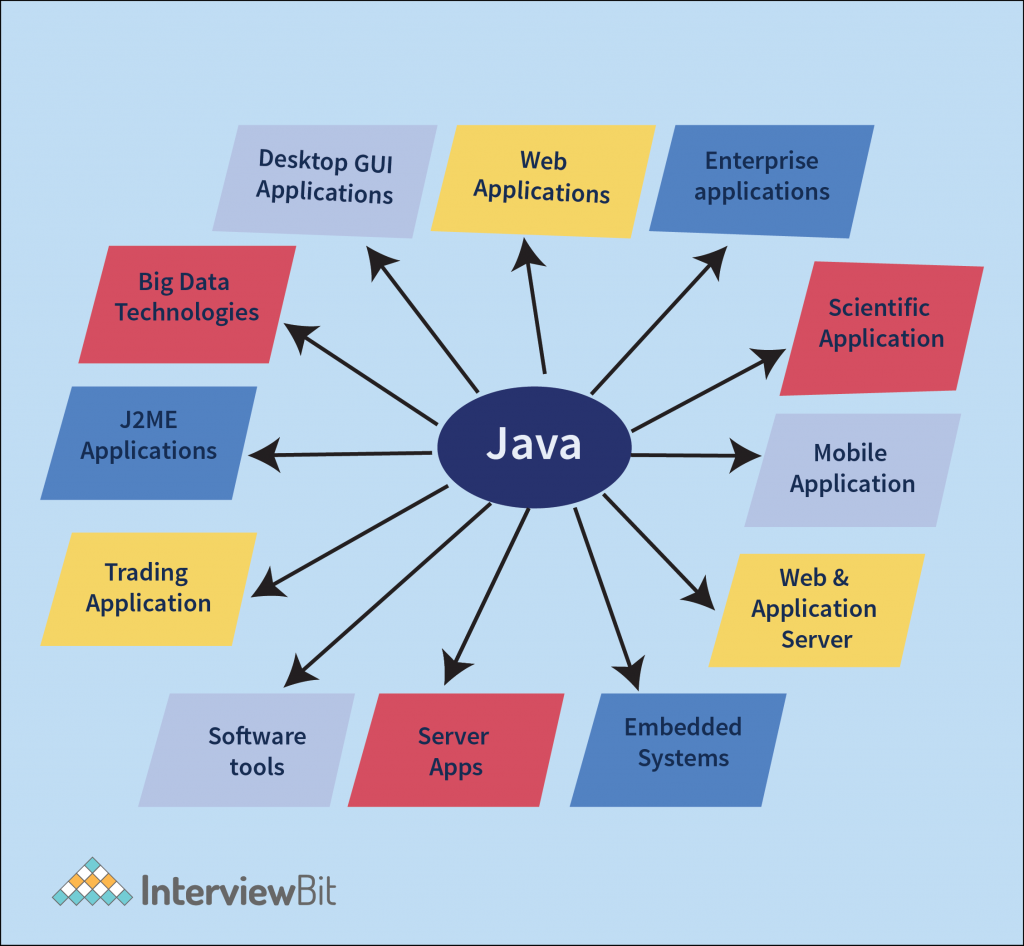
Java is a versatile programming language that has gained immense popularity for its ability to create robust and scalable applications. Java applications are used in a wide range of industries, from web development to mobile apps and enterprise software solutions.

One of the key strengths of Java applications is their platform independence. This means that a Java application can run on any device or operating system that has a Java Virtual Machine (JVM) installed. This portability makes Java an ideal choice for developing cross-platform applications that reach a larger audience.

Java’s rich set of libraries and frameworks provide developers with the tools they need to build complex and feature-rich applications efficiently. Whether you are developing a simple desktop application or a sophisticated web-based system, Java offers the flexibility and scalability required to meet your project’s demands.

Furthermore, Java’s strong emphasis on security makes it a popular choice for developing secure applications. With built-in features like automatic memory management and strong type checking, Java helps developers write code that is less prone to common vulnerabilities such as buffer overflows or memory leaks.

Java’s community support is another factor that contributes to its popularity. The vast community of Java developers worldwide ensures that there are plenty of resources, tutorials, and forums available for developers looking to enhance their skills or troubleshoot issues they encounter during development.

In conclusion, Java applications offer unparalleled versatility, portability, security, and community support. Whether you are a seasoned developer or just starting your programming journey, exploring the world of Java applications can open up a world of possibilities for creating innovative and powerful software solutions.


9 Essential Tips for Building Robust and Maintainable Java Applications

  1. 1. Write clean and readable code to improve maintainability.
  2. 2. Follow naming conventions to enhance code consistency.
  3. 3. Use meaningful comments to explain complex logic or algorithms.
  4. 4. Break down large functions into smaller, reusable methods for better organization.
  5. 5. Implement error handling to gracefully manage exceptions and prevent crashes.
  6. 6. Optimize performance by avoiding unnecessary loops or operations.
  7. 7. Utilize design patterns to solve common problems effectively.
  8. 8. Test your application thoroughly with unit tests and integration tests.
  9. 9. Keep learning and stay updated with the latest Java features and best practices.

1. Write clean and readable code to improve maintainability.

Writing clean and readable code is crucial when developing Java applications to enhance maintainability. By following best practices and adhering to coding standards, developers can ensure that their code is easy to understand and modify in the future. Clean code not only makes it simpler for other team members to collaborate on the project but also reduces the chances of introducing bugs during maintenance. Prioritizing readability in code can lead to more efficient debugging, faster updates, and overall smoother development processes for Java applications.

2. Follow naming conventions to enhance code consistency.

Following naming conventions is a crucial practice in Java application development as it enhances code consistency and readability. By adhering to established naming conventions, developers can create code that is easier to understand and maintain. Consistent naming of classes, methods, variables, and other elements not only improves the overall quality of the codebase but also promotes collaboration among team members. When everyone follows the same naming conventions, it becomes simpler to navigate through the code, identify functionalities, and make modifications without confusion. This simple tip can have a significant impact on the efficiency and effectiveness of Java application development projects.

3. Use meaningful comments to explain complex logic or algorithms.

When developing a Java application, it is crucial to utilize meaningful comments to elucidate intricate logic or algorithms. By incorporating clear and concise comments within the codebase, developers can enhance the readability and maintainability of the application. These comments serve as valuable documentation for understanding the purpose behind complex logic, facilitating collaboration among team members, and aiding in future troubleshooting and modifications. Embracing this practice not only promotes code clarity but also contributes to the overall efficiency and effectiveness of the Java application development process.

4. Break down large functions into smaller, reusable methods for better organization.

Breaking down large functions into smaller, reusable methods is a valuable tip in Java application development. By dividing complex tasks into smaller, more manageable chunks, developers can improve the organization and maintainability of their code. This practice not only enhances readability but also promotes code reusability, making it easier to maintain and update the application in the future. Additionally, breaking down functions into smaller methods allows for better testing and debugging, as issues can be isolated and addressed more effectively. Overall, adopting this approach leads to more efficient and structured Java applications.

5. Implement error handling to gracefully manage exceptions and prevent crashes.

Implementing error handling is a crucial aspect of developing Java applications to ensure smooth operation and prevent unexpected crashes. By gracefully managing exceptions, developers can anticipate potential errors and handle them appropriately, maintaining the application’s stability and enhancing the user experience. Proper error handling not only helps in identifying issues promptly but also allows for effective troubleshooting and debugging, leading to more robust and reliable Java applications.

6. Optimize performance by avoiding unnecessary loops or operations.

To optimize the performance of a Java application, it is crucial to avoid unnecessary loops or operations. By minimizing the number of loops and streamlining operations within the code, developers can significantly improve the efficiency and speed of their application. Unnecessary loops can lead to increased processing time and resource consumption, impacting the overall performance of the software. Therefore, by carefully assessing and optimizing the logic within loops and operations, developers can enhance the performance of their Java application and deliver a more responsive user experience.

7. Utilize design patterns to solve common problems effectively.

Utilizing design patterns in Java applications is a valuable strategy to solve common problems effectively. By leveraging established design patterns such as Singleton, Factory, or Observer, developers can streamline their code structure, improve maintainability, and enhance scalability. Design patterns provide proven solutions to recurring design challenges, allowing developers to write cleaner and more efficient code while promoting best practices in software development. Incorporating design patterns in Java applications not only enhances code quality but also fosters a deeper understanding of software architecture principles among developers.

8. Test your application thoroughly with unit tests and integration tests.

Testing your Java application thoroughly with unit tests and integration tests is crucial for ensuring its reliability and functionality. Unit tests allow you to test individual components of your code in isolation, verifying that each part works as intended. On the other hand, integration tests help you assess how different parts of your application work together as a whole. By conducting both types of tests diligently, you can identify and address any issues early in the development process, leading to a more robust and stable Java application in the end.

9. Keep learning and stay updated with the latest Java features and best practices.

To ensure the success of your Java applications, it is crucial to continuously expand your knowledge and stay informed about the latest Java features and best practices. By keeping up with advancements in the Java ecosystem, you can leverage new tools, techniques, and optimizations to enhance the performance, security, and scalability of your applications. Embracing a mindset of lifelong learning in Java development not only sharpens your skills but also empowers you to adapt to industry trends and deliver cutting-edge solutions that meet evolving user needs.

java development kit

Mastering Java Development Kit: Essential Tools for Java Programmers

The Java Development Kit (JDK): Everything You Need to Know

The Java Development Kit (JDK): Everything You Need to Know

Java is a popular programming language used for developing a wide range of applications, from simple desktop tools to complex enterprise systems. At the core of Java development is the Java Development Kit (JDK), a crucial set of tools that every Java developer needs to have.

What is the JDK?

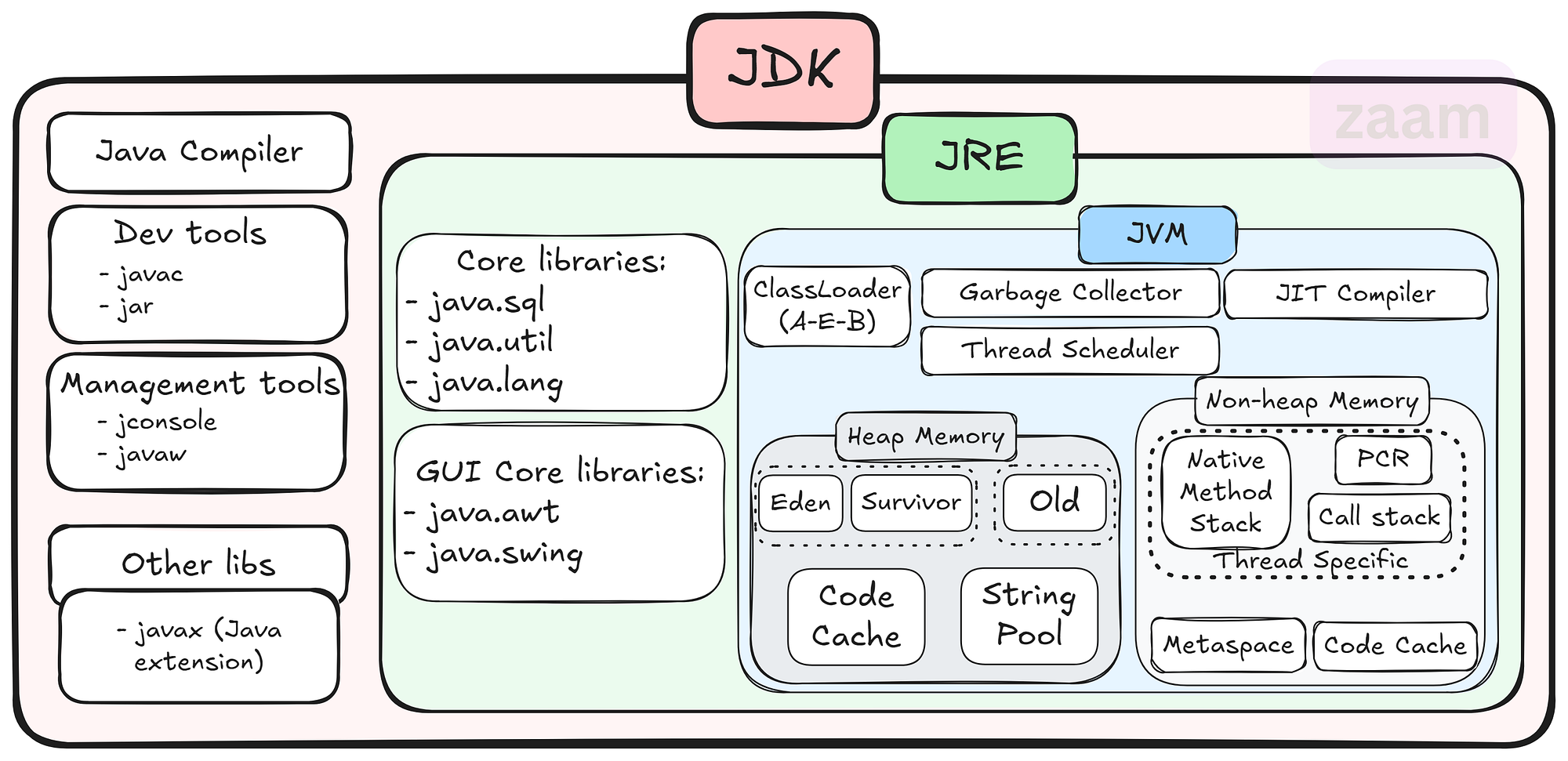
The JDK is a software development kit that provides all the necessary tools and libraries for developing Java applications. It includes the Java Runtime Environment (JRE), which is required for running Java programs, as well as development tools such as the Java compiler, debugger, and other utilities.

Key Components of the JDK

Some of the key components of the JDK include:

  • Java Compiler: The javac compiler converts Java source code into bytecode that can be executed by the JVM.
  • Java Virtual Machine (JVM): The JVM is responsible for executing Java bytecode on different platforms.
  • Java Class Library: A collection of pre-written classes and interfaces that provide core functionality for Java applications.
  • Development Tools: Tools like Javadoc for generating API documentation, JAR for packaging applications, and more.

Why Use the JDK?

The JDK is essential for Java developers because it provides everything needed to write, compile, debug, and run Java applications. By using the JDK, developers can ensure that their code is compatible with different platforms and environments thanks to the JVM’s portability.

Getting Started with the JDK

To start using the JDK, developers can download it from Oracle’s website or other authorized sources. Installation instructions are typically provided with the download package, making it easy to set up and start developing in Java.

Conclusion

The JDK plays a vital role in Java development by providing developers with all the necessary tools and libraries to create powerful and scalable applications. Whether you are a beginner or an experienced developer, having a solid understanding of the JDK is essential for success in Java programming.


8 Key Advantages of the Java Development Kit for Developers

  1. Comprehensive set of tools for Java development
  2. Includes the Java compiler for converting source code to bytecode
  3. Provides a rich collection of libraries for building robust applications
  4. Cross-platform compatibility with the Java Virtual Machine (JVM)
  5. Supports object-oriented programming principles
  6. Integrated development environment (IDE) support for coding convenience
  7. Regular updates and improvements from Oracle and the Java community
  8. Extensive documentation and resources available online for learning and troubleshooting


Challenges of the Java Development Kit: Size, Complexity, Resource Demands, and Compatibility Issues

  1. Large Size
  2. Complexity
  3. Resource Intensive
  4. Updates and Compatibility

Comprehensive set of tools for Java development

The Java Development Kit (JDK) stands out for its comprehensive set of tools tailored for Java development. From the Java compiler to debugging utilities and class libraries, the JDK equips developers with everything they need to efficiently write, compile, and debug Java applications. This extensive toolkit not only streamlines the development process but also ensures that developers have access to a wide array of resources to tackle various aspects of Java programming effectively.

Includes the Java compiler for converting source code to bytecode

The Java Development Kit (JDK) offers a significant advantage by including the Java compiler, a crucial tool for converting source code into bytecode. This feature simplifies the development process for Java programmers, allowing them to write code in a human-readable format and then compile it into bytecode that can be executed by the Java Virtual Machine (JVM). By bundling the compiler with the JDK, developers can seamlessly transition from writing code to testing and running their applications without the need for additional tools or configurations.

Provides a rich collection of libraries for building robust applications

The Java Development Kit (JDK) stands out for its ability to provide a rich collection of libraries that empower developers to build robust applications with ease. These libraries offer a wide range of pre-written classes and interfaces that cover various functionalities, saving developers time and effort in coding from scratch. By leveraging the extensive library support within the JDK, developers can enhance the functionality and performance of their applications while ensuring scalability and reliability in their software projects.

Cross-platform compatibility with the Java Virtual Machine (JVM)

The Java Development Kit (JDK) offers a significant advantage with its cross-platform compatibility through the Java Virtual Machine (JVM). This feature allows Java applications to run on various operating systems without the need for recompilation, ensuring seamless deployment across different platforms. By leveraging the JVM, developers can write code once and have it executed on Windows, macOS, Linux, and other supported environments, making Java a versatile choice for creating applications that reach a wide audience.

Supports object-oriented programming principles

Java Development Kit (JDK) offers a significant advantage by supporting object-oriented programming principles. Object-oriented programming allows developers to organize code into reusable and modular components, enhancing code readability, maintainability, and scalability. With the JDK’s support for object-oriented programming, developers can easily create complex applications by leveraging concepts such as classes, objects, inheritance, and polymorphism, leading to more efficient and robust software development processes.

Integrated development environment (IDE) support for coding convenience

The Java Development Kit (JDK) offers integrated development environment (IDE) support, providing developers with a user-friendly platform for coding convenience. With IDE tools tailored for Java development, programmers can benefit from features like code completion, syntax highlighting, debugging capabilities, and project management tools. This support streamlines the coding process, enhances productivity, and helps developers write high-quality Java applications efficiently.

Regular updates and improvements from Oracle and the Java community

Regular updates and improvements from Oracle and the Java community ensure that the Java Development Kit (JDK) remains a cutting-edge tool for developers. By staying current with the latest advancements, developers can benefit from enhanced performance, security patches, and new features that help streamline their development process and keep their applications up-to-date with industry standards. This commitment to continuous improvement demonstrates the dedication of both Oracle and the Java community to support developers in creating robust and innovative Java applications.

Extensive documentation and resources available online for learning and troubleshooting

Java Development Kit (JDK) offers a significant advantage with its extensive documentation and abundant online resources available for learning and troubleshooting. Whether you are a novice Java developer looking to grasp the basics or an experienced programmer seeking solutions to complex issues, the wealth of online materials ensures that you have the support and guidance needed to enhance your Java development skills effectively. The comprehensive documentation and resources associated with JDK empower developers to overcome challenges, explore new features, and continuously improve their proficiency in Java programming.

Large Size

The Java Development Kit (JDK) has a notable downside in its large size, which can demand a considerable amount of storage space on your system. Due to its extensive collection of tools, libraries, and resources, the JDK’s size may pose a challenge for users with limited storage capacity, potentially impacting the availability of space for other applications or files on the system. This aspect of the JDK’s size underscores the importance of considering storage requirements when installing and using this development kit for Java programming projects.

Complexity

Java development using the JDK can present a significant challenge in terms of complexity, particularly for beginners. The extensive toolset provided by the JDK can be overwhelming for those new to Java programming, making it difficult to grasp all the functionalities and how they interact. Navigating through the various tools and libraries within the JDK may require a steep learning curve, potentially slowing down the development process and causing frustration for inexperienced developers.

Resource Intensive

One significant drawback of using the Java Development Kit (JDK) is its resource-intensive nature. Running Java applications developed with the JDK may demand higher system resources compared to applications built with other programming languages. This increased resource requirement can lead to higher memory consumption and slower performance on devices with limited capabilities, potentially affecting the overall efficiency and responsiveness of the application.

Updates and Compatibility

Keeping up with JDK updates and ensuring compatibility with different versions can be challenging for Java developers. As new updates are released regularly to enhance performance, security, and features, developers need to stay vigilant in updating their development environments and ensuring that their code remains compatible with the latest JDK versions. This process can be time-consuming and may require adjustments to existing codebases to avoid potential compatibility issues. Additionally, managing dependencies and third-party libraries to align with JDK updates adds another layer of complexity to the development process.

java runtime

Exploring the Significance of Java Runtime Environment in Application Development

The Importance of Java Runtime Environment (JRE)

The Importance of Java Runtime Environment (JRE)

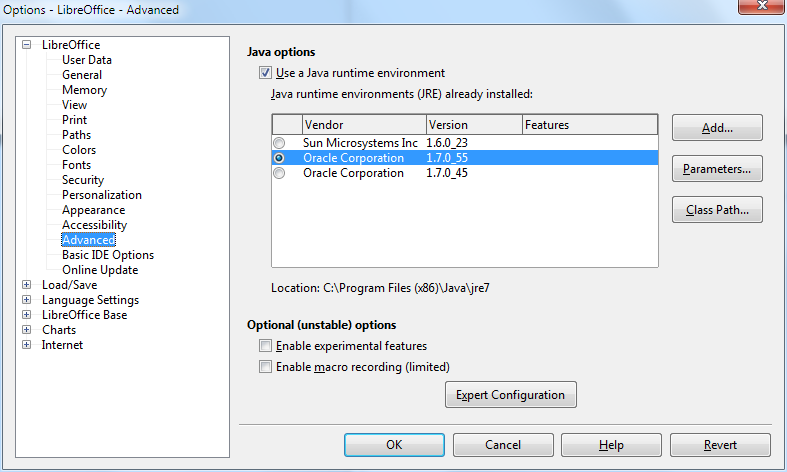
Java Runtime Environment (JRE) is a crucial component for running Java applications on your computer. It provides the necessary environment for executing Java programs by including the Java Virtual Machine (JVM), class libraries, and other supporting files.

One of the key benefits of JRE is its platform independence. Java programs compiled into bytecode can run on any device with a compatible JRE installed, regardless of the underlying operating system. This makes Java a popular choice for developing cross-platform applications.

Furthermore, JRE ensures that Java applications are executed securely within a controlled environment. The JVM manages memory allocation, garbage collection, and other important tasks to prevent unauthorized access or malicious activities.

Updating your JRE is essential to maintain compatibility with the latest Java applications and security patches. By keeping your JRE up-to-date, you can ensure optimal performance and protection against potential vulnerabilities.

In conclusion, Java Runtime Environment plays a vital role in enabling the seamless execution of Java applications across different platforms while ensuring security and reliability. It is an indispensable component for anyone using Java-based software.


Understanding Java Runtime: Answers to 8 Frequently Asked Questions

  1. Is Java runtime still relevant today?
  2. What is the difference between Java Runtime and JDK?
  3. What is JRE vs JDK?
  4. How to install a Java Runtime?
  5. How do I get Java runtime?
  6. Is Java Runtime still needed?
  7. What does Java Runtime do?
  8. What is the Java runtime?

Is Java runtime still relevant today?

In today’s rapidly evolving technological landscape, the relevance of Java runtime remains significant. Despite the emergence of new programming languages and frameworks, Java continues to be a popular choice for developing robust and scalable applications. Its platform independence, strong community support, and extensive libraries make it a versatile tool for a wide range of projects. Many enterprise-level systems and critical applications still rely on Java runtime for their functionality, highlighting its enduring importance in the software development industry. As long as there is a need for reliable, cross-platform solutions, Java runtime will continue to play a vital role in modern software development practices.

What is the difference between Java Runtime and JDK?

When discussing the difference between Java Runtime and JDK, it is important to understand their distinct roles in Java development. The Java Runtime Environment (JRE) is responsible for running Java applications by providing the necessary environment, including the Java Virtual Machine (JVM) and class libraries. On the other hand, the Java Development Kit (JDK) is a comprehensive package that includes tools for developing, debugging, and monitoring Java applications in addition to the components of JRE. While JRE is essential for executing Java programs, JDK is required for developing and compiling them. In summary, JRE enables running Java applications, while JDK encompasses the entire development process from coding to deployment.

What is JRE vs JDK?

In the realm of Java development, a common question that arises is the distinction between Java Runtime Environment (JRE) and Java Development Kit (JDK). The JRE is essential for running Java applications as it includes the Java Virtual Machine (JVM) and class libraries needed for execution. On the other hand, the JDK is a comprehensive package that not only contains the JRE components but also includes development tools such as compilers and debuggers for creating Java applications. While JRE is sufficient for end-users who only need to run Java programs, developers require the JDK to write, compile, and debug their own Java code. Understanding the differences between JRE and JDK is fundamental for anyone involved in Java software development.

How to install a Java Runtime?

To install Java Runtime Environment (JRE) on your system, you can follow these simple steps. First, visit the official Oracle website and navigate to the Java SE Downloads page. Choose the appropriate JRE version for your operating system (Windows, macOS, or Linux) and click on the download link. Once the download is complete, run the installer and follow the on-screen instructions to complete the installation process. After successful installation, you may need to set up environment variables to ensure that Java is properly configured on your system. Finally, verify the installation by opening a command prompt or terminal window and typing “java -version” to check if Java Runtime has been installed correctly.

How do I get Java runtime?

To obtain the Java Runtime Environment (JRE), you can easily download it from the official website of Oracle, the company that develops Java. Simply visit the Oracle website, navigate to the Java downloads section, and select the appropriate JRE version for your operating system. Follow the on-screen instructions to complete the download and installation process. It is important to regularly update your JRE to ensure compatibility with new Java applications and to benefit from the latest security enhancements provided by Oracle.

Is Java Runtime still needed?

In today’s digital landscape, the question of whether Java Runtime is still necessary remains a common inquiry among users. Despite advancements in technology and the emergence of alternative programming languages, Java Runtime continues to be a fundamental component for running Java applications efficiently. Many software programs and web applications still rely on Java, making the presence of Java Runtime essential for seamless execution. Moreover, Java’s platform independence and robust security features reinforce the importance of having a functional Java Runtime Environment to support various applications across different operating systems. Thus, while the relevance of Java Runtime may vary depending on individual needs, its significance in facilitating the operation of Java-based software remains undeniable in many contexts.

What does Java Runtime do?

Java Runtime Environment (JRE) is responsible for executing Java applications on a computer system. It includes the Java Virtual Machine (JVM), class libraries, and other necessary components to run Java programs smoothly. Essentially, Java Runtime creates a controlled environment where Java applications can be executed securely and efficiently. It ensures that the bytecode generated by Java compilers can be interpreted and run on various platforms without the need for recompilation, making Java a versatile and widely used programming language for developing cross-platform applications.

What is the Java runtime?

The Java runtime, also known as Java Runtime Environment (JRE), is a crucial component necessary for running Java applications on a computer system. It consists of the Java Virtual Machine (JVM), class libraries, and other essential files that provide the environment needed to execute Java programs. The JRE ensures that Java applications can run smoothly and securely by handling tasks such as memory management and garbage collection. It plays a key role in enabling the platform independence of Java, allowing programs to be executed on various devices with different operating systems as long as they have a compatible JRE installed.

java software

Unlocking the Potential of Java Software: A Comprehensive Guide

The Power of Java Software

The Power of Java Software

Java software has become a cornerstone in the world of technology, powering a wide range of applications and systems. Its versatility, reliability, and scalability make it a popular choice for developers and businesses alike.

What is Java?

Java is a high-level programming language that was developed by Sun Microsystems in the mid-1990s. It is known for its “write once, run anywhere” philosophy, which means that Java programs can run on any platform that has a Java Virtual Machine (JVM) installed.

Features of Java Software

One of the key features of Java software is its portability. This allows developers to create applications that can be deployed on various operating systems without any modifications. Additionally, Java is known for its robust security features, making it a popular choice for developing secure applications.

Applications of Java Software

Java software is used in a wide range of applications, including:

  • Enterprise applications
  • Web applications
  • Mobile applications
  • Gaming applications
  • Embedded systems
  • Big data technologies

The Future of Java Software

Despite the emergence of new programming languages and technologies, Java continues to be a popular choice for developers due to its stability and performance. With ongoing updates and improvements, Java software remains relevant in today’s rapidly evolving tech landscape.


6 Essential Tips for Writing Clean and Effective Java Software

  1. Use meaningful variable names to improve code readability.
  2. Follow Java naming conventions for classes, methods, and variables.
  3. Break down complex tasks into smaller methods for better maintainability.
  4. Document your code using comments to explain its purpose and functionality.
  5. Make use of Java’s built-in libraries and frameworks to avoid reinventing the wheel.
  6. Regularly test your code using unit tests to ensure its correctness.

Use meaningful variable names to improve code readability.

Using meaningful variable names is a crucial tip in Java software development as it significantly enhances code readability. By choosing descriptive and relevant names for variables, developers can easily understand the purpose and function of each variable within the code. This practice not only makes the code more readable for the original developer but also for anyone else who may need to work on or maintain the code in the future. Clear and meaningful variable names help streamline the coding process, improve collaboration among team members, and ultimately contribute to creating more maintainable and efficient Java software applications.

Follow Java naming conventions for classes, methods, and variables.

It is essential to adhere to Java naming conventions when naming classes, methods, and variables in your code. By following these conventions, such as using camelCase for method and variable names and PascalCase for class names, you ensure consistency and readability throughout your codebase. Consistent naming practices make it easier for other developers to understand your code and maintain it effectively. Additionally, following Java naming conventions helps in promoting good coding practices and standards within the Java development community.

Break down complex tasks into smaller methods for better maintainability.

When working with Java software, it is essential to break down complex tasks into smaller methods to enhance maintainability. By dividing a large task into smaller, more manageable chunks, developers can improve code readability, reusability, and ease of maintenance. This approach also facilitates debugging and troubleshooting processes, as each method focuses on a specific functionality or aspect of the overall task. Overall, breaking down complex tasks into smaller methods is a best practice that promotes efficient development and long-term sustainability of Java software projects.

Document your code using comments to explain its purpose and functionality.

Documenting your code using comments is a crucial practice when working with Java software. By adding comments to explain the purpose and functionality of your code, you not only make it easier for yourself to understand and maintain the code in the future but also for other developers who may collaborate on the project. Clear and concise comments can provide valuable insights into the logic behind the code, making it more readable and maintainable. In addition, well-documented code helps in troubleshooting and debugging, saving time and effort in identifying and fixing issues.

Make use of Java’s built-in libraries and frameworks to avoid reinventing the wheel.

When working with Java software, it is highly beneficial to leverage Java’s built-in libraries and frameworks to avoid reinventing the wheel. Java offers a rich collection of libraries and frameworks that provide ready-made solutions for common programming tasks, such as data manipulation, networking, and user interface development. By utilizing these resources, developers can streamline their workflow, improve efficiency, and focus on implementing unique features rather than writing code from scratch. This approach not only saves time and effort but also ensures that the software benefits from well-tested and optimized components.

Regularly test your code using unit tests to ensure its correctness.

Regularly testing your code using unit tests is a crucial practice in Java software development to ensure its correctness and reliability. By writing and running unit tests, developers can verify the behavior of individual components of their code, identifying bugs and errors early in the development process. This proactive approach not only helps in maintaining the quality of the code but also streamlines the debugging process and enhances overall code stability. Incorporating unit testing as a routine part of the development cycle promotes code maintainability and fosters a culture of continuous improvement in software development practices.