


Simple Java Program: A Beginner’s Guide to Writing and Running Your First Code
How to Write a Simple Java Program
Java is a popular programming language used to build desktop, web, and mobile applications. A good way to get started is to write a small program that displays a message on the screen.
Your First Java Program
The program below prints “Hello, World!” in the console:
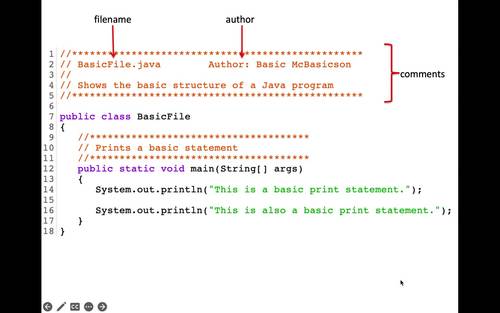
public class HelloWorld {


    public static void main(String[] args) {


        System.out.println("Hello, World!");


    }


}
Understanding the Code
public class HelloWorlddefines a class namedHelloWorld. In Java, the class name should match the file name, so save the program asHelloWorld.java.public static void main(String[] args)defines the main method. Java starts running the program from this method.System.out.println()displays text in the console. The text to display goes inside the parentheses and quotation marks.- Braces,
{ }, mark the beginning and end of the class and method. - The semicolon at the end of the print statement tells Java that the instruction is complete.
Compile and Run the Program
Install a Java Development Kit (JDK), then open a terminal or command prompt in the folder containing HelloWorld.java. Compile the program with:
javac HelloWorld.javaIf compilation succeeds, Java creates a file named HelloWorld.class. Run the program with:
java HelloWorldThe output will be:
Hello, World!Try a Small Change
Replace the message inside System.out.println() with your own text. For example:
System.out.println("Java is fun to learn!");Save the file, compile it again, and run it to see the new output. This simple example introduces the basic structure of a Java program and gives you a starting point for exploring variables, input, and other programming concepts.
7 Essential Tips for Writing Simple Java Programs
- Use `public static void main(String[] args)` as the program’s entry point.
- Save the file with the same name as its public class.
- Use `System.out.println()` to display text.
- End most statements with a semicolon.
- Match every opening brace with a closing brace.
- Compile with `javac` and run with `java`.
- Keep variable names clear and descriptive.
Use `public static void main(String[] args)` as the program’s entry point.
In a simple Java program, `public static void main(String[] args)` is the entry point—the method Java looks for to begin running your code. Place the statements you want the program to execute inside its braces. The method signature must be written with the correct spelling and capitalization, or Java won’t recognize it as the program’s starting point.
Save the file with the same name as its public class.
In Java, save your source file with the same name as its public class, including matching capitalization, and add the .java extension. For example, if your public class is HelloWorld, name the file HelloWorld.java. This naming rule helps the Java compiler locate and compile the class correctly.
Use `System.out.println()` to display text.
Use `System.out.println()` to display text in a Java program’s console. Place the text inside quotation marks within the parentheses, as in `System.out.println(“Hello, world!”);`. Java prints the message and then moves to a new line, making this method useful for showing greetings, results, and other output.
End most statements with a semicolon.
In Java, most statements end with a semicolon, which tells the compiler that an instruction is complete. For example, `System.out.println(“Hello, world!”);` needs a semicolon at the end. Forgetting one can cause a compile-time error, so check your statements when the compiler reports a problem. Some Java structures, such as class and method declarations, do not end with semicolons.
Match every opening brace with a closing brace.
In a simple Java program, every opening brace ({) must have a matching closing brace (}). Braces mark the beginning and end of code blocks, such as classes and methods, so a missing or misplaced brace can cause compilation errors or change how the program works. Indenting nested blocks consistently makes braces easier to match and your code easier to read.
Compile with `javac` and run with `java`.
To compile a simple Java program, open a terminal in the folder containing the `.java` file and run `javac FileName.java`, replacing `FileName` with the name of your file. After compilation succeeds, run the program with `java ClassName`—without the `.java` extension—to see its output.
Keep variable names clear and descriptive.
Use clear, descriptive variable names so your code is easier to read and understand. For example, studentAge is more informative than x, and totalPrice makes its purpose clearer than n. Meaningful names also make simple Java programs easier to update and help you spot mistakes as you learn.