Exploring the Power of Java Server Pages in Web Development
Java Server Pages (JSP) – A Comprehensive Guide
Java Server Pages (JSP) is a technology that helps developers create dynamic web pages based on HTML, XML, or other document types. It allows for the separation of logic and presentation in web development, making it easier to maintain and update websites.
How JSP Works
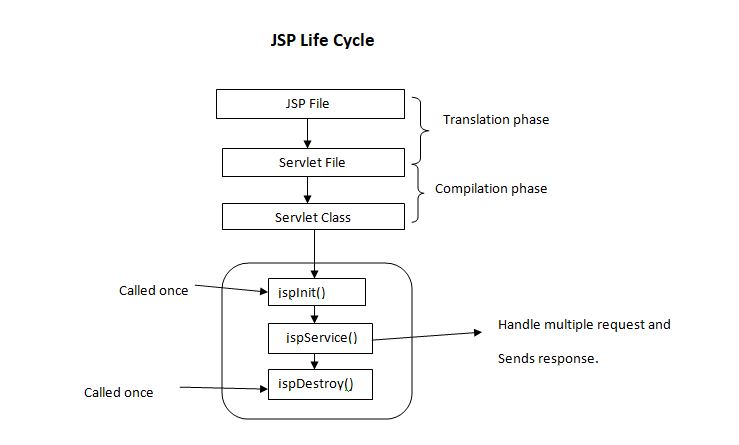
JSP pages contain a mix of HTML and Java code. When a client requests a JSP page, the server processes the Java code within the page to generate dynamic content. This content is then combined with the static elements of the page to produce the final output sent to the client’s browser.
Benefits of Using JSP
- Easy Integration: JSP can be seamlessly integrated with Java code, allowing developers to leverage existing Java libraries and frameworks.
- Reusable Components: JSP allows for the creation of reusable components that can be included in multiple pages, promoting code reusability and maintainability.
- Rapid Development: With its familiar syntax and built-in tags, JSP enables developers to quickly build dynamic web applications without extensive coding.
- Scalability: JSP applications can easily scale to accommodate increased traffic and user demands by leveraging Java’s robust scalability features.
JSP Tags
JSP provides a set of predefined tags that simplify common tasks such as displaying data, iterating over collections, and controlling flow. These tags help streamline development and improve code readability.
Conclusion
Java Server Pages (JSP) is a powerful technology for building dynamic web applications. By combining HTML with Java code, developers can create interactive and responsive websites that meet modern user expectations. Whether you are new to web development or an experienced developer, mastering JSP can enhance your skills and enable you to create sophisticated web solutions.
7 Essential Tips for Effective Java Server Pages (JSP) Development
- Use JSP for dynamic content generation in web applications.
- Separate Java code from presentation logic by using JSP scriptlets, expressions, and declarations.
- Utilize JSP standard actions like
- Avoid embedding complex Java logic directly within JSP pages to maintain readability and maintainability.
- Employ JSTL (JavaServer Pages Standard Tag Library) for simplifying common tasks in JSP development.
- Ensure proper error handling in JSP to provide meaningful feedback to users in case of exceptions.
- Optimize performance by minimizing the use of scriptlets and utilizing tag libraries efficiently.
Use JSP for dynamic content generation in web applications.
Utilizing Java Server Pages (JSP) for dynamic content generation in web applications is a highly efficient approach. By leveraging JSP, developers can seamlessly integrate Java code with HTML to create interactive and personalized web pages. This enables the generation of dynamic content based on user input, database queries, or other external factors, enhancing the overall user experience. JSP’s versatility and ease of use make it a valuable tool for building responsive and engaging web applications that meet the evolving demands of modern users.
Separate Java code from presentation logic by using JSP scriptlets, expressions, and declarations.
To enhance the maintainability and readability of Java Server Pages (JSP), it is recommended to separate Java code from presentation logic effectively. This can be achieved by utilizing JSP scriptlets, expressions, and declarations. By employing these features, developers can keep the presentation layer clean and focused on displaying content, while the Java code handles the underlying logic. This practice not only improves code organization but also makes it easier to troubleshoot and update the application in the future.
Utilize JSP standard actions like
When working with Java Server Pages (JSP), it is beneficial to utilize JSP standard actions like to modularize your code and promote reusability. By incorporating these standard actions, you can efficiently include external files or components within your JSP pages, making it easier to manage and maintain your web application. This practice not only enhances the organization of your code but also simplifies the development process by allowing you to focus on specific functionalities within each included file.
Avoid embedding complex Java logic directly within JSP pages to maintain readability and maintainability.
To ensure readability and maintainability in Java Server Pages (JSP), it is advisable to avoid embedding complex Java logic directly within the JSP pages. By separating the presentation layer from the business logic, developers can create cleaner and more organized code that is easier to understand and update. Instead, encapsulating complex Java logic in separate classes or scripts and invoking them from the JSP pages can improve code structure and facilitate future modifications without compromising code clarity.
Employ JSTL (JavaServer Pages Standard Tag Library) for simplifying common tasks in JSP development.
Employing JSTL (JavaServer Pages Standard Tag Library) in Java Server Pages development is a valuable tip for simplifying common tasks. By utilizing the predefined tags provided by JSTL, developers can streamline tasks such as iteration, conditionals, and data formatting within JSP pages. This not only enhances code readability but also reduces the need for extensive Java code, making development more efficient and maintainable. Embracing JSTL empowers developers to leverage its powerful features and accelerate the creation of dynamic and robust web applications.
Ensure proper error handling in JSP to provide meaningful feedback to users in case of exceptions.
Proper error handling in Java Server Pages (JSP) is crucial to provide users with meaningful feedback in case of exceptions. By implementing robust error handling mechanisms, developers can effectively communicate issues to users and guide them on how to proceed. This not only enhances the user experience but also helps in troubleshooting and resolving issues promptly, ensuring a smoother interaction between users and the web application.
Optimize performance by minimizing the use of scriptlets and utilizing tag libraries efficiently.
To optimize performance in Java Server Pages (JSP), it is recommended to minimize the use of scriptlets and instead utilize tag libraries efficiently. By reducing the reliance on scriptlets, which embed Java code directly into the JSP page, developers can improve code readability and maintainability. Tag libraries provide a cleaner and more structured way to incorporate dynamic functionality into JSP pages, leading to better performance and scalability of web applications. Efficient utilization of tag libraries not only enhances code organization but also helps streamline development processes and boost overall application performance.
When working with Java Server Pages (JSP), it is beneficial to utilize JSP standard actions like
Avoid embedding complex Java logic directly within JSP pages to maintain readability and maintainability.
To ensure readability and maintainability in Java Server Pages (JSP), it is advisable to avoid embedding complex Java logic directly within the JSP pages. By separating the presentation layer from the business logic, developers can create cleaner and more organized code that is easier to understand and update. Instead, encapsulating complex Java logic in separate classes or scripts and invoking them from the JSP pages can improve code structure and facilitate future modifications without compromising code clarity.
Employ JSTL (JavaServer Pages Standard Tag Library) for simplifying common tasks in JSP development.
Employing JSTL (JavaServer Pages Standard Tag Library) in Java Server Pages development is a valuable tip for simplifying common tasks. By utilizing the predefined tags provided by JSTL, developers can streamline tasks such as iteration, conditionals, and data formatting within JSP pages. This not only enhances code readability but also reduces the need for extensive Java code, making development more efficient and maintainable. Embracing JSTL empowers developers to leverage its powerful features and accelerate the creation of dynamic and robust web applications.
Ensure proper error handling in JSP to provide meaningful feedback to users in case of exceptions.
Proper error handling in Java Server Pages (JSP) is crucial to provide users with meaningful feedback in case of exceptions. By implementing robust error handling mechanisms, developers can effectively communicate issues to users and guide them on how to proceed. This not only enhances the user experience but also helps in troubleshooting and resolving issues promptly, ensuring a smoother interaction between users and the web application.
Optimize performance by minimizing the use of scriptlets and utilizing tag libraries efficiently.
To optimize performance in Java Server Pages (JSP), it is recommended to minimize the use of scriptlets and instead utilize tag libraries efficiently. By reducing the reliance on scriptlets, which embed Java code directly into the JSP page, developers can improve code readability and maintainability. Tag libraries provide a cleaner and more structured way to incorporate dynamic functionality into JSP pages, leading to better performance and scalability of web applications. Efficient utilization of tag libraries not only enhances code organization but also helps streamline development processes and boost overall application performance.