cfchris.com

Loading

java source code

Java Source Code: A Beginner’s Guide to Writing and Running Programs

Understanding Java Source Code

Java source code is the human-readable text developers write to create Java applications. It contains instructions, data definitions, and logic that describe how a program should work. Before a Java program can run, its source code is typically compiled into bytecode, which runs on the Java Virtual Machine (JVM).

What Is a Java Source File?

Java source files usually have the .java extension. A source file can contain classes, interfaces, methods, variables, and comments. For example, a simple program might look like this:

public class HelloWorld {

public static void main(String[] args) {

System.out.println("Hello, world!");

}

}

In this example, HelloWorld is a class. The main method is the program’s entry point, and System.out.println displays a line of text.

From Source Code to a Running Program

Java uses a two-stage process to turn source code into a running application:

  1. Compilation: The Java compiler, javac, checks the source code and converts it into bytecode. The result is commonly saved in a .class file.
  2. Execution: The JVM runs the bytecode. Because JVMs are available for many operating systems, the same compiled program can often run on different platforms.

A typical command-line workflow is:

javac HelloWorld.java

java HelloWorld

The first command compiles the source file. The second starts the program.

Key Parts of Java Source Code

  • Classes and interfaces: These define the structure and behavior of a Java program.
  • Methods: Methods contain instructions that perform tasks.
  • Variables: Variables store values, such as numbers, text, or object references.
  • Packages and imports: Packages organize related code, while import statements make other classes available.
  • Comments: Comments explain code to readers and are ignored by the compiler.

Java is case-sensitive, so total and Total are different names. In conventional Java projects, class names use PascalCase, while method and variable names usually use camelCase.

Why Source Code Matters

Readable source code is easier to maintain, test, and improve. Clear names, consistent formatting, and focused methods help developers understand how a program works. Comments are useful when they explain intent or important decisions, but well-written code should also communicate its purpose through its structure and naming.

Java source code is also the foundation for collaboration. Teams use version control systems to track changes, review updates, and coordinate work. Automated tests and build tools can help verify that changes behave as expected.

Getting Started

To begin writing Java source code, install a Java Development Kit (JDK), choose a text editor or integrated development environment, and create a file with a .java extension. Start with a small program, compile it, and run it. As you learn, explore variables, conditionals, loops, methods, classes, and exception handling.

Learning to read and write Java source code takes practice. By building small projects and reviewing clear examples, beginners can develop a solid understanding of how Java programs are structured and how they run.


Understanding Java Source Code: Common Questions Answered

  1. Is Java source code human-readable?
  2. Is Java a source code?
  3. Is Java outdated in 2026?
  4. Is Java built on C or C++?
  5. What is the source code of Java?

Is Java source code human-readable?

Yes, Java source code is human-readable: it uses familiar words, symbols, and a structured syntax that developers can write and understand. For example, a Java statement such as System.out.println("Hello, world!"); clearly indicates that text will be displayed. Although some programs can become complex, clear naming, formatting, and comments make Java source code easier to read and maintain.

Is Java a source code?

No. Java is a programming language, not source code itself. Source code is the human-readable set of instructions a programmer writes using Java, usually saved in files with the .java extension. A Java compiler then converts that source code into bytecode that can run on the Java Virtual Machine (JVM).

Is Java outdated in 2026?

No, Java is not outdated in 2026. It remains widely used for enterprise software, backend services, Android development, and large-scale systems, with ongoing updates to the language and its ecosystem. While newer languages may suit some projects better, Java continues to be a practical choice when long-term support, mature tools, performance, and a large developer community matter.

Is Java built on C or C++?

Java is not built on C or C++, though its syntax was influenced by both languages, especially C and C++. Java was designed as a separate programming language, with features such as automatic memory management and a bytecode-based runtime. Its compiler and runtime have been implemented in different languages over time, so Java itself is not simply a version of C or C++.

What is the source code of Java?

Java source code is the human-readable set of instructions written by developers to create Java programs, typically saved in files with the .java extension. A Java compiler translates this code into bytecode, which the Java Virtual Machine (JVM) executes. If you mean the source code used to build the Java platform itself, much of it is available in the OpenJDK project.
for java

A Beginner’s Guide to Programming for Java Apps

Getting Started with Java Programming

Java is a popular, general-purpose programming language used to build everything from web applications and business software to Android apps and large-scale systems. Its combination of readability, portability, and extensive tooling makes it a strong choice for both new programmers and experienced developers.

What Is Java?

Java is a class-based, object-oriented language. Developers write Java source code, which is compiled into bytecode. The Java Virtual Machine (JVM) runs that bytecode on compatible devices and operating systems. This approach helps Java programs run across different platforms without requiring a separate version of the source code for each one.

Why Learn Java?

  • Portability: Java applications can run on many platforms with a compatible JVM.
  • Versatility: Java is used in web services, enterprise applications, desktop software, and other fields.
  • Strong ecosystem: A wide range of libraries, frameworks, development tools, and learning resources is available.
  • Useful fundamentals: Learning Java introduces concepts such as classes, objects, types, and exception handling that apply to many programming languages.
  • Ongoing use: Organizations continue to use Java for applications that need to be maintained and expanded over time.

Your First Java Program

A simple Java program can display a message in the console:

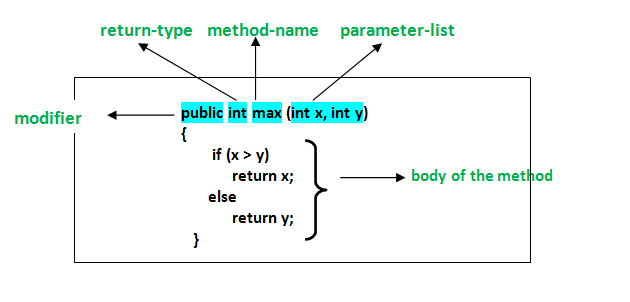
public class Main {

public static void main(String[] args) {

System.out.println("Hello, Java!");

}

}

The main method is the entry point for this program. The System.out.println statement prints a line of text. Java’s syntax may look formal at first, but its structure encourages code that is organized and explicit.

Core Concepts to Explore

As you learn Java, start with variables and data types, conditional statements, loops, and methods. Then move on to object-oriented programming, including classes, objects, inheritance, and interfaces. Exceptions and collections are also important topics for writing practical programs.

Small projects are a useful way to practice. Try building a calculator, a to-do list, or a program that reads and summarizes information. Working through real examples helps connect language features to the problems they solve.

Tools for Java Development

To begin, install a Java Development Kit (JDK), which includes tools for compiling and running Java programs. You can write code in a basic text editor, but an integrated development environment (IDE) can make development easier with features such as code completion, debugging, and project management.

Keep Building Your Skills

Java is a substantial language, so there is no need to learn everything at once. Focus on the fundamentals, write code regularly, and read errors carefully when something does not work. With steady practice, you can use Java to create reliable applications and build a solid foundation for further software development.


8 Essential Tips for Writing Clean and Effective Java Code

  1. Use meaningful names for classes, methods, and variables.
  2. Keep methods small and focused on one task.
  3. Prefer interfaces when designing flexible APIs.
  4. Use try-with-resources to close files and streams.
  5. Handle exceptions specifically instead of catching everything.
  6. Use `equals()` to compare objects, not `==`.
  7. Choose collections based on how they’ll be used.
  8. Write unit tests for important behavior.

Use meaningful names for classes, methods, and variables.

Use meaningful names for Java classes, methods, and variables to make your code easier to understand and maintain. Choose names that clearly describe what each element represents or does, such as CustomerAccount, calculateTotal(), or orderCount. Clear, consistent naming helps you and other developers follow the logic, spot mistakes, and update the code with confidence.

Keep methods small and focused on one task.

Keep Java methods small and focused on one task. A method that does one thing is easier to understand, test, debug, and reuse. If a method starts handling several responsibilities—such as validating input, updating data, and formatting output—consider splitting those steps into separate methods with clear names. This keeps your code organized and makes future changes less likely to cause unexpected problems.

Prefer interfaces when designing flexible APIs.

When designing a flexible Java API, prefer accepting or returning interfaces rather than specific implementation classes. For example, use `List` instead of `ArrayList` when a method only needs list behavior. This keeps the API focused on what callers can do, lets implementations change without affecting users, and makes it easier to substitute alternatives such as `LinkedList` or custom implementations. Use a concrete class only when its specific behavior is essential.

Use try-with-resources to close files and streams.

Use Java’s try-with-resources statement to manage files and streams safely. It automatically closes any resource that implements `AutoCloseable` when the statement finishes, even if an exception occurs, helping prevent resource leaks and keeping your code concise. Declare resources in the parentheses after `try`, such as a `BufferedReader` or `InputStream`, and handle any exceptions that may be thrown while using them.

Handle exceptions specifically instead of catching everything.

In Java, handle exceptions as specifically as possible instead of catching every error with a broad catch (Exception e) block. Catching the expected exception types lets you respond appropriately—for example, by retrying a failed operation or showing a helpful message—while allowing unexpected problems to surface during testing and debugging. Avoid swallowing exceptions silently; log or otherwise handle them meaningfully so issues are easier to diagnose.

Use `equals()` to compare objects, not `==`.

When comparing Java objects, use `equals()` to check whether they have the same value, rather than `==`, which checks whether two references point to the exact same object. For example, two separate `String` objects can contain the same text but still evaluate as different with `==`. Calling `equals()` makes the comparison based on content, as long as the object’s class implements the method appropriately.

Choose collections based on how they’ll be used.

Choose Java collections based on how your data will be used. Use a List when order matters or you need to access items by index, a Set when you want to prevent duplicates, and a Map when you need to look up values by key. Also consider whether you need fast lookups, predictable iteration order, or thread safety, since different implementations—such as ArrayList, HashSet, and HashMap—make different tradeoffs. Matching the collection to the task can make your code clearer and more efficient.

Write unit tests for important behavior.

Write unit tests for the most important behavior in your Java applications. Tests help verify that methods produce the expected results, catch regressions when code changes, and make it easier to refactor with confidence. Focus first on core logic and edge cases, such as empty inputs, invalid values, or boundary conditions. Frameworks like JUnit make it straightforward to organize and run tests as part of your development workflow.

java api

Unlocking the Potential of Java API: A Developer’s Guide

The Power of Java API: Simplifying Development

The Power of Java API: Simplifying Development

Java API (Application Programming Interface) plays a crucial role in simplifying software development by providing a set of pre-written code and protocols for building applications. Java’s extensive API library offers a wide range of classes, methods, and interfaces that developers can leverage to streamline their coding process.

Benefits of Java API

One of the key benefits of using Java API is its reusability. Developers can tap into the vast collection of pre-built components within the API to perform common tasks without having to write code from scratch. This not only saves time and effort but also ensures consistency and reliability in application development.

Moreover, Java API promotes interoperability by allowing different software components to communicate with each other seamlessly. By adhering to established standards and protocols, developers can integrate various functionalities into their applications with ease.

Popular Java APIs

Some of the popular Java APIs include:

  • Java SE API: The core API for standard Java development, offering essential classes for data structures, input/output operations, networking, and more.
  • Java EE API: Designed for enterprise-level applications, providing features for web services, messaging, persistence, and security.
  • JavaFX API: Used for creating rich graphical user interfaces (GUIs) and multimedia applications with advanced visual effects.

Enhancing Development Efficiency

By leveraging Java API, developers can focus on implementing business logic and application-specific features rather than reinventing the wheel. The modular structure of the API allows for easy integration of new functionalities and updates without disrupting existing codebase.

In addition, the extensive documentation and community support surrounding Java API make it easier for developers to learn and explore new capabilities. This collaborative ecosystem fosters innovation and knowledge sharing among programmers worldwide.

In Conclusion

The versatility and robustness of Java API make it an indispensable tool for modern software development. Whether you are a seasoned developer or just starting out in programming, harnessing the power of Java’s rich library of APIs can greatly enhance your productivity and creativity in building innovative applications.


Mastering Java API: 6 Essential Tips for Effective Usage

  1. Read the official Java API documentation to understand available classes and methods.
  2. Follow naming conventions when using Java API to ensure consistency and readability.
  3. Use interfaces provided by Java API for implementing common functionalities in your applications.
  4. Handle exceptions properly when working with Java API to maintain code reliability.
  5. Regularly update your knowledge of Java API to leverage new features and improvements.
  6. Optimize performance by understanding the efficiency of different methods in the Java API.

Read the official Java API documentation to understand available classes and methods.

To maximize your efficiency and effectiveness in Java programming, it is highly recommended to delve into the official Java API documentation. By exploring this comprehensive resource, you can gain valuable insights into the wide array of classes and methods at your disposal. Understanding the functionality and usage of these components will not only expand your knowledge but also empower you to make informed decisions when designing and implementing your Java applications.

Follow naming conventions when using Java API to ensure consistency and readability.

When utilizing Java API, it is essential to adhere to naming conventions to maintain consistency and enhance readability in your code. By following established naming standards for classes, methods, variables, and packages, developers can create code that is easier to understand and maintain. Consistent naming practices not only improve collaboration among team members but also contribute to the overall quality of the software development process.

Use interfaces provided by Java API for implementing common functionalities in your applications.

When working with Java API, utilizing the interfaces provided can greatly simplify the implementation of common functionalities in your applications. By leveraging these pre-defined interfaces, developers can adhere to established standards and best practices, ensuring consistency and reliability in their code. This approach not only saves time and effort but also promotes code reusability and maintainability, making it easier to extend and modify the functionality of the application in the future.

Handle exceptions properly when working with Java API to maintain code reliability.

When utilizing the Java API, it is crucial to handle exceptions properly to uphold code reliability. By implementing robust exception handling mechanisms, developers can anticipate and address potential errors that may arise during the execution of API calls. Properly managing exceptions not only ensures the stability of the application but also enhances its resilience in handling unexpected scenarios, ultimately contributing to a more secure and dependable software system.

Regularly update your knowledge of Java API to leverage new features and improvements.

To make the most out of Java API, it is essential to stay updated with the latest advancements and enhancements. By regularly updating your knowledge of Java API, you can take advantage of new features and improvements that can streamline your development process and enhance the functionality of your applications. Keeping abreast of updates ensures that you are utilizing the full potential of Java API and staying competitive in the ever-evolving landscape of software development.

Optimize performance by understanding the efficiency of different methods in the Java API.

To optimize performance in Java development, it is essential to have a deep understanding of the efficiency of various methods available in the Java API. By carefully analyzing and selecting the most appropriate methods for specific tasks, developers can significantly improve the speed and resource utilization of their applications. Being aware of the performance implications of different API methods allows developers to make informed decisions that enhance overall application efficiency and responsiveness.

system design in software engineering

Mastering System Design in Software Engineering: Building Robust Solutions

The Importance of System Design in Software Engineering

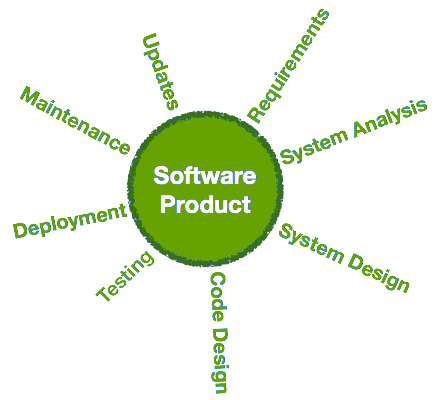
System design is a critical phase in the software engineering process that lays the foundation for creating a successful and efficient software system. It involves defining the architecture, components, modules, interfaces, and data for a system to satisfy specified requirements.

Key Aspects of System Design

During system design, software engineers focus on several key aspects:

  • Architecture: Determining the overall structure of the system and how components will interact with each other.
  • Data Management: Designing how data will be stored, accessed, and managed within the system.
  • Interfaces: Defining how different parts of the system will communicate with each other.
  • Modules: Breaking down the system into smaller modules to facilitate development and maintenance.

Benefits of Effective System Design

A well-designed system offers numerous benefits to both developers and end-users:

  • Scalability: A good design allows for easy scaling of the system as requirements change or grow.
  • Maintainability: Modular design simplifies maintenance and updates to the system without affecting other components.
  • Performance: Efficient design leads to optimized performance and faster response times.
  • Reliability: A robust design reduces the likelihood of errors and enhances system reliability.

Challenges in System Design

Despite its importance, system design can present challenges to software engineers. Some common challenges include:

  • Complexity: Balancing various requirements while keeping the design simple and manageable can be challenging.
  • Interoperability: Ensuring that different components work seamlessly together can be complex, especially in large systems.
  • Sustainability: Designing a system that can adapt to future changes without requiring a complete overhaul is crucial but challenging.

In Conclusion

In software engineering, effective system design is essential for creating reliable, scalable, and maintainable software systems. By carefully planning and designing the architecture, data management, interfaces, and modules of a system, developers can build solutions that meet user needs while being flexible enough to adapt to changing requirements over time.

An investment in thorough system design early in the development process can lead to significant long-term benefits in terms of performance, reliability, and overall success of a software project. It is a critical step that should not be overlooked in any software engineering endeavor.


5 Essential Tips for Effective System Design in Software Engineering

  1. Break down the system into smaller components for easier management and scalability.
  2. Consider the reliability, availability, and performance requirements of the system.
  3. Design with flexibility in mind to accommodate future changes and updates.
  4. Ensure clear communication and documentation to aid in understanding and maintenance.
  5. Regularly review and optimize the system design to improve efficiency and effectiveness.

Break down the system into smaller components for easier management and scalability.

Breaking down the system into smaller components is a crucial tip in software engineering system design. By dividing the system into manageable modules, developers can simplify the development process, enhance maintainability, and improve scalability. Smaller components allow for easier management, as each module can be developed, tested, and updated independently. This approach not only streamlines the development workflow but also enables the system to scale more effectively as requirements evolve. Ultimately, breaking down the system into smaller components promotes better organization, efficiency, and adaptability in software engineering projects.

Consider the reliability, availability, and performance requirements of the system.

When designing a software system, it is crucial to consider the reliability, availability, and performance requirements of the system. Reliability ensures that the system operates consistently and accurately under various conditions, while availability guarantees that the system is accessible when needed. Performance requirements dictate how efficiently the system should respond to user requests and handle workloads. By carefully evaluating and incorporating these factors into the system design process, software engineers can create a robust and efficient solution that meets user expectations and business needs effectively.

Design with flexibility in mind to accommodate future changes and updates.

When approaching system design in software engineering, it is crucial to prioritize flexibility to accommodate future changes and updates. By designing with adaptability in mind, developers can anticipate and prepare for evolving requirements, technologies, and user needs. A flexible system architecture allows for seamless integration of new features, enhancements, and modifications without disrupting the overall functionality of the software. Embracing flexibility in design not only ensures the longevity and sustainability of the system but also streamlines the process of incorporating updates in a cost-effective and efficient manner.

Ensure clear communication and documentation to aid in understanding and maintenance.

Ensuring clear communication and thorough documentation is crucial in system design for software engineering. Clear communication among team members helps in understanding the system architecture, components, and interactions, leading to a cohesive development process. Additionally, comprehensive documentation serves as a valuable resource for future maintenance and updates, allowing developers to quickly grasp the system’s intricacies and make informed decisions. By prioritizing clear communication and detailed documentation, software engineers can enhance collaboration, reduce errors, and streamline the maintenance of software systems effectively.

Regularly review and optimize the system design to improve efficiency and effectiveness.

Regularly reviewing and optimizing the system design is a crucial tip in software engineering to enhance efficiency and effectiveness. By periodically evaluating the architecture, components, and interfaces of the system, developers can identify potential bottlenecks, redundancies, or areas for improvement. This proactive approach not only helps streamline processes and enhance performance but also ensures that the system remains aligned with evolving requirements and technological advancements. Continuous optimization of the system design is key to maintaining a robust and adaptable software solution that can meet the changing needs of users and stakeholders effectively.

software design in software engineering

Exploring the Significance of Software Design in Software Engineering Practices

The Importance of Software Design in Software Engineering

Software design plays a crucial role in the field of software engineering. It is the process of defining the architecture, components, interfaces, and other characteristics of a software system to meet specified requirements. Effective software design is essential for creating high-quality, scalable, and maintainable software applications.

Key Aspects of Software Design

Software design involves several key aspects that are critical to the success of a software project:

  1. Architectural Design: This phase focuses on defining the overall structure of the software system, including its components, modules, and relationships. A well-designed architecture provides a solid foundation for the rest of the development process.
  2. Interface Design: Interfaces are crucial for communication between different parts of a software system. Good interface design ensures that components can interact seamlessly and efficiently.
  3. Data Design: Data is at the core of many software applications. Data design involves defining data structures, storage mechanisms, and access methods to ensure efficient data processing and retrieval.
  4. Algorithm Design: Algorithms are essential for solving complex problems efficiently. Algorithm design focuses on developing effective algorithms that meet performance requirements and optimize resource utilization.

The Benefits of Good Software Design

Effective software design offers several benefits to both developers and end-users:

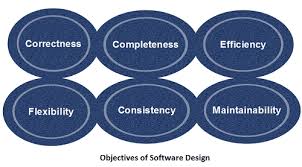
  • Scalability: A well-designed software system can easily accommodate changes and additions without requiring extensive rework.
  • Maintainability: Good design practices make it easier to maintain and update software systems over time, reducing maintenance costs and effort.
  • Reliability: Properly designed software systems are more reliable and less prone to errors or failures, leading to improved user satisfaction.
  • Performance: Well-designed algorithms and data structures can enhance the performance of a software application, ensuring optimal speed and efficiency.

In Conclusion

Software design is a fundamental aspect of software engineering that significantly impacts the quality, scalability, and maintainability of software applications. By investing time and effort into effective design practices, developers can create robust systems that meet user needs and stand the test of time.


Key Questions Answered: Understanding Software Design in Software Engineering

  1. What is software design in software engineering?
  2. Why is software design important in software engineering?
  3. What are the key aspects of software design?
  4. How does architectural design contribute to software development?
  5. What role does interface design play in software engineering?
  6. Why is data design crucial in developing a software application?
  7. How can good algorithm design impact the performance of a software system?

What is software design in software engineering?

Software design in software engineering refers to the process of conceptualizing and defining the architecture, components, interfaces, and characteristics of a software system to meet specific requirements. It involves making critical decisions about how the software will be structured, how its components will interact, and how data will be managed and processed. Effective software design is essential for creating robust, scalable, and maintainable software applications that deliver value to users. By focusing on aspects such as architectural design, interface design, data design, and algorithm design, software engineers can ensure that the resulting software system meets performance objectives and user expectations.

Why is software design important in software engineering?

Software design is crucial in software engineering because it serves as the blueprint for developing high-quality, efficient, and reliable software applications. By carefully planning the architecture, components, interfaces, and data structures of a system during the design phase, software engineers can ensure that the final product meets user requirements and performs optimally. Good software design facilitates scalability, maintainability, and extensibility of the software, making it easier to adapt to changing needs and technologies in the future. Ultimately, effective software design lays the foundation for successful software development projects by guiding developers in creating solutions that are well-structured, robust, and easy to maintain.

What are the key aspects of software design?

When discussing the key aspects of software design in software engineering, it is essential to highlight several critical components that contribute to the successful development of a software system. These key aspects include architectural design, interface design, data design, and algorithm design. Architectural design focuses on defining the overall structure and components of the system, while interface design ensures seamless communication between different parts. Data design involves structuring data for efficient processing and retrieval, and algorithm design aims to develop effective algorithms for problem-solving. By addressing these key aspects thoughtfully during the software design phase, developers can create robust and scalable software solutions that meet user requirements effectively.

How does architectural design contribute to software development?

Architectural design plays a crucial role in software development by providing a blueprint for the overall structure and organization of a software system. It defines the components, modules, interfaces, and relationships within the system, laying the foundation for the development process. A well-thought-out architectural design enables developers to better understand the system’s complexity, make informed decisions about technology choices, and ensure that the system meets functional and non-functional requirements. By establishing a clear structure early on, architectural design helps streamline development efforts, promote code reusability, facilitate collaboration among team members, and ultimately contribute to the creation of scalable, maintainable, and high-quality software applications.

What role does interface design play in software engineering?

Interface design plays a crucial role in software engineering by serving as the bridge between different components of a software system. Interfaces define how various parts of the system communicate and interact with each other, ensuring seamless operation and efficient data exchange. A well-designed interface simplifies the complexity of the underlying system, making it easier for developers to work on different modules independently. Additionally, user interfaces play a vital role in software design by providing users with intuitive ways to interact with the application, enhancing user experience and usability. In essence, interface design is essential for fostering collaboration among developers, improving system reliability, and creating user-friendly software products.

Why is data design crucial in developing a software application?

Data design is crucial in developing a software application because it forms the foundation for efficient data processing and management within the system. Proper data design involves defining data structures, storage mechanisms, and access methods that optimize performance and ensure data integrity. By carefully planning and implementing data design principles, developers can enhance the scalability, reliability, and maintainability of the software application. Effective data design enables seamless data retrieval, manipulation, and storage, ultimately improving the overall functionality and user experience of the software system.

How can good algorithm design impact the performance of a software system?

Good algorithm design plays a critical role in shaping the performance of a software system. By developing efficient algorithms that optimize resource utilization and minimize computational complexity, software engineers can significantly enhance the speed and efficiency of a software application. Well-designed algorithms can reduce processing time, improve responsiveness, and enable the system to handle larger datasets or higher workloads without compromising performance. In essence, good algorithm design lays the foundation for a high-performing software system that delivers optimal results to users while maximizing computational resources.