cfchris.com

Loading

computer tech solutions

Computer Tech Solutions for a Smarter, More Secure Future

Computer Tech Solutions: Helping People and Businesses Work Smarter

Computers and digital tools play a central role in how people work, communicate, and manage everyday tasks. When technology works well, it can save time and make work easier. When it breaks down or falls behind, it can interrupt business, create security risks, and cause frustration. Computer tech solutions help people and organizations choose, maintain, and use technology more effectively.

What Are Computer Tech Solutions?

Computer tech solutions are services, tools, and strategies that address technology needs and problems. They can include setting up computers, repairing hardware, managing networks, protecting data, moving systems to the cloud, and providing ongoing technical support. The right solution depends on the user’s goals, budget, existing equipment, and security requirements.

Common Types of Technology Support

Computer Setup and Repair

Proper setup helps computers run reliably from the start. This may involve installing operating systems and applications, configuring user accounts, connecting printers, and transferring files from an older device. Repair services can help diagnose problems such as slow performance, failing components, software errors, or unexpected shutdowns.

Network and Wi-Fi Management

A dependable network allows computers, phones, printers, and other devices to communicate. Network support can include router configuration, Wi-Fi coverage improvements, equipment installation, and troubleshooting connection issues. For businesses, network planning can also help control access and keep important systems available.

Cybersecurity and Data Protection

Security is an essential part of any technology plan. Useful safeguards include strong, unique passwords, multifactor authentication, software updates, antivirus protection, and regular data backups. Businesses may also need access controls, security monitoring, and an incident response plan. No single tool can prevent every threat, so a layered approach is often the most practical.

Cloud Services and Data Backup

Cloud services can make files and applications available across multiple devices and locations. They can also support collaboration and flexible work arrangements. Before moving data to the cloud, it is important to consider privacy, access permissions, ongoing costs, and backup needs. Cloud storage and backup are not always the same, so organizations should confirm that critical data can be restored when needed.

Software and System Support

Software support helps keep applications compatible, updated, and configured for the work they need to do. This may include installing business software, resolving errors, managing licenses, and helping users learn new tools. Regular maintenance can reduce avoidable problems and help systems stay useful over time.

Choosing the Right Solution

Before investing in technology, identify the problem you want to solve. A useful assessment includes the devices and software already in use, the people who rely on them, any security or compliance requirements, and the budget available. It is also worth considering future needs so that a short-term fix does not create a larger challenge later.

For ongoing support, look for clear communication, transparent pricing, relevant experience, and a practical plan for maintaining and protecting your systems. Ask what is included, how urgent issues are handled, and how your data and account access will be managed.

Technology That Supports Your Goals

Computer tech solutions are most effective when they fit the people and processes using them. A well-maintained computer, secure network, reliable backup, or thoughtfully chosen cloud service can make daily work smoother and reduce unnecessary risk. With regular maintenance and informed planning, technology can remain a dependable tool for both personal and business needs.


9 Essential Computer Tech Tips for a Smooth and Secure Experience

  1. Restart the computer to clear temporary glitches.
  2. Install updates to fix bugs and security issues.
  3. Back up important files to cloud storage or an external drive.
  4. Use strong, unique passwords for every account.
  5. Run a trusted antivirus scan if the computer behaves strangely.
  6. Free up disk space by removing unused apps and files.
  7. Check cable connections when a device stops working.
  8. Use a password manager to store login details securely.
  9. Contact tech support if basic troubleshooting fails.

Restart the computer to clear temporary glitches.

Restarting your computer is a simple first step when you encounter a temporary glitch, such as a frozen app, sluggish performance, or a device that isn’t responding as expected. A restart closes active programs and refreshes the operating system, which can clear minor errors and restore normal operation. Save your work first, then restart and check whether the issue is resolved.

Install updates to fix bugs and security issues.

Install updates regularly to fix bugs, improve performance, and address security vulnerabilities. Operating system, software, and device updates often include important protections against new threats, so delaying them can leave your computer exposed. Turn on automatic updates when practical, and restart your device when prompted to complete the installation.

Back up important files to cloud storage or an external drive.

Protect important files by backing them up regularly to a trusted cloud storage service, an external drive, or both. Cloud backups make files accessible from different devices, while an external drive gives you a separate copy that can be stored safely offline. Set up automatic backups when possible, and occasionally check that your files can be restored—having a backup is only useful if it works when you need it.

Use strong, unique passwords for every account.

Use a strong, unique password for every account to reduce the risk of a security breach. If one password is stolen or exposed, unique passwords help prevent attackers from using it to access your other accounts. Consider using a reputable password manager to create and securely store long passwords, and turn on multifactor authentication whenever it’s available for an extra layer of protection.

Run a trusted antivirus scan if the computer behaves strangely.

If your computer starts behaving strangely—such as slowing down, showing unexpected pop-ups, or opening unfamiliar programs—run a scan with trusted, up-to-date antivirus software. Follow the program’s instructions to quarantine or remove any detected threats, then restart your computer if prompted. Avoid downloading unfamiliar “cleanup” tools, and keep your operating system and security software updated to help protect against future threats.

Free up disk space by removing unused apps and files.

Freeing up disk space can help your computer run more smoothly and leave room for important updates and new files. Start by uninstalling apps you no longer use, then review your Downloads, Documents, and desktop folders for duplicate or unnecessary files. Before deleting anything, make sure you have a backup of files you may want later, and empty the Recycle Bin or Trash when you’re ready.

Check cable connections when a device stops working.

When a device suddenly stops working, check its cable connections before trying more complicated fixes. Make sure each cable is firmly plugged into the device and the power outlet, and look for loose, damaged, or frayed cords. If possible, unplug and reconnect the cables, then test the device again. A simple connection issue is often easy to fix and can save time and unnecessary repair costs.

Use a password manager to store login details securely.

Use a password manager to store your login details securely and make it easier to use a unique, strong password for every account. Instead of remembering dozens of passwords or reusing the same one, you’ll only need to remember the manager’s main password. Choose a reputable password manager, protect it with multifactor authentication when available, and never share your master password.

Contact tech support if basic troubleshooting fails.

If basic troubleshooting doesn’t solve the problem, contact tech support for help. A support professional can identify issues that may not be obvious, guide you through safe next steps, and recommend repairs or solutions. Before reaching out, note any error messages, what you’ve already tried, and when the problem started—these details can help speed up diagnosis.
computer and software engineering

Exploring the Intersection of Computer and Software Engineering

Computer and Software Engineering

The World of Computer and Software Engineering

Computer and software engineering are two dynamic fields that play a crucial role in shaping our modern world. From the devices we use daily to the complex systems that power industries, computer and software engineers are at the forefront of innovation and technological advancement.

What is Computer Engineering?

Computer engineering focuses on the design, development, and maintenance of computer hardware and systems. Computer engineers work on components such as processors, memory devices, networking equipment, and more. They also ensure that these components work together efficiently to create functional computer systems.

What is Software Engineering?

Software engineering, on the other hand, deals with the design, development, testing, and maintenance of software applications. Software engineers use programming languages and tools to create applications that meet specific requirements and solve problems for users.

The Intersection of Computer and Software Engineering

Computer and software engineering often overlap, with professionals in both fields collaborating to create integrated systems. Computer engineers provide the hardware infrastructure on which software applications run, while software engineers develop the programs that leverage this hardware.

The Impact of Computer and Software Engineering

The impact of computer and software engineering can be seen in various aspects of our lives. From smartphones that connect us to the world to sophisticated algorithms that power financial markets, these disciplines have revolutionized how we live, work, communicate, and entertain ourselves.

Careers in Computer and Software Engineering

Careers in computer and software engineering offer diverse opportunities for professionals to work in areas such as artificial intelligence, cybersecurity, cloud computing, robotics, data science, mobile app development, and more. With technology evolving rapidly, there is a constant demand for skilled engineers who can innovate and adapt to new challenges.

Conclusion

In conclusion, computer and software engineering are vital fields that drive technological progress across industries. As we continue to rely on digital solutions for our everyday tasks, the expertise of computer and software engineers will be essential in shaping a future powered by innovation.


Top 5 FAQs About Careers in Computer and Software Engineering

  1. What is the difference between computer engineering and software engineering?
  2. What programming languages are essential for a career in software engineering?
  3. How can I become a computer engineer or software engineer?
  4. What are the latest trends in computer and software engineering?
  5. What career opportunities are available for computer and software engineers?

What is the difference between computer engineering and software engineering?

One frequently asked question in the field of computer and software engineering is: “What is the difference between computer engineering and software engineering?” Computer engineering primarily focuses on designing, developing, and maintaining computer hardware components and systems, such as processors, memory devices, and networking equipment. On the other hand, software engineering deals with the design, development, testing, and maintenance of software applications using programming languages and tools. While computer engineers work on the physical infrastructure of computing systems, software engineers create the programs that run on these systems. Both disciplines are essential in creating integrated technology solutions that drive innovation and progress in the digital age.

What programming languages are essential for a career in software engineering?

When considering a career in software engineering, it is common to wonder about the essential programming languages to master. While the specific languages may vary depending on the industry and specialization, some foundational languages are widely recognized as essential for software engineers. Languages such as Java, Python, C++, JavaScript, and SQL are commonly sought after by employers due to their versatility and widespread use in various applications. Mastering these programming languages can provide a strong foundation for a successful career in software engineering, enabling professionals to develop diverse applications and solutions across different platforms and domains.

How can I become a computer engineer or software engineer?

To become a computer engineer or software engineer, individuals typically pursue a formal education in computer science, software engineering, or a related field. This often involves obtaining a bachelor’s degree from an accredited institution. Additionally, gaining practical experience through internships, co-op programs, or personal projects can be beneficial in developing the necessary skills and knowledge. Continuous learning and staying updated on the latest technologies and trends in the industry are also crucial for aspiring computer and software engineers to thrive in this dynamic field. Networking with professionals in the industry and seeking mentorship can provide valuable guidance and insights for those looking to establish a successful career in computer engineering or software engineering.

The latest trends in computer and software engineering encompass a wide range of innovative technologies and methodologies that are reshaping the industry. From artificial intelligence and machine learning to edge computing, quantum computing, and blockchain technology, there is a continual evolution towards more efficient, secure, and scalable solutions. Additionally, trends such as DevOps practices, cloud-native development, Internet of Things (IoT) integration, and low-code/no-code platforms are gaining momentum, enabling faster development cycles and greater flexibility in software engineering processes. Staying updated on these trends is crucial for professionals in the field to remain competitive and drive forward the future of computer and software engineering.

What career opportunities are available for computer and software engineers?

Career opportunities for computer and software engineers are abundant and diverse. Professionals in these fields have the chance to work in various industries, including artificial intelligence, cybersecurity, cloud computing, robotics, data science, mobile app development, and more. With the rapid evolution of technology, there is a growing demand for skilled engineers who can innovate and adapt to new challenges. Whether designing cutting-edge software applications, securing digital systems from cyber threats, or developing advanced algorithms for machine learning, computer and software engineers play a crucial role in shaping the future of technology across different sectors.

it infrastructure

Optimizing Your Business with a Robust IT Infrastructure Strategy

The Importance of IT Infrastructure in Today’s Business Environment

The Importance of IT Infrastructure in Today’s Business Environment

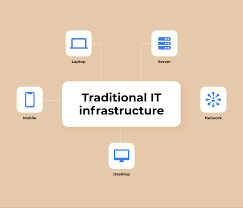
In the digital age, a robust and efficient IT infrastructure is essential for the success of any business. IT infrastructure encompasses all the components necessary to operate and manage information technology within an organization.

From hardware such as servers, computers, and networking equipment to software applications and databases, a well-designed IT infrastructure provides the foundation for seamless communication, data management, and operational efficiency.

Key Components of IT Infrastructure

Key components of IT infrastructure include:

  • Hardware: Servers, workstations, routers, switches, and other physical devices that support IT operations.
  • Software: Operating systems, applications, databases, and other software tools that enable business processes.
  • Networking: Infrastructure such as routers, switches, firewalls, and network cables that facilitate communication between devices.
  • Data Storage: Systems for storing and managing data securely and efficiently.
  • Security Measures: Tools and protocols to protect data from unauthorized access or cyber threats.

The Benefits of a Strong IT Infrastructure

A well-designed IT infrastructure offers numerous benefits to businesses:

  • Improved Efficiency: Streamlined processes and automated tasks lead to increased productivity.
  • Enhanced Communication: Seamless communication channels enable collaboration among employees and departments.
  • Data Security: Robust security measures protect sensitive information from cyber threats.
  • Better Decision-Making: Access to real-time data allows for informed decision-making at all levels of the organization.

The Future of IT Infrastructure

As technology continues to evolve rapidly, businesses must adapt their IT infrastructure to meet changing demands. Cloud computing, artificial intelligence (AI), Internet of Things (IoT), and other emerging technologies are reshaping the way organizations operate.

In conclusion, investing in a reliable and scalable IT infrastructure is crucial for businesses looking to stay competitive in today’s fast-paced digital landscape. By leveraging the power of technology effectively, organizations can drive innovation, improve operational efficiency, and achieve sustainable growth in the long run.


6 Essential Tips for Maintaining a Secure and Efficient IT Infrastructure

  1. Regularly update software and firmware to ensure security patches are in place.
  2. Implement strong password policies and consider multi-factor authentication for added security.
  3. Backup data regularly and store it securely offsite to protect against data loss.
  4. Monitor network traffic for any unusual activity that may indicate a security breach.
  5. Document your IT infrastructure setup and procedures to facilitate troubleshooting and maintenance.
  6. Consider implementing virtualization technology to optimize resource utilization and scalability.

Regularly update software and firmware to ensure security patches are in place.

Regularly updating software and firmware is a critical aspect of maintaining a secure IT infrastructure. By staying current with updates, organizations can ensure that security patches are promptly applied to address vulnerabilities and protect against potential cyber threats. These updates not only enhance the overall security posture of the system but also help in safeguarding sensitive data and maintaining the integrity of operations. Prioritizing software and firmware updates demonstrates a proactive approach to cybersecurity and minimizes the risk of exploitation by malicious actors.

Implement strong password policies and consider multi-factor authentication for added security.

Implementing strong password policies and considering multi-factor authentication are crucial steps in enhancing IT infrastructure security. By enforcing complex password requirements, such as length, complexity, and regular changes, organizations can significantly reduce the risk of unauthorized access to sensitive data. Additionally, implementing multi-factor authentication adds an extra layer of security by requiring users to provide multiple forms of verification before accessing systems or applications. These measures help safeguard against potential cyber threats and ensure that critical business information remains protected.

Backup data regularly and store it securely offsite to protect against data loss.

Regularly backing up data and securely storing it offsite is a crucial tip for maintaining a robust IT infrastructure. In the event of data loss due to hardware failure, cyber attacks, or natural disasters, having secure offsite backups ensures that critical information can be recovered swiftly and effectively. By implementing a reliable backup strategy, businesses can safeguard their valuable data assets and minimize the risk of disruptions that could impact operations and productivity.

Monitor network traffic for any unusual activity that may indicate a security breach.

Monitoring network traffic for any unusual activity is a critical aspect of maintaining a secure IT infrastructure. By keeping a close eye on data flow and communication patterns within the network, IT professionals can quickly identify potential security breaches or unauthorized access attempts. Unusual spikes in traffic, unfamiliar IP addresses, or suspicious data transfers could be early signs of a cyber threat. Proactive monitoring allows organizations to respond promptly to any security incidents, minimizing the risk of data breaches and protecting sensitive information from malicious actors.

Document your IT infrastructure setup and procedures to facilitate troubleshooting and maintenance.

Documenting your IT infrastructure setup and procedures is a critical step in ensuring smooth troubleshooting and maintenance processes. By maintaining detailed documentation, including network configurations, hardware specifications, software installations, and operational procedures, IT teams can quickly identify issues, implement solutions efficiently, and minimize downtime. Clear documentation also helps new team members familiarize themselves with the infrastructure and promotes consistency in system management practices. Overall, thorough documentation plays a vital role in enhancing the reliability and effectiveness of IT operations within an organization.

Consider implementing virtualization technology to optimize resource utilization and scalability.

Consider implementing virtualization technology to optimize resource utilization and scalability in your IT infrastructure. Virtualization allows you to create virtual instances of servers, storage, and networks, enabling more efficient use of hardware resources and easier scalability as your business grows. By consolidating multiple virtual machines on a single physical server, you can reduce costs, improve flexibility, and enhance overall performance. Virtualization technology is a powerful tool that can help streamline operations and adapt quickly to changing business needs in a dynamic digital environment.

c

Coding with C: Unleashing the Power of a Timeless Language

The Power of C Programming Language

The Power of C Programming Language

C is a versatile and powerful programming language that has stood the test of time. Developed in the early 1970s, C has become one of the most widely used languages in the world, influencing many other programming languages that came after it.

One of the key strengths of C is its efficiency. C allows for low-level manipulation of computer hardware and memory, making it ideal for developing system software, such as operating systems and device drivers. Its speed and ability to directly access memory make it a popular choice for performance-critical applications.

Another advantage of C is its portability. C code can be easily adapted to different platforms with minimal changes, making it a great choice for cross-platform development. Many modern operating systems, like Windows and Linux, are written in C or have parts written in C.

C is also known for its flexibility and scalability. It provides a solid foundation for building complex software systems while allowing programmers to control hardware resources efficiently. Its syntax is clear and concise, making it easy to read and maintain code over time.

Despite being a powerful language, mastering C can be challenging due to its low-level nature and manual memory management. However, the skills acquired from learning C are invaluable and provide a strong foundation for understanding other programming languages.

In conclusion, C remains a fundamental language in the world of programming due to its efficiency, portability, flexibility, and scalability. Whether you are developing embedded systems, operating systems, or high-performance applications, mastering C can open up a world of possibilities in the field of software development.


6 Frequently Asked Questions About the C Programming Language

  1. What is C programming language?
  2. What are the key features of C?
  3. How is C different from other programming languages?
  4. What are the advantages of using C?
  5. Is learning C difficult for beginners?
  6. What are some common applications of C?

What is C programming language?

The C programming language is a powerful and versatile programming language that has been widely used since its development in the early 1970s. Known for its efficiency, portability, and flexibility, C allows programmers to write code that can directly interact with hardware and memory, making it ideal for system software development. Its clear syntax and ability to scale to complex projects have made it a foundational language in the world of programming. Mastering C provides a strong foundation for understanding other languages and opens up opportunities in various fields of software development.

What are the key features of C?

C, a widely used programming language, boasts several key features that contribute to its enduring popularity. One prominent feature of C is its efficiency, allowing for low-level hardware manipulation and fast execution speed. Additionally, C’s portability enables code to be easily adapted across different platforms with minimal modifications. The language’s flexibility and scalability make it suitable for developing a wide range of software applications, from system software to high-performance applications. Despite its challenges, such as manual memory management, mastering C provides a solid foundation for understanding programming concepts and languages.

How is C different from other programming languages?

In the realm of programming languages, C stands out for its unique characteristics that set it apart from others. One key distinction lies in its efficiency and speed, allowing for direct manipulation of hardware resources and memory. Unlike higher-level languages, C provides programmers with greater control over system-level operations, making it well-suited for developing system software and performance-critical applications. Additionally, C’s portability and scalability make it a versatile choice for cross-platform development, enabling code to be easily adapted to various environments with minimal modifications. Its concise syntax and emphasis on manual memory management contribute to a deeper understanding of how computers operate at a fundamental level, making C a valuable language to learn for those seeking a solid foundation in programming.

What are the advantages of using C?

When considering the advantages of using C, several key points come to light. Firstly, C is known for its efficiency and speed, making it an ideal choice for developing performance-critical applications. Its ability to directly access memory and manipulate hardware at a low level allows for optimized code execution. Additionally, C offers portability across different platforms with minimal modifications, making it suitable for cross-platform development. The language’s flexibility and scalability enable developers to build complex software systems while maintaining control over hardware resources. Despite its challenges in manual memory management, mastering C provides a strong foundation for understanding other programming languages and opens up diverse opportunities in software development.

Is learning C difficult for beginners?

Learning C programming can be a challenging but rewarding experience for beginners. Due to its low-level nature and manual memory management, mastering C may require extra effort and attention to detail. However, the skills acquired from learning C are invaluable and provide a strong foundation for understanding other programming languages. With dedication and practice, beginners can overcome the initial learning curve of C and gain a deeper understanding of computer systems and software development principles.

What are some common applications of C?

C programming language is widely used across various industries and applications due to its efficiency and versatility. Some common applications of C include developing operating systems like Windows and Linux, creating system software such as device drivers, implementing embedded systems for electronics and IoT devices, building high-performance applications like databases and web servers, designing game engines for video games, and writing compilers and interpreters for other programming languages. The speed, portability, and low-level control provided by C make it a popular choice for projects that require direct interaction with hardware or demand optimal performance.

it support and maintenance

Optimizing Business Operations: The Vital Role of IT Support and Maintenance

The Importance of IT Support and Maintenance

The Importance of IT Support and Maintenance

In today’s digital age, technology plays a crucial role in the success of businesses. From managing operations to communicating with customers, a reliable IT infrastructure is essential for smooth operations. However, simply setting up IT systems is not enough; regular support and maintenance are equally important.

Why is IT Support Important?

IT support ensures that your systems are running smoothly and efficiently. It provides a lifeline when technical issues arise, preventing downtime that can be costly for businesses. A dedicated IT support team can quickly address problems, troubleshoot issues, and provide timely solutions to keep your operations running seamlessly.

The Benefits of Regular Maintenance

Regular maintenance of IT systems is like servicing a car – it keeps everything running smoothly and prevents major breakdowns. By conducting routine checks, updates, and optimizations, you can prolong the life of your hardware and software while maximizing performance.

Key Aspects of IT Maintenance

IT maintenance involves various tasks, including:

  • Software updates and patches
  • Hardware inspections and cleaning
  • Data backups and recovery planning
  • Network security monitoring
  • Performance tuning and optimization

The Role of Managed Service Providers (MSPs)

Many businesses rely on Managed Service Providers (MSPs) for comprehensive IT support and maintenance services. MSPs offer proactive monitoring, round-the-clock support, and expertise in managing complex IT environments. By partnering with an MSP, businesses can focus on their core activities while leaving the technical aspects to experts.

In Conclusion

IT support and maintenance are essential components of a successful business strategy in the digital age. By investing in reliable support services and regular maintenance routines, businesses can ensure optimal performance, minimize downtime, and stay ahead in an increasingly competitive market.

© 2022 The Importance of IT Support and Maintenance – All rights reserved.


Essential IT Support and Maintenance Tips for Optimal Security and Performance

  1. Regularly update software to ensure security and performance.
  2. Back up important data frequently to prevent loss.
  3. Use strong, unique passwords for all accounts and change them periodically.
  4. Implement antivirus and anti-malware solutions to protect against threats.
  5. Monitor system performance to identify potential issues early.
  6. Provide user training on best practices for cybersecurity.
  7. Document IT procedures and protocols for consistency and reference.
  8. Schedule routine maintenance checks to keep hardware in good condition.

Regularly update software to ensure security and performance.

Regularly updating software is a crucial aspect of IT support and maintenance to enhance security and optimize performance. By staying current with software updates, businesses can patch vulnerabilities that cyber threats exploit, thus safeguarding sensitive data and maintaining system integrity. Additionally, software updates often include performance enhancements and bug fixes that contribute to a smoother and more efficient operation of IT systems. Prioritizing software updates is a proactive measure that reinforces the overall stability and reliability of an organization’s IT infrastructure.

Back up important data frequently to prevent loss.

Backing up important data frequently is a crucial tip in IT support and maintenance to prevent loss. By creating regular backups of essential files and information, businesses can safeguard against unexpected events such as system failures, cyberattacks, or human errors. This proactive approach ensures that even in the event of data loss, organizations can quickly recover and resume operations without significant disruptions. Prioritizing data backup as part of a comprehensive IT strategy is key to maintaining business continuity and protecting valuable assets.

Use strong, unique passwords for all accounts and change them periodically.

To enhance IT support and maintenance practices, it is crucial to use strong, unique passwords for all accounts and change them periodically. Strong passwords help safeguard sensitive information from unauthorized access, reducing the risk of security breaches. By regularly updating passwords, businesses can mitigate the potential impact of cyber threats and ensure the integrity of their IT systems. This simple yet effective tip plays a significant role in enhancing overall cybersecurity measures and maintaining a secure digital environment for organizational operations.

Implement antivirus and anti-malware solutions to protect against threats.

To enhance the security of your IT systems, it is crucial to implement antivirus and anti-malware solutions. These tools act as a shield against a wide range of cyber threats, including viruses, malware, spyware, and ransomware. By regularly updating and running scans with these security solutions, you can detect and remove malicious programs before they cause harm to your data and network. Investing in robust antivirus and anti-malware software is a proactive measure that helps safeguard your IT infrastructure from potential cyberattacks.

Monitor system performance to identify potential issues early.

Monitoring system performance is a crucial tip in IT support and maintenance as it allows businesses to identify potential issues early on. By keeping a close eye on key performance metrics, such as CPU usage, memory utilization, and network traffic, IT teams can proactively detect anomalies or signs of degradation. Early detection enables prompt troubleshooting and intervention before minor issues escalate into major problems, helping to ensure the smooth operation of IT systems and minimize disruptions to business activities.

Provide user training on best practices for cybersecurity.

Providing user training on best practices for cybersecurity is a crucial aspect of IT support and maintenance. By educating users on how to identify and prevent security threats, businesses can significantly reduce the risk of cyberattacks and data breaches. Training sessions on topics such as recognizing phishing emails, creating strong passwords, and practicing safe browsing habits empower employees to be proactive in safeguarding sensitive information. Ultimately, investing in cybersecurity training not only enhances the overall security posture of an organization but also fosters a culture of vigilance and responsibility among its workforce.

Document IT procedures and protocols for consistency and reference.

Documenting IT procedures and protocols is a crucial tip for ensuring consistency and providing a reference point in IT support and maintenance. By clearly outlining step-by-step processes, troubleshooting methods, and best practices, organizations can streamline their operations, reduce errors, and enhance efficiency. Having documented procedures also serves as a valuable resource for training new team members and ensuring that everyone follows standardized protocols, ultimately leading to improved IT service delivery and overall system reliability.

Schedule routine maintenance checks to keep hardware in good condition.

To ensure the longevity and optimal performance of your hardware, it is crucial to schedule routine maintenance checks. By proactively inspecting and servicing your hardware components on a regular basis, you can identify potential issues early, prevent unexpected failures, and keep your systems in good condition. This proactive approach not only helps in maintaining the efficiency of your IT infrastructure but also minimizes the risk of costly downtime due to hardware malfunctions. Regular maintenance checks are a simple yet effective way to extend the lifespan of your hardware and ensure smooth operations for your business.