


A Beginner’s Guide to Programming for Java Apps
Getting Started with Java Programming
Java is a popular, general-purpose programming language used to build everything from web applications and business software to Android apps and large-scale systems. Its combination of readability, portability, and extensive tooling makes it a strong choice for both new programmers and experienced developers.
What Is Java?
Java is a class-based, object-oriented language. Developers write Java source code, which is compiled into bytecode. The Java Virtual Machine (JVM) runs that bytecode on compatible devices and operating systems. This approach helps Java programs run across different platforms without requiring a separate version of the source code for each one.
Why Learn Java?
- Portability: Java applications can run on many platforms with a compatible JVM.
- Versatility: Java is used in web services, enterprise applications, desktop software, and other fields.
- Strong ecosystem: A wide range of libraries, frameworks, development tools, and learning resources is available.
- Useful fundamentals: Learning Java introduces concepts such as classes, objects, types, and exception handling that apply to many programming languages.
- Ongoing use: Organizations continue to use Java for applications that need to be maintained and expanded over time.
Your First Java Program
A simple Java program can display a message in the console:
public class Main {


    public static void main(String[] args) {


        System.out.println("Hello, Java!");


    }


}
The main method is the entry point for this program. The System.out.println statement prints a line of text. Java’s syntax may look formal at first, but its structure encourages code that is organized and explicit.
Core Concepts to Explore
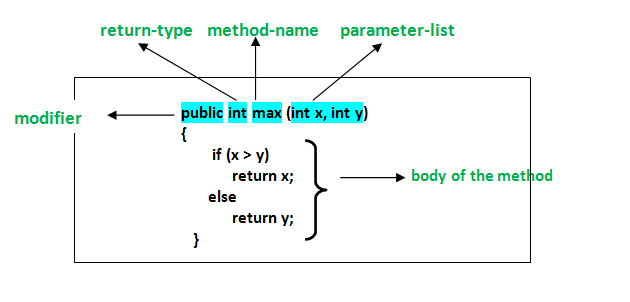
As you learn Java, start with variables and data types, conditional statements, loops, and methods. Then move on to object-oriented programming, including classes, objects, inheritance, and interfaces. Exceptions and collections are also important topics for writing practical programs.
Small projects are a useful way to practice. Try building a calculator, a to-do list, or a program that reads and summarizes information. Working through real examples helps connect language features to the problems they solve.
Tools for Java Development
To begin, install a Java Development Kit (JDK), which includes tools for compiling and running Java programs. You can write code in a basic text editor, but an integrated development environment (IDE) can make development easier with features such as code completion, debugging, and project management.
Keep Building Your Skills
Java is a substantial language, so there is no need to learn everything at once. Focus on the fundamentals, write code regularly, and read errors carefully when something does not work. With steady practice, you can use Java to create reliable applications and build a solid foundation for further software development.
8 Essential Tips for Writing Clean and Effective Java Code
- Use meaningful names for classes, methods, and variables.
- Keep methods small and focused on one task.
- Prefer interfaces when designing flexible APIs.
- Use try-with-resources to close files and streams.
- Handle exceptions specifically instead of catching everything.
- Use `equals()` to compare objects, not `==`.
- Choose collections based on how they’ll be used.
- Write unit tests for important behavior.
Use meaningful names for classes, methods, and variables.
Use meaningful names for Java classes, methods, and variables to make your code easier to understand and maintain. Choose names that clearly describe what each element represents or does, such as CustomerAccount, calculateTotal(), or orderCount. Clear, consistent naming helps you and other developers follow the logic, spot mistakes, and update the code with confidence.
Keep methods small and focused on one task.
Keep Java methods small and focused on one task. A method that does one thing is easier to understand, test, debug, and reuse. If a method starts handling several responsibilities—such as validating input, updating data, and formatting output—consider splitting those steps into separate methods with clear names. This keeps your code organized and makes future changes less likely to cause unexpected problems.
Prefer interfaces when designing flexible APIs.
When designing a flexible Java API, prefer accepting or returning interfaces rather than specific implementation classes. For example, use `List
Use try-with-resources to close files and streams.
Use Java’s try-with-resources statement to manage files and streams safely. It automatically closes any resource that implements `AutoCloseable` when the statement finishes, even if an exception occurs, helping prevent resource leaks and keeping your code concise. Declare resources in the parentheses after `try`, such as a `BufferedReader` or `InputStream`, and handle any exceptions that may be thrown while using them.
Handle exceptions specifically instead of catching everything.
In Java, handle exceptions as specifically as possible instead of catching every error with a broad catch (Exception e) block. Catching the expected exception types lets you respond appropriately—for example, by retrying a failed operation or showing a helpful message—while allowing unexpected problems to surface during testing and debugging. Avoid swallowing exceptions silently; log or otherwise handle them meaningfully so issues are easier to diagnose.
Use `equals()` to compare objects, not `==`.
When comparing Java objects, use `equals()` to check whether they have the same value, rather than `==`, which checks whether two references point to the exact same object. For example, two separate `String` objects can contain the same text but still evaluate as different with `==`. Calling `equals()` makes the comparison based on content, as long as the object’s class implements the method appropriately.
Choose collections based on how they’ll be used.
Choose Java collections based on how your data will be used. Use a List when order matters or you need to access items by index, a Set when you want to prevent duplicates, and a Map when you need to look up values by key. Also consider whether you need fast lookups, predictable iteration order, or thread safety, since different implementations—such as ArrayList, HashSet, and HashMap—make different tradeoffs. Matching the collection to the task can make your code clearer and more efficient.
Write unit tests for important behavior.
Write unit tests for the most important behavior in your Java applications. Tests help verify that methods produce the expected results, catch regressions when code changes, and make it easier to refactor with confidence. Focus first on core logic and edge cases, such as empty inputs, invalid values, or boundary conditions. Frameworks like JUnit make it straightforward to organize and run tests as part of your development workflow.