cfchris.com

Loading

salesforce software engineer

Salesforce Software Engineer: Role, Skills, and Career Path

What Does a Salesforce Software Engineer Do?

A Salesforce software engineer designs, builds, and maintains applications and integrations on the Salesforce platform. The role combines software development with an understanding of how organizations manage customer relationships, sales, service, marketing, and business operations.

Salesforce offers both low-code tools and extensive development capabilities. Engineers use these options to tailor the platform to an organization’s needs, connect it with other systems, and help ensure that its data and processes work reliably.

Key Responsibilities

Day-to-day work varies by employer and project, but a Salesforce software engineer may:

  • Develop custom features using Apex, Salesforce’s programming language.
  • Build interactive user interfaces with Lightning Web Components (LWC).
  • Configure objects, fields, validation rules, flows, and other platform features.
  • Connect Salesforce to external applications through APIs and integration tools.
  • Write automated tests and troubleshoot bugs, performance issues, and data problems.
  • Review requirements with business stakeholders and translate them into technical solutions.
  • Deploy changes between development, testing, and production environments.
  • Document technical decisions and help maintain security and data quality.

Common Salesforce Technologies

Salesforce engineers often work with a mix of platform-specific and general software development tools. Common technologies include:

  • Apex: A server-side language used to implement business logic.
  • Lightning Web Components: A framework for building modern user interfaces.
  • SOQL and SOSL: Query languages for finding and working with Salesforce data.
  • REST and SOAP APIs: Interfaces commonly used to integrate Salesforce with other systems.
  • Salesforce CLI and source control: Tools for managing code, environments, and deployments.
  • JavaScript, HTML, and CSS: Web technologies that support front-end development.

The exact toolset depends on the organization’s Salesforce products, architecture, and development practices.

Skills That Matter

Strong programming fundamentals are important, including object-oriented design, data structures, testing, and debugging. Salesforce engineers also benefit from understanding databases, web application architecture, APIs, and version control.

Technical ability is only part of the job. Engineers need to communicate clearly with administrators, product owners, analysts, and end users. Because Salesforce often supports essential business workflows, the ability to understand a problem before proposing a solution is especially valuable.

Salesforce Engineer vs. Salesforce Administrator

Salesforce administrators typically focus on configuring and maintaining the platform with declarative tools, such as flows, permissions, and reports. Salesforce software engineers generally spend more time writing code, building custom components, and designing integrations. In practice, the roles can overlap, and many teams combine configuration and custom development to find the simplest effective solution.

How to Become a Salesforce Software Engineer

There is no single path into the profession. Many people begin with a background in computer science, software development, or information technology. Others transition from Salesforce administration or related business systems roles.

  1. Learn core programming concepts. Practice object-oriented programming, JavaScript, databases, and web development fundamentals.
  2. Explore Salesforce. Use Salesforce learning resources and hands-on practice environments to understand the platform.
  3. Build practical projects. Create sample components, automation, and integrations, and document the decisions behind them.
  4. Learn testing and deployment. Get familiar with automated tests, source control, and moving changes safely between environments.
  5. Consider certifications. Salesforce certifications can help demonstrate platform knowledge, though hands-on experience and problem-solving skills remain important.

Career Outlook

Organizations across many industries use Salesforce to support customer-facing and internal processes. As a result, engineers who can customize the platform, integrate it with other systems, and maintain reliable applications may find opportunities in consulting firms, technology companies, nonprofits, and in-house IT teams.

Job titles and expectations vary. Some roles emphasize Apex and custom application development, while others focus on integrations, user interfaces, or platform architecture. Reviewing the responsibilities in a job listing can help candidates identify which skills to develop.

Final Thoughts

A Salesforce software engineer connects software development with real business needs. The role is a good fit for people who enjoy solving technical problems, working with data and APIs, and collaborating with teams to improve how work gets done. A strong foundation in programming, platform knowledge, and clear communication can help build a lasting career in Salesforce development.


Top 5 Benefits of Being a Salesforce Software Engineer: High Demand, Competitive Pay, and Career Growth

  1. High demand across many industries
  2. Competitive earning potential
  3. Opportunities to solve business problems
  4. A broad ecosystem of tools and technologies
  5. Clear paths for learning and career growth


Challenges Faced by Salesforce Software Engineers: Navigating Skill Limitations, Platform Updates, and More

  1. Salesforce-specific skills may limit career flexibility.
  2. Platform updates require ongoing learning.
  3. Complex customizations can be difficult to maintain.
  4. Debugging integrations can be time-consuming.
  5. Licensing costs may constrain project choices.
  6. Business requirements can change frequently.

High demand across many industries

Salesforce software engineers are in high demand across many industries because organizations use Salesforce to manage customer relationships, sales, service, and business operations. Companies in sectors such as finance, health care, retail, technology, and nonprofits often need skilled engineers to customize the platform, connect it with other systems, and improve business processes. This broad adoption gives qualified professionals opportunities to work with different types of organizations and projects.

Competitive earning potential

Salesforce software engineers can have competitive earning potential, especially as they build expertise in areas such as Apex development, integrations, and Salesforce architecture. Compensation varies based on experience, location, industry, and the complexity of the role, but specialized skills and a strong track record can help professionals qualify for higher-paying opportunities.

Opportunities to solve business problems

One of the biggest advantages of being a Salesforce software engineer is the opportunity to solve real business problems. By understanding how a company works, you can build custom features, automate repetitive tasks, and connect systems so teams can serve customers more effectively. The result is more than working code—it’s practical improvements that help people save time, make better decisions, and reach their goals.

A broad ecosystem of tools and technologies

One major advantage of being a Salesforce software engineer is access to a broad ecosystem of tools and technologies. From Apex and Lightning Web Components to APIs, automation tools, cloud services, and development platforms, Salesforce offers many ways to build and connect business applications. This variety lets engineers solve different kinds of problems, develop new skills, and choose the right approach for each project.

Clear paths for learning and career growth

One advantage of becoming a Salesforce software engineer is having clear paths for learning and career growth. Salesforce offers structured learning resources, hands-on practice, and certifications that help professionals build skills step by step. As experience grows, engineers can pursue specialties such as application development, integrations, or platform architecture, creating opportunities to advance into senior, lead, or architect roles.

Salesforce-specific skills may limit career flexibility.

A potential drawback of specializing as a Salesforce software engineer is that deep expertise in Salesforce-specific tools, languages, and workflows may not transfer directly to other technology roles. Employers outside the Salesforce ecosystem may prioritize experience with different platforms or programming stacks, which can make career changes less straightforward. Building broader skills in areas such as JavaScript, APIs, databases, cloud architecture, and general software engineering practices can help keep future options open.

Platform updates require ongoing learning.

One challenge of being a Salesforce software engineer is keeping up with the platform’s regular updates. New features, changes, and tools can affect how applications are built and maintained, so engineers need to make time for continuous learning. Staying current helps prevent outdated practices and ensures solutions remain secure, compatible, and effective.

Complex customizations can be difficult to maintain.

One challenge of working as a Salesforce software engineer is that complex customizations can be difficult to maintain. Custom code, integrations, and automation may become harder to understand as business requirements change, especially when documentation or testing is limited. Over time, even a small update can have unexpected effects across the platform, so engineers need to plan carefully, follow consistent development practices, and regularly review and test custom solutions.

Debugging integrations can be time-consuming.

One challenge of being a Salesforce software engineer is that debugging integrations can be time-consuming. When Salesforce exchanges data with external applications, an issue may stem from the code, API limits, authentication, data formats, or the other system’s behavior. Engineers often need to trace requests across multiple services and environments before finding the cause, which can delay fixes and require careful coordination with other teams.

Licensing costs may constrain project choices.

Licensing costs can constrain the choices available to a Salesforce software engineer. Because Salesforce features and user access may depend on subscription plans, a technically sound solution might require additional licenses or paid add-ons. Engineers often need to weigh project requirements against the organization’s budget, and may have to adjust the design, limit access, or find an alternative approach to avoid unexpected costs.

Business requirements can change frequently.

One challenge of working as a Salesforce software engineer is that business requirements can change frequently. A solution that meets a team’s needs today may need adjustments as priorities, workflows, or customer expectations shift. Engineers must stay flexible, clarify updated requirements, and assess how changes could affect existing features, integrations, and data. This ongoing adaptation can make planning and delivery more difficult, especially when timelines are tight.


c++ software engineer

C++ Software Engineer: Roles, Skills, and Career Paths

What Does a C++ Software Engineer Do?

A C++ software engineer designs, builds, tests, and maintains software using C++, a powerful programming language known for its performance and flexibility. C++ is used in systems where speed, reliability, and control over computer resources matter—from game engines and desktop applications to embedded devices and financial platforms.

Key Responsibilities

The day-to-day work of a C++ software engineer depends on the product and industry, but often includes:

  • Writing and reviewing clear, efficient C++ code
  • Designing software components and application architecture
  • Finding and fixing bugs, performance issues, and memory problems
  • Creating automated tests and maintaining existing test suites
  • Working with other engineers, designers, and product teams
  • Documenting technical decisions and supporting software releases

Because C++ gives developers significant control over memory and system resources, engineers must consider how their code behaves—not just whether it produces the right result. Careful testing and code review help make software dependable and easier to maintain.

Where C++ Engineers Work

C++ is used across a wide range of industries. Engineers may work on:

  • Games and entertainment: Game engines, graphics, physics, and real-time systems
  • Embedded software: Code for vehicles, appliances, robotics, and industrial equipment
  • Operating systems and infrastructure: System tools, databases, browsers, and networking software
  • Finance: Applications that need low-latency processing and predictable performance
  • Scientific computing: Simulations and data-intensive applications

Skills That Matter

Strong C++ fundamentals are essential, including familiarity with object-oriented and generic programming, the standard library, and modern language features. Engineers also benefit from understanding data structures, algorithms, concurrency, debugging, and performance profiling.

Knowledge of tools and related technologies can be valuable, too. Depending on the role, a C++ engineer might use build systems, version control, testing frameworks, integrated development environments, and platforms such as Linux or Windows. Experience with graphics APIs, networking, databases, or embedded hardware may be important for specialized positions.

Technical ability is only part of the job. Communication, collaboration, curiosity, and the ability to explain tradeoffs help engineers contribute effectively to a team.

How to Become a C++ Software Engineer

Many C++ engineers study computer science, software engineering, or a related field, but there are multiple ways to build the skills needed for the role. A practical learning path might include:

  1. Learn programming fundamentals and core C++ concepts.
  2. Practice writing small programs, then build larger projects.
  3. Study data structures, algorithms, and software design.
  4. Learn to use debugging, testing, and version-control tools.
  5. Create a portfolio that demonstrates problem-solving and code quality.
  6. Apply for internships, entry-level positions, or projects that provide hands-on experience.

Personal projects can make learning more concrete. Building a small game, command-line utility, simulation, or embedded project gives aspiring engineers a chance to practice design, testing, and debugging in a realistic setting.

Why Choose a Career in C++?

C++ remains relevant because many applications require high performance, precise resource management, or close interaction with hardware. The language also offers opportunities to work in varied fields, from game development to robotics and infrastructure software.

The work can be challenging. C++ has a large feature set, and writing safe, maintainable code requires care. But for people who enjoy understanding how software works beneath the surface and solving complex technical problems, a C++ software engineering career can be both engaging and rewarding.

Conclusion

A C++ software engineer combines programming expertise with problem-solving and careful engineering practices. Whether developing real-time applications, embedded systems, or performance-critical software, these professionals help build technology that is efficient, reliable, and capable of meeting demanding requirements.


Top 9 Frequently Asked Questions About C++ Software Engineering Careers

  1. What is the salary of C programmer?
  2. What engineer makes $500,000 a year?
  3. Can I be a software engineer with C++?
  4. How is C++ used in software engineering?
  5. Is C++ good for software engineering?
  6. What is the difference between C and C++ developer?
  7. Are C programmers rare?
  8. Do I need C++ to be a software engineer?
  9. Is a C++ Developer a software Engineer?

What is the salary of C programmer?

In the United States, a C programmer’s salary can vary widely, but many roles pay roughly $70,000 to $130,000 per year. Pay depends on experience, location, industry, and the complexity of the work; engineers specializing in areas such as embedded systems, operating systems, or performance-critical software may earn more. Because employers often group C programming with broader software engineering roles, job titles and responsibilities can affect salary comparisons.

What engineer makes $500,000 a year?

Engineers who earn $500,000 a year are typically highly experienced specialists or senior leaders, such as principal or distinguished software engineers at major technology companies, or quantitative software engineers at hedge funds and trading firms. These figures usually refer to total compensation—including salary, bonuses, and stock—not base salary alone, and they are uncommon and depend on the employer, location, performance, and market conditions. C++ expertise can be valuable in areas such as trading systems, game engines, and infrastructure, but knowing C++ alone does not guarantee this level of pay.

Can I be a software engineer with C++?

Yes, you can become a software engineer with C++. It’s widely used to build games, desktop applications, operating systems, embedded software, and other performance-critical systems. Learn core C++ concepts alongside data structures, algorithms, testing, debugging, and software design, then apply those skills in projects that demonstrate your abilities. Depending on the role, employers may also value experience with tools such as Git, build systems, and Linux.

How is C++ used in software engineering?

C++ is used in software engineering to build fast, reliable applications that need strong performance and control over system resources. C++ software engineers use it to develop game engines, operating systems, embedded software, browsers, databases, financial platforms, and scientific applications. Its speed and ability to work close to hardware make it a good fit for complex, resource-intensive systems, while its broad range of features supports large-scale software development.

Is C++ good for software engineering?

Yes, C++ is a strong choice for software engineering, especially when performance, efficiency, and direct control over system resources are important. It’s widely used in areas such as game development, embedded systems, operating systems, financial technology, and other performance-critical applications. C++ can have a steeper learning curve than some languages, so it may not be the best fit for every project, but its versatility and mature ecosystem make it a valuable skill for software engineers.

What is the difference between C and C++ developer?

A C developer primarily works with C, a procedural language often used for operating systems, embedded devices, and other low-level software. A C++ developer uses C++, which supports procedural programming as well as object-oriented and generic programming, making it common in areas such as game development, desktop applications, and performance-critical systems. The languages share some syntax and concepts, but C++ has additional features, libraries, and design approaches. In practice, the difference depends on the role: both developers may work close to hardware, while C++ positions often emphasize classes, templates, and larger software architectures.

Are C programmers rare?

C programmers aren’t necessarily rare, but roles requiring deep, specialized C expertise are less common than general software development jobs. C remains important in embedded systems, operating systems, device drivers, and other performance-critical software, so experienced C programmers are valued in those fields. Many developers also know C alongside C++ or other languages, which can make it harder to judge how many are dedicated C specialists.

Do I need C++ to be a software engineer?

No, you don’t need to know C++ to become a software engineer. Many engineers work primarily with languages such as Python, Java, JavaScript, C#, or Swift, depending on the products they build. C++ is especially useful for performance-critical software, game engines, embedded systems, and other applications that require close control over hardware and memory. Choose a language based on your interests and career goals, then focus on core skills like problem-solving, data structures, testing, and writing maintainable code.

Is a C++ Developer a software Engineer?

Yes, a C++ developer can be a software engineer, but the titles aren’t always interchangeable. “C++ developer” usually describes someone who builds software primarily with C++, while “software engineer” often emphasizes the broader process of designing, testing, and maintaining reliable software systems. In practice, many C++ developers perform software engineering work, and the exact title depends on the employer and responsibilities.

it software engineer

IT Software Engineer: Roles, Skills, and Career Opportunities

What Does an IT Software Engineer Do?

An IT software engineer designs, builds, tests, and maintains software that helps people and organizations solve problems. The role combines programming skills with engineering practices, such as planning, documentation, testing, and ongoing improvement. IT software engineers may create business applications, websites, mobile apps, cloud services, or tools that support an organization’s technology systems.

Key Responsibilities

A software engineer’s daily work depends on the team and project, but common responsibilities include:

  • Understanding user and business requirements
  • Designing software systems and choosing suitable technologies
  • Writing, reviewing, and improving code
  • Testing software to find and fix defects
  • Maintaining existing applications and resolving technical issues
  • Documenting code, systems, and development processes
  • Working with designers, project managers, IT teams, and other engineers

Skills and Tools

Programming is an important part of the job, but successful software engineering involves more than writing code. Engineers need problem-solving skills, attention to detail, clear communication, and the ability to collaborate. They also need to understand how software fits into a larger IT environment, including networks, databases, operating systems, and security practices.

Depending on their work, software engineers may use languages such as Java, Python, C#, JavaScript, or SQL. Common tools include version-control systems, code editors, cloud platforms, automated testing frameworks, and project-management software. The specific tools vary by employer and project.

Education and Career Paths

Many software engineers have a degree in computer science, software engineering, or a related field. Others enter the profession through technical programs, independent study, internships, or practical experience. A portfolio of projects can help demonstrate skills, especially for candidates who are building experience.

With experience, an engineer may specialize in areas such as cloud computing, cybersecurity, mobile development, data engineering, or artificial intelligence. Other career paths include senior engineer, technical lead, software architect, engineering manager, or IT consultant.

Why Software Engineering Matters

Software supports many aspects of modern life, from online services and business operations to healthcare, transportation, and communication. IT software engineers help make these systems useful, reliable, and secure. Their work often continues after a product launches, as software must be updated to fix issues, meet changing needs, and work with new technologies.

Is This Career a Good Fit?

Software engineering may suit people who enjoy solving puzzles, learning new technologies, and turning ideas into practical tools. The work can involve complex challenges and changing priorities, so curiosity, patience, and a willingness to keep learning are valuable. For those who enjoy building and improving technology, it can offer a wide range of opportunities across industries.


8 Essential Tips for Success as an IT Software Engineer

  1. Master core programming concepts.
  2. Practice problem-solving every day.
  3. Write clean, readable code.
  4. Use version control consistently.
  5. Learn to test your software.
  6. Communicate clearly with your team.
  7. Keep learning new tools and technologies.
  8. Ask for feedback and improve.

Master core programming concepts.

Mastering core programming concepts is essential for becoming a successful IT software engineer. Build a strong understanding of variables, data types, control flow, functions, data structures, algorithms, and object-oriented programming before focusing too heavily on specific tools or frameworks. These fundamentals make it easier to learn new languages, write clear and efficient code, troubleshoot problems, and design software that can grow and adapt over time. Practice regularly by building small projects and explaining how your code works.

Practice problem-solving every day.

Practice problem-solving every day to strengthen the skills you’ll use as an IT software engineer. Try a coding challenge, debug a small program, or break a real-world task into manageable steps. Focus on understanding why a solution works, not just getting the right answer. Over time, regular practice can help you think more logically, write clearer code, and tackle unfamiliar technical challenges with greater confidence.

Write clean, readable code.

Writing clean, readable code is an essential skill for an IT software engineer. Clear names, consistent formatting, and simple structure make code easier to understand, test, and maintain—not just for its author, but for teammates who may work on it later. Keep functions focused, avoid unnecessary complexity, and add comments when they clarify the reasoning behind a decision. Well-organized code helps teams find bugs faster and adapt software as requirements change.

Use version control consistently.

Use version control consistently to track changes, collaborate safely, and make it easier to recover from mistakes. Commit small, focused updates with clear messages so teammates can understand what changed and why. Whether working alone or on a team, a consistent version-control workflow helps keep code organized and makes software development more reliable.

Learn to test your software.

Learn to test your software so you can catch problems early and make your applications more reliable. Practice writing tests that check individual functions, how different parts of a system work together, and whether the finished product behaves as users expect. Automated tests can save time as your code changes, while hands-on testing can reveal usability issues that scripts may miss. Building testing into your workflow helps prevent regressions, makes debugging easier, and gives you greater confidence when releasing updates.

Communicate clearly with your team.

Clear communication helps IT software engineers collaborate effectively and keep projects moving. Share updates on your progress, explain technical issues in plain language, and ask questions when requirements are unclear. When discussing a problem, include relevant details and suggest possible next steps. Clear, respectful communication helps teammates coordinate their work, catch misunderstandings early, and build better software together.

Keep learning new tools and technologies.

IT software engineers should make continuous learning part of their routine because tools, programming languages, and best practices evolve quickly. Exploring new technologies through online courses, documentation, personal projects, or professional communities can help engineers work more efficiently and adapt to changing project needs. It’s not necessary to learn every new tool; focus on technologies that support your goals and solve real problems.

Ask for feedback and improve.

Ask for feedback regularly from teammates, mentors, and users, and treat their input as an opportunity to grow. Constructive feedback can reveal bugs, improve code quality, and help make software easier to use and maintain. Consider each suggestion thoughtfully, ask questions when something is unclear, and apply what you learn to your next project. Over time, this habit can strengthen both your technical skills and your ability to collaborate.

java course for beginners

Java Course for Beginners: Learn the Fundamentals and Build Your First Programs

Java Course for Beginners: A Practical Guide to Getting Started

Java is a popular programming language used to build everything from business applications and web services to Android apps and large-scale software systems. Its clear structure, broad ecosystem, and strong community make it a useful language for people learning to code. A well-designed Java course for beginners can help you move from basic concepts to building programs of your own.

Why Learn Java?

Java is designed to run on many types of computers. Java programs are typically compiled into bytecode, which runs on the Java Virtual Machine (JVM). This approach helps the same program work across different operating systems, provided a compatible JVM is available.

Java is also widely used in professional software development. Learning it can introduce you to essential programming ideas—including variables, loops, methods, and object-oriented programming—that apply to many other languages as well.

What a Beginner Java Course Should Cover

You do not need previous programming experience to begin. A good introductory course explains each idea step by step and gives you opportunities to practice it. Look for a course that includes these core topics:

  • Setting up your tools: Install a Java Development Kit (JDK) and choose a code editor or integrated development environment (IDE).
  • Your first program: Learn how to write, compile, and run a simple Java application.
  • Variables and data types: Store information using types such as int, double, boolean, and String.
  • Operators and expressions: Perform calculations and compare values.
  • Conditionals: Use if, else, and switch statements to make decisions.
  • Loops: Repeat tasks with for and while loops.
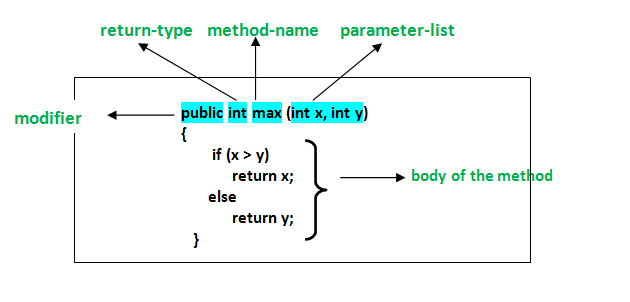
  • Methods: Organize code into reusable blocks.
  • Arrays and collections: Work with groups of values.
  • Object-oriented programming: Create classes and objects, and learn about fields, constructors, and methods.
  • Debugging and errors: Read compiler messages, find mistakes, and improve your code.

How to Choose the Right Course

Beginner courses come in many formats, including online lessons, classroom instruction, books, and self-paced tutorials. The best choice depends on how you like to learn and how much time you can set aside. Before enrolling, check that the course:

  • Clearly identifies itself as suitable for beginners.
  • Uses current Java tools and explains how to install them.
  • Includes coding exercises, not just videos or lectures.
  • Builds concepts gradually and explains unfamiliar terms.
  • Offers small projects that let you apply what you have learned.

A course does not have to teach every Java feature at once. A strong foundation in the basics is more valuable than rushing through advanced topics before you are ready.

Practice with Small Projects

Writing code regularly is one of the best ways to make progress. After learning the fundamentals, try projects that are simple enough to finish but flexible enough to expand. For example, you could create:

  • A temperature or unit converter
  • A basic calculator
  • A number-guessing game
  • A to-do list for the command line
  • A program that tracks books, movies, or personal expenses

Start with a basic version, then add features as your skills improve. A number-guessing game, for instance, can begin with a random number and a loop. Later, you can add input validation, a limited number of guesses, and a way to play again.

Tips for Learning Java Successfully

Set a manageable learning schedule. Short, frequent practice sessions often work better than trying to learn everything in one sitting. Type out examples yourself, change them, and observe what happens. When you encounter an error, read the message carefully and test one possible fix at a time.

It is also normal to revisit concepts. Object-oriented programming and other topics may take time to feel comfortable. Keep your early programs, review them later, and notice how your understanding has grown.

What Comes After the Basics?

Once you can write small programs and understand how classes and objects work, you can explore topics such as exception handling, file input and output, generics, testing, and common data structures. Your next steps can depend on your goals. For example, you might study web development, Android development, or backend application development.

Start Building with Java

A Java course for beginners can give you a clear path into programming, but progress comes from applying what you learn. Choose a course with hands-on exercises, practice consistently, and build small projects along the way. With patience and regular effort, you can develop the skills to create useful Java applications and continue learning more advanced programming concepts.


Top FAQs About Starting a Java Course for Beginners

  1. Which is the best Java course for beginners?
  2. How can I learn Java as a beginner?
  3. Is 1 month enough to learn Java?
  4. How do I start studying Java?

Which is the best Java course for beginners?

The best Java course for beginners is one that assumes no prior programming experience, teaches concepts step by step, and gives you plenty of hands-on practice. Look for lessons covering Java basics, problem-solving, and object-oriented programming, along with exercises and small projects that help you apply what you learn. The right choice also depends on your learning style, schedule, and budget, so preview a lesson or two before committing.

How can I learn Java as a beginner?

Beginners can learn Java by starting with the basics: installing the JDK and a code editor, then practicing variables, data types, conditionals, loops, methods, and classes. Follow a structured beginner course with hands-on exercises, and write code regularly rather than only watching lessons. Small projects—such as a calculator or number-guessing game—help reinforce new concepts. When errors come up, read the messages carefully and use them as clues; steady practice is more effective than trying to learn everything at once.

Is 1 month enough to learn Java?

One month is enough to learn Java’s fundamentals if you study consistently and practice regularly, but it’s usually not enough to master the language or become job-ready. In that time, you can learn basic syntax, variables, conditionals, loops, methods, and introductory object-oriented programming, then apply them in small projects. Your progress will depend on your prior experience and the time you can dedicate each day. Continue practicing after the first month to strengthen your skills and explore more advanced topics.

How do I start studying Java?

To start studying Java, install the latest Java Development Kit (JDK) and choose a beginner-friendly editor or IDE, such as IntelliJ IDEA or Visual Studio Code. Then follow a structured introductory course that covers basic syntax, variables, conditionals, loops, methods, and classes. Write and run small programs as you learn—such as a calculator or number-guessing game—and practice regularly. When you encounter errors, read the messages carefully and use them to understand how your code works.

for java

A Beginner’s Guide to Programming for Java Apps

Getting Started with Java Programming

Java is a popular, general-purpose programming language used to build everything from web applications and business software to Android apps and large-scale systems. Its combination of readability, portability, and extensive tooling makes it a strong choice for both new programmers and experienced developers.

What Is Java?

Java is a class-based, object-oriented language. Developers write Java source code, which is compiled into bytecode. The Java Virtual Machine (JVM) runs that bytecode on compatible devices and operating systems. This approach helps Java programs run across different platforms without requiring a separate version of the source code for each one.

Why Learn Java?

  • Portability: Java applications can run on many platforms with a compatible JVM.
  • Versatility: Java is used in web services, enterprise applications, desktop software, and other fields.
  • Strong ecosystem: A wide range of libraries, frameworks, development tools, and learning resources is available.
  • Useful fundamentals: Learning Java introduces concepts such as classes, objects, types, and exception handling that apply to many programming languages.
  • Ongoing use: Organizations continue to use Java for applications that need to be maintained and expanded over time.

Your First Java Program

A simple Java program can display a message in the console:

public class Main {

public static void main(String[] args) {

System.out.println("Hello, Java!");

}

}

The main method is the entry point for this program. The System.out.println statement prints a line of text. Java’s syntax may look formal at first, but its structure encourages code that is organized and explicit.

Core Concepts to Explore

As you learn Java, start with variables and data types, conditional statements, loops, and methods. Then move on to object-oriented programming, including classes, objects, inheritance, and interfaces. Exceptions and collections are also important topics for writing practical programs.

Small projects are a useful way to practice. Try building a calculator, a to-do list, or a program that reads and summarizes information. Working through real examples helps connect language features to the problems they solve.

Tools for Java Development

To begin, install a Java Development Kit (JDK), which includes tools for compiling and running Java programs. You can write code in a basic text editor, but an integrated development environment (IDE) can make development easier with features such as code completion, debugging, and project management.

Keep Building Your Skills

Java is a substantial language, so there is no need to learn everything at once. Focus on the fundamentals, write code regularly, and read errors carefully when something does not work. With steady practice, you can use Java to create reliable applications and build a solid foundation for further software development.


8 Essential Tips for Writing Clean and Effective Java Code

  1. Use meaningful names for classes, methods, and variables.
  2. Keep methods small and focused on one task.
  3. Prefer interfaces when designing flexible APIs.
  4. Use try-with-resources to close files and streams.
  5. Handle exceptions specifically instead of catching everything.
  6. Use `equals()` to compare objects, not `==`.
  7. Choose collections based on how they’ll be used.
  8. Write unit tests for important behavior.

Use meaningful names for classes, methods, and variables.

Use meaningful names for Java classes, methods, and variables to make your code easier to understand and maintain. Choose names that clearly describe what each element represents or does, such as CustomerAccount, calculateTotal(), or orderCount. Clear, consistent naming helps you and other developers follow the logic, spot mistakes, and update the code with confidence.

Keep methods small and focused on one task.

Keep Java methods small and focused on one task. A method that does one thing is easier to understand, test, debug, and reuse. If a method starts handling several responsibilities—such as validating input, updating data, and formatting output—consider splitting those steps into separate methods with clear names. This keeps your code organized and makes future changes less likely to cause unexpected problems.

Prefer interfaces when designing flexible APIs.

When designing a flexible Java API, prefer accepting or returning interfaces rather than specific implementation classes. For example, use `List` instead of `ArrayList` when a method only needs list behavior. This keeps the API focused on what callers can do, lets implementations change without affecting users, and makes it easier to substitute alternatives such as `LinkedList` or custom implementations. Use a concrete class only when its specific behavior is essential.

Use try-with-resources to close files and streams.

Use Java’s try-with-resources statement to manage files and streams safely. It automatically closes any resource that implements `AutoCloseable` when the statement finishes, even if an exception occurs, helping prevent resource leaks and keeping your code concise. Declare resources in the parentheses after `try`, such as a `BufferedReader` or `InputStream`, and handle any exceptions that may be thrown while using them.

Handle exceptions specifically instead of catching everything.

In Java, handle exceptions as specifically as possible instead of catching every error with a broad catch (Exception e) block. Catching the expected exception types lets you respond appropriately—for example, by retrying a failed operation or showing a helpful message—while allowing unexpected problems to surface during testing and debugging. Avoid swallowing exceptions silently; log or otherwise handle them meaningfully so issues are easier to diagnose.

Use `equals()` to compare objects, not `==`.

When comparing Java objects, use `equals()` to check whether they have the same value, rather than `==`, which checks whether two references point to the exact same object. For example, two separate `String` objects can contain the same text but still evaluate as different with `==`. Calling `equals()` makes the comparison based on content, as long as the object’s class implements the method appropriately.

Choose collections based on how they’ll be used.

Choose Java collections based on how your data will be used. Use a List when order matters or you need to access items by index, a Set when you want to prevent duplicates, and a Map when you need to look up values by key. Also consider whether you need fast lookups, predictable iteration order, or thread safety, since different implementations—such as ArrayList, HashSet, and HashMap—make different tradeoffs. Matching the collection to the task can make your code clearer and more efficient.

Write unit tests for important behavior.

Write unit tests for the most important behavior in your Java applications. Tests help verify that methods produce the expected results, catch regressions when code changes, and make it easier to refactor with confidence. Focus first on core logic and edge cases, such as empty inputs, invalid values, or boundary conditions. Frameworks like JUnit make it straightforward to organize and run tests as part of your development workflow.

bloomberg software engineer

Exploring the Role of a Bloomberg Software Engineer in Cutting-Edge Technology Solutions

Bloomberg Software Engineer

The Role of a Bloomberg Software Engineer

Software engineers at Bloomberg play a crucial role in developing cutting-edge technology solutions that power the financial industry. These professionals are responsible for designing, building, and maintaining software systems that enable Bloomberg to deliver real-time data, analytics, and financial tools to its clients.

Key Responsibilities

As a software engineer at Bloomberg, you will be involved in:

  • Collaborating with cross-functional teams to design and implement software solutions
  • Writing clean, efficient, and maintainable code
  • Testing and debugging software applications to ensure high performance and reliability
  • Participating in code reviews and providing constructive feedback to peers
  • Staying up-to-date with the latest technologies and industry trends
  • Contributing to the continuous improvement of development processes and best practices

Skills and Qualifications

To excel as a Bloomberg software engineer, candidates typically possess:

  • A strong background in computer science or a related field
  • Proficiency in programming languages such as C++, Java, Python, or others
  • Experience with software development methodologies like Agile or Scrum
  • Excellent problem-solving skills and attention to detail
  • Effective communication and teamwork abilities
  • A passion for innovation and a drive for continuous learning

Career Development at Bloomberg

Bloomberg is committed to fostering the professional growth of its employees. Software engineers have access to various training programs, mentorship opportunities, and career advancement paths within the company. Additionally, Bloomberg encourages its employees to participate in industry conferences, hackathons, and other events to expand their knowledge and network with peers.

In Conclusion

The role of a software engineer at Bloomberg offers an exciting opportunity to work on complex technical challenges while making a meaningful impact on the global financial landscape. If you are passionate about technology and eager to contribute your skills to a dynamic team environment, consider exploring a career as a Bloomberg software engineer.


6 Essential Tips for Success as a Bloomberg Software Engineer

  1. Stay updated on the latest technologies and programming languages used at Bloomberg.
  2. Develop strong problem-solving skills to tackle complex technical challenges.
  3. Collaborate effectively with team members and stakeholders to deliver high-quality software solutions.
  4. Prioritize learning and professional growth to advance your career as a software engineer at Bloomberg.
  5. Pay attention to detail in coding and testing to ensure robust and reliable software products.
  6. Stay adaptable and open-minded to embrace changes in technology trends and project requirements.

Stay updated on the latest technologies and programming languages used at Bloomberg.

To excel as a software engineer at Bloomberg, it is essential to stay updated on the latest technologies and programming languages utilized within the company. By keeping abreast of advancements in the tech industry, you can enhance your skills, adapt to evolving project requirements, and contribute effectively to innovative solutions. Continuous learning and exploration of new tools and languages not only demonstrate your commitment to professional growth but also enable you to stay competitive in a fast-paced and dynamic work environment like Bloomberg.

Develop strong problem-solving skills to tackle complex technical challenges.

Developing strong problem-solving skills is essential for success as a Bloomberg software engineer. In this role, you will encounter complex technical challenges that require innovative solutions. By honing your ability to analyze problems, think critically, and approach issues methodically, you will be better equipped to navigate the intricate world of software development at Bloomberg. Embracing a proactive and creative problem-solving mindset will not only enhance your effectiveness as an engineer but also contribute to the continuous improvement and innovation within the team.

Collaborate effectively with team members and stakeholders to deliver high-quality software solutions.

Collaboration is key for Bloomberg software engineers to deliver high-quality software solutions. By working effectively with team members and stakeholders, engineers can leverage diverse perspectives and expertise to tackle complex challenges and ensure that the final product meets the highest standards. Clear communication, mutual respect, and a shared commitment to excellence are essential elements of successful collaboration at Bloomberg, enabling software engineers to create innovative solutions that drive the company’s mission forward in the fast-paced world of financial technology.

Prioritize learning and professional growth to advance your career as a software engineer at Bloomberg.

To advance your career as a software engineer at Bloomberg, it is essential to prioritize learning and professional growth. Embracing continuous learning opportunities, staying updated on the latest technologies, and actively seeking mentorship can help you enhance your skills and expertise in the dynamic field of software engineering. By investing in your personal development and expanding your knowledge base, you can position yourself for success and progression within the innovative environment of Bloomberg.

Pay attention to detail in coding and testing to ensure robust and reliable software products.

When working as a Bloomberg software engineer, it is essential to pay meticulous attention to detail during the coding and testing processes. By focusing on precision and thoroughness, engineers can create robust and reliable software products that meet high standards of performance and quality. This dedication to detail not only enhances the functionality of the software but also contributes to building trust with clients who rely on Bloomberg’s technology solutions for critical financial operations.

As a Bloomberg software engineer, it is essential to stay adaptable and open-minded to effectively navigate the ever-evolving landscape of technology trends and project requirements. By embracing changes with a flexible mindset, engineers can proactively respond to shifting demands, incorporate new tools and methodologies, and drive innovation in their work. This approach not only enhances problem-solving abilities but also fosters continuous learning and growth within the dynamic environment of software development at Bloomberg.

visual studio code java

Unlocking Java Development Potential with Visual Studio Code

Exploring Visual Studio Code for Java Development

Exploring Visual Studio Code for Java Development

Visual Studio Code (VS Code) has gained popularity among developers for its versatility and ease of use. While it is commonly associated with web development, VS Code also offers robust support for Java development, making it a compelling choice for Java programmers.

Key Features:

IntelliSense: VS Code provides IntelliSense capabilities for Java, offering intelligent code completion, parameter info, and code navigation features that enhance productivity.

Debugging: Developers can easily debug their Java applications within VS Code using breakpoints, variable inspection, and other debugging tools integrated seamlessly into the editor.

Extensions: The vast array of extensions available for VS Code allows developers to customize their Java development environment to suit their preferences and workflow.

Setting Up Java in Visual Studio Code:

To start coding in Java with Visual Studio Code, follow these steps:

  1. Install Java Development Kit (JDK): Ensure that you have the JDK installed on your system.
  2. Install Visual Studio Code: Download and install Visual Studio Code from the official website.
  3. Install Java Extension Pack: Install the “Java Extension Pack” from the VS Code marketplace to access essential tools and features for Java development.
  4. Create a New Project: Create a new Java project in VS Code and start coding!

The Future of Java Development with Visual Studio Code

The integration of Visual Studio Code with the robust capabilities of the Java ecosystem opens up exciting possibilities for developers. With its intuitive interface, powerful features, and extensive customization options, Visual Studio Code is poised to become a go-to choice for Java developers looking to streamline their workflow and boost productivity.

If you are a Java developer looking for a modern and efficient IDE, consider exploring Visual Studio Code – it might just be the tool you need to take your coding experience to the next level!


Top 7 FAQs About Using Visual Studio Code for Java Development

  1. How do I set up Java in Visual Studio Code?
  2. What are the key features of Visual Studio Code for Java development?
  3. Can I debug Java applications in Visual Studio Code?
  4. Which extensions are recommended for Java development in Visual Studio Code?
  5. How can I install the Java Extension Pack in Visual Studio Code?
  6. Is IntelliSense available for Java programming in Visual Studio Code?
  7. What makes Visual Studio Code a popular choice for Java developers?

How do I set up Java in Visual Studio Code?

Setting up Java in Visual Studio Code is a straightforward process that involves a few key steps. First, ensure that you have the Java Development Kit (JDK) installed on your system. Next, download and install Visual Studio Code from the official website. Then, head to the VS Code marketplace and install the “Java Extension Pack” to access essential tools and features for Java development. Once you have completed these steps, you can create a new Java project in Visual Studio Code and start coding seamlessly. This setup allows developers to harness the power of Visual Studio Code’s intuitive interface and robust features for efficient Java development.

What are the key features of Visual Studio Code for Java development?

Visual Studio Code offers a range of key features that make it an excellent choice for Java development. One standout feature is IntelliSense, which provides intelligent code completion, parameter information, and code navigation to enhance developers’ productivity. Additionally, Visual Studio Code supports robust debugging capabilities, allowing developers to easily debug their Java applications using breakpoints and variable inspection tools. The availability of a wide variety of extensions further enhances the Java development experience in Visual Studio Code, enabling developers to customize their environment to suit their specific needs and preferences.

Can I debug Java applications in Visual Studio Code?

Yes, you can debug Java applications in Visual Studio Code. Visual Studio Code offers robust debugging capabilities for Java developers, allowing them to set breakpoints, inspect variables, and step through their code with ease. By installing the necessary Java extensions and configuring the debugger settings, developers can seamlessly debug their Java applications directly within the familiar interface of Visual Studio Code. This feature enhances the development experience and empowers developers to troubleshoot and optimize their Java code effectively.

When it comes to Java development in Visual Studio Code, several extensions are highly recommended to enhance your coding experience. Some popular extensions for Java development include the “Java Extension Pack,” which provides essential tools like language support, debugging capabilities, and project management features. Additionally, “Spring Boot Extension Pack” is ideal for developers working with Spring Boot applications, offering specialized support and tools tailored to Spring projects. Other recommended extensions include “CheckStyle for Java,” “SonarLint,” and “Maven for Java.” These extensions can significantly improve your productivity and streamline your workflow when developing Java applications in Visual Studio Code.

How can I install the Java Extension Pack in Visual Studio Code?

To install the Java Extension Pack in Visual Studio Code, follow these simple steps. First, open Visual Studio Code and navigate to the Extensions view by clicking on the Extensions icon in the Activity Bar on the side of the window or by pressing Ctrl+Shift+X. In the search bar, type “Java Extension Pack” and press Enter. Locate the Java Extension Pack in the search results and click on the “Install” button next to it. Visual Studio Code will then download and install the extension pack, enabling you to access a comprehensive set of tools and features tailored for Java development within the editor.

Is IntelliSense available for Java programming in Visual Studio Code?

IntelliSense, a powerful feature for code completion and navigation, is indeed available for Java programming in Visual Studio Code. With IntelliSense support, Java developers can benefit from intelligent suggestions, parameter information, and quick navigation to enhance their coding experience and productivity within the VS Code environment. This feature helps streamline the development process by providing real-time assistance and insights while writing Java code, making it easier for developers to write accurate and efficient code in Visual Studio Code.

Visual Studio Code has emerged as a popular choice among Java developers for several compelling reasons. Its robust support for Java development, including features like IntelliSense for smart code completion, powerful debugging tools, and a vast library of extensions tailored to Java programming, enhances the coding experience and boosts productivity. The seamless integration of Visual Studio Code with the Java ecosystem provides developers with a versatile and efficient environment to write, debug, and manage their Java projects effectively. Additionally, Visual Studio Code’s user-friendly interface and customization options make it an attractive option for Java developers seeking a modern and streamlined IDE that caters to their specific needs and preferences.

java programming software

Exploring the Versatility of Java Programming Software

Article: Java Programming Software

The Power of Java Programming Software

Java programming software is a versatile and powerful tool used by developers worldwide to create robust applications for a variety of platforms. Known for its portability, flexibility, and security features, Java has become one of the most popular programming languages in the industry.

One of the key advantages of using Java programming software is its “write once, run anywhere” capability. This means that Java applications can be developed on one platform and run on any other platform without the need for recompilation. This portability makes Java an ideal choice for developing cross-platform applications that can reach a wider audience.

Another strength of Java programming software is its extensive library of pre-built classes and APIs (Application Programming Interfaces) that simplify common programming tasks. Developers can leverage these libraries to accelerate development processes and focus on building innovative features rather than reinventing the wheel.

Security is a top priority in today’s digital landscape, and Java programming software offers robust security features to protect applications from potential threats. With built-in security mechanisms such as sandboxing and encryption capabilities, Java helps developers create secure applications that safeguard sensitive data and prevent unauthorized access.

Furthermore, Java’s object-oriented nature promotes code reusability, modularity, and scalability, making it easier for developers to maintain and extend their applications over time. The language’s strong typing system also helps catch errors at compile time, reducing the likelihood of runtime issues in production environments.

In conclusion, Java programming software empowers developers to build high-performance, secure, and scalable applications that meet the demands of today’s dynamic technology landscape. Whether you are a beginner learning the basics or an experienced developer working on enterprise-level projects, Java provides the tools and resources you need to succeed in the ever-evolving world of software development.


6 Essential Tips for Enhancing Your Java Programming Skills

  1. Use meaningful variable names to improve code readability.
  2. Follow Java naming conventions for classes, methods, and variables.
  3. Comment your code to explain complex logic or functionality.
  4. Practice writing efficient algorithms and optimize your code for performance.
  5. Familiarize yourself with Java libraries and frameworks to leverage existing solutions.
  6. Regularly test and debug your code to ensure it functions as intended.

Use meaningful variable names to improve code readability.

When working with Java programming software, it is essential to use meaningful variable names to enhance code readability. By choosing descriptive and relevant names for variables, developers can make their code more understandable and maintainable. Clear variable names not only help in comprehending the purpose of each variable but also contribute to efficient collaboration among team members. Additionally, using meaningful variable names can reduce the likelihood of errors and make debugging processes smoother. Embracing this simple yet impactful tip can significantly improve the overall quality of Java codebases.

Follow Java naming conventions for classes, methods, and variables.

It is essential to adhere to Java naming conventions when writing code for classes, methods, and variables. By following these conventions, developers can ensure consistency and readability across their codebase. Naming conventions such as using CamelCase for class names, starting with a lowercase letter for method names, and using meaningful names for variables help make the code more understandable and maintainable. Consistent naming practices also facilitate collaboration among team members and promote good coding standards within a project. By following Java naming conventions, developers can create cleaner and more organized code that is easier to manage and debug in the long run.

Comment your code to explain complex logic or functionality.

When working with Java programming software, it is essential to comment your code to explain complex logic or functionality. Comments serve as valuable documentation for yourself and other developers, providing insights into the purpose and reasoning behind specific code segments. By adding clear and concise comments, you not only enhance the readability of your code but also make it easier to maintain, debug, and modify in the future. Effective commenting practices in Java programming software help ensure that your code remains understandable and accessible, facilitating collaboration and promoting efficient development processes.

Practice writing efficient algorithms and optimize your code for performance.

To excel in Java programming software, it is crucial to practice writing efficient algorithms and optimize your code for performance. By honing your algorithmic skills and focusing on optimizing code efficiency, you can enhance the speed and responsiveness of your applications. This practice not only improves the overall performance of your software but also demonstrates a mastery of Java programming principles that are essential for developing high-quality and scalable applications.

Familiarize yourself with Java libraries and frameworks to leverage existing solutions.

To maximize your efficiency and productivity in Java programming, it is essential to familiarize yourself with Java libraries and frameworks. By understanding and utilizing these existing solutions, you can leverage pre-built functionalities and components to streamline your development process. Java libraries and frameworks offer a wealth of resources that can help you expedite project timelines, enhance code quality, and focus on implementing innovative features rather than starting from scratch. Embracing these tools will not only save you time and effort but also empower you to create robust and scalable applications with ease.

Regularly test and debug your code to ensure it functions as intended.

Regularly testing and debugging your code is a crucial practice in Java programming software development. By systematically checking for errors and ensuring that the code functions as intended, developers can identify and fix issues early in the development process. Testing helps maintain the reliability and quality of the software, ensuring that it meets the desired specifications and performs optimally. Through diligent testing and debugging, developers can deliver robust, error-free applications that provide a seamless user experience.

software engineer

Exploring the Role of a Software Engineer in Modern Technology

Article: Software Engineer

The Role of a Software Engineer in Today’s Tech Industry

In the fast-paced world of technology, software engineers play a crucial role in designing, developing, and maintaining the software applications that power our modern lives. These skilled professionals are responsible for creating innovative solutions to complex problems and ensuring that software systems function efficiently and effectively.

Key Responsibilities of a Software Engineer

Software engineers are involved in every stage of the software development process. From initial concept and design to implementation, testing, and maintenance, their responsibilities include:

  • Writing code in various programming languages
  • Collaborating with cross-functional teams to define requirements
  • Testing and debugging software applications
  • Implementing best practices for software development
  • Maintaining and updating existing software systems

Skills Required for Success

To excel as a software engineer, individuals need a combination of technical skills, problem-solving abilities, and strong communication skills. Some key skills required for success in this role include:

  • Proficiency in programming languages such as Java, C++, Python, or JavaScript
  • Understanding of data structures and algorithms
  • Knowledge of software development methodologies like Agile or Scrum
  • Ability to work collaboratively in a team environment
  • Continuous learning mindset to stay updated with evolving technologies

Career Opportunities for Software Engineers

The demand for skilled software engineers continues to grow across various industries, including technology, healthcare, finance, and more. With the ever-increasing reliance on digital solutions, software engineers can explore diverse career opportunities such as:

  • Software developer
  • Systems analyst
  • Data scientist
  • IT consultant
  • Cybersecurity specialist/liI

In Conclusion…

In conclusion, software engineers play a vital role in shaping the technological landscape we live in today. Their expertise and innovation drive progress and enable businesses and individuals to leverage cutting-edge solutions for a brighter future.

©2023 All rights reserved | YourWebsite.com


Understanding Software Engineering: Key Roles, Skills, and Career Paths

  1. What does a software engineer do?
  2. What skills are required to become a software engineer?
  3. How can I become a software engineer?
  4. What programming languages should a software engineer know?
  5. What is the average salary of a software engineer?
  6. What career opportunities are available for software engineers?

What does a software engineer do?

A software engineer is responsible for designing, developing, and maintaining software applications to meet specific requirements. They write code in various programming languages, collaborate with cross-functional teams to define project goals, test and debug software systems, and ensure that best practices are followed throughout the development process. Software engineers play a critical role in creating innovative solutions to complex problems and ensuring that software applications function efficiently and effectively to meet the needs of users.

What skills are required to become a software engineer?

To become a successful software engineer, a combination of technical skills and soft skills is essential. Proficiency in programming languages like Java, C++, Python, or JavaScript is crucial, along with a solid understanding of data structures and algorithms. Problem-solving abilities, attention to detail, and the capacity to work collaboratively in a team are also key attributes. Additionally, staying updated with the latest technologies and software development methodologies is vital for continuous growth and success in the dynamic field of software engineering.

How can I become a software engineer?

To become a software engineer, individuals typically follow a structured path that includes obtaining a relevant degree in computer science or a related field. Additionally, gaining practical experience through internships or personal projects can be beneficial in developing coding skills and understanding software development processes. Continuous learning and staying updated with the latest technologies are essential for aspiring software engineers to thrive in this dynamic field. Building a strong portfolio showcasing one’s projects and capabilities can also help in securing job opportunities as a software engineer.

What programming languages should a software engineer know?

Software engineers should have a strong foundation in programming languages to excel in their roles. While the specific languages may vary depending on the job requirements and industry trends, some commonly recommended programming languages for software engineers include Java, Python, C++, JavaScript, and SQL. These languages are versatile and widely used across different domains, making them valuable skills for software engineers to possess. Additionally, familiarity with frameworks and tools associated with these languages can further enhance a software engineer’s capabilities in developing robust and efficient software solutions.

What is the average salary of a software engineer?

The average salary of a software engineer can vary depending on factors such as location, experience, level of expertise, and the specific industry in which they work. In general, software engineers are well-compensated professionals due to their high demand and specialized skill set. According to recent data, the average salary for a software engineer in the United States ranges from $80,000 to $120,000 per year. However, this figure can be higher or lower based on individual circumstances and market conditions.

What career opportunities are available for software engineers?

Software engineers have a wide range of career opportunities available to them in today’s tech-driven world. They can pursue roles such as software developer, systems analyst, data scientist, IT consultant, and cybersecurity specialist. With the increasing demand for digital solutions across various industries, software engineers have the flexibility to explore diverse career paths that align with their interests and expertise. Whether working on developing cutting-edge applications, analyzing complex systems, harnessing data insights, or ensuring robust cybersecurity measures, software engineers play a crucial role in shaping the future of technology and driving innovation across different sectors.

application software engineer

Unlocking Innovation: The Role of an Application Software Engineer

Article: Application Software Engineer

The Role of an Application Software Engineer

Application software engineers play a crucial role in the development and maintenance of software applications that are used by individuals and businesses alike. These professionals are responsible for designing, coding, testing, and debugging applications to ensure they meet the needs and requirements of users.

Key Responsibilities

Application software engineers work closely with clients or stakeholders to understand their needs and translate them into functional software solutions. They write code using various programming languages, such as Java, C++, or Python, to create applications that perform specific tasks or functions.

These engineers also conduct thorough testing of the software to identify and fix any bugs or issues before deployment. They may collaborate with other team members, such as UX designers and quality assurance testers, to ensure the final product meets quality standards.

Educational Background

Most application software engineers hold a bachelor’s degree in computer science, software engineering, or a related field. Some employers may also require certifications or advanced degrees for senior positions.

Skills Required

To excel as an application software engineer, individuals need strong problem-solving skills, attention to detail, and proficiency in programming languages. They should also have excellent communication skills to collaborate effectively with team members and stakeholders.

Career Outlook

The demand for application software engineers is expected to grow as more industries rely on technology for their operations. These professionals can work in various sectors, including healthcare, finance, e-commerce, and more.

In conclusion, application software engineers play a vital role in creating user-friendly and efficient software applications that enhance productivity and streamline processes for organizations worldwide.


8 Essential Tips for Success as an Application Software Engineer

  1. Stay updated on the latest programming languages and technologies.
  2. Practice coding regularly to improve your skills.
  3. Collaborate with other developers to learn new techniques and approaches.
  4. Pay attention to detail when writing code to avoid errors.
  5. Communicate effectively with team members and stakeholders.
  6. Test your code thoroughly to ensure quality and functionality.
  7. Document your code for easier maintenance and future reference.
  8. Stay organized with project management tools and techniques.

Stay updated on the latest programming languages and technologies.

It is essential for application software engineers to stay updated on the latest programming languages and technologies to remain competitive in the ever-evolving tech industry. By keeping abreast of new developments, engineers can enhance their skills, adapt to changing trends, and leverage innovative tools to create cutting-edge software solutions that meet the demands of modern users. Continuous learning and exploration of emerging technologies are key to staying relevant and ensuring long-term success in this dynamic field.

Practice coding regularly to improve your skills.

To enhance your proficiency as an application software engineer, it is essential to practice coding regularly. By dedicating time to coding exercises and projects, you can sharpen your problem-solving abilities, familiarize yourself with different programming languages, and gain valuable hands-on experience in software development. Consistent practice not only improves your technical skills but also boosts your confidence in tackling complex challenges that may arise in the field of application engineering.

Collaborate with other developers to learn new techniques and approaches.

Collaborating with other developers is a valuable tip for application software engineers looking to enhance their skills and stay updated with the latest industry trends. By working together with peers, engineers can exchange knowledge, share best practices, and learn new techniques and approaches that can improve their coding efficiency and problem-solving abilities. This collaborative environment fosters creativity and innovation, ultimately leading to the development of high-quality software applications that meet the evolving needs of users and stakeholders.

Pay attention to detail when writing code to avoid errors.

When working as an application software engineer, it is crucial to pay close attention to detail when writing code to avoid errors. Even a small oversight can lead to significant issues in the functionality of the software. By meticulously reviewing and testing the code, engineers can identify and rectify any mistakes before they impact the performance of the application. This dedication to precision not only ensures the quality of the software but also contributes to a more efficient development process overall.

Communicate effectively with team members and stakeholders.

Effective communication is essential for application software engineers to collaborate successfully with team members and stakeholders. Clear and concise communication helps ensure that everyone is on the same page regarding project requirements, progress, and challenges. By maintaining open lines of communication, software engineers can address issues promptly, gather feedback, and make informed decisions that contribute to the overall success of the project. Strong communication skills also help build trust and foster a positive working environment, leading to better teamwork and ultimately, superior outcomes in software development projects.

Test your code thoroughly to ensure quality and functionality.

It is essential for application software engineers to test their code thoroughly to guarantee the quality and functionality of the software they develop. By conducting comprehensive testing, engineers can identify and rectify any bugs or issues before the software is deployed. This practice not only ensures a seamless user experience but also helps in maintaining the integrity and reliability of the application. Testing plays a crucial role in delivering high-quality software that meets the needs and expectations of users.

Document your code for easier maintenance and future reference.

Documenting your code is a critical practice for application software engineers to ensure easier maintenance and future reference. By adding comments and explanations within the code, developers can provide valuable insights into the purpose of each function, variable, or section of code. This documentation not only helps the original coder understand their own work better but also assists other team members who may need to review or modify the code in the future. Clear and concise documentation can save time and effort in troubleshooting issues, making it an essential aspect of creating well-maintained and sustainable software applications.

Stay organized with project management tools and techniques.

To excel as an application software engineer, it is essential to stay organized with project management tools and techniques. By utilizing tools like project management software, task boards, and agile methodologies, engineers can effectively plan, track progress, and prioritize tasks to ensure timely delivery of high-quality software solutions. These organizational strategies help streamline workflow, improve collaboration among team members, and ultimately contribute to the success of software development projects.