


ERP Development: A Practical Guide to Building a System That Fits Your Business
ERP Development: Building a System Around the Way Your Business Works
Enterprise resource planning (ERP) development is the process of creating or customizing software that connects a company’s core operations in one system. Instead of relying on separate tools for accounting, inventory, sales, purchasing, and human resources, an ERP system brings key data and workflows together.
For many organizations, the goal is not simply to install new software. It is to make everyday work more consistent, improve visibility across departments, and give employees reliable information for making decisions. A thoughtfully developed ERP system can support those goals while adapting to the organization’s processes and future plans.
What Is ERP Development?
ERP development can include building a new system, extending an existing ERP platform, or integrating ERP software with other business applications. The right approach depends on the organization’s needs, budget, technical environment, and willingness to adapt its processes.
An ERP solution may connect functions such as:
- Finance, billing, and accounting
- Inventory and warehouse management
- Purchasing and supplier management
- Sales, customer service, and order processing
- Manufacturing and production planning
- Human resources and payroll
- Reporting and business analytics
Not every business needs all of these capabilities. ERP development is most effective when the system is designed around the processes and information the organization actually needs.
Custom ERP Development or an Existing Platform?
Businesses typically choose between customizing an established ERP platform and developing a solution from the ground up. Neither option is right for every organization.
Customizing an Existing ERP
An established platform may offer proven features, regular updates, and a broad ecosystem of support. Customization can fill gaps in the standard product or connect it to specialized tools. This approach may reduce development time, but extensive modifications can make upgrades and maintenance more complicated.
Building a Custom ERP System
A custom system can be designed for distinctive workflows, industry requirements, or legacy environments. It may provide greater control over features and user experience. However, custom development requires careful planning and ongoing investment in security, support, hosting, and future enhancements.
Before choosing, compare the cost and flexibility of each option over its full lifecycle—not just the initial implementation. A platform that seems inexpensive at first may require costly customization, while a custom system may take longer to build and maintain.
Key Benefits of ERP Development
More Consistent Information
When departments work from separate spreadsheets and applications, information can become duplicated or out of date. An ERP system can create a shared source of information, helping teams coordinate around consistent records and processes.
Improved Operational Visibility
Integrated data can help managers understand what is happening across the business. For example, connecting sales, purchasing, and inventory information can make it easier to spot supply concerns or track orders.
Streamlined Workflows
ERP software can reduce repetitive data entry and automate routine steps, such as approval routing, notifications, and invoice processing. Automation should be introduced carefully: unclear or inefficient processes should be improved before they are built into software.
Better Reporting
With data organized across business functions, teams can create more useful reports and monitor performance. The value depends on accurate data, well-defined metrics, and reporting tools that answer real business questions.
Support for Growth
A well-planned ERP system can accommodate new locations, products, users, or workflows. Scalability requires more than adding server capacity; the system’s architecture and data model must also support change.
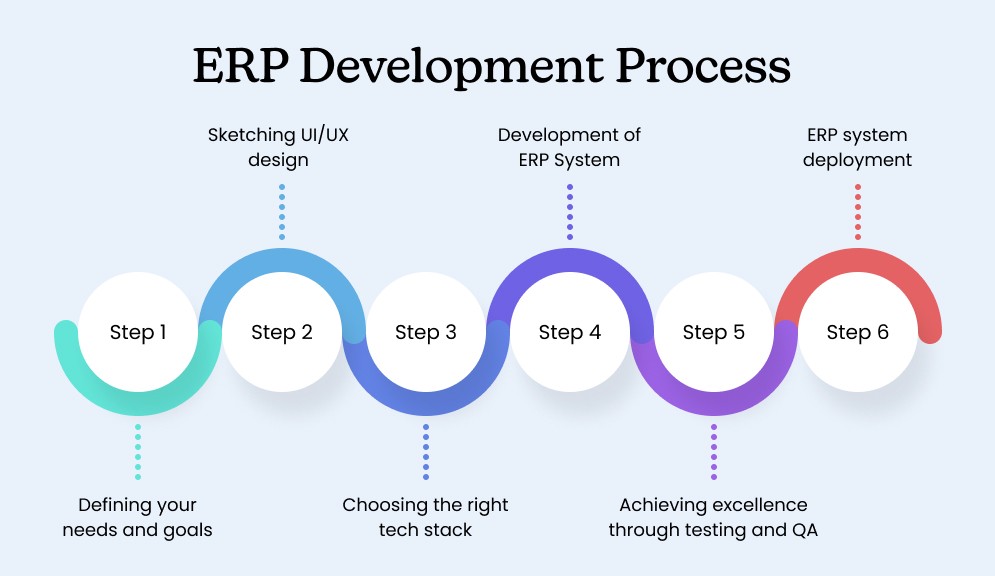
The ERP Development Process
Define Business Goals
Start by identifying the problems the system should solve. Goals might include reducing order processing time, improving inventory accuracy, or consolidating financial reporting. Clear outcomes help guide decisions and make it possible to evaluate the project.
Map Existing Processes
Document how work currently moves through the organization, including exceptions and manual workarounds. Involve employees who perform these tasks every day. Their feedback can reveal requirements that may not be visible to leadership or technical teams.
Set Requirements and Priorities
Separate essential requirements from features that can wait. Consider user roles, workflows, reports, integrations, regulatory needs, and data migration. A prioritized list helps control scope and focus the initial release on the most important capabilities.
Choose the Architecture and Technology
Decide whether the system will be cloud-based, hosted on company infrastructure, or use a hybrid approach. The choice affects access, performance, security, maintenance, and cost. Technical decisions should reflect the organization’s capabilities and long-term needs.
Design and Build in Stages
Developers and stakeholders can work together to create the system in manageable releases. Prototypes and frequent reviews make it easier to identify usability issues and adjust requirements before they become expensive to change.
Migrate and Validate Data
Data migration is one of the most important parts of an ERP project. Before transferring information, teams should identify duplicate, incomplete, or outdated records. Test migrations and reconciliation checks can help confirm that important data arrives accurately.
Test, Train, and Launch
Testing should cover individual features, integrations, security, performance, and complete business workflows. Training should be practical and role-specific, giving employees a chance to learn the tasks they will perform. A phased rollout may reduce disruption compared with launching every feature at once.
Maintain and Improve
After launch, the system needs monitoring, support, security updates, and a process for handling user feedback. Reviewing performance against the original goals can help determine which improvements should come next.
Important Considerations
- Scope: Trying to replace every system and automate every process at once can increase risk. Prioritize the most valuable capabilities.
- Integration: ERP software may need to exchange information with payment services, ecommerce platforms, shipping providers, or older applications. Plan how data will move and how errors will be handled.
- Security: Use appropriate access controls, encryption, backups, and audit logs. Employees should only be able to view or change information needed for their roles.
- Data quality: Poor-quality data can undermine reporting and automation. Establish ownership and rules for maintaining important records.
- User adoption: A technically capable system can still fail if it is difficult to use or does not fit employees’ workflows. Include users throughout design, testing, and training.
- Total cost: Account for implementation, licensing, development, data migration, training, hosting, support, and future upgrades.
Common ERP Development Challenges
ERP projects can become difficult when requirements are unclear, stakeholders are not involved, or customization grows without strong controls. Delayed decisions and underestimated data-cleanup work can also affect timelines and budgets.
These challenges can be reduced by assigning clear project ownership, agreeing on priorities, reviewing progress regularly, and making decisions based on business value. It is also important to plan for change management: new software often changes responsibilities and routines, not just screens and reports.
How to Measure ERP Success
Success should be measured against the goals established before development begins. Useful indicators may include:
- Time required to complete key workflows
- Inventory accuracy and order fulfillment performance
- Rate of manual data entry or duplicate records
- Reporting speed and data consistency
- System availability and support requests
- Employee adoption and user satisfaction
These measures should be reviewed over time. An ERP system is an ongoing business tool, and its value depends on how well it continues to support changing needs.
Conclusion
ERP development can help an organization connect its operations, improve access to business information, and create more consistent workflows. The best solution is not necessarily the largest or most customized one. It is the system that addresses clear business needs, fits the organization’s capabilities, and can be maintained as the business evolves.
By setting practical goals, involving employees, planning data and integrations carefully, and delivering the system in stages, organizations can make ERP development a more manageable and valuable investment.
9 ERP Development Tips for a Successful Implementation
- Map business processes before designing modules.
- Involve end users early and often.
- Keep customizations minimal and well documented.
- Prioritize data quality before migration.
- Plan integrations and APIs from the start.
- Build security into every workflow.
- Test edge cases and peak workloads.
- Train users with role-specific examples.
- Monitor performance and refine after launch.
Map business processes before designing modules.
Before designing ERP modules, map how work moves through your business—from the first request to the final outcome. Document each step, the people involved, the information required, and any exceptions or manual workarounds. This helps ensure the system reflects real operational needs rather than assumptions, reveals opportunities to simplify workflows, and prevents costly redesign later. Involve employees who perform the work every day so the finished modules are practical and easy to use.
Involve end users early and often.
Involving end users early and often helps ensure an ERP system reflects how work actually gets done. Employees who use the system every day can identify practical requirements, common bottlenecks, and potential usability problems that might otherwise be overlooked. Gather their input during planning, share prototypes for feedback, and include them in testing before launch. Ongoing communication and role-specific training can also build trust, encourage adoption, and reduce costly changes later in development.
Keep customizations minimal and well documented.
Keep ERP customizations to a minimum and document every change clearly. Excessive modifications can make upgrades, troubleshooting, and ongoing support more difficult, while undocumented changes may leave teams unsure how the system works. Whenever possible, use the platform’s standard features and configuration options, and record the purpose, owner, and impact of each customization so it can be reviewed and maintained over time.
Prioritize data quality before migration.
Prioritize data quality before migrating information into a new ERP system. Review existing records for duplicates, missing fields, outdated details, and inconsistent formats, then clean and standardize the data before transfer. Assign clear ownership for important records and test the migration with a sample set to verify accuracy. Starting with reliable data helps prevent errors in reports, workflows, and business decisions after launch.
Plan integrations and APIs from the start.
Plan integrations and APIs from the start of ERP development, not as an afterthought. Identify which systems need to exchange data—such as accounting tools, ecommerce platforms, payment services, or warehouse software—and define how that information will flow. Clear API standards, data formats, authentication, and error handling help ensure integrations are reliable and secure. Planning early can also prevent costly rework and make it easier to add or replace systems as business needs change.
Build security into every workflow.
Build security into every ERP workflow from the start, rather than treating it as a final check. Define role-based access so employees can view and change only the information they need, and protect sensitive actions with approval steps, validation, and audit logs. Secure data as it moves between the ERP and connected systems, and regularly review permissions as roles change. Making these safeguards part of everyday processes helps reduce errors, prevent unauthorized access, and protect business information without creating unnecessary friction for users.
Test edge cases and peak workloads.
Test edge cases and peak workloads before launching your ERP system. Check how it handles unusual inputs, missing or duplicate data, failed integrations, and unexpected user actions—not just routine workflows. Then simulate busy periods, such as month-end processing or a surge in orders, to uncover slowdowns and capacity limits. Finding these issues early helps protect data accuracy, maintain reliable performance, and prevent costly disruptions when the system is in everyday use.
Train users with role-specific examples.
Train users with role-specific examples so they can see how the ERP system supports the tasks they perform every day. Instead of giving every employee the same broad overview, tailor training to each team’s workflows—for example, show warehouse staff how to receive inventory, while finance staff practice reviewing invoices and reconciling payments. Hands-on, familiar scenarios make new features easier to understand, build confidence, and help users avoid mistakes when the system goes live.
Monitor performance and refine after launch.
After your ERP system launches, monitor its performance to make sure it’s meeting business goals and supporting day-to-day work. Track indicators such as system response times, workflow completion rates, data accuracy, and user feedback. Regularly review the results with employees and stakeholders, then prioritize improvements based on the issues and opportunities you uncover. Ongoing refinement helps keep the system reliable, useful, and aligned with changing business needs.