cfchris.com

Loading

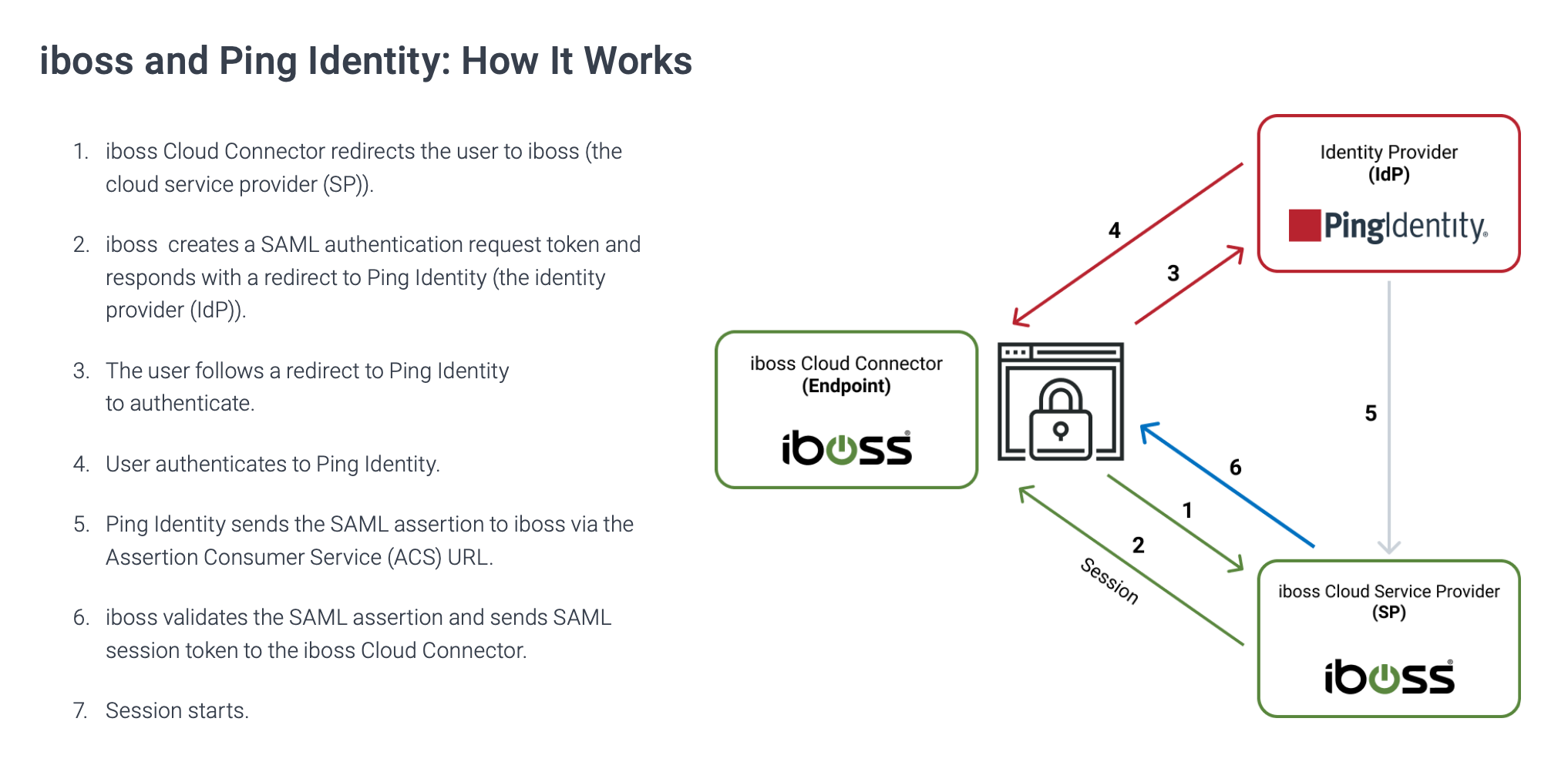
iboss cloud

Unlocking Security Excellence with iboss Cloud Solutions

The Power of iboss Cloud: Revolutionizing Cloud Security

The Power of iboss Cloud: Revolutionizing Cloud Security

In today’s digital age, ensuring the security of your organization’s network and data is paramount. With the increasing shift towards cloud-based solutions, traditional security measures are often inadequate to protect against sophisticated cyber threats. This is where iboss Cloud comes in.

iboss Cloud is a cutting-edge cloud security platform that offers comprehensive protection for organizations of all sizes. By leveraging the power of the cloud, iboss provides advanced threat prevention, data loss prevention, and secure web gateway capabilities to safeguard your network from a wide range of cyber threats.

Key Features of iboss Cloud:

  • Advanced Threat Prevention: iboss Cloud uses AI-driven threat detection and real-time analytics to identify and mitigate advanced threats before they can infiltrate your network.
  • Data Loss Prevention: With robust data loss prevention capabilities, iboss helps organizations prevent sensitive data from being leaked or compromised.
  • Secure Web Gateway: By providing secure web gateway functionality, iboss ensures that users can safely access the internet without exposing the organization to cyber risks.
  • Scalability and Flexibility: Designed for scalability and flexibility, iboss Cloud can easily adapt to the evolving security needs of your organization as it grows.
  • User-Friendly Interface: The intuitive interface of iboss Cloud makes it easy for administrators to manage security policies and monitor network activity effectively.

With its innovative approach to cloud security, iboss Cloud is revolutionizing how organizations protect their networks and data in an increasingly complex threat landscape. By partnering with iboss, organizations can stay ahead of cyber threats and ensure a secure digital environment for their users.


Maximizing Security and Efficiency: 6 Essential Tips for Using iboss Cloud

  1. Ensure proper configuration of policies to meet your organization’s needs.
  2. Regularly review and update filtering rules to enhance security measures.
  3. Utilize reporting features to monitor internet usage and identify potential risks.
  4. Train employees on best practices for using iboss cloud effectively and securely.
  5. Integrate iboss cloud with other cybersecurity tools for comprehensive protection.
  6. Stay informed about new features and updates to make the most of the platform.

Ensure proper configuration of policies to meet your organization’s needs.

Ensuring proper configuration of policies is crucial when utilizing iboss Cloud to safeguard your organization’s network. By tailoring security policies to meet the specific needs and requirements of your organization, you can effectively mitigate risks and enhance overall protection against cyber threats. Customizing policies allows you to define access controls, set content filtering rules, and establish protocols that align with your security objectives. With a well-configured policy framework in place, you can optimize the functionality of iboss Cloud and maximize its effectiveness in safeguarding your network infrastructure.

Regularly review and update filtering rules to enhance security measures.

Regularly reviewing and updating filtering rules is a crucial tip for maximizing the security measures provided by iboss Cloud. By staying proactive in managing and adjusting filtering rules, organizations can ensure that their network security remains effective against evolving cyber threats. This practice helps in fine-tuning the security parameters to address new vulnerabilities and potential risks, ultimately enhancing the overall protection of sensitive data and resources within the network infrastructure.

Utilize reporting features to monitor internet usage and identify potential risks.

Utilizing the reporting features of iboss Cloud allows organizations to effectively monitor internet usage and identify potential risks within their network. By analyzing detailed reports on user activity, browsing behavior, and security incidents, administrators can gain valuable insights into potential vulnerabilities and threats. This proactive approach enables organizations to take timely action to mitigate risks, strengthen their security posture, and ensure a safe and compliant internet environment for their users.

Train employees on best practices for using iboss cloud effectively and securely.

Training employees on best practices for using iboss Cloud effectively and securely is crucial to maximizing the benefits of this advanced cloud security platform. By educating staff on how to navigate iboss Cloud’s features, understand security protocols, and recognize potential threats, organizations can empower their workforce to proactively contribute to a secure network environment. Through comprehensive training sessions and ongoing support, employees can develop the necessary skills to leverage iboss Cloud efficiently while maintaining a strong defense against cyber threats.

Integrate iboss cloud with other cybersecurity tools for comprehensive protection.

To maximize cybersecurity defenses, it is highly recommended to integrate iboss Cloud with other cybersecurity tools. By combining iboss Cloud with complementary security solutions, organizations can achieve a more robust and comprehensive protection strategy. This integration allows for enhanced threat detection, rapid incident response, and better overall visibility into network security posture. By leveraging the strengths of different tools in a cohesive ecosystem, organizations can create a layered defense approach that effectively safeguards against a wide range of cyber threats.

Stay informed about new features and updates to make the most of the platform.

Staying informed about new features and updates is crucial to maximizing the benefits of iboss Cloud. By keeping abreast of the latest enhancements to the platform, users can take advantage of advanced functionalities and security measures to better protect their networks and data. Regularly checking for updates and understanding how new features can enhance overall performance ensures that organizations can leverage the full potential of iboss Cloud for optimal security and efficiency.

network security in cloud computing

Enhancing Network Security in Cloud Computing: Best Practices and Challenges

Network Security in Cloud Computing

The Importance of Network Security in Cloud Computing

Cloud computing has revolutionized the way businesses operate by offering scalable and flexible solutions for data storage, processing, and access. However, with the convenience of cloud services comes the critical need for robust network security measures to protect sensitive information from cyber threats.

Challenges in Network Security for Cloud Computing

One of the main challenges in ensuring network security in cloud computing is the shared responsibility model between cloud service providers and users. While cloud providers are responsible for securing the infrastructure, users must implement proper security measures to protect their data and applications.

Moreover, the dynamic nature of cloud environments makes it challenging to monitor and control network traffic effectively. Virtualized networks, multi-tenant environments, and remote access further complicate network security management in the cloud.

Best Practices for Network Security in Cloud Computing

To enhance network security in cloud computing, organizations should implement the following best practices:

  • Encryption: Encrypting data both at rest and in transit helps prevent unauthorized access to sensitive information.
  • Access Control: Implement strict access control policies to limit user permissions and prevent unauthorized access to resources.
  • Intrusion Detection Systems (IDS) and Intrusion Prevention Systems (IPS): Deploy IDS and IPS solutions to detect and mitigate potential security breaches in real-time.
  • Regular Auditing and Monitoring: Conduct regular audits of network activity and monitor for any suspicious behavior that could indicate a security threat.
  • Data Loss Prevention (DLP): Implement DLP solutions to prevent data leakage and ensure compliance with regulatory requirements.

The Future of Network Security in Cloud Computing

As cyber threats continue to evolve, organizations must stay vigilant and proactive in implementing robust network security measures in their cloud environments. Emerging technologies such as artificial intelligence (AI) and machine learning (ML) are being leveraged to enhance threat detection capabilities and improve overall network security posture.

By prioritizing network security in cloud computing, businesses can safeguard their data, maintain customer trust, and ensure continuity of operations in an increasingly digital world.


8 Essential Tips for Enhancing Network Security in Cloud Computing

  1. Implement strong access controls and authentication mechanisms.
  2. Encrypt data both in transit and at rest.
  3. Regularly update and patch all software and systems.
  4. Monitor network traffic for any suspicious activities or anomalies.
  5. Use multi-factor authentication to enhance security.
  6. Backup data regularly and store it securely offsite.
  7. Implement network segmentation to limit access to sensitive information.
  8. Educate employees on best practices for network security in cloud computing.

Implement strong access controls and authentication mechanisms.

Implementing strong access controls and authentication mechanisms is crucial in ensuring network security in cloud computing. By enforcing strict user permissions and robust authentication processes, organizations can effectively prevent unauthorized access to sensitive data and resources stored in the cloud. Strong access controls help mitigate the risk of data breaches and insider threats, enhancing overall security posture in the cloud environment. Prioritizing access control measures is essential for maintaining the integrity and confidentiality of information, safeguarding against potential cyber threats and ensuring compliance with regulatory requirements.

Encrypt data both in transit and at rest.

To enhance network security in cloud computing, it is crucial to encrypt data both in transit and at rest. Encrypting data while it is being transmitted between systems and when it is stored on servers helps protect sensitive information from unauthorized access. By implementing strong encryption protocols, organizations can ensure that data remains secure even if intercepted during transmission or compromised at rest. This practice adds an extra layer of protection to safeguard valuable data assets in the cloud environment.

Regularly update and patch all software and systems.

Regularly updating and patching all software and systems is a crucial tip for maintaining strong network security in cloud computing. By staying current with software updates, organizations can address known vulnerabilities and ensure that their systems are equipped with the latest security patches to defend against potential cyber threats. Neglecting to update software leaves systems susceptible to exploitation by malicious actors, highlighting the importance of proactive maintenance to bolster overall network security in the cloud environment.

Monitor network traffic for any suspicious activities or anomalies.

Monitoring network traffic for any suspicious activities or anomalies is a crucial tip in ensuring robust network security in cloud computing. By continuously analyzing network traffic, organizations can detect unauthorized access attempts, unusual data transfers, or other signs of potential security breaches. Prompt identification of suspicious activities allows for immediate response and mitigation measures to prevent data loss or system compromise. Monitoring network traffic not only helps in maintaining a secure cloud environment but also enhances overall cybersecurity posture by proactively addressing threats before they escalate.

Use multi-factor authentication to enhance security.

Utilizing multi-factor authentication is a crucial tip to bolster network security in cloud computing. By requiring users to provide multiple forms of verification before accessing sensitive data or applications, organizations can significantly reduce the risk of unauthorized access and potential data breaches. This added layer of security not only enhances protection against cyber threats but also ensures that only authorized individuals can gain entry, strengthening overall network security in the cloud environment.

Backup data regularly and store it securely offsite.

It is crucial to backup data regularly and store it securely offsite as a key tip for network security in cloud computing. By maintaining up-to-date backups of critical data and ensuring they are stored in a separate, secure location, organizations can mitigate the risk of data loss due to cyber attacks, hardware failures, or natural disasters. This practice not only helps in data recovery but also ensures business continuity and minimizes potential disruptions to operations in the event of unforeseen incidents.

Implement network segmentation to limit access to sensitive information.

Implementing network segmentation is a crucial tip in enhancing network security in cloud computing. By dividing the network into separate segments, organizations can control and restrict access to sensitive information, reducing the risk of unauthorized breaches. This proactive approach helps contain potential security threats within isolated areas, making it harder for attackers to move laterally across the network. Network segmentation not only strengthens data protection but also improves overall network performance and simplifies security management by focusing on specific security requirements for each segment.

Educate employees on best practices for network security in cloud computing.

It is crucial to educate employees on best practices for network security in cloud computing to mitigate risks and enhance overall cybersecurity posture. By providing training and guidance on topics such as data encryption, access control, and recognizing phishing attempts, organizations can empower their staff to make informed decisions that protect sensitive information stored in the cloud. Educated employees serve as a critical line of defense against cyber threats, helping to create a culture of security awareness within the organization.

web based document management system

Optimizing Workflow Efficiency with a Web-Based Document Management System

The Benefits of a Web-Based Document Management System

The Benefits of a Web-Based Document Management System

In today’s digital age, managing documents efficiently is crucial for businesses of all sizes. A web-based document management system offers a convenient and secure solution to organize, store, and access documents online. Here are some key benefits of implementing a web-based document management system:

Accessibility

One of the primary benefits of a web-based document management system is the ability to access your documents from anywhere with an internet connection. This ensures that your team members can collaborate on projects and access important files even when they are not in the office.

Security

Web-based document management systems provide robust security features to protect your sensitive information. With encryption, user authentication, and access controls, you can ensure that only authorized users have access to specific documents.

Version Control

Keeping track of document versions can be challenging, especially when multiple team members are working on the same file. A web-based document management system allows you to track changes, revert to previous versions, and maintain a clear audit trail of document edits.

Collaboration

Collaboration is made easy with a web-based document management system. Team members can work together on documents in real-time, leave comments, and provide feedback without the need for emailing files back and forth.

Cost-Effective

Implementing a web-based document management system eliminates the need for physical storage space and reduces paper usage. This not only saves costs associated with printing and storing paper documents but also contributes to environmental sustainability.

Scalability

A web-based document management system can easily scale with your business as it grows. You can add more users, increase storage capacity, and customize features according to your evolving needs without significant disruptions.

In conclusion, a web-based document management system offers numerous benefits that enhance efficiency, collaboration, security, and cost-effectiveness for businesses looking to streamline their document workflows in the digital era.


8 Essential Tips for Optimizing Your Web-Based Document Management System

  1. Ensure regular backups of all documents to prevent data loss.
  2. Implement user permissions to control access and editing rights.
  3. Utilize version control to track changes made to documents over time.
  4. Set up automated workflows for efficient document routing and approval processes.
  5. Integrate with other tools such as email and calendars for seamless collaboration.
  6. Provide training and support for users to maximize system utilization.
  7. Regularly audit the system for security vulnerabilities and compliance with regulations.
  8. Consider scalability options to accommodate future growth of document storage needs.

Ensure regular backups of all documents to prevent data loss.

Regular backups of all documents are essential to prevent data loss when using a web-based document management system. By implementing a robust backup strategy, businesses can safeguard their valuable information against unexpected events such as system failures, cyber attacks, or human errors. Regularly backing up documents ensures that even in the event of data loss, businesses can quickly restore their files and continue operations without disruption. Prioritizing regular backups is a proactive measure that helps maintain the integrity and availability of critical documents, providing peace of mind for organizations relying on web-based document management systems.

Implement user permissions to control access and editing rights.

Implementing user permissions in a web-based document management system is essential for controlling access and editing rights effectively. By setting up user-specific permissions, organizations can ensure that only authorized individuals have the ability to view, edit, or delete sensitive documents. This not only enhances security but also helps maintain data integrity and compliance with regulatory requirements. User permissions provide a granular level of control over document access, allowing businesses to tailor access rights based on roles and responsibilities within the organization.

Utilize version control to track changes made to documents over time.

Utilizing version control in a web-based document management system is essential for tracking changes made to documents over time. By maintaining a clear record of document versions and edits, teams can easily identify who made specific changes, revert to previous versions if needed, and ensure that the most up-to-date information is always accessible. This feature enhances collaboration, streamlines workflows, and helps maintain data integrity within the organization.

Set up automated workflows for efficient document routing and approval processes.

Setting up automated workflows for efficient document routing and approval processes is a game-changer in web-based document management systems. By automating the flow of documents through predefined routes and approval stages, businesses can streamline their operations, reduce manual errors, and ensure timely approvals. This feature not only saves time but also improves collaboration among team members by providing a clear and structured process for document handling. Businesses can achieve greater efficiency and productivity by leveraging automated workflows in their web-based document management system.

Integrate with other tools such as email and calendars for seamless collaboration.

Integrating a web-based document management system with other tools like email and calendars can significantly enhance collaboration within a team. By seamlessly connecting these platforms, team members can easily share documents, schedule meetings, and coordinate tasks more efficiently. This integration streamlines communication processes and ensures that all relevant information is accessible in one centralized location, ultimately improving productivity and teamwork.

Provide training and support for users to maximize system utilization.

To maximize the utilization of a web-based document management system, it is essential to provide comprehensive training and ongoing support for users. By offering training sessions that educate users on the system’s features, functionalities, and best practices, organizations can ensure that their employees are equipped with the knowledge and skills needed to effectively utilize the system. Additionally, providing continuous support through help desks, user guides, and troubleshooting resources can address any issues or questions that may arise, ultimately enhancing user confidence and system adoption. Effective training and support empower users to leverage the full potential of the document management system, leading to improved productivity and efficiency within the organization.

Regularly audit the system for security vulnerabilities and compliance with regulations.

Regularly auditing your web-based document management system for security vulnerabilities and compliance with regulations is essential to ensure the integrity and confidentiality of your sensitive information. By conducting routine assessments, you can identify potential risks, address any vulnerabilities promptly, and maintain adherence to industry regulations and standards. This proactive approach not only enhances the security of your system but also demonstrates your commitment to safeguarding data privacy and maintaining compliance with legal requirements.

Consider scalability options to accommodate future growth of document storage needs.

When implementing a web-based document management system, it is essential to consider scalability options to accommodate future growth of document storage needs. By planning for scalability from the outset, businesses can ensure that their system can easily expand to meet increasing storage demands as the organization grows. This proactive approach not only prevents potential storage constraints but also allows for a seamless transition as document volumes increase over time.

cloud based document management

Maximizing Efficiency: The Power of Cloud-Based Document Management

Cloud-Based Document Management

The Benefits of Cloud-Based Document Management

In today’s digital age, managing documents efficiently is crucial for businesses of all sizes. Cloud-based document management systems have revolutionized the way organizations handle their information. Instead of traditional paper-based methods or on-premises servers, cloud-based solutions offer numerous advantages that streamline processes and enhance collaboration.

Accessibility and Flexibility

One of the key benefits of cloud-based document management is the ability to access files from anywhere with an internet connection. This flexibility allows employees to work remotely, access important documents on-the-go, and collaborate in real-time without being tied to a specific location or device.

Cost-Effectiveness

Implementing a cloud-based document management system eliminates the need for physical storage space and reduces costs associated with printing, copying, and maintaining paper documents. Additionally, cloud solutions typically operate on a subscription basis, allowing businesses to scale their usage according to their needs without large upfront investments.

Data Security and Backup

Cloud-based document management systems offer robust security features such as encryption, access controls, and regular backups to protect sensitive information from unauthorized access or loss. Data stored in the cloud is often more secure than traditional on-premises storage due to advanced security protocols implemented by service providers.

Collaboration and Version Control

Collaboration is made seamless with cloud-based document management systems as multiple users can work on the same document simultaneously. Version control features ensure that everyone is working on the latest version of a file, reducing errors and confusion that may arise from outdated information.

Scalability and Integration

Cloud solutions are highly scalable, allowing businesses to expand their storage capacity or add new features as their needs evolve. Integration with other software applications such as customer relationship management (CRM) systems or project management tools further enhances efficiency by streamlining workflows and data sharing.

Conclusion

In conclusion, cloud-based document management offers a multitude of benefits that empower organizations to manage their information effectively in today’s fast-paced business environment. By leveraging the accessibility, cost-effectiveness, security, collaboration capabilities, scalability, and integration options provided by cloud solutions, businesses can optimize their document workflows and drive productivity across teams.


5 Essential Tips for Effective Cloud-Based Document Management

  1. Ensure data security by using encryption and access controls.
  2. Regularly back up your documents to prevent data loss.
  3. Implement version control to track changes and updates made to documents.
  4. Train employees on proper use of the cloud document management system to maximize efficiency.
  5. Integrate with other business tools for seamless workflow and collaboration.

Ensure data security by using encryption and access controls.

To enhance data security in cloud-based document management, it is vital to implement robust measures such as encryption and access controls. Encryption helps protect sensitive information by encoding data in a way that only authorized users can decipher, adding an extra layer of security against potential breaches. Access controls allow administrators to define who can view, edit, or share specific documents, ensuring that confidential data remains protected and only accessible to authorized personnel. By prioritizing encryption and access controls, organizations can safeguard their documents effectively in the cloud environment.

Regularly back up your documents to prevent data loss.

Regularly backing up your documents is a crucial aspect of effective cloud-based document management. By creating routine backups, you can safeguard your data against unexpected events such as system failures, cyber attacks, or accidental deletions. Ensuring that your documents are securely stored in multiple locations not only mitigates the risk of data loss but also provides peace of mind knowing that your valuable information is protected and easily recoverable when needed.

Implement version control to track changes and updates made to documents.

Implementing version control in a cloud-based document management system is essential for tracking changes and updates made to documents. By maintaining a history of revisions, users can easily review past edits, compare different versions, and identify who made specific changes. Version control not only enhances collaboration by ensuring everyone is working on the most recent document iteration but also provides a reliable audit trail for accountability and compliance purposes. This feature promotes accuracy, transparency, and efficiency in document management processes.

Train employees on proper use of the cloud document management system to maximize efficiency.

Training employees on the proper use of the cloud document management system is essential to maximize efficiency within an organization. By providing comprehensive training sessions, employees can learn how to leverage the system’s features effectively, ensuring that documents are stored, accessed, and shared efficiently. Proper training also helps in promoting best practices for data security, version control, and collaboration, ultimately leading to improved productivity and streamlined workflows across teams. Investing in employee training demonstrates a commitment to harnessing the full potential of cloud-based document management solutions for enhanced organizational success.

Integrate with other business tools for seamless workflow and collaboration.

To enhance workflow efficiency and foster seamless collaboration, it is recommended to integrate cloud-based document management systems with other essential business tools. By integrating document management with tools such as project management software, customer relationship management (CRM) systems, or communication platforms, organizations can streamline processes, facilitate information sharing, and ensure that all team members have access to up-to-date data. This integration not only improves productivity but also promotes better coordination and communication among team members, ultimately leading to more effective and agile business operations.