cfchris.com

Loading

microsoft cloud security

Microsoft Cloud Security: Essential Strategies for Protecting Your Data and Workloads

Microsoft Cloud Security: A Practical Guide

Microsoft cloud services—including Azure, Microsoft 365, and services built on the Microsoft cloud—offer organizations flexible ways to run applications, collaborate, and manage data. Protecting those environments takes more than turning on a security feature. It requires clear ownership, strong identity controls, thoughtful configuration, and ongoing monitoring.

Understand the Shared Responsibility Model

Cloud security is a shared responsibility between Microsoft and its customers. Microsoft secures the underlying cloud infrastructure, while customers remain responsible for areas such as user accounts, access permissions, data, and many service configurations. The exact division of responsibility depends on the service being used. For example, a managed software service generally requires less infrastructure management by the customer than a virtual machine running in Azure.

Before deploying a workload, identify what Microsoft manages and what your organization must secure. This helps prevent gaps in areas such as patching, backups, access control, and data protection.

Make Identity Your First Line of Defense

Compromised accounts are a common path into cloud environments, so identity protection should be a priority. Microsoft Entra ID provides identity and access management capabilities for Microsoft cloud services and other applications.

  • Require multifactor authentication, especially for administrators and remote access.
  • Use conditional access policies to evaluate factors such as user, device, location, and risk.
  • Apply least privilege: give users and applications only the access they need.
  • Use privileged identity management practices to limit standing administrator access.
  • Review inactive accounts, service principals, and access permissions regularly.

Strong identity controls can reduce the impact of stolen passwords and help limit an attacker’s ability to move through an environment.

Protect Azure Workloads and Configurations

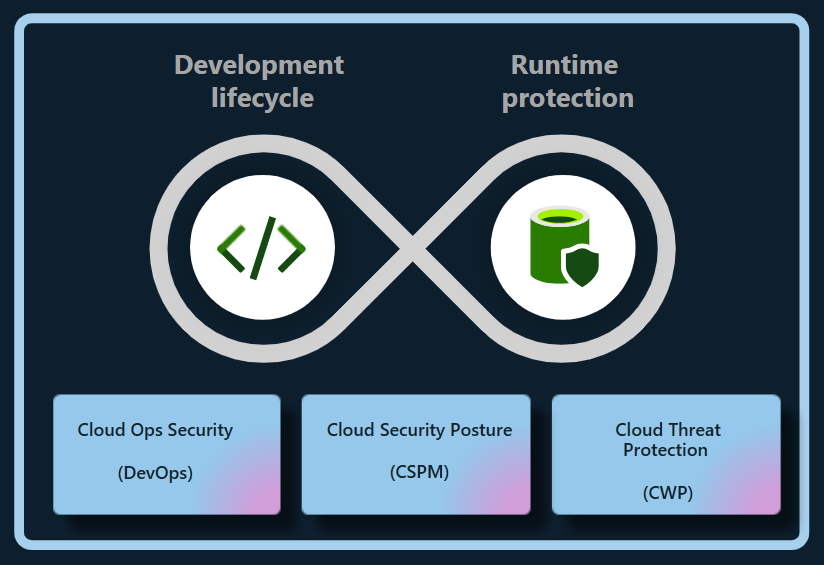
Misconfigured cloud resources can expose systems or data even when the underlying platform is secure. In Azure, organizations should establish secure configuration standards for subscriptions, networks, storage, virtual machines, and databases. Azure Policy can help enforce organizational requirements, while Microsoft Defender for Cloud can provide security recommendations and threat protection capabilities for supported resources.

Important practices include restricting public access where it is not required, using network segmentation, securing administrative connections, encrypting sensitive data, and keeping workloads patched. Backups should be protected from accidental deletion and ransomware, and recovery plans should be tested rather than assumed to work.

Secure Microsoft 365 and Collaboration

Microsoft 365 brings together email, file storage, meetings, and collaboration tools. Security settings should reflect how people actually work while limiting unnecessary exposure. Review sharing defaults in services such as SharePoint and OneDrive, manage external collaboration, and establish retention and access policies appropriate to the organization.

Microsoft Defender for Office 365 can help protect against threats such as phishing and malicious attachments, depending on the plan and configuration. Security awareness training and clear procedures for reporting suspicious messages remain important because technical controls cannot prevent every social-engineering attempt.

Protect and Govern Data

Cloud security also depends on knowing what data an organization stores and who can access it. Microsoft Purview includes data governance, information protection, and compliance capabilities, with features varying by product and license. Organizations can use classification and sensitivity labels to help identify and protect important information, and apply data loss prevention policies to reduce inappropriate sharing.

Start by identifying sensitive data, defining who should be able to access it, and deciding how long it should be retained. Policies should be tested with users and business teams to avoid disrupting legitimate work.

Monitor, Detect, and Respond

Security controls are most effective when organizations can detect suspicious activity and respond quickly. Microsoft Defender products provide security capabilities across various environments, while Microsoft Sentinel is a cloud-based security information and event management (SIEM) and security orchestration, automation, and response (SOAR) platform. The tools an organization needs depend on its environment, risk profile, and licensing.

Establish a process for reviewing alerts, investigating incidents, and escalating serious findings. Keep audit logging enabled where appropriate, define incident-response roles, and practice response scenarios such as account compromise, data exposure, and ransomware. Monitoring without a clear response process can leave important alerts unattended.

Build a Sustainable Security Program

Microsoft cloud security is not a one-time setup. Services change, employees join and leave, and business requirements evolve. A sustainable program includes regular access reviews, configuration assessments, vulnerability management, backup testing, and updates to policies and incident-response plans.

Begin with the basics: secure administrator accounts, enable strong authentication, reduce excessive permissions, protect sensitive data, and establish reliable monitoring. Then use Microsoft’s security guidance and the controls available in your specific services to improve protection over time. Because features and licensing can change, verify current capabilities and requirements in Microsoft’s official documentation before designing or purchasing a solution.


Top 9 Benefits of Microsoft Cloud Security for Your Business

  1. Scales with your business needs
  2. Offers strong identity controls
  3. Supports multifactor authentication
  4. Helps protect data with encryption
  5. Provides built-in threat detection
  6. Integrates with Microsoft 365
  7. Enables centralized security management
  8. Supports compliance and governance
  9. Offers tools for monitoring and response


5 Challenges of Microsoft Cloud Security: Complexity, Costs, and Dependence

  1. Can be complex to configure and manage.
  2. Advanced security features may require costly licenses.
  3. Misconfigurations can expose data and services.
  4. Dependence on Microsoft can limit flexibility.
  5. Requires ongoing expertise and monitoring.

Scales with your business needs

Microsoft cloud security can scale alongside your business, helping you adjust protection as your team, data, and workloads grow or change. You can add security capabilities, expand coverage across cloud services, and adapt access controls and policies as new needs arise—without having to build and maintain all the supporting infrastructure yourself. This flexibility can help keep security aligned with your business while making it easier to manage changing requirements.

Offers strong identity controls

Microsoft cloud security offers strong identity controls that help organizations protect accounts, apps, and data. With tools such as Microsoft Entra ID, teams can require multifactor authentication, apply access policies based on user and device risk, and limit permissions to only what each person needs. These safeguards make it harder for unauthorized users to gain access and help reduce the impact of compromised credentials.

Supports multifactor authentication

Microsoft cloud security supports multifactor authentication (MFA), adding an extra layer of protection beyond a password. Users may be asked to confirm their identity with an authenticator app, a security key, or another approved method. This makes it harder for someone to access an account with a stolen or guessed password and helps organizations better protect email, files, and cloud resources.

Helps protect data with encryption

Microsoft cloud security helps protect data with encryption, making information harder to read if it is accessed without authorization. Encryption can safeguard data while it is stored and while it moves between services or devices. With appropriate configuration and key-management practices, organizations can add an important layer of protection for sensitive information across their cloud environments.

Provides built-in threat detection

Microsoft cloud security includes built-in threat detection capabilities that help identify suspicious activity across supported services, users, devices, and workloads. These tools can analyze signals and surface alerts about potential risks—such as unusual sign-ins or malicious behavior—so security teams can investigate and respond more quickly. When configured to fit an organization’s environment, built-in detection can strengthen visibility without requiring every monitoring capability to be assembled from scratch.

Integrates with Microsoft 365

Microsoft cloud security integrates seamlessly with Microsoft 365, helping organizations protect email, files, meetings, and user accounts within the tools employees already use. This integration can bring security policies, identity controls, and threat protection together across services such as Outlook, Teams, SharePoint, and OneDrive. As a result, administrators can manage access more consistently, respond to potential threats with greater visibility, and help safeguard sensitive information without disrupting everyday collaboration.

Enables centralized security management

Microsoft cloud security enables centralized security management by bringing key security settings, policies, alerts, and monitoring tools together across cloud services. This gives IT and security teams a clearer view of their environment and helps them apply consistent protections, manage access, and respond to potential threats more efficiently. Centralized oversight can also make it easier to identify gaps and coordinate security practices across users, devices, and workloads.

Supports compliance and governance

Microsoft cloud security supports compliance and governance by providing tools to help organizations protect sensitive information, manage access, apply data-retention policies, and monitor activity. Services such as Microsoft Purview can help classify and govern data, while built-in security and compliance features can support an organization’s efforts to meet applicable regulatory and internal requirements. The right controls depend on the Microsoft services in use, the organization’s configuration, and its specific compliance obligations.

Offers tools for monitoring and response

Microsoft cloud security offers tools that help organizations monitor activity, detect potential threats, and respond to incidents. Services such as Microsoft Defender and Microsoft Sentinel can bring security signals together, surface suspicious behavior, and support investigation and response workflows. With appropriate configuration and ongoing oversight, these tools can help teams identify problems sooner and coordinate a more effective response.

Can be complex to configure and manage.

One drawback of Microsoft cloud security is that it can be complex to configure and manage. Services such as Azure, Microsoft 365, and Microsoft Entra ID offer many security settings, policies, and tools, and the right setup depends on an organization’s needs and licensing. Misconfigured controls or unclear responsibilities can leave gaps in protection, so teams may need specialized expertise, ongoing training, and regular reviews to manage the environment effectively.

Advanced security features may require costly licenses.

Advanced security features in Microsoft cloud services can come at a significant additional cost. Capabilities such as enhanced threat detection, identity protection, compliance tools, and advanced data protection may require higher-tier subscriptions or separate licenses. For organizations with tight budgets, these costs can make it difficult to deploy the full set of recommended safeguards, so it’s important to compare licensing options and prioritize features based on risk and business needs.

Misconfigurations can expose data and services.

One potential drawback of Microsoft cloud security is that misconfigurations can expose sensitive data and services to unauthorized access. A storage account with overly permissive access, an exposed network endpoint, or an incorrectly assigned user role can create security gaps—even when the underlying Microsoft platform is operating securely. Preventing these issues requires careful setup, regular configuration reviews, and ongoing monitoring.

Dependence on Microsoft can limit flexibility.

Relying heavily on Microsoft’s cloud security tools can limit an organization’s flexibility. Teams may find it difficult or costly to switch providers, integrate competing products, or adapt workflows built around Microsoft-specific services. This dependence can also make it harder to respond to changing business needs or negotiate terms, so organizations should consider portability and interoperability when designing their cloud security strategy.

Requires ongoing expertise and monitoring.

Microsoft cloud security requires ongoing expertise and monitoring to remain effective. Services, threats, and security settings change over time, so organizations need knowledgeable staff to review configurations, manage access, investigate alerts, and respond to incidents. Without consistent oversight, misconfigurations or suspicious activity may go unnoticed, leaving sensitive data and systems at risk.

Network Security Best Practices: Essential Steps to Protect Your Network

Network Security Best Practices

A secure network helps protect sensitive information, keep systems available, and reduce the risk of costly disruptions. Whether you manage a home network, a small business, or a large organization, network security works best as an ongoing process—not a one-time setup. The practices below can help you strengthen your defenses and respond more effectively to threats.

Keep Systems and Network Devices Updated

Install security updates for operating systems, applications, routers, firewalls, and other network equipment as soon as practical. Updates often fix vulnerabilities that attackers could otherwise exploit. Replace devices that no longer receive security support, and remove software or services that are no longer needed.

Where possible, enable automatic updates for routine security fixes. For business environments, test important updates before broad deployment and maintain a schedule for reviewing devices that may have been missed.

Use Strong Authentication

Change default usernames and passwords on routers, access points, and other equipment. Use long, unique passwords for every account, ideally stored in a reputable password manager. Avoid shared accounts when individual accounts are available, since personal accounts make it easier to track activity and revoke access when someone leaves.

Enable multifactor authentication (MFA) for administrative accounts, remote access, cloud services, and other important systems. MFA adds another verification step, making a stolen password less useful to an attacker.

Limit Access and Apply Least Privilege

Give users and devices only the access they need to do their work. Separate everyday user accounts from administrator accounts, and use elevated privileges only when necessary. Review permissions regularly, especially after job changes or departures.

Disable unused accounts, open ports, network services, and remote-access tools. Restrict administrative interfaces so they are reachable only from approved devices or trusted network locations.

Segment the Network

Network segmentation divides a network into smaller sections, limiting how far an intruder can move if one device or account is compromised. For example, organizations can separate employee computers, servers, guest Wi-Fi, and internet-connected devices such as cameras or printers.

Use firewall rules to control which sections can communicate and allow only the connections required for normal operations. Review these rules periodically to remove outdated or overly broad access.

Secure Wi-Fi and Remote Connections

Protect wireless networks with current encryption and a strong, unique passphrase. Change the access point’s default administrator credentials, keep its firmware updated, and use a separate guest network for visitors and personal devices. Avoid exposing the network’s administrative interface to the public internet.

For remote work, require secure connections through an approved VPN or other protected access method. Combine remote access with MFA, limit who can use it, and monitor for unusual sign-in activity. Do not rely on a VPN alone; remote devices should also be updated and protected.

Deploy Firewalls and Endpoint Protection

Firewalls help control traffic entering and leaving a network. Configure them to deny unnecessary connections by default, then allow only the traffic required for business or personal use. Check firewall logs and rules for unexpected changes or suspicious activity.

Install reputable endpoint protection on computers and servers, and keep it enabled and updated. Endpoint tools can help detect malicious files, suspicious behavior, and other threats that network controls may not catch.

Protect Data and Backups

Encrypt sensitive data when it is stored and when it travels across networks. Use secure protocols and avoid sending confidential information over untrusted connections without appropriate protection.

Maintain regular backups of important data and systems. Keep at least one backup isolated from the main network so malware or an intruder cannot easily alter or delete every copy. Test restores periodically; a backup is useful only if it can be recovered.

Monitor Activity and Prepare to Respond

Collect and review logs from firewalls, servers, endpoints, and important applications. Alerts can help identify unusual login attempts, unexpected data transfers, or changes to critical settings. Make sure logs are protected from unauthorized changes and retained long enough to support investigations.

Create an incident response plan that explains who to contact, how to isolate affected systems, how to preserve evidence, and how to restore operations. Practice the plan so that people know what to do under pressure.

Train Users and Review Security Regularly

People play an important role in network security. Teach users how to recognize phishing attempts, report suspicious messages, handle sensitive information, and use approved tools. Make reporting easy and respond constructively so potential problems are raised quickly.

Regularly review network diagrams, device inventories, access permissions, firewall rules, and security policies. Periodic vulnerability assessments can help identify weaknesses before they are exploited. Address findings according to their risk and verify that fixes have worked.

Make Security an Ongoing Practice

No single tool can protect every network from every threat. Strong security comes from combining updated systems, careful access controls, segmentation, monitoring, backups, and informed users. Start with the measures that address your most important risks, document your decisions, and revisit them as your network and needs change.


7 Essential Tips for Strengthening Your Network Security

  1. Use strong, unique passwords and enable multifactor authentication.
  2. Keep routers, firewalls, and devices updated.
  3. Use WPA3 or WPA2 encryption for Wi-Fi.
  4. Change default administrator usernames and passwords.
  5. Segment guest and smart-home devices from sensitive systems.
  6. Disable unused ports, services, and remote access.
  7. Monitor network logs and investigate unusual activity.

Use strong, unique passwords and enable multifactor authentication.

Use strong, unique passwords for every network account, especially administrator and remote-access accounts. Long passphrases are easier to remember and harder to guess, while a password manager can help you store them securely without reusing them. Enable multifactor authentication (MFA) wherever possible to add another layer of protection, so a stolen password alone is less likely to grant access.

Keep routers, firewalls, and devices updated.

Keep routers, firewalls, computers, and other connected devices updated with the latest security patches and firmware. Updates often fix vulnerabilities that attackers could exploit, so install them promptly and enable automatic updates when available. Replace devices that no longer receive security support, and remove outdated software or services you no longer use.

Use WPA3 or WPA2 encryption for Wi-Fi.

Use WPA3 encryption to protect your Wi-Fi network whenever your router and devices support it. If WPA3 isn’t available, choose WPA2-AES rather than outdated options such as WEP or WPA. Set a strong, unique Wi-Fi password, change the router’s default administrator credentials, and keep its firmware up to date to help prevent unauthorized access.

Change default administrator usernames and passwords.

Change the default administrator username and password on every router, access point, and network device you manage. Default credentials are often publicly documented, so attackers may try them to gain control of a device and alter its settings, intercept traffic, or access connected systems. Choose a unique, strong password for each device, change the administrator username if the device allows it, and store the credentials securely in a password manager.

Segment guest and smart-home devices from sensitive systems.

Place guest devices and smart-home equipment—such as TVs, cameras, and speakers—on a separate Wi-Fi network from computers, phones, and other systems that contain sensitive information. These devices may have weaker security or receive fewer updates, so separating them helps limit access if one is compromised. Use your router’s guest-network or network-segmentation feature, and allow only the connections each device needs.

Disable unused ports, services, and remote access.

Disable unused network ports, services, and remote-access tools to reduce the number of ways an attacker could reach your systems. Turn off features you don’t need, close unnecessary firewall ports, and limit administrative access to trusted devices or locations. Review these settings regularly, since old services and access rules can remain enabled long after they’re needed.

Monitor network logs and investigate unusual activity.

Monitor network logs regularly to spot unusual activity, such as repeated failed sign-in attempts, unexpected connections, or large transfers of data. Set alerts for suspicious patterns and investigate them promptly to determine whether they’re harmless or signs of a security issue. Keeping logs protected and retaining them long enough can also help identify what happened and support a faster response.

cloud tech solutions

Cloud Tech Solutions: A Practical Guide for Modern Businesses

Cloud Tech Solutions: A Smarter Way to Work

Cloud technology has changed how businesses store information, run applications, and support their teams. Instead of relying only on equipment located in an office, organizations can use internet-based services to access computing resources when and where they need them. The result can be a more flexible, scalable approach to technology.

What Are Cloud Tech Solutions?

Cloud tech solutions are services and tools delivered over the internet. They may include data storage, software, servers, databases, networking, backup, and security tools. Businesses can use these services individually or combine them into a broader cloud environment.

Cloud services are commonly grouped into three categories:

  • Software as a Service (SaaS): Ready-to-use applications accessed online, such as email, collaboration tools, and customer management software.
  • Infrastructure as a Service (IaaS): On-demand computing resources, such as virtual servers, storage, and networking.
  • Platform as a Service (PaaS): Tools and environments developers use to build, test, and deploy applications.

Benefits of Cloud Technology

Scale as Needs Change

Cloud resources can often be increased or reduced as business demands shift. This flexibility can help organizations respond to seasonal changes, new projects, or growth without making every technology decision around a fixed set of in-house equipment.

Support Flexible Work

With the right setup, employees can securely access files and applications from different locations and devices. Cloud-based collaboration tools can also help teams share information and work together in real time.

Improve Business Continuity

Cloud backup and recovery services can help organizations restore important data and systems after an outage or other disruption. A well-designed continuity plan should define what needs protection, how often data is backed up, and how recovery will be tested.

Manage Costs More Effectively

Many cloud services use subscription or consumption-based pricing. This can reduce the need for large upfront hardware purchases, though costs should be monitored carefully. Unused resources, data transfers, and premium features can add up if they are not managed.

Security and Reliability Matter

Moving to the cloud does not automatically make systems secure. Providers typically protect their underlying infrastructure, while customers remain responsible for areas such as user access, data handling, application settings, and device security. Responsibilities vary by service, so it is important to understand the arrangement.

Good cloud security practices include using multifactor authentication, applying least-privilege access, encrypting sensitive data, keeping systems updated, and reviewing activity logs. Organizations should also consider compliance requirements and the location of their data before choosing services.

Choosing the Right Cloud Approach

There is no single cloud setup that works for every organization. Some businesses use a public cloud, where services are shared across customers. Others choose a private cloud for greater control, or a hybrid approach that combines cloud services with on-site systems.

Before selecting a solution, consider:

  • Which business problems the technology should address
  • How much storage, computing power, and availability are needed
  • Security, privacy, and compliance requirements
  • How the cloud service will connect with existing systems
  • Expected costs, including ongoing management and support
  • How data can be backed up, recovered, or moved in the future

Plan the Transition

A successful cloud transition starts with a clear plan. Begin by reviewing existing applications, data, and dependencies. Then prioritize workloads based on business value, risk, and complexity. Testing a small project first can reveal potential issues before a larger migration begins.

After migration, ongoing management is essential. Regularly review access permissions, performance, backup results, and spending. A cloud environment should evolve as the organization’s needs change.

Make Cloud Technology Work for Your Business

Cloud tech solutions can help organizations become more adaptable, support distributed teams, and access powerful tools without managing every part of the underlying infrastructure. The best results come from matching technology to real business needs and giving equal attention to planning, security, and ongoing oversight.


9 Essential Tips for Optimizing Your Cloud Technology Solutions

  1. Choose a cloud model that fits your needs.
  2. Set clear goals before migrating.
  3. Use multi-factor authentication.
  4. Encrypt data in transit and at rest.
  5. Automate backups and recovery tests.
  6. Monitor costs and set budget alerts.
  7. Scale resources to match demand.
  8. Review access permissions regularly.
  9. Plan for outages with redundancy.

Choose a cloud model that fits your needs.

Choose a cloud model that fits your needs by considering how much control, flexibility, and support your organization requires. A public cloud can be a cost-effective choice for scalable services, while a private cloud may suit businesses with strict security or compliance requirements. A hybrid cloud combines both, letting you keep sensitive workloads in a private environment while using public cloud resources for other tasks. Compare your options based on your budget, existing systems, security needs, and plans for growth.

Set clear goals before migrating.

Before moving to the cloud, define what you want the migration to achieve. Clear goals—such as improving application performance, supporting remote work, strengthening disaster recovery, or reducing infrastructure costs—help guide decisions about which services to choose and what to move first. Set measurable targets, identify potential risks, and agree on how success will be evaluated. With a well-defined plan, your team can keep the migration focused, manage costs, and confirm that the new cloud environment delivers real business value.

Use multi-factor authentication.

Use multi-factor authentication (MFA) to add an extra layer of protection to your cloud accounts. In addition to a password, MFA requires a second form of verification, such as an authenticator app, security key, or one-time code. This can help prevent unauthorized access even if a password is stolen or guessed. Enable MFA for all cloud services that support it, especially administrator and business accounts, and choose a secure verification method whenever possible.

Encrypt data in transit and at rest.

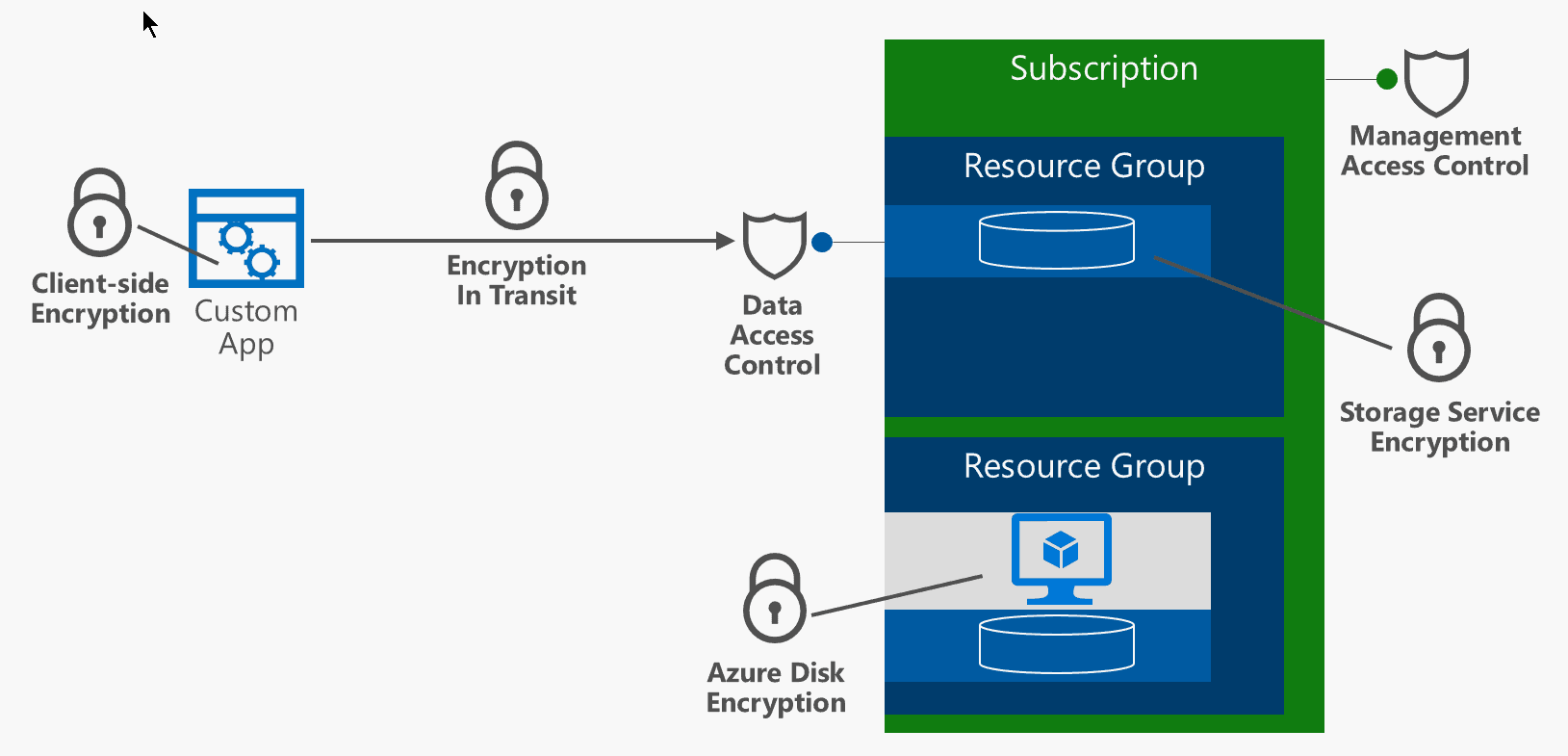
Encrypting data both in transit and at rest helps protect sensitive information from unauthorized access. Data in transit—such as information moving between a user’s device and a cloud service—should be protected with secure protocols like TLS. Data at rest, including files stored in cloud databases or backups, should also be encrypted. Use strong encryption settings, manage encryption keys carefully, and review your cloud provider’s security options to help keep information protected throughout its lifecycle.

Automate backups and recovery tests.

Automate backups and recovery tests to help protect important data and confirm it can be restored when needed. Set backups to run on a regular schedule, monitor them for failures, and test recovery procedures periodically. These checks can reveal missing files, outdated backup copies, or setup problems before an outage or cyberattack makes recovery urgent.

Monitor costs and set budget alerts.

Regularly monitoring cloud spending can help prevent small, unexpected charges from turning into a large bill. Review usage reports to spot idle resources, sudden increases, or services that are no longer needed, and set budget alerts to notify your team when spending approaches a chosen limit. Alerts won’t automatically stop charges, but they give you time to investigate and adjust before costs climb further.

Scale resources to match demand.

Scale cloud resources to match demand so your systems have the capacity they need without paying for more than necessary. During busy periods, you can add computing power or storage to maintain performance; when demand drops, scale back to reduce costs. Monitoring usage and setting clear scaling rules helps keep services responsive, efficient, and budget-friendly.

Review access permissions regularly.

Review access permissions regularly to make sure employees and vendors can access only the cloud resources they need. Remove accounts for people who have left the organization, update permissions when roles change, and check for inactive or overly privileged accounts. Routine reviews help reduce the risk of unauthorized access and keep sensitive data better protected.

Plan for outages with redundancy.

Plan for outages by building redundancy into your cloud environment. Use backups, failover systems, and resources in separate availability zones or regions so a single service disruption doesn’t bring critical operations to a halt. Test your recovery plan regularly, and make sure your team knows how to restore services and data quickly when an outage occurs.

cyber security infrastructure

Enhancing Your Organization’s Cyber Security Infrastructure: A Comprehensive Guide

The Importance of Cyber Security Infrastructure in Today’s Digital World

In today’s interconnected world, where businesses and individuals rely heavily on digital technologies, the need for robust cyber security infrastructure has never been more critical. Cyber threats continue to evolve and become more sophisticated, posing significant risks to sensitive data, financial assets, and even national security. Establishing a strong cyber security infrastructure is essential to safeguarding against these threats and ensuring the integrity and confidentiality of information.

Key Components of Cyber Security Infrastructure

A comprehensive cyber security infrastructure encompasses various components that work together to protect systems, networks, and data from cyber attacks. Some key components include:

  • Firewalls: Firewalls act as a barrier between internal networks and external threats, monitoring and filtering incoming and outgoing network traffic based on predefined security rules.
  • Intrusion Detection Systems (IDS) and Intrusion Prevention Systems (IPS): IDS and IPS are designed to detect and prevent unauthorized access or malicious activities within a network by analyzing network traffic patterns.
  • Antivirus Software: Antivirus software helps detect and remove malware, viruses, and other malicious software that can compromise system security.
  • Data Encryption: Encrypting sensitive data ensures that even if it is intercepted by unauthorized parties, they cannot decipher its contents without the decryption key.
  • Security Information and Event Management (SIEM): SIEM solutions collect and analyze log data from various sources to identify potential security incidents in real-time.

The Role of Cyber Security Infrastructure in Business Operations

For businesses, a robust cyber security infrastructure is not just about protecting data—it is also about safeguarding their reputation, maintaining customer trust, and ensuring uninterrupted operations. A successful cyber attack can have devastating consequences for a company, leading to financial losses, legal liabilities, and long-term damage to its brand image.

By investing in cyber security infrastructure, businesses can mitigate these risks by proactively identifying vulnerabilities, implementing effective security measures, conducting regular risk assessments, and providing employee training on cybersecurity best practices. This proactive approach helps organizations stay ahead of potential threats and respond swiftly in the event of a breach.

The Future of Cyber Security Infrastructure

As cyber threats continue to evolve in complexity and scale, the need for advanced cyber security infrastructure will only grow. Technologies such as artificial intelligence (AI), machine learning, blockchain, and quantum cryptography are being leveraged to enhance cybersecurity capabilities and stay one step ahead of cybercriminals.

Furthermore, with the rise of remote workforces and cloud-based services, organizations must adapt their cyber security infrastructure to address new challenges related to securing distributed environments and protecting sensitive data across multiple platforms.

In Conclusion

Cyber security infrastructure plays a crucial role in safeguarding our digital assets against ever-evolving threats. By prioritizing cybersecurity measures, staying informed about emerging risks, investing in advanced technologies, and fostering a culture of vigilance within organizations, we can collectively build a more secure digital ecosystem for the future.


Top 5 Essential Tips for Strengthening Your Cybersecurity Infrastructure

  1. Regularly update software and security patches to protect against known vulnerabilities.
  2. Implement strong password policies and consider multi-factor authentication for added security.
  3. Encrypt sensitive data both in transit and at rest to prevent unauthorized access.
  4. Conduct regular security audits and risk assessments to identify potential weaknesses in the infrastructure.
  5. Train employees on cybersecurity best practices to build a culture of security awareness within the organization.

Regularly update software and security patches to protect against known vulnerabilities.

Regularly updating software and security patches is a fundamental practice in maintaining a robust cyber security infrastructure. By staying current with the latest updates, organizations can effectively protect their systems and networks against known vulnerabilities that cybercriminals may exploit. These updates often contain critical security patches that address weaknesses identified by software developers or security researchers. Failing to apply these updates in a timely manner can leave systems exposed to potential attacks, making it essential for businesses to prioritize regular software maintenance as part of their overall cybersecurity strategy.

Implement strong password policies and consider multi-factor authentication for added security.

To enhance cyber security infrastructure, it is crucial to implement strong password policies and consider multi-factor authentication for added security. Strong passwords that are complex and unique help prevent unauthorized access to sensitive data and systems. By requiring users to follow password guidelines such as using a combination of letters, numbers, and special characters, organizations can significantly reduce the risk of password-related breaches. Additionally, implementing multi-factor authentication adds an extra layer of protection by requiring users to provide multiple forms of verification before accessing accounts or systems, making it harder for cyber attackers to compromise security. By incorporating these measures into their cyber security strategy, organizations can bolster their defenses against potential threats and better safeguard their digital assets.

Encrypt sensitive data both in transit and at rest to prevent unauthorized access.

To enhance the security of sensitive data, it is crucial to encrypt it both in transit and at rest. Encrypting data in transit ensures that information remains secure while being transferred between systems or over networks, protecting it from interception by unauthorized parties. Similarly, encrypting data at rest involves securing stored data on devices or servers, making it unreadable to anyone without the appropriate decryption key. By implementing robust encryption measures, organizations can significantly reduce the risk of unauthorized access and safeguard the confidentiality and integrity of their valuable information.

Conduct regular security audits and risk assessments to identify potential weaknesses in the infrastructure.

Conducting regular security audits and risk assessments is a fundamental practice in maintaining a strong cyber security infrastructure. By systematically evaluating the effectiveness of existing security measures and identifying potential vulnerabilities, organizations can proactively address weaknesses before they are exploited by malicious actors. These assessments provide valuable insights into the overall security posture of the infrastructure, enabling informed decisions on implementing additional safeguards and mitigating risks effectively. Regular audits and risk assessments are essential components of a comprehensive cyber security strategy, helping to ensure the resilience and integrity of digital assets in an ever-evolving threat landscape.

Train employees on cybersecurity best practices to build a culture of security awareness within the organization.

Training employees on cybersecurity best practices is a fundamental step in establishing a culture of security awareness within an organization. By educating staff members on how to identify and respond to potential cyber threats, companies can empower their workforce to become active participants in safeguarding sensitive data and protecting against malicious activities. Through ongoing training sessions, employees can learn about the latest cybersecurity trends, understand the importance of following security protocols, and contribute to creating a secure environment where everyone plays a role in maintaining the integrity of the organization’s cyber security infrastructure.

aws cyber security

Enhancing Cloud Security: Leveraging AWS Cyber Security Solutions

AWS Cyber Security: Protecting Your Cloud Infrastructure

AWS Cyber Security: Protecting Your Cloud Infrastructure

As businesses increasingly rely on cloud services for their operations, ensuring the security of data and applications hosted on platforms like Amazon Web Services (AWS) is paramount. AWS offers robust security features to help protect your cloud infrastructure from cyber threats.

Key Aspects of AWS Cyber Security

Here are some key aspects of AWS cyber security that you should be aware of:

Shared Responsibility Model:

AWS follows a shared responsibility model, where they are responsible for the security of the cloud infrastructure, while customers are responsible for securing their data and applications within the cloud. Understanding this model is essential for implementing effective security measures.

Identity and Access Management (IAM):

AWS IAM allows you to manage user access to resources securely. By defining granular permissions and roles, you can control who can access which resources, helping prevent unauthorized access to sensitive data.

Network Security:

AWS provides tools such as Virtual Private Cloud (VPC) and Security Groups to secure your network infrastructure. You can create private networks, set up firewalls, and monitor network traffic to detect and prevent potential security breaches.

Data Encryption:

Encrypting data at rest and in transit is crucial for maintaining the confidentiality and integrity of your information. AWS offers services like AWS Key Management Service (KMS) for managing encryption keys and Amazon S3 server-side encryption for securing data stored in S3 buckets.

Best Practices for AWS Cyber Security

To enhance the security of your AWS environment, consider implementing the following best practices:

  • Regularly review and update IAM policies to ensure least privilege access.
  • Enable multi-factor authentication (MFA) for added account protection.
  • Monitor logs and set up alerts to detect suspicious activities.
  • Conduct regular vulnerability assessments and penetration testing.
  • Stay informed about AWS security updates and best practices.

Conclusion

In conclusion, AWS offers a wide range of security features to help safeguard your cloud infrastructure against cyber threats. By understanding these features and following best practices for AWS cyber security, you can create a more secure environment for your data and applications in the cloud.


8 Essential Tips for Strengthening AWS Cybersecurity

  1. Enable multi-factor authentication (MFA) for all user accounts
  2. Regularly rotate access keys and credentials
  3. Use AWS Identity and Access Management (IAM) to control access to AWS resources
  4. Encrypt data at rest and in transit using AWS Key Management Service (KMS)
  5. Monitor your AWS environment for security incidents using Amazon GuardDuty
  6. Implement network security best practices, such as configuring security groups and network ACLs
  7. Regularly update and patch your EC2 instances and other AWS services
  8. Enable logging and monitoring in AWS CloudTrail, CloudWatch, and Config

Enable multi-factor authentication (MFA) for all user accounts

Enabling multi-factor authentication (MFA) for all user accounts is a crucial step in enhancing the security of your AWS environment. By requiring an additional verification method beyond just a password, such as a unique code sent to a mobile device, MFA adds an extra layer of protection against unauthorized access. This simple yet effective measure significantly reduces the risk of account compromise and strengthens overall security posture, ensuring that only authorized users can access sensitive resources within your AWS infrastructure.

Regularly rotate access keys and credentials

Regularly rotating access keys and credentials is a crucial practice in AWS cyber security. By frequently updating these keys and credentials, you can reduce the risk of unauthorized access to your cloud resources. This proactive measure helps enhance the overall security posture of your AWS environment, ensuring that only authorized users have access to sensitive data and applications. Regular rotation of access keys and credentials is a simple yet effective way to mitigate potential security vulnerabilities and protect your cloud infrastructure from cyber threats.

Use AWS Identity and Access Management (IAM) to control access to AWS resources

Utilizing AWS Identity and Access Management (IAM) is a crucial tip for enhancing AWS cyber security. By leveraging IAM, businesses can effectively manage and control access to their AWS resources. IAM allows organizations to set granular permissions and roles, ensuring that only authorized users have access to specific resources within the cloud environment. This helps prevent unauthorized access, reduces the risk of data breaches, and enhances overall security posture on the AWS platform.

Encrypt data at rest and in transit using AWS Key Management Service (KMS)

To enhance the security of your data stored in Amazon Web Services (AWS), it is crucial to encrypt data both at rest and in transit using AWS Key Management Service (KMS). By utilizing KMS, you can manage encryption keys securely and ensure that your sensitive information remains protected from unauthorized access. Encrypting data at rest prevents unauthorized users from accessing data stored in databases or on disk, while encrypting data in transit adds an extra layer of security when data is being transferred between services or applications within your AWS environment. Implementing encryption with AWS KMS helps mitigate the risk of data breaches and strengthens the overall security posture of your cloud infrastructure.

Monitor your AWS environment for security incidents using Amazon GuardDuty

Monitoring your AWS environment for security incidents is crucial in maintaining a secure cloud infrastructure. Amazon GuardDuty is a powerful tool that can help you detect and respond to potential threats in real-time. By leveraging GuardDuty’s threat detection capabilities, you can proactively identify unauthorized access, malicious activities, and other suspicious behavior within your AWS environment. This proactive approach allows you to take immediate action to mitigate risks and strengthen the overall security posture of your cloud infrastructure.

Implement network security best practices, such as configuring security groups and network ACLs

Implementing network security best practices, such as configuring security groups and network Access Control Lists (ACLs), is crucial for enhancing the overall security of your AWS environment. By setting up proper security groups and ACLs, you can control inbound and outbound traffic to your instances, restrict access to specific ports, and prevent unauthorized network communication. These measures help reduce the attack surface and mitigate potential security risks, ensuring a more secure and resilient cloud infrastructure on Amazon Web Services.

Regularly update and patch your EC2 instances and other AWS services

Regularly updating and patching your EC2 instances and other AWS services is a critical aspect of maintaining strong cyber security in your cloud environment. By staying current with software updates and patches, you can address known vulnerabilities and reduce the risk of potential security breaches. This proactive approach helps to enhance the overall security posture of your AWS infrastructure, ensuring that your systems are better protected against emerging threats and attacks.

Enable logging and monitoring in AWS CloudTrail, CloudWatch, and Config

Enabling logging and monitoring in AWS services like CloudTrail, CloudWatch, and Config is a crucial tip for enhancing cyber security. By setting up comprehensive logging and monitoring mechanisms, businesses can gain valuable insights into their AWS environment, detect suspicious activities or unauthorized access in real-time, and ensure compliance with security policies. These tools provide visibility into user actions, resource changes, and system configurations, allowing organizations to proactively identify and respond to potential security threats effectively.

azure cloud security

Enhancing Data Protection with Azure Cloud Security Measures

Azure Cloud Security

Azure Cloud Security: Safeguarding Your Data in the Cloud

Cloud computing has revolutionized the way businesses operate, offering flexibility, scalability, and cost-efficiency. However, with the benefits of cloud services come security challenges that must be addressed to protect sensitive data and ensure compliance with regulations.

Why Azure Cloud Security Matters

Microsoft Azure is a leading cloud platform that provides a wide range of security features to help organizations secure their data and applications. Here are some key aspects of Azure cloud security:

  • Data Encryption: Azure offers encryption at rest and in transit to protect data from unauthorized access.
  • Identity and Access Management: Azure Active Directory enables organizations to manage user identities and control access to resources.
  • Network Security: Azure Virtual Network allows organizations to create secure networks and control traffic flow.
  • Security Monitoring: Azure Security Center provides continuous monitoring and threat detection to identify and respond to security incidents.
  • Compliance Certifications: Azure maintains a wide range of compliance certifications to meet industry-specific regulatory requirements.

Best Practices for Securing Your Azure Environment

To enhance security in your Azure environment, consider implementing the following best practices:

  1. Multifactor Authentication: Require users to provide multiple forms of verification before accessing resources.
  2. Data Classification: Classify data based on sensitivity levels and apply appropriate security controls.
  3. Patch Management: Keep software up-to-date with the latest security patches to address vulnerabilities.
  4. Regular Auditing: Conduct regular audits of your Azure environment to identify potential security gaps.
  5. Educate Users: Provide training on security best practices to help users recognize and respond to security threats.

In Conclusion

Azure cloud security is a critical aspect of maintaining a secure and compliant cloud environment. By leveraging the robust security features offered by Microsoft Azure and following best practices for securing your environment, you can safeguard your data, applications, and infrastructure in the cloud.


Understanding Azure Cloud Security: Key Questions and Comparisons

  1. How secure is Azure cloud services?
  2. What are the 5 pillars of cloud security?
  3. What security does Microsoft Azure have?
  4. What are Azure security tools?
  5. Why Azure is more secure than AWS?
  6. What is the difference between AWS and Azure security?

How secure is Azure cloud services?

Azure cloud services are known for their robust security measures that prioritize safeguarding data and ensuring the privacy of users. Microsoft Azure implements a comprehensive range of security features, including data encryption, identity and access management, network security, and continuous monitoring for threat detection. With a wide array of compliance certifications and adherence to industry-specific regulatory requirements, Azure provides a secure cloud environment for businesses to operate in. By following best practices and leveraging the security capabilities of Azure, organizations can confidently trust in the security of their data and applications within the Azure cloud services ecosystem.

What are the 5 pillars of cloud security?

In the realm of Azure cloud security, understanding the five pillars of cloud security is essential for ensuring a robust and comprehensive security posture. These pillars encompass key aspects that organizations must address to protect their data and resources effectively. The five pillars of cloud security typically include identity and access management, data protection, network security, application security, and compliance. By focusing on these pillars, organizations can establish a strong foundation for securing their Azure environments and mitigating potential risks associated with cloud computing.

What security does Microsoft Azure have?

Microsoft Azure offers a comprehensive set of security features to protect data and applications in the cloud. Some key security measures provided by Azure include data encryption at rest and in transit, identity and access management through Azure Active Directory, network security with Azure Virtual Network, continuous monitoring and threat detection via Azure Security Center, and adherence to various compliance certifications to meet regulatory requirements. These robust security capabilities help organizations safeguard their assets and maintain a secure environment within the Microsoft Azure cloud platform.

What are Azure security tools?

Azure offers a variety of robust security tools to help organizations enhance their cloud security posture. These tools include Azure Security Center, Azure Active Directory, Azure Key Vault, Azure Information Protection, and more. Azure Security Center provides continuous monitoring, threat detection, and security recommendations to protect cloud resources. Azure Active Directory enables identity and access management, while Azure Key Vault allows secure storage and management of cryptographic keys and secrets. Azure Information Protection helps classify and protect sensitive data across devices and applications. By leveraging these Azure security tools, organizations can strengthen their overall security framework in the cloud.

Why Azure is more secure than AWS?

When comparing Azure to AWS in terms of security, Azure is often considered more secure due to its strong focus on compliance and governance. Microsoft Azure provides a comprehensive set of security features, such as advanced threat detection, encryption, identity management, and compliance certifications. Additionally, Azure’s integrated security tools and services, like Azure Security Center and Azure Active Directory, offer robust protection for data and applications. Microsoft’s commitment to security and privacy standards across its cloud services further enhances Azure’s reputation for providing a secure cloud environment for businesses and organizations.

What is the difference between AWS and Azure security?

When comparing AWS and Azure security, one key difference lies in their approach to security features and services. While both cloud platforms offer a range of security tools, AWS is known for its granular control and customization options, allowing users to fine-tune security settings to meet specific requirements. On the other hand, Azure emphasizes integration with existing Microsoft products and services, providing a seamless experience for organizations already using Microsoft technologies. Understanding these differences can help organizations choose the cloud platform that best aligns with their security needs and preferences.

modern tech solutions

Empowering Businesses with Cutting-Edge Modern Tech Solutions

The Impact of Modern Tech Solutions on Businesses

The Impact of Modern Tech Solutions on Businesses

In today’s fast-paced digital world, modern technology solutions have revolutionized the way businesses operate. From streamlining processes to enhancing customer experiences, technology plays a crucial role in driving success and growth.

Enhanced Efficiency and Productivity

Modern tech solutions such as cloud computing, automation, and data analytics have significantly improved efficiency and productivity in businesses. Cloud computing allows for seamless collaboration and access to data from anywhere, while automation reduces manual tasks and speeds up processes. Data analytics provides valuable insights that help in making informed decisions quickly.

Improved Customer Experiences

Businesses can now leverage modern tech solutions to enhance customer experiences. Chatbots provide instant customer support, personalized recommendations based on user behavior improve engagement, and mobile apps offer convenience and accessibility. These technologies create a seamless experience for customers, leading to increased satisfaction and loyalty.

Cost Savings and Competitive Advantage

Implementing modern tech solutions can result in cost savings for businesses. By automating repetitive tasks, reducing errors, and optimizing processes, companies can operate more efficiently and effectively. Additionally, leveraging technology can give businesses a competitive advantage by staying ahead of trends and meeting customer demands more effectively than competitors.

Challenges of Adopting Modern Tech Solutions

While the benefits of modern tech solutions are clear, there are challenges associated with their adoption. These include initial investment costs, integration with existing systems, cybersecurity risks, and the need for ongoing training for employees. Overcoming these challenges requires careful planning, strategic implementation, and continuous monitoring.

The Future of Business Technology

As technology continues to evolve rapidly, businesses must adapt to stay competitive. Embracing modern tech solutions is essential for future success, as they enable organizations to innovate, grow, and meet the ever-changing needs of customers. By investing in technology wisely and strategically, businesses can position themselves for long-term growth and sustainability.


7 Essential Tips for Maximizing Modern Tech Solutions

  1. Utilize cloud computing for scalability and flexibility.
  2. Implement data encryption to enhance security measures.
  3. Adopt automation tools to streamline repetitive tasks.
  4. Integrate artificial intelligence for data analysis and insights.
  5. Embrace Internet of Things (IoT) devices for connectivity and efficiency.
  6. Stay updated with the latest tech trends for competitive advantage.
  7. Prioritize user experience in developing tech solutions.

Utilize cloud computing for scalability and flexibility.

Utilizing cloud computing offers businesses the opportunity to achieve scalability and flexibility in their operations. By leveraging cloud services, organizations can easily adjust their resources based on demand, allowing for seamless scalability as business needs evolve. Additionally, cloud computing provides the flexibility to access data and applications from anywhere, enabling remote work capabilities and enhancing overall efficiency. Embracing cloud technology empowers businesses to adapt quickly to changing market conditions and optimize their operations for improved performance and growth.

Implement data encryption to enhance security measures.

Implementing data encryption is a crucial step in enhancing security measures for modern tech solutions. By encrypting sensitive information, businesses can protect data from unauthorized access and ensure confidentiality. Data encryption transforms data into a secure format that can only be accessed with the proper decryption key, adding an extra layer of defense against cyber threats. This proactive approach to security not only safeguards valuable data but also builds trust with customers and partners, demonstrating a commitment to protecting their information.

Adopt automation tools to streamline repetitive tasks.

Adopting automation tools to streamline repetitive tasks is a key strategy in leveraging modern tech solutions for increased efficiency and productivity in businesses. By automating routine processes, organizations can save time, reduce errors, and free up employees to focus on more strategic and value-added activities. Automation not only accelerates task completion but also ensures consistency and accuracy, leading to improved overall performance and operational effectiveness. Embracing automation tools empowers businesses to optimize their workflows, enhance productivity, and stay competitive in today’s fast-paced digital landscape.

Integrate artificial intelligence for data analysis and insights.

Integrating artificial intelligence (AI) for data analysis and insights is a transformative approach that allows businesses to harness the power of their data more effectively. AI algorithms can process vast amounts of data at unprecedented speeds, identifying patterns and trends that might be missed by traditional methods. By leveraging AI, companies can gain deeper insights into customer behavior, market trends, and operational efficiencies. This enables more informed decision-making and strategic planning. Additionally, AI-driven analytics can help predict future outcomes and automate routine data tasks, freeing up valuable human resources for more complex problem-solving activities. As a result, integrating AI into data analysis not only enhances accuracy but also provides a competitive edge in today’s fast-paced business environment.

Embrace Internet of Things (IoT) devices for connectivity and efficiency.

Embracing Internet of Things (IoT) devices can significantly enhance connectivity and efficiency in various settings. By integrating IoT devices into systems and processes, businesses can collect real-time data, automate tasks, and improve decision-making. These interconnected devices enable seamless communication and collaboration, leading to increased productivity and streamlined operations. Leveraging IoT technology not only enhances efficiency but also opens up opportunities for innovation and optimization in a wide range of industries.

Staying updated with the latest tech trends is essential for businesses seeking a competitive advantage in today’s fast-paced digital landscape. By keeping abreast of emerging technologies and industry developments, companies can identify new opportunities, streamline processes, and better meet the evolving needs of their customers. Embracing innovation and incorporating cutting-edge tech solutions into business strategies not only enhances efficiency and productivity but also positions organizations as industry leaders poised for sustained success in the dynamic market environment.

Prioritize user experience in developing tech solutions.

Prioritizing user experience in developing tech solutions is essential for ensuring the success and effectiveness of the technology being implemented. By focusing on creating intuitive interfaces, seamless interactions, and personalized experiences, businesses can enhance user satisfaction, increase engagement, and drive adoption rates. Taking into account the needs and preferences of end-users throughout the development process not only improves the usability of the technology but also builds trust and loyalty among users. Ultimately, placing a strong emphasis on user experience leads to more successful tech solutions that truly meet the needs of their intended audience.

cloud based cyber security companies

Enhancing Security: The Role of Cloud-Based Cyber Security Companies

Article: Cloud-Based Cyber Security Companies

The Rise of Cloud-Based Cyber Security Companies

In today’s digital age, the importance of cyber security cannot be overstated. With the increasing number of cyber threats and data breaches, businesses are turning to innovative solutions to protect their sensitive information. One such solution that has gained popularity in recent years is cloud-based cyber security.

Cloud-based cyber security companies offer a range of services and products that help organizations safeguard their data and systems in the cloud. By leveraging the power of cloud computing, these companies can provide scalable and cost-effective security solutions that are tailored to meet the unique needs of each client.

Benefits of Cloud-Based Cyber Security Companies

There are several key benefits to partnering with a cloud-based cyber security company:

  • Scalability: Cloud-based solutions can easily scale up or down based on the needs of your business, providing flexibility and cost savings.
  • Accessibility: With cloud-based security tools, you can access your data and monitor your systems from anywhere in the world, enhancing convenience and efficiency.
  • Automation: Many cloud-based security solutions offer automated features that help streamline processes and detect threats in real-time.
  • Cost-Effectiveness: By outsourcing your cyber security needs to a cloud-based provider, you can reduce upfront costs associated with hardware and software purchases.
  • Expertise: Cloud-based cyber security companies employ skilled professionals who specialize in protecting data in the cloud, ensuring that your systems are secure at all times.

The Future of Cyber Security

As more businesses migrate their operations to the cloud, the demand for reliable cyber security solutions will continue to grow. Cloud-based cyber security companies are well-positioned to meet this demand by offering cutting-edge technologies and services that help organizations stay ahead of emerging threats.

In conclusion, cloud-based cyber security companies play a crucial role in safeguarding sensitive data and systems in today’s interconnected world. By harnessing the power of cloud computing, these companies provide scalable, accessible, and cost-effective solutions that enable businesses to mitigate risks and protect their assets effectively.


6 Essential Tips for Strengthening Cloud-Based Cybersecurity

  1. Ensure data encryption for secure transmission and storage.
  2. Implement multi-factor authentication to enhance access control.
  3. Regularly update security patches to protect against vulnerabilities.
  4. Monitor network traffic for suspicious activities or potential threats.
  5. Conduct regular security audits and assessments to identify weaknesses.
  6. Provide employee training on cybersecurity best practices to prevent human errors.

Ensure data encryption for secure transmission and storage.

To enhance the security of your data in the cloud, it is essential to prioritize data encryption for both transmission and storage. By encrypting your data, you add an extra layer of protection that ensures sensitive information remains secure and unreadable to unauthorized users. This practice not only safeguards your data during transfer between devices or networks but also when stored in cloud servers, mitigating the risk of potential breaches and maintaining confidentiality. Implementing robust encryption measures is a fundamental step in bolstering the overall cyber security posture of your organization when working with cloud-based services.

Implement multi-factor authentication to enhance access control.

Implementing multi-factor authentication is a crucial tip recommended by cloud-based cyber security companies to enhance access control. By requiring users to provide multiple forms of verification before accessing sensitive data or systems, such as a password and a unique code sent to their mobile device, multi-factor authentication adds an extra layer of security that significantly reduces the risk of unauthorized access. This additional step helps thwart potential cyber threats and ensures that only authorized individuals can gain entry, strengthening overall security measures in the cloud environment.

Regularly update security patches to protect against vulnerabilities.

Regularly updating security patches is a crucial practice for enhancing the protection of cloud-based cyber security systems against vulnerabilities. By staying current with the latest patches, companies can address known security weaknesses and prevent potential exploitation by cyber threats. This proactive approach helps to strengthen the overall security posture of cloud environments, reducing the risk of breaches and ensuring that sensitive data remains secure.

Monitor network traffic for suspicious activities or potential threats.

Monitoring network traffic for suspicious activities or potential threats is a crucial aspect of effective cloud-based cyber security. By continuously analyzing incoming and outgoing data packets, organizations can detect anomalies, unauthorized access attempts, or unusual patterns that may indicate a security breach. This proactive approach allows companies to identify and respond to threats in real-time, minimizing the risk of data loss or system compromise. Implementing robust network monitoring tools and practices is essential for maintaining a secure cloud environment and safeguarding sensitive information against cyber attacks.

Conduct regular security audits and assessments to identify weaknesses.

Conducting regular security audits and assessments is a crucial tip for cloud-based cyber security companies to identify weaknesses in their systems and processes. By proactively evaluating their security measures, companies can uncover vulnerabilities, gaps, or potential threats that may compromise the integrity of their data stored in the cloud. These audits help in strengthening defenses, implementing necessary updates, and ensuring that robust security protocols are in place to protect against evolving cyber threats effectively.

Provide employee training on cybersecurity best practices to prevent human errors.

Employee training on cybersecurity best practices is a crucial aspect of maintaining strong defenses against cyber threats in cloud-based environments. By educating employees on how to identify and respond to potential security risks, organizations can significantly reduce the likelihood of human errors that may compromise sensitive data or systems. Training sessions that cover topics such as phishing awareness, password management, and safe browsing habits empower employees to become proactive participants in safeguarding company assets and contribute to a culture of security awareness within the organization.

saas cyber security

Enhancing SaaS Cyber Security: Best Practices for Data Protection

The Importance of SaaS Cyber Security

The Importance of SaaS Cyber Security

Software as a Service (SaaS) has become increasingly popular among businesses for its convenience and scalability. However, with the rise of SaaS applications comes the need for robust cyber security measures to protect sensitive data and ensure business continuity.

Why SaaS Cyber Security Matters

Securing SaaS applications is crucial to safeguarding valuable information stored in the cloud. Cyber threats such as data breaches, ransomware attacks, and phishing scams pose significant risks to organizations that rely on SaaS solutions.

Key Aspects of SaaS Cyber Security

Effective SaaS cyber security involves implementing various measures to mitigate risks and prevent unauthorized access to data. Some key aspects include:

  • Data Encryption: Encrypting data both in transit and at rest helps protect information from being intercepted or compromised.
  • Multi-Factor Authentication: Implementing multi-factor authentication adds an extra layer of security by requiring users to provide multiple forms of verification.
  • Regular Security Audits: Conducting regular security audits helps identify vulnerabilities and ensure compliance with industry standards.
  • Employee Training: Educating employees about best practices for data security and how to recognize potential threats can help prevent cyber attacks.
  • Incident Response Plan: Having a well-defined incident response plan in place enables organizations to respond quickly and effectively in the event of a security breach.

The Future of SaaS Cyber Security

As technology continues to evolve, so do cyber threats. It is essential for organizations to stay vigilant and proactive in enhancing their SaaS cyber security posture. By investing in robust security measures and staying informed about emerging threats, businesses can better protect their data and maintain the trust of their customers.


7 Key Advantages of SaaS Cybersecurity: Boosting Protection and Efficiency

  1. Enhanced Data Security
  2. Scalability
  3. Cost-Effective
  4. Automatic Updates
  5. Accessibility
  6. Compliance Assurance
  7. Disaster Recovery


Top 7 Concerns About SaaS Cybersecurity: What You Need to Know

  1. Dependency on Service Provider
  2. Data Privacy Concerns
  3. Limited Control
  4. Internet Connectivity Dependency
  5. Shared Resources
  6. Vendor Lock-in
  7. Security Incidents Impact Multiple Users

Enhanced Data Security

Enhanced data security is a significant advantage of SaaS cyber security measures. By implementing robust security protocols, SaaS applications ensure that sensitive data is safeguarded against unauthorized access. This protection is crucial in today’s digital landscape, where data breaches and cyber attacks are prevalent threats. With SaaS cyber security in place, organizations can have peace of mind knowing that their valuable information is well-protected, maintaining the trust of their customers and stakeholders.

Scalability

Scalability is a significant advantage of SaaS cyber security, allowing businesses to adapt and expand their security measures seamlessly as they grow and evolve. With SaaS solutions, organizations can easily adjust their security protocols to accommodate increased data volumes, user access levels, and changing business needs. This flexibility ensures that businesses can maintain a strong and effective security posture throughout their growth journey without significant disruptions or delays.

Cost-Effective

Implementing SaaS cyber security is a cost-effective solution that offers significant savings compared to establishing and managing in-house security infrastructure. By leveraging SaaS services, businesses can benefit from advanced security measures without the hefty upfront costs associated with building and maintaining their own security systems. This cost-efficient approach allows organizations to allocate resources more efficiently, focusing on core business activities while ensuring robust protection against cyber threats.

Automatic Updates

SaaS providers offer a significant advantage in terms of cyber security through automatic updates. By consistently updating their security features to address new threats and vulnerabilities, SaaS providers ensure that their clients’ data remains protected against evolving cyber risks. This proactive approach to security maintenance not only saves businesses time and resources but also enhances their overall resilience to potential cyber attacks. Automatic updates play a crucial role in keeping SaaS applications secure and up-to-date, providing peace of mind to users knowing that they are always equipped with the latest defense mechanisms against emerging threats.

Accessibility

The accessibility aspect of SaaS cyber security offers users the convenience of accessing secure applications from any location with an internet connection. This flexibility allows users to work remotely, collaborate seamlessly, and stay productive without being tied to a specific physical location. By enabling users to access software and data securely from anywhere, SaaS enhances efficiency and agility within organizations while maintaining robust security measures to protect sensitive information.

Compliance Assurance

Compliance assurance is a significant advantage of SaaS cyber security as many SaaS providers diligently adhere to industry regulations and standards. By following established guidelines, SaaS providers help businesses ensure compliance with data protection laws and other regulatory requirements. This proactive approach not only helps organizations avoid costly penalties but also instills trust among customers and stakeholders, demonstrating a commitment to safeguarding sensitive information and maintaining high standards of security.

Disaster Recovery

SaaS solutions offer a valuable pro in the form of disaster recovery capabilities. These platforms typically come equipped with robust backup and recovery features that play a critical role in safeguarding data during emergencies or unforeseen events. By leveraging these built-in tools, businesses can ensure that their information remains secure and accessible even in the face of disasters, helping them maintain continuity and minimize potential disruptions to their operations.

Dependency on Service Provider

Organizations face a significant con of SaaS cyber security in the form of dependency on the service provider for security measures. This reliance introduces a potential risk, especially when the provider’s security practices are insufficient or inadequate. In such cases, organizations may find themselves vulnerable to cyber threats and data breaches that could have been prevented with more robust security protocols in place. The lack of control over the security practices of the SaaS provider underscores the importance for organizations to thoroughly vet and assess the security capabilities of their service providers to mitigate this inherent risk.

Data Privacy Concerns

Storing sensitive data in the cloud raises significant data privacy concerns for organizations utilizing SaaS solutions. The potential risk of unauthorized access to confidential information stored in the cloud poses a threat to data privacy and can lead to compliance issues with regulations such as GDPR and HIPAA. Ensuring that data is securely handled and protected from cyber threats is crucial to maintaining trust with customers and meeting regulatory requirements in an increasingly data-sensitive environment. Organizations must address these data privacy concerns proactively by implementing robust security measures and encryption protocols to safeguard sensitive information stored in the cloud.

Limited Control

Organizations utilizing Software as a Service (SaaS) solutions may encounter the con of limited control over the security protocols and infrastructure provided by the SaaS provider. This lack of control can pose challenges for organizations that have specific security requirements or compliance standards to meet. Without the ability to directly manage or customize security measures, businesses may feel vulnerable to potential risks and find it difficult to address security concerns that are not within their control. It is crucial for organizations to carefully assess and negotiate security agreements with SaaS providers to ensure that their data remains protected and compliant with industry regulations.

Internet Connectivity Dependency

Access to SaaS applications is crucial for modern businesses, but one significant con of SaaS cyber security is the dependency on internet connectivity. Organizations relying on SaaS solutions are vulnerable to disruptions caused by internet outages or connectivity issues. Any interruption in internet access can hinder productivity and impact business operations, highlighting the importance of having contingency plans in place to mitigate the risks associated with this dependency.

Shared Resources

In SaaS environments, one significant con of cyber security is the concept of shared resources due to multi-tenancy. When resources are shared among multiple users, there is a higher risk of data exposure. This shared infrastructure can create vulnerabilities that may be exploited by malicious actors, leading to potential breaches and unauthorized access to sensitive information. Organizations must carefully assess and manage the risks associated with shared resources in SaaS environments to ensure the protection of their data and maintain a secure operating environment.

Vendor Lock-in

Vendor lock-in is a significant con of SaaS cyber security, as it can restrict businesses from easily switching between providers. This limitation not only hinders flexibility but also poses potential security risks when considering a change in SaaS vendors. Organizations may find themselves locked into a specific provider’s ecosystem, making it challenging to migrate data and applications to a different platform without encountering compatibility issues or data security vulnerabilities. The lack of portability and interoperability in SaaS solutions due to vendor lock-in can impede businesses from adapting to evolving security needs and exploring alternative options for better cyber security measures.

Security Incidents Impact Multiple Users

A significant drawback of SaaS cyber security is that security incidents have the potential to impact multiple users at once. When a security breach occurs in a SaaS application, the repercussions can be widespread, affecting numerous users simultaneously. This amplifies the consequences for organizations, as the compromised data or system vulnerability may have far-reaching effects on business operations and data integrity. The interconnected nature of SaaS platforms means that a single breach can have a cascading impact, underscoring the importance of robust security measures to protect both individual users and the organization as a whole.

blockchain software development

Exploring the World of Blockchain Software Development

Blockchain Software Development

The Rise of Blockchain Software Development

Blockchain technology has been making waves in various industries, offering a decentralized and secure way of handling transactions and data. As a result, blockchain software development has gained significant attention and importance in recent years.

Developers working on blockchain projects are tasked with creating applications that leverage the unique properties of blockchain technology. These properties include transparency, immutability, security, and decentralization.

Key Aspects of Blockchain Software Development:

  • Smart Contracts: Smart contracts are self-executing contracts with the terms of the agreement written into code. Developers need to ensure the accuracy and security of smart contracts in blockchain applications.
  • Cryptocurrency Integration: Many blockchain applications involve cryptocurrencies as a means of value exchange. Developers must implement secure cryptocurrency transactions within their software.
  • Consensus Mechanisms: Consensus mechanisms like Proof of Work (PoW) or Proof of Stake (PoS) are essential components of blockchain networks. Developers need to understand these mechanisms to build efficient and secure systems.
  • Data Encryption: Data stored on a blockchain is encrypted for security purposes. Developers must implement robust encryption techniques to protect sensitive information.

The Future of Blockchain Software Development

As the adoption of blockchain technology continues to grow, the demand for skilled blockchain developers is expected to rise. Companies across industries are exploring ways to integrate blockchain into their operations, creating numerous opportunities for developers specializing in this field.

In conclusion, blockchain software development plays a crucial role in shaping the future of digital transactions and data management. With its potential to revolutionize various sectors, developers working on blockchain projects have a unique opportunity to drive innovation and create impactful solutions for businesses and consumers alike.


9 Essential Tips for Successful Blockchain Software Development

  1. Understand the basics of blockchain technology before starting development.
  2. Choose the right blockchain platform based on your project requirements.
  3. Focus on security measures to protect against vulnerabilities and attacks.
  4. Implement smart contracts efficiently for automation and transparency.
  5. Regularly test and audit your code to ensure its reliability and functionality.
  6. Collaborate with other developers in the blockchain community for insights and best practices.
  7. Stay updated with the latest trends and advancements in blockchain technology.
  8. Document your code thoroughly for easier maintenance and future development.
  9. Consider scalability options from the beginning to accommodate future growth.

Understand the basics of blockchain technology before starting development.

Before embarking on blockchain software development, it is essential to grasp the fundamentals of blockchain technology. Understanding the core principles and mechanisms behind blockchain is crucial for developers to create efficient and secure applications. By gaining a solid foundation in blockchain basics, developers can make informed decisions throughout the development process, ensuring that their solutions leverage the full potential of this innovative technology.

Choose the right blockchain platform based on your project requirements.

When embarking on blockchain software development, it is crucial to select the appropriate blockchain platform that aligns with your project’s specific requirements. Different blockchain platforms offer varying features, scalability options, consensus mechanisms, and smart contract capabilities. By carefully evaluating your project needs and understanding the strengths of each platform, you can make an informed decision that sets the foundation for a successful and efficient development process. Choosing the right blockchain platform ensures optimal performance, security, and compatibility with your project goals.

Focus on security measures to protect against vulnerabilities and attacks.

When delving into blockchain software development, it is paramount to prioritize security measures to safeguard against vulnerabilities and potential attacks. By implementing robust security protocols and staying vigilant against emerging threats, developers can ensure the integrity and confidentiality of data stored on the blockchain network. Proactive measures such as encryption, authentication mechanisms, and regular security audits are essential to fortifying the system against malicious activities, ultimately enhancing trust and reliability in blockchain applications.

Implement smart contracts efficiently for automation and transparency.

When delving into blockchain software development, it is essential to prioritize the efficient implementation of smart contracts. By focusing on creating smart contracts that are well-designed and secure, developers can enable automation and transparency within blockchain applications. Smart contracts serve as self-executing agreements that automatically enforce the terms written into their code, streamlining processes and reducing the need for intermediaries. This not only enhances operational efficiency but also fosters transparency by providing a clear record of transactions on the blockchain network. Therefore, mastering the art of implementing smart contracts efficiently is key to unlocking the full potential of blockchain technology.

Regularly test and audit your code to ensure its reliability and functionality.

Regularly testing and auditing your code is crucial in blockchain software development to uphold its reliability and functionality. By conducting thorough tests and audits, developers can identify and rectify any potential vulnerabilities or errors in the code, ensuring that the blockchain application operates securely and efficiently. This proactive approach not only enhances the overall quality of the software but also instills trust among users and stakeholders in the integrity of the blockchain system.

Collaborate with other developers in the blockchain community for insights and best practices.

Collaborating with other developers in the blockchain community is a valuable tip for those involved in blockchain software development. By engaging with peers in the field, developers can gain insights, share knowledge, and exchange best practices. This collaborative approach not only fosters a sense of community but also allows developers to stay updated on the latest trends and advancements in blockchain technology. Working together with others in the blockchain community can lead to innovative solutions, enhanced learning experiences, and ultimately contribute to the growth and success of blockchain projects.

Staying updated with the latest trends and advancements in blockchain technology is crucial for developers in the field of blockchain software development. The rapid evolution of blockchain technology introduces new concepts, tools, and best practices that can significantly impact the development process. By staying informed about the latest trends, developers can adapt their skills and strategies to leverage emerging technologies effectively, ensuring that their blockchain applications remain innovative, secure, and competitive in the ever-changing landscape of blockchain development.

Document your code thoroughly for easier maintenance and future development.

Documenting your code thoroughly is essential in blockchain software development to facilitate easier maintenance and future development. By providing clear explanations of the code’s functionality, structure, and purpose, developers can easily understand and modify the codebase as needed. Proper documentation also helps new team members onboard quickly and ensures continuity in the project. Additionally, well-documented code enhances collaboration among developers and promotes best practices in coding standards, ultimately leading to more efficient and sustainable blockchain applications.

Consider scalability options from the beginning to accommodate future growth.

When embarking on blockchain software development, it is crucial to consider scalability options from the outset to accommodate future growth. By designing a scalable architecture from the beginning, developers can ensure that the blockchain application can handle increased transaction volumes and user interactions as the platform expands. This proactive approach not only enhances the performance and efficiency of the system but also positions the project for long-term success in meeting evolving demands and scaling requirements.