
cfchris.com

Loading

azure cloud security

Enhancing Data Protection with Azure Cloud Security Measures

Azure Cloud Security

Azure Cloud Security: Safeguarding Your Data in the Cloud

Cloud computing has revolutionized the way businesses operate, offering flexibility, scalability, and cost-efficiency. However, with the benefits of cloud services come security challenges that must be addressed to protect sensitive data and ensure compliance with regulations.

Why Azure Cloud Security Matters

Microsoft Azure is a leading cloud platform that provides a wide range of security features to help organizations secure their data and applications. Here are some key aspects of Azure cloud security:

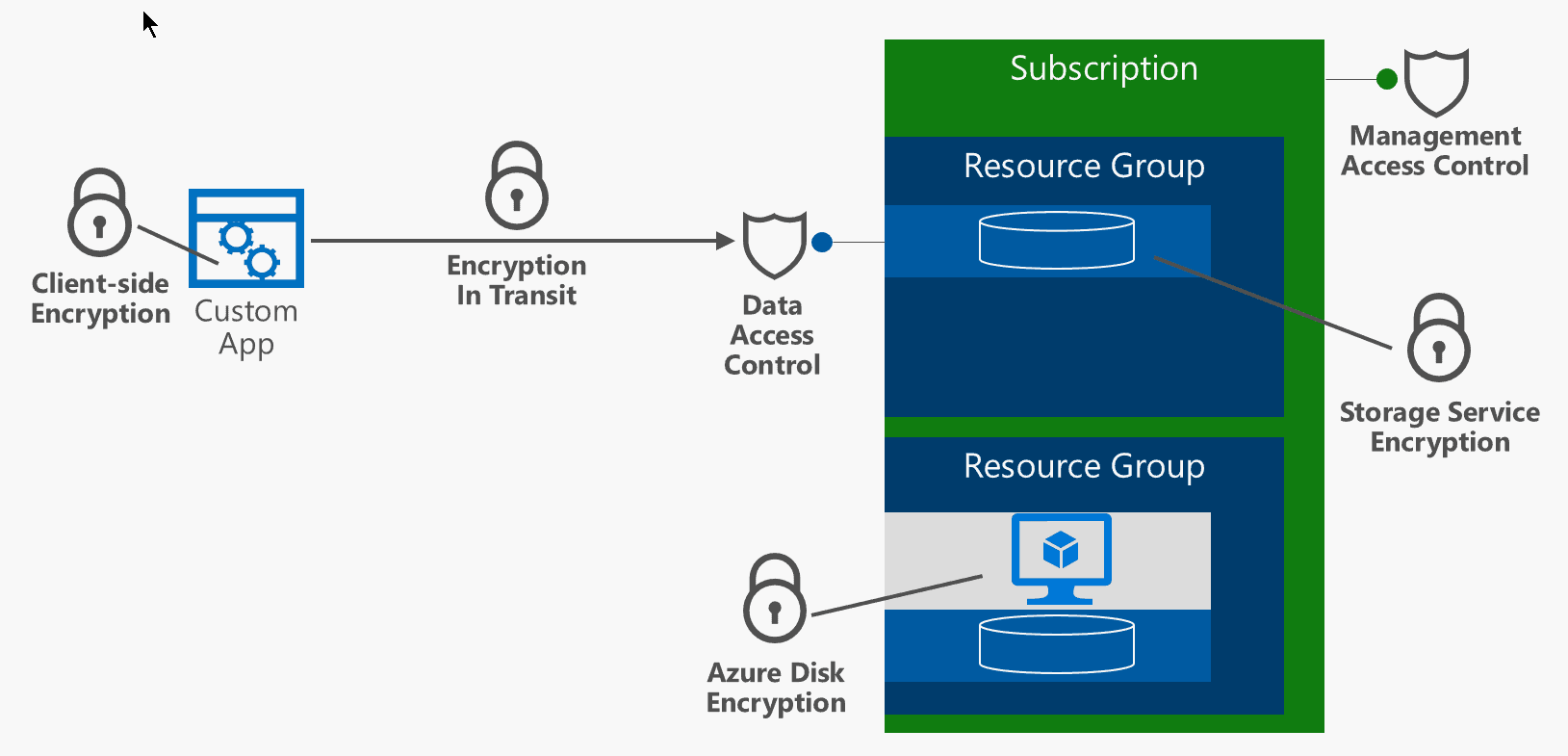
  • Data Encryption: Azure offers encryption at rest and in transit to protect data from unauthorized access.
  • Identity and Access Management: Azure Active Directory enables organizations to manage user identities and control access to resources.
  • Network Security: Azure Virtual Network allows organizations to create secure networks and control traffic flow.
  • Security Monitoring: Azure Security Center provides continuous monitoring and threat detection to identify and respond to security incidents.
  • Compliance Certifications: Azure maintains a wide range of compliance certifications to meet industry-specific regulatory requirements.

Best Practices for Securing Your Azure Environment

To enhance security in your Azure environment, consider implementing the following best practices:

  1. Multifactor Authentication: Require users to provide multiple forms of verification before accessing resources.
  2. Data Classification: Classify data based on sensitivity levels and apply appropriate security controls.
  3. Patch Management: Keep software up-to-date with the latest security patches to address vulnerabilities.
  4. Regular Auditing: Conduct regular audits of your Azure environment to identify potential security gaps.
  5. Educate Users: Provide training on security best practices to help users recognize and respond to security threats.

In Conclusion

Azure cloud security is a critical aspect of maintaining a secure and compliant cloud environment. By leveraging the robust security features offered by Microsoft Azure and following best practices for securing your environment, you can safeguard your data, applications, and infrastructure in the cloud.


Understanding Azure Cloud Security: Key Questions and Comparisons

  1. How secure is Azure cloud services?
  2. What are the 5 pillars of cloud security?
  3. What security does Microsoft Azure have?
  4. What are Azure security tools?
  5. Why Azure is more secure than AWS?
  6. What is the difference between AWS and Azure security?

How secure is Azure cloud services?

Azure cloud services are known for their robust security measures that prioritize safeguarding data and ensuring the privacy of users. Microsoft Azure implements a comprehensive range of security features, including data encryption, identity and access management, network security, and continuous monitoring for threat detection. With a wide array of compliance certifications and adherence to industry-specific regulatory requirements, Azure provides a secure cloud environment for businesses to operate in. By following best practices and leveraging the security capabilities of Azure, organizations can confidently trust in the security of their data and applications within the Azure cloud services ecosystem.

What are the 5 pillars of cloud security?

In the realm of Azure cloud security, understanding the five pillars of cloud security is essential for ensuring a robust and comprehensive security posture. These pillars encompass key aspects that organizations must address to protect their data and resources effectively. The five pillars of cloud security typically include identity and access management, data protection, network security, application security, and compliance. By focusing on these pillars, organizations can establish a strong foundation for securing their Azure environments and mitigating potential risks associated with cloud computing.

What security does Microsoft Azure have?

Microsoft Azure offers a comprehensive set of security features to protect data and applications in the cloud. Some key security measures provided by Azure include data encryption at rest and in transit, identity and access management through Azure Active Directory, network security with Azure Virtual Network, continuous monitoring and threat detection via Azure Security Center, and adherence to various compliance certifications to meet regulatory requirements. These robust security capabilities help organizations safeguard their assets and maintain a secure environment within the Microsoft Azure cloud platform.

What are Azure security tools?

Azure offers a variety of robust security tools to help organizations enhance their cloud security posture. These tools include Azure Security Center, Azure Active Directory, Azure Key Vault, Azure Information Protection, and more. Azure Security Center provides continuous monitoring, threat detection, and security recommendations to protect cloud resources. Azure Active Directory enables identity and access management, while Azure Key Vault allows secure storage and management of cryptographic keys and secrets. Azure Information Protection helps classify and protect sensitive data across devices and applications. By leveraging these Azure security tools, organizations can strengthen their overall security framework in the cloud.

Why Azure is more secure than AWS?

When comparing Azure to AWS in terms of security, Azure is often considered more secure due to its strong focus on compliance and governance. Microsoft Azure provides a comprehensive set of security features, such as advanced threat detection, encryption, identity management, and compliance certifications. Additionally, Azure’s integrated security tools and services, like Azure Security Center and Azure Active Directory, offer robust protection for data and applications. Microsoft’s commitment to security and privacy standards across its cloud services further enhances Azure’s reputation for providing a secure cloud environment for businesses and organizations.

What is the difference between AWS and Azure security?

When comparing AWS and Azure security, one key difference lies in their approach to security features and services. While both cloud platforms offer a range of security tools, AWS is known for its granular control and customization options, allowing users to fine-tune security settings to meet specific requirements. On the other hand, Azure emphasizes integration with existing Microsoft products and services, providing a seamless experience for organizations already using Microsoft technologies. Understanding these differences can help organizations choose the cloud platform that best aligns with their security needs and preferences.
google platform

Unlocking the Potential of Google Platform: A Comprehensive Overview

The Power of Google Platform

The Power of Google Platform

Google Platform is a comprehensive suite of cloud computing services offered by Google. It provides a wide range of tools and resources for businesses and developers to build, deploy, and scale applications and websites with ease.

Key Features of Google Platform:

  • Google Cloud Storage: Secure and scalable object storage for storing data in the cloud.
  • Google Compute Engine: Virtual machines on Google’s infrastructure for running workloads.
  • Google App Engine: Platform as a Service (PaaS) offering for building and deploying applications.
  • Google Kubernetes Engine: Managed Kubernetes service for containerized applications.
  • BigQuery: Serverless, highly scalable, and cost-effective multi-cloud data warehouse.
  • Firebase: Backend as a Service (BaaS) platform for building mobile and web applications.

Benefits of Using Google Platform:

By leveraging Google Platform, businesses can enjoy the following benefits:

  • Scalability: Easily scale resources up or down based on demand.
  • Simplicity: Streamlined processes for development, deployment, and management.
  • Safety & Security: Robust security measures to protect data and applications.
  • Flexibility: Support for multiple programming languages and frameworks.
  • Cost-Effectiveness: Pay only for what you use with flexible pricing options.

In conclusion, Google Platform empowers businesses to innovate faster, reduce operational overhead, and scale globally. With its powerful tools and services, organizations can focus on creating exceptional digital experiences without worrying about infrastructure management.


Top 8 Advantages of Using the Google Platform for Your Business

  1. Scalability for handling varying workloads
  2. Robust security measures to protect data
  3. Cost-effective pricing options based on usage
  4. Easy integration with other Google services
  5. High availability and reliability of services
  6. Support for multiple programming languages and frameworks
  7. Streamlined processes for development and deployment
  8. Global reach with data centers in multiple regions


7 Drawbacks of Using Google Platform: Costs, Complexity, and More

  1. Potential for high costs if resources are not managed efficiently
  2. Complex pricing structure may be confusing for some users
  3. Limited support for certain programming languages and frameworks
  4. Dependency on Google’s infrastructure and services
  5. Data privacy concerns due to the scale of Google’s operations
  6. Integration challenges with existing on-premises systems
  7. Possible downtime or service disruptions impacting business operations

Scalability for handling varying workloads

Google Platform’s scalability feature allows businesses to effortlessly manage fluctuating workloads by dynamically adjusting resources based on demand. This flexibility ensures that applications can seamlessly handle spikes in traffic or increased computational needs without any downtime or performance issues. With Google Platform, organizations can efficiently scale their operations up or down as needed, optimizing efficiency and cost-effectiveness while maintaining a seamless user experience.

Robust security measures to protect data

Google Platform offers robust security measures to protect data, ensuring that businesses can trust their valuable information is safe and secure. With features such as encryption, access controls, monitoring tools, and compliance certifications, Google Platform provides a strong defense against potential threats and unauthorized access. This proactive approach to security gives organizations peace of mind knowing that their data is well-protected in the cloud environment.

Cost-effective pricing options based on usage

Google Platform offers a significant advantage with its cost-effective pricing options that are based on actual usage. This pay-as-you-go model allows businesses to optimize their expenses by only paying for the resources they consume. By eliminating upfront costs and providing flexible pricing structures, Google Platform enables organizations to scale efficiently while keeping their operational costs in check. This approach not only promotes financial transparency but also ensures that businesses can adapt to changing demands without overspending on unnecessary infrastructure.

Easy integration with other Google services

Google Platform offers the significant advantage of easy integration with other Google services. This seamless connectivity allows businesses to leverage a wide range of tools and resources within the Google ecosystem, enhancing productivity and efficiency. By effortlessly combining Google Platform with services such as Gmail, Google Drive, and Google Analytics, organizations can create cohesive workflows, streamline processes, and access valuable insights to drive informed decision-making. The interoperability of Google services ensures a unified experience for users and enables businesses to maximize the benefits of a comprehensive suite of solutions tailored to their specific needs.

High availability and reliability of services

Google Platform’s high availability and reliability of services ensure that businesses can operate smoothly without worrying about downtime or disruptions. With redundant systems and data centers across the globe, Google Platform minimizes the risk of service interruptions, providing a dependable infrastructure for critical applications and workloads. This pro of Google Platform gives businesses the confidence to focus on their core operations and innovation, knowing that their services will be consistently available to users.

Support for multiple programming languages and frameworks

Google Platform’s support for multiple programming languages and frameworks is a significant advantage for developers and businesses. This flexibility allows users to choose the tools that best fit their needs and expertise, enabling them to work with familiar languages and frameworks to build applications efficiently. Whether developers prefer Java, Python, Node.js, or other languages, Google Platform offers a diverse ecosystem that caters to a wide range of development preferences, making it easier to create robust and scalable solutions tailored to specific requirements.

Streamlined processes for development and deployment

Google Platform offers a significant advantage with its streamlined processes for development and deployment. By providing efficient tools and resources, Google Platform enables businesses to accelerate their development cycles and deploy applications seamlessly. This streamlined approach not only saves time but also enhances productivity, allowing teams to focus more on innovation and less on managing complex deployment processes. Ultimately, this pro of Google Platform contributes to faster time-to-market for products and services, giving businesses a competitive edge in today’s fast-paced digital landscape.

Global reach with data centers in multiple regions

Google Platform’s global reach with data centers in multiple regions is a significant advantage for businesses looking to expand their operations worldwide. By leveraging Google’s extensive network of data centers, companies can ensure low latency and high performance for their applications and services across different geographic locations. This distributed infrastructure also enhances reliability and resilience, allowing businesses to deliver a seamless experience to users regardless of their location. Additionally, having data centers in multiple regions enables organizations to comply with data sovereignty requirements and regulations specific to certain countries or regions, ensuring data privacy and security on a global scale.

Potential for high costs if resources are not managed efficiently

The potential for high costs on Google Platform arises when resources are not managed efficiently. Without careful monitoring and optimization, businesses may inadvertently overspend on cloud services due to unused or underutilized resources. Inefficient resource allocation, failure to scale down when not needed, or lack of cost-control measures can lead to unexpected expenses. It is crucial for organizations utilizing Google Platform to implement proper resource management strategies to mitigate the risk of incurring unnecessary costs and ensure cost-effectiveness in their cloud operations.

Complex pricing structure may be confusing for some users

The complex pricing structure of Google Platform may pose a challenge for some users, as navigating through the various pricing tiers, options, and usage calculations can be confusing. This complexity could lead to difficulties in accurately estimating costs and optimizing resource allocation, potentially resulting in unexpected charges for users who are not well-versed in the intricacies of the pricing model. Clear communication and education on pricing details are essential to help users make informed decisions and effectively manage their expenses when utilizing Google Platform services.

Limited support for certain programming languages and frameworks

One notable drawback of Google Platform is its limited support for certain programming languages and frameworks. While the platform offers a wide range of tools and services, developers may face challenges if they prefer programming languages or frameworks that are not fully supported by Google. This limitation can restrict the flexibility and choice available to developers, potentially leading to compatibility issues and additional workarounds when building applications on the platform.

Dependency on Google’s infrastructure and services

One significant drawback of Google Platform is the dependency it creates on Google’s infrastructure and services. Relying heavily on a single provider for cloud computing needs can pose risks in terms of vendor lock-in and potential service disruptions. If Google experiences downtime or makes changes to its offerings, users of Google Platform may face challenges in maintaining continuity and flexibility in their operations. This dependency limits the freedom to easily migrate to alternative platforms or integrate with other cloud services, potentially hindering scalability and adaptability in the long run.

Data privacy concerns due to the scale of Google’s operations

Data privacy concerns arise due to the vast scale of Google’s operations within its platform. With a multitude of users and extensive data collection practices, there is a heightened risk of potential privacy breaches and unauthorized access to sensitive information. The sheer volume of data stored and processed by Google raises questions about how effectively user data is protected and whether individual privacy rights are adequately safeguarded within such a massive ecosystem. Addressing these concerns is crucial to maintaining trust and transparency in Google’s platform and ensuring the privacy and security of user data remains a top priority.

Integration challenges with existing on-premises systems

One significant challenge of using Google Platform is the integration difficulties it poses with existing on-premises systems. Organizations that have invested in on-premises infrastructure may face complexities when trying to seamlessly connect their legacy systems with Google’s cloud services. This can lead to compatibility issues, data migration challenges, and potential disruptions in business operations. Addressing these integration challenges requires careful planning, expertise, and resources to ensure a smooth transition to the cloud while maintaining the functionality and security of existing on-premises systems.

Possible downtime or service disruptions impacting business operations

One significant drawback of Google Platform is the potential for downtime or service disruptions that can impact business operations. Despite Google’s robust infrastructure and redundancy measures, unforeseen technical issues or maintenance activities can lead to temporary outages, causing inconvenience and potentially affecting productivity. Businesses relying heavily on Google Platform services need to have contingency plans in place to mitigate the risks associated with possible downtime and ensure continuity of operations during such instances.