
cfchris.com

Loading

simple java program

Simple Java Program: A Beginner’s Guide to Writing and Running Your First Code

How to Write a Simple Java Program

Java is a popular programming language used to build desktop, web, and mobile applications. A good way to get started is to write a small program that displays a message on the screen.

Your First Java Program

The program below prints “Hello, World!” in the console:

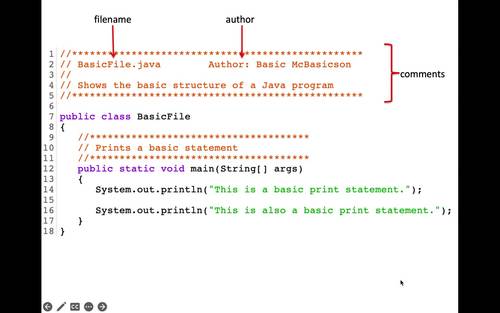
public class HelloWorld {

public static void main(String[] args) {

System.out.println("Hello, World!");

}

}

Understanding the Code

  • public class HelloWorld defines a class named HelloWorld. In Java, the class name should match the file name, so save the program as HelloWorld.java.
  • public static void main(String[] args) defines the main method. Java starts running the program from this method.
  • System.out.println() displays text in the console. The text to display goes inside the parentheses and quotation marks.
  • Braces, { }, mark the beginning and end of the class and method.
  • The semicolon at the end of the print statement tells Java that the instruction is complete.

Compile and Run the Program

Install a Java Development Kit (JDK), then open a terminal or command prompt in the folder containing HelloWorld.java. Compile the program with:

javac HelloWorld.java

If compilation succeeds, Java creates a file named HelloWorld.class. Run the program with:

java HelloWorld

The output will be:

Hello, World!

Try a Small Change

Replace the message inside System.out.println() with your own text. For example:

System.out.println("Java is fun to learn!");

Save the file, compile it again, and run it to see the new output. This simple example introduces the basic structure of a Java program and gives you a starting point for exploring variables, input, and other programming concepts.


7 Essential Tips for Writing Simple Java Programs

  1. Use `public static void main(String[] args)` as the program’s entry point.
  2. Save the file with the same name as its public class.
  3. Use `System.out.println()` to display text.
  4. End most statements with a semicolon.
  5. Match every opening brace with a closing brace.
  6. Compile with `javac` and run with `java`.
  7. Keep variable names clear and descriptive.

Use `public static void main(String[] args)` as the program’s entry point.

In a simple Java program, `public static void main(String[] args)` is the entry point—the method Java looks for to begin running your code. Place the statements you want the program to execute inside its braces. The method signature must be written with the correct spelling and capitalization, or Java won’t recognize it as the program’s starting point.

Save the file with the same name as its public class.

In Java, save your source file with the same name as its public class, including matching capitalization, and add the .java extension. For example, if your public class is HelloWorld, name the file HelloWorld.java. This naming rule helps the Java compiler locate and compile the class correctly.

Use `System.out.println()` to display text.

Use `System.out.println()` to display text in a Java program’s console. Place the text inside quotation marks within the parentheses, as in `System.out.println(“Hello, world!”);`. Java prints the message and then moves to a new line, making this method useful for showing greetings, results, and other output.

End most statements with a semicolon.

In Java, most statements end with a semicolon, which tells the compiler that an instruction is complete. For example, `System.out.println(“Hello, world!”);` needs a semicolon at the end. Forgetting one can cause a compile-time error, so check your statements when the compiler reports a problem. Some Java structures, such as class and method declarations, do not end with semicolons.

Match every opening brace with a closing brace.

In a simple Java program, every opening brace ({) must have a matching closing brace (}). Braces mark the beginning and end of code blocks, such as classes and methods, so a missing or misplaced brace can cause compilation errors or change how the program works. Indenting nested blocks consistently makes braces easier to match and your code easier to read.

Compile with `javac` and run with `java`.

To compile a simple Java program, open a terminal in the folder containing the `.java` file and run `javac FileName.java`, replacing `FileName` with the name of your file. After compilation succeeds, run the program with `java ClassName`—without the `.java` extension—to see its output.

Keep variable names clear and descriptive.

Use clear, descriptive variable names so your code is easier to read and understand. For example, studentAge is more informative than x, and totalPrice makes its purpose clearer than n. Meaningful names also make simple Java programs easier to update and help you spot mistakes as you learn.
byte code in java

Demystifying Bytecode in Java: A Comprehensive Guide

Understanding Bytecode in Java

Understanding Bytecode in Java

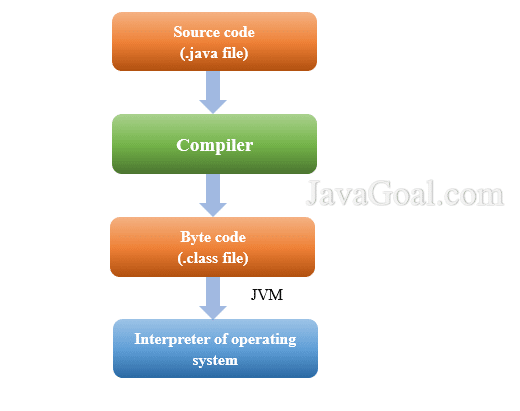
When you write a Java program, the code you create is not directly executed by the computer’s hardware. Instead, it goes through a series of transformations before it can be run. One of these transformations involves converting the Java source code into bytecode.

Bytecode is an intermediate representation of your Java code that is machine-independent. It is a set of instructions that can be executed by the Java Virtual Machine (JVM). This allows Java programs to be platform-independent, as the bytecode can be run on any system that has a JVM installed.

When you compile your Java source code, the Java compiler translates it into bytecode instead of native machine code. This bytecode is saved in .class files, which can then be executed by the JVM. The JVM takes care of interpreting and executing these bytecode instructions.

One advantage of using bytecode is that it provides a level of security. Since bytecode is not in native machine language, it cannot directly access system resources or perform harmful operations. This helps in creating a secure environment for running Java applications.

Another benefit of bytecode is portability. You can write your Java program once and run it on any system that has a compatible JVM. This “write once, run anywhere” capability has been one of the key features that have made Java so popular among developers.

Overall, understanding bytecode and how it works within the Java ecosystem is essential for any Java developer. It plays a crucial role in making Java programs platform-independent, secure, and portable.


6 Essential Tips for Understanding and Optimizing Java Bytecode

  1. Bytecode is a platform-independent intermediate code generated by the Java compiler.
  2. Java bytecode is executed by the Java Virtual Machine (JVM).
  3. Bytecode allows Java programs to be run on any device or operating system that has a JVM installed.
  4. Decompilers can be used to convert bytecode back into readable Java source code for analysis or reverse engineering.
  5. Optimizing bytecode can improve the performance of Java applications.
  6. Understanding bytecode can help in debugging and optimizing Java programs.

Bytecode is a platform-independent intermediate code generated by the Java compiler.

Bytecode serves as a platform-independent intermediate code that is produced by the Java compiler. This bytecode is not specific to any particular hardware or operating system, making it versatile and capable of running on any system equipped with a Java Virtual Machine (JVM). By generating bytecode, Java enables developers to write code once and execute it across different platforms seamlessly, embodying the essence of platform independence in software development.

Java bytecode is executed by the Java Virtual Machine (JVM).

Java bytecode serves as an intermediary language that the Java Virtual Machine (JVM) can understand and execute. When a Java program is compiled, it is transformed into bytecode instructions that are platform-independent. The JVM then takes on the responsibility of interpreting and executing these bytecode instructions, making it possible for Java programs to run on any system that has a JVM installed. This seamless interaction between bytecode and the JVM is what enables the portability and cross-platform compatibility that Java is known for.

Bytecode allows Java programs to be run on any device or operating system that has a JVM installed.

Bytecode in Java serves as a crucial intermediary step that enables Java programs to achieve platform independence. By compiling Java source code into bytecode, developers can ensure that their applications can run on any device or operating system equipped with a Java Virtual Machine (JVM). This flexibility not only simplifies the deployment of Java software but also underscores the “write once, run anywhere” principle that has long been a defining feature of Java development.

Decompilers can be used to convert bytecode back into readable Java source code for analysis or reverse engineering.

Decompilers play a crucial role in the Java development process by allowing developers to convert bytecode back into readable Java source code. This capability is invaluable for analysis, debugging, and reverse engineering of Java applications. By utilizing decompilers, developers can gain insights into how the code functions at a higher level, making it easier to troubleshoot issues, understand complex algorithms, and improve overall code quality. Decompilers serve as powerful tools in the Java ecosystem, providing developers with the flexibility and visibility needed to enhance their coding practices effectively.

Optimizing bytecode can improve the performance of Java applications.

Optimizing bytecode can significantly enhance the performance of Java applications. By refining the bytecode generated during the compilation process, developers can streamline the execution of their programs, leading to faster and more efficient operations. Techniques such as eliminating redundant instructions, reducing memory usage, and improving code structure can all contribute to optimizing bytecode and ultimately boosting the overall performance of Java applications. This optimization process is crucial for ensuring that Java programs run smoothly and deliver optimal results, making it a key consideration for developers aiming to enhance their application’s performance.

Understanding bytecode can help in debugging and optimizing Java programs.

Understanding bytecode in Java can greatly aid in debugging and optimizing Java programs. By delving into the intermediate representation of the code that the Java Virtual Machine (JVM) executes, developers can gain insights into how their programs are being processed at a lower level. This deeper understanding allows for more efficient troubleshooting of issues and fine-tuning performance optimizations. By analyzing bytecode instructions, developers can pinpoint bottlenecks, identify potential areas for improvement, and ultimately enhance the overall quality and efficiency of their Java applications.