cfchris.com

Loading

java course for beginners

Java Course for Beginners: Learn the Fundamentals and Build Your First Programs

Java Course for Beginners: A Practical Guide to Getting Started

Java is a popular programming language used to build everything from business applications and web services to Android apps and large-scale software systems. Its clear structure, broad ecosystem, and strong community make it a useful language for people learning to code. A well-designed Java course for beginners can help you move from basic concepts to building programs of your own.

Why Learn Java?

Java is designed to run on many types of computers. Java programs are typically compiled into bytecode, which runs on the Java Virtual Machine (JVM). This approach helps the same program work across different operating systems, provided a compatible JVM is available.

Java is also widely used in professional software development. Learning it can introduce you to essential programming ideas—including variables, loops, methods, and object-oriented programming—that apply to many other languages as well.

What a Beginner Java Course Should Cover

You do not need previous programming experience to begin. A good introductory course explains each idea step by step and gives you opportunities to practice it. Look for a course that includes these core topics:

  • Setting up your tools: Install a Java Development Kit (JDK) and choose a code editor or integrated development environment (IDE).
  • Your first program: Learn how to write, compile, and run a simple Java application.
  • Variables and data types: Store information using types such as int, double, boolean, and String.
  • Operators and expressions: Perform calculations and compare values.
  • Conditionals: Use if, else, and switch statements to make decisions.
  • Loops: Repeat tasks with for and while loops.
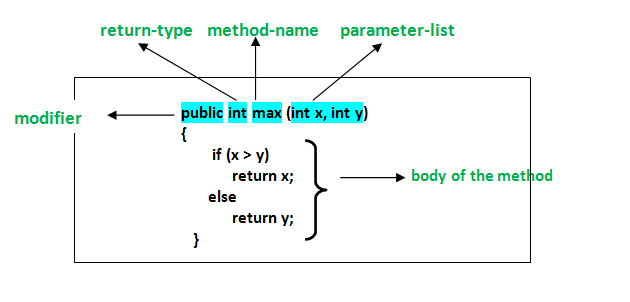
  • Methods: Organize code into reusable blocks.
  • Arrays and collections: Work with groups of values.
  • Object-oriented programming: Create classes and objects, and learn about fields, constructors, and methods.
  • Debugging and errors: Read compiler messages, find mistakes, and improve your code.

How to Choose the Right Course

Beginner courses come in many formats, including online lessons, classroom instruction, books, and self-paced tutorials. The best choice depends on how you like to learn and how much time you can set aside. Before enrolling, check that the course:

  • Clearly identifies itself as suitable for beginners.
  • Uses current Java tools and explains how to install them.
  • Includes coding exercises, not just videos or lectures.
  • Builds concepts gradually and explains unfamiliar terms.
  • Offers small projects that let you apply what you have learned.

A course does not have to teach every Java feature at once. A strong foundation in the basics is more valuable than rushing through advanced topics before you are ready.

Practice with Small Projects

Writing code regularly is one of the best ways to make progress. After learning the fundamentals, try projects that are simple enough to finish but flexible enough to expand. For example, you could create:

  • A temperature or unit converter
  • A basic calculator
  • A number-guessing game
  • A to-do list for the command line
  • A program that tracks books, movies, or personal expenses

Start with a basic version, then add features as your skills improve. A number-guessing game, for instance, can begin with a random number and a loop. Later, you can add input validation, a limited number of guesses, and a way to play again.

Tips for Learning Java Successfully

Set a manageable learning schedule. Short, frequent practice sessions often work better than trying to learn everything in one sitting. Type out examples yourself, change them, and observe what happens. When you encounter an error, read the message carefully and test one possible fix at a time.

It is also normal to revisit concepts. Object-oriented programming and other topics may take time to feel comfortable. Keep your early programs, review them later, and notice how your understanding has grown.

What Comes After the Basics?

Once you can write small programs and understand how classes and objects work, you can explore topics such as exception handling, file input and output, generics, testing, and common data structures. Your next steps can depend on your goals. For example, you might study web development, Android development, or backend application development.

Start Building with Java

A Java course for beginners can give you a clear path into programming, but progress comes from applying what you learn. Choose a course with hands-on exercises, practice consistently, and build small projects along the way. With patience and regular effort, you can develop the skills to create useful Java applications and continue learning more advanced programming concepts.


Top FAQs About Starting a Java Course for Beginners

  1. Which is the best Java course for beginners?
  2. How can I learn Java as a beginner?
  3. Is 1 month enough to learn Java?
  4. How do I start studying Java?

Which is the best Java course for beginners?

The best Java course for beginners is one that assumes no prior programming experience, teaches concepts step by step, and gives you plenty of hands-on practice. Look for lessons covering Java basics, problem-solving, and object-oriented programming, along with exercises and small projects that help you apply what you learn. The right choice also depends on your learning style, schedule, and budget, so preview a lesson or two before committing.

How can I learn Java as a beginner?

Beginners can learn Java by starting with the basics: installing the JDK and a code editor, then practicing variables, data types, conditionals, loops, methods, and classes. Follow a structured beginner course with hands-on exercises, and write code regularly rather than only watching lessons. Small projects—such as a calculator or number-guessing game—help reinforce new concepts. When errors come up, read the messages carefully and use them as clues; steady practice is more effective than trying to learn everything at once.

Is 1 month enough to learn Java?

One month is enough to learn Java’s fundamentals if you study consistently and practice regularly, but it’s usually not enough to master the language or become job-ready. In that time, you can learn basic syntax, variables, conditionals, loops, methods, and introductory object-oriented programming, then apply them in small projects. Your progress will depend on your prior experience and the time you can dedicate each day. Continue practicing after the first month to strengthen your skills and explore more advanced topics.

How do I start studying Java?

To start studying Java, install the latest Java Development Kit (JDK) and choose a beginner-friendly editor or IDE, such as IntelliJ IDEA or Visual Studio Code. Then follow a structured introductory course that covers basic syntax, variables, conditionals, loops, methods, and classes. Write and run small programs as you learn—such as a calculator or number-guessing game—and practice regularly. When you encounter errors, read the messages carefully and use them to understand how your code works.
java certification course

Java Certification Course: Build Your Skills and Prepare for the Exam

Java Certification Course: A Practical Guide to Getting Started

A Java certification course can help you build programming skills, prepare for a recognized credential, and demonstrate your knowledge to employers. Whether you’re new to software development or an experienced programmer looking to strengthen your résumé, the right course can provide a structured path to learning Java.

What Is a Java Certification Course?

A Java certification course teaches the concepts and skills covered by a particular Java certification exam or learning program. Courses may include video lessons, instructor-led classes, coding exercises, practice tests, and projects.

Course content varies, but commonly covers Java syntax, object-oriented programming, classes and interfaces, exception handling, collections, generics, and working with the Java development environment. More advanced courses may explore concurrency, database connectivity, APIs, and application development.

Who Should Consider Taking a Course?

Java certification courses may be useful for:

  • Beginners who want a guided introduction to programming
  • Students preparing for software development roles
  • Developers who use other languages and want to learn Java
  • Java programmers seeking to review core concepts
  • Professionals preparing for a specific certification exam

Before choosing a course, check its prerequisites. Some are designed for learners with no programming experience, while others expect familiarity with Java or general programming concepts.

Choosing the Right Java Course

Start by identifying your goal. If you want to learn programming, look for a beginner-friendly course with regular coding practice. If you’re preparing for an exam, confirm that the course aligns with the current exam objectives and Java version.

Consider these factors when comparing options:

  • Course level: Choose a course suited to your current experience.
  • Practice opportunities: Look for coding assignments, projects, and realistic questions.
  • Instructor support: Decide whether you prefer self-paced lessons or live instruction.
  • Current materials: Java and certification requirements can change, so check when the content was last updated.
  • Cost and schedule: Compare the total price, course length, and any additional exam fees.
  • Credential details: Verify who issues the certification and what completing the course actually provides.

Course Completion and Certification Are Not Always the Same

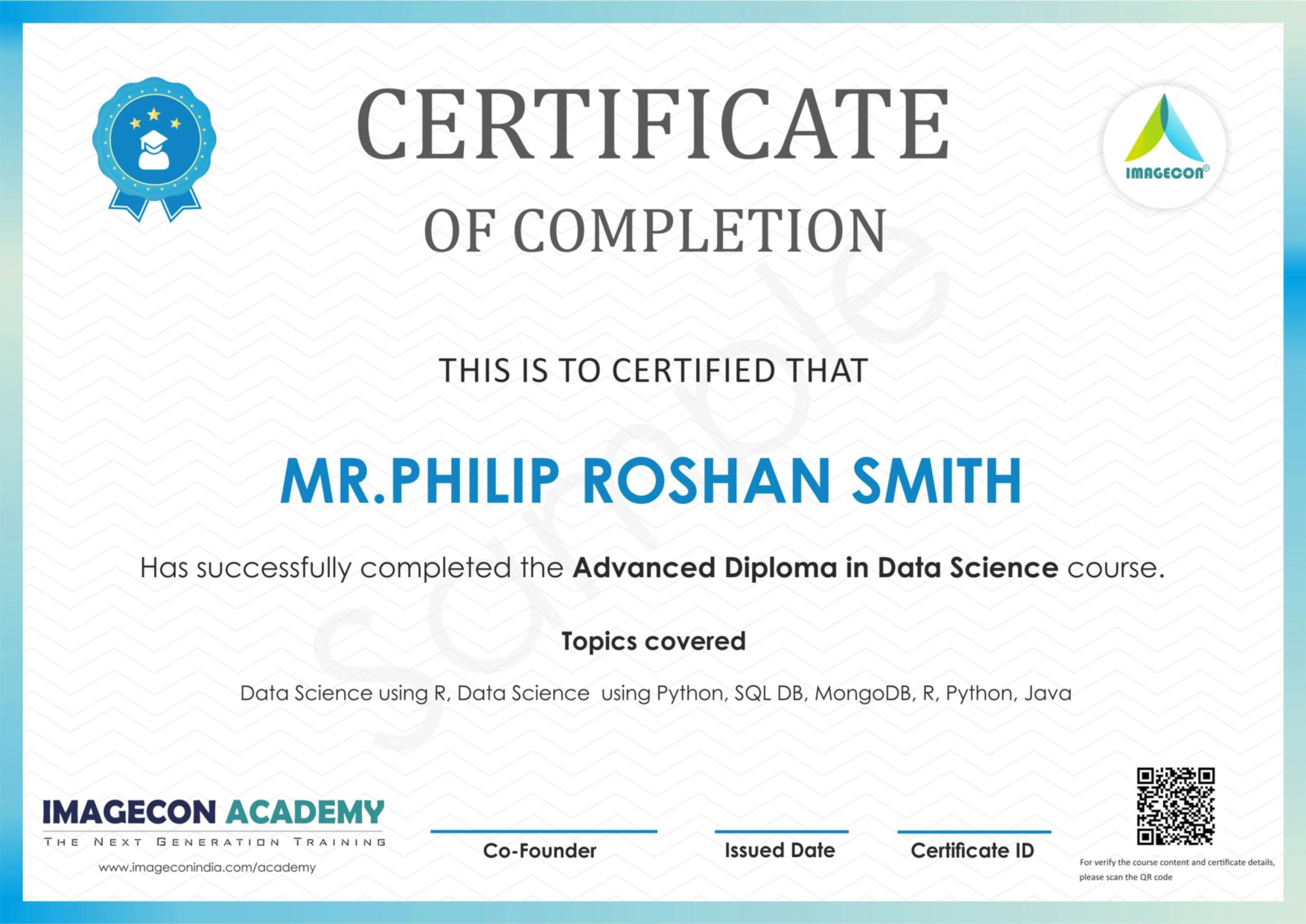
Completing a course may earn you a certificate of completion, but that is not necessarily the same as earning an industry certification. Some credentials require passing a separate exam. Review the certification provider’s official requirements, exam format, fees, and policies before enrolling in a preparation course.

Certification programs and exam details may change. Use the provider’s official website as the final source of information about available credentials and current requirements.

How to Prepare for a Java Certification Exam

A consistent study plan is usually more effective than cramming. Begin by reviewing the exam objectives and noting topics that are unfamiliar. Then combine instruction with hands-on practice: write small programs, test different inputs, and explain what the code does.

  1. Review the objectives. Use them to organize your study plan.
  2. Learn the fundamentals. Make sure you understand syntax, data types, control flow, and object-oriented principles.
  3. Code regularly. Practice in a development environment rather than relying only on videos or notes.
  4. Work through practice questions. Use them to find gaps in your understanding, not just to memorize answers.
  5. Build a small project. A practical project can help connect individual concepts.
  6. Review and adjust. Spend extra time on topics you find challenging.

Benefits of Learning Java

Java is used in a range of software applications, including business systems, web services, and Android development. Learning the language can help you understand programming fundamentals that transfer to other technologies. A certification may also give you a structured learning goal and a way to document your achievement.

However, a credential alone does not guarantee a job or prove practical ability. Employers may also look for problem-solving skills, project experience, communication, and familiarity with the tools used in their environment. Pairing coursework with hands-on projects can help you show what you can do.

Start with a Clear Goal

The best Java certification course is one that matches your experience, learning preferences, and career goals. Compare the course outline with the relevant exam objectives, confirm what credential—if any—you’ll earn, and make time for regular coding practice. With a realistic plan and steady effort, a course can be a useful step toward stronger Java skills.


9 Essential Tips for Mastering Your Java Certification Course

  1. Choose a course aligned with your Java certification exam.
  2. Check that the syllabus matches the latest exam objectives.
  3. Review Java fundamentals before starting advanced topics.
  4. Practice coding exercises regularly.
  5. Use mock exams to track your progress.
  6. Study core APIs and object-oriented programming.
  7. Ask instructors for help with difficult concepts.
  8. Set a consistent weekly study schedule.
  9. Review incorrect answers and learn from them.

Choose a course aligned with your Java certification exam.

Choose a course that aligns closely with the Java certification exam you plan to take. Exam objectives and Java versions can vary, so review the official exam outline and compare it with the course syllabus before enrolling. A well-matched course helps you focus your study time on relevant topics, practice the skills the exam measures, and avoid gaps in your preparation.

Check that the syllabus matches the latest exam objectives.

Before enrolling in a Java certification course, compare its syllabus with the certification provider’s latest exam objectives. Exam topics and requirements can change, so an outdated course may leave gaps in your preparation or spend time on material that’s no longer relevant. Check when the course was last updated and use the official exam page to confirm that the lessons cover the skills and topics you’ll be tested on.

Review Java fundamentals before starting advanced topics.

Before diving into advanced topics in a Java certification course, review the fundamentals, including data types, control flow, classes, objects, and methods. A strong grasp of these core concepts makes complex material easier to understand and helps you spot mistakes in your code. If anything feels rusty, spend time practicing with small programs before moving on.

Practice coding exercises regularly.

Practice coding exercises regularly to turn Java concepts into skills you can use confidently. Write programs from scratch, experiment with different solutions, and revisit topics such as loops, classes, collections, and exception handling. Consistent practice helps you spot gaps in your understanding, prepare for exam-style questions, and become more comfortable applying Java in real-world projects.

Use mock exams to track your progress.

Use mock exams to track your progress as you prepare for a Java certification. Taking practice tests under timed conditions can help you get comfortable with the exam format, identify topics that need more review, and see how your performance changes over time. After each test, review both incorrect answers and any questions you guessed on, then use those results to guide your next study sessions.

Study core APIs and object-oriented programming.

Focus on Java’s core APIs and object-oriented programming as you prepare for a certification course or exam. Practice using common classes and collections, and make sure you understand how classes, objects, inheritance, interfaces, and encapsulation work together. Writing small programs is a useful way to reinforce these concepts and recognize how they apply to real code.

Ask instructors for help with difficult concepts.

When a Java concept feels difficult, ask your instructor for help instead of letting confusion build. Describe what you’ve tried, share the code or error message you’re working with, and point out where you get stuck. An instructor can clarify the idea, suggest a different way to approach it, or recommend extra practice. Getting help early can make challenging topics easier to understand and keep you moving forward in your course.

Set a consistent weekly study schedule.

Set a consistent weekly study schedule to make steady progress in your Java certification course. Choose study times that fit your routine, then set aside regular blocks for lessons, coding practice, and reviewing challenging topics. Even a few focused sessions each week can help you retain concepts, build confidence, and avoid last-minute cramming.

Review incorrect answers and learn from them.

After each practice test, take time to review every incorrect answer and understand why your choice was wrong. Revisit the related Java concepts, check the official documentation or course materials, and try a few similar coding questions to reinforce what you’ve learned. This turns mistakes into useful feedback, helps reveal gaps in your understanding, and prepares you to handle unfamiliar questions on the certification exam.

for java

A Beginner’s Guide to Programming for Java Apps

Getting Started with Java Programming

Java is a popular, general-purpose programming language used to build everything from web applications and business software to Android apps and large-scale systems. Its combination of readability, portability, and extensive tooling makes it a strong choice for both new programmers and experienced developers.

What Is Java?

Java is a class-based, object-oriented language. Developers write Java source code, which is compiled into bytecode. The Java Virtual Machine (JVM) runs that bytecode on compatible devices and operating systems. This approach helps Java programs run across different platforms without requiring a separate version of the source code for each one.

Why Learn Java?

  • Portability: Java applications can run on many platforms with a compatible JVM.
  • Versatility: Java is used in web services, enterprise applications, desktop software, and other fields.
  • Strong ecosystem: A wide range of libraries, frameworks, development tools, and learning resources is available.
  • Useful fundamentals: Learning Java introduces concepts such as classes, objects, types, and exception handling that apply to many programming languages.
  • Ongoing use: Organizations continue to use Java for applications that need to be maintained and expanded over time.

Your First Java Program

A simple Java program can display a message in the console:

public class Main {

public static void main(String[] args) {

System.out.println("Hello, Java!");

}

}

The main method is the entry point for this program. The System.out.println statement prints a line of text. Java’s syntax may look formal at first, but its structure encourages code that is organized and explicit.

Core Concepts to Explore

As you learn Java, start with variables and data types, conditional statements, loops, and methods. Then move on to object-oriented programming, including classes, objects, inheritance, and interfaces. Exceptions and collections are also important topics for writing practical programs.

Small projects are a useful way to practice. Try building a calculator, a to-do list, or a program that reads and summarizes information. Working through real examples helps connect language features to the problems they solve.

Tools for Java Development

To begin, install a Java Development Kit (JDK), which includes tools for compiling and running Java programs. You can write code in a basic text editor, but an integrated development environment (IDE) can make development easier with features such as code completion, debugging, and project management.

Keep Building Your Skills

Java is a substantial language, so there is no need to learn everything at once. Focus on the fundamentals, write code regularly, and read errors carefully when something does not work. With steady practice, you can use Java to create reliable applications and build a solid foundation for further software development.


8 Essential Tips for Writing Clean and Effective Java Code

  1. Use meaningful names for classes, methods, and variables.
  2. Keep methods small and focused on one task.
  3. Prefer interfaces when designing flexible APIs.
  4. Use try-with-resources to close files and streams.
  5. Handle exceptions specifically instead of catching everything.
  6. Use `equals()` to compare objects, not `==`.
  7. Choose collections based on how they’ll be used.
  8. Write unit tests for important behavior.

Use meaningful names for classes, methods, and variables.

Use meaningful names for Java classes, methods, and variables to make your code easier to understand and maintain. Choose names that clearly describe what each element represents or does, such as CustomerAccount, calculateTotal(), or orderCount. Clear, consistent naming helps you and other developers follow the logic, spot mistakes, and update the code with confidence.

Keep methods small and focused on one task.

Keep Java methods small and focused on one task. A method that does one thing is easier to understand, test, debug, and reuse. If a method starts handling several responsibilities—such as validating input, updating data, and formatting output—consider splitting those steps into separate methods with clear names. This keeps your code organized and makes future changes less likely to cause unexpected problems.

Prefer interfaces when designing flexible APIs.

When designing a flexible Java API, prefer accepting or returning interfaces rather than specific implementation classes. For example, use `List` instead of `ArrayList` when a method only needs list behavior. This keeps the API focused on what callers can do, lets implementations change without affecting users, and makes it easier to substitute alternatives such as `LinkedList` or custom implementations. Use a concrete class only when its specific behavior is essential.

Use try-with-resources to close files and streams.

Use Java’s try-with-resources statement to manage files and streams safely. It automatically closes any resource that implements `AutoCloseable` when the statement finishes, even if an exception occurs, helping prevent resource leaks and keeping your code concise. Declare resources in the parentheses after `try`, such as a `BufferedReader` or `InputStream`, and handle any exceptions that may be thrown while using them.

Handle exceptions specifically instead of catching everything.

In Java, handle exceptions as specifically as possible instead of catching every error with a broad catch (Exception e) block. Catching the expected exception types lets you respond appropriately—for example, by retrying a failed operation or showing a helpful message—while allowing unexpected problems to surface during testing and debugging. Avoid swallowing exceptions silently; log or otherwise handle them meaningfully so issues are easier to diagnose.

Use `equals()` to compare objects, not `==`.

When comparing Java objects, use `equals()` to check whether they have the same value, rather than `==`, which checks whether two references point to the exact same object. For example, two separate `String` objects can contain the same text but still evaluate as different with `==`. Calling `equals()` makes the comparison based on content, as long as the object’s class implements the method appropriately.

Choose collections based on how they’ll be used.

Choose Java collections based on how your data will be used. Use a List when order matters or you need to access items by index, a Set when you want to prevent duplicates, and a Map when you need to look up values by key. Also consider whether you need fast lookups, predictable iteration order, or thread safety, since different implementations—such as ArrayList, HashSet, and HashMap—make different tradeoffs. Matching the collection to the task can make your code clearer and more efficient.

Write unit tests for important behavior.

Write unit tests for the most important behavior in your Java applications. Tests help verify that methods produce the expected results, catch regressions when code changes, and make it easier to refactor with confidence. Focus first on core logic and edge cases, such as empty inputs, invalid values, or boundary conditions. Frameworks like JUnit make it straightforward to organize and run tests as part of your development workflow.

java for dummies

Mastering Java for Dummies: A Beginner’s Guide to Programming Success

Java for Dummies

Java for Dummies: A Beginner’s Guide to Programming

Java is a popular programming language known for its versatility and ease of use. Whether you’re new to programming or looking to expand your skills, Java for Dummies is the perfect starting point.

Why Choose Java?

Java is widely used in web development, mobile applications, and enterprise systems. Its syntax is similar to other programming languages like C++ and C#, making it easier to learn for beginners.

What You’ll Learn

In Java for Dummies, you’ll learn:

  • The basics of Java programming, including variables, data types, and control structures
  • Object-oriented programming concepts such as classes, objects, and inheritance
  • How to work with arrays, collections, and input/output streams
  • Creating graphical user interfaces using JavaFX

Who Should Read This Book?

This book is ideal for:

  • Absolute beginners with no prior programming experience
  • Students studying computer science or related fields
  • Professionals looking to add Java skills to their repertoire

Why Java for Dummies?

Java for Dummies breaks down complex programming concepts into easy-to-understand explanations. With step-by-step examples and practical exercises, you’ll quickly grasp the fundamentals of Java programming.

Get Started Today!

Ready to dive into the world of Java programming? Pick up a copy of Java for Dummies and start your coding journey today!

© 2023 Java for Dummies. All rights reserved.


5 Essential Tips for Beginners to Master Java Programming

  1. Start with understanding the basic syntax of Java
  2. Practice writing simple programs to get hands-on experience
  3. Learn about object-oriented programming concepts in Java
  4. Explore Java libraries and frameworks to enhance your development skills
  5. Join online communities or forums to ask questions and learn from others

Start with understanding the basic syntax of Java

To begin your journey with Java programming, it is essential to grasp the fundamental syntax of the language. Understanding the basic syntax of Java lays a solid foundation for learning more advanced concepts and techniques. By familiarizing yourself with key elements such as variables, data types, and control structures, you will build confidence in writing and reading Java code effectively. Starting with a strong grasp of Java syntax sets you on the right path towards becoming a proficient Java developer.

Practice writing simple programs to get hands-on experience

To enhance your understanding of Java programming as suggested in the tip from “Java for Dummies,” it is crucial to practice writing simple programs regularly. By engaging in hands-on coding exercises, you can apply theoretical knowledge to real-world scenarios, solidifying your grasp of Java concepts and syntax. Through consistent practice, you will build confidence in your programming skills and develop a problem-solving mindset essential for mastering Java development.

Learn about object-oriented programming concepts in Java

To excel in Java programming, it is crucial to grasp object-oriented programming concepts. Understanding how classes, objects, and inheritance work in Java not only enhances your coding skills but also allows you to build more efficient and scalable applications. By delving into object-oriented programming principles, as outlined in Java for Dummies, you can elevate your proficiency in Java and unlock a world of possibilities in software development.

Explore Java libraries and frameworks to enhance your development skills

Exploring Java libraries and frameworks is a valuable tip for those diving into Java programming with “Java for Dummies.” By delving into these resources, beginners can enhance their development skills and leverage pre-built functionalities to streamline their coding process. Java libraries like Apache Commons and frameworks such as Spring provide a wealth of tools and components that can significantly boost efficiency and productivity in software development projects. Embracing these resources opens up a world of possibilities for Java learners to create more robust and sophisticated applications while honing their programming expertise.

Join online communities or forums to ask questions and learn from others

To enhance your learning experience with Java for Dummies, consider joining online communities or forums where you can engage with fellow learners and experts. These platforms provide a valuable space to ask questions, seek guidance on challenging topics, and learn from the experiences of others in the Java programming community. By actively participating in online discussions, you can expand your knowledge, gain insights into best practices, and build a supportive network of like-minded individuals passionate about Java development.

java 19

Exploring the Latest Features of Java 19: Enhancing Performance and Productivity

Exploring Java 19

Exploring Java 19

Java, one of the most popular programming languages in the world, continues to evolve with the release of Java 19. This latest version brings several new features and improvements that enhance the language’s capabilities and performance.

New Features in Java 19

Some of the key features introduced in Java 19 include:

  • Pattern Matching for switch: Building upon the pattern matching feature introduced in previous versions, Java 19 enhances switch expressions with pattern matching capabilities, making code more concise and readable.
  • Sealed Classes: Sealed classes restrict which classes can be subclasses, providing better control over class hierarchies and improving code maintainability.
  • Vector API: The Vector API introduces a set of vectorized operations to leverage modern hardware capabilities for improved performance in numerical computations.
  • Foreign Function & Memory API: This feature allows Java programs to interoperate with native code more easily by providing a standardized way to call native functions and manage memory.

Performance Improvements

In addition to new features, Java 19 also includes performance enhancements that optimize memory usage, reduce overhead, and improve overall runtime efficiency. These improvements make Java applications faster and more responsive.

Migrating to Java 19

For developers considering upgrading to Java 19, it is essential to review the release notes and ensure compatibility with existing codebases. Testing thoroughly is recommended to identify any potential issues or deprecated features that may impact application functionality.

Conclusion

Java 19 represents another step forward in the evolution of the language, offering exciting new features and performance improvements for developers. By embracing these advancements and staying current with updates, developers can leverage the full potential of Java for building robust and efficient applications.


Top 7 Tips for Mastering Java 19: New Features, Performance Boosts, and Best Practices

  1. Explore the new features introduced in Java 19, such as pattern matching for switch statements.
  2. Take advantage of sealed classes and interfaces to enforce stronger encapsulation in your code.
  3. Utilize the enhanced APIs for working with collections, like List.copyOf() and Set.copyOf().
  4. Experiment with the improved performance optimizations in Java 19 for better runtime efficiency.
  5. Learn about the enhancements to the Javadoc tool for generating documentation more effectively.
  6. Stay updated on any changes to deprecated APIs or removed features in Java 19 to avoid compatibility issues.
  7. Consider upgrading your development environment to support Java 19 and leverage its latest capabilities.

Explore the new features introduced in Java 19, such as pattern matching for switch statements.

Discover the latest enhancements in Java 19, including the innovative addition of pattern matching for switch statements. This new feature streamlines code logic and readability, offering developers a more efficient way to handle conditional statements. By exploring these new capabilities in Java 19, programmers can enhance their coding practices and leverage the language’s evolving functionalities for improved software development.

Take advantage of sealed classes and interfaces to enforce stronger encapsulation in your code.

By utilizing sealed classes and interfaces in Java 19, developers can enforce stronger encapsulation within their codebase. Sealed classes allow for better control over class hierarchies by restricting which classes can be subclasses, thereby enhancing code maintainability and reducing the risk of unintended inheritance. This feature promotes a more structured and secure design approach, ensuring that the intended behavior of classes and interfaces is preserved throughout the development process.

Utilize the enhanced APIs for working with collections, like List.copyOf() and Set.copyOf().

Java 19 introduces enhanced APIs for working with collections, such as List.copyOf() and Set.copyOf(). These new methods provide a convenient way to create immutable copies of lists and sets, ensuring data integrity and preventing unintended modifications. By utilizing these enhanced APIs, developers can streamline their code and improve efficiency when handling collections in Java applications.

Experiment with the improved performance optimizations in Java 19 for better runtime efficiency.

To enhance runtime efficiency in Java 19, it is recommended to experiment with the improved performance optimizations introduced in this version. By leveraging these enhancements, developers can fine-tune their applications to run more efficiently, resulting in faster execution and improved overall performance. Testing and implementing these optimizations can lead to significant gains in runtime speed and resource utilization, ultimately enhancing the user experience and the application’s responsiveness.

Learn about the enhancements to the Javadoc tool for generating documentation more effectively.

In Java 19, developers can benefit from enhancements to the Javadoc tool, which facilitate the generation of documentation more effectively. By learning about these improvements, developers can streamline the process of documenting their code, making it easier to maintain and share information about their projects. The updated Javadoc tool in Java 19 offers new features and capabilities that contribute to clearer and more comprehensive documentation, ultimately enhancing the overall quality of Java applications.

Stay updated on any changes to deprecated APIs or removed features in Java 19 to avoid compatibility issues.

Staying updated on any changes to deprecated APIs or removed features in Java 19 is crucial to avoid compatibility issues in your codebase. By keeping track of these modifications, developers can proactively address potential issues and ensure a smooth transition to the latest version of Java. It is essential to review the documentation and release notes carefully, as well as conduct thorough testing to identify and resolve any deprecated or removed features that may impact the functionality of your applications.

Consider upgrading your development environment to support Java 19 and leverage its latest capabilities.

Consider upgrading your development environment to support Java 19 to take advantage of its latest capabilities. By migrating to Java 19, you can access new features such as pattern matching for switch statements, sealed classes, Vector API, and the Foreign Function & Memory API. Upgrading your environment will not only enhance your programming experience but also enable you to write more efficient and modern Java code.

java 8

Mastering Java 8: Unlocking the Power of Modern Java Features

Exploring Java 8: Features and Benefits

Exploring Java 8: Features and Benefits

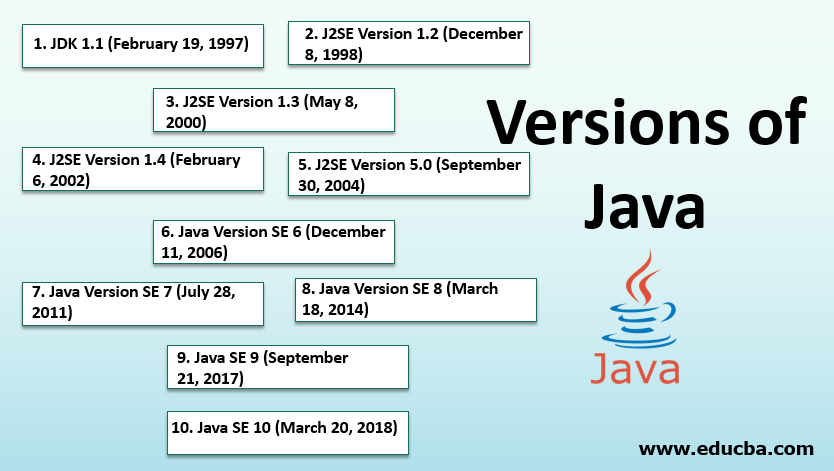
Java 8, released by Oracle in March 2014, introduced several groundbreaking features that revolutionized the way developers write code in Java. Let’s delve into some of the key features and benefits of Java 8:

Lambda Expressions

One of the most significant additions to Java 8 is lambda expressions. This feature allows developers to write more concise and readable code by enabling functional programming constructs in Java.

Stream API

The Stream API introduced in Java 8 provides a powerful way to work with collections. Streams allow for efficient processing of data through pipelines of operations such as filter, map, and reduce, making code more expressive and easier to parallelize.

Date and Time API

Prior to Java 8, working with dates and times in Java was cumbersome. The new Date and Time API simplifies date and time manipulation by providing classes like LocalDate, LocalTime, LocalDateTime, and ZonedDateTime.

Optional Class

The Optional class in Java 8 helps developers handle null values more effectively. By encouraging the use of Optional, developers can write cleaner code that explicitly handles scenarios where a value may be absent.

Default Methods

In interfaces, Java 8 introduced default methods that allow interfaces to have method implementations. This feature enables backward compatibility with existing code while still evolving interfaces with new methods.

Performance Improvements

Java 8 also brought performance improvements through features like parallel streams that leverage multi-core processors for faster execution of stream operations on large datasets.

In conclusion, Java 8 has significantly enhanced the Java programming language by introducing modern features that improve developer productivity, code readability, and performance. Embracing these features can lead to more efficient and maintainable codebases for Java applications.


Mastering Java 8: 7 Essential Tips for Modern Java Development

  1. Utilize lambda expressions to write more concise code.
  2. Explore the Stream API for processing collections in a functional style.
  3. Use default methods in interfaces to add new methods without breaking existing implementations.
  4. Leverage Optional to handle potentially null values more effectively.
  5. Learn about the new Date and Time API for improved date and time manipulation.
  6. Understand method references to simplify code that just calls an existing method.
  7. Experiment with parallel streams for concurrent processing of data.

Utilize lambda expressions to write more concise code.

By utilizing lambda expressions in Java 8, developers can significantly enhance the readability and conciseness of their code. Lambda expressions allow for a more streamlined way of defining anonymous functions, making the code more expressive and easier to understand. This feature enables developers to write functions in a more functional programming style, reducing boilerplate code and improving overall code efficiency. Incorporating lambda expressions in Java 8 can lead to more concise and readable code, ultimately enhancing the development process and making maintenance tasks easier in the long run.

Explore the Stream API for processing collections in a functional style.

By exploring the Stream API in Java 8, developers can leverage functional programming principles to process collections in a more efficient and expressive manner. The Stream API allows for seamless chaining of operations like filter, map, and reduce, enabling developers to write code that is both concise and easy to parallelize. Embracing the Stream API not only simplifies collection processing but also paves the way for writing more robust and maintainable code in Java applications.

Use default methods in interfaces to add new methods without breaking existing implementations.

By utilizing default methods in interfaces in Java 8, developers can seamlessly introduce new methods without disrupting the functionality of existing implementations. This feature allows for the evolution of interfaces by providing method implementations within the interface itself, ensuring backward compatibility with classes that already implement the interface. By leveraging default methods, developers can extend interfaces with additional functionality while maintaining the integrity of the codebase and facilitating smoother transitions during software updates or enhancements.

Leverage Optional to handle potentially null values more effectively.

By leveraging the Optional class in Java 8, developers can handle potentially null values more effectively. Optional encourages explicit handling of scenarios where a value may be absent, promoting cleaner and more robust code practices. This approach not only enhances code readability but also helps prevent null pointer exceptions, leading to more reliable and maintainable Java applications.

Learn about the new Date and Time API for improved date and time manipulation.

To enhance your Java programming skills with Java 8, it is highly recommended to explore the new Date and Time API. This feature offers a more streamlined approach to handling dates and times, providing developers with a set of classes like LocalDate, LocalTime, LocalDateTime, and ZonedDateTime for improved date and time manipulation. By mastering the Date and Time API in Java 8, you can simplify complex date-related operations and create more robust and efficient applications.

Understand method references to simplify code that just calls an existing method.

Understanding method references in Java 8 is a powerful technique that simplifies code by allowing developers to directly reference existing methods. Instead of writing verbose lambda expressions to call a method, method references provide a concise and clear way to invoke functions. This not only enhances code readability but also promotes reusability and maintainability by streamlining the syntax and reducing boilerplate code. By grasping the concept of method references, developers can optimize their Java 8 codebase and make it more efficient and elegant.

Experiment with parallel streams for concurrent processing of data.

When working with Java 8, a valuable tip is to experiment with parallel streams for concurrent processing of data. By utilizing parallel streams, developers can take advantage of multi-core processors to enhance the performance of stream operations on large datasets. This approach can lead to faster data processing and improved efficiency in handling computationally intensive tasks. However, it is essential to carefully design and test parallel stream usage to ensure thread safety and avoid potential concurrency issues. Overall, exploring parallel streams in Java 8 can offer a powerful tool for optimizing data processing workflows and achieving better performance in applications.