cfchris.com

Loading

cyber security management services

Cyber Security Management Services: Protecting Your Business from Digital Threats

Cybersecurity Management Services: Protecting Your Business in a Changing Threat Landscape

Cybersecurity is an ongoing business responsibility, not a one-time technology project. New threats, changing systems, and evolving work practices can create risks for organizations of every size. Cybersecurity management services help businesses assess those risks, strengthen their defenses, and respond effectively when security issues arise.

What Are Cybersecurity Management Services?

Cybersecurity management services provide ongoing support for the people, processes, and technologies used to protect an organization’s systems and information. Depending on a business’s needs, services may include security assessments, monitoring, policy development, employee training, incident response planning, and help with regulatory requirements.

Some organizations manage cybersecurity internally, while others work with an outside provider for specialized expertise or day-to-day support. A provider may work alongside an internal IT team or take responsibility for selected security functions.

Common Cybersecurity Management Services

Security Risk Assessments

A risk assessment identifies potential weaknesses in systems, accounts, applications, and business processes. It can help an organization understand which risks are most important and decide where to focus its security investments.

Security Monitoring and Threat Detection

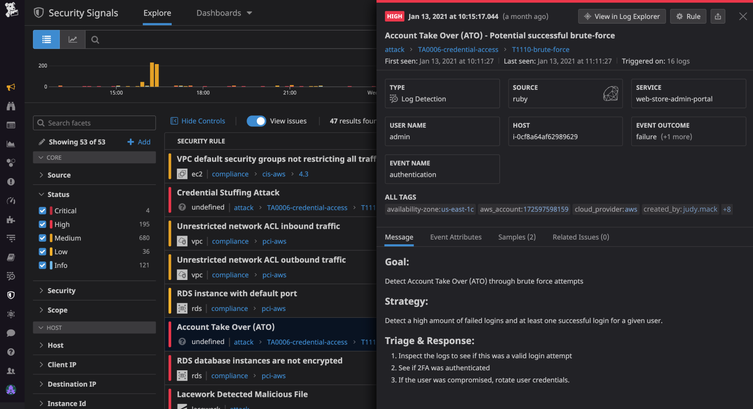
Monitoring tools can help identify unusual activity, suspicious logins, malware, and other potential threats. When alerts are reviewed and handled promptly, businesses may be better positioned to investigate problems before they cause wider disruption.

Vulnerability and Patch Management

Software vulnerabilities can leave systems exposed if they are not addressed. Vulnerability management involves identifying known weaknesses, prioritizing them by risk, and coordinating updates or other safeguards.

Identity and Access Management

Managing who can access business systems is a core part of cybersecurity. Services may include multifactor authentication, access reviews, stronger account controls, and processes for promptly changing or removing access when someone changes roles or leaves the organization.

Employee Security Awareness

Employees can help protect an organization when they know how to recognize phishing attempts, handle sensitive information, and report suspicious activity. Training can reinforce practical security habits and make reporting concerns easier.

Incident Response Planning

Even well-prepared organizations can experience security incidents. An incident response plan outlines who should take action, how systems and information will be protected, and how the organization will communicate and recover. Planning ahead can reduce confusion during a high-pressure situation.

Backup and Recovery Planning

Reliable backups can help a business restore important data after an outage, accidental deletion, hardware failure, or ransomware incident. A recovery plan should identify what needs to be restored first and include regular tests to check that backups can be used.

Why Ongoing Cybersecurity Management Matters

Security needs change as organizations adopt new applications, hire employees, work with vendors, or move data to cloud services. Ongoing management can help businesses keep track of these changes and maintain appropriate protections over time.

  • Reduce avoidable risk: Regular reviews can reveal weaknesses before they become larger problems.
  • Improve response readiness: Clear plans and responsibilities help teams act more effectively during an incident.
  • Support business continuity: Security and recovery planning can help limit interruptions to essential operations.
  • Make security more consistent: Documented procedures help employees and teams follow the same expectations.
  • Use expertise effectively: Outside specialists can provide skills or coverage that may be difficult to maintain in-house.

Choosing a Cybersecurity Management Provider

Cybersecurity services should fit an organization’s systems, operations, and risk profile. Before selecting a provider, consider the following:

  • Which services are included, and which require additional fees?
  • How are alerts reviewed, prioritized, and escalated?
  • Who will be responsible for responding to an incident?
  • How will the provider coordinate with internal IT staff and leadership?
  • How are access to business systems and sensitive information controlled?
  • What reports, recommendations, or service reviews will be provided?
  • Can the provider support the organization’s legal, contractual, and regulatory obligations?

It is also helpful to ask how a provider will learn about the business, document its environment, and measure progress. A useful relationship should include clear communication and practical recommendations—not just software or alerts.

Build a Security Program That Can Adapt

Effective cybersecurity management is a continuing process. It starts with understanding the organization’s most important systems and risks, then combines suitable safeguards with monitoring, training, and response planning. Regular reviews help ensure those measures remain relevant as the business changes.

Cybersecurity management services can give organizations the structure and support to take a more proactive approach. With clear priorities and consistent oversight, businesses can better protect their information, support daily operations, and prepare for security challenges.


Top FAQs About Cybersecurity Management Services: Costs, Careers, and Key Players

  1. What are the top 3 cybersecurity companies?
  2. What is the average cost of cyber security services?
  3. Can I make $200,000 a year in cyber security?
  4. What are cyber security managed services?
  5. What is cybersecurity service management?
  6. What are the examples of managed security services?
  7. What is the role of cyber security management?
  8. How much do cybersecurity services cost?

What are the top 3 cybersecurity companies?

There isn’t a universally agreed-upon top three, since the best cybersecurity company depends on an organization’s size, needs, and budget. CrowdStrike, Palo Alto Networks, and Microsoft are widely recognized for their cybersecurity products and services, including threat detection, network security, and cloud protection. For managed cybersecurity services, compare providers based on their expertise, monitoring and response capabilities, industry experience, and fit with your existing systems.

What is the average cost of cyber security services?

There’s no single average cost for cybersecurity services because pricing depends on your organization’s size, risk level, systems, and the type of support needed. Small businesses may pay a few hundred to several thousand dollars per month for ongoing managed security, while assessments, compliance projects, and incident response are often priced separately. The best way to estimate your cost is to identify your priorities and request a detailed quote that explains what’s included, how support is provided, and whether there are additional fees.

Can I make $200,000 a year in cyber security?

Yes, earning $200,000 a year in cybersecurity is possible, especially in senior or specialized roles such as security architect, director of information security, or security consultant. Reaching that level often requires substantial experience, in-demand technical or leadership skills, and working in a higher-paying market; compensation may also include bonuses or stock rather than base salary alone. Pay varies widely by location, employer, and role, so $200,000 is achievable for some professionals but is not a typical starting salary or a guaranteed outcome.

What are cyber security managed services?

Cybersecurity managed services are ongoing security solutions provided by an outside specialist to help protect an organization’s systems, data, and users. Depending on the provider and service plan, they may include security monitoring, threat detection, vulnerability and patch management, access controls, employee training, and incident response support. These services can supplement an in-house IT team or provide security expertise a business does not have internally.

What is cybersecurity service management?

Cybersecurity service management is the process of planning, coordinating, and overseeing the security services an organization uses to protect its systems, data, and users. It may include managing security monitoring, access controls, vulnerability updates, incident response, employee training, and reporting. The goal is to make these services work together, align them with business needs, and continually adapt them as threats and technology change.

What are the examples of managed security services?

Examples of managed security services include 24/7 security monitoring and threat detection, managed firewalls, endpoint protection, vulnerability scanning and patch management, email security, identity and access management, security awareness training, data backup and recovery, and incident response support. A provider may deliver these services individually or combine them into a broader program tailored to an organization’s systems, risks, and needs.

What is the role of cyber security management?

Cybersecurity management helps an organization protect its systems, networks, and sensitive information by coordinating security policies, tools, and practices. It includes identifying and reducing risks, managing access, monitoring for suspicious activity, preparing for and responding to incidents, and helping employees follow safe security practices. By regularly reviewing and improving these measures, cybersecurity management supports business continuity and helps the organization adapt to changing threats.

How much do cybersecurity services cost?

The cost of cybersecurity services depends on your organization’s size, risk level, systems, and the type of support you need. A one-time security assessment typically costs less than ongoing services such as 24/7 monitoring, vulnerability management, incident response, or compliance support. Pricing may be based on a monthly subscription, the number of users or devices, or a custom scope of work. Requesting a detailed quote can help you compare what’s included and choose services that fit your budget and security priorities.


cloud tech solutions

Cloud Tech Solutions: A Practical Guide for Modern Businesses

Cloud Tech Solutions: A Smarter Way to Work

Cloud technology has changed how businesses store information, run applications, and support their teams. Instead of relying only on equipment located in an office, organizations can use internet-based services to access computing resources when and where they need them. The result can be a more flexible, scalable approach to technology.

What Are Cloud Tech Solutions?

Cloud tech solutions are services and tools delivered over the internet. They may include data storage, software, servers, databases, networking, backup, and security tools. Businesses can use these services individually or combine them into a broader cloud environment.

Cloud services are commonly grouped into three categories:

  • Software as a Service (SaaS): Ready-to-use applications accessed online, such as email, collaboration tools, and customer management software.
  • Infrastructure as a Service (IaaS): On-demand computing resources, such as virtual servers, storage, and networking.
  • Platform as a Service (PaaS): Tools and environments developers use to build, test, and deploy applications.

Benefits of Cloud Technology

Scale as Needs Change

Cloud resources can often be increased or reduced as business demands shift. This flexibility can help organizations respond to seasonal changes, new projects, or growth without making every technology decision around a fixed set of in-house equipment.

Support Flexible Work

With the right setup, employees can securely access files and applications from different locations and devices. Cloud-based collaboration tools can also help teams share information and work together in real time.

Improve Business Continuity

Cloud backup and recovery services can help organizations restore important data and systems after an outage or other disruption. A well-designed continuity plan should define what needs protection, how often data is backed up, and how recovery will be tested.

Manage Costs More Effectively

Many cloud services use subscription or consumption-based pricing. This can reduce the need for large upfront hardware purchases, though costs should be monitored carefully. Unused resources, data transfers, and premium features can add up if they are not managed.

Security and Reliability Matter

Moving to the cloud does not automatically make systems secure. Providers typically protect their underlying infrastructure, while customers remain responsible for areas such as user access, data handling, application settings, and device security. Responsibilities vary by service, so it is important to understand the arrangement.

Good cloud security practices include using multifactor authentication, applying least-privilege access, encrypting sensitive data, keeping systems updated, and reviewing activity logs. Organizations should also consider compliance requirements and the location of their data before choosing services.

Choosing the Right Cloud Approach

There is no single cloud setup that works for every organization. Some businesses use a public cloud, where services are shared across customers. Others choose a private cloud for greater control, or a hybrid approach that combines cloud services with on-site systems.

Before selecting a solution, consider:

  • Which business problems the technology should address
  • How much storage, computing power, and availability are needed
  • Security, privacy, and compliance requirements
  • How the cloud service will connect with existing systems
  • Expected costs, including ongoing management and support
  • How data can be backed up, recovered, or moved in the future

Plan the Transition

A successful cloud transition starts with a clear plan. Begin by reviewing existing applications, data, and dependencies. Then prioritize workloads based on business value, risk, and complexity. Testing a small project first can reveal potential issues before a larger migration begins.

After migration, ongoing management is essential. Regularly review access permissions, performance, backup results, and spending. A cloud environment should evolve as the organization’s needs change.

Make Cloud Technology Work for Your Business

Cloud tech solutions can help organizations become more adaptable, support distributed teams, and access powerful tools without managing every part of the underlying infrastructure. The best results come from matching technology to real business needs and giving equal attention to planning, security, and ongoing oversight.


9 Essential Tips for Optimizing Your Cloud Technology Solutions

  1. Choose a cloud model that fits your needs.
  2. Set clear goals before migrating.
  3. Use multi-factor authentication.
  4. Encrypt data in transit and at rest.
  5. Automate backups and recovery tests.
  6. Monitor costs and set budget alerts.
  7. Scale resources to match demand.
  8. Review access permissions regularly.
  9. Plan for outages with redundancy.

Choose a cloud model that fits your needs.

Choose a cloud model that fits your needs by considering how much control, flexibility, and support your organization requires. A public cloud can be a cost-effective choice for scalable services, while a private cloud may suit businesses with strict security or compliance requirements. A hybrid cloud combines both, letting you keep sensitive workloads in a private environment while using public cloud resources for other tasks. Compare your options based on your budget, existing systems, security needs, and plans for growth.

Set clear goals before migrating.

Before moving to the cloud, define what you want the migration to achieve. Clear goals—such as improving application performance, supporting remote work, strengthening disaster recovery, or reducing infrastructure costs—help guide decisions about which services to choose and what to move first. Set measurable targets, identify potential risks, and agree on how success will be evaluated. With a well-defined plan, your team can keep the migration focused, manage costs, and confirm that the new cloud environment delivers real business value.

Use multi-factor authentication.

Use multi-factor authentication (MFA) to add an extra layer of protection to your cloud accounts. In addition to a password, MFA requires a second form of verification, such as an authenticator app, security key, or one-time code. This can help prevent unauthorized access even if a password is stolen or guessed. Enable MFA for all cloud services that support it, especially administrator and business accounts, and choose a secure verification method whenever possible.

Encrypt data in transit and at rest.

Encrypting data both in transit and at rest helps protect sensitive information from unauthorized access. Data in transit—such as information moving between a user’s device and a cloud service—should be protected with secure protocols like TLS. Data at rest, including files stored in cloud databases or backups, should also be encrypted. Use strong encryption settings, manage encryption keys carefully, and review your cloud provider’s security options to help keep information protected throughout its lifecycle.

Automate backups and recovery tests.

Automate backups and recovery tests to help protect important data and confirm it can be restored when needed. Set backups to run on a regular schedule, monitor them for failures, and test recovery procedures periodically. These checks can reveal missing files, outdated backup copies, or setup problems before an outage or cyberattack makes recovery urgent.

Monitor costs and set budget alerts.

Regularly monitoring cloud spending can help prevent small, unexpected charges from turning into a large bill. Review usage reports to spot idle resources, sudden increases, or services that are no longer needed, and set budget alerts to notify your team when spending approaches a chosen limit. Alerts won’t automatically stop charges, but they give you time to investigate and adjust before costs climb further.

Scale resources to match demand.

Scale cloud resources to match demand so your systems have the capacity they need without paying for more than necessary. During busy periods, you can add computing power or storage to maintain performance; when demand drops, scale back to reduce costs. Monitoring usage and setting clear scaling rules helps keep services responsive, efficient, and budget-friendly.

Review access permissions regularly.

Review access permissions regularly to make sure employees and vendors can access only the cloud resources they need. Remove accounts for people who have left the organization, update permissions when roles change, and check for inactive or overly privileged accounts. Routine reviews help reduce the risk of unauthorized access and keep sensitive data better protected.

Plan for outages with redundancy.

Plan for outages by building redundancy into your cloud environment. Use backups, failover systems, and resources in separate availability zones or regions so a single service disruption doesn’t bring critical operations to a halt. Test your recovery plan regularly, and make sure your team knows how to restore services and data quickly when an outage occurs.

cyber security operations

Cyber Security Operations: A Practical Guide to Protecting Your Organization

Cybersecurity Operations: A Practical Guide to Protecting Your Organization

Cybersecurity operations are the people, processes, and technologies an organization uses to monitor its systems, detect threats, and respond to security incidents. They help turn cybersecurity from a collection of tools into an ongoing practice: identifying risks, protecting important assets, and limiting damage when something goes wrong.

As businesses rely on cloud services, connected devices, remote work, and digital data, their potential attack surface continues to grow. Effective cybersecurity operations help organizations keep pace by providing visibility into their environments and a coordinated way to handle threats.

What Are Cybersecurity Operations?

Cybersecurity operations cover the day-to-day work of defending an organization’s networks, devices, applications, and information. This work may be performed by an internal security team, a managed security provider, or a combination of both.

A central part of many operations programs is a security operations center, or SOC. A SOC is a team or function responsible for monitoring security activity, investigating alerts, and coordinating responses. Not every organization needs a dedicated, 24-hour SOC, but every organization benefits from clear ownership of security monitoring and incident response.

Core Functions of a Security Operations Program

Continuous Monitoring

Teams collect and review security data from sources such as endpoints, servers, cloud platforms, identity systems, and network devices. Monitoring can reveal unusual behavior, suspicious logins, malware activity, or changes that may indicate an attack.

Threat Detection and Investigation

Security tools generate alerts when activity matches known indicators or appears unusual. Analysts assess those alerts, determine whether they represent a real threat, and gather context before deciding what to do. Good detection depends not only on technology but also on well-tuned rules and an understanding of normal business activity.

Incident Response

When a security incident is confirmed, the response team works to contain it, remove the threat, and restore affected systems. A documented incident response plan clarifies roles, decision-making authority, communication steps, and recovery priorities before an emergency occurs.

Vulnerability and Patch Management

Cybersecurity operations also include finding weaknesses in software, devices, and configurations. Teams prioritize vulnerabilities based on factors such as severity, exposure, and business impact, then coordinate testing and remediation. Timely updates can reduce the opportunities attackers have to exploit known flaws.

Threat Intelligence

Threat intelligence provides information about current attacker techniques, malicious infrastructure, and emerging risks. Used thoughtfully, it can help teams improve detection and focus their attention. Intelligence is most useful when it is relevant to the organization’s systems and connected to practical defensive actions.

People, Processes, and Technology

Strong cybersecurity operations require more than purchasing security software. The three essential elements are:

  • People: Skilled staff who can interpret alerts, make sound decisions, and communicate with technical teams and business leaders.
  • Processes: Clear procedures for monitoring, escalation, incident response, recovery, and continuous improvement.
  • Technology: Tools that provide visibility, help identify threats, and support investigation and response.

When one of these elements is missing, the entire program can suffer. For example, a security platform may generate more alerts than a small team can investigate. Well-designed processes help prioritize those alerts, while training and automation can help staff act efficiently.

Common Challenges

Organizations often face a high volume of security alerts, limited staffing, and complex technology environments. Data may be spread across on-premises systems, multiple cloud services, and employee devices. Inconsistent logging or unclear ownership can make investigations slower and less reliable.

Alert fatigue is another common concern. When teams receive too many low-priority or false-positive alerts, important warnings can be overlooked. Regularly reviewing detection rules, improving asset visibility, and prioritizing alerts by risk can help reduce this problem.

How to Improve Cybersecurity Operations

  1. Understand your environment. Maintain an inventory of important systems, devices, accounts, and data. You cannot reliably protect assets you do not know exist.
  2. Prioritize business risks. Identify the systems and information whose loss or disruption would have the greatest impact, then align monitoring and response plans with those priorities.
  3. Establish clear procedures. Document how incidents are reported, investigated, escalated, contained, and communicated.
  4. Improve visibility. Collect useful security logs from critical systems and protect those logs from unauthorized changes.
  5. Practice response. Tabletop exercises and technical drills help teams find gaps in their plans before a real incident occurs.
  6. Measure and refine. Review response times, recurring incident types, alert quality, and remediation progress. Use the results to improve the program.

The Role of Automation and AI

Automation can handle repetitive tasks, such as enriching an alert with related information or isolating a device under approved conditions. These capabilities can help teams respond faster, but they should be tested and governed carefully. High-impact actions should have appropriate safeguards, oversight, and a way to reverse mistakes.

Artificial intelligence can help analyze large volumes of activity and surface patterns for investigation. It does not replace security professionals or eliminate the need for sound processes. Organizations should evaluate how automated systems use data, validate their results, and ensure that people remain accountable for important security decisions.

Building a Resilient Security Program

Cybersecurity operations are an ongoing cycle of preparation, monitoring, detection, response, and improvement. No organization can prevent every attack, but a well-organized program can make threats easier to identify and incidents less disruptive.

By combining capable people, tested procedures, and appropriately selected technology, organizations can strengthen their defenses and recover more effectively when security events occur. The best starting point is a clear understanding of critical assets, realistic risks, and the actions the organization will take when those risks become real.


Top 5 Essential Cybersecurity Tips for Protecting Your Operations

  1. Enable multi-factor authentication on all accounts.
  2. Patch systems promptly to close known vulnerabilities.
  3. Monitor logs for unusual activity and failed logins.
  4. Back up critical data and test recovery regularly.
  5. Train staff to spot phishing and report incidents.

Enable multi-factor authentication on all accounts.

Enable multi-factor authentication (MFA) on every account that supports it, especially email, banking, administrator, and cloud service accounts. MFA requires an additional verification step—such as an authenticator app, security key, or passkey—along with a password, making it harder for attackers to gain access with stolen or reused credentials. For stronger protection, choose phishing-resistant options like passkeys or hardware security keys when available, and keep recovery methods secure and up to date.

Patch systems promptly to close known vulnerabilities.

Patch systems promptly to close known vulnerabilities before attackers can exploit them. Apply security updates to operating systems, applications, devices, and cloud services as soon as practical, prioritizing internet-facing and business-critical systems. Test patches where needed, schedule updates to limit disruption, and verify that installations succeed. For systems that cannot be patched right away, use temporary safeguards—such as restricting access or disabling affected features—and track the issue until it is resolved.

Monitor logs for unusual activity and failed logins.

Monitor system, application, and network logs for unusual activity, including repeated failed login attempts, logins from unfamiliar locations, and access at unexpected times. These patterns can signal a brute-force attack, compromised account, or other security issue. Centralize logs where possible, set alerts for suspicious behavior, and investigate promptly. Keep logs protected and retain them long enough to support incident investigations.

Back up critical data and test recovery regularly.

Back up critical data regularly and keep copies separate from the systems they protect, so an attack, hardware failure, or accidental deletion won’t destroy every version. Just as important, test your recovery process on a regular schedule: verify that backups are complete, can be restored, and meet your organization’s recovery needs. A backup is only useful if you can access it and restore operations when it matters.

Train staff to spot phishing and report incidents.

Train staff to recognize phishing emails, texts, and calls by watching for suspicious links, unexpected attachments, urgent demands, and requests for sensitive information. Encourage employees to report anything suspicious promptly through a clear, easy-to-use process—even if they are unsure or have already clicked a link. Regular training and realistic practice help people respond confidently, giving security teams a better chance to contain threats before they spread.

cyber security monitoring

Cyber Security Monitoring: A Practical Guide to Detecting and Responding to Threats

Cybersecurity Monitoring: A Practical Guide for Organizations

Cybersecurity threats can emerge at any time, and even well-protected systems may have vulnerabilities. Cybersecurity monitoring helps organizations spot suspicious activity, investigate potential incidents, and respond before a problem causes serious damage. It is an ongoing process—not a one-time security check.

What Is Cybersecurity Monitoring?

Cybersecurity monitoring is the continuous review of activity across an organization’s computers, networks, applications, cloud services, and user accounts. Security teams look for signs of unauthorized access, malware, data theft, unusual behavior, and other possible threats.

Monitoring may rely on automated tools, human analysis, or a combination of both. For example, software might flag a login from an unfamiliar location, while an analyst determines whether it is a legitimate employee or a compromised account.

Why Is Monitoring Important?

Many attacks do not cause immediate, obvious disruption. An intruder may quietly explore a network, steal credentials, or access sensitive information over time. Continuous monitoring can help reduce the time between the start of an attack and its detection.

Effective monitoring can help organizations:

  • Identify suspicious activity earlier
  • Limit the impact of security incidents
  • Protect sensitive and customer data
  • Investigate events with useful system records
  • Meet security, privacy, or regulatory obligations
  • Understand recurring weaknesses and improve defenses

What Should Organizations Monitor?

A useful monitoring program considers the systems and information most important to the organization. Common sources of security data include:

  • Network traffic: Connections between devices, unusual data transfers, and attempts to reach suspicious destinations.
  • User accounts: Login patterns, failed sign-in attempts, changes to permissions, and activity involving privileged accounts.
  • Endpoints: Activity on laptops, desktops, servers, and mobile devices, including unexpected software or processes.
  • Applications and cloud services: Access to files, configuration changes, administrative actions, and unusual use of cloud resources.
  • Security tools: Alerts from firewalls, endpoint protection, email security, and identity systems.

How Cybersecurity Monitoring Works

Monitoring typically involves several connected activities:

  1. Collect data: Gather relevant logs and alerts from devices, services, and security tools.
  2. Analyze activity: Compare events with known threat indicators, established rules, and normal patterns of use.
  3. Prioritize alerts: Assess the likelihood and potential impact of each event to help teams focus on the most urgent risks.
  4. Investigate: Review related events and available evidence to determine whether an alert is a real incident.
  5. Respond: Take appropriate steps, such as disabling a compromised account, isolating a device, or blocking malicious traffic.
  6. Improve: Use lessons from incidents and near misses to refine security controls and response procedures.

Tools and Services

Organizations use a range of technologies to support monitoring. Security information and event management (SIEM) platforms collect and correlate data from multiple sources. Endpoint detection and response (EDR) tools help identify and investigate activity on individual devices. Network monitoring tools examine traffic, while identity and access management systems record account activity.

Some organizations operate an internal security operations center (SOC). Others use a managed security service provider to monitor systems and help investigate alerts. The right approach depends on an organization’s size, risk, budget, and available expertise. Tools can help process large volumes of data, but they still need thoughtful configuration and qualified people to interpret results.

Best Practices for an Effective Program

  • Start with important assets. Identify critical systems, sensitive data, and accounts that would cause significant harm if compromised.
  • Set clear priorities. Define which events require immediate attention and who is responsible for responding.
  • Protect and retain logs. Limit access to security records and keep them for a period that supports investigations and applicable requirements.
  • Reduce alert fatigue. Tune rules to minimize irrelevant alerts without overlooking meaningful warning signs.
  • Use multiple signals. A single unusual event may have an innocent explanation; related events can provide better context.
  • Prepare response procedures. Document how to report, investigate, contain, and recover from common incident types.
  • Test and review. Practice incident response and periodically check whether monitoring covers new systems, services, and risks.
  • Respect privacy. Establish appropriate policies for collecting and reviewing employee and customer data, and follow applicable laws.

Measuring Success

Counting alerts alone does not show whether a monitoring program is effective. Organizations can also assess how quickly they detect and respond to incidents, whether high-priority systems are covered, how often alerts are false positives, and whether investigations lead to practical improvements. These measures should support better decisions rather than encourage teams to chase a single target.

Conclusion

Cybersecurity monitoring gives organizations a clearer view of activity across their digital environments. When paired with sound security controls, trained responders, and a tested incident response plan, it can help detect threats sooner and reduce their impact. The strongest programs are continually reviewed and adapted as technology, business needs, and risks change.


6 Essential Tips for Effective Cybersecurity Monitoring

  1. Monitor network traffic for unusual patterns.
  2. Enable alerts for suspicious login attempts.
  3. Review security logs regularly.
  4. Use endpoint detection on all devices.
  5. Investigate alerts promptly.
  6. Test monitoring tools and response plans.

Monitor network traffic for unusual patterns.

Monitor network traffic for unusual patterns, such as unexpected data transfers, connections to unfamiliar destinations, or spikes in activity outside normal business hours. These changes may signal compromised accounts, malware, or unauthorized access. Set a baseline for typical network behavior, use monitoring tools to flag anomalies, and investigate alerts promptly to determine whether they’re legitimate or require a response.

Enable alerts for suspicious login attempts.

Enable alerts for suspicious login attempts so your team can quickly investigate potential account compromise. Configure notifications for patterns such as repeated failed sign-ins, logins from unusual locations or devices, and attempts to access privileged accounts. Pair alerts with a clear response process, such as verifying the activity with the user, requiring a password reset, or temporarily locking the account when appropriate. Tune alert settings regularly to reduce false alarms while ensuring genuinely risky activity receives prompt attention.

Review security logs regularly.

Review security logs regularly to spot unusual activity before it becomes a bigger problem. Check records from systems such as user accounts, servers, applications, and firewalls for unexpected logins, repeated failed sign-in attempts, unfamiliar devices, or unusual data transfers. Set a consistent review schedule, prioritize alerts involving sensitive systems, and investigate anything that doesn’t match normal activity. Regular reviews can help your team detect threats sooner and respond with better information.

Use endpoint detection on all devices.

Use endpoint detection and response (EDR) on every device that accesses your organization’s data, including laptops, desktops, and servers. EDR tools monitor device activity for signs of malware or other suspicious behavior and can help security teams investigate and contain threats quickly. Keep the software enabled and up to date, and make sure alerts are reviewed and acted on promptly.

Investigate alerts promptly.

Investigate security alerts promptly to determine whether they indicate a real threat and limit potential damage. Prioritize alerts based on their severity and the systems involved, then review relevant logs and activity for context. If an alert appears credible, follow your incident response plan—such as securing an account or isolating a device—and document what happened and how it was handled.

Test monitoring tools and response plans.

Regularly test your cybersecurity monitoring tools and response plans to make sure they work when an incident occurs. Run practice scenarios, such as a compromised account or suspicious data transfer, to confirm that alerts reach the right people and responders understand what to do. Use the results to fix gaps, update procedures, and ensure your tools are configured to detect the threats most relevant to your organization.

cybersecurity as a service

Cybersecurity as a Service: A Practical Guide for Businesses

Cybersecurity as a Service: A Practical Guide for Businesses

Cybersecurity is no longer a one-time project. Threats change constantly, software needs regular updates, and even well-prepared organizations can face new risks. For many businesses, keeping up requires more time and specialized expertise than an in-house team can provide. Cybersecurity as a Service (CSaaS) offers another approach: access to ongoing security tools and expertise through an external provider.

What Is Cybersecurity as a Service?

Cybersecurity as a Service is a model in which an organization relies on a third-party provider for some or all of its security operations. Services are typically delivered on an ongoing basis and may be tailored to the organization’s size, systems, risk profile, and regulatory requirements.

Depending on the provider and service plan, CSaaS may include security monitoring, threat detection, vulnerability assessments, incident response support, employee training, and help with security policies. Some providers focus on a specific area, while others offer a broader managed security program.

Common Cybersecurity as a Service Offerings

  • Security monitoring: Reviewing activity across networks, devices, cloud environments, and applications to identify suspicious behavior.
  • Managed detection and response: Investigating potential threats and helping contain or remediate them. The exact level of response varies by provider and contract.
  • Vulnerability management: Identifying weaknesses in systems and helping prioritize fixes based on risk.
  • Endpoint protection: Managing security for computers, mobile devices, and servers.
  • Cloud security: Helping protect cloud accounts, workloads, data, and configurations.
  • Identity and access management: Supporting controls such as multifactor authentication, role-based access, and account reviews.
  • Security awareness training: Teaching employees how to recognize phishing, handle sensitive information, and report concerns.
  • Incident response planning: Preparing procedures and providing support when a security event occurs.

Why Businesses Choose CSaaS

Access to specialized expertise: Security providers may bring experience across different technologies and threat scenarios. This can be valuable for organizations that do not have a dedicated security team.

Ongoing coverage: Security risks do not follow business hours. Some services provide continuous monitoring or on-call support, depending on the agreement.

Predictable costs: A subscription or managed-services arrangement can make security spending easier to plan than building every capability internally. Costs and included services vary, so it is important to review the full scope.

Room to scale: Services can often be adjusted as an organization adds employees, locations, applications, or cloud systems.

More focus on core work: By delegating selected security tasks, internal staff may have more time for other business priorities. Outsourcing does not remove the organization’s responsibility for managing risk, however.

What CSaaS Does Not Do

Cybersecurity as a Service is not a guarantee that an organization will never experience a breach. No provider can eliminate every risk, and technology alone cannot prevent every incident. Effective security still depends on clear policies, reliable backups, timely software updates, appropriate access controls, and informed employees.

Responsibility is also shared. The provider may operate specific tools or monitor defined systems, while the customer remains responsible for decisions such as approving access, protecting business data, and following applicable legal or regulatory requirements. Those boundaries should be documented before service begins.

How to Choose a Provider

Start by identifying the problems the service needs to solve. A business seeking help with after-hours monitoring may need a different arrangement from one preparing for a compliance review or improving cloud security.

  • Define the scope: Confirm which systems, locations, users, and data are covered—and which are not.
  • Understand response procedures: Ask who investigates alerts, who can take action, how quickly the provider responds, and when the business will be contacted.
  • Review service levels: Look for clear commitments about availability, response times, reporting, and escalation. Check how those commitments are measured.
  • Ask about data handling: Understand what information the provider collects, where it is stored, who can access it, and how it is protected.
  • Check experience and references: Look for experience with organizations of a similar size, industry, and technology environment.
  • Clarify responsibilities: Establish who manages software updates, account permissions, investigations, backups, and incident communications.
  • Plan for continuity: Ask how service handoffs, data access, and security operations will work if the contract ends.

Making the Most of the Service

Before onboarding, create an accurate inventory of devices, applications, cloud services, and important data. Share existing policies and known risks with the provider, and identify internal contacts who can make decisions during an incident. Regularly review reports and hold meetings to discuss unresolved issues, changing business needs, and recommended improvements.

It is also important to test the relationship before an emergency. Tabletop exercises and incident-response drills can reveal unclear responsibilities and communication gaps while there is still time to address them.

Conclusion

Cybersecurity as a Service can help businesses access security expertise and ongoing support without building every capability in-house. The value depends on choosing services that match actual risks, defining responsibilities clearly, and staying actively involved. With a well-scoped agreement and sound internal practices, CSaaS can become a practical part of a broader cybersecurity program.


Top 5 Advantages of Cybersecurity as a Service for Your Business

  1. Access to specialized security expertise
  2. Continuous threat monitoring
  3. Predictable subscription costs
  4. Scales with business needs
  5. Frees staff to focus on core work


7 Potential Drawbacks of Cybersecurity as a Service: Costs, Control, and More

  1. Ongoing subscription costs can add up.
  2. Less direct control over security operations.
  3. Service quality varies between providers.
  4. Sensitive data may be shared with a vendor.
  5. Response times may depend on the service agreement.
  6. Integrating tools can be complex.
  7. Outsourcing does not eliminate business risk.

Access to specialized security expertise

Cybersecurity as a Service gives businesses access to specialized security expertise without requiring them to hire and maintain a large in-house team. Providers bring experience with evolving threats, security tools, and industry practices, helping organizations identify risks, strengthen defenses, and respond to potential incidents. This expertise can be especially valuable for small and midsize businesses that need knowledgeable support but may not have the resources to build a dedicated security department.

Continuous threat monitoring

Continuous threat monitoring helps organizations spot suspicious activity as it happens, rather than discovering it after significant damage has occurred. A cybersecurity provider can monitor networks, devices, and cloud systems around the clock, investigate alerts, and notify the right people when action is needed. This ongoing visibility can help businesses respond to emerging threats more quickly, even when their internal team is unavailable.

Predictable subscription costs

Cybersecurity as a Service can make security spending more predictable through a regular subscription fee. Instead of making large upfront investments in tools, hiring, and ongoing maintenance, businesses can budget for an agreed set of services each month or year. Costs depend on the provider and scope, so reviewing what’s included—and what may incur extra charges—helps avoid surprises.

Scales with business needs

Cybersecurity as a Service can scale as your business changes. You can adjust coverage as you add employees, open new locations, adopt cloud tools, or face new security requirements—without having to build an entirely new in-house security team. This flexibility helps keep protection aligned with your needs and budget as your organization grows.

Frees staff to focus on core work

Cybersecurity as a Service can free employees from time-consuming security tasks, such as monitoring alerts, managing tools, and tracking routine updates. With a specialized provider handling agreed-upon responsibilities, your team can spend more time on the work that directly supports your business goals. Outsourcing security does not eliminate the need for internal oversight, but it can help staff focus their attention where it matters most.

Ongoing subscription costs can add up.

Ongoing subscription costs for cybersecurity as a service can add up over time, especially as a business grows or adds more users, devices, and security features. What starts as a manageable monthly expense may become a significant part of the IT budget, so it’s important to review pricing, renewal terms, and potential add-on fees regularly. Compare the total long-term cost with the value and coverage provided to make sure the service continues to fit your needs.

Less direct control over security operations.

One potential drawback of cybersecurity as a service is having less direct control over day-to-day security operations. When an outside provider manages monitoring, tools, or incident response, your team may have limited visibility into how decisions are made or how quickly actions are taken. This can create challenges if the provider’s procedures do not align with your business priorities. To reduce the risk, define responsibilities, approval requirements, reporting expectations, and escalation procedures clearly in the service agreement.

Service quality varies between providers.

Service quality can vary significantly between cybersecurity providers, making it difficult to know what level of protection you’ll receive. Providers may differ in their expertise, monitoring capabilities, response times, communication, and the tools they use. A service that sounds comprehensive may also have important limits in its contract. Before choosing a provider, review exactly what’s included, ask how incidents are handled, and check references to ensure the service meets your organization’s needs.

Sensitive data may be shared with a vendor.

One potential drawback of cybersecurity as a service is that protecting your systems may require sharing sensitive data with an outside vendor. Depending on the service, the provider could access security logs, user information, system configurations, or other confidential details. This creates additional privacy and data-protection risks, especially if the vendor’s controls or practices are inadequate. Before signing an agreement, review what data will be collected, how it will be stored and protected, who can access it, and whether it will be shared with subcontractors.

Response times may depend on the service agreement.

Response times for cybersecurity as a service can depend on the terms of the service agreement. A provider may prioritize incidents according to severity, offer different response levels for different plans, or limit support to certain hours. If those details are unclear, a business could wait longer than expected for help during a security incident. Before signing, confirm response-time commitments, after-hours coverage, escalation procedures, and what actions the provider is authorized to take.

Integrating tools can be complex.

Integrating cybersecurity tools can be complex, especially when a provider’s platforms need to work with existing networks, cloud services, and business applications. Compatibility issues, duplicated alerts, or gaps in data sharing can make it harder to get a clear view of security risks. Setup may also require changes to workflows and access controls, so businesses should clarify integration requirements, responsibilities, and ongoing support before adopting a service.

Outsourcing does not eliminate business risk.

Outsourcing cybersecurity can add valuable expertise and support, but it does not eliminate a business’s responsibility for managing risk. The provider can only protect the systems, data, and processes covered by the agreement, and gaps in scope, communication, or internal practices may leave the organization exposed. Businesses still need to make informed security decisions, maintain sound policies, train employees, and understand who is responsible for each task—especially during an incident.

iboss cloud

Unlocking Security Excellence with iboss Cloud Solutions

The Power of iboss Cloud: Revolutionizing Cloud Security

The Power of iboss Cloud: Revolutionizing Cloud Security

In today’s digital age, ensuring the security of your organization’s network and data is paramount. With the increasing shift towards cloud-based solutions, traditional security measures are often inadequate to protect against sophisticated cyber threats. This is where iboss Cloud comes in.

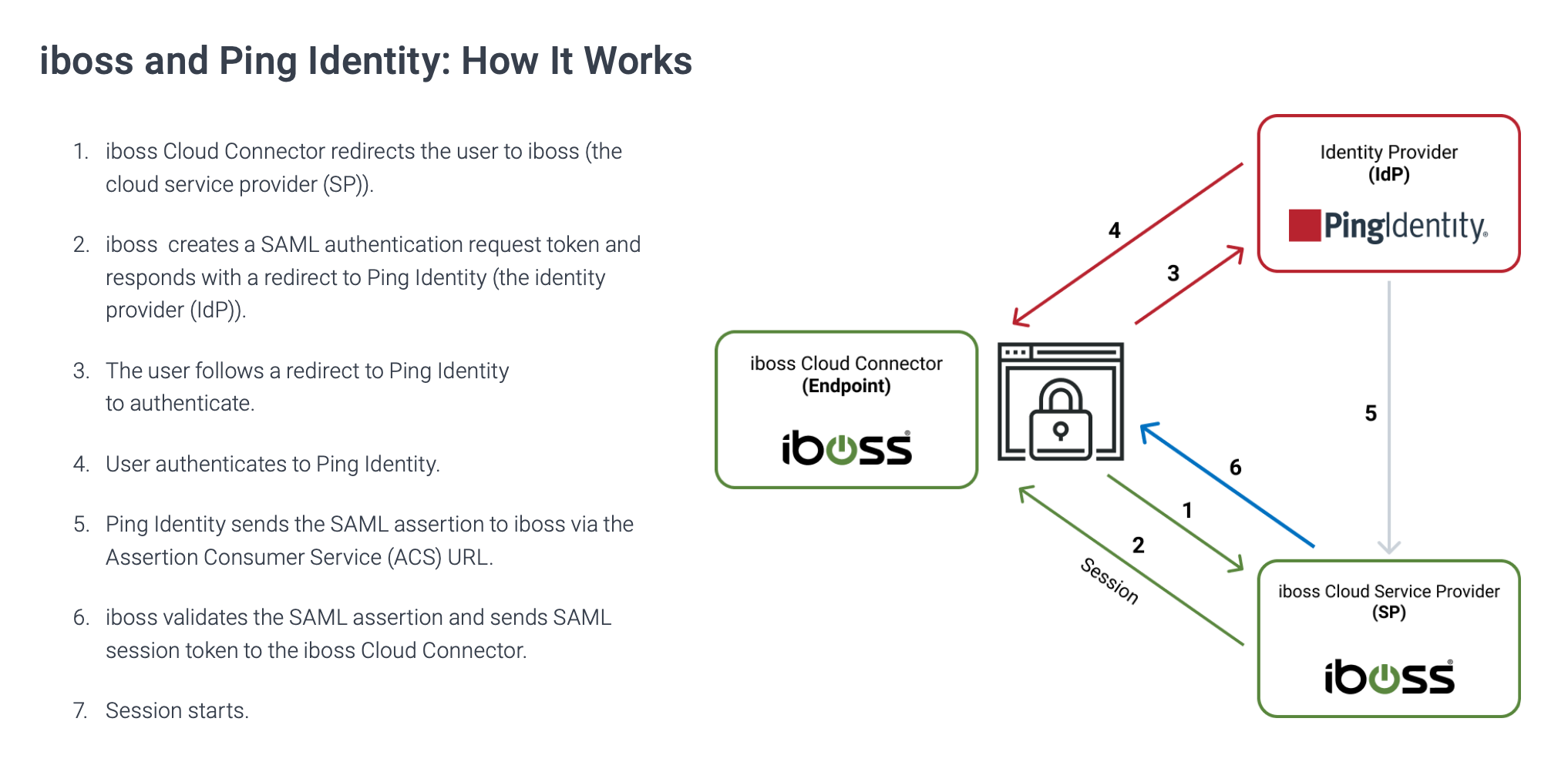
iboss Cloud is a cutting-edge cloud security platform that offers comprehensive protection for organizations of all sizes. By leveraging the power of the cloud, iboss provides advanced threat prevention, data loss prevention, and secure web gateway capabilities to safeguard your network from a wide range of cyber threats.

Key Features of iboss Cloud:

  • Advanced Threat Prevention: iboss Cloud uses AI-driven threat detection and real-time analytics to identify and mitigate advanced threats before they can infiltrate your network.
  • Data Loss Prevention: With robust data loss prevention capabilities, iboss helps organizations prevent sensitive data from being leaked or compromised.
  • Secure Web Gateway: By providing secure web gateway functionality, iboss ensures that users can safely access the internet without exposing the organization to cyber risks.
  • Scalability and Flexibility: Designed for scalability and flexibility, iboss Cloud can easily adapt to the evolving security needs of your organization as it grows.
  • User-Friendly Interface: The intuitive interface of iboss Cloud makes it easy for administrators to manage security policies and monitor network activity effectively.

With its innovative approach to cloud security, iboss Cloud is revolutionizing how organizations protect their networks and data in an increasingly complex threat landscape. By partnering with iboss, organizations can stay ahead of cyber threats and ensure a secure digital environment for their users.


Maximizing Security and Efficiency: 6 Essential Tips for Using iboss Cloud

  1. Ensure proper configuration of policies to meet your organization’s needs.
  2. Regularly review and update filtering rules to enhance security measures.
  3. Utilize reporting features to monitor internet usage and identify potential risks.
  4. Train employees on best practices for using iboss cloud effectively and securely.
  5. Integrate iboss cloud with other cybersecurity tools for comprehensive protection.
  6. Stay informed about new features and updates to make the most of the platform.

Ensure proper configuration of policies to meet your organization’s needs.

Ensuring proper configuration of policies is crucial when utilizing iboss Cloud to safeguard your organization’s network. By tailoring security policies to meet the specific needs and requirements of your organization, you can effectively mitigate risks and enhance overall protection against cyber threats. Customizing policies allows you to define access controls, set content filtering rules, and establish protocols that align with your security objectives. With a well-configured policy framework in place, you can optimize the functionality of iboss Cloud and maximize its effectiveness in safeguarding your network infrastructure.

Regularly review and update filtering rules to enhance security measures.

Regularly reviewing and updating filtering rules is a crucial tip for maximizing the security measures provided by iboss Cloud. By staying proactive in managing and adjusting filtering rules, organizations can ensure that their network security remains effective against evolving cyber threats. This practice helps in fine-tuning the security parameters to address new vulnerabilities and potential risks, ultimately enhancing the overall protection of sensitive data and resources within the network infrastructure.

Utilize reporting features to monitor internet usage and identify potential risks.

Utilizing the reporting features of iboss Cloud allows organizations to effectively monitor internet usage and identify potential risks within their network. By analyzing detailed reports on user activity, browsing behavior, and security incidents, administrators can gain valuable insights into potential vulnerabilities and threats. This proactive approach enables organizations to take timely action to mitigate risks, strengthen their security posture, and ensure a safe and compliant internet environment for their users.

Train employees on best practices for using iboss cloud effectively and securely.

Training employees on best practices for using iboss Cloud effectively and securely is crucial to maximizing the benefits of this advanced cloud security platform. By educating staff on how to navigate iboss Cloud’s features, understand security protocols, and recognize potential threats, organizations can empower their workforce to proactively contribute to a secure network environment. Through comprehensive training sessions and ongoing support, employees can develop the necessary skills to leverage iboss Cloud efficiently while maintaining a strong defense against cyber threats.

Integrate iboss cloud with other cybersecurity tools for comprehensive protection.

To maximize cybersecurity defenses, it is highly recommended to integrate iboss Cloud with other cybersecurity tools. By combining iboss Cloud with complementary security solutions, organizations can achieve a more robust and comprehensive protection strategy. This integration allows for enhanced threat detection, rapid incident response, and better overall visibility into network security posture. By leveraging the strengths of different tools in a cohesive ecosystem, organizations can create a layered defense approach that effectively safeguards against a wide range of cyber threats.

Stay informed about new features and updates to make the most of the platform.

Staying informed about new features and updates is crucial to maximizing the benefits of iboss Cloud. By keeping abreast of the latest enhancements to the platform, users can take advantage of advanced functionalities and security measures to better protect their networks and data. Regularly checking for updates and understanding how new features can enhance overall performance ensures that organizations can leverage the full potential of iboss Cloud for optimal security and efficiency.

Enhancing Data Protection: The Role of Cloud Web Security in Safeguarding Information

Cloud Web Security

The Importance of Cloud Web Security

In today’s digital age, the use of cloud services has become ubiquitous in both personal and business environments. Cloud computing offers numerous benefits, such as scalability, cost-efficiency, and flexibility. However, with the increasing reliance on cloud-based solutions, ensuring the security of data and applications stored in the cloud has become a top priority.

Challenges in Cloud Web Security

One of the main challenges in cloud web security is the protection of sensitive information from unauthorized access and cyber threats. As data is transferred between users and cloud servers over the internet, there is a risk of interception by malicious actors. Additionally, vulnerabilities in cloud infrastructure or misconfigurations can expose data to potential breaches.

Best Practices for Cloud Web Security

To mitigate these risks and enhance cloud web security, organizations should implement best practices such as:

  • Encryption: Encrypting data both at rest and in transit helps prevent unauthorized access.
  • Access Control: Implementing strict access control measures ensures that only authorized users can interact with sensitive data.
  • Regular Audits: Conducting regular security audits and assessments helps identify vulnerabilities and ensure compliance with security standards.
  • Multi-Factor Authentication (MFA): Enforcing MFA adds an extra layer of security by requiring multiple forms of verification for user authentication.
  • Security Monitoring: Continuous monitoring of cloud environments for suspicious activities or anomalies can help detect and respond to security incidents promptly.

The Future of Cloud Web Security

As technology continues to evolve, so do cyber threats. The future of cloud web security lies in adopting advanced technologies such as artificial intelligence (AI) and machine learning to proactively detect and mitigate security risks. Additionally, regulatory compliance requirements will drive organizations to prioritize data protection and privacy in their cloud strategies.

In conclusion, ensuring robust cloud web security is essential for safeguarding sensitive information and maintaining trust with users. By implementing best practices and staying informed about emerging threats, organizations can confidently embrace the benefits of cloud computing while mitigating potential risks.


Understanding Cloud Web Security: Key Differences, Pillars, and Examples

  1. What is the difference between cybersecurity and cloud security?
  2. What are the 4 pillars of cloud security?
  3. What is the difference between network security and cloud security?
  4. What are the four types of cloud security?
  5. What is cloud cyber security?
  6. What is web security cloud?
  7. What is an example of cloud security?

What is the difference between cybersecurity and cloud security?

When discussing cybersecurity and cloud security, it is important to understand the distinction between the two concepts. Cybersecurity encompasses the protection of all digital assets, including networks, systems, and data, from cyber threats such as malware, phishing attacks, and unauthorized access. On the other hand, cloud security specifically focuses on safeguarding data and applications stored in cloud environments from potential risks associated with cloud computing, such as data breaches, misconfigurations, and insider threats. While cybersecurity is a broader term that addresses overall digital security measures, cloud security hones in on securing specifically cloud-based resources and services to ensure confidentiality, integrity, and availability of data in the cloud.

What are the 4 pillars of cloud security?

The 4 pillars of cloud security encompass key principles that organizations should prioritize to ensure robust protection of their cloud environments. These pillars include data security, compliance, identity and access management, and security governance. Data security focuses on encrypting data, implementing access controls, and monitoring for unauthorized access. Compliance involves adhering to industry regulations and standards to protect sensitive information. Identity and access management emphasize controlling user privileges and authentication mechanisms. Security governance entails establishing policies, procedures, and controls to manage risks effectively in the cloud environment. By addressing these four pillars comprehensively, organizations can enhance their cloud security posture and mitigate potential threats effectively.

What is the difference between network security and cloud security?

When comparing network security and cloud security, it is important to understand that while both focus on protecting data and systems, they operate in different contexts. Network security primarily deals with securing the network infrastructure itself, including devices, servers, and connections within an organization’s on-premises network. On the other hand, cloud security is specifically tailored to safeguarding data and applications stored in cloud environments managed by third-party providers. Cloud security addresses unique challenges such as data encryption, access control in shared environments, and compliance with cloud-specific regulations. While network security focuses on internal threats and perimeter defenses, cloud security expands its scope to address risks associated with remote access, multi-tenancy, and data migration across cloud platforms. Ultimately, understanding the distinctions between network security and cloud security is crucial for organizations to implement comprehensive cybersecurity measures that cover both their traditional network infrastructure and their cloud-based resources effectively.

What are the four types of cloud security?

When discussing cloud web security, it is essential to understand the four main types of cloud security measures that organizations can implement to protect their data and applications. These include network security, data security, identity management, and compliance. Network security focuses on securing the network infrastructure to prevent unauthorized access and cyber attacks. Data security involves encrypting data at rest and in transit to safeguard sensitive information from breaches. Identity management ensures that only authorized users can access resources within the cloud environment. Compliance measures address regulatory requirements and industry standards to maintain data privacy and integrity in the cloud. By implementing these four types of cloud security measures effectively, organizations can enhance their overall cybersecurity posture and mitigate potential risks.

What is cloud cyber security?

Cloud cybersecurity refers to the practices and technologies implemented to protect cloud-based systems, data, and infrastructure from cyber threats. It encompasses a range of security measures designed to safeguard sensitive information stored in the cloud from unauthorized access, data breaches, and other malicious activities. Cloud cybersecurity involves encryption, access controls, threat detection, incident response protocols, and compliance with industry regulations to ensure the confidentiality, integrity, and availability of data in cloud environments. By employing robust cybersecurity measures in the cloud, organizations can enhance their overall security posture and mitigate risks associated with storing and processing data in remote servers.

What is web security cloud?

Web security cloud, also known as cloud web security, refers to the practice of protecting websites and web applications hosted in the cloud from cyber threats and unauthorized access. It involves implementing security measures such as encryption, access control, and monitoring to ensure the confidentiality, integrity, and availability of data stored in the cloud. Web security cloud solutions help organizations defend against various threats, including malware, phishing attacks, and data breaches, by leveraging advanced technologies and best practices to secure their online assets effectively. By prioritizing web security in the cloud environment, businesses can safeguard their digital presence and maintain trust with users while harnessing the benefits of cloud computing.

What is an example of cloud security?

An example of cloud security is the use of encryption to protect data stored in cloud environments. Encryption involves encoding data in a way that only authorized parties with the decryption key can access it. By encrypting sensitive information before uploading it to the cloud, organizations can ensure that even if the data is intercepted, it remains unreadable and secure. This practice enhances the overall security of cloud storage and mitigates the risk of unauthorized access to confidential data.

cybersecurity services

Enhancing Security: The Vital Role of Cybersecurity Services

The Importance of Cybersecurity Services

The Importance of Cybersecurity Services

In today’s digital age, cybersecurity has become a critical aspect of protecting sensitive information and maintaining the integrity of businesses and individuals online. Cyber threats are constantly evolving, making it essential for organizations to invest in robust cybersecurity services to safeguard their data and systems.

Types of Cybersecurity Services

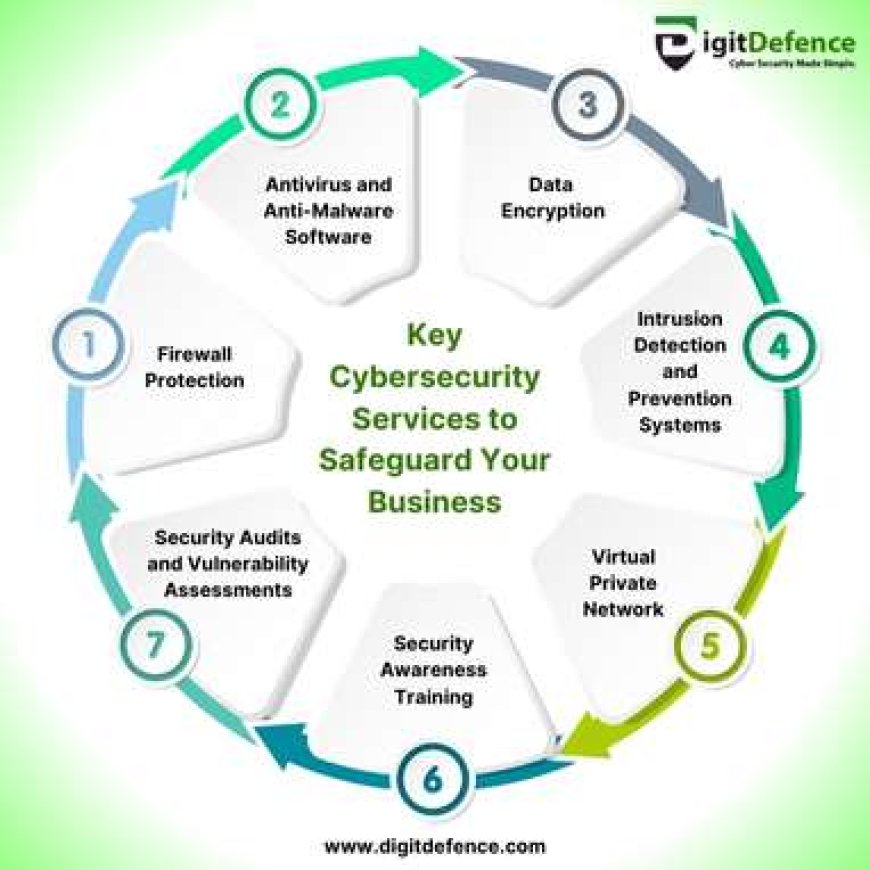
Cybersecurity services encompass a wide range of solutions designed to detect, prevent, and respond to cyber threats. Some common cybersecurity services include:

  • Network Security: Securing networks from unauthorized access and ensuring data confidentiality.
  • Endpoint Security: Protecting individual devices such as computers, laptops, and mobile devices from malware and other cyber threats.
  • Incident Response: Developing plans to address security incidents promptly and minimize their impact.
  • Security Audits: Evaluating existing security measures to identify vulnerabilities and areas for improvement.
  • Cloud Security: Ensuring data stored in cloud environments is protected from unauthorized access.

The Benefits of Cybersecurity Services

Investing in cybersecurity services offers numerous benefits, including:

  • Data Protection: Safeguarding sensitive information from theft or unauthorized access.
  • Breach Prevention: Proactively identifying and mitigating potential security risks before they result in a breach.
  • Compliance: Ensuring that organizations comply with industry regulations and standards related to data security.
  • Reputation Management: Building trust with customers by demonstrating a commitment to protecting their data.

The Future of Cybersecurity Services

As cyber threats continue to evolve, the demand for advanced cybersecurity services will only increase. Organizations must stay vigilant and adapt their security measures to combat emerging threats effectively. By partnering with reputable cybersecurity service providers, businesses can enhance their security posture and minimize the risk of cyber attacks.

In conclusion, cybersecurity services play a crucial role in safeguarding digital assets and maintaining trust in an increasingly interconnected world. By prioritizing cybersecurity measures, organizations can protect themselves against evolving cyber threats and ensure the resilience of their operations in the face of potential security breaches.


8 Essential Cybersecurity Tips to Protect Your Digital Life

  1. Regularly update your software and operating systems to patch security vulnerabilities.
  2. Use strong, unique passwords for each online account and consider using a password manager.
  3. Enable two-factor authentication whenever possible for an added layer of security.
  4. Be cautious of phishing emails and never click on suspicious links or download attachments from unknown sources.
  5. Secure your home network with a strong password and encryption to prevent unauthorized access.
  6. Backup your data regularly to protect against data loss in case of a cyber attack or system failure.
  7. Educate yourself and your employees about cybersecurity best practices to create a security-conscious culture.
  8. Consider investing in cybersecurity services such as antivirus software, firewall protection, and intrusion detection systems.

Regularly update your software and operating systems to patch security vulnerabilities.

Regularly updating your software and operating systems is a crucial step in maintaining strong cybersecurity defenses. By installing the latest patches and updates, you can address known security vulnerabilities that cyber attackers may exploit. These updates often include important security fixes that help protect your devices and data from potential threats. Making software updates a routine practice can significantly enhance the overall security posture of your systems and reduce the risk of falling victim to cyber attacks.

Use strong, unique passwords for each online account and consider using a password manager.

In the realm of cybersecurity services, a crucial tip is to utilize strong, unique passwords for every online account and contemplate employing a password manager. By creating complex and distinct passwords for each account, individuals can significantly enhance their overall online security. A password manager offers a convenient solution for securely storing and managing multiple passwords, reducing the risk of password reuse and enhancing protection against unauthorized access to sensitive information. Embracing this practice can fortify one’s digital defenses and mitigate the potential risks associated with compromised credentials in today’s interconnected digital landscape.

Enable two-factor authentication whenever possible for an added layer of security.

Enabling two-factor authentication whenever possible is a highly recommended practice in cybersecurity services. This additional layer of security provides an extra barrier against unauthorized access by requiring users to provide a second form of verification, such as a code sent to their mobile device or a biometric scan. By implementing two-factor authentication, individuals and organizations can significantly enhance their defense against cyber threats and reduce the risk of unauthorized account access or data breaches.

It is crucial to exercise caution when it comes to cybersecurity services, particularly in dealing with phishing emails. One essential tip is to be wary of suspicious emails and refrain from clicking on any links or downloading attachments from unknown sources. Phishing attacks often disguise themselves as legitimate communications to trick individuals into revealing sensitive information or installing malware on their devices. By staying vigilant and avoiding interactions with suspicious email content, individuals can significantly reduce the risk of falling victim to cyber threats and protect their personal and organizational data from potential breaches.

Secure your home network with a strong password and encryption to prevent unauthorized access.

To enhance the security of your home network, it is crucial to secure it with a strong password and encryption. By setting up a robust password that combines letters, numbers, and special characters, you can significantly reduce the risk of unauthorized access to your network. Additionally, enabling encryption protocols such as WPA2 or WPA3 adds an extra layer of protection by encoding data transmitted over the network, making it more challenging for cybercriminals to intercept sensitive information. Taking these simple yet effective steps can go a long way in safeguarding your home network from potential security threats.

Backup your data regularly to protect against data loss in case of a cyber attack or system failure.

Regularly backing up your data is a crucial tip in cybersecurity services to mitigate the risk of data loss due to cyber attacks or system failures. By maintaining up-to-date backups of your important information, you can ensure that even if your systems are compromised, you have a secure copy of your data that can be restored quickly, minimizing the impact of potential security incidents. Backup strategies are an essential component of a comprehensive cybersecurity plan, providing an added layer of protection against unforeseen events that could jeopardize the integrity and availability of your critical data.

Educate yourself and your employees about cybersecurity best practices to create a security-conscious culture.

Creating a security-conscious culture within your organization begins with education. By taking the time to educate yourself and your employees about cybersecurity best practices, you can empower everyone to play a proactive role in protecting sensitive information and preventing cyber threats. From recognizing phishing emails to implementing strong password policies, knowledge is key to building a resilient defense against potential security breaches. By fostering a culture of awareness and vigilance, you can strengthen your overall cybersecurity posture and mitigate risks effectively.

Consider investing in cybersecurity services such as antivirus software, firewall protection, and intrusion detection systems.

When it comes to safeguarding your digital assets, it is crucial to consider investing in cybersecurity services such as antivirus software, firewall protection, and intrusion detection systems. These tools form the backbone of a robust cybersecurity strategy by providing essential layers of defense against malware, unauthorized access, and suspicious activities. Antivirus software helps detect and remove malicious programs, while firewall protection acts as a barrier against unauthorized network traffic. Intrusion detection systems monitor network activity for signs of potential threats, enabling proactive responses to mitigate risks effectively. By incorporating these cybersecurity services into your security framework, you can enhance your overall defense posture and better protect your valuable data from cyber threats.