cfchris.com

Loading

java source code

Java Source Code: A Beginner’s Guide to Writing and Running Programs

Understanding Java Source Code

Java source code is the human-readable text developers write to create Java applications. It contains instructions, data definitions, and logic that describe how a program should work. Before a Java program can run, its source code is typically compiled into bytecode, which runs on the Java Virtual Machine (JVM).

What Is a Java Source File?

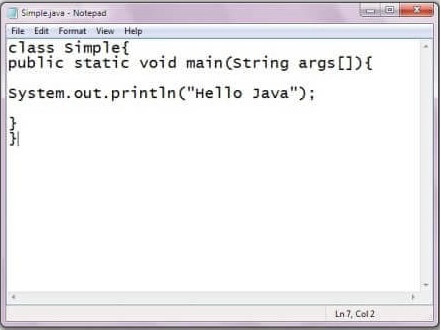
Java source files usually have the .java extension. A source file can contain classes, interfaces, methods, variables, and comments. For example, a simple program might look like this:

public class HelloWorld {

public static void main(String[] args) {

System.out.println("Hello, world!");

}

}

In this example, HelloWorld is a class. The main method is the program’s entry point, and System.out.println displays a line of text.

From Source Code to a Running Program

Java uses a two-stage process to turn source code into a running application:

  1. Compilation: The Java compiler, javac, checks the source code and converts it into bytecode. The result is commonly saved in a .class file.
  2. Execution: The JVM runs the bytecode. Because JVMs are available for many operating systems, the same compiled program can often run on different platforms.

A typical command-line workflow is:

javac HelloWorld.java

java HelloWorld

The first command compiles the source file. The second starts the program.

Key Parts of Java Source Code

  • Classes and interfaces: These define the structure and behavior of a Java program.
  • Methods: Methods contain instructions that perform tasks.
  • Variables: Variables store values, such as numbers, text, or object references.
  • Packages and imports: Packages organize related code, while import statements make other classes available.
  • Comments: Comments explain code to readers and are ignored by the compiler.

Java is case-sensitive, so total and Total are different names. In conventional Java projects, class names use PascalCase, while method and variable names usually use camelCase.

Why Source Code Matters

Readable source code is easier to maintain, test, and improve. Clear names, consistent formatting, and focused methods help developers understand how a program works. Comments are useful when they explain intent or important decisions, but well-written code should also communicate its purpose through its structure and naming.

Java source code is also the foundation for collaboration. Teams use version control systems to track changes, review updates, and coordinate work. Automated tests and build tools can help verify that changes behave as expected.

Getting Started

To begin writing Java source code, install a Java Development Kit (JDK), choose a text editor or integrated development environment, and create a file with a .java extension. Start with a small program, compile it, and run it. As you learn, explore variables, conditionals, loops, methods, classes, and exception handling.

Learning to read and write Java source code takes practice. By building small projects and reviewing clear examples, beginners can develop a solid understanding of how Java programs are structured and how they run.


Understanding Java Source Code: Common Questions Answered

  1. Is Java source code human-readable?
  2. Is Java a source code?
  3. Is Java outdated in 2026?
  4. Is Java built on C or C++?
  5. What is the source code of Java?

Is Java source code human-readable?

Yes, Java source code is human-readable: it uses familiar words, symbols, and a structured syntax that developers can write and understand. For example, a Java statement such as System.out.println("Hello, world!"); clearly indicates that text will be displayed. Although some programs can become complex, clear naming, formatting, and comments make Java source code easier to read and maintain.

Is Java a source code?

No. Java is a programming language, not source code itself. Source code is the human-readable set of instructions a programmer writes using Java, usually saved in files with the .java extension. A Java compiler then converts that source code into bytecode that can run on the Java Virtual Machine (JVM).

Is Java outdated in 2026?

No, Java is not outdated in 2026. It remains widely used for enterprise software, backend services, Android development, and large-scale systems, with ongoing updates to the language and its ecosystem. While newer languages may suit some projects better, Java continues to be a practical choice when long-term support, mature tools, performance, and a large developer community matter.

Is Java built on C or C++?

Java is not built on C or C++, though its syntax was influenced by both languages, especially C and C++. Java was designed as a separate programming language, with features such as automatic memory management and a bytecode-based runtime. Its compiler and runtime have been implemented in different languages over time, so Java itself is not simply a version of C or C++.

What is the source code of Java?

Java source code is the human-readable set of instructions written by developers to create Java programs, typically saved in files with the .java extension. A Java compiler translates this code into bytecode, which the Java Virtual Machine (JVM) executes. If you mean the source code used to build the Java platform itself, much of it is available in the OpenJDK project.
java course for beginners

Java Course for Beginners: Learn the Fundamentals and Build Your First Programs

Java Course for Beginners: A Practical Guide to Getting Started

Java is a popular programming language used to build everything from business applications and web services to Android apps and large-scale software systems. Its clear structure, broad ecosystem, and strong community make it a useful language for people learning to code. A well-designed Java course for beginners can help you move from basic concepts to building programs of your own.

Why Learn Java?

Java is designed to run on many types of computers. Java programs are typically compiled into bytecode, which runs on the Java Virtual Machine (JVM). This approach helps the same program work across different operating systems, provided a compatible JVM is available.

Java is also widely used in professional software development. Learning it can introduce you to essential programming ideas—including variables, loops, methods, and object-oriented programming—that apply to many other languages as well.

What a Beginner Java Course Should Cover

You do not need previous programming experience to begin. A good introductory course explains each idea step by step and gives you opportunities to practice it. Look for a course that includes these core topics:

  • Setting up your tools: Install a Java Development Kit (JDK) and choose a code editor or integrated development environment (IDE).
  • Your first program: Learn how to write, compile, and run a simple Java application.
  • Variables and data types: Store information using types such as int, double, boolean, and String.
  • Operators and expressions: Perform calculations and compare values.
  • Conditionals: Use if, else, and switch statements to make decisions.
  • Loops: Repeat tasks with for and while loops.
  • Methods: Organize code into reusable blocks.
  • Arrays and collections: Work with groups of values.
  • Object-oriented programming: Create classes and objects, and learn about fields, constructors, and methods.
  • Debugging and errors: Read compiler messages, find mistakes, and improve your code.

How to Choose the Right Course

Beginner courses come in many formats, including online lessons, classroom instruction, books, and self-paced tutorials. The best choice depends on how you like to learn and how much time you can set aside. Before enrolling, check that the course:

  • Clearly identifies itself as suitable for beginners.
  • Uses current Java tools and explains how to install them.
  • Includes coding exercises, not just videos or lectures.
  • Builds concepts gradually and explains unfamiliar terms.
  • Offers small projects that let you apply what you have learned.

A course does not have to teach every Java feature at once. A strong foundation in the basics is more valuable than rushing through advanced topics before you are ready.

Practice with Small Projects

Writing code regularly is one of the best ways to make progress. After learning the fundamentals, try projects that are simple enough to finish but flexible enough to expand. For example, you could create:

  • A temperature or unit converter
  • A basic calculator
  • A number-guessing game
  • A to-do list for the command line
  • A program that tracks books, movies, or personal expenses

Start with a basic version, then add features as your skills improve. A number-guessing game, for instance, can begin with a random number and a loop. Later, you can add input validation, a limited number of guesses, and a way to play again.

Tips for Learning Java Successfully

Set a manageable learning schedule. Short, frequent practice sessions often work better than trying to learn everything in one sitting. Type out examples yourself, change them, and observe what happens. When you encounter an error, read the message carefully and test one possible fix at a time.

It is also normal to revisit concepts. Object-oriented programming and other topics may take time to feel comfortable. Keep your early programs, review them later, and notice how your understanding has grown.

What Comes After the Basics?

Once you can write small programs and understand how classes and objects work, you can explore topics such as exception handling, file input and output, generics, testing, and common data structures. Your next steps can depend on your goals. For example, you might study web development, Android development, or backend application development.

Start Building with Java

A Java course for beginners can give you a clear path into programming, but progress comes from applying what you learn. Choose a course with hands-on exercises, practice consistently, and build small projects along the way. With patience and regular effort, you can develop the skills to create useful Java applications and continue learning more advanced programming concepts.


Top FAQs About Starting a Java Course for Beginners

  1. Which is the best Java course for beginners?
  2. How can I learn Java as a beginner?
  3. Is 1 month enough to learn Java?
  4. How do I start studying Java?

Which is the best Java course for beginners?

The best Java course for beginners is one that assumes no prior programming experience, teaches concepts step by step, and gives you plenty of hands-on practice. Look for lessons covering Java basics, problem-solving, and object-oriented programming, along with exercises and small projects that help you apply what you learn. The right choice also depends on your learning style, schedule, and budget, so preview a lesson or two before committing.

How can I learn Java as a beginner?

Beginners can learn Java by starting with the basics: installing the JDK and a code editor, then practicing variables, data types, conditionals, loops, methods, and classes. Follow a structured beginner course with hands-on exercises, and write code regularly rather than only watching lessons. Small projects—such as a calculator or number-guessing game—help reinforce new concepts. When errors come up, read the messages carefully and use them as clues; steady practice is more effective than trying to learn everything at once.

Is 1 month enough to learn Java?

One month is enough to learn Java’s fundamentals if you study consistently and practice regularly, but it’s usually not enough to master the language or become job-ready. In that time, you can learn basic syntax, variables, conditionals, loops, methods, and introductory object-oriented programming, then apply them in small projects. Your progress will depend on your prior experience and the time you can dedicate each day. Continue practicing after the first month to strengthen your skills and explore more advanced topics.

How do I start studying Java?

To start studying Java, install the latest Java Development Kit (JDK) and choose a beginner-friendly editor or IDE, such as IntelliJ IDEA or Visual Studio Code. Then follow a structured introductory course that covers basic syntax, variables, conditionals, loops, methods, and classes. Write and run small programs as you learn—such as a calculator or number-guessing game—and practice regularly. When you encounter errors, read the messages carefully and use them to understand how your code works.

for java

A Beginner’s Guide to Programming for Java Apps

Getting Started with Java Programming

Java is a popular, general-purpose programming language used to build everything from web applications and business software to Android apps and large-scale systems. Its combination of readability, portability, and extensive tooling makes it a strong choice for both new programmers and experienced developers.

What Is Java?

Java is a class-based, object-oriented language. Developers write Java source code, which is compiled into bytecode. The Java Virtual Machine (JVM) runs that bytecode on compatible devices and operating systems. This approach helps Java programs run across different platforms without requiring a separate version of the source code for each one.

Why Learn Java?

  • Portability: Java applications can run on many platforms with a compatible JVM.
  • Versatility: Java is used in web services, enterprise applications, desktop software, and other fields.
  • Strong ecosystem: A wide range of libraries, frameworks, development tools, and learning resources is available.
  • Useful fundamentals: Learning Java introduces concepts such as classes, objects, types, and exception handling that apply to many programming languages.
  • Ongoing use: Organizations continue to use Java for applications that need to be maintained and expanded over time.

Your First Java Program

A simple Java program can display a message in the console:

public class Main {

public static void main(String[] args) {

System.out.println("Hello, Java!");

}

}

The main method is the entry point for this program. The System.out.println statement prints a line of text. Java’s syntax may look formal at first, but its structure encourages code that is organized and explicit.

Core Concepts to Explore

As you learn Java, start with variables and data types, conditional statements, loops, and methods. Then move on to object-oriented programming, including classes, objects, inheritance, and interfaces. Exceptions and collections are also important topics for writing practical programs.

Small projects are a useful way to practice. Try building a calculator, a to-do list, or a program that reads and summarizes information. Working through real examples helps connect language features to the problems they solve.

Tools for Java Development

To begin, install a Java Development Kit (JDK), which includes tools for compiling and running Java programs. You can write code in a basic text editor, but an integrated development environment (IDE) can make development easier with features such as code completion, debugging, and project management.

Keep Building Your Skills

Java is a substantial language, so there is no need to learn everything at once. Focus on the fundamentals, write code regularly, and read errors carefully when something does not work. With steady practice, you can use Java to create reliable applications and build a solid foundation for further software development.


8 Essential Tips for Writing Clean and Effective Java Code

  1. Use meaningful names for classes, methods, and variables.
  2. Keep methods small and focused on one task.
  3. Prefer interfaces when designing flexible APIs.
  4. Use try-with-resources to close files and streams.
  5. Handle exceptions specifically instead of catching everything.
  6. Use `equals()` to compare objects, not `==`.
  7. Choose collections based on how they’ll be used.
  8. Write unit tests for important behavior.

Use meaningful names for classes, methods, and variables.

Use meaningful names for Java classes, methods, and variables to make your code easier to understand and maintain. Choose names that clearly describe what each element represents or does, such as CustomerAccount, calculateTotal(), or orderCount. Clear, consistent naming helps you and other developers follow the logic, spot mistakes, and update the code with confidence.

Keep methods small and focused on one task.

Keep Java methods small and focused on one task. A method that does one thing is easier to understand, test, debug, and reuse. If a method starts handling several responsibilities—such as validating input, updating data, and formatting output—consider splitting those steps into separate methods with clear names. This keeps your code organized and makes future changes less likely to cause unexpected problems.

Prefer interfaces when designing flexible APIs.

When designing a flexible Java API, prefer accepting or returning interfaces rather than specific implementation classes. For example, use `List` instead of `ArrayList` when a method only needs list behavior. This keeps the API focused on what callers can do, lets implementations change without affecting users, and makes it easier to substitute alternatives such as `LinkedList` or custom implementations. Use a concrete class only when its specific behavior is essential.

Use try-with-resources to close files and streams.

Use Java’s try-with-resources statement to manage files and streams safely. It automatically closes any resource that implements `AutoCloseable` when the statement finishes, even if an exception occurs, helping prevent resource leaks and keeping your code concise. Declare resources in the parentheses after `try`, such as a `BufferedReader` or `InputStream`, and handle any exceptions that may be thrown while using them.

Handle exceptions specifically instead of catching everything.

In Java, handle exceptions as specifically as possible instead of catching every error with a broad catch (Exception e) block. Catching the expected exception types lets you respond appropriately—for example, by retrying a failed operation or showing a helpful message—while allowing unexpected problems to surface during testing and debugging. Avoid swallowing exceptions silently; log or otherwise handle them meaningfully so issues are easier to diagnose.

Use `equals()` to compare objects, not `==`.

When comparing Java objects, use `equals()` to check whether they have the same value, rather than `==`, which checks whether two references point to the exact same object. For example, two separate `String` objects can contain the same text but still evaluate as different with `==`. Calling `equals()` makes the comparison based on content, as long as the object’s class implements the method appropriately.

Choose collections based on how they’ll be used.

Choose Java collections based on how your data will be used. Use a List when order matters or you need to access items by index, a Set when you want to prevent duplicates, and a Map when you need to look up values by key. Also consider whether you need fast lookups, predictable iteration order, or thread safety, since different implementations—such as ArrayList, HashSet, and HashMap—make different tradeoffs. Matching the collection to the task can make your code clearer and more efficient.

Write unit tests for important behavior.

Write unit tests for the most important behavior in your Java applications. Tests help verify that methods produce the expected results, catch regressions when code changes, and make it easier to refactor with confidence. Focus first on core logic and edge cases, such as empty inputs, invalid values, or boundary conditions. Frameworks like JUnit make it straightforward to organize and run tests as part of your development workflow.

java basic programs

Mastering Java Basic Programs: A Beginner’s Guide to Essential Java Coding

Article: Java Basic Programs

Exploring Java Basic Programs

Java is a versatile and widely-used programming language that is known for its simplicity and flexibility. It is a popular choice for beginners due to its readability and ease of learning. In this article, we will explore some basic programs in Java that can help you understand the fundamentals of the language.

Hello World Program

The classic “Hello World” program is often the first program beginners write when learning a new programming language. In Java, it looks like this:


public class HelloWorld {

public static void main(String[] args) {

System.out.println("Hello, World!");

}

}

This program simply prints out “Hello, World!” to the console when executed. It demonstrates the basic structure of a Java program, including classes, methods, and statements.

Sum of Two Numbers Program

Another common beginner program is one that calculates the sum of two numbers. Here’s an example in Java:


public class SumOfTwoNumbers {

public static void main(String[] args) {

int num1 = 5;

int num2 = 10;

int sum = num1 + num2;

System.out.println("The sum of " + num1 + " and " + num2 + " is: " + sum);

}

}

This program declares two integer variables, adds them together, and then prints out the result.

Conclusion

These are just a few examples of basic programs in Java. By practicing writing and running these programs, you can gain a solid foundation in Java programming. Remember to experiment with different variations and explore more complex programs as you progress in your learning journey.


7 Common Questions About Getting Started with Basic Java Programs

  1. What is the basic program of Java?
  2. Is C++ or Java harder?
  3. Is Java easy for beginners?
  4. What is the simplest Java program?
  5. What is Java basics for beginners?
  6. How to write a simple program in Java for beginners?
  7. What are the basic programs in Java?

What is the basic program of Java?

One of the frequently asked questions regarding Java basic programs is, “What is the basic program of Java?” The most fundamental program in Java that beginners often start with is the “Hello World” program. This simple yet essential program showcases the basic structure of a Java program, including classes, methods, and statements. By printing out the phrase “Hello, World!” to the console, this introductory program helps newcomers grasp the foundational concepts of Java programming and sets a solid starting point for further exploration into the language’s capabilities.

Is C++ or Java harder?

When comparing C++ and Java in terms of difficulty, the answer can vary depending on individual preferences and background. Both languages have their own complexities and learning curves. C++ is known for its low-level capabilities and memory management, which can be challenging for beginners. On the other hand, Java is often considered more beginner-friendly due to its simpler syntax and automatic memory management. Ultimately, the perceived difficulty of C++ or Java will depend on factors such as prior programming experience, personal learning style, and the specific goals of the programmer.

Is Java easy for beginners?

When it comes to beginners learning programming, Java is often considered a suitable language due to its relatively straightforward syntax and extensive documentation. While Java may have a steeper learning curve compared to some other beginner-friendly languages, its strict structure and strong typing can help new programmers develop good coding habits early on. Additionally, the vast community support and abundance of online resources make it easier for beginners to find help and guidance as they navigate their Java learning journey. Ultimately, with dedication and practice, many beginners find that Java can be a rewarding language to learn and master.

What is the simplest Java program?

When it comes to Java programming, one of the most frequently asked questions is, “What is the simplest Java program?” The simplest Java program that beginners often start with is the “Hello World” program. This basic program typically consists of just a few lines of code that print out the phrase “Hello, World!” to the console. Despite its simplicity, the “Hello World” program serves as an essential introduction to Java syntax and structure, making it an ideal starting point for those new to the language.

What is Java basics for beginners?

For beginners, Java basics encompass the fundamental concepts and syntax of the Java programming language. It includes understanding key components such as variables, data types, operators, control structures (like loops and conditional statements), methods, classes, and objects. Java basics also involve learning how to write simple programs to perform common tasks, like printing messages to the console or performing basic arithmetic operations. Mastering these foundational concepts is essential for beginners to build a strong understanding of Java programming and pave the way for more advanced learning and development in the language.

How to write a simple program in Java for beginners?

For beginners looking to write a simple program in Java, the key is to start with a basic structure that includes a class and a main method. A common starting point is the “Hello World” program, which involves creating a class with a main method that prints out the phrase “Hello, World!” to the console. By understanding this foundational structure and syntax, beginners can gradually expand their knowledge and skills by exploring more complex programs and concepts in Java programming.

What are the basic programs in Java?

One frequently asked question in the realm of Java programming is, “What are the basic programs in Java?” This question often arises from beginners looking to grasp the fundamental concepts of Java programming. Basic programs in Java typically include the classic “Hello World” program, which serves as an introduction to the syntax and structure of Java code. Additionally, programs that perform simple tasks like calculating the sum of two numbers or displaying basic arithmetic operations are commonly explored by novice programmers to solidify their understanding of Java fundamentals. By starting with these basic programs, learners can build a strong foundation in Java programming and gradually progress to more complex applications.

java for dummies

Mastering Java for Dummies: A Beginner’s Guide to Programming Success

Java for Dummies

Java for Dummies: A Beginner’s Guide to Programming

Java is a popular programming language known for its versatility and ease of use. Whether you’re new to programming or looking to expand your skills, Java for Dummies is the perfect starting point.

Why Choose Java?

Java is widely used in web development, mobile applications, and enterprise systems. Its syntax is similar to other programming languages like C++ and C#, making it easier to learn for beginners.

What You’ll Learn

In Java for Dummies, you’ll learn:

  • The basics of Java programming, including variables, data types, and control structures
  • Object-oriented programming concepts such as classes, objects, and inheritance
  • How to work with arrays, collections, and input/output streams
  • Creating graphical user interfaces using JavaFX

Who Should Read This Book?

This book is ideal for:

  • Absolute beginners with no prior programming experience
  • Students studying computer science or related fields
  • Professionals looking to add Java skills to their repertoire

Why Java for Dummies?

Java for Dummies breaks down complex programming concepts into easy-to-understand explanations. With step-by-step examples and practical exercises, you’ll quickly grasp the fundamentals of Java programming.

Get Started Today!

Ready to dive into the world of Java programming? Pick up a copy of Java for Dummies and start your coding journey today!

© 2023 Java for Dummies. All rights reserved.


5 Essential Tips for Beginners to Master Java Programming

  1. Start with understanding the basic syntax of Java
  2. Practice writing simple programs to get hands-on experience
  3. Learn about object-oriented programming concepts in Java
  4. Explore Java libraries and frameworks to enhance your development skills
  5. Join online communities or forums to ask questions and learn from others

Start with understanding the basic syntax of Java

To begin your journey with Java programming, it is essential to grasp the fundamental syntax of the language. Understanding the basic syntax of Java lays a solid foundation for learning more advanced concepts and techniques. By familiarizing yourself with key elements such as variables, data types, and control structures, you will build confidence in writing and reading Java code effectively. Starting with a strong grasp of Java syntax sets you on the right path towards becoming a proficient Java developer.

Practice writing simple programs to get hands-on experience

To enhance your understanding of Java programming as suggested in the tip from “Java for Dummies,” it is crucial to practice writing simple programs regularly. By engaging in hands-on coding exercises, you can apply theoretical knowledge to real-world scenarios, solidifying your grasp of Java concepts and syntax. Through consistent practice, you will build confidence in your programming skills and develop a problem-solving mindset essential for mastering Java development.

Learn about object-oriented programming concepts in Java

To excel in Java programming, it is crucial to grasp object-oriented programming concepts. Understanding how classes, objects, and inheritance work in Java not only enhances your coding skills but also allows you to build more efficient and scalable applications. By delving into object-oriented programming principles, as outlined in Java for Dummies, you can elevate your proficiency in Java and unlock a world of possibilities in software development.

Explore Java libraries and frameworks to enhance your development skills

Exploring Java libraries and frameworks is a valuable tip for those diving into Java programming with “Java for Dummies.” By delving into these resources, beginners can enhance their development skills and leverage pre-built functionalities to streamline their coding process. Java libraries like Apache Commons and frameworks such as Spring provide a wealth of tools and components that can significantly boost efficiency and productivity in software development projects. Embracing these resources opens up a world of possibilities for Java learners to create more robust and sophisticated applications while honing their programming expertise.

Join online communities or forums to ask questions and learn from others

To enhance your learning experience with Java for Dummies, consider joining online communities or forums where you can engage with fellow learners and experts. These platforms provide a valuable space to ask questions, seek guidance on challenging topics, and learn from the experiences of others in the Java programming community. By actively participating in online discussions, you can expand your knowledge, gain insights into best practices, and build a supportive network of like-minded individuals passionate about Java development.

java square

Exploring Java Square: Fundamental Geometric Concepts

The Java Square: Exploring the Fundamentals

The Java Square: Exploring the Fundamentals

Java, a versatile and powerful programming language, offers numerous features and functionalities that make it a popular choice among developers. One fundamental concept in Java programming is the notion of a square.

What is a Square in Java?

In Java, a square is a geometric shape with four equal sides and four right angles. It is often represented by its side length or diagonal length. The calculation of the area and perimeter of a square are common operations in Java programming.

Calculating the Area of a Square in Java

To calculate the area of a square in Java, you can use the formula:

area = sideLength * sideLength;

Where “sideLength” represents the length of one side of the square. By multiplying the side length by itself, you can determine the total area enclosed by the square.

Calculating the Perimeter of a Square in Java

The perimeter of a square can be calculated using the formula:

perimeter = 4 * sideLength;

Here, “sideLength” denotes the length of one side of the square. By multiplying this value by 4, you obtain the total perimeter encompassing all four sides of the square.

Implementing Square Operations in Java

In Java programming, you can create classes and methods to encapsulate square-related operations. By defining appropriate functions for calculating area and perimeter, you can efficiently work with squares in your programs.

Utilizing object-oriented principles such as inheritance and polymorphism, you can extend your square implementation to incorporate more complex geometric shapes and hierarchies.

Conclusion

The concept of squares in Java exemplifies fundamental principles in programming, including mathematical computations and object-oriented design. By mastering these concepts, developers can enhance their skills and create robust applications that leverage geometric calculations effectively.


Understanding Squares in Java: FAQs on Calculations, Formulas, and Best Practices

  1. What is a square in Java?
  2. How do you calculate the area of a square in Java?
  3. How do you calculate the perimeter of a square in Java?
  4. Can you explain the formula for calculating the area of a square in Java?
  5. What is the formula for finding the perimeter of a square in Java?
  6. Are there specific methods or functions to implement square operations in Java?
  7. How can object-oriented principles be applied to work with squares in Java programming?
  8. What are some common mistakes or challenges when dealing with squares in Java?

What is a square in Java?

In Java programming, a square is defined as a geometric shape characterized by four equal sides and four right angles. It is a fundamental concept in geometry and serves as a common example for understanding basic mathematical calculations within the language. In Java, a square can be represented by its side length or diagonal length, with formulas readily available for calculating its area and perimeter. Understanding the properties and operations associated with squares in Java is essential for performing geometric computations and implementing related functionalities in software development projects.

How do you calculate the area of a square in Java?

Calculating the area of a square in Java involves a straightforward process. To determine the area of a square, you can simply multiply the length of one side by itself. This computation is achieved by using the formula “area = sideLength * sideLength”. By squaring the side length value, you obtain the total area enclosed within the square. This fundamental operation is essential in Java programming and serves as a basic example of mathematical calculations applied within software development contexts.

How do you calculate the perimeter of a square in Java?

Calculating the perimeter of a square in Java involves a straightforward process. In Java programming, you can determine the perimeter of a square by multiplying the length of one side by 4. This simple formula, “perimeter = 4 * sideLength,” where “sideLength” represents the length of one side of the square, allows developers to efficiently compute the total distance around the square. By implementing this calculation in Java code, programmers can easily incorporate perimeter calculations into their applications, showcasing the elegance and simplicity of working with geometric shapes in Java.

Can you explain the formula for calculating the area of a square in Java?

When it comes to calculating the area of a square in Java, the formula is quite straightforward. By multiplying the length of one side of the square by itself, you can easily determine the total area enclosed by the square. The formula for calculating the area of a square in Java is simply: area = sideLength * sideLength. This simple calculation allows developers to efficiently compute the area of a square within their Java programs, making it a fundamental and essential operation when working with geometric shapes in Java programming.

What is the formula for finding the perimeter of a square in Java?

When it comes to calculating the perimeter of a square in Java, the formula is straightforward and easy to implement. The perimeter of a square can be determined by multiplying the length of one side by 4. In Java programming, you can express this formula as “perimeter = 4 * sideLength,” where “sideLength” represents the length of a single side of the square. By applying this formula, developers can efficiently compute the total distance around the square, encompassing all four equal sides.

Are there specific methods or functions to implement square operations in Java?

When it comes to implementing square operations in Java, developers often wonder if there are specific methods or functions tailored for this purpose. While Java does not have built-in functions specifically dedicated to squares, programmers can create custom methods within their classes to handle square-related calculations efficiently. By defining functions for calculating the area, perimeter, and other properties of a square, developers can encapsulate these operations and leverage them across their applications. Additionally, object-oriented principles in Java enable the creation of classes that represent squares and provide reusable functionalities for working with geometric shapes effectively.

How can object-oriented principles be applied to work with squares in Java programming?

When working with squares in Java programming, object-oriented principles can be effectively applied to enhance the design and functionality of the square-related operations. By creating a Square class that encapsulates attributes such as side length and methods for calculating area and perimeter, developers can leverage concepts like encapsulation, inheritance, and polymorphism. Encapsulation allows for data hiding and abstraction, ensuring that the internal details of the Square class are hidden from external entities. Inheritance enables the creation of specialized square subclasses with additional features or behaviors, while polymorphism allows for flexibility in handling different types of squares within a unified interface. By applying these object-oriented principles thoughtfully, developers can create modular, reusable, and extensible solutions for working with squares in Java programming.

What are some common mistakes or challenges when dealing with squares in Java?

When working with squares in Java, some common mistakes or challenges that developers may encounter include incorrect calculations of the square’s area or perimeter due to improper handling of side lengths, overlooking the validation of input values to ensure they represent valid square dimensions, and potential issues with precision when dealing with floating-point arithmetic. Additionally, ensuring proper encapsulation and organization of square-related operations within classes and methods can be challenging for beginners, leading to code that is difficult to maintain and debug. By paying attention to these potential pitfalls and adopting best practices in Java programming, developers can effectively address these challenges and work more efficiently with squares in their applications.

effective java

Unlocking the Secrets of Effective Java Programming

The Power of Effective Java Programming

The Power of Effective Java Programming

Java is a versatile and powerful programming language that is widely used in various applications and industries. To truly harness the full potential of Java, it is essential to understand and implement effective programming practices. This is where “Effective Java” comes into play.

What is Effective Java?

“Effective Java” is a renowned book written by Joshua Bloch, a distinguished software engineer who was formerly a chief architect at Google and a key contributor to the Java platform. The book offers invaluable insights and best practices for writing efficient, readable, and maintainable Java code.

Key Principles of Effective Java

Some key principles highlighted in “Effective Java” include:

  • Use of Design Patterns: The book emphasizes the importance of leveraging design patterns to solve common programming challenges effectively.
  • Effective Use of Generics: Understanding how to use generics in Java can lead to more type-safe and reusable code.
  • Error Handling: Proper error handling techniques are crucial for writing robust and reliable code.
  • Concurrency: Guidelines on writing concurrent programs that are efficient and free from race conditions are discussed in detail.
  • Performance Optimization: Tips on optimizing performance without sacrificing code clarity are provided to help developers create efficient applications.

The Impact of Effective Java

By following the recommendations outlined in “Effective Java,” developers can significantly enhance the quality of their codebase. Adopting these best practices not only results in cleaner and more maintainable code but also helps prevent common pitfalls that can lead to bugs and performance issues.

In Conclusion

“Effective Java” serves as a comprehensive guide for both novice and experienced Java developers looking to elevate their programming skills. By adhering to the principles laid out in this book, developers can write better code, improve productivity, and ultimately deliver high-quality software solutions.


6 Essential Tips for Writing Effective Java Code

  1. Follow naming conventions for classes, methods, and variables.
  2. Use meaningful and descriptive names for better code readability.
  3. Write small and focused methods to promote reusability and maintainability.
  4. Avoid using magic numbers in your code; define constants instead.
  5. Always handle exceptions properly to prevent unexpected program behavior.
  6. Regularly refactor your code to improve its design and performance.

Follow naming conventions for classes, methods, and variables.

Adhering to naming conventions for classes, methods, and variables is a fundamental aspect of writing effective Java code. Consistent and meaningful naming not only enhances code readability but also makes it easier for developers to understand the purpose and functionality of different components within the codebase. By following established naming conventions, such as using camelCase for method names and PascalCase for class names, developers can create code that is more intuitive, maintainable, and accessible to others working on the project.

Use meaningful and descriptive names for better code readability.

Using meaningful and descriptive names for variables, methods, and classes is a fundamental principle in effective Java programming. By choosing clear and expressive names that accurately reflect the purpose and functionality of each component, developers can greatly enhance code readability. Well-chosen names not only make the code easier to understand for others but also for the original developer when revisiting the code in the future. This practice promotes maintainability, reduces the risk of errors, and contributes to overall code quality.

Write small and focused methods to promote reusability and maintainability.

To enhance the reusability and maintainability of Java code, it is advisable to follow the tip of writing small and focused methods. By breaking down complex functionalities into smaller, more manageable units, developers can promote code reusability across different parts of the application. Additionally, having concise and focused methods makes it easier to understand, debug, and maintain the codebase in the long run. This practice not only improves the overall structure of the code but also contributes to better collaboration among team members working on the project.

Avoid using magic numbers in your code; define constants instead.

In effective Java programming, it is recommended to avoid using magic numbers in your code and instead define constants. Magic numbers are hard-coded numerical values scattered throughout the code, making it difficult to understand their significance. By defining constants with meaningful names, developers can improve code readability, maintainability, and reduce the risk of errors caused by unclear or arbitrary values. This practice enhances code quality and promotes better software design principles in Java development.

Always handle exceptions properly to prevent unexpected program behavior.

Properly handling exceptions in Java is a fundamental practice that can prevent unexpected program behavior and enhance the reliability of your code. By implementing exception handling mechanisms, developers can gracefully manage errors and failures, ensuring that their programs continue to function correctly even when unexpected issues arise. This proactive approach not only improves the robustness of the software but also facilitates troubleshooting and debugging processes, leading to more stable and predictable applications.

Regularly refactor your code to improve its design and performance.

Regularly refactoring your code is a crucial practice in effective Java programming. By continuously improving the design and performance of your code through refactoring, you ensure that it remains clean, maintainable, and efficient. Refactoring allows you to identify and eliminate redundant or poorly structured code, leading to enhanced readability and scalability. Embracing this tip not only results in a more robust codebase but also facilitates easier troubleshooting and future enhancements in your Java projects.

learn java

Master Java Programming: Learn Java Like a Pro

Learn Java: A Comprehensive Guide

Learn Java: A Comprehensive Guide

Java is a versatile and widely-used programming language that powers countless applications, from mobile apps to enterprise software. Whether you are a beginner or an experienced developer looking to expand your skills, learning Java can open up a world of opportunities for you.

Why Learn Java?

Java is known for its platform independence, meaning that once you write a Java program, it can run on any device that has a Java Virtual Machine (JVM). This makes Java a popular choice for developing cross-platform applications.

In addition, Java’s robust libraries and frameworks make it easier to build complex applications efficiently. Its strong community support and vast resources also make learning Java more accessible and enjoyable.

Getting Started with Java

If you are new to programming, don’t worry! Java’s syntax is relatively easy to learn compared to other languages. You can start by installing the Java Development Kit (JDK) on your computer and using an Integrated Development Environment (IDE) like Eclipse or IntelliJ IDEA to write and run your code.

Begin with the basics, such as variables, data types, loops, and conditional statements. As you progress, dive into object-oriented programming concepts like classes, objects, inheritance, and polymorphism.

Advanced Topics in Java

Once you have a solid understanding of the fundamentals, you can explore more advanced topics in Java like multithreading, exception handling, database connectivity using JDBC, GUI programming with Swing or JavaFX, and web development with frameworks like Spring or Hibernate.

Practice Makes Perfect

To truly master Java programming, practice is key. Challenge yourself with coding exercises on platforms like LeetCode or HackerRank. Build small projects to apply what you have learned and gain hands-on experience working with real-world problems.

Conclusion

Learning Java can be a rewarding journey that opens up endless possibilities in the world of software development. Whether you aspire to be a mobile app developer, web developer, or software engineer, mastering Java will equip you with the skills needed to succeed in today’s tech-driven world.


Top 8 FAQs About Learning Java: A Guide for Beginners

  1. What is Java and why should I learn it?
  2. Is Java difficult to learn for beginners?
  3. What are the basic concepts I need to understand in Java?
  4. How can I start learning Java programming?
  5. Are there any recommended resources or tutorials for learning Java?
  6. What are the key features of Java that make it a popular programming language?
  7. Can I become a successful programmer by learning Java?
  8. What career opportunities are available for those who know Java?

What is Java and why should I learn it?

Java is a versatile and powerful programming language that is widely used in various domains, from mobile app development to enterprise software solutions. Learning Java is beneficial for several reasons. Firstly, Java’s platform independence allows programs to run on any device with a Java Virtual Machine (JVM), making it ideal for cross-platform development. Additionally, Java’s extensive libraries and frameworks simplify the process of building complex applications. Its strong community support and vast resources also make it an accessible language for beginners and experienced developers alike. Overall, mastering Java opens up a world of opportunities in the tech industry and equips you with valuable skills that are in high demand.

Is Java difficult to learn for beginners?

For beginners, learning Java may seem challenging at first due to its syntax and object-oriented programming concepts. However, with dedication and practice, Java can become more manageable to grasp. Many resources, tutorials, and online courses are available to help beginners understand Java effectively. Breaking down the learning process into smaller steps and focusing on practical applications can make learning Java less intimidating for newcomers. Ultimately, while Java may present some initial hurdles, the rewards of mastering this versatile language are well worth the effort for aspiring programmers.

What are the basic concepts I need to understand in Java?

To effectively learn Java, it is essential to grasp the basic concepts that form the foundation of the language. Understanding fundamental concepts such as variables, data types, control structures (like loops and conditional statements), methods, classes, and objects is crucial. Object-oriented programming principles like inheritance, encapsulation, polymorphism, and abstraction are also key components to comprehend. By mastering these core concepts, learners can build a strong understanding of Java programming and pave the way for more advanced topics in software development.

How can I start learning Java programming?

To start learning Java programming, it is recommended to begin by installing the Java Development Kit (JDK) on your computer and selecting an Integrated Development Environment (IDE) such as Eclipse or IntelliJ IDEA. Familiarize yourself with basic concepts like variables, data types, loops, and conditional statements. Utilize online resources, tutorials, and practice exercises to reinforce your understanding. As you progress, delve into object-oriented programming principles and gradually explore more advanced topics in Java to enhance your skills and knowledge. Remember that consistent practice and hands-on experience are key to mastering Java programming effectively.

When it comes to learning Java, one of the most frequently asked questions is about recommended resources or tutorials. There are numerous high-quality resources available for beginners and experienced developers alike. Online platforms like Codecademy, Udemy, and Coursera offer comprehensive Java courses with interactive lessons and hands-on projects. Additionally, websites like Oracle’s Java Tutorials, Baeldung, and Java Code Geeks provide in-depth articles, tutorials, and code examples to help learners enhance their Java skills. Books such as “Head First Java” by Kathy Sierra and Bert Bates or “Effective Java” by Joshua Bloch are also highly recommended for those looking to deepen their understanding of the language. With a wealth of resources at your disposal, embarking on your journey to learn Java has never been more accessible and rewarding.

Java’s popularity as a programming language can be attributed to its key features that set it apart from others. One of the main reasons for Java’s widespread adoption is its platform independence, allowing developers to write code once and run it on any device with a Java Virtual Machine (JVM). Additionally, Java’s robust standard library and extensive ecosystem of frameworks simplify the development process, making it easier to build complex applications efficiently. Its strong emphasis on security, scalability, and performance further solidify Java’s position as a top choice for a wide range of applications across different industries.

Can I become a successful programmer by learning Java?

Many aspiring programmers wonder if learning Java can lead them to success in the field. The answer is a resounding yes. Java is a powerful and versatile programming language widely used in various domains, making it a valuable skill to possess. By mastering Java, you not only gain proficiency in a popular language but also develop problem-solving abilities and a strong foundation in object-oriented programming. With dedication, practice, and continuous learning, becoming a successful programmer through Java is not only achievable but also opens up numerous opportunities in the ever-evolving tech industry.

What career opportunities are available for those who know Java?

Java is a highly sought-after programming language in the tech industry, offering a wide range of career opportunities for those who master it. Professionals proficient in Java can explore roles such as Java developer, software engineer, web developer, mobile app developer, system architect, and more. With Java’s versatility and widespread use in various domains like finance, healthcare, e-commerce, and gaming, individuals skilled in Java have the advantage of pursuing diverse career paths and securing rewarding positions in the ever-evolving field of technology.

java programming software

Exploring the Versatility of Java Programming Software

Article: Java Programming Software

The Power of Java Programming Software

Java programming software is a versatile and powerful tool used by developers worldwide to create robust applications for a variety of platforms. Known for its portability, flexibility, and security features, Java has become one of the most popular programming languages in the industry.

One of the key advantages of using Java programming software is its “write once, run anywhere” capability. This means that Java applications can be developed on one platform and run on any other platform without the need for recompilation. This portability makes Java an ideal choice for developing cross-platform applications that can reach a wider audience.

Another strength of Java programming software is its extensive library of pre-built classes and APIs (Application Programming Interfaces) that simplify common programming tasks. Developers can leverage these libraries to accelerate development processes and focus on building innovative features rather than reinventing the wheel.

Security is a top priority in today’s digital landscape, and Java programming software offers robust security features to protect applications from potential threats. With built-in security mechanisms such as sandboxing and encryption capabilities, Java helps developers create secure applications that safeguard sensitive data and prevent unauthorized access.

Furthermore, Java’s object-oriented nature promotes code reusability, modularity, and scalability, making it easier for developers to maintain and extend their applications over time. The language’s strong typing system also helps catch errors at compile time, reducing the likelihood of runtime issues in production environments.

In conclusion, Java programming software empowers developers to build high-performance, secure, and scalable applications that meet the demands of today’s dynamic technology landscape. Whether you are a beginner learning the basics or an experienced developer working on enterprise-level projects, Java provides the tools and resources you need to succeed in the ever-evolving world of software development.


6 Essential Tips for Enhancing Your Java Programming Skills

  1. Use meaningful variable names to improve code readability.
  2. Follow Java naming conventions for classes, methods, and variables.
  3. Comment your code to explain complex logic or functionality.
  4. Practice writing efficient algorithms and optimize your code for performance.
  5. Familiarize yourself with Java libraries and frameworks to leverage existing solutions.
  6. Regularly test and debug your code to ensure it functions as intended.

Use meaningful variable names to improve code readability.

When working with Java programming software, it is essential to use meaningful variable names to enhance code readability. By choosing descriptive and relevant names for variables, developers can make their code more understandable and maintainable. Clear variable names not only help in comprehending the purpose of each variable but also contribute to efficient collaboration among team members. Additionally, using meaningful variable names can reduce the likelihood of errors and make debugging processes smoother. Embracing this simple yet impactful tip can significantly improve the overall quality of Java codebases.

Follow Java naming conventions for classes, methods, and variables.

It is essential to adhere to Java naming conventions when writing code for classes, methods, and variables. By following these conventions, developers can ensure consistency and readability across their codebase. Naming conventions such as using CamelCase for class names, starting with a lowercase letter for method names, and using meaningful names for variables help make the code more understandable and maintainable. Consistent naming practices also facilitate collaboration among team members and promote good coding standards within a project. By following Java naming conventions, developers can create cleaner and more organized code that is easier to manage and debug in the long run.

Comment your code to explain complex logic or functionality.

When working with Java programming software, it is essential to comment your code to explain complex logic or functionality. Comments serve as valuable documentation for yourself and other developers, providing insights into the purpose and reasoning behind specific code segments. By adding clear and concise comments, you not only enhance the readability of your code but also make it easier to maintain, debug, and modify in the future. Effective commenting practices in Java programming software help ensure that your code remains understandable and accessible, facilitating collaboration and promoting efficient development processes.

Practice writing efficient algorithms and optimize your code for performance.

To excel in Java programming software, it is crucial to practice writing efficient algorithms and optimize your code for performance. By honing your algorithmic skills and focusing on optimizing code efficiency, you can enhance the speed and responsiveness of your applications. This practice not only improves the overall performance of your software but also demonstrates a mastery of Java programming principles that are essential for developing high-quality and scalable applications.

Familiarize yourself with Java libraries and frameworks to leverage existing solutions.

To maximize your efficiency and productivity in Java programming, it is essential to familiarize yourself with Java libraries and frameworks. By understanding and utilizing these existing solutions, you can leverage pre-built functionalities and components to streamline your development process. Java libraries and frameworks offer a wealth of resources that can help you expedite project timelines, enhance code quality, and focus on implementing innovative features rather than starting from scratch. Embracing these tools will not only save you time and effort but also empower you to create robust and scalable applications with ease.

Regularly test and debug your code to ensure it functions as intended.

Regularly testing and debugging your code is a crucial practice in Java programming software development. By systematically checking for errors and ensuring that the code functions as intended, developers can identify and fix issues early in the development process. Testing helps maintain the reliability and quality of the software, ensuring that it meets the desired specifications and performs optimally. Through diligent testing and debugging, developers can deliver robust, error-free applications that provide a seamless user experience.

object oriented software development

Mastering Object-Oriented Software Development: A Comprehensive Guide

Object-Oriented Software Development

The Power of Object-Oriented Software Development

Object-oriented software development is a powerful paradigm that has revolutionized the way we design and build software applications. By organizing code into objects that interact with each other, developers can create more modular, flexible, and scalable systems.

Key Concepts of Object-Oriented Programming (OOP)

In OOP, everything is treated as an object, which encapsulates data and behavior. The key concepts of OOP include:

  • Classes: Blueprint for creating objects with shared attributes and methods.
  • Objects: Instances of classes that contain data and can perform actions.
  • Inheritance: Mechanism for creating new classes based on existing ones to promote code reuse.
  • Polymorphism: Ability for objects to take on different forms or behaviors based on their context.
  • Encapsulation: Bundling data and methods within a class to restrict access and maintain code integrity.

Benefits of Object-Oriented Software Development

There are several advantages to using OOP in software development:

  • Modularity: Code is organized into self-contained objects, making it easier to manage and update.
  • Reusability: Objects can be reused in different parts of the application or in other projects, saving time and effort.
  • Maintainability: Changes made to one part of the codebase do not necessarily impact other parts, reducing the risk of introducing bugs.
  • Scalability: OOP allows for building complex systems by breaking them down into smaller, more manageable components.
  • Ease of Testing: Objects can be tested individually, leading to more efficient testing processes and improved quality assurance.

Popular Object-Oriented Programming Languages

Many programming languages support object-oriented programming principles. Some popular OOP languages include Java, C++, Python, C#, and Ruby. Each language has its own syntax and features for implementing OOP concepts effectively.


Understanding Object-Oriented Software Development: Key Concepts and Examples

  1. What is object-oriented programming with example?
  2. What are the 4 basics of OOP?
  3. What is an example of object-oriented software development?
  4. What is object-oriented programming software?
  5. Is OOP used in software development?

What is object-oriented programming with example?

Object-oriented programming (OOP) is a programming paradigm that structures code around objects, which are instances of classes containing data and behavior. In OOP, objects interact with each other to perform tasks, making the code more modular and easier to manage. An example of object-oriented programming can be seen in a simple banking system. A “BankAccount” class could define properties such as account number, balance, and owner name, along with methods like deposit and withdraw. Multiple instances of the BankAccount class can be created for different customers, each with its own unique data. This encapsulation of data and behavior within objects is a fundamental concept of OOP that promotes code reusability and maintainability.

What are the 4 basics of OOP?

In object-oriented software development, understanding the four basics of OOP is crucial for mastering this programming paradigm. The four fundamental principles of OOP are encapsulation, inheritance, polymorphism, and abstraction. Encapsulation involves bundling data and methods within a class to restrict access and maintain code integrity. Inheritance allows for creating new classes based on existing ones to promote code reuse. Polymorphism enables objects to take on different forms or behaviors based on their context. Abstraction involves hiding complex implementation details and providing a simplified interface for interacting with objects. By grasping these core concepts, developers can effectively design and build robust, scalable software systems using object-oriented programming techniques.

What is an example of object-oriented software development?

In the realm of object-oriented software development, a classic example that often comes to mind is the creation of a banking system. In this scenario, various objects such as accounts, customers, transactions, and employees are defined with their respective attributes and behaviors. For instance, an “Account” object may have properties like account number, balance, and account type, along with methods to deposit funds, withdraw money, and check the balance. Through interactions between these objects using inheritance, encapsulation, and polymorphism principles, a robust and scalable banking system can be designed and implemented following the object-oriented paradigm.

What is object-oriented programming software?

Object-oriented programming software is a methodology used in software development where code is organized around objects that encapsulate data and behavior. In this paradigm, everything is treated as an object, which can interact with other objects to perform tasks. Objects are instances of classes that define their attributes and methods. Object-oriented programming promotes modularity, reusability, and maintainability by breaking down complex systems into smaller, more manageable components. By utilizing concepts such as inheritance, polymorphism, and encapsulation, developers can create flexible and scalable applications that are easier to design, implement, and maintain.

Is OOP used in software development?

In the realm of software development, Object-Oriented Programming (OOP) is a widely utilized paradigm that plays a fundamental role in creating robust and scalable applications. OOP is extensively employed by developers across various industries due to its ability to enhance code organization, promote reusability, and facilitate easier maintenance of complex systems. By structuring code into objects that encapsulate data and behavior, OOP enables developers to build modular and efficient software solutions. The adoption of OOP principles has become a standard practice in modern software development, highlighting its significance in shaping the way applications are designed and implemented.