cfchris.com

Loading

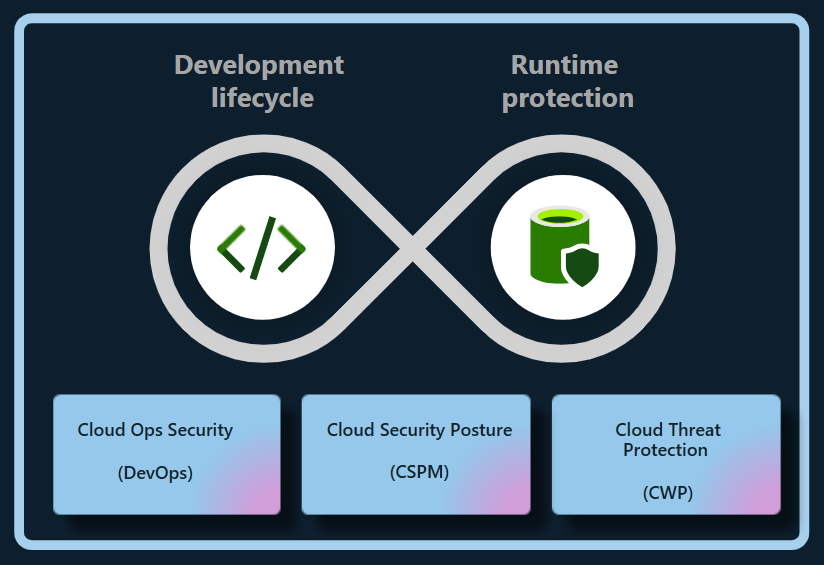
microsoft cloud security

Microsoft Cloud Security: Essential Strategies for Protecting Your Data and Workloads

Microsoft Cloud Security: A Practical Guide

Microsoft cloud services—including Azure, Microsoft 365, and services built on the Microsoft cloud—offer organizations flexible ways to run applications, collaborate, and manage data. Protecting those environments takes more than turning on a security feature. It requires clear ownership, strong identity controls, thoughtful configuration, and ongoing monitoring.

Understand the Shared Responsibility Model

Cloud security is a shared responsibility between Microsoft and its customers. Microsoft secures the underlying cloud infrastructure, while customers remain responsible for areas such as user accounts, access permissions, data, and many service configurations. The exact division of responsibility depends on the service being used. For example, a managed software service generally requires less infrastructure management by the customer than a virtual machine running in Azure.

Before deploying a workload, identify what Microsoft manages and what your organization must secure. This helps prevent gaps in areas such as patching, backups, access control, and data protection.

Make Identity Your First Line of Defense

Compromised accounts are a common path into cloud environments, so identity protection should be a priority. Microsoft Entra ID provides identity and access management capabilities for Microsoft cloud services and other applications.

  • Require multifactor authentication, especially for administrators and remote access.
  • Use conditional access policies to evaluate factors such as user, device, location, and risk.
  • Apply least privilege: give users and applications only the access they need.
  • Use privileged identity management practices to limit standing administrator access.
  • Review inactive accounts, service principals, and access permissions regularly.

Strong identity controls can reduce the impact of stolen passwords and help limit an attacker’s ability to move through an environment.

Protect Azure Workloads and Configurations

Misconfigured cloud resources can expose systems or data even when the underlying platform is secure. In Azure, organizations should establish secure configuration standards for subscriptions, networks, storage, virtual machines, and databases. Azure Policy can help enforce organizational requirements, while Microsoft Defender for Cloud can provide security recommendations and threat protection capabilities for supported resources.

Important practices include restricting public access where it is not required, using network segmentation, securing administrative connections, encrypting sensitive data, and keeping workloads patched. Backups should be protected from accidental deletion and ransomware, and recovery plans should be tested rather than assumed to work.

Secure Microsoft 365 and Collaboration

Microsoft 365 brings together email, file storage, meetings, and collaboration tools. Security settings should reflect how people actually work while limiting unnecessary exposure. Review sharing defaults in services such as SharePoint and OneDrive, manage external collaboration, and establish retention and access policies appropriate to the organization.

Microsoft Defender for Office 365 can help protect against threats such as phishing and malicious attachments, depending on the plan and configuration. Security awareness training and clear procedures for reporting suspicious messages remain important because technical controls cannot prevent every social-engineering attempt.

Protect and Govern Data

Cloud security also depends on knowing what data an organization stores and who can access it. Microsoft Purview includes data governance, information protection, and compliance capabilities, with features varying by product and license. Organizations can use classification and sensitivity labels to help identify and protect important information, and apply data loss prevention policies to reduce inappropriate sharing.

Start by identifying sensitive data, defining who should be able to access it, and deciding how long it should be retained. Policies should be tested with users and business teams to avoid disrupting legitimate work.

Monitor, Detect, and Respond

Security controls are most effective when organizations can detect suspicious activity and respond quickly. Microsoft Defender products provide security capabilities across various environments, while Microsoft Sentinel is a cloud-based security information and event management (SIEM) and security orchestration, automation, and response (SOAR) platform. The tools an organization needs depend on its environment, risk profile, and licensing.

Establish a process for reviewing alerts, investigating incidents, and escalating serious findings. Keep audit logging enabled where appropriate, define incident-response roles, and practice response scenarios such as account compromise, data exposure, and ransomware. Monitoring without a clear response process can leave important alerts unattended.

Build a Sustainable Security Program

Microsoft cloud security is not a one-time setup. Services change, employees join and leave, and business requirements evolve. A sustainable program includes regular access reviews, configuration assessments, vulnerability management, backup testing, and updates to policies and incident-response plans.

Begin with the basics: secure administrator accounts, enable strong authentication, reduce excessive permissions, protect sensitive data, and establish reliable monitoring. Then use Microsoft’s security guidance and the controls available in your specific services to improve protection over time. Because features and licensing can change, verify current capabilities and requirements in Microsoft’s official documentation before designing or purchasing a solution.


Top 9 Benefits of Microsoft Cloud Security for Your Business

  1. Scales with your business needs
  2. Offers strong identity controls
  3. Supports multifactor authentication
  4. Helps protect data with encryption
  5. Provides built-in threat detection
  6. Integrates with Microsoft 365
  7. Enables centralized security management
  8. Supports compliance and governance
  9. Offers tools for monitoring and response


5 Challenges of Microsoft Cloud Security: Complexity, Costs, and Dependence

  1. Can be complex to configure and manage.
  2. Advanced security features may require costly licenses.
  3. Misconfigurations can expose data and services.
  4. Dependence on Microsoft can limit flexibility.
  5. Requires ongoing expertise and monitoring.

Scales with your business needs

Microsoft cloud security can scale alongside your business, helping you adjust protection as your team, data, and workloads grow or change. You can add security capabilities, expand coverage across cloud services, and adapt access controls and policies as new needs arise—without having to build and maintain all the supporting infrastructure yourself. This flexibility can help keep security aligned with your business while making it easier to manage changing requirements.

Offers strong identity controls

Microsoft cloud security offers strong identity controls that help organizations protect accounts, apps, and data. With tools such as Microsoft Entra ID, teams can require multifactor authentication, apply access policies based on user and device risk, and limit permissions to only what each person needs. These safeguards make it harder for unauthorized users to gain access and help reduce the impact of compromised credentials.

Supports multifactor authentication

Microsoft cloud security supports multifactor authentication (MFA), adding an extra layer of protection beyond a password. Users may be asked to confirm their identity with an authenticator app, a security key, or another approved method. This makes it harder for someone to access an account with a stolen or guessed password and helps organizations better protect email, files, and cloud resources.

Helps protect data with encryption

Microsoft cloud security helps protect data with encryption, making information harder to read if it is accessed without authorization. Encryption can safeguard data while it is stored and while it moves between services or devices. With appropriate configuration and key-management practices, organizations can add an important layer of protection for sensitive information across their cloud environments.

Provides built-in threat detection

Microsoft cloud security includes built-in threat detection capabilities that help identify suspicious activity across supported services, users, devices, and workloads. These tools can analyze signals and surface alerts about potential risks—such as unusual sign-ins or malicious behavior—so security teams can investigate and respond more quickly. When configured to fit an organization’s environment, built-in detection can strengthen visibility without requiring every monitoring capability to be assembled from scratch.

Integrates with Microsoft 365

Microsoft cloud security integrates seamlessly with Microsoft 365, helping organizations protect email, files, meetings, and user accounts within the tools employees already use. This integration can bring security policies, identity controls, and threat protection together across services such as Outlook, Teams, SharePoint, and OneDrive. As a result, administrators can manage access more consistently, respond to potential threats with greater visibility, and help safeguard sensitive information without disrupting everyday collaboration.

Enables centralized security management

Microsoft cloud security enables centralized security management by bringing key security settings, policies, alerts, and monitoring tools together across cloud services. This gives IT and security teams a clearer view of their environment and helps them apply consistent protections, manage access, and respond to potential threats more efficiently. Centralized oversight can also make it easier to identify gaps and coordinate security practices across users, devices, and workloads.

Supports compliance and governance

Microsoft cloud security supports compliance and governance by providing tools to help organizations protect sensitive information, manage access, apply data-retention policies, and monitor activity. Services such as Microsoft Purview can help classify and govern data, while built-in security and compliance features can support an organization’s efforts to meet applicable regulatory and internal requirements. The right controls depend on the Microsoft services in use, the organization’s configuration, and its specific compliance obligations.

Offers tools for monitoring and response

Microsoft cloud security offers tools that help organizations monitor activity, detect potential threats, and respond to incidents. Services such as Microsoft Defender and Microsoft Sentinel can bring security signals together, surface suspicious behavior, and support investigation and response workflows. With appropriate configuration and ongoing oversight, these tools can help teams identify problems sooner and coordinate a more effective response.

Can be complex to configure and manage.

One drawback of Microsoft cloud security is that it can be complex to configure and manage. Services such as Azure, Microsoft 365, and Microsoft Entra ID offer many security settings, policies, and tools, and the right setup depends on an organization’s needs and licensing. Misconfigured controls or unclear responsibilities can leave gaps in protection, so teams may need specialized expertise, ongoing training, and regular reviews to manage the environment effectively.

Advanced security features may require costly licenses.

Advanced security features in Microsoft cloud services can come at a significant additional cost. Capabilities such as enhanced threat detection, identity protection, compliance tools, and advanced data protection may require higher-tier subscriptions or separate licenses. For organizations with tight budgets, these costs can make it difficult to deploy the full set of recommended safeguards, so it’s important to compare licensing options and prioritize features based on risk and business needs.

Misconfigurations can expose data and services.

One potential drawback of Microsoft cloud security is that misconfigurations can expose sensitive data and services to unauthorized access. A storage account with overly permissive access, an exposed network endpoint, or an incorrectly assigned user role can create security gaps—even when the underlying Microsoft platform is operating securely. Preventing these issues requires careful setup, regular configuration reviews, and ongoing monitoring.

Dependence on Microsoft can limit flexibility.

Relying heavily on Microsoft’s cloud security tools can limit an organization’s flexibility. Teams may find it difficult or costly to switch providers, integrate competing products, or adapt workflows built around Microsoft-specific services. This dependence can also make it harder to respond to changing business needs or negotiate terms, so organizations should consider portability and interoperability when designing their cloud security strategy.

Requires ongoing expertise and monitoring.

Microsoft cloud security requires ongoing expertise and monitoring to remain effective. Services, threats, and security settings change over time, so organizations need knowledgeable staff to review configurations, manage access, investigate alerts, and respond to incidents. Without consistent oversight, misconfigurations or suspicious activity may go unnoticed, leaving sensitive data and systems at risk.

Network Security Best Practices: Essential Steps to Protect Your Network

Network Security Best Practices

A secure network helps protect sensitive information, keep systems available, and reduce the risk of costly disruptions. Whether you manage a home network, a small business, or a large organization, network security works best as an ongoing process—not a one-time setup. The practices below can help you strengthen your defenses and respond more effectively to threats.

Keep Systems and Network Devices Updated

Install security updates for operating systems, applications, routers, firewalls, and other network equipment as soon as practical. Updates often fix vulnerabilities that attackers could otherwise exploit. Replace devices that no longer receive security support, and remove software or services that are no longer needed.

Where possible, enable automatic updates for routine security fixes. For business environments, test important updates before broad deployment and maintain a schedule for reviewing devices that may have been missed.

Use Strong Authentication

Change default usernames and passwords on routers, access points, and other equipment. Use long, unique passwords for every account, ideally stored in a reputable password manager. Avoid shared accounts when individual accounts are available, since personal accounts make it easier to track activity and revoke access when someone leaves.

Enable multifactor authentication (MFA) for administrative accounts, remote access, cloud services, and other important systems. MFA adds another verification step, making a stolen password less useful to an attacker.

Limit Access and Apply Least Privilege

Give users and devices only the access they need to do their work. Separate everyday user accounts from administrator accounts, and use elevated privileges only when necessary. Review permissions regularly, especially after job changes or departures.

Disable unused accounts, open ports, network services, and remote-access tools. Restrict administrative interfaces so they are reachable only from approved devices or trusted network locations.

Segment the Network

Network segmentation divides a network into smaller sections, limiting how far an intruder can move if one device or account is compromised. For example, organizations can separate employee computers, servers, guest Wi-Fi, and internet-connected devices such as cameras or printers.

Use firewall rules to control which sections can communicate and allow only the connections required for normal operations. Review these rules periodically to remove outdated or overly broad access.

Secure Wi-Fi and Remote Connections

Protect wireless networks with current encryption and a strong, unique passphrase. Change the access point’s default administrator credentials, keep its firmware updated, and use a separate guest network for visitors and personal devices. Avoid exposing the network’s administrative interface to the public internet.

For remote work, require secure connections through an approved VPN or other protected access method. Combine remote access with MFA, limit who can use it, and monitor for unusual sign-in activity. Do not rely on a VPN alone; remote devices should also be updated and protected.

Deploy Firewalls and Endpoint Protection

Firewalls help control traffic entering and leaving a network. Configure them to deny unnecessary connections by default, then allow only the traffic required for business or personal use. Check firewall logs and rules for unexpected changes or suspicious activity.

Install reputable endpoint protection on computers and servers, and keep it enabled and updated. Endpoint tools can help detect malicious files, suspicious behavior, and other threats that network controls may not catch.

Protect Data and Backups

Encrypt sensitive data when it is stored and when it travels across networks. Use secure protocols and avoid sending confidential information over untrusted connections without appropriate protection.

Maintain regular backups of important data and systems. Keep at least one backup isolated from the main network so malware or an intruder cannot easily alter or delete every copy. Test restores periodically; a backup is useful only if it can be recovered.

Monitor Activity and Prepare to Respond

Collect and review logs from firewalls, servers, endpoints, and important applications. Alerts can help identify unusual login attempts, unexpected data transfers, or changes to critical settings. Make sure logs are protected from unauthorized changes and retained long enough to support investigations.

Create an incident response plan that explains who to contact, how to isolate affected systems, how to preserve evidence, and how to restore operations. Practice the plan so that people know what to do under pressure.

Train Users and Review Security Regularly

People play an important role in network security. Teach users how to recognize phishing attempts, report suspicious messages, handle sensitive information, and use approved tools. Make reporting easy and respond constructively so potential problems are raised quickly.

Regularly review network diagrams, device inventories, access permissions, firewall rules, and security policies. Periodic vulnerability assessments can help identify weaknesses before they are exploited. Address findings according to their risk and verify that fixes have worked.

Make Security an Ongoing Practice

No single tool can protect every network from every threat. Strong security comes from combining updated systems, careful access controls, segmentation, monitoring, backups, and informed users. Start with the measures that address your most important risks, document your decisions, and revisit them as your network and needs change.


7 Essential Tips for Strengthening Your Network Security

  1. Use strong, unique passwords and enable multifactor authentication.
  2. Keep routers, firewalls, and devices updated.
  3. Use WPA3 or WPA2 encryption for Wi-Fi.
  4. Change default administrator usernames and passwords.
  5. Segment guest and smart-home devices from sensitive systems.
  6. Disable unused ports, services, and remote access.
  7. Monitor network logs and investigate unusual activity.

Use strong, unique passwords and enable multifactor authentication.

Use strong, unique passwords for every network account, especially administrator and remote-access accounts. Long passphrases are easier to remember and harder to guess, while a password manager can help you store them securely without reusing them. Enable multifactor authentication (MFA) wherever possible to add another layer of protection, so a stolen password alone is less likely to grant access.

Keep routers, firewalls, and devices updated.

Keep routers, firewalls, computers, and other connected devices updated with the latest security patches and firmware. Updates often fix vulnerabilities that attackers could exploit, so install them promptly and enable automatic updates when available. Replace devices that no longer receive security support, and remove outdated software or services you no longer use.

Use WPA3 or WPA2 encryption for Wi-Fi.

Use WPA3 encryption to protect your Wi-Fi network whenever your router and devices support it. If WPA3 isn’t available, choose WPA2-AES rather than outdated options such as WEP or WPA. Set a strong, unique Wi-Fi password, change the router’s default administrator credentials, and keep its firmware up to date to help prevent unauthorized access.

Change default administrator usernames and passwords.

Change the default administrator username and password on every router, access point, and network device you manage. Default credentials are often publicly documented, so attackers may try them to gain control of a device and alter its settings, intercept traffic, or access connected systems. Choose a unique, strong password for each device, change the administrator username if the device allows it, and store the credentials securely in a password manager.

Segment guest and smart-home devices from sensitive systems.

Place guest devices and smart-home equipment—such as TVs, cameras, and speakers—on a separate Wi-Fi network from computers, phones, and other systems that contain sensitive information. These devices may have weaker security or receive fewer updates, so separating them helps limit access if one is compromised. Use your router’s guest-network or network-segmentation feature, and allow only the connections each device needs.

Disable unused ports, services, and remote access.

Disable unused network ports, services, and remote-access tools to reduce the number of ways an attacker could reach your systems. Turn off features you don’t need, close unnecessary firewall ports, and limit administrative access to trusted devices or locations. Review these settings regularly, since old services and access rules can remain enabled long after they’re needed.

Monitor network logs and investigate unusual activity.

Monitor network logs regularly to spot unusual activity, such as repeated failed sign-in attempts, unexpected connections, or large transfers of data. Set alerts for suspicious patterns and investigate them promptly to determine whether they’re harmless or signs of a security issue. Keeping logs protected and retaining them long enough can also help identify what happened and support a faster response.

technologies

Emerging Technologies Shaping the Future

The Ever-Evolving World of Technology

The Ever-Evolving World of Technology

Technology has become an integral part of our daily lives, shaping the way we communicate, work, and entertain ourselves. From the invention of the wheel to the rise of artificial intelligence, technological advancements have continuously transformed societies across the globe.

The Impact of Technology on Communication

One of the most significant impacts of technology is in the realm of communication. The advent of the internet and mobile devices has revolutionized how people connect with one another. Social media platforms like Facebook, Twitter, and Instagram allow individuals to share experiences and ideas instantly with a global audience. Video conferencing tools such as Zoom and Microsoft Teams have made remote work more feasible than ever before.

Technological Advancements in Healthcare

In healthcare, technology has led to groundbreaking innovations that improve patient care and outcomes. Telemedicine enables patients to consult with healthcare professionals from the comfort of their homes. Wearable devices like smartwatches monitor vital signs in real-time, providing valuable data for both users and doctors.

The Role of Artificial Intelligence

Artificial intelligence (AI) is at the forefront of modern technological advancements. AI algorithms are used in various applications, from autonomous vehicles to personalized recommendations on streaming services. Machine learning techniques help businesses analyze vast amounts of data to make informed decisions.

The Future of Technology

Looking ahead, technologies such as quantum computing and blockchain hold promise for further transformation across industries. Quantum computers have the potential to solve complex problems beyond the capability of classical computers, while blockchain technology offers secure solutions for transactions and data management.

Challenges Ahead

Despite its many benefits, technology also presents challenges such as privacy concerns and cybersecurity threats. As technology continues to evolve, it is crucial for society to address these issues responsibly.

Conclusion

The world of technology is ever-changing, offering both opportunities and challenges. By embracing innovation while addressing its implications thoughtfully, society can harness technology’s potential to improve quality of life globally.


8 Essential Tech Tips for Security, Privacy, and Well-being

  1. Regularly update your devices and software to ensure security.
  2. Backup your important data regularly to prevent data loss.
  3. Use strong, unique passwords for all your accounts and enable two-factor authentication when possible.
  4. Be cautious about clicking on links or downloading attachments from unknown sources to avoid malware.
  5. Protect your privacy by reviewing and adjusting the privacy settings on your devices and online accounts.
  6. Learn basic troubleshooting techniques to solve common tech issues on your own.
  7. Stay informed about the latest tech trends and developments to keep up with advancements.
  8. Practice digital detox by taking breaks from technology to reduce screen time and improve well-being.

Regularly update your devices and software to ensure security.

Regularly updating your devices and software is crucial to maintaining security in today’s digital landscape. Software updates often include patches for vulnerabilities that hackers may exploit to gain unauthorized access to your data or device. By staying current with updates, you not only ensure that your technology operates smoothly but also protect yourself against potential cyber threats. Prioritizing regular updates is a proactive step in safeguarding your digital assets and maintaining a secure online environment.

Backup your important data regularly to prevent data loss.

It is crucial to backup your important data regularly to safeguard against potential data loss. By creating backups of your files and documents, you can protect valuable information from unforeseen events such as hardware failures, accidental deletions, or cyberattacks. Regularly backing up your data ensures that you can restore critical information quickly and minimize disruptions in case of an unexpected loss. Embracing this simple yet essential practice can provide peace of mind and ensure that your important data remains secure and accessible when you need it most.

Use strong, unique passwords for all your accounts and enable two-factor authentication when possible.

It is crucial to prioritize cybersecurity by using strong, unique passwords for all your accounts and enabling two-factor authentication whenever possible. Strong passwords that combine letters, numbers, and special characters help enhance the security of your online accounts, making them less vulnerable to hacking attempts. Two-factor authentication adds an extra layer of protection by requiring a secondary verification step, such as a code sent to your phone, further safeguarding your sensitive information from unauthorized access. By implementing these security measures, you can significantly reduce the risk of falling victim to cyber threats and protect your digital identity effectively.

To safeguard your digital security, it is essential to exercise caution when encountering links or attachments from unfamiliar sources. Clicking on suspicious links or downloading unknown attachments can expose your device to malware, potentially compromising your data and privacy. By staying vigilant and refraining from engaging with such content, you can minimize the risk of falling victim to cyber threats and protect your digital assets effectively.

Protect your privacy by reviewing and adjusting the privacy settings on your devices and online accounts.

To safeguard your privacy in the digital age, it is essential to regularly review and adjust the privacy settings on your devices and online accounts. By taking proactive steps to control the information you share and who can access it, you can better protect your personal data from unauthorized use or exposure. Stay informed about the latest privacy features offered by technology companies and make use of them to maintain a secure online presence.

Learn basic troubleshooting techniques to solve common tech issues on your own.

Learning basic troubleshooting techniques is essential for anyone who uses technology regularly. By equipping yourself with these skills, you can save time and frustration when faced with common tech issues. Whether it’s a computer glitch, a network problem, or a software malfunction, being able to diagnose and resolve the issue on your own can be empowering. Not only does it help you become more self-sufficient, but it also allows you to get back to being productive or enjoying your devices without having to wait for external help.

Staying informed about the latest tech trends and developments is essential to keeping up with advancements in the ever-evolving world of technology. By staying updated on emerging technologies, you can remain competitive, adapt to changes in your industry, and explore new opportunities for growth and innovation. Whether it’s through following tech news websites, attending industry conferences, or engaging with online communities, staying informed allows you to make informed decisions and leverage the power of technology to drive success in your personal and professional endeavors.

Practice digital detox by taking breaks from technology to reduce screen time and improve well-being.

In today’s digital age, practicing a digital detox by consciously taking breaks from technology can have a profound impact on our well-being. By reducing screen time and disconnecting from the constant influx of information, we give ourselves the opportunity to recharge and refocus. Stepping away from screens allows us to engage in activities that promote mindfulness, creativity, and human connection, ultimately leading to a healthier balance between our online and offline lives.

web based document management system

Optimizing Workflow Efficiency with a Web-Based Document Management System

The Benefits of a Web-Based Document Management System

The Benefits of a Web-Based Document Management System

In today’s digital age, managing documents efficiently is crucial for businesses of all sizes. A web-based document management system offers a convenient and secure solution to organize, store, and access documents online. Here are some key benefits of implementing a web-based document management system:

Accessibility

One of the primary benefits of a web-based document management system is the ability to access your documents from anywhere with an internet connection. This ensures that your team members can collaborate on projects and access important files even when they are not in the office.

Security

Web-based document management systems provide robust security features to protect your sensitive information. With encryption, user authentication, and access controls, you can ensure that only authorized users have access to specific documents.

Version Control

Keeping track of document versions can be challenging, especially when multiple team members are working on the same file. A web-based document management system allows you to track changes, revert to previous versions, and maintain a clear audit trail of document edits.

Collaboration

Collaboration is made easy with a web-based document management system. Team members can work together on documents in real-time, leave comments, and provide feedback without the need for emailing files back and forth.

Cost-Effective

Implementing a web-based document management system eliminates the need for physical storage space and reduces paper usage. This not only saves costs associated with printing and storing paper documents but also contributes to environmental sustainability.

Scalability

A web-based document management system can easily scale with your business as it grows. You can add more users, increase storage capacity, and customize features according to your evolving needs without significant disruptions.

In conclusion, a web-based document management system offers numerous benefits that enhance efficiency, collaboration, security, and cost-effectiveness for businesses looking to streamline their document workflows in the digital era.


8 Essential Tips for Optimizing Your Web-Based Document Management System

  1. Ensure regular backups of all documents to prevent data loss.
  2. Implement user permissions to control access and editing rights.
  3. Utilize version control to track changes made to documents over time.
  4. Set up automated workflows for efficient document routing and approval processes.
  5. Integrate with other tools such as email and calendars for seamless collaboration.
  6. Provide training and support for users to maximize system utilization.
  7. Regularly audit the system for security vulnerabilities and compliance with regulations.
  8. Consider scalability options to accommodate future growth of document storage needs.

Ensure regular backups of all documents to prevent data loss.

Regular backups of all documents are essential to prevent data loss when using a web-based document management system. By implementing a robust backup strategy, businesses can safeguard their valuable information against unexpected events such as system failures, cyber attacks, or human errors. Regularly backing up documents ensures that even in the event of data loss, businesses can quickly restore their files and continue operations without disruption. Prioritizing regular backups is a proactive measure that helps maintain the integrity and availability of critical documents, providing peace of mind for organizations relying on web-based document management systems.

Implement user permissions to control access and editing rights.

Implementing user permissions in a web-based document management system is essential for controlling access and editing rights effectively. By setting up user-specific permissions, organizations can ensure that only authorized individuals have the ability to view, edit, or delete sensitive documents. This not only enhances security but also helps maintain data integrity and compliance with regulatory requirements. User permissions provide a granular level of control over document access, allowing businesses to tailor access rights based on roles and responsibilities within the organization.

Utilize version control to track changes made to documents over time.

Utilizing version control in a web-based document management system is essential for tracking changes made to documents over time. By maintaining a clear record of document versions and edits, teams can easily identify who made specific changes, revert to previous versions if needed, and ensure that the most up-to-date information is always accessible. This feature enhances collaboration, streamlines workflows, and helps maintain data integrity within the organization.

Set up automated workflows for efficient document routing and approval processes.

Setting up automated workflows for efficient document routing and approval processes is a game-changer in web-based document management systems. By automating the flow of documents through predefined routes and approval stages, businesses can streamline their operations, reduce manual errors, and ensure timely approvals. This feature not only saves time but also improves collaboration among team members by providing a clear and structured process for document handling. Businesses can achieve greater efficiency and productivity by leveraging automated workflows in their web-based document management system.

Integrate with other tools such as email and calendars for seamless collaboration.

Integrating a web-based document management system with other tools like email and calendars can significantly enhance collaboration within a team. By seamlessly connecting these platforms, team members can easily share documents, schedule meetings, and coordinate tasks more efficiently. This integration streamlines communication processes and ensures that all relevant information is accessible in one centralized location, ultimately improving productivity and teamwork.

Provide training and support for users to maximize system utilization.

To maximize the utilization of a web-based document management system, it is essential to provide comprehensive training and ongoing support for users. By offering training sessions that educate users on the system’s features, functionalities, and best practices, organizations can ensure that their employees are equipped with the knowledge and skills needed to effectively utilize the system. Additionally, providing continuous support through help desks, user guides, and troubleshooting resources can address any issues or questions that may arise, ultimately enhancing user confidence and system adoption. Effective training and support empower users to leverage the full potential of the document management system, leading to improved productivity and efficiency within the organization.

Regularly audit the system for security vulnerabilities and compliance with regulations.

Regularly auditing your web-based document management system for security vulnerabilities and compliance with regulations is essential to ensure the integrity and confidentiality of your sensitive information. By conducting routine assessments, you can identify potential risks, address any vulnerabilities promptly, and maintain adherence to industry regulations and standards. This proactive approach not only enhances the security of your system but also demonstrates your commitment to safeguarding data privacy and maintaining compliance with legal requirements.

Consider scalability options to accommodate future growth of document storage needs.

When implementing a web-based document management system, it is essential to consider scalability options to accommodate future growth of document storage needs. By planning for scalability from the outset, businesses can ensure that their system can easily expand to meet increasing storage demands as the organization grows. This proactive approach not only prevents potential storage constraints but also allows for a seamless transition as document volumes increase over time.

cloud based document management system

Unlocking Efficiency: The Power of a Cloud-Based Document Management System

The Benefits of a Cloud-Based Document Management System

The Benefits of a Cloud-Based Document Management System

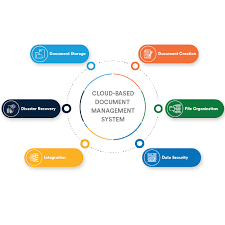
In today’s digital age, managing documents efficiently is crucial for businesses of all sizes. A cloud-based document management system offers numerous advantages over traditional paper-based systems. Let’s explore some of the key benefits:

Accessibility and Collaboration

One of the primary advantages of a cloud-based document management system is the ability to access documents from anywhere with an internet connection. This enables employees to collaborate in real-time, regardless of their location. Team members can work on documents simultaneously, increasing productivity and efficiency.

Cost-Effectiveness

Implementing a cloud-based document management system eliminates the need for physical storage space and reduces costs associated with printing, paper, and manual filing systems. Businesses can save money on infrastructure maintenance and streamline their document management processes.

Security and Data Backup

Cloud-based document management systems offer enhanced security features such as encryption, access controls, and audit trails to protect sensitive information. Additionally, data stored in the cloud is automatically backed up, reducing the risk of data loss due to hardware failures or disasters.

Scalability and Flexibility

Cloud-based document management systems are highly scalable, allowing businesses to easily adjust storage capacity based on their needs. As businesses grow, they can expand their storage space without investing in additional hardware or software upgrades.

Compliance and Regulatory Requirements

Many industries have strict compliance requirements regarding document retention and security. A cloud-based document management system helps businesses meet regulatory standards by providing secure storage, version control, and audit capabilities.

Conclusion

A cloud-based document management system offers a wide range of benefits that can significantly improve efficiency, collaboration, security, and compliance within an organization. By leveraging the power of cloud technology, businesses can streamline their document management processes and focus on driving growth and innovation.


5 Essential Tips for Optimizing Your Cloud-Based Document Management System

  1. Ensure proper access controls are in place to protect sensitive information.
  2. Regularly back up your documents to prevent data loss.
  3. Utilize version control features to track changes and revisions.
  4. Train employees on how to effectively use the document management system.
  5. Integrate with other tools and applications for seamless workflow management.

Ensure proper access controls are in place to protect sensitive information.

It is crucial to ensure proper access controls are in place when implementing a cloud-based document management system to safeguard sensitive information. By setting up granular permissions and user roles, businesses can control who has access to specific documents and prevent unauthorized users from viewing or editing sensitive data. This security measure helps mitigate the risk of data breaches and ensures that confidential information remains protected at all times.

Regularly back up your documents to prevent data loss.

Regularly backing up your documents is a crucial practice to prevent data loss when using a cloud-based document management system. By creating backups at scheduled intervals, you ensure that even in the event of unexpected issues like system failures or accidental deletions, your important files are safe and easily recoverable. This proactive approach not only safeguards your data but also provides peace of mind knowing that your information is secure and accessible whenever needed.

Utilize version control features to track changes and revisions.

Utilizing version control features in a cloud-based document management system is essential for tracking changes and revisions effectively. By maintaining a history of document versions, users can easily review previous iterations, identify modifications, and revert to earlier versions if needed. This feature enhances collaboration among team members, ensures data integrity, and streamlines the document editing process by providing a clear audit trail of all changes made to the document.

Train employees on how to effectively use the document management system.

Training employees on how to effectively use the cloud-based document management system is crucial for maximizing its benefits. By providing comprehensive training sessions, employees can learn how to navigate the system efficiently, collaborate with colleagues, maintain data security, and adhere to compliance regulations. Investing in employee training ensures that the organization can fully leverage the capabilities of the document management system, leading to improved productivity, streamlined workflows, and enhanced data management practices.

Integrate with other tools and applications for seamless workflow management.

Integrating a cloud-based document management system with other tools and applications is essential for ensuring a seamless workflow management process. By connecting your document management system with other software solutions such as project management tools, communication platforms, and CRM systems, you can streamline processes, enhance collaboration, and improve overall efficiency. This integration allows for easy access to documents across different platforms, eliminates silos between systems, and creates a more cohesive work environment where information flows smoothly between various tools, ultimately boosting productivity and driving better results.