
cfchris.com

Loading

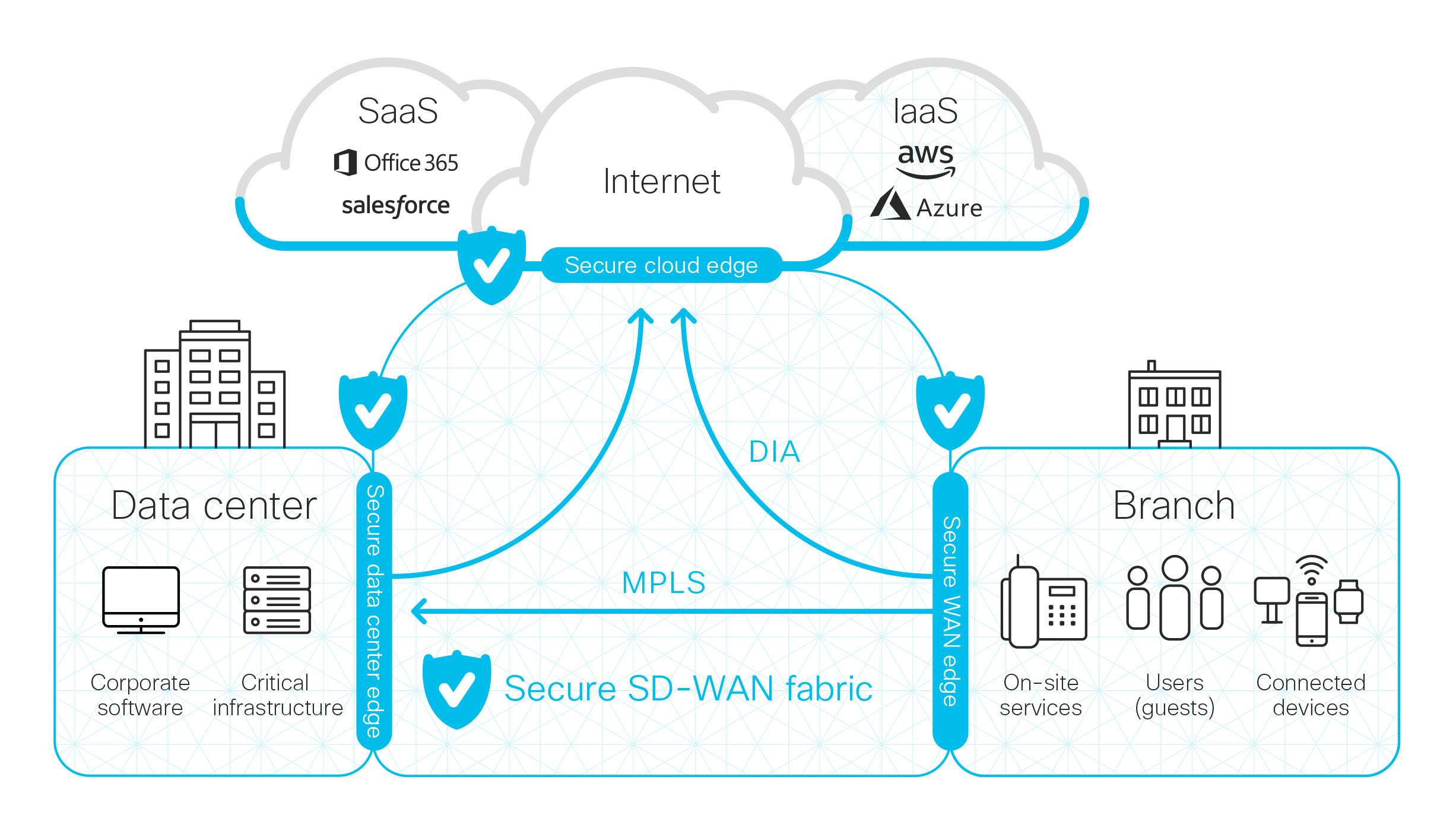
cloud security network

Ensuring Data Protection: The Crucial Role of Cloud Security Network

The Importance of Cloud Security Network

The Importance of Cloud Security Network

In today’s digital age, businesses are increasingly relying on cloud services to store and manage their data. While the cloud offers numerous benefits such as scalability, flexibility, and cost-efficiency, it also poses significant security risks. This is where a robust cloud security network comes into play.

Securing Your Data in the Cloud

Cloud security network refers to the measures and protocols put in place to protect data stored in the cloud from unauthorized access, data breaches, and other cyber threats. With sensitive information being stored off-site on remote servers, it is crucial for businesses to implement strong security practices to safeguard their data.

The Role of Encryption

Encryption is a fundamental aspect of cloud security network. By encrypting data before it is uploaded to the cloud and decrypting it only upon retrieval, businesses can ensure that their information remains secure even if it is intercepted by hackers. Strong encryption algorithms provide an additional layer of protection against unauthorized access.

Access Control and Authentication

Another key component of cloud security network is access control and authentication. Businesses should implement strict access control policies to limit who can view, edit, or delete data stored in the cloud. Multi-factor authentication adds an extra layer of security by requiring users to verify their identity through multiple means.

Regular Monitoring and Updates

Continuous monitoring of the cloud infrastructure is essential to detect any suspicious activity or potential security breaches promptly. Regular software updates and patches should be applied to ensure that vulnerabilities are addressed promptly and that the system remains secure against evolving cyber threats.

Conclusion

In conclusion, a robust cloud security network is essential for businesses leveraging cloud services to protect their valuable data from cyber threats. By implementing strong encryption measures, access control policies, regular monitoring, and updates, businesses can mitigate risks and ensure that their data remains secure in the cloud.


5 Essential Tips for Enhancing Cloud Network Security

  1. Use strong, unique passwords for cloud accounts.
  2. Enable multi-factor authentication for an added layer of security.
  3. Regularly update and patch all cloud services and applications.
  4. Encrypt data both in transit and at rest within the cloud network.
  5. Implement strict access controls to limit who can interact with sensitive data.

Use strong, unique passwords for cloud accounts.

It is crucial to use strong, unique passwords for cloud accounts to enhance the security of your data stored in the cloud. By creating complex passwords that combine letters, numbers, and special characters, you can significantly reduce the risk of unauthorized access to your sensitive information. Using different passwords for each cloud account adds an extra layer of protection, ensuring that a breach in one account does not compromise others. Regularly updating and changing these passwords further strengthens the security of your cloud network and helps safeguard your data from potential cyber threats.

Enable multi-factor authentication for an added layer of security.

Enabling multi-factor authentication is a crucial tip for enhancing cloud security network. By requiring users to verify their identity through multiple means, such as a password and a unique code sent to their mobile device, businesses can significantly reduce the risk of unauthorized access to sensitive data stored in the cloud. This additional layer of security adds an extra barrier for potential attackers and strengthens the overall security posture of the cloud infrastructure.

Regularly update and patch all cloud services and applications.

Regularly updating and patching all cloud services and applications is a crucial aspect of maintaining a secure cloud security network. By staying up-to-date with the latest software updates and patches, businesses can address vulnerabilities promptly and ensure that their cloud infrastructure remains resilient against potential cyber threats. Failure to update regularly can leave systems exposed to exploitation by malicious actors, making it essential for organizations to prioritize proactive maintenance to enhance the overall security of their cloud environment.

Encrypt data both in transit and at rest within the cloud network.

Encrypting data both in transit and at rest within the cloud network is a crucial tip for enhancing cloud security. By encrypting data while it is being transferred between devices and servers (in transit) and also when it is stored on the cloud servers (at rest), businesses can ensure that their sensitive information remains secure from potential threats. This dual-layer encryption approach adds an extra level of protection, making it significantly harder for unauthorized users to access or intercept the data, thus safeguarding the confidentiality and integrity of the information stored in the cloud network.

Implement strict access controls to limit who can interact with sensitive data.

To enhance the security of your cloud network, it is crucial to implement strict access controls that restrict access to sensitive data only to authorized individuals. By limiting who can interact with this critical information, businesses can significantly reduce the risk of unauthorized access and data breaches. Implementing robust access control measures ensures that sensitive data remains protected and only accessible to those with the necessary permissions, thereby strengthening the overall security of the cloud network.

windows software development

Exploring the Dynamics of Windows Software Development

Windows Software Development

The World of Windows Software Development

Windows software development is a vast and dynamic field that continues to evolve with the latest technologies and trends. With millions of users worldwide, developing software for the Windows platform offers immense opportunities for developers to create innovative and impactful applications.

Key Aspects of Windows Software Development

Developing software for Windows involves using various programming languages such as C#, C++, and Visual Basic along with frameworks like .NET. These tools provide developers with a robust environment to build applications that run seamlessly on Windows operating systems.

User Interface Design

User interface design plays a crucial role in Windows software development. Creating intuitive and visually appealing interfaces enhances user experience and usability. Developers leverage tools like XAML (Extensible Application Markup Language) to design responsive and interactive interfaces for Windows applications.

Integration with Microsoft Services

Windows software can be integrated with various Microsoft services such as Azure, Office 365, and Dynamics 365. Leveraging these services enables developers to enhance the functionality of their applications by incorporating cloud services, productivity tools, and business solutions.

Security Considerations

Security is paramount in Windows software development. Implementing robust security measures such as encryption, authentication, and secure communication protocols is essential to protect user data and ensure the integrity of the application.

The Future of Windows Software Development

As technology advances, the future of Windows software development looks promising with emerging trends like artificial intelligence, Internet of Things (IoT), and cloud computing shaping the landscape. Developers are exploring new possibilities to create innovative applications that cater to the evolving needs of users in an interconnected world.

Whether you are a seasoned developer or just starting your journey in Windows software development, staying informed about the latest tools and technologies is key to success in this dynamic field.

Explore the endless possibilities that Windows software development offers and unleash your creativity to build impactful applications that make a difference in the digital world.

Contact us at [email protected] for inquiries or collaborations.


8 Key Advantages of Windows Software Development: From a Vast User Base to Future Opportunities

  1. Vast user base
  2. Robust development tools
  3. Integration with Microsoft services
  4. Familiar environment
  5. Rich user interface design options
  6. Strong security features
  7. Compatibility
  8. Future opportunities


Challenges in Windows Software Development: Navigating Compatibility, Costs, and Flexibility

  1. Limited cross-platform compatibility compared to other development environments.
  2. Dependency on Microsoft technologies and frameworks may restrict flexibility in software development.
  3. Higher licensing costs for certain tools and services required for Windows software development.
  4. Potential compatibility issues with older versions of Windows OS, requiring additional testing and maintenance.
  5. Slower adoption of new features and updates compared to open-source platforms.

Vast user base

Windows software development offers a significant advantage in its vast user base. With a large number of users globally, Windows provides software developers with a broad audience to showcase their applications. This extensive reach not only increases visibility but also offers developers the opportunity to cater to diverse user preferences and needs, ultimately enhancing the impact and success of their software products.

Robust development tools

Windows software development benefits from robust development tools such as Visual Studio, which significantly enhance the efficiency and productivity of developers. Visual Studio provides a comprehensive integrated development environment (IDE) with features like code debugging, project management, and collaboration tools that streamline the software creation process. With these powerful tools at their disposal, developers can write, test, and deploy applications for Windows platforms with ease and precision, ultimately leading to faster development cycles and higher-quality software products.

Integration with Microsoft services

Integration with Microsoft services is a significant advantage of Windows software development. Developers have the flexibility to seamlessly integrate their applications with a wide range of Microsoft services, such as Azure, Office 365, and Dynamics 365. This integration enables developers to enhance the functionality of their software by leveraging cloud services, productivity tools, and business solutions provided by Microsoft. The ease of integration with Microsoft services empowers developers to create robust and feature-rich applications that cater to diverse user needs effectively.

Familiar environment

One significant advantage of Windows software development is the familiar environment it provides to developers. Due to the widespread use of Windows operating systems, many developers already have a solid understanding of the platform, making it easier for them to dive into software development for Windows. This familiarity not only reduces the learning curve but also enables developers to leverage their existing knowledge and skills to create innovative and efficient applications that cater to the needs of Windows users.

Rich user interface design options

Windows software development offers a significant advantage in terms of rich user interface design options. With tools like XAML, developers can create visually appealing and interactive interfaces that enhance the user experience. The flexibility and capabilities provided by Windows empower developers to design intuitive and engaging interfaces that not only look great but also improve usability and overall user satisfaction.

Strong security features

Windows software development offers the advantage of strong security features that are crucial for safeguarding applications and user data. With robust security measures such as encryption, secure communication protocols, and authentication mechanisms, Windows provides a secure environment for developers to build applications that prioritize data protection and integrity. By leveraging these built-in security features, developers can ensure the safety and confidentiality of sensitive information, enhancing trust and reliability in their applications.

Compatibility

One significant advantage of Windows software development is its compatibility across a wide range of devices that run on different versions of the operating system. This flexibility allows developers to create applications that can seamlessly run on various Windows-powered devices, ensuring a broader reach and accessibility for users. Whether it’s a desktop, laptop, tablet, or mobile device, Windows software offers a consistent user experience regardless of the device’s specifications or operating system version.

Future opportunities

With emerging technologies driving advancements in the digital landscape, Windows software development presents abundant opportunities for innovation. The evolving tech ecosystem offers developers a platform to explore new possibilities and create cutting-edge solutions that cater to the changing needs of users. By staying at the forefront of emerging trends, developers can harness the potential of Windows software development to drive impactful and transformative innovations in the ever-evolving tech industry.

Limited cross-platform compatibility compared to other development environments.

One significant drawback of Windows software development is its limited cross-platform compatibility when compared to other development environments. Applications built specifically for Windows may face challenges when it comes to running on different operating systems such as macOS or Linux. This can restrict the reach and accessibility of the software, requiring additional effort and resources to adapt or recreate the application for multiple platforms, ultimately impacting the overall development process and user experience.

Dependency on Microsoft technologies and frameworks may restrict flexibility in software development.

One significant drawback of Windows software development is the heavy dependency on Microsoft technologies and frameworks, which can potentially limit the flexibility of developers. Relying solely on Microsoft tools may restrict the ability to explore alternative solutions or utilize open-source technologies that could offer more customization options or cost-effective alternatives. This dependency can create a barrier to innovation and hinder developers from fully leveraging a diverse range of resources available in the software development landscape.

Higher licensing costs for certain tools and services required for Windows software development.

One significant drawback of Windows software development is the higher licensing costs associated with certain tools and services required for development. Developers often encounter financial constraints when accessing essential software components, such as IDEs (Integrated Development Environments), frameworks, and libraries specific to the Windows platform. These additional expenses can pose a challenge for individuals or organizations looking to create Windows applications, impacting budget allocation and potentially limiting access to advanced development resources.

Potential compatibility issues with older versions of Windows OS, requiring additional testing and maintenance.

One significant drawback of Windows software development is the potential compatibility issues that may arise with older versions of the Windows operating system. This challenge often necessitates additional testing and maintenance efforts to ensure that the developed software functions correctly across various Windows OS versions. Addressing compatibility issues can be time-consuming and resource-intensive, leading to delays in deployment and increased maintenance costs for developers.

Slower adoption of new features and updates compared to open-source platforms.

In the realm of Windows software development, a notable drawback is the slower adoption of new features and updates when compared to open-source platforms. Due to the rigorous testing and validation processes required by Microsoft before releasing updates, developers may experience delays in implementing cutting-edge functionalities in their applications. This slower pace of feature integration can sometimes hinder innovation and responsiveness to rapidly evolving market demands, posing a challenge for developers aiming to stay at the forefront of technological advancements within the Windows ecosystem.