Maximizing Network Efficiency with Microsoft Network Monitor
Microsoft Network Monitor is a powerful tool developed by Microsoft for monitoring and analyzing network traffic. It provides network administrators and IT professionals with valuable insights into the performance and behavior of their networks.
With Microsoft Network Monitor, users can capture and analyze network packets in real-time, allowing them to identify issues such as network congestion, latency, packet loss, and potential security threats. This tool is essential for troubleshooting network problems, optimizing network performance, and ensuring the overall health of a network infrastructure.
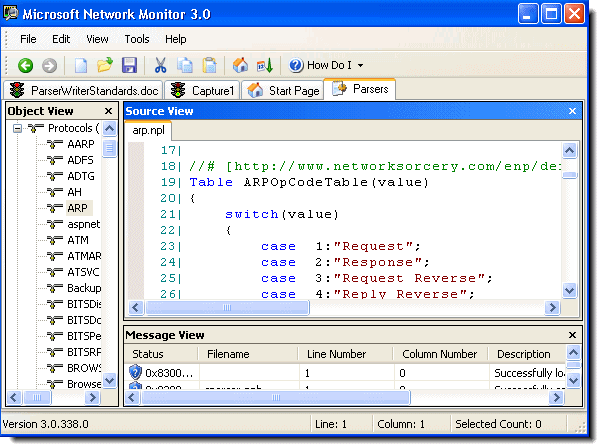
One of the key features of Microsoft Network Monitor is its user-friendly interface that displays captured data in an easy-to-understand format. Users can filter and search through captured packets to focus on specific information or troubleshoot particular issues effectively.
Moreover, Microsoft Network Monitor supports various protocols and provides detailed information about each packet, including source and destination IP addresses, port numbers, protocol type, packet size, and more. This level of granularity enables users to gain a comprehensive understanding of their network traffic patterns and behavior.
Whether you are managing a small local network or a large enterprise-level infrastructure, Microsoft Network Monitor is a valuable tool that empowers you to monitor, analyze, and optimize your network with precision and efficiency.
In conclusion, Microsoft Network Monitor is an indispensable tool for any organization looking to maintain a reliable and secure network environment. By leveraging its advanced features and capabilities, IT professionals can proactively manage their networks and ensure optimal performance at all times.
Top 7 Benefits of Microsoft Network Monitor for Enhanced Network Management
- Real-time network traffic monitoring
- User-friendly interface for easy data analysis
- Support for a wide range of network protocols
- Ability to capture and analyze packets efficiently
- Effective troubleshooting of network issues
- Detailed packet information for in-depth analysis
- Helps optimize network performance and security
Challenges of Using Microsoft Network Monitor: Limited Protocol Support, Steep Learning Curve, and Lack of Updates
- Limited protocol support compared to other network monitoring tools
- Steep learning curve for beginners due to its advanced features and technical nature
- Not actively maintained or updated by Microsoft, potentially leading to compatibility issues with newer operating systems
Real-time network traffic monitoring
Real-time network traffic monitoring is a significant advantage of Microsoft Network Monitor. This feature allows network administrators and IT professionals to capture and analyze network packets as they are transmitted, providing instant visibility into the current state of the network. By monitoring network traffic in real time, users can quickly detect and respond to issues such as performance bottlenecks, security breaches, or abnormal behavior. This proactive approach enables organizations to maintain optimal network performance, enhance security measures, and ensure uninterrupted operations. With real-time monitoring capabilities, Microsoft Network Monitor empowers users to make informed decisions promptly and effectively manage their network infrastructure.
User-friendly interface for easy data analysis
Microsoft Network Monitor offers a user-friendly interface that simplifies the process of analyzing network data. This intuitive interface allows users to efficiently navigate through captured packets, apply filters, and search for specific information with ease. By presenting data in a clear and organized manner, Microsoft Network Monitor streamlines the data analysis process, enabling network administrators and IT professionals to quickly identify issues, troubleshoot problems, and optimize network performance effectively.
Support for a wide range of network protocols
Microsoft Network Monitor offers a significant advantage with its support for a wide range of network protocols. This feature allows network administrators and IT professionals to monitor and analyze diverse types of network traffic effectively. Whether it’s Ethernet, TCP/IP, UDP, HTTP, or other protocols, Microsoft Network Monitor can capture and dissect packets across various network layers. This versatility enables users to gain comprehensive insights into their network infrastructure, troubleshoot issues across different protocols, and ensure the smooth operation of their networks with precision and flexibility.
Ability to capture and analyze packets efficiently
The standout feature of Microsoft Network Monitor lies in its exceptional ability to capture and analyze network packets efficiently. This capability allows network administrators and IT professionals to gain deep insights into network traffic, quickly pinpointing issues such as congestion, latency, or security threats. By efficiently capturing and analyzing packets in real-time, users can streamline the troubleshooting process, optimize network performance, and ensure the smooth operation of their network infrastructure. Microsoft Network Monitor’s robust packet analysis capabilities make it a valuable tool for maintaining a healthy and secure network environment.
Effective troubleshooting of network issues
Microsoft Network Monitor excels in facilitating effective troubleshooting of network issues. By capturing and analyzing network packets in real-time, this tool allows network administrators to pinpoint the root causes of problems such as network congestion, latency, packet loss, and security vulnerabilities. With its user-friendly interface and robust filtering capabilities, Microsoft Network Monitor enables users to isolate specific issues quickly and efficiently. This proactive approach to troubleshooting not only minimizes downtime but also helps in optimizing network performance and ensuring the overall health of the network infrastructure.
Detailed packet information for in-depth analysis
Microsoft Network Monitor offers a significant advantage with its capability to provide detailed packet information for in-depth analysis. This feature allows network administrators and IT professionals to delve deep into network traffic data, gaining valuable insights into the source, destination, protocol type, packet size, and other crucial details of each packet. By having access to such comprehensive information, users can conduct thorough analysis, identify potential issues or anomalies, troubleshoot network problems effectively, and make informed decisions to optimize network performance and security. The ability to perform in-depth analysis with detailed packet information sets Microsoft Network Monitor apart as a powerful tool for monitoring and managing network traffic with precision and efficiency.
Helps optimize network performance and security
Microsoft Network Monitor offers a significant advantage by helping optimize network performance and security. By capturing and analyzing network traffic in real-time, this tool enables network administrators to identify bottlenecks, latency issues, and potential security threats. With detailed insights into network behavior, administrators can make informed decisions to enhance performance, streamline operations, and strengthen security measures. The ability to proactively monitor and analyze network data empowers organizations to maintain a high level of efficiency and safeguard their networks against potential vulnerabilities.
Limited protocol support compared to other network monitoring tools
One significant drawback of Microsoft Network Monitor is its limited protocol support when compared to other network monitoring tools available in the market. While it provides essential functionality for capturing and analyzing network traffic, its support for a wide range of protocols may be lacking. This limitation could hinder network administrators and IT professionals who require in-depth analysis of specific or less common protocols, potentially leading them to seek alternative solutions with broader protocol coverage to meet their monitoring needs effectively.
Steep learning curve for beginners due to its advanced features and technical nature
For beginners, one significant drawback of Microsoft Network Monitor is its steep learning curve attributed to its advanced features and technical nature. The tool’s complexity may overwhelm novice users who are not familiar with network analysis concepts and protocols. Understanding how to effectively utilize the various functionalities and interpret the detailed packet information provided by the software can be challenging for those without prior experience in network monitoring. As a result, beginners may require additional time and effort to grasp the full capabilities of Microsoft Network Monitor, potentially hindering their ability to efficiently troubleshoot network issues and optimize performance.
Not actively maintained or updated by Microsoft, potentially leading to compatibility issues with newer operating systems
A significant drawback of Microsoft Network Monitor is that it is not actively maintained or updated by Microsoft, which can result in compatibility issues with newer operating systems. As technology evolves and operating systems undergo updates, the lack of ongoing support for Network Monitor may lead to functionality limitations or even incompatibility with the latest platforms. This can pose challenges for users who rely on the tool for network monitoring and analysis, as they may encounter issues when trying to run it on newer systems. It is essential for users to be aware of this con and consider alternative network monitoring solutions that receive regular updates and support to ensure seamless performance across different operating environments.