cfchris.com

Loading

thinking in java

Thinking in Java: A Practical Guide to Object-Oriented Programming

Thinking in Java: A Practical Approach to Object-Oriented Programming

Learning Java is about more than memorizing keywords and syntax. It also means learning how to break problems into manageable pieces, represent those pieces in code, and make them work together. That way of approaching software is often described as “thinking in Java.”

The phrase is also associated with Thinking in Java, a programming book by Bruce Eckel. The book has introduced many readers to Java and object-oriented programming. Whether you are studying the book or learning Java through another resource, its central challenge remains useful: understand the ideas behind the code, not just the code itself.

Start With the Problem

Before writing a class or choosing a data structure, clarify what the program needs to accomplish. Identify the inputs, the expected outputs, and any rules the program must follow. A clear problem statement makes it easier to decide what belongs in the software and what can be left out.

For example, a program that tracks library books might need to record each book’s title, author, and availability. It may also need to support actions such as checking out and returning a book. Thinking through those requirements first helps reveal the information and behavior the program should represent.

Use Objects to Model Concepts

Java is an object-oriented language. In object-oriented programming, classes define the structure and behavior of objects. A Book class, for instance, could hold a title and author, while methods could describe actions related to that book.

public class Book {

private String title;

private String author;

private boolean checkedOut;

public Book(String title, String author) {

this.title = title;

this.author = author;

this.checkedOut = false;

}

public void checkOut() {

checkedOut = true;

}

public boolean isCheckedOut() {

return checkedOut;

}

}

This example demonstrates encapsulation: the class keeps its data private and provides methods for interacting with it. Encapsulation helps protect an object’s state and gives the rest of the program a clear way to use it.

Choose Abstraction Carefully

Abstraction means focusing on the details that matter while hiding unnecessary complexity. A program that uses a book might need to know whether it is available, but it may not need to know every detail about how that status is stored internally.

Good abstractions make code easier to understand and change. Too little abstraction can leave a program tangled; too much can add layers that solve no real problem. The goal is not to create a class for every noun, but to give each part of the program a clear responsibility.

Favor Clear, Cohesive Design

A well-designed class has a focused purpose. If one class handles user input, stores data, formats reports, and communicates with a database, it may be doing too much. Separating responsibilities can make the program easier to test, maintain, and extend.

Readable names also matter. A method called checkOut() communicates more than one called process(). In Java, clear naming and consistent formatting are not merely cosmetic; they help developers reason about what a program does.

Understand Inheritance and Composition

Java supports inheritance, which lets one class extend another. Inheritance can be useful when a type truly is a specialized form of another type. For example, a PrintedBook might share common features with a general Book class.

However, inheritance should not be used just to reuse a few lines of code. Often, composition is a better choice: one object contains or uses another object to perform part of its work. Composition can keep relationships flexible and reduce dependencies between classes.

Learn Through Small Experiments

Java concepts become easier to understand when you test them in working programs. Write a small example, compile it, observe the result, and change one thing at a time. When an error appears, read the compiler message and trace the relevant values instead of changing code at random.

Useful practice projects include a number-guessing game, a simple contact list, a command-line expense tracker, or a basic library catalog. These projects provide opportunities to work with classes, collections, conditionals, loops, and exceptions without requiring a large application.

Build Good Habits Early

  • Use meaningful names for classes, methods, and variables.
  • Keep methods focused and avoid unnecessary complexity.
  • Use access modifiers such as private to control access to class data.
  • Handle errors deliberately, including situations that may produce exceptions.
  • Test behavior with normal inputs as well as unexpected ones.
  • Refactor code when a clearer design becomes apparent.

From Syntax to Problem Solving

Thinking in Java ultimately means treating programming as a process of modeling, design, and careful problem solving. Syntax tells the compiler how to read the program; sound design helps people understand and improve it. By practicing with small projects and paying attention to object responsibilities, encapsulation, and clarity, Java learners can move beyond writing code that merely runs toward writing code that is easier to maintain.


8 Tips for Thinking in Java: Write Clear, Object-Oriented Code

  1. Think in terms of objects and their responsibilities.
  2. Use classes to model clear, focused concepts.
  3. Prefer composition over deep inheritance.
  4. Keep fields private and expose only needed behavior.
  5. Use interfaces to reduce coupling.
  6. Handle exceptions deliberately and specifically.
  7. Choose collections based on how data is used.
  8. Write small tests to verify each class’s behavior.

Think in terms of objects and their responsibilities.

When thinking in Java, focus on the objects your program needs and the responsibilities each one should handle. A class should represent a clear concept and keep related data and behavior together—for example, a `Book` object can store a title and provide methods for checking its availability. Giving each object a focused role makes code easier to understand, test, and maintain, while reducing the temptation to put unrelated tasks into one class.

Use classes to model clear, focused concepts.

Use classes to model clear, focused concepts in your program. Each class should represent a meaningful idea and have a well-defined responsibility, such as a `Book` that stores book details or a `Library` that manages a collection of books. Keeping classes focused makes your code easier to understand, test, and update. If a class starts handling unrelated tasks, consider separating those responsibilities into smaller, cohesive classes.

Prefer composition over deep inheritance.

When designing Java programs, prefer composition over deep inheritance. Instead of building a long chain of subclasses, create focused classes that work together by holding references to other objects. Composition often makes code easier to understand, test, and change because each class can have a clear responsibility without depending on every detail of its parent classes. Use inheritance when a genuine “is-a” relationship exists, but choose composition when an object simply needs another object’s behavior.

Keep fields private and expose only needed behavior.

Keeping fields private is a core Java practice that protects an object’s internal state and prevents other parts of a program from changing it unexpectedly. Instead of exposing data directly, provide only the methods callers need to use the object, such as `checkOut()` or `isAvailable()`. This approach, called encapsulation, makes classes easier to maintain because internal details can change without forcing updates throughout the rest of the program. It also helps each class enforce its own rules and present a clear, focused interface.

Use interfaces to reduce coupling.

Use interfaces to reduce coupling by letting classes depend on shared behavior rather than specific implementations. For example, a service can accept a `PaymentProcessor` interface instead of depending directly on a credit card processor, making it easier to add another payment option or swap implementations without rewriting the service. This approach also simplifies testing, since a lightweight mock can stand in for the real implementation. Keep interfaces focused on meaningful capabilities, so they make your Java code more flexible without adding unnecessary complexity.

Handle exceptions deliberately and specifically.

Handle exceptions deliberately and specifically by catching only the errors your code can reasonably address. A broad catch-all can hide bugs and make failures harder to diagnose, while a focused catch lets you respond appropriately—for example, by asking for a valid file path when a file is missing or showing a clear message when input is invalid. When an exception cannot be handled meaningfully at that point, allow it to propagate or rethrow it with useful context, and avoid silently ignoring it.

Choose collections based on how data is used.

When thinking in Java, choose a collection based on how your data will be used, not just on what is familiar. Use a List when order matters or you need duplicates, a Set when you need unique values, and a Map when you need to look up values by a key. Also consider performance: for example, an ArrayList works well for frequent access by index, while a HashSet is useful for quick membership checks. Picking the right collection makes your code clearer and can improve its efficiency.

Write small tests to verify each class’s behavior.

Write small tests to verify each class’s behavior as you build your Java program. Focus each test on a specific responsibility, such as checking that a method returns the expected value or that an object updates its state correctly. These focused tests make bugs easier to find, help confirm that classes work as intended, and give you confidence to change or extend your code later.
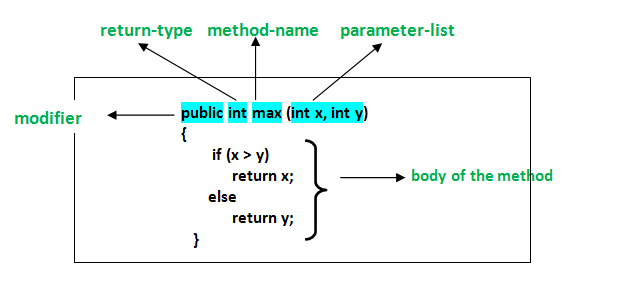
udemy java

Udemy Java Courses: A Guide to Learning Java Online

Learning Java on Udemy: How to Choose the Right Course

Java is one of the most widely used programming languages, powering applications in areas such as web development, enterprise software, and Android development. For beginners and experienced programmers alike, Udemy offers a range of Java courses that can help build practical skills at your own pace.

What You Can Learn

Java courses on Udemy cover topics at different levels. A beginner course may introduce programming fundamentals, while an advanced course might focus on frameworks, testing, or application architecture. Depending on the course, you may learn:

  • Java syntax, variables, data types, and control flow
  • Object-oriented programming, including classes, inheritance, and interfaces
  • Collections, generics, and exception handling
  • Working with files, databases, and APIs
  • Building projects with tools and frameworks such as Spring
  • Testing, debugging, and using development environments

How to Choose a Java Course

The best course depends on your experience and goals. Before enrolling, read the course description and check that its content matches what you want to learn. A course designed for complete beginners should explain basic concepts and provide setup instructions. If you already know the fundamentals, look for lessons that go deeper or focus on a specific area of Java development.

It can also help to review the course curriculum, sample lessons, and recent student feedback. Look for a clear structure, hands-on exercises, and projects that let you apply what you learn. Check when the material was last updated, especially if the course covers development tools or frameworks that change over time.

Make the Most of Your Course

Watching lessons is only part of learning to code. Write the examples yourself, experiment with the code, and try solving small problems without immediately looking at the answer. When you encounter an error, practice reading the message and tracing the issue. These habits help turn new concepts into skills you can use independently.

Consider supplementing your course with a personal project. You could build a simple calculator, task tracker, or small application that works with a database. Projects give you a chance to combine concepts and create examples to discuss in a portfolio or interview.

Is Udemy a Good Way to Learn Java?

Udemy can be a flexible and affordable starting point for learning Java, particularly if you prefer video lessons and self-paced study. However, the experience varies by course, and completing a course alone does not guarantee professional proficiency. Consistent practice, independent projects, and learning to use documentation are important parts of the process.

With a course suited to your level and a steady routine of hands-on coding, Udemy can help you build a solid foundation in Java. Choose a learning path that supports your goals, practice regularly, and keep developing projects as your skills grow.


Learning Java on Udemy: 9 Frequently Asked Questions

  1. Is Udemy a good place to learn Java?
  2. Which Udemy Java course is best for beginners?
  3. Can I learn Java on Udemy with no programming experience?
  4. How long does it take to complete a Java course on Udemy?
  5. Do Udemy Java courses include hands-on projects?
  6. Do Udemy Java courses provide a certificate of completion?
  7. How much do Java courses on Udemy cost?
  8. Are Udemy Java courses kept up to date?
  9. Can a Udemy Java course help me get a job as a Java developer?

Is Udemy a good place to learn Java?

Yes, Udemy can be a good place to learn Java, especially if you prefer flexible, self-paced video lessons. Courses range from beginner fundamentals to advanced topics, so review the curriculum, sample lessons, and recent student feedback to find one that fits your experience and goals. To make real progress, practice writing code alongside the lessons and build projects of your own; watching videos alone is rarely enough to develop strong programming skills.

Which Udemy Java course is best for beginners?

The best Udemy Java course for beginners is one that starts with the fundamentals, explains concepts clearly, and includes plenty of coding exercises and practical projects. Before enrolling, review the curriculum, preview a lesson, and check recent student feedback to make sure the course matches your learning style and goals. Look for coverage of core topics such as variables, control flow, methods, and object-oriented programming, and choose a course that’s regularly updated.

Can I learn Java on Udemy with no programming experience?

Yes, you can learn Java on Udemy with no programming experience. Look for a beginner-friendly course that starts with the basics, explains how to set up your development environment, and includes hands-on exercises and projects. Work through the lessons at your own pace, write the code yourself, and practice regularly. Programming concepts can take time to understand, so starting small and reviewing lessons when needed can help you build confidence.

How long does it take to complete a Java course on Udemy?

The time it takes to complete a Java course on Udemy depends on the course’s length, your prior programming experience, and how much time you can study each week. Some introductory courses can be finished in a few days of focused learning, while more comprehensive courses may take several weeks or longer. Since Udemy courses are typically self-paced, you can pause, revisit lessons, and practice coding at a schedule that works for you.

Do Udemy Java courses include hands-on projects?

Yes, many Udemy Java courses include hands-on projects, coding exercises, or practice assignments to help you apply what you learn. The amount and type of project work vary by course, so review the curriculum and course description before enrolling. Look for projects that match your experience level and learning goals, and plan to write and adapt the code yourself to get the most benefit.

Do Udemy Java courses provide a certificate of completion?

Yes, many Udemy Java courses provide a certificate of completion after you finish all the course requirements. You can typically access and download the certificate from your Udemy account. Keep in mind that Udemy certificates recognize course completion but are not formal academic credit or an industry certification. Check the individual course details for its requirements and certificate availability.

How much do Java courses on Udemy cost?

Java course prices on Udemy vary by instructor, course content, and promotions. Many courses are regularly discounted, so the price you pay may be lower than the listed price. Check the course page for current pricing, included materials, and any applicable refund terms before enrolling.

Are Udemy Java courses kept up to date?

Udemy Java courses may be updated by their instructors, but how often they’re refreshed varies from course to course. Before enrolling, check the course’s “Last updated” date, curriculum, and recent student reviews to see whether the material still matches your learning goals and current tools. Java fundamentals often remain useful over time, while lessons on frameworks, software versions, and development tools may need more frequent updates.

Can a Udemy Java course help me get a job as a Java developer?

A Udemy Java course can help you build foundational skills and complete projects that may strengthen your job applications, but finishing a course alone usually isn’t enough to land a Java developer role. Employers often look for practical coding experience, familiarity with tools and frameworks used in the job, problem-solving skills, and the ability to explain your work. Choose a course with hands-on projects, then keep practicing, build a portfolio, and prepare for technical interviews to improve your chances.

for java

A Beginner’s Guide to Programming for Java Apps

Getting Started with Java Programming

Java is a popular, general-purpose programming language used to build everything from web applications and business software to Android apps and large-scale systems. Its combination of readability, portability, and extensive tooling makes it a strong choice for both new programmers and experienced developers.

What Is Java?

Java is a class-based, object-oriented language. Developers write Java source code, which is compiled into bytecode. The Java Virtual Machine (JVM) runs that bytecode on compatible devices and operating systems. This approach helps Java programs run across different platforms without requiring a separate version of the source code for each one.

Why Learn Java?

  • Portability: Java applications can run on many platforms with a compatible JVM.
  • Versatility: Java is used in web services, enterprise applications, desktop software, and other fields.
  • Strong ecosystem: A wide range of libraries, frameworks, development tools, and learning resources is available.
  • Useful fundamentals: Learning Java introduces concepts such as classes, objects, types, and exception handling that apply to many programming languages.
  • Ongoing use: Organizations continue to use Java for applications that need to be maintained and expanded over time.

Your First Java Program

A simple Java program can display a message in the console:

public class Main {

public static void main(String[] args) {

System.out.println("Hello, Java!");

}

}

The main method is the entry point for this program. The System.out.println statement prints a line of text. Java’s syntax may look formal at first, but its structure encourages code that is organized and explicit.

Core Concepts to Explore

As you learn Java, start with variables and data types, conditional statements, loops, and methods. Then move on to object-oriented programming, including classes, objects, inheritance, and interfaces. Exceptions and collections are also important topics for writing practical programs.

Small projects are a useful way to practice. Try building a calculator, a to-do list, or a program that reads and summarizes information. Working through real examples helps connect language features to the problems they solve.

Tools for Java Development

To begin, install a Java Development Kit (JDK), which includes tools for compiling and running Java programs. You can write code in a basic text editor, but an integrated development environment (IDE) can make development easier with features such as code completion, debugging, and project management.

Keep Building Your Skills

Java is a substantial language, so there is no need to learn everything at once. Focus on the fundamentals, write code regularly, and read errors carefully when something does not work. With steady practice, you can use Java to create reliable applications and build a solid foundation for further software development.


8 Essential Tips for Writing Clean and Effective Java Code

  1. Use meaningful names for classes, methods, and variables.
  2. Keep methods small and focused on one task.
  3. Prefer interfaces when designing flexible APIs.
  4. Use try-with-resources to close files and streams.
  5. Handle exceptions specifically instead of catching everything.
  6. Use `equals()` to compare objects, not `==`.
  7. Choose collections based on how they’ll be used.
  8. Write unit tests for important behavior.

Use meaningful names for classes, methods, and variables.

Use meaningful names for Java classes, methods, and variables to make your code easier to understand and maintain. Choose names that clearly describe what each element represents or does, such as CustomerAccount, calculateTotal(), or orderCount. Clear, consistent naming helps you and other developers follow the logic, spot mistakes, and update the code with confidence.

Keep methods small and focused on one task.

Keep Java methods small and focused on one task. A method that does one thing is easier to understand, test, debug, and reuse. If a method starts handling several responsibilities—such as validating input, updating data, and formatting output—consider splitting those steps into separate methods with clear names. This keeps your code organized and makes future changes less likely to cause unexpected problems.

Prefer interfaces when designing flexible APIs.

When designing a flexible Java API, prefer accepting or returning interfaces rather than specific implementation classes. For example, use `List` instead of `ArrayList` when a method only needs list behavior. This keeps the API focused on what callers can do, lets implementations change without affecting users, and makes it easier to substitute alternatives such as `LinkedList` or custom implementations. Use a concrete class only when its specific behavior is essential.

Use try-with-resources to close files and streams.

Use Java’s try-with-resources statement to manage files and streams safely. It automatically closes any resource that implements `AutoCloseable` when the statement finishes, even if an exception occurs, helping prevent resource leaks and keeping your code concise. Declare resources in the parentheses after `try`, such as a `BufferedReader` or `InputStream`, and handle any exceptions that may be thrown while using them.

Handle exceptions specifically instead of catching everything.

In Java, handle exceptions as specifically as possible instead of catching every error with a broad catch (Exception e) block. Catching the expected exception types lets you respond appropriately—for example, by retrying a failed operation or showing a helpful message—while allowing unexpected problems to surface during testing and debugging. Avoid swallowing exceptions silently; log or otherwise handle them meaningfully so issues are easier to diagnose.

Use `equals()` to compare objects, not `==`.

When comparing Java objects, use `equals()` to check whether they have the same value, rather than `==`, which checks whether two references point to the exact same object. For example, two separate `String` objects can contain the same text but still evaluate as different with `==`. Calling `equals()` makes the comparison based on content, as long as the object’s class implements the method appropriately.

Choose collections based on how they’ll be used.

Choose Java collections based on how your data will be used. Use a List when order matters or you need to access items by index, a Set when you want to prevent duplicates, and a Map when you need to look up values by key. Also consider whether you need fast lookups, predictable iteration order, or thread safety, since different implementations—such as ArrayList, HashSet, and HashMap—make different tradeoffs. Matching the collection to the task can make your code clearer and more efficient.

Write unit tests for important behavior.

Write unit tests for the most important behavior in your Java applications. Tests help verify that methods produce the expected results, catch regressions when code changes, and make it easier to refactor with confidence. Focus first on core logic and edge cases, such as empty inputs, invalid values, or boundary conditions. Frameworks like JUnit make it straightforward to organize and run tests as part of your development workflow.

java for dummies

Mastering Java for Dummies: A Beginner’s Guide to Programming Success

Java for Dummies

Java for Dummies: A Beginner’s Guide to Programming

Java is a popular programming language known for its versatility and ease of use. Whether you’re new to programming or looking to expand your skills, Java for Dummies is the perfect starting point.

Why Choose Java?

Java is widely used in web development, mobile applications, and enterprise systems. Its syntax is similar to other programming languages like C++ and C#, making it easier to learn for beginners.

What You’ll Learn

In Java for Dummies, you’ll learn:

  • The basics of Java programming, including variables, data types, and control structures
  • Object-oriented programming concepts such as classes, objects, and inheritance
  • How to work with arrays, collections, and input/output streams
  • Creating graphical user interfaces using JavaFX

Who Should Read This Book?

This book is ideal for:

  • Absolute beginners with no prior programming experience
  • Students studying computer science or related fields
  • Professionals looking to add Java skills to their repertoire

Why Java for Dummies?

Java for Dummies breaks down complex programming concepts into easy-to-understand explanations. With step-by-step examples and practical exercises, you’ll quickly grasp the fundamentals of Java programming.

Get Started Today!

Ready to dive into the world of Java programming? Pick up a copy of Java for Dummies and start your coding journey today!

© 2023 Java for Dummies. All rights reserved.


5 Essential Tips for Beginners to Master Java Programming

  1. Start with understanding the basic syntax of Java
  2. Practice writing simple programs to get hands-on experience
  3. Learn about object-oriented programming concepts in Java
  4. Explore Java libraries and frameworks to enhance your development skills
  5. Join online communities or forums to ask questions and learn from others

Start with understanding the basic syntax of Java

To begin your journey with Java programming, it is essential to grasp the fundamental syntax of the language. Understanding the basic syntax of Java lays a solid foundation for learning more advanced concepts and techniques. By familiarizing yourself with key elements such as variables, data types, and control structures, you will build confidence in writing and reading Java code effectively. Starting with a strong grasp of Java syntax sets you on the right path towards becoming a proficient Java developer.

Practice writing simple programs to get hands-on experience

To enhance your understanding of Java programming as suggested in the tip from “Java for Dummies,” it is crucial to practice writing simple programs regularly. By engaging in hands-on coding exercises, you can apply theoretical knowledge to real-world scenarios, solidifying your grasp of Java concepts and syntax. Through consistent practice, you will build confidence in your programming skills and develop a problem-solving mindset essential for mastering Java development.

Learn about object-oriented programming concepts in Java

To excel in Java programming, it is crucial to grasp object-oriented programming concepts. Understanding how classes, objects, and inheritance work in Java not only enhances your coding skills but also allows you to build more efficient and scalable applications. By delving into object-oriented programming principles, as outlined in Java for Dummies, you can elevate your proficiency in Java and unlock a world of possibilities in software development.

Explore Java libraries and frameworks to enhance your development skills

Exploring Java libraries and frameworks is a valuable tip for those diving into Java programming with “Java for Dummies.” By delving into these resources, beginners can enhance their development skills and leverage pre-built functionalities to streamline their coding process. Java libraries like Apache Commons and frameworks such as Spring provide a wealth of tools and components that can significantly boost efficiency and productivity in software development projects. Embracing these resources opens up a world of possibilities for Java learners to create more robust and sophisticated applications while honing their programming expertise.

Join online communities or forums to ask questions and learn from others

To enhance your learning experience with Java for Dummies, consider joining online communities or forums where you can engage with fellow learners and experts. These platforms provide a valuable space to ask questions, seek guidance on challenging topics, and learn from the experiences of others in the Java programming community. By actively participating in online discussions, you can expand your knowledge, gain insights into best practices, and build a supportive network of like-minded individuals passionate about Java development.

java for beginners

Java for Beginners: A Step-by-Step Guide to Learning Programming

Java for Beginners

Java for Beginners: A Comprehensive Guide

If you are new to programming and looking to learn a versatile and widely-used language, Java is an excellent choice. Java is known for its simplicity, readability, and vast community support, making it ideal for beginners to start their coding journey.

Why Learn Java?

Java is a high-level programming language that is platform-independent, meaning you can write code once and run it on any device that supports Java. This feature makes Java versatile and widely used in various applications, from web development to mobile apps.

Key Concepts in Java

As a beginner learning Java, you will come across essential concepts such as:

  • Variables: Used to store data values.
  • Control Structures: Including loops and conditional statements.
  • Classes and Objects: The building blocks of Java programs.
  • Inheritance and Polymorphism: Important concepts in object-oriented programming.
  • Exception Handling: Dealing with errors in your code.

Resources for Learning Java

If you are eager to start your journey into Java programming, there are plenty of resources available online. Websites like Codecademy, Coursera, and Oracle’s official Java tutorials offer step-by-step lessons tailored for beginners.

Your First Java Program

To get started with coding in Java, begin by writing a simple “Hello World” program. This classic program prints the text “Hello World” on the screen and serves as an excellent introduction to basic syntax in Java.


public class HelloWorld {

public static void main(String[] args) {

System.out.println("Hello World");

}

}

Coding Challenges

To enhance your skills and understanding of Java, consider participating in coding challenges on platforms like LeetCode or HackerRank. These challenges provide real-world problems that can help you practice your coding skills and improve your problem-solving abilities.

In Conclusion

Learning Java as a beginner can open up a world of opportunities in the programming field. With dedication, practice, and the right resources, you can master this powerful language and embark on a rewarding career as a software developer or programmer.


Top 8 Frequently Asked Questions About Learning Java for Beginners

  1. Can you learn Java as a beginner?
  2. Will Java be replaced by AI?
  3. What are the 4 pillars of Java?
  4. How can I start to learn Java?
  5. Can I teach myself Java?
  6. Which is harder, C++ or Java?
  7. What is Java basics for beginners?
  8. Is Java easy to learn for beginners?

Can you learn Java as a beginner?

For beginners looking to delve into the world of programming, learning Java is not only possible but highly recommended. Java’s user-friendly syntax, extensive documentation, and robust community support make it an excellent choice for those starting their coding journey. With dedication, practice, and access to various online resources tailored for beginners, mastering Java can be a rewarding experience that lays a solid foundation for further exploration in the field of software development.

Will Java be replaced by AI?

While artificial intelligence is advancing rapidly and influencing many aspects of technology, it is unlikely that AI will replace Java in the foreseeable future. Java is a robust and versatile programming language that has been widely adopted across various industries for its reliability, scalability, and platform independence. AI technologies often rely on programming languages like Java to build applications and frameworks. Instead of replacing Java, AI is more likely to complement it by enhancing development processes and creating more sophisticated tools that can streamline coding tasks. As a result, Java remains an essential skill for developers, especially as they integrate AI capabilities into their projects.

What are the 4 pillars of Java?

The four pillars of Java are key concepts that form the foundation of the language and are essential for beginners to understand. These pillars include: Object-Oriented Programming (OOP), which emphasizes the use of classes and objects for organizing code; Inheritance, allowing classes to inherit attributes and methods from other classes; Encapsulation, which involves bundling data and methods into a single unit; and Polymorphism, enabling objects to take on multiple forms based on their context. Mastery of these pillars is crucial for building robust and efficient Java programs.

How can I start to learn Java?

For beginners looking to start learning Java, a great way to begin is by familiarizing yourself with the basic syntax and concepts of the language. Online tutorials, courses, and books dedicated to Java programming can provide a structured approach to learning. Setting up a development environment on your computer and practicing writing simple programs can help reinforce your understanding of Java fundamentals. Additionally, engaging in coding challenges and projects can further enhance your skills and confidence in using Java. Remember that consistent practice, patience, and a willingness to explore and experiment are key to mastering Java as a beginner.

Can I teach myself Java?

Teaching yourself Java is absolutely possible for beginners. With the abundance of online resources, tutorials, and practice exercises available, you can learn Java at your own pace and convenience. Many successful programmers have started by teaching themselves Java through self-study and hands-on practice. By dedicating time and effort to understanding the key concepts of Java programming, you can build a solid foundation and gradually advance your skills in this versatile language. Remember, persistence and a passion for learning are key to mastering Java on your own.

Which is harder, C++ or Java?

When it comes to comparing the difficulty level between C++ and Java for beginners, opinions may vary. Both C++ and Java are powerful programming languages with their own complexities and learning curves. Some beginners find C++ more challenging due to its low-level features and strict syntax, while others may perceive Java as easier to grasp because of its simpler syntax and automatic memory management. Ultimately, the difficulty of learning C++ or Java depends on individual preferences, prior programming experience, and the specific goals of the learner. It is recommended for beginners to explore both languages and determine which one aligns better with their interests and objectives in the field of programming.

What is Java basics for beginners?

For beginners diving into Java programming, understanding the basics is crucial to building a strong foundation. Java basics encompass fundamental concepts such as variables, control structures, classes and objects, inheritance, polymorphism, and exception handling. These core principles form the building blocks of Java programs and are essential for beginners to grasp in order to write efficient and functional code. By mastering these Java basics, beginners can progress confidently in their learning journey and unlock the full potential of this versatile programming language.

Is Java easy to learn for beginners?

For beginners diving into the world of programming, the question of whether Java is easy to learn often arises. Java, known for its simplicity and readability, is considered beginner-friendly due to its straightforward syntax and vast community support. While mastering any programming language requires dedication and practice, Java’s clear structure and extensive resources tailored for beginners make it a popular choice for those starting their coding journey. With commitment and the right guidance, beginners can find Java to be an accessible and rewarding language to learn.

object oriented software engineering

Mastering Object-Oriented Software Engineering Principles

Object-Oriented Software Engineering

Object-Oriented Software Engineering

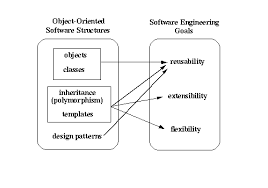
Object-oriented software engineering is a methodology that focuses on designing and developing software systems based on the concept of objects. In this approach, software components are modeled as objects that have attributes (data) and behaviors (methods).

Key Concepts of Object-Oriented Software Engineering:

  • Classes and Objects: Classes are blueprints for creating objects. Objects are instances of classes that encapsulate data and behavior.
  • Inheritance: Inheritance allows classes to inherit attributes and behaviors from other classes, promoting code reusability and modularity.
  • Polymorphism: Polymorphism enables objects of different classes to be treated as objects of a common superclass, allowing for flexibility in design and implementation.
  • Encapsulation: Encapsulation hides the internal state of an object and only exposes necessary interfaces for interacting with the object, promoting data security and abstraction.
  • Abstraction: Abstraction focuses on modeling real-world entities as simplified representations in software systems, emphasizing essential characteristics while hiding unnecessary details.

Benefits of Object-Oriented Software Engineering:

The object-oriented approach offers several advantages, including:

  • Modularity: Objects can be developed independently, promoting code organization and maintenance.
  • Reusability: Objects can be reused in different contexts, reducing development time and effort.
  • Maintainability: Changes to one part of the system have minimal impact on other parts, enhancing system scalability and adaptability.
  • Simplicity: Object-oriented design simplifies complex systems by breaking them down into manageable components with well-defined interactions.

In conclusion, object-oriented software engineering provides a structured approach to software development that emphasizes flexibility, scalability, and maintainability. By leveraging key concepts such as classes, inheritance, polymorphism, encapsulation, and abstraction, developers can create robust and efficient software systems that meet the evolving needs of users and businesses.


8 Essential Tips for Mastering Object-Oriented Software Engineering

  1. Encapsulate data to restrict direct access and enforce data integrity.
  2. Use inheritance to promote code reuse and establish relationships between classes.
  3. Favor composition over inheritance to maintain flexibility and avoid deep class hierarchies.
  4. Implement polymorphism to allow objects of different classes to be treated as objects of a common superclass.
  5. Follow the SOLID principles (Single Responsibility, Open/Closed, Liskov Substitution, Interface Segregation, Dependency Inversion) for better design and maintainability.
  6. Apply design patterns like Factory, Singleton, Observer, Strategy, etc., to solve common design problems efficiently.
  7. Use interfaces or abstract classes to define contracts that classes must adhere to.
  8. Practice good naming conventions and create clear documentation for your classes and methods.

Encapsulate data to restrict direct access and enforce data integrity.

Encapsulating data in object-oriented software engineering is a crucial practice that restricts direct access to data and enforces data integrity within a system. By encapsulating data, developers can control how data is accessed and modified, reducing the risk of unintended errors or unauthorized changes. This approach promotes security and robustness by ensuring that data manipulation occurs through defined interfaces and methods, enhancing the overall reliability and maintainability of the software system.

Use inheritance to promote code reuse and establish relationships between classes.

Using inheritance in object-oriented software engineering is a powerful technique to promote code reuse and establish relationships between classes. By creating a hierarchy of classes where subclasses inherit attributes and behaviors from their superclasses, developers can avoid redundant code and build upon existing functionality. This approach not only streamlines development but also enhances the maintainability and scalability of the software system by fostering a modular and structured design. Inheritance allows for the creation of specialized classes that inherit common characteristics from more general classes, enabling developers to efficiently model real-world relationships and dependencies within the software architecture.

Favor composition over inheritance to maintain flexibility and avoid deep class hierarchies.

When practicing object-oriented software engineering, it is advisable to prioritize composition over inheritance to uphold flexibility and prevent the creation of complex class hierarchies. By favoring composition, developers can construct classes by combining existing functionalities rather than relying solely on inheritance. This approach promotes code reusability, simplifies maintenance, and allows for greater adaptability in the system design. Emphasizing composition over inheritance helps avoid the pitfalls of deep class hierarchies, leading to more modular and scalable software solutions that are easier to manage and extend over time.

Implement polymorphism to allow objects of different classes to be treated as objects of a common superclass.

Implementing polymorphism in object-oriented software engineering is a powerful technique that enables objects of different classes to be treated as objects of a common superclass. By utilizing polymorphism, developers can write code that is more flexible and adaptable, allowing for seamless interaction between diverse objects while promoting code reusability and simplifying system design. This approach not only enhances the modularity and scalability of software systems but also facilitates the creation of more maintainable and extensible codebases.

Follow the SOLID principles (Single Responsibility, Open/Closed, Liskov Substitution, Interface Segregation, Dependency Inversion) for better design and maintainability.

Adhering to the SOLID principles—Single Responsibility, Open/Closed, Liskov Substitution, Interface Segregation, and Dependency Inversion—can significantly enhance the design and maintainability of object-oriented software engineering projects. By following these principles, developers ensure that each class has a single responsibility, making the codebase easier to understand and modify. The Open/Closed principle encourages extending functionality without modifying existing code, promoting scalability and reducing the risk of introducing bugs. Liskov Substitution emphasizes substitutability of objects derived from a base class, enhancing code reusability and flexibility. Interface Segregation advocates for specific client interfaces rather than one general-purpose interface, leading to more cohesive and manageable code structures. Finally, Dependency Inversion promotes decoupling between modules by depending on abstractions rather than concrete implementations, facilitating easier testing and maintenance of software systems. By incorporating these SOLID principles into software design practices, developers can achieve more robust, adaptable, and maintainable solutions.

Apply design patterns like Factory, Singleton, Observer, Strategy, etc., to solve common design problems efficiently.

In object-oriented software engineering, applying design patterns such as Factory, Singleton, Observer, Strategy, and others is a valuable practice to efficiently solve common design problems. These design patterns provide proven solutions to recurring challenges in software development, offering structured approaches that enhance code reusability, maintainability, and scalability. By incorporating these design patterns into the development process, developers can streamline their workflow, improve system architecture, and create more robust and flexible software solutions that align with best practices in the industry.

Use interfaces or abstract classes to define contracts that classes must adhere to.

In object-oriented software engineering, it is advisable to utilize interfaces or abstract classes to establish contracts that classes must follow. By defining these contracts, developers can enforce consistency and ensure that implementing classes adhere to specific guidelines and behaviors. Interfaces and abstract classes serve as blueprints for defining common methods and properties that participating classes must implement or inherit, promoting code reusability, modularity, and maintainability in software systems. This practice not only enhances the structure and organization of the codebase but also facilitates easier integration of new components while maintaining a clear separation of concerns.

Practice good naming conventions and create clear documentation for your classes and methods.

When practicing object-oriented software engineering, it is crucial to adhere to good naming conventions and maintain clear documentation for your classes and methods. By choosing descriptive and meaningful names for classes and methods, you enhance code readability and maintainability. Clear documentation provides insights into the purpose, functionality, and usage of each component, aiding developers in understanding and utilizing them effectively. These practices not only facilitate collaboration among team members but also contribute to the overall quality of the software system by promoting consistency and clarity in its design and implementation.

learn java programming online

Master Java Programming Skills Online: Learn Java Programming Online with Ease

Learn Java Programming Online

The Benefits of Learning Java Programming Online

In today’s digital age, learning to code has become an essential skill. Java programming, in particular, is widely used in various applications, from web development to mobile app creation. If you’re looking to learn Java programming online, you’re making a smart choice.

Convenience and Flexibility

One of the key advantages of learning Java programming online is the convenience and flexibility it offers. You can access course materials and tutorials from anywhere with an internet connection, allowing you to study at your own pace and schedule.

Interactive Learning Experience

Many online Java programming courses provide interactive learning experiences through coding exercises, quizzes, and projects. This hands-on approach helps reinforce your understanding of Java concepts and allows you to practice your skills in real-world scenarios.

Access to Expert Instructors

Online Java programming courses often feature experienced instructors who are experts in the field. You can benefit from their knowledge and guidance as they walk you through complex topics and provide valuable insights into best practices in Java programming.

Cost-Effective Learning

Compared to traditional classroom-based courses, online Java programming courses are often more cost-effective. You can find a variety of free or affordable options that offer high-quality instruction and resources to help you master Java programming without breaking the bank.

Join the Online Java Programming Community

By learning Java programming online, you also have the opportunity to connect with a vibrant community of fellow learners and professionals. Online forums, discussion boards, and coding challenges allow you to collaborate with others, seek help when needed, and share your accomplishments as you progress in your Java programming journey.

In conclusion, learning Java programming online is a convenient, interactive, and cost-effective way to acquire valuable coding skills. Whether you’re a beginner looking to start your coding journey or an experienced developer seeking to expand your knowledge base, online Java programming courses offer a wealth of resources and support to help you succeed.


Top 7 FAQs About Learning Java Programming Online

  1. Is Java harder than Python?
  2. What are the 4 rules of Java?
  3. Is Java still in demand in 2026?
  4. Can I learn Java online for free?
  5. What is the best website to learn Java?
  6. Can I learn Java programming on my own?
  7. How can I learn Java by myself?

Is Java harder than Python?

When it comes to comparing Java and Python in terms of difficulty, it ultimately depends on individual preferences and prior experience. Java is known for its strict syntax and explicit type declarations, which can make it seem more complex to beginners. On the other hand, Python’s readability and simplicity often make it more beginner-friendly. However, both languages have their strengths and weaknesses, and choosing between them should be based on your specific goals and the type of projects you intend to work on. With dedication and practice, mastering either Java or Python is achievable for aspiring programmers.

What are the 4 rules of Java?

When learning Java programming online, one frequently asked question is about the four rules of Java. The four rules of Java, also known as the “four pillars of object-oriented programming,” are encapsulation, inheritance, polymorphism, and abstraction. These fundamental principles form the backbone of Java programming and are essential for creating well-structured and efficient code. Understanding and applying these rules not only helps developers write better Java programs but also enables them to design scalable and maintainable software solutions.

Is Java still in demand in 2026?

As of 2026, Java continues to be a highly sought-after programming language in the tech industry. Despite the emergence of new languages and technologies, Java’s versatility, performance, and extensive use in various applications ensure its ongoing relevance. Many companies rely on Java for web development, mobile app creation, enterprise software solutions, and more. Learning Java programming online remains a valuable investment for individuals looking to build a solid foundation in coding and pursue rewarding career opportunities in the ever-evolving tech landscape.

Can I learn Java online for free?

For those wondering if they can learn Java online for free, the answer is a resounding yes. There are numerous resources available on the internet that offer free Java programming courses, tutorials, and exercises to help you master this popular programming language without any cost. Whether you’re a beginner looking to start your coding journey or an experienced developer seeking to enhance your Java skills, the wealth of free online resources makes it accessible for anyone interested in learning Java programming at their own pace and convenience.

What is the best website to learn Java?

When it comes to learning Java programming online, one frequently asked question is, “What is the best website to learn Java?” There are several reputable websites that offer comprehensive Java programming courses tailored to different skill levels. Some popular choices include Codecademy, Udemy, Coursera, and Oracle’s official Java tutorials. Each of these platforms provides a range of resources, such as interactive lessons, coding exercises, and community support, to help learners master Java programming effectively. Ultimately, the best website to learn Java may vary depending on individual preferences and learning styles. It’s recommended to explore different options and choose the platform that aligns best with your goals and requirements.

Can I learn Java programming on my own?

Many individuals wonder if they can learn Java programming on their own. The answer is yes! With the abundance of online resources, tutorials, and courses available, aspiring Java programmers have the opportunity to acquire the necessary skills independently. Self-learning allows individuals to progress at their own pace, tailor their learning experience to suit their needs, and delve into Java programming concepts deeply. While guidance from experienced instructors can be beneficial, self-motivated learners can certainly achieve proficiency in Java programming through self-study and practice.

How can I learn Java by myself?

Learning Java by yourself is a rewarding journey that offers flexibility and autonomy in mastering this popular programming language. To learn Java independently, you can leverage a variety of online resources such as tutorials, coding exercises, and interactive platforms that cater to self-paced learning. Setting clear goals, practicing regularly, and seeking guidance from online communities or forums can enhance your understanding of Java concepts and help you build practical skills. By taking initiative and staying committed to self-study, you can successfully navigate the process of learning Java on your own terms.

java square

Exploring Java Square: Fundamental Geometric Concepts

The Java Square: Exploring the Fundamentals

The Java Square: Exploring the Fundamentals

Java, a versatile and powerful programming language, offers numerous features and functionalities that make it a popular choice among developers. One fundamental concept in Java programming is the notion of a square.

What is a Square in Java?

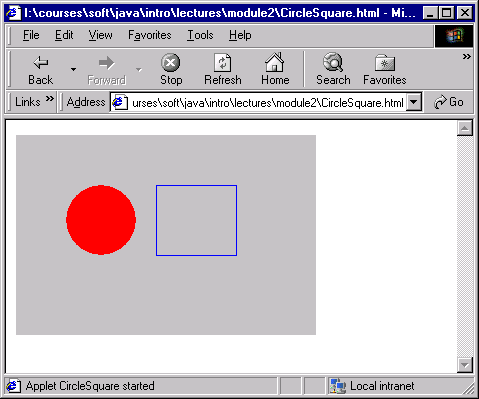
In Java, a square is a geometric shape with four equal sides and four right angles. It is often represented by its side length or diagonal length. The calculation of the area and perimeter of a square are common operations in Java programming.

Calculating the Area of a Square in Java

To calculate the area of a square in Java, you can use the formula:

area = sideLength * sideLength;

Where “sideLength” represents the length of one side of the square. By multiplying the side length by itself, you can determine the total area enclosed by the square.

Calculating the Perimeter of a Square in Java

The perimeter of a square can be calculated using the formula:

perimeter = 4 * sideLength;

Here, “sideLength” denotes the length of one side of the square. By multiplying this value by 4, you obtain the total perimeter encompassing all four sides of the square.

Implementing Square Operations in Java

In Java programming, you can create classes and methods to encapsulate square-related operations. By defining appropriate functions for calculating area and perimeter, you can efficiently work with squares in your programs.

Utilizing object-oriented principles such as inheritance and polymorphism, you can extend your square implementation to incorporate more complex geometric shapes and hierarchies.

Conclusion

The concept of squares in Java exemplifies fundamental principles in programming, including mathematical computations and object-oriented design. By mastering these concepts, developers can enhance their skills and create robust applications that leverage geometric calculations effectively.


Understanding Squares in Java: FAQs on Calculations, Formulas, and Best Practices

  1. What is a square in Java?
  2. How do you calculate the area of a square in Java?
  3. How do you calculate the perimeter of a square in Java?
  4. Can you explain the formula for calculating the area of a square in Java?
  5. What is the formula for finding the perimeter of a square in Java?
  6. Are there specific methods or functions to implement square operations in Java?
  7. How can object-oriented principles be applied to work with squares in Java programming?
  8. What are some common mistakes or challenges when dealing with squares in Java?

What is a square in Java?

In Java programming, a square is defined as a geometric shape characterized by four equal sides and four right angles. It is a fundamental concept in geometry and serves as a common example for understanding basic mathematical calculations within the language. In Java, a square can be represented by its side length or diagonal length, with formulas readily available for calculating its area and perimeter. Understanding the properties and operations associated with squares in Java is essential for performing geometric computations and implementing related functionalities in software development projects.

How do you calculate the area of a square in Java?

Calculating the area of a square in Java involves a straightforward process. To determine the area of a square, you can simply multiply the length of one side by itself. This computation is achieved by using the formula “area = sideLength * sideLength”. By squaring the side length value, you obtain the total area enclosed within the square. This fundamental operation is essential in Java programming and serves as a basic example of mathematical calculations applied within software development contexts.

How do you calculate the perimeter of a square in Java?

Calculating the perimeter of a square in Java involves a straightforward process. In Java programming, you can determine the perimeter of a square by multiplying the length of one side by 4. This simple formula, “perimeter = 4 * sideLength,” where “sideLength” represents the length of one side of the square, allows developers to efficiently compute the total distance around the square. By implementing this calculation in Java code, programmers can easily incorporate perimeter calculations into their applications, showcasing the elegance and simplicity of working with geometric shapes in Java.

Can you explain the formula for calculating the area of a square in Java?

When it comes to calculating the area of a square in Java, the formula is quite straightforward. By multiplying the length of one side of the square by itself, you can easily determine the total area enclosed by the square. The formula for calculating the area of a square in Java is simply: area = sideLength * sideLength. This simple calculation allows developers to efficiently compute the area of a square within their Java programs, making it a fundamental and essential operation when working with geometric shapes in Java programming.

What is the formula for finding the perimeter of a square in Java?

When it comes to calculating the perimeter of a square in Java, the formula is straightforward and easy to implement. The perimeter of a square can be determined by multiplying the length of one side by 4. In Java programming, you can express this formula as “perimeter = 4 * sideLength,” where “sideLength” represents the length of a single side of the square. By applying this formula, developers can efficiently compute the total distance around the square, encompassing all four equal sides.

Are there specific methods or functions to implement square operations in Java?

When it comes to implementing square operations in Java, developers often wonder if there are specific methods or functions tailored for this purpose. While Java does not have built-in functions specifically dedicated to squares, programmers can create custom methods within their classes to handle square-related calculations efficiently. By defining functions for calculating the area, perimeter, and other properties of a square, developers can encapsulate these operations and leverage them across their applications. Additionally, object-oriented principles in Java enable the creation of classes that represent squares and provide reusable functionalities for working with geometric shapes effectively.

How can object-oriented principles be applied to work with squares in Java programming?

When working with squares in Java programming, object-oriented principles can be effectively applied to enhance the design and functionality of the square-related operations. By creating a Square class that encapsulates attributes such as side length and methods for calculating area and perimeter, developers can leverage concepts like encapsulation, inheritance, and polymorphism. Encapsulation allows for data hiding and abstraction, ensuring that the internal details of the Square class are hidden from external entities. Inheritance enables the creation of specialized square subclasses with additional features or behaviors, while polymorphism allows for flexibility in handling different types of squares within a unified interface. By applying these object-oriented principles thoughtfully, developers can create modular, reusable, and extensible solutions for working with squares in Java programming.

What are some common mistakes or challenges when dealing with squares in Java?

When working with squares in Java, some common mistakes or challenges that developers may encounter include incorrect calculations of the square’s area or perimeter due to improper handling of side lengths, overlooking the validation of input values to ensure they represent valid square dimensions, and potential issues with precision when dealing with floating-point arithmetic. Additionally, ensuring proper encapsulation and organization of square-related operations within classes and methods can be challenging for beginners, leading to code that is difficult to maintain and debug. By paying attention to these potential pitfalls and adopting best practices in Java programming, developers can effectively address these challenges and work more efficiently with squares in their applications.

learn java

Master Java Programming: Learn Java Like a Pro

Learn Java: A Comprehensive Guide

Learn Java: A Comprehensive Guide

Java is a versatile and widely-used programming language that powers countless applications, from mobile apps to enterprise software. Whether you are a beginner or an experienced developer looking to expand your skills, learning Java can open up a world of opportunities for you.

Why Learn Java?

Java is known for its platform independence, meaning that once you write a Java program, it can run on any device that has a Java Virtual Machine (JVM). This makes Java a popular choice for developing cross-platform applications.

In addition, Java’s robust libraries and frameworks make it easier to build complex applications efficiently. Its strong community support and vast resources also make learning Java more accessible and enjoyable.

Getting Started with Java

If you are new to programming, don’t worry! Java’s syntax is relatively easy to learn compared to other languages. You can start by installing the Java Development Kit (JDK) on your computer and using an Integrated Development Environment (IDE) like Eclipse or IntelliJ IDEA to write and run your code.

Begin with the basics, such as variables, data types, loops, and conditional statements. As you progress, dive into object-oriented programming concepts like classes, objects, inheritance, and polymorphism.

Advanced Topics in Java

Once you have a solid understanding of the fundamentals, you can explore more advanced topics in Java like multithreading, exception handling, database connectivity using JDBC, GUI programming with Swing or JavaFX, and web development with frameworks like Spring or Hibernate.

Practice Makes Perfect

To truly master Java programming, practice is key. Challenge yourself with coding exercises on platforms like LeetCode or HackerRank. Build small projects to apply what you have learned and gain hands-on experience working with real-world problems.

Conclusion

Learning Java can be a rewarding journey that opens up endless possibilities in the world of software development. Whether you aspire to be a mobile app developer, web developer, or software engineer, mastering Java will equip you with the skills needed to succeed in today’s tech-driven world.


Top 8 FAQs About Learning Java: A Guide for Beginners

  1. What is Java and why should I learn it?
  2. Is Java difficult to learn for beginners?
  3. What are the basic concepts I need to understand in Java?
  4. How can I start learning Java programming?
  5. Are there any recommended resources or tutorials for learning Java?
  6. What are the key features of Java that make it a popular programming language?
  7. Can I become a successful programmer by learning Java?
  8. What career opportunities are available for those who know Java?

What is Java and why should I learn it?

Java is a versatile and powerful programming language that is widely used in various domains, from mobile app development to enterprise software solutions. Learning Java is beneficial for several reasons. Firstly, Java’s platform independence allows programs to run on any device with a Java Virtual Machine (JVM), making it ideal for cross-platform development. Additionally, Java’s extensive libraries and frameworks simplify the process of building complex applications. Its strong community support and vast resources also make it an accessible language for beginners and experienced developers alike. Overall, mastering Java opens up a world of opportunities in the tech industry and equips you with valuable skills that are in high demand.

Is Java difficult to learn for beginners?

For beginners, learning Java may seem challenging at first due to its syntax and object-oriented programming concepts. However, with dedication and practice, Java can become more manageable to grasp. Many resources, tutorials, and online courses are available to help beginners understand Java effectively. Breaking down the learning process into smaller steps and focusing on practical applications can make learning Java less intimidating for newcomers. Ultimately, while Java may present some initial hurdles, the rewards of mastering this versatile language are well worth the effort for aspiring programmers.

What are the basic concepts I need to understand in Java?

To effectively learn Java, it is essential to grasp the basic concepts that form the foundation of the language. Understanding fundamental concepts such as variables, data types, control structures (like loops and conditional statements), methods, classes, and objects is crucial. Object-oriented programming principles like inheritance, encapsulation, polymorphism, and abstraction are also key components to comprehend. By mastering these core concepts, learners can build a strong understanding of Java programming and pave the way for more advanced topics in software development.

How can I start learning Java programming?

To start learning Java programming, it is recommended to begin by installing the Java Development Kit (JDK) on your computer and selecting an Integrated Development Environment (IDE) such as Eclipse or IntelliJ IDEA. Familiarize yourself with basic concepts like variables, data types, loops, and conditional statements. Utilize online resources, tutorials, and practice exercises to reinforce your understanding. As you progress, delve into object-oriented programming principles and gradually explore more advanced topics in Java to enhance your skills and knowledge. Remember that consistent practice and hands-on experience are key to mastering Java programming effectively.

When it comes to learning Java, one of the most frequently asked questions is about recommended resources or tutorials. There are numerous high-quality resources available for beginners and experienced developers alike. Online platforms like Codecademy, Udemy, and Coursera offer comprehensive Java courses with interactive lessons and hands-on projects. Additionally, websites like Oracle’s Java Tutorials, Baeldung, and Java Code Geeks provide in-depth articles, tutorials, and code examples to help learners enhance their Java skills. Books such as “Head First Java” by Kathy Sierra and Bert Bates or “Effective Java” by Joshua Bloch are also highly recommended for those looking to deepen their understanding of the language. With a wealth of resources at your disposal, embarking on your journey to learn Java has never been more accessible and rewarding.

Java’s popularity as a programming language can be attributed to its key features that set it apart from others. One of the main reasons for Java’s widespread adoption is its platform independence, allowing developers to write code once and run it on any device with a Java Virtual Machine (JVM). Additionally, Java’s robust standard library and extensive ecosystem of frameworks simplify the development process, making it easier to build complex applications efficiently. Its strong emphasis on security, scalability, and performance further solidify Java’s position as a top choice for a wide range of applications across different industries.

Can I become a successful programmer by learning Java?

Many aspiring programmers wonder if learning Java can lead them to success in the field. The answer is a resounding yes. Java is a powerful and versatile programming language widely used in various domains, making it a valuable skill to possess. By mastering Java, you not only gain proficiency in a popular language but also develop problem-solving abilities and a strong foundation in object-oriented programming. With dedication, practice, and continuous learning, becoming a successful programmer through Java is not only achievable but also opens up numerous opportunities in the ever-evolving tech industry.

What career opportunities are available for those who know Java?

Java is a highly sought-after programming language in the tech industry, offering a wide range of career opportunities for those who master it. Professionals proficient in Java can explore roles such as Java developer, software engineer, web developer, mobile app developer, system architect, and more. With Java’s versatility and widespread use in various domains like finance, healthcare, e-commerce, and gaming, individuals skilled in Java have the advantage of pursuing diverse career paths and securing rewarding positions in the ever-evolving field of technology.

object oriented software development

Mastering Object-Oriented Software Development: A Comprehensive Guide

Object-Oriented Software Development

The Power of Object-Oriented Software Development

Object-oriented software development is a powerful paradigm that has revolutionized the way we design and build software applications. By organizing code into objects that interact with each other, developers can create more modular, flexible, and scalable systems.

Key Concepts of Object-Oriented Programming (OOP)

In OOP, everything is treated as an object, which encapsulates data and behavior. The key concepts of OOP include:

  • Classes: Blueprint for creating objects with shared attributes and methods.
  • Objects: Instances of classes that contain data and can perform actions.
  • Inheritance: Mechanism for creating new classes based on existing ones to promote code reuse.
  • Polymorphism: Ability for objects to take on different forms or behaviors based on their context.
  • Encapsulation: Bundling data and methods within a class to restrict access and maintain code integrity.

Benefits of Object-Oriented Software Development

There are several advantages to using OOP in software development:

  • Modularity: Code is organized into self-contained objects, making it easier to manage and update.
  • Reusability: Objects can be reused in different parts of the application or in other projects, saving time and effort.
  • Maintainability: Changes made to one part of the codebase do not necessarily impact other parts, reducing the risk of introducing bugs.
  • Scalability: OOP allows for building complex systems by breaking them down into smaller, more manageable components.
  • Ease of Testing: Objects can be tested individually, leading to more efficient testing processes and improved quality assurance.

Popular Object-Oriented Programming Languages

Many programming languages support object-oriented programming principles. Some popular OOP languages include Java, C++, Python, C#, and Ruby. Each language has its own syntax and features for implementing OOP concepts effectively.


Understanding Object-Oriented Software Development: Key Concepts and Examples

  1. What is object-oriented programming with example?
  2. What are the 4 basics of OOP?
  3. What is an example of object-oriented software development?
  4. What is object-oriented programming software?
  5. Is OOP used in software development?

What is object-oriented programming with example?

Object-oriented programming (OOP) is a programming paradigm that structures code around objects, which are instances of classes containing data and behavior. In OOP, objects interact with each other to perform tasks, making the code more modular and easier to manage. An example of object-oriented programming can be seen in a simple banking system. A “BankAccount” class could define properties such as account number, balance, and owner name, along with methods like deposit and withdraw. Multiple instances of the BankAccount class can be created for different customers, each with its own unique data. This encapsulation of data and behavior within objects is a fundamental concept of OOP that promotes code reusability and maintainability.

What are the 4 basics of OOP?

In object-oriented software development, understanding the four basics of OOP is crucial for mastering this programming paradigm. The four fundamental principles of OOP are encapsulation, inheritance, polymorphism, and abstraction. Encapsulation involves bundling data and methods within a class to restrict access and maintain code integrity. Inheritance allows for creating new classes based on existing ones to promote code reuse. Polymorphism enables objects to take on different forms or behaviors based on their context. Abstraction involves hiding complex implementation details and providing a simplified interface for interacting with objects. By grasping these core concepts, developers can effectively design and build robust, scalable software systems using object-oriented programming techniques.

What is an example of object-oriented software development?

In the realm of object-oriented software development, a classic example that often comes to mind is the creation of a banking system. In this scenario, various objects such as accounts, customers, transactions, and employees are defined with their respective attributes and behaviors. For instance, an “Account” object may have properties like account number, balance, and account type, along with methods to deposit funds, withdraw money, and check the balance. Through interactions between these objects using inheritance, encapsulation, and polymorphism principles, a robust and scalable banking system can be designed and implemented following the object-oriented paradigm.

What is object-oriented programming software?

Object-oriented programming software is a methodology used in software development where code is organized around objects that encapsulate data and behavior. In this paradigm, everything is treated as an object, which can interact with other objects to perform tasks. Objects are instances of classes that define their attributes and methods. Object-oriented programming promotes modularity, reusability, and maintainability by breaking down complex systems into smaller, more manageable components. By utilizing concepts such as inheritance, polymorphism, and encapsulation, developers can create flexible and scalable applications that are easier to design, implement, and maintain.

Is OOP used in software development?

In the realm of software development, Object-Oriented Programming (OOP) is a widely utilized paradigm that plays a fundamental role in creating robust and scalable applications. OOP is extensively employed by developers across various industries due to its ability to enhance code organization, promote reusability, and facilitate easier maintenance of complex systems. By structuring code into objects that encapsulate data and behavior, OOP enables developers to build modular and efficient software solutions. The adoption of OOP principles has become a standard practice in modern software development, highlighting its significance in shaping the way applications are designed and implemented.