
cfchris.com

Loading

java development kit

Mastering Java Development Kit: Essential Tools for Java Programmers

The Java Development Kit (JDK): Everything You Need to Know

The Java Development Kit (JDK): Everything You Need to Know

Java is a popular programming language used for developing a wide range of applications, from simple desktop tools to complex enterprise systems. At the core of Java development is the Java Development Kit (JDK), a crucial set of tools that every Java developer needs to have.

What is the JDK?

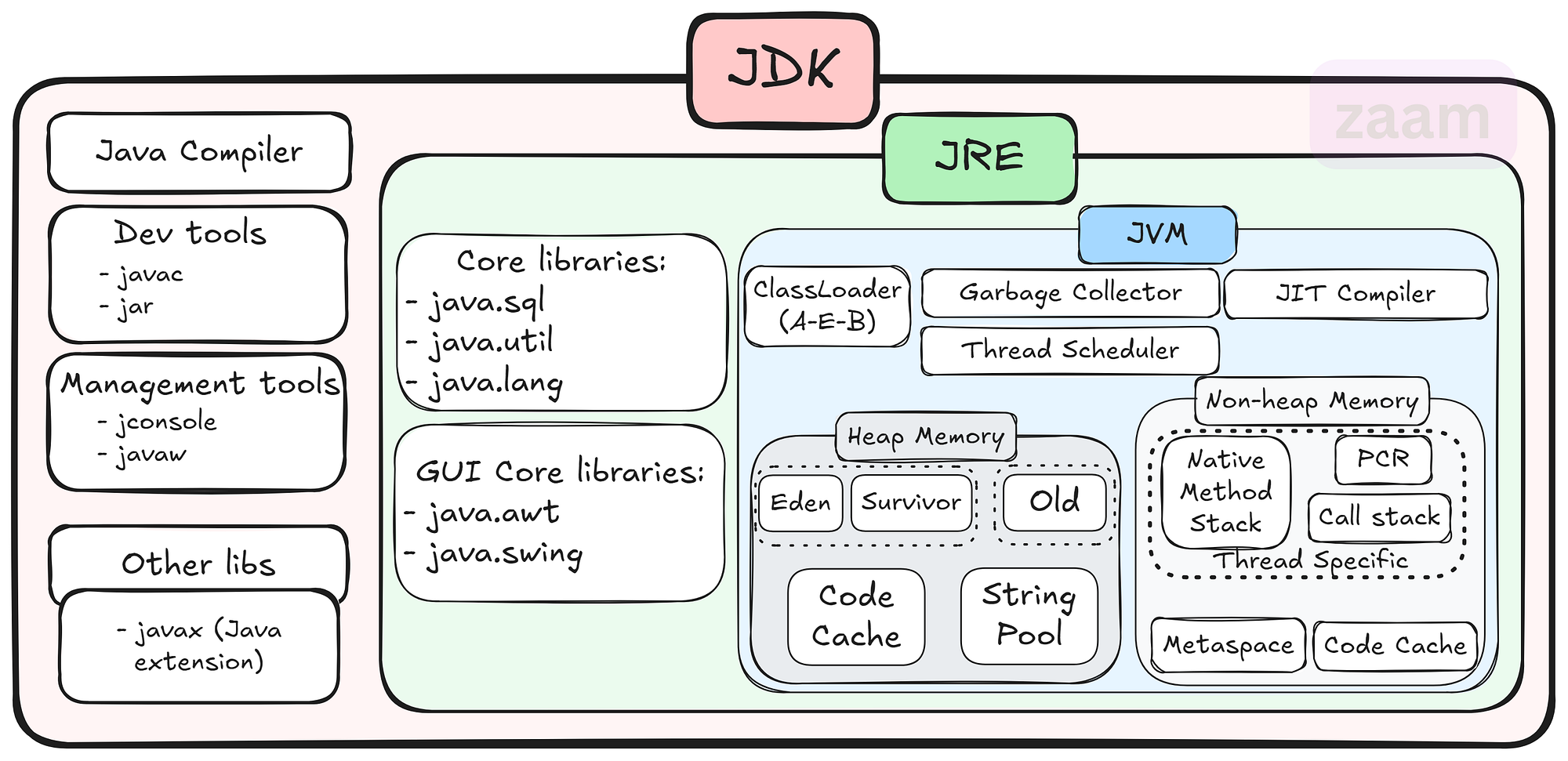
The JDK is a software development kit that provides all the necessary tools and libraries for developing Java applications. It includes the Java Runtime Environment (JRE), which is required for running Java programs, as well as development tools such as the Java compiler, debugger, and other utilities.

Key Components of the JDK

Some of the key components of the JDK include:

  • Java Compiler: The javac compiler converts Java source code into bytecode that can be executed by the JVM.
  • Java Virtual Machine (JVM): The JVM is responsible for executing Java bytecode on different platforms.
  • Java Class Library: A collection of pre-written classes and interfaces that provide core functionality for Java applications.
  • Development Tools: Tools like Javadoc for generating API documentation, JAR for packaging applications, and more.

Why Use the JDK?

The JDK is essential for Java developers because it provides everything needed to write, compile, debug, and run Java applications. By using the JDK, developers can ensure that their code is compatible with different platforms and environments thanks to the JVM’s portability.

Getting Started with the JDK

To start using the JDK, developers can download it from Oracle’s website or other authorized sources. Installation instructions are typically provided with the download package, making it easy to set up and start developing in Java.

Conclusion

The JDK plays a vital role in Java development by providing developers with all the necessary tools and libraries to create powerful and scalable applications. Whether you are a beginner or an experienced developer, having a solid understanding of the JDK is essential for success in Java programming.


8 Key Advantages of the Java Development Kit for Developers

  1. Comprehensive set of tools for Java development
  2. Includes the Java compiler for converting source code to bytecode
  3. Provides a rich collection of libraries for building robust applications
  4. Cross-platform compatibility with the Java Virtual Machine (JVM)
  5. Supports object-oriented programming principles
  6. Integrated development environment (IDE) support for coding convenience
  7. Regular updates and improvements from Oracle and the Java community
  8. Extensive documentation and resources available online for learning and troubleshooting


Challenges of the Java Development Kit: Size, Complexity, Resource Demands, and Compatibility Issues

  1. Large Size
  2. Complexity
  3. Resource Intensive
  4. Updates and Compatibility

Comprehensive set of tools for Java development

The Java Development Kit (JDK) stands out for its comprehensive set of tools tailored for Java development. From the Java compiler to debugging utilities and class libraries, the JDK equips developers with everything they need to efficiently write, compile, and debug Java applications. This extensive toolkit not only streamlines the development process but also ensures that developers have access to a wide array of resources to tackle various aspects of Java programming effectively.

Includes the Java compiler for converting source code to bytecode

The Java Development Kit (JDK) offers a significant advantage by including the Java compiler, a crucial tool for converting source code into bytecode. This feature simplifies the development process for Java programmers, allowing them to write code in a human-readable format and then compile it into bytecode that can be executed by the Java Virtual Machine (JVM). By bundling the compiler with the JDK, developers can seamlessly transition from writing code to testing and running their applications without the need for additional tools or configurations.

Provides a rich collection of libraries for building robust applications

The Java Development Kit (JDK) stands out for its ability to provide a rich collection of libraries that empower developers to build robust applications with ease. These libraries offer a wide range of pre-written classes and interfaces that cover various functionalities, saving developers time and effort in coding from scratch. By leveraging the extensive library support within the JDK, developers can enhance the functionality and performance of their applications while ensuring scalability and reliability in their software projects.

Cross-platform compatibility with the Java Virtual Machine (JVM)

The Java Development Kit (JDK) offers a significant advantage with its cross-platform compatibility through the Java Virtual Machine (JVM). This feature allows Java applications to run on various operating systems without the need for recompilation, ensuring seamless deployment across different platforms. By leveraging the JVM, developers can write code once and have it executed on Windows, macOS, Linux, and other supported environments, making Java a versatile choice for creating applications that reach a wide audience.

Supports object-oriented programming principles

Java Development Kit (JDK) offers a significant advantage by supporting object-oriented programming principles. Object-oriented programming allows developers to organize code into reusable and modular components, enhancing code readability, maintainability, and scalability. With the JDK’s support for object-oriented programming, developers can easily create complex applications by leveraging concepts such as classes, objects, inheritance, and polymorphism, leading to more efficient and robust software development processes.

Integrated development environment (IDE) support for coding convenience

The Java Development Kit (JDK) offers integrated development environment (IDE) support, providing developers with a user-friendly platform for coding convenience. With IDE tools tailored for Java development, programmers can benefit from features like code completion, syntax highlighting, debugging capabilities, and project management tools. This support streamlines the coding process, enhances productivity, and helps developers write high-quality Java applications efficiently.

Regular updates and improvements from Oracle and the Java community

Regular updates and improvements from Oracle and the Java community ensure that the Java Development Kit (JDK) remains a cutting-edge tool for developers. By staying current with the latest advancements, developers can benefit from enhanced performance, security patches, and new features that help streamline their development process and keep their applications up-to-date with industry standards. This commitment to continuous improvement demonstrates the dedication of both Oracle and the Java community to support developers in creating robust and innovative Java applications.

Extensive documentation and resources available online for learning and troubleshooting

Java Development Kit (JDK) offers a significant advantage with its extensive documentation and abundant online resources available for learning and troubleshooting. Whether you are a novice Java developer looking to grasp the basics or an experienced programmer seeking solutions to complex issues, the wealth of online materials ensures that you have the support and guidance needed to enhance your Java development skills effectively. The comprehensive documentation and resources associated with JDK empower developers to overcome challenges, explore new features, and continuously improve their proficiency in Java programming.

Large Size

The Java Development Kit (JDK) has a notable downside in its large size, which can demand a considerable amount of storage space on your system. Due to its extensive collection of tools, libraries, and resources, the JDK’s size may pose a challenge for users with limited storage capacity, potentially impacting the availability of space for other applications or files on the system. This aspect of the JDK’s size underscores the importance of considering storage requirements when installing and using this development kit for Java programming projects.

Complexity

Java development using the JDK can present a significant challenge in terms of complexity, particularly for beginners. The extensive toolset provided by the JDK can be overwhelming for those new to Java programming, making it difficult to grasp all the functionalities and how they interact. Navigating through the various tools and libraries within the JDK may require a steep learning curve, potentially slowing down the development process and causing frustration for inexperienced developers.

Resource Intensive

One significant drawback of using the Java Development Kit (JDK) is its resource-intensive nature. Running Java applications developed with the JDK may demand higher system resources compared to applications built with other programming languages. This increased resource requirement can lead to higher memory consumption and slower performance on devices with limited capabilities, potentially affecting the overall efficiency and responsiveness of the application.

Updates and Compatibility

Keeping up with JDK updates and ensuring compatibility with different versions can be challenging for Java developers. As new updates are released regularly to enhance performance, security, and features, developers need to stay vigilant in updating their development environments and ensuring that their code remains compatible with the latest JDK versions. This process can be time-consuming and may require adjustments to existing codebases to avoid potential compatibility issues. Additionally, managing dependencies and third-party libraries to align with JDK updates adds another layer of complexity to the development process.
java runtime

Exploring the Significance of Java Runtime Environment in Application Development

The Importance of Java Runtime Environment (JRE)

The Importance of Java Runtime Environment (JRE)

Java Runtime Environment (JRE) is a crucial component for running Java applications on your computer. It provides the necessary environment for executing Java programs by including the Java Virtual Machine (JVM), class libraries, and other supporting files.

One of the key benefits of JRE is its platform independence. Java programs compiled into bytecode can run on any device with a compatible JRE installed, regardless of the underlying operating system. This makes Java a popular choice for developing cross-platform applications.

Furthermore, JRE ensures that Java applications are executed securely within a controlled environment. The JVM manages memory allocation, garbage collection, and other important tasks to prevent unauthorized access or malicious activities.

Updating your JRE is essential to maintain compatibility with the latest Java applications and security patches. By keeping your JRE up-to-date, you can ensure optimal performance and protection against potential vulnerabilities.

In conclusion, Java Runtime Environment plays a vital role in enabling the seamless execution of Java applications across different platforms while ensuring security and reliability. It is an indispensable component for anyone using Java-based software.


Understanding Java Runtime: Answers to 8 Frequently Asked Questions

  1. Is Java runtime still relevant today?
  2. What is the difference between Java Runtime and JDK?
  3. What is JRE vs JDK?
  4. How to install a Java Runtime?
  5. How do I get Java runtime?
  6. Is Java Runtime still needed?
  7. What does Java Runtime do?
  8. What is the Java runtime?

Is Java runtime still relevant today?

In today’s rapidly evolving technological landscape, the relevance of Java runtime remains significant. Despite the emergence of new programming languages and frameworks, Java continues to be a popular choice for developing robust and scalable applications. Its platform independence, strong community support, and extensive libraries make it a versatile tool for a wide range of projects. Many enterprise-level systems and critical applications still rely on Java runtime for their functionality, highlighting its enduring importance in the software development industry. As long as there is a need for reliable, cross-platform solutions, Java runtime will continue to play a vital role in modern software development practices.

What is the difference between Java Runtime and JDK?

When discussing the difference between Java Runtime and JDK, it is important to understand their distinct roles in Java development. The Java Runtime Environment (JRE) is responsible for running Java applications by providing the necessary environment, including the Java Virtual Machine (JVM) and class libraries. On the other hand, the Java Development Kit (JDK) is a comprehensive package that includes tools for developing, debugging, and monitoring Java applications in addition to the components of JRE. While JRE is essential for executing Java programs, JDK is required for developing and compiling them. In summary, JRE enables running Java applications, while JDK encompasses the entire development process from coding to deployment.

What is JRE vs JDK?

In the realm of Java development, a common question that arises is the distinction between Java Runtime Environment (JRE) and Java Development Kit (JDK). The JRE is essential for running Java applications as it includes the Java Virtual Machine (JVM) and class libraries needed for execution. On the other hand, the JDK is a comprehensive package that not only contains the JRE components but also includes development tools such as compilers and debuggers for creating Java applications. While JRE is sufficient for end-users who only need to run Java programs, developers require the JDK to write, compile, and debug their own Java code. Understanding the differences between JRE and JDK is fundamental for anyone involved in Java software development.

How to install a Java Runtime?

To install Java Runtime Environment (JRE) on your system, you can follow these simple steps. First, visit the official Oracle website and navigate to the Java SE Downloads page. Choose the appropriate JRE version for your operating system (Windows, macOS, or Linux) and click on the download link. Once the download is complete, run the installer and follow the on-screen instructions to complete the installation process. After successful installation, you may need to set up environment variables to ensure that Java is properly configured on your system. Finally, verify the installation by opening a command prompt or terminal window and typing “java -version” to check if Java Runtime has been installed correctly.

How do I get Java runtime?

To obtain the Java Runtime Environment (JRE), you can easily download it from the official website of Oracle, the company that develops Java. Simply visit the Oracle website, navigate to the Java downloads section, and select the appropriate JRE version for your operating system. Follow the on-screen instructions to complete the download and installation process. It is important to regularly update your JRE to ensure compatibility with new Java applications and to benefit from the latest security enhancements provided by Oracle.

Is Java Runtime still needed?

In today’s digital landscape, the question of whether Java Runtime is still necessary remains a common inquiry among users. Despite advancements in technology and the emergence of alternative programming languages, Java Runtime continues to be a fundamental component for running Java applications efficiently. Many software programs and web applications still rely on Java, making the presence of Java Runtime essential for seamless execution. Moreover, Java’s platform independence and robust security features reinforce the importance of having a functional Java Runtime Environment to support various applications across different operating systems. Thus, while the relevance of Java Runtime may vary depending on individual needs, its significance in facilitating the operation of Java-based software remains undeniable in many contexts.

What does Java Runtime do?

Java Runtime Environment (JRE) is responsible for executing Java applications on a computer system. It includes the Java Virtual Machine (JVM), class libraries, and other necessary components to run Java programs smoothly. Essentially, Java Runtime creates a controlled environment where Java applications can be executed securely and efficiently. It ensures that the bytecode generated by Java compilers can be interpreted and run on various platforms without the need for recompilation, making Java a versatile and widely used programming language for developing cross-platform applications.

What is the Java runtime?

The Java runtime, also known as Java Runtime Environment (JRE), is a crucial component necessary for running Java applications on a computer system. It consists of the Java Virtual Machine (JVM), class libraries, and other essential files that provide the environment needed to execute Java programs. The JRE ensures that Java applications can run smoothly and securely by handling tasks such as memory management and garbage collection. It plays a key role in enabling the platform independence of Java, allowing programs to be executed on various devices with different operating systems as long as they have a compatible JRE installed.

java software

Unlocking the Potential of Java Software: A Comprehensive Guide

The Power of Java Software

The Power of Java Software

Java software has become a cornerstone in the world of technology, powering a wide range of applications and systems. Its versatility, reliability, and scalability make it a popular choice for developers and businesses alike.

What is Java?

Java is a high-level programming language that was developed by Sun Microsystems in the mid-1990s. It is known for its “write once, run anywhere” philosophy, which means that Java programs can run on any platform that has a Java Virtual Machine (JVM) installed.

Features of Java Software

One of the key features of Java software is its portability. This allows developers to create applications that can be deployed on various operating systems without any modifications. Additionally, Java is known for its robust security features, making it a popular choice for developing secure applications.

Applications of Java Software

Java software is used in a wide range of applications, including:

  • Enterprise applications
  • Web applications
  • Mobile applications
  • Gaming applications
  • Embedded systems
  • Big data technologies

The Future of Java Software

Despite the emergence of new programming languages and technologies, Java continues to be a popular choice for developers due to its stability and performance. With ongoing updates and improvements, Java software remains relevant in today’s rapidly evolving tech landscape.


6 Essential Tips for Writing Clean and Effective Java Software

  1. Use meaningful variable names to improve code readability.
  2. Follow Java naming conventions for classes, methods, and variables.
  3. Break down complex tasks into smaller methods for better maintainability.
  4. Document your code using comments to explain its purpose and functionality.
  5. Make use of Java’s built-in libraries and frameworks to avoid reinventing the wheel.
  6. Regularly test your code using unit tests to ensure its correctness.

Use meaningful variable names to improve code readability.

Using meaningful variable names is a crucial tip in Java software development as it significantly enhances code readability. By choosing descriptive and relevant names for variables, developers can easily understand the purpose and function of each variable within the code. This practice not only makes the code more readable for the original developer but also for anyone else who may need to work on or maintain the code in the future. Clear and meaningful variable names help streamline the coding process, improve collaboration among team members, and ultimately contribute to creating more maintainable and efficient Java software applications.

Follow Java naming conventions for classes, methods, and variables.

It is essential to adhere to Java naming conventions when naming classes, methods, and variables in your code. By following these conventions, such as using camelCase for method and variable names and PascalCase for class names, you ensure consistency and readability throughout your codebase. Consistent naming practices make it easier for other developers to understand your code and maintain it effectively. Additionally, following Java naming conventions helps in promoting good coding practices and standards within the Java development community.

Break down complex tasks into smaller methods for better maintainability.

When working with Java software, it is essential to break down complex tasks into smaller methods to enhance maintainability. By dividing a large task into smaller, more manageable chunks, developers can improve code readability, reusability, and ease of maintenance. This approach also facilitates debugging and troubleshooting processes, as each method focuses on a specific functionality or aspect of the overall task. Overall, breaking down complex tasks into smaller methods is a best practice that promotes efficient development and long-term sustainability of Java software projects.

Document your code using comments to explain its purpose and functionality.

Documenting your code using comments is a crucial practice when working with Java software. By adding comments to explain the purpose and functionality of your code, you not only make it easier for yourself to understand and maintain the code in the future but also for other developers who may collaborate on the project. Clear and concise comments can provide valuable insights into the logic behind the code, making it more readable and maintainable. In addition, well-documented code helps in troubleshooting and debugging, saving time and effort in identifying and fixing issues.

Make use of Java’s built-in libraries and frameworks to avoid reinventing the wheel.

When working with Java software, it is highly beneficial to leverage Java’s built-in libraries and frameworks to avoid reinventing the wheel. Java offers a rich collection of libraries and frameworks that provide ready-made solutions for common programming tasks, such as data manipulation, networking, and user interface development. By utilizing these resources, developers can streamline their workflow, improve efficiency, and focus on implementing unique features rather than writing code from scratch. This approach not only saves time and effort but also ensures that the software benefits from well-tested and optimized components.

Regularly test your code using unit tests to ensure its correctness.

Regularly testing your code using unit tests is a crucial practice in Java software development to ensure its correctness and reliability. By writing and running unit tests, developers can verify the behavior of individual components of their code, identifying bugs and errors early in the development process. This proactive approach not only helps in maintaining the quality of the code but also streamlines the debugging process and enhances overall code stability. Incorporating unit testing as a routine part of the development cycle promotes code maintainability and fosters a culture of continuous improvement in software development practices.