
cfchris.com

Loading

java development kit

Mastering Java Development Kit: Essential Tools for Java Programmers

The Java Development Kit (JDK): Everything You Need to Know

The Java Development Kit (JDK): Everything You Need to Know

Java is a popular programming language used for developing a wide range of applications, from simple desktop tools to complex enterprise systems. At the core of Java development is the Java Development Kit (JDK), a crucial set of tools that every Java developer needs to have.

What is the JDK?

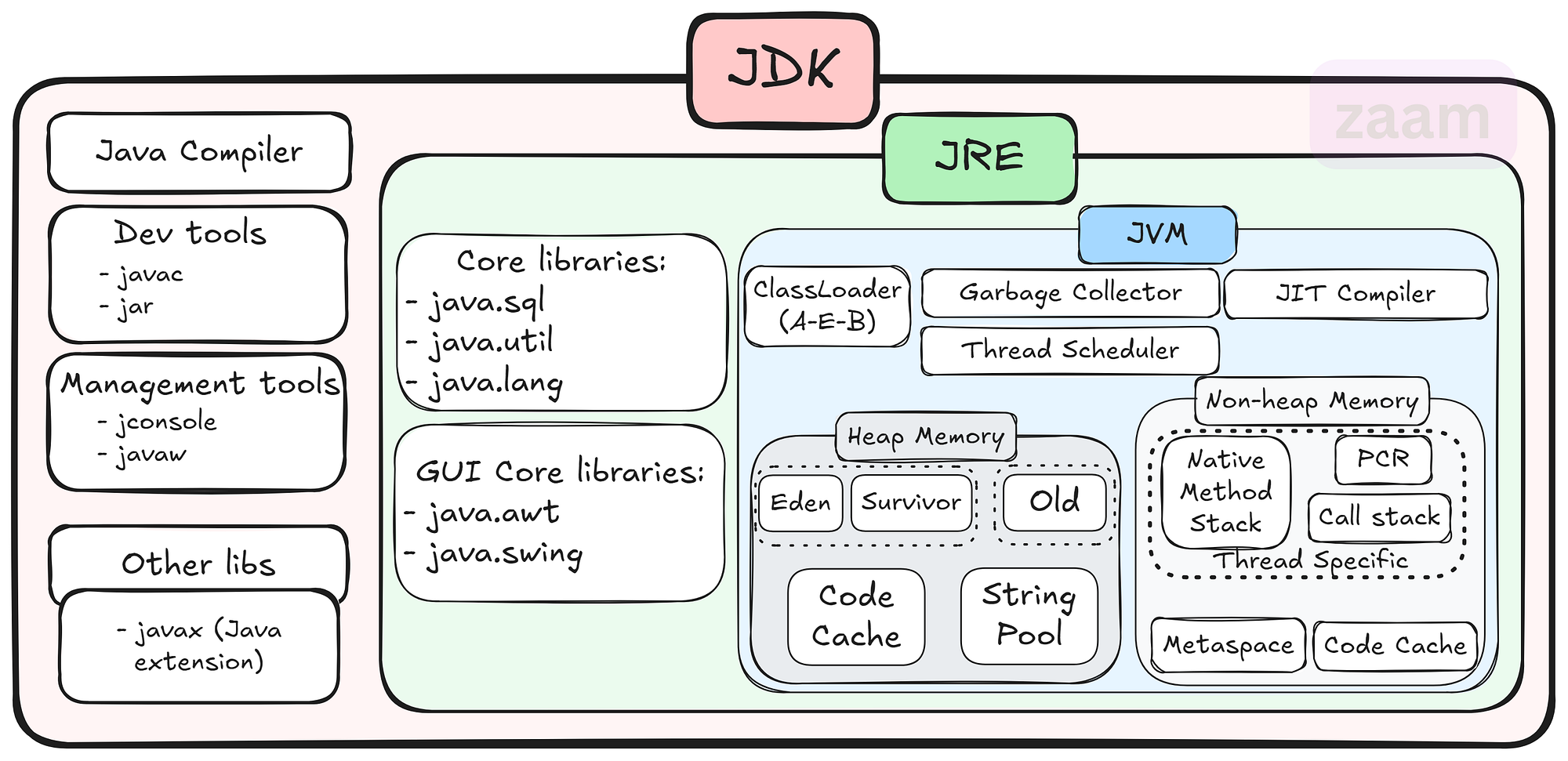
The JDK is a software development kit that provides all the necessary tools and libraries for developing Java applications. It includes the Java Runtime Environment (JRE), which is required for running Java programs, as well as development tools such as the Java compiler, debugger, and other utilities.

Key Components of the JDK

Some of the key components of the JDK include:

  • Java Compiler: The javac compiler converts Java source code into bytecode that can be executed by the JVM.
  • Java Virtual Machine (JVM): The JVM is responsible for executing Java bytecode on different platforms.
  • Java Class Library: A collection of pre-written classes and interfaces that provide core functionality for Java applications.
  • Development Tools: Tools like Javadoc for generating API documentation, JAR for packaging applications, and more.

Why Use the JDK?

The JDK is essential for Java developers because it provides everything needed to write, compile, debug, and run Java applications. By using the JDK, developers can ensure that their code is compatible with different platforms and environments thanks to the JVM’s portability.

Getting Started with the JDK

To start using the JDK, developers can download it from Oracle’s website or other authorized sources. Installation instructions are typically provided with the download package, making it easy to set up and start developing in Java.

Conclusion

The JDK plays a vital role in Java development by providing developers with all the necessary tools and libraries to create powerful and scalable applications. Whether you are a beginner or an experienced developer, having a solid understanding of the JDK is essential for success in Java programming.


8 Key Advantages of the Java Development Kit for Developers

  1. Comprehensive set of tools for Java development
  2. Includes the Java compiler for converting source code to bytecode
  3. Provides a rich collection of libraries for building robust applications
  4. Cross-platform compatibility with the Java Virtual Machine (JVM)
  5. Supports object-oriented programming principles
  6. Integrated development environment (IDE) support for coding convenience
  7. Regular updates and improvements from Oracle and the Java community
  8. Extensive documentation and resources available online for learning and troubleshooting


Challenges of the Java Development Kit: Size, Complexity, Resource Demands, and Compatibility Issues

  1. Large Size
  2. Complexity
  3. Resource Intensive
  4. Updates and Compatibility

Comprehensive set of tools for Java development

The Java Development Kit (JDK) stands out for its comprehensive set of tools tailored for Java development. From the Java compiler to debugging utilities and class libraries, the JDK equips developers with everything they need to efficiently write, compile, and debug Java applications. This extensive toolkit not only streamlines the development process but also ensures that developers have access to a wide array of resources to tackle various aspects of Java programming effectively.

Includes the Java compiler for converting source code to bytecode

The Java Development Kit (JDK) offers a significant advantage by including the Java compiler, a crucial tool for converting source code into bytecode. This feature simplifies the development process for Java programmers, allowing them to write code in a human-readable format and then compile it into bytecode that can be executed by the Java Virtual Machine (JVM). By bundling the compiler with the JDK, developers can seamlessly transition from writing code to testing and running their applications without the need for additional tools or configurations.

Provides a rich collection of libraries for building robust applications

The Java Development Kit (JDK) stands out for its ability to provide a rich collection of libraries that empower developers to build robust applications with ease. These libraries offer a wide range of pre-written classes and interfaces that cover various functionalities, saving developers time and effort in coding from scratch. By leveraging the extensive library support within the JDK, developers can enhance the functionality and performance of their applications while ensuring scalability and reliability in their software projects.

Cross-platform compatibility with the Java Virtual Machine (JVM)

The Java Development Kit (JDK) offers a significant advantage with its cross-platform compatibility through the Java Virtual Machine (JVM). This feature allows Java applications to run on various operating systems without the need for recompilation, ensuring seamless deployment across different platforms. By leveraging the JVM, developers can write code once and have it executed on Windows, macOS, Linux, and other supported environments, making Java a versatile choice for creating applications that reach a wide audience.

Supports object-oriented programming principles

Java Development Kit (JDK) offers a significant advantage by supporting object-oriented programming principles. Object-oriented programming allows developers to organize code into reusable and modular components, enhancing code readability, maintainability, and scalability. With the JDK’s support for object-oriented programming, developers can easily create complex applications by leveraging concepts such as classes, objects, inheritance, and polymorphism, leading to more efficient and robust software development processes.

Integrated development environment (IDE) support for coding convenience

The Java Development Kit (JDK) offers integrated development environment (IDE) support, providing developers with a user-friendly platform for coding convenience. With IDE tools tailored for Java development, programmers can benefit from features like code completion, syntax highlighting, debugging capabilities, and project management tools. This support streamlines the coding process, enhances productivity, and helps developers write high-quality Java applications efficiently.

Regular updates and improvements from Oracle and the Java community

Regular updates and improvements from Oracle and the Java community ensure that the Java Development Kit (JDK) remains a cutting-edge tool for developers. By staying current with the latest advancements, developers can benefit from enhanced performance, security patches, and new features that help streamline their development process and keep their applications up-to-date with industry standards. This commitment to continuous improvement demonstrates the dedication of both Oracle and the Java community to support developers in creating robust and innovative Java applications.

Extensive documentation and resources available online for learning and troubleshooting

Java Development Kit (JDK) offers a significant advantage with its extensive documentation and abundant online resources available for learning and troubleshooting. Whether you are a novice Java developer looking to grasp the basics or an experienced programmer seeking solutions to complex issues, the wealth of online materials ensures that you have the support and guidance needed to enhance your Java development skills effectively. The comprehensive documentation and resources associated with JDK empower developers to overcome challenges, explore new features, and continuously improve their proficiency in Java programming.

Large Size

The Java Development Kit (JDK) has a notable downside in its large size, which can demand a considerable amount of storage space on your system. Due to its extensive collection of tools, libraries, and resources, the JDK’s size may pose a challenge for users with limited storage capacity, potentially impacting the availability of space for other applications or files on the system. This aspect of the JDK’s size underscores the importance of considering storage requirements when installing and using this development kit for Java programming projects.

Complexity

Java development using the JDK can present a significant challenge in terms of complexity, particularly for beginners. The extensive toolset provided by the JDK can be overwhelming for those new to Java programming, making it difficult to grasp all the functionalities and how they interact. Navigating through the various tools and libraries within the JDK may require a steep learning curve, potentially slowing down the development process and causing frustration for inexperienced developers.

Resource Intensive

One significant drawback of using the Java Development Kit (JDK) is its resource-intensive nature. Running Java applications developed with the JDK may demand higher system resources compared to applications built with other programming languages. This increased resource requirement can lead to higher memory consumption and slower performance on devices with limited capabilities, potentially affecting the overall efficiency and responsiveness of the application.

Updates and Compatibility

Keeping up with JDK updates and ensuring compatibility with different versions can be challenging for Java developers. As new updates are released regularly to enhance performance, security, and features, developers need to stay vigilant in updating their development environments and ensuring that their code remains compatible with the latest JDK versions. This process can be time-consuming and may require adjustments to existing codebases to avoid potential compatibility issues. Additionally, managing dependencies and third-party libraries to align with JDK updates adds another layer of complexity to the development process.


java jdk download

Streamline Your Development Process with Java JDK Download

Article: Java JDK Download

The Importance of Java JDK Download

Java Development Kit (JDK) is a crucial tool for Java developers as it provides the necessary components to develop, compile, and run Java applications. Whether you are a beginner or an experienced developer, having the JDK installed on your system is essential for Java programming.

Downloading the Java JDK

To download the latest version of Java JDK, visit the official Oracle website or use a trusted source like OpenJDK. Make sure to select the appropriate version based on your operating system (Windows, macOS, Linux) and architecture (32-bit or 64-bit).

Installation Process

Once you have downloaded the JDK installer, follow the installation instructions provided by Oracle or OpenJDK. The installation process typically involves setting up environment variables and configuring your IDE (Integrated Development Environment) to recognize the JDK.

Benefits of Using Java JDK

  • Development Tools: JDK includes tools like javac (Java Compiler), java (Java Runtime Environment), and javadoc (Java Documentation Generator) that are essential for Java development.
  • Compatibility: By using the official Java JDK, you ensure compatibility with various Java libraries, frameworks, and tools.
  • Security Updates: Oracle regularly releases security updates and patches for the JDK to protect against vulnerabilities and ensure a secure development environment.
  • Performance Optimization: The JDK is optimized for performance, providing efficient execution of Java code and improved runtime performance.

In Conclusion

Downloading and installing the Java Development Kit is a fundamental step for anyone looking to develop Java applications. By having access to the tools and libraries provided by the JDK, developers can create robust and efficient software solutions that leverage the power of Java programming language.


8 Essential Tips for Downloading and Installing Java JDK Safely and Effectively

  1. Ensure you download the JDK from the official Oracle website to avoid potential security risks.
  2. Check your system requirements before downloading to ensure compatibility with your operating system.
  3. Select the appropriate JDK version based on your project requirements and Java development needs.
  4. Consider downloading the JDK bundled with an Integrated Development Environment (IDE) for a more streamlined development experience.
  5. Verify the integrity of the downloaded JDK file by comparing its checksum with the one provided on the official website.
  6. Follow installation instructions carefully to ensure a successful setup of the JDK on your system.
  7. Keep track of JDK updates and consider setting up automatic updates to stay current with security patches and new features.
  8. Explore additional resources such as tutorials and documentation to maximize your usage of the Java Development Kit.

Ensure you download the JDK from the official Oracle website to avoid potential security risks.

When downloading the Java JDK, it is crucial to ensure that you obtain it from the official Oracle website to mitigate potential security risks. By obtaining the JDK from a trusted and verified source like Oracle, you can be confident that you are getting a genuine and secure version of the software. This precaution helps safeguard your system against any malicious threats or vulnerabilities that may be present in unauthorized or counterfeit versions of the JDK. Prioritizing security when downloading software is essential for maintaining a safe and reliable development environment.

Check your system requirements before downloading to ensure compatibility with your operating system.

Before downloading the Java JDK, it is essential to check your system requirements to ensure compatibility with your operating system. By verifying that your system meets the necessary specifications, you can avoid installation issues and ensure a smooth setup process. Taking this precautionary step will help you download the correct version of the JDK that is compatible with your operating system, enabling you to start developing Java applications without any compatibility-related obstacles.

Select the appropriate JDK version based on your project requirements and Java development needs.

When downloading the Java JDK, it is crucial to select the appropriate version that aligns with your project requirements and Java development needs. Choosing the right JDK version ensures compatibility with your development environment and allows you to leverage the features and enhancements that best suit your programming goals. Whether you are working on a specific project or exploring new Java functionalities, selecting the right JDK version sets the foundation for successful and efficient Java development practices.

Consider downloading the JDK bundled with an Integrated Development Environment (IDE) for a more streamlined development experience.

When downloading the Java Development Kit (JDK), it is advisable to consider opting for a version bundled with an Integrated Development Environment (IDE) for a more streamlined development experience. By choosing a JDK package that includes an IDE, developers can benefit from having all the necessary tools in one integrated platform, facilitating coding, debugging, and testing processes within a cohesive environment. This approach can enhance productivity and efficiency in Java application development by providing a seamless workflow for software creation and deployment.

Verify the integrity of the downloaded JDK file by comparing its checksum with the one provided on the official website.

It is highly recommended to verify the integrity of the downloaded Java JDK file by comparing its checksum with the one provided on the official website. This additional step ensures that the file has not been tampered with or corrupted during the download process. By confirming the checksum, you can have peace of mind knowing that you have obtained a genuine and secure copy of the JDK, reducing the risk of potential issues during installation and development.

Follow installation instructions carefully to ensure a successful setup of the JDK on your system.

It is crucial to follow the installation instructions carefully when downloading the Java JDK to guarantee a successful setup on your system. By adhering to the provided guidelines, you can avoid potential errors and ensure that the JDK is properly configured for your development environment. Paying attention to each step of the installation process will help you leverage the full capabilities of the JDK and streamline your Java development workflow effectively.

Keep track of JDK updates and consider setting up automatic updates to stay current with security patches and new features.

It is crucial to stay informed about Java JDK updates to ensure your development environment remains secure and up-to-date. Consider enabling automatic updates for the JDK to receive timely security patches and access new features as they become available. By actively managing JDK updates, you can enhance the performance, stability, and security of your Java applications while staying aligned with the latest advancements in the Java ecosystem.

Explore additional resources such as tutorials and documentation to maximize your usage of the Java Development Kit.

To maximize your usage of the Java Development Kit, it is highly recommended to explore additional resources such as tutorials and documentation. By delving into these supplementary materials, developers can gain a deeper understanding of the JDK’s features and functionalities, enabling them to harness its full potential in their Java development projects. Tutorials can provide practical guidance on using specific tools within the JDK, while documentation offers comprehensive insights into various aspects of Java programming. Embracing these resources not only enhances proficiency but also empowers developers to create more robust and efficient Java applications.

online android app development

Mastering Online Android App Development: Tools, Tips, and Trends

Online Android App Development

Online Android App Development: A Comprehensive Guide

In today’s digital age, mobile applications have become an essential part of our daily lives. With millions of apps available on the Google Play Store, Android app development has emerged as a lucrative field for developers. This article delves into the world of online Android app development, exploring tools, resources, and best practices to help you create successful apps.

The Rise of Android App Development

Android holds a significant share of the global smartphone market, making it a prime platform for app developers. The open-source nature of the Android operating system allows developers to customize and innovate freely. This flexibility has led to a vibrant ecosystem where creativity thrives.

Getting Started with Online Tools

The advent of online development tools has made it easier than ever to start building Android apps. Here are some popular platforms:

  • Android Studio: The official integrated development environment (IDE) for Android app development. It offers robust features such as code editing, debugging, and performance tooling.
  • Kodular: A web-based platform that allows users to create apps without extensive coding knowledge through a drag-and-drop interface.
  • Appy Pie: An intuitive app builder that enables users to design and build apps quickly using pre-made templates and modules.

Programming Languages for Android Development

The primary programming languages used in Android app development are Java and Kotlin. While Java has been the traditional choice for many years, Kotlin is gaining popularity due to its concise syntax and modern features.

Kotlin vs. Java

  • Kotlin: Known for its simplicity and interoperability with Java, Kotlin reduces boilerplate code and enhances productivity.
  • Java: A mature language with extensive libraries and community support, making it reliable for complex applications.

Best Practices for Developing Successful Apps

To ensure your app stands out in the crowded marketplace, consider these best practices:

  1. User-Centric Design: Focus on creating an intuitive user interface (UI) that enhances user experience (UX).
  2. Performance Optimization: Optimize your app’s performance by minimizing load times and reducing memory usage.
  3. Regular Updates: Keep your app updated with new features and security patches to maintain user engagement.
  4. User Feedback: Incorporate feedback from users to improve your app continuously.

The Future of Online Android App Development

The future looks promising for online Android app development as technology continues to evolve. Emerging trends such as artificial intelligence (AI), augmented reality (AR), and machine learning are opening new avenues for innovation in mobile applications.

The demand for skilled developers will continue to grow as businesses seek to leverage mobile technology to reach their audiences effectively. By staying informed about the latest tools and trends in online Android app development, you can position yourself at the forefront of this dynamic industry.

Conclusion

The world of online Android app development is vast and full of opportunities. Whether you’re a seasoned developer or just starting out, there are numerous resources available to help you succeed. By mastering essential tools like Android Studio or exploring user-friendly platforms like Kodular or Appy Pie, you can bring your creative ideas to life in the form of innovative mobile applications.

Your journey into online Android app development promises not only personal growth but also the potential to make a significant impact on how people interact with technology every day.


6 Essential Tips for Successful Online Android App Development

  1. Understand the Android platform and guidelines for app development.
  2. Use Android Studio as the primary Integrated Development Environment (IDE).
  3. Follow best practices for user interface design to ensure a good user experience.
  4. Optimize your app for performance and battery efficiency.
  5. Test your app thoroughly on different devices and screen sizes.
  6. Stay updated with the latest trends and technologies in Android development.

Understand the Android platform and guidelines for app development.

To succeed in online Android app development, it is crucial to thoroughly understand the Android platform and adhere to its guidelines for app development. By familiarizing yourself with the intricacies of the platform, including its design principles, user interface requirements, and performance considerations, you can ensure that your app meets the standards set by Google. Following these guidelines not only enhances the user experience but also increases the chances of your app being approved and well-received on the Google Play Store.

Use Android Studio as the primary Integrated Development Environment (IDE).

When embarking on online Android app development, it is highly recommended to utilize Android Studio as the primary Integrated Development Environment (IDE). Android Studio, being the official IDE for Android app development, offers a comprehensive suite of tools and features that streamline the development process. From code editing to debugging and performance analysis, Android Studio provides developers with a robust platform to create high-quality apps efficiently. By harnessing the power of Android Studio, developers can leverage its capabilities to build innovative and user-friendly applications for the ever-evolving Android ecosystem.

Follow best practices for user interface design to ensure a good user experience.

Following best practices for user interface design is crucial in online Android app development to guarantee a positive user experience. A well-designed user interface enhances usability, navigation, and overall aesthetics of the app, ultimately leading to higher user satisfaction and engagement. By focusing on intuitive layouts, clear navigation paths, consistent design elements, and responsive interactions, developers can create an app that not only looks visually appealing but also functions seamlessly, making it easier for users to accomplish their tasks efficiently. Prioritizing user interface design best practices is key to creating a successful Android app that resonates with users and keeps them coming back for more.

Optimize your app for performance and battery efficiency.

Optimizing your app for performance and battery efficiency is crucial in ensuring a seamless user experience. By streamlining code, minimizing resource-intensive operations, and implementing efficient algorithms, you can enhance your app’s responsiveness and reduce its impact on device battery life. Prioritizing performance optimization not only improves user satisfaction but also contributes to the longevity of your app’s success in the competitive Android app market.

Test your app thoroughly on different devices and screen sizes.

To ensure the optimal performance and user experience of your Android app, it is crucial to test it thoroughly on a variety of devices and screen sizes. By conducting comprehensive testing across different platforms, you can identify and address any compatibility issues, layout inconsistencies, or functionality errors that may arise. This proactive approach not only helps in delivering a seamless experience to users but also enhances the overall quality and reliability of your app across the diverse landscape of Android devices.

To excel in online Android app development, it is crucial to stay updated with the latest trends and technologies in the field. The Android ecosystem is constantly evolving, with new features, tools, and best practices emerging regularly. By staying informed about the latest advancements, developers can leverage cutting-edge technologies to create innovative and competitive apps. Continuous learning and adaptation to industry trends not only enhance the quality of app development but also ensure relevance in a dynamic and fast-paced market.