cfchris.com

Loading

salesforce software engineer

Salesforce Software Engineer: Role, Skills, and Career Path

What Does a Salesforce Software Engineer Do?

A Salesforce software engineer designs, builds, and maintains applications and integrations on the Salesforce platform. The role combines software development with an understanding of how organizations manage customer relationships, sales, service, marketing, and business operations.

Salesforce offers both low-code tools and extensive development capabilities. Engineers use these options to tailor the platform to an organization’s needs, connect it with other systems, and help ensure that its data and processes work reliably.

Key Responsibilities

Day-to-day work varies by employer and project, but a Salesforce software engineer may:

  • Develop custom features using Apex, Salesforce’s programming language.
  • Build interactive user interfaces with Lightning Web Components (LWC).
  • Configure objects, fields, validation rules, flows, and other platform features.
  • Connect Salesforce to external applications through APIs and integration tools.
  • Write automated tests and troubleshoot bugs, performance issues, and data problems.
  • Review requirements with business stakeholders and translate them into technical solutions.
  • Deploy changes between development, testing, and production environments.
  • Document technical decisions and help maintain security and data quality.

Common Salesforce Technologies

Salesforce engineers often work with a mix of platform-specific and general software development tools. Common technologies include:

  • Apex: A server-side language used to implement business logic.
  • Lightning Web Components: A framework for building modern user interfaces.
  • SOQL and SOSL: Query languages for finding and working with Salesforce data.
  • REST and SOAP APIs: Interfaces commonly used to integrate Salesforce with other systems.
  • Salesforce CLI and source control: Tools for managing code, environments, and deployments.
  • JavaScript, HTML, and CSS: Web technologies that support front-end development.

The exact toolset depends on the organization’s Salesforce products, architecture, and development practices.

Skills That Matter

Strong programming fundamentals are important, including object-oriented design, data structures, testing, and debugging. Salesforce engineers also benefit from understanding databases, web application architecture, APIs, and version control.

Technical ability is only part of the job. Engineers need to communicate clearly with administrators, product owners, analysts, and end users. Because Salesforce often supports essential business workflows, the ability to understand a problem before proposing a solution is especially valuable.

Salesforce Engineer vs. Salesforce Administrator

Salesforce administrators typically focus on configuring and maintaining the platform with declarative tools, such as flows, permissions, and reports. Salesforce software engineers generally spend more time writing code, building custom components, and designing integrations. In practice, the roles can overlap, and many teams combine configuration and custom development to find the simplest effective solution.

How to Become a Salesforce Software Engineer

There is no single path into the profession. Many people begin with a background in computer science, software development, or information technology. Others transition from Salesforce administration or related business systems roles.

  1. Learn core programming concepts. Practice object-oriented programming, JavaScript, databases, and web development fundamentals.
  2. Explore Salesforce. Use Salesforce learning resources and hands-on practice environments to understand the platform.
  3. Build practical projects. Create sample components, automation, and integrations, and document the decisions behind them.
  4. Learn testing and deployment. Get familiar with automated tests, source control, and moving changes safely between environments.
  5. Consider certifications. Salesforce certifications can help demonstrate platform knowledge, though hands-on experience and problem-solving skills remain important.

Career Outlook

Organizations across many industries use Salesforce to support customer-facing and internal processes. As a result, engineers who can customize the platform, integrate it with other systems, and maintain reliable applications may find opportunities in consulting firms, technology companies, nonprofits, and in-house IT teams.

Job titles and expectations vary. Some roles emphasize Apex and custom application development, while others focus on integrations, user interfaces, or platform architecture. Reviewing the responsibilities in a job listing can help candidates identify which skills to develop.

Final Thoughts

A Salesforce software engineer connects software development with real business needs. The role is a good fit for people who enjoy solving technical problems, working with data and APIs, and collaborating with teams to improve how work gets done. A strong foundation in programming, platform knowledge, and clear communication can help build a lasting career in Salesforce development.


Top 5 Benefits of Being a Salesforce Software Engineer: High Demand, Competitive Pay, and Career Growth

  1. High demand across many industries
  2. Competitive earning potential
  3. Opportunities to solve business problems
  4. A broad ecosystem of tools and technologies
  5. Clear paths for learning and career growth


Challenges Faced by Salesforce Software Engineers: Navigating Skill Limitations, Platform Updates, and More

  1. Salesforce-specific skills may limit career flexibility.
  2. Platform updates require ongoing learning.
  3. Complex customizations can be difficult to maintain.
  4. Debugging integrations can be time-consuming.
  5. Licensing costs may constrain project choices.
  6. Business requirements can change frequently.

High demand across many industries

Salesforce software engineers are in high demand across many industries because organizations use Salesforce to manage customer relationships, sales, service, and business operations. Companies in sectors such as finance, health care, retail, technology, and nonprofits often need skilled engineers to customize the platform, connect it with other systems, and improve business processes. This broad adoption gives qualified professionals opportunities to work with different types of organizations and projects.

Competitive earning potential

Salesforce software engineers can have competitive earning potential, especially as they build expertise in areas such as Apex development, integrations, and Salesforce architecture. Compensation varies based on experience, location, industry, and the complexity of the role, but specialized skills and a strong track record can help professionals qualify for higher-paying opportunities.

Opportunities to solve business problems

One of the biggest advantages of being a Salesforce software engineer is the opportunity to solve real business problems. By understanding how a company works, you can build custom features, automate repetitive tasks, and connect systems so teams can serve customers more effectively. The result is more than working code—it’s practical improvements that help people save time, make better decisions, and reach their goals.

A broad ecosystem of tools and technologies

One major advantage of being a Salesforce software engineer is access to a broad ecosystem of tools and technologies. From Apex and Lightning Web Components to APIs, automation tools, cloud services, and development platforms, Salesforce offers many ways to build and connect business applications. This variety lets engineers solve different kinds of problems, develop new skills, and choose the right approach for each project.

Clear paths for learning and career growth

One advantage of becoming a Salesforce software engineer is having clear paths for learning and career growth. Salesforce offers structured learning resources, hands-on practice, and certifications that help professionals build skills step by step. As experience grows, engineers can pursue specialties such as application development, integrations, or platform architecture, creating opportunities to advance into senior, lead, or architect roles.

Salesforce-specific skills may limit career flexibility.

A potential drawback of specializing as a Salesforce software engineer is that deep expertise in Salesforce-specific tools, languages, and workflows may not transfer directly to other technology roles. Employers outside the Salesforce ecosystem may prioritize experience with different platforms or programming stacks, which can make career changes less straightforward. Building broader skills in areas such as JavaScript, APIs, databases, cloud architecture, and general software engineering practices can help keep future options open.

Platform updates require ongoing learning.

One challenge of being a Salesforce software engineer is keeping up with the platform’s regular updates. New features, changes, and tools can affect how applications are built and maintained, so engineers need to make time for continuous learning. Staying current helps prevent outdated practices and ensures solutions remain secure, compatible, and effective.

Complex customizations can be difficult to maintain.

One challenge of working as a Salesforce software engineer is that complex customizations can be difficult to maintain. Custom code, integrations, and automation may become harder to understand as business requirements change, especially when documentation or testing is limited. Over time, even a small update can have unexpected effects across the platform, so engineers need to plan carefully, follow consistent development practices, and regularly review and test custom solutions.

Debugging integrations can be time-consuming.

One challenge of being a Salesforce software engineer is that debugging integrations can be time-consuming. When Salesforce exchanges data with external applications, an issue may stem from the code, API limits, authentication, data formats, or the other system’s behavior. Engineers often need to trace requests across multiple services and environments before finding the cause, which can delay fixes and require careful coordination with other teams.

Licensing costs may constrain project choices.

Licensing costs can constrain the choices available to a Salesforce software engineer. Because Salesforce features and user access may depend on subscription plans, a technically sound solution might require additional licenses or paid add-ons. Engineers often need to weigh project requirements against the organization’s budget, and may have to adjust the design, limit access, or find an alternative approach to avoid unexpected costs.

Business requirements can change frequently.

One challenge of working as a Salesforce software engineer is that business requirements can change frequently. A solution that meets a team’s needs today may need adjustments as priorities, workflows, or customer expectations shift. Engineers must stay flexible, clarify updated requirements, and assess how changes could affect existing features, integrations, and data. This ongoing adaptation can make planning and delivery more difficult, especially when timelines are tight.

it software engineer

IT Software Engineer: Roles, Skills, and Career Opportunities

What Does an IT Software Engineer Do?

An IT software engineer designs, builds, tests, and maintains software that helps people and organizations solve problems. The role combines programming skills with engineering practices, such as planning, documentation, testing, and ongoing improvement. IT software engineers may create business applications, websites, mobile apps, cloud services, or tools that support an organization’s technology systems.

Key Responsibilities

A software engineer’s daily work depends on the team and project, but common responsibilities include:

  • Understanding user and business requirements
  • Designing software systems and choosing suitable technologies
  • Writing, reviewing, and improving code
  • Testing software to find and fix defects
  • Maintaining existing applications and resolving technical issues
  • Documenting code, systems, and development processes
  • Working with designers, project managers, IT teams, and other engineers

Skills and Tools

Programming is an important part of the job, but successful software engineering involves more than writing code. Engineers need problem-solving skills, attention to detail, clear communication, and the ability to collaborate. They also need to understand how software fits into a larger IT environment, including networks, databases, operating systems, and security practices.

Depending on their work, software engineers may use languages such as Java, Python, C#, JavaScript, or SQL. Common tools include version-control systems, code editors, cloud platforms, automated testing frameworks, and project-management software. The specific tools vary by employer and project.

Education and Career Paths

Many software engineers have a degree in computer science, software engineering, or a related field. Others enter the profession through technical programs, independent study, internships, or practical experience. A portfolio of projects can help demonstrate skills, especially for candidates who are building experience.

With experience, an engineer may specialize in areas such as cloud computing, cybersecurity, mobile development, data engineering, or artificial intelligence. Other career paths include senior engineer, technical lead, software architect, engineering manager, or IT consultant.

Why Software Engineering Matters

Software supports many aspects of modern life, from online services and business operations to healthcare, transportation, and communication. IT software engineers help make these systems useful, reliable, and secure. Their work often continues after a product launches, as software must be updated to fix issues, meet changing needs, and work with new technologies.

Is This Career a Good Fit?

Software engineering may suit people who enjoy solving puzzles, learning new technologies, and turning ideas into practical tools. The work can involve complex challenges and changing priorities, so curiosity, patience, and a willingness to keep learning are valuable. For those who enjoy building and improving technology, it can offer a wide range of opportunities across industries.


8 Essential Tips for Success as an IT Software Engineer

  1. Master core programming concepts.
  2. Practice problem-solving every day.
  3. Write clean, readable code.
  4. Use version control consistently.
  5. Learn to test your software.
  6. Communicate clearly with your team.
  7. Keep learning new tools and technologies.
  8. Ask for feedback and improve.

Master core programming concepts.

Mastering core programming concepts is essential for becoming a successful IT software engineer. Build a strong understanding of variables, data types, control flow, functions, data structures, algorithms, and object-oriented programming before focusing too heavily on specific tools or frameworks. These fundamentals make it easier to learn new languages, write clear and efficient code, troubleshoot problems, and design software that can grow and adapt over time. Practice regularly by building small projects and explaining how your code works.

Practice problem-solving every day.

Practice problem-solving every day to strengthen the skills you’ll use as an IT software engineer. Try a coding challenge, debug a small program, or break a real-world task into manageable steps. Focus on understanding why a solution works, not just getting the right answer. Over time, regular practice can help you think more logically, write clearer code, and tackle unfamiliar technical challenges with greater confidence.

Write clean, readable code.

Writing clean, readable code is an essential skill for an IT software engineer. Clear names, consistent formatting, and simple structure make code easier to understand, test, and maintain—not just for its author, but for teammates who may work on it later. Keep functions focused, avoid unnecessary complexity, and add comments when they clarify the reasoning behind a decision. Well-organized code helps teams find bugs faster and adapt software as requirements change.

Use version control consistently.

Use version control consistently to track changes, collaborate safely, and make it easier to recover from mistakes. Commit small, focused updates with clear messages so teammates can understand what changed and why. Whether working alone or on a team, a consistent version-control workflow helps keep code organized and makes software development more reliable.

Learn to test your software.

Learn to test your software so you can catch problems early and make your applications more reliable. Practice writing tests that check individual functions, how different parts of a system work together, and whether the finished product behaves as users expect. Automated tests can save time as your code changes, while hands-on testing can reveal usability issues that scripts may miss. Building testing into your workflow helps prevent regressions, makes debugging easier, and gives you greater confidence when releasing updates.

Communicate clearly with your team.

Clear communication helps IT software engineers collaborate effectively and keep projects moving. Share updates on your progress, explain technical issues in plain language, and ask questions when requirements are unclear. When discussing a problem, include relevant details and suggest possible next steps. Clear, respectful communication helps teammates coordinate their work, catch misunderstandings early, and build better software together.

Keep learning new tools and technologies.

IT software engineers should make continuous learning part of their routine because tools, programming languages, and best practices evolve quickly. Exploring new technologies through online courses, documentation, personal projects, or professional communities can help engineers work more efficiently and adapt to changing project needs. It’s not necessary to learn every new tool; focus on technologies that support your goals and solve real problems.

Ask for feedback and improve.

Ask for feedback regularly from teammates, mentors, and users, and treat their input as an opportunity to grow. Constructive feedback can reveal bugs, improve code quality, and help make software easier to use and maintain. Consider each suggestion thoughtfully, ask questions when something is unclear, and apply what you learn to your next project. Over time, this habit can strengthen both your technical skills and your ability to collaborate.

www java com

www java com: A Guide to Java Downloads, Updates, and Support

What Is Java.com?

Java.com is the official website for Java software from Oracle. It provides information and resources for people who use Java on personal computers, including guidance on downloading, installing, and updating Java when it is needed to run certain applications.

What Is Java?

Java is a widely used programming language and software platform. Developers use it to build applications for many kinds of devices and systems. Some programs require Java components to be installed on a computer before they can run.

Java is distinct from JavaScript, despite the similar names. JavaScript is commonly used to add interactive features to websites, while Java is a separate programming language and platform.

What You Can Find on Java.com

Visitors can use Java.com to find Java-related downloads, installation instructions, troubleshooting help, and information about updates. The site is especially useful when a program specifically says that Java is required.

Not every computer needs Java installed. Many modern websites and applications work without it, so it is best to install Java only when a trusted application requires it. Before downloading software, check that you are visiting the official website and review the installation prompts carefully.

Keeping Java Up to Date

When Java is installed, keeping it updated can help address security issues and improve compatibility. Use the update tools included with the software or follow the instructions on Java.com. Avoid download links in unexpected pop-ups or messages, which may lead to unwanted or unsafe software.

Java for Developers

Java.com is aimed mainly at people who need Java for applications on their computers. Developers looking for programming tools, technical documentation, or enterprise products may need Oracle’s developer resources or other official Java project sites instead.

In Summary

Java.com is a starting point for learning about and obtaining Java software for compatible applications. If you need Java, use trusted sources, install only what is necessary, and keep the software updated.


Comprehensive Guide to Java: Download, Install, and Troubleshoot with Confidence

  1. Official source for Java downloads.
  2. Provides installation instructions.
  3. Offers update guidance.
  4. Includes troubleshooting resources.
  5. Explains Java’s purpose.
  6. Helps users check Java requirements.
  7. Supports safe, informed downloading.
  8. Easy starting point for Java users.


7 Drawbacks of Using www.java.com: Why It May Not Be Essential for Everyone

  1. Java is unnecessary for many users.
  2. Some Java apps require manual setup.
  3. Installation prompts may include extras.
  4. Java updates can interrupt workflows.
  5. Compatibility issues may affect older apps.
  6. The site focuses mainly on consumer Java downloads.
  7. Java is often confused with JavaScript.

Official source for Java downloads.

One key advantage of Java.com is that it provides an official source for Java downloads. Getting Java directly from the official website can help you avoid unofficial installers that may include unwanted software or outdated files. Before downloading, make sure Java is needed for the application you want to use, and follow the site’s installation and update instructions.

Provides installation instructions.

One useful feature of Java.com is its clear installation instructions. The site guides users through downloading and setting up Java, helping them follow the right steps for their computer and troubleshoot common issues along the way.

Offers update guidance.

Java.com offers clear guidance on checking for and installing Java updates. Keeping Java up to date can help improve compatibility and address security issues, while the site’s instructions make it easier to follow the recommended update process.

Includes troubleshooting resources.

One advantage of Java.com is that it includes troubleshooting resources to help users resolve common issues with downloading, installing, updating, or running Java. These guides can make it easier to find a solution and get back to using applications that rely on Java.

Explains Java’s purpose.

Java.com explains Java’s purpose in clear, accessible terms, helping visitors understand what the technology does and why certain applications may require it. This makes the site a useful starting point for people who want to learn the basics before deciding whether they need to download or use Java.

Helps users check Java requirements.

Java.com helps users check whether their computer meets the requirements for Java and whether Java is installed and working properly. This can make it easier to troubleshoot applications that depend on Java and determine whether an update or installation is needed.

Supports safe, informed downloading.

Java.com supports safe, informed downloading by providing official Java software alongside installation guidance and helpful information. Users can check what they’re downloading, follow clear setup instructions, and avoid relying on unfamiliar third-party download sites.

Easy starting point for Java users.

Java.com is an easy starting point for anyone who needs Java on a computer. The site brings together helpful information about downloading, installing, and updating Java, so users can quickly find the guidance they need without sorting through technical resources designed for developers.

Java is unnecessary for many users.

One drawback of Java.com is that many users may not need Java at all. Most modern websites and everyday applications run without it, so installing Java when no program requires it can add unnecessary software to a computer. Users should check whether a trusted application specifically needs Java before downloading or installing it.

Some Java apps require manual setup.

Some Java applications require manual setup before they work properly. You may need to adjust settings, install a specific version, or follow extra steps, which can be confusing if you’re not familiar with Java.

Installation prompts may include extras.

One potential drawback of www.java.com is that installation prompts may offer optional extras alongside Java. These offers can be easy to overlook, so review each screen carefully and decline anything you don’t want before continuing.

Java updates can interrupt workflows.

Java updates can interrupt workflows, especially when they appear during important tasks or require a browser or application restart. Downloads, installation steps, and compatibility checks may take time, while changes to Java settings can affect applications that depend on a particular version. Scheduling updates for a convenient time and checking that essential programs remain compatible can help reduce disruption.

Compatibility issues may affect older apps.

Compatibility issues may affect older apps that rely on specific Java versions or features. Updating Java can sometimes cause these applications to behave differently or stop working, so check the app’s requirements before installing a new version. Older software may also need updates or help from its developer to run properly.

The site focuses mainly on consumer Java downloads.

One drawback of Java.com is that it focuses mainly on Java downloads and support for everyday users, so developers may not find the technical documentation, development tools, or enterprise resources they need. They may have to look elsewhere on Oracle’s developer sites or other Java community resources.

Java is often confused with JavaScript.

A common drawback of Java.com is that Java is often confused with JavaScript because their names are so similar. Despite the resemblance, they are different technologies used for different purposes, and installing Java does not enable JavaScript in a web browser. This confusion can make it harder for users to find the right information or software for their needs.

softwaredeveloper

The Essential Role of a Software Developer in Today’s Tech-driven World

The Role of a Software Developer in Today’s Digital World

The Role of a Software Developer in Today’s Digital World

In today’s rapidly evolving digital landscape, software developers play a crucial role in shaping the technology that powers our daily lives. From mobile apps to complex enterprise systems, software developers are the masterminds behind the code that drives innovation and efficiency.

What Does a Software Developer Do?

A software developer is responsible for designing, coding, testing, and maintaining software applications. They work closely with stakeholders to understand requirements and develop solutions that meet specific needs. Software developers utilize various programming languages and tools to create functional and user-friendly applications.

Skills Required for Software Development

To excel as a software developer, one must possess a combination of technical skills, problem-solving abilities, and creativity. Some essential skills for software development include proficiency in programming languages such as Java, Python, C++, or JavaScript, knowledge of database management systems, and familiarity with development frameworks.

The Importance of Software Developers

Software developers are instrumental in driving digital transformation across industries. They enable businesses to streamline operations, enhance customer experiences, and stay competitive in the market. The innovative solutions created by software developers have revolutionized how we communicate, work, shop, and interact with the world around us.

Future Outlook for Software Developers

As technology continues to advance at a rapid pace, the demand for skilled software developers is expected to grow. From artificial intelligence to cybersecurity and cloud computing, new opportunities are emerging for software developers to make significant contributions to society.

In conclusion, software developers are at the forefront of technological innovation, driving progress and shaping the future of our digital world. Their expertise and dedication play a vital role in creating solutions that improve efficiency, connectivity, and convenience for individuals and organizations alike.


7 Common Questions About Becoming a Software Developer: Skills, Salaries, and Career Insights

  1. What does a software developer do?
  2. What skills are required to become a software developer?
  3. How much does a software developer earn on average?
  4. What programming languages should a software developer know?
  5. What is the difference between a software developer and a software engineer?
  6. What are the typical responsibilities of a software developer?
  7. How can someone become a successful software developer?

What does a software developer do?

A software developer is responsible for designing, coding, testing, and maintaining software applications. They collaborate with stakeholders to understand requirements and develop solutions that meet specific needs. Utilizing various programming languages and tools, software developers create functional and user-friendly applications that drive innovation and efficiency in today’s digital world. Their role involves translating ideas into code, troubleshooting issues, and continuously improving software to meet evolving demands. Through their expertise and problem-solving skills, software developers play a critical role in shaping technology solutions that enhance user experiences and drive business success.

What skills are required to become a software developer?

To become a successful software developer, a combination of technical skills, problem-solving abilities, and creativity is essential. Proficiency in programming languages such as Java, Python, C++, or JavaScript is crucial. Additionally, knowledge of database management systems and familiarity with development frameworks are important for creating functional and user-friendly applications. Strong communication skills, attention to detail, and a passion for continuous learning are also key traits that can help aspiring software developers excel in their field.

How much does a software developer earn on average?

The average salary of a software developer can vary depending on factors such as experience, location, industry, and specific skills. In the United States, the median annual wage for software developers was around $110,140 in 2020, according to the Bureau of Labor Statistics. However, entry-level positions may offer lower salaries while senior developers with specialized expertise can earn significantly higher incomes. It’s important to note that salaries for software developers are competitive and tend to reflect the high demand for skilled professionals in the tech industry.

What programming languages should a software developer know?

When considering the question of which programming languages a software developer should know, it is essential to understand that the choice of languages can vary depending on the specific field and project requirements. However, some commonly recommended programming languages for software developers include Java, Python, C++, JavaScript, and SQL. Java is widely used for building enterprise applications, while Python is favored for its simplicity and versatility in tasks such as data analysis and machine learning. C++ is commonly used in system programming and game development, while JavaScript is essential for web development. SQL is crucial for database management and querying. Ultimately, a well-rounded software developer may benefit from proficiency in a combination of these languages to tackle diverse projects effectively.

What is the difference between a software developer and a software engineer?

When it comes to the distinction between a software developer and a software engineer, the terms are often used interchangeably, leading to confusion. While both roles involve designing, coding, and testing software applications, there are subtle differences in their focus and responsibilities. A software developer typically concentrates on the development of specific features or components within an application, focusing more on coding and implementation. On the other hand, a software engineer tends to take a broader approach, considering the entire software development lifecycle, including design, architecture, testing, and maintenance. Software engineers often have a more strategic role in planning and executing complex projects, while software developers may be more hands-on in writing code to meet specific requirements. Ultimately, both roles are essential in creating functional and user-friendly software solutions that drive innovation and efficiency in today’s digital world.

What are the typical responsibilities of a software developer?

Software developers typically have a wide range of responsibilities that revolve around designing, developing, testing, and maintaining software applications. They collaborate with stakeholders to gather requirements, create technical specifications, and write code using various programming languages. Software developers also conduct thorough testing to ensure the functionality and performance of the software meet quality standards. Additionally, they often troubleshoot issues, implement updates and enhancements, and stay current with industry trends to continuously improve their skills and deliver innovative solutions.

How can someone become a successful software developer?

To become a successful software developer, one must first acquire a strong foundation in programming languages and software development principles. Continuous learning and staying updated with the latest technologies are essential in this fast-paced industry. Building practical experience through coding projects, internships, and collaboration with peers can help hone skills and problem-solving abilities. Effective communication, teamwork, and adaptability are also key traits that contribute to success in software development. Embracing challenges, seeking feedback, and being open to learning from mistakes are crucial for personal growth and career advancement in this dynamic field.

javascript programming

Mastering JavaScript Programming: A Guide to Building Dynamic Web Applications

The Power of JavaScript Programming

The Power of JavaScript Programming

JavaScript is a versatile and powerful programming language that has become an essential tool for web development. Originally created to make web pages interactive, JavaScript has evolved into a full-fledged programming language that can be used for a wide range of applications.

One of the key strengths of JavaScript is its versatility. It can be used for front-end development to create dynamic and interactive user interfaces. With the rise of libraries and frameworks like React, Angular, and Vue.js, JavaScript has become the backbone of modern web development.

JavaScript is not limited to just front-end development. With Node.js, developers can use JavaScript for server-side programming as well. This allows for building full-stack applications using a single programming language, simplifying the development process and increasing efficiency.

Another advantage of JavaScript is its large and active community. Developers have access to a vast array of resources, libraries, and tools that make it easier to build complex applications quickly. The open-source nature of JavaScript ensures that there is always room for innovation and improvement.

JavaScript’s asynchronous nature also sets it apart from other languages. This allows developers to write non-blocking code that can handle multiple operations simultaneously, leading to faster and more responsive applications.

In conclusion, JavaScript programming offers endless possibilities for developers looking to create dynamic and engaging web applications. Its versatility, active community, and asynchronous capabilities make it a powerful tool in the world of software development.


7 Essential FAQs for Mastering JavaScript Programming

  1. What is JavaScript and what is it used for?
  2. How does JavaScript differ from other programming languages?
  3. What are the key features of JavaScript?
  4. How can I start learning JavaScript as a beginner?
  5. What are common mistakes to avoid when writing JavaScript code?
  6. What are the best practices for optimizing JavaScript performance?
  7. How can I stay updated with the latest trends and updates in the world of JavaScript programming?

What is JavaScript and what is it used for?

JavaScript is a versatile programming language commonly used in web development to make web pages interactive and dynamic. It is a client-side scripting language that runs in the browser, allowing developers to create engaging user interfaces and enhance the user experience. JavaScript can be used for a wide range of applications, including form validation, creating animations, handling events, interacting with APIs, and building full-fledged web applications. Its flexibility and ubiquity make it an essential tool for front-end developers looking to add interactivity and functionality to websites.

How does JavaScript differ from other programming languages?

JavaScript differs from other programming languages in several key ways. One significant difference is its ability to run directly in a web browser, allowing for dynamic and interactive web pages. Unlike languages that are compiled before execution, JavaScript is an interpreted language, which means it is executed line by line at runtime. Additionally, JavaScript is a loosely typed language, meaning variables do not have strict data types assigned to them. This flexibility can make coding faster and more straightforward but also requires careful attention to prevent unexpected behavior. Overall, JavaScript’s unique characteristics make it a versatile and essential tool for web development and beyond.

What are the key features of JavaScript?

JavaScript, a widely-used programming language, boasts several key features that make it a popular choice for web development. One of its primary characteristics is its versatility, allowing developers to create dynamic and interactive user interfaces for websites and web applications. JavaScript’s ability to run on both the client-side and server-side further enhances its flexibility, enabling developers to build full-stack applications using a single language. Additionally, JavaScript’s asynchronous nature facilitates the creation of responsive and efficient applications by handling multiple operations simultaneously. Its extensive community support, vast library of resources, and continuous innovation contribute to making JavaScript a powerful and essential tool in modern software development.

How can I start learning JavaScript as a beginner?

For beginners looking to start learning JavaScript, there are several steps to take to build a solid foundation in the language. First, it’s essential to familiarize yourself with basic programming concepts such as variables, data types, and control structures. Online tutorials and courses are great resources for beginners to grasp these fundamental concepts. Practice coding regularly by working on small projects or exercises to reinforce your understanding. Additionally, reading documentation and exploring code examples can help deepen your knowledge of JavaScript syntax and best practices. Joining online communities or forums where you can ask questions and collaborate with other learners is also beneficial for gaining insights and staying motivated on your learning journey. Remember that consistency and patience are key when starting out with JavaScript programming as a beginner.

What are common mistakes to avoid when writing JavaScript code?

When writing JavaScript code, there are several common mistakes that developers should avoid to ensure efficient and bug-free programming. One common mistake is not properly understanding the scope of variables, which can lead to unexpected behavior and bugs in the code. Another common pitfall is neglecting to handle errors effectively, resulting in code that is prone to crashing or malfunctioning. Additionally, relying too heavily on global variables can cause issues with variable conflicts and make the code harder to maintain. It’s crucial to pay attention to these common mistakes and follow best practices to write clean, reliable JavaScript code.

What are the best practices for optimizing JavaScript performance?

When it comes to optimizing JavaScript performance, following best practices is crucial for ensuring efficient and smooth-running web applications. Some key strategies include minimizing the use of global variables, optimizing loops and functions for better efficiency, reducing DOM manipulation, utilizing caching techniques to store reusable data, and implementing lazy loading to defer the loading of non-essential resources. Additionally, using tools like minification and compression can help reduce file sizes and improve load times. By adhering to these best practices, developers can enhance the performance of their JavaScript code and deliver a seamless user experience on websites and web applications.

To stay updated with the latest trends and updates in the world of JavaScript programming, there are several effective strategies you can employ. Firstly, following reputable websites, blogs, and forums dedicated to JavaScript, such as MDN Web Docs, JavaScript Weekly, and Stack Overflow, can provide valuable insights into new developments and best practices. Additionally, participating in online communities like GitHub repositories and developer meetups can help you engage with other professionals and stay informed about emerging trends. It is also beneficial to regularly explore new JavaScript libraries, frameworks, and tools to expand your knowledge and adapt to the evolving landscape of web development. By incorporating these proactive approaches into your routine, you can ensure that you remain up-to-date with the dynamic world of JavaScript programming.

java and javascript

Exploring the Contrasts: Java vs. JavaScript in Modern Programming

Article: Java and JavaScript

The Difference Between Java and JavaScript

Java and JavaScript are two popular programming languages that are often confused due to their similar names. However, they serve different purposes and have distinct characteristics.

Java

Java is a robust, general-purpose programming language that is widely used for developing desktop, web, and mobile applications. It is known for its platform independence, meaning that Java programs can run on any device that has a Java Virtual Machine (JVM) installed.

Java is statically typed, which means that variables must be declared before they can be used. It is an object-oriented language with a strong emphasis on code reusability and modularity.

JavaScript

JavaScript, on the other hand, is a dynamic scripting language primarily used for creating interactive web pages. It runs on the client side within a web browser, allowing developers to add functionality to websites such as form validation, animations, and dynamic content updates.

JavaScript is loosely typed, allowing variables to change data types dynamically. It is also an event-driven language, meaning that code execution is triggered by user actions or system events.

Main Differences

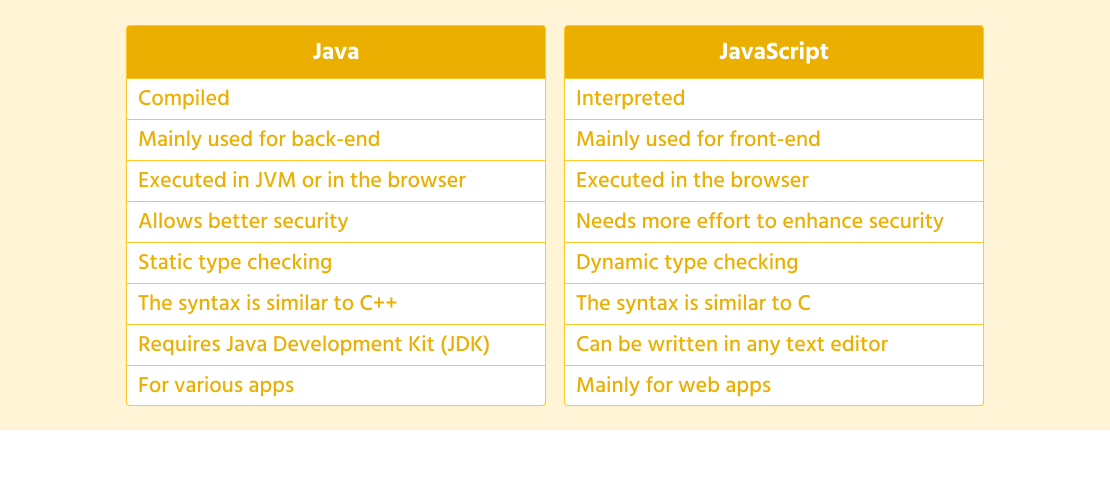
  • Java is a compiled language, while JavaScript is an interpreted language.
  • Java requires a specific development environment to run (JVM), whereas JavaScript runs directly in web browsers.
  • Java is more suitable for building complex applications with high performance requirements, while JavaScript excels in enhancing user interfaces and interactivity on websites.
  • Despite their differences, both languages play crucial roles in the world of software development and have their unique strengths and use cases.

In conclusion, while Java and JavaScript share some similarities in their syntax and structure, they cater to different needs in the realm of programming. Understanding their distinctions can help developers choose the right tool for the job when embarking on software development projects.


Understanding Java and JavaScript: Answers to 7 Common Questions

  1. Are Java and JavaScript the same thing?
  2. Which is the no. 1 coding language?
  3. Is Java and JavaScript the same thing?
  4. Can I learn JavaScript in 7 days?
  5. Should I learn Java or JavaScript?
  6. Can Java be used with JavaScript?
  7. Is JavaScript replacing Java?

Are Java and JavaScript the same thing?

One common misconception in the programming world is whether Java and JavaScript are the same thing. Despite their similar names, Java and JavaScript are two distinct programming languages with different purposes and characteristics. Java is a versatile, statically typed language primarily used for developing applications across various platforms, while JavaScript is a dynamic scripting language mainly utilized for enhancing interactivity on web pages. Understanding the differences between Java and JavaScript can help clarify their unique roles in software development and dispel the confusion surrounding their namesake similarity.

Which is the no. 1 coding language?

The question of which coding language holds the top spot as the number one choice is subjective and can vary depending on the context and purpose. Java and JavaScript are both widely used languages in the programming world, each excelling in different areas. Java is favored for its versatility and robustness in building various applications, while JavaScript shines in creating dynamic and interactive web experiences. Ultimately, there is no definitive answer to which coding language is the absolute best, as it ultimately depends on the specific requirements of a project and the expertise of the developer utilizing it.

Is Java and JavaScript the same thing?

The frequently asked question, “Is Java and JavaScript the same thing?” often arises due to their similar names. However, Java and JavaScript are two distinct programming languages with different purposes and characteristics. Java is a versatile language used for developing various applications, while JavaScript is primarily utilized for enhancing web pages with interactive elements. Despite sharing some syntax similarities, Java and JavaScript serve separate roles in software development, each offering unique features and capabilities tailored to specific use cases. Understanding the differences between Java and JavaScript is essential for developers to effectively leverage the strengths of each language in their projects.

Can I learn JavaScript in 7 days?

Learning JavaScript in 7 days is a common question among beginners eager to acquire programming skills quickly. While it is possible to grasp the basics of JavaScript within a week through intensive study and practice, mastering the language in such a short timeframe may be challenging for most individuals. JavaScript is a powerful and versatile programming language used for web development, and proficiency typically requires consistent practice and hands-on experience over an extended period. Setting realistic learning goals, dedicating time daily to study and code, and seeking guidance from resources like tutorials, documentation, and online communities can help accelerate the learning process effectively. Ultimately, the journey to becoming proficient in JavaScript is a continuous learning experience that evolves with time and practice.

Should I learn Java or JavaScript?

When faced with the frequently asked question of whether to learn Java or JavaScript, it’s essential to consider your specific goals and interests in programming. Java is a versatile language commonly used for building robust applications across various platforms, while JavaScript is primarily focused on enhancing web interactivity and user experience. If you aim to delve into desktop or mobile application development, mastering Java might be the way to go. On the other hand, if your focus lies in web development and creating dynamic website features, learning JavaScript would be more beneficial. Ultimately, both languages have their strengths and applications in the programming world, so choosing between Java and JavaScript depends on your desired career path and the type of projects you envision working on.

Can Java be used with JavaScript?

When it comes to the question of whether Java can be used with JavaScript, it’s important to clarify that while both languages share a similar name, they serve different purposes and operate in distinct environments. Java is a robust programming language commonly used for developing applications, while JavaScript is primarily utilized for enhancing web pages with interactive features. While there are ways to integrate Java and JavaScript in certain scenarios, they typically function independently due to their specific roles and execution environments. Developers may leverage tools like Java applets or server-side technologies to communicate with JavaScript on the client side, but direct integration between the two languages is not a typical practice in modern software development. Understanding the strengths and limitations of each language can help determine the most effective approach when considering their potential collaboration in a project.

Is JavaScript replacing Java?

The frequently asked question of whether JavaScript is replacing Java is a common topic of discussion in the programming community. While both languages have their strengths and use cases, it’s essential to understand that JavaScript and Java serve different purposes in the world of software development. JavaScript is primarily used for client-side web development, enhancing user interfaces and adding interactivity to websites. On the other hand, Java is a versatile language known for its platform independence and robustness, making it suitable for building complex applications across various domains. While JavaScript’s popularity has surged in recent years due to its role in web development, Java continues to be widely used in enterprise applications, mobile development, and other areas where its strengths shine. Ultimately, rather than replacing each other, JavaScript and Java coexist as valuable tools that cater to distinct programming needs.

javascript code examples

Exploring the Power of JavaScript Through Code Examples

The Power of JavaScript: Exploring Code Examples

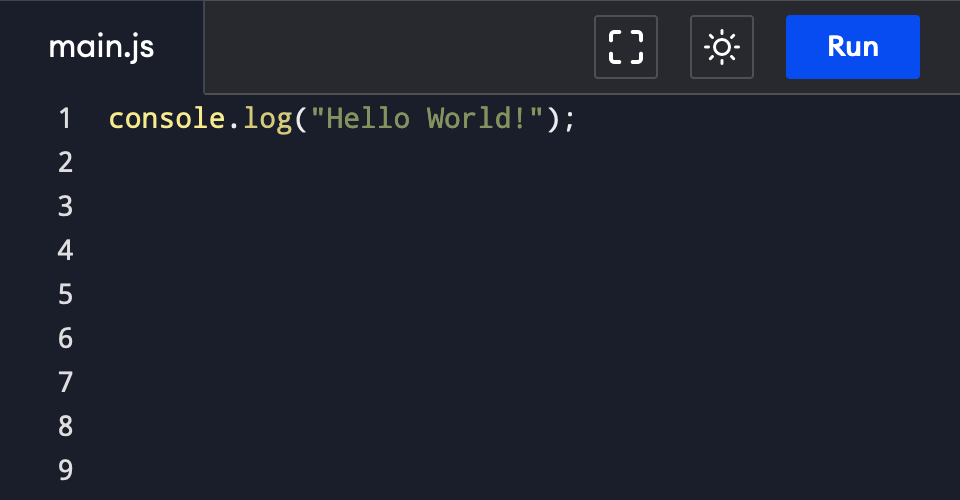
JavaScript is a versatile programming language that is widely used in web development to create dynamic and interactive websites. With its flexibility and ease of use, JavaScript allows developers to add functionality and interactivity to their web pages. Let’s explore some code examples to showcase the power of JavaScript:

Example 1: Displaying a Welcome Message

With just a few lines of JavaScript code, you can display a personalized welcome message to your website visitors:

“`html

Welcome Message Example

“`

Example 2: Creating an Interactive Button

You can make your website more engaging by adding an interactive button that changes its text when clicked:

“`html

Interactive Button Example

“`

Example 3: Validating Form Input

JavaScript can also be used to validate user input in forms to ensure data integrity:

“`html

“`

These examples demonstrate just a fraction of what JavaScript can do. By leveraging the power of JavaScript, developers can create dynamic, responsive, and user-friendly web applications that enhance the overall user experience.


8 Commonly Asked Questions About JavaScript Code Examples and Their Solutions

  1. 1. How can I display a message using JavaScript?
  2. 2. How do I create interactive elements like buttons with JavaScript?
  3. 3. What are some common uses of JavaScript in web development?
  4. 4. Can you provide examples of form validation using JavaScript?
  5. 5. How can I manipulate the DOM (Document Object Model) with JavaScript?
  6. 6. What is event handling in JavaScript and how is it used in code examples?
  7. 7. How do I make AJAX (Asynchronous JavaScript and XML) requests with JavaScript?
  8. 8. Are there any resources or tutorials for beginners to learn about JavaScript code examples?

1. How can I display a message using JavaScript?

To display a message using JavaScript, developers can use the `alert()`, `prompt()`, or `document.write()` functions. The `alert()` function creates a pop-up dialog box with a message, while the `prompt()` function prompts the user to input text. Additionally, the `document.write()` function can dynamically write content directly to the HTML document. By incorporating these functions into their code, developers can easily showcase messages and interact with users in a simple and effective manner using JavaScript.

2. How do I create interactive elements like buttons with JavaScript?

To create interactive elements like buttons using JavaScript, you can utilize event handling to define actions that occur when the button is clicked. By assigning a function to the button’s onclick event, you can specify the behavior you want the button to exhibit when interacted with. This allows you to dynamically change the content of the button or perform specific actions based on user input. JavaScript provides a flexible and powerful way to add interactivity to your web pages, giving you the ability to create engaging user experiences through custom functionality and behavior.

3. What are some common uses of JavaScript in web development?

JavaScript is a foundational element in web development, offering a wide range of functionalities that enhance user interaction and experience on websites. Some common uses of JavaScript in web development include form validation to ensure data accuracy, creating interactive elements like buttons and sliders for engaging user interfaces, implementing dynamic content updates without reloading the entire page, and integrating with APIs to fetch and display real-time data. JavaScript also plays a crucial role in animations, user authentication processes, handling events such as clicks or scrolls, and optimizing website performance through asynchronous loading of resources. Overall, JavaScript is essential for building modern, dynamic websites that deliver a seamless and interactive user experience.

4. Can you provide examples of form validation using JavaScript?

Certainly! Form validation using JavaScript is a common practice in web development to ensure that user input meets specific criteria before being submitted. By incorporating JavaScript code into the form, developers can create custom validation rules such as checking for required fields, validating email addresses, or ensuring that input data falls within a certain range. These validations help improve the user experience by providing real-time feedback and preventing erroneous data from being submitted. Overall, form validation with JavaScript is a powerful tool that enhances the functionality and reliability of web forms.

5. How can I manipulate the DOM (Document Object Model) with JavaScript?

To manipulate the DOM (Document Object Model) with JavaScript, developers can use a variety of methods and properties provided by the language. By accessing elements within the DOM tree using selectors like getElementById, getElementsByClassName, or querySelector, developers can dynamically change content, styles, attributes, and even create new elements on a web page. Additionally, event listeners can be attached to DOM elements to respond to user interactions such as clicks or key presses. Through these techniques, JavaScript empowers developers to create dynamic and interactive web experiences by manipulating the structure and content of the DOM in real-time.

6. What is event handling in JavaScript and how is it used in code examples?

Event handling in JavaScript refers to the process of defining and assigning functions to be executed when a specific event occurs, such as a user clicking a button or hovering over an element on a webpage. In code examples, event handling is implemented by using event listeners to listen for certain events and trigger corresponding actions. For instance, a click event on a button can be captured using an event listener, which then calls a function to perform a specific task, like displaying a message or updating content on the page. Event handling is crucial in creating interactive and dynamic web applications that respond to user actions in real-time, enhancing the overall user experience.

7. How do I make AJAX (Asynchronous JavaScript and XML) requests with JavaScript?

To make AJAX (Asynchronous JavaScript and XML) requests with JavaScript, developers can use the XMLHttpRequest object to send and receive data from a web server without having to reload the entire page. By utilizing AJAX, developers can create dynamic and interactive web applications that fetch data in the background, providing a seamless user experience. With the XMLHttpRequest object, developers can specify the type of request (GET or POST), define the URL endpoint, handle response data asynchronously, and update the webpage content dynamically based on the retrieved data. AJAX has revolutionized web development by enabling real-time updates and improved performance without disrupting the user’s browsing experience.

8. Are there any resources or tutorials for beginners to learn about JavaScript code examples?

For beginners looking to learn about JavaScript code examples, there are plenty of resources and tutorials available online. Websites like Codecademy, W3Schools, and Mozilla Developer Network offer comprehensive guides and interactive lessons that cover a wide range of JavaScript topics, including code examples. Additionally, platforms like YouTube and Udemy host video tutorials that cater to different learning styles. By exploring these resources, beginners can gain a solid understanding of JavaScript fundamentals and practice writing their own code examples to enhance their skills.

javascript examples

Exploring Creative JavaScript Examples for Interactive Web Experiences

Exploring JavaScript Examples

JavaScript is a versatile programming language that is commonly used to enhance the interactivity of websites. With its wide range of functionalities, JavaScript can be applied in various ways to create dynamic and engaging web experiences. Let’s explore some examples of how JavaScript can be used:

Form Validation

JavaScript can be used to validate user input in forms, ensuring that the data submitted is correct and meets specified criteria. For example, you can create a script that checks if an email address entered by a user is in the correct format before allowing the form to be submitted.

Image Slideshow

JavaScript can also be used to create interactive image slideshows on websites. By writing a script that cycles through a set of images and displays them one after another with transition effects, you can enhance the visual appeal of your website.

Interactive Maps

With JavaScript libraries like Google Maps API, you can integrate interactive maps into your website. Users can interact with the map by zooming in, panning around, and even adding custom markers for locations of interest.

Dynamic Content Loading

JavaScript enables dynamic content loading without having to reload the entire webpage. For instance, you can use AJAX (Asynchronous JavaScript and XML) to fetch data from a server and update specific parts of a webpage without disrupting the user experience.

Form Submission Handling

You can use JavaScript to handle form submissions asynchronously, providing instant feedback to users without reloading the page. This technique enhances user experience by giving immediate responses upon form submission.

In conclusion, JavaScript offers endless possibilities for creating interactive and engaging web experiences. By leveraging its capabilities through various examples like form validation, image slideshows, interactive maps, dynamic content loading, and form submission handling, you can take your website to the next level of interactivity and functionality.


Top 9 JavaScript Example FAQs: Form Validation, Image Slideshows, Interactive Maps, and More

  1. 1. How can I create a simple form validation using JavaScript?
  2. 2. What are some popular libraries or frameworks for creating image slideshows with JavaScript?
  3. 3. How do I integrate interactive maps into my website using JavaScript?
  4. 4. Can you provide an example of dynamic content loading using AJAX in JavaScript?
  5. 5. What is the best practice for handling form submissions asynchronously with JavaScript?
  6. 6. How can I implement client-side input validation in JavaScript to improve user experience?
  7. 7. Are there any specific security considerations when using JavaScript examples on a website?
  8. 8. How do I optimize performance when incorporating multiple JavaScript examples on a webpage?
  9. 9. What are some creative ways to use JavaScript to enhance user engagement on a website?

1. How can I create a simple form validation using JavaScript?

To create a simple form validation using JavaScript, you can write a script that checks the input fields of a form before it is submitted. For instance, you can verify if a required field is empty or validate the format of an email address. By attaching event listeners to the form elements, you can trigger validation functions when the user interacts with the form. Providing informative error messages and preventing form submission until all criteria are met enhances user experience and ensures data integrity. JavaScript empowers developers to customize form validation logic according to their specific requirements, making it a powerful tool for enhancing user interaction on websites.

There are several popular libraries and frameworks commonly used for creating image slideshows with JavaScript. One of the most well-known libraries is Slick Carousel, which offers a wide range of customizable options for creating responsive and feature-rich slideshows. Another popular choice is Swiper, known for its smooth touch interactions and support for various types of content beyond images. Additionally, libraries like Flickity and Glide.js provide easy-to-use solutions with unique features such as draggable sliders and carousel layouts. These libraries offer developers a convenient way to implement dynamic and visually appealing image slideshows on websites efficiently.

3. How do I integrate interactive maps into my website using JavaScript?

To integrate interactive maps into your website using JavaScript, you can utilize libraries like Google Maps API. By incorporating the API into your code, you gain access to a wide range of functionalities that allow you to create dynamic and interactive maps for your website visitors. With JavaScript, you can customize the map’s appearance, add markers for specific locations, enable zooming and panning features, and even integrate additional layers for enhanced user experience. By following the documentation provided by the mapping library and implementing the necessary scripts in your web pages, you can seamlessly integrate interactive maps that engage and inform your audience effectively.

4. Can you provide an example of dynamic content loading using AJAX in JavaScript?

Certainly! Dynamic content loading using AJAX in JavaScript is a common technique used to fetch data from a server asynchronously and update specific parts of a webpage without requiring a full page reload. For example, you can create a button on a webpage that, when clicked, triggers an AJAX request to retrieve new content from the server and seamlessly updates the existing content on the page. This approach enhances user experience by providing real-time updates without disrupting the overall layout or functionality of the webpage.

5. What is the best practice for handling form submissions asynchronously with JavaScript?

When it comes to handling form submissions asynchronously with JavaScript, the best practice is to utilize AJAX (Asynchronous JavaScript and XML) technology. By using AJAX, you can send form data to the server in the background without refreshing the entire webpage. This allows for a seamless user experience where feedback can be provided instantly without disrupting the user’s interaction on the page. Additionally, incorporating error handling mechanisms and validation checks on both the client and server sides ensures data integrity and enhances the overall reliability of form submissions.

6. How can I implement client-side input validation in JavaScript to improve user experience?

Implementing client-side input validation in JavaScript is a crucial step to enhance the user experience on a website. By writing scripts that validate user input directly in the browser, you can provide instant feedback to users, guiding them to correct any errors before submitting a form. This proactive approach not only improves data accuracy but also saves time by preventing unnecessary server requests for invalid data. Through client-side input validation, users can enjoy a smoother and more intuitive interaction with web forms, leading to a more satisfying browsing experience overall.

7. Are there any specific security considerations when using JavaScript examples on a website?

When using JavaScript examples on a website, it is crucial to consider security implications to protect both the website and its users. One key consideration is the risk of Cross-Site Scripting (XSS) attacks, where malicious scripts are injected into web pages to steal sensitive information or manipulate content. To mitigate this risk, it is important to sanitize user input, validate data before processing it, and avoid executing code from untrusted sources. Additionally, implementing Content Security Policy (CSP) headers can help prevent unauthorized script execution and enhance the overall security posture of the website. By following best practices and staying vigilant about potential security threats, developers can ensure that their JavaScript examples do not compromise the integrity and safety of the website.

8. How do I optimize performance when incorporating multiple JavaScript examples on a webpage?

When incorporating multiple JavaScript examples on a webpage, optimizing performance is crucial to ensure a smooth user experience. One effective way to enhance performance is by minimizing the number of external script files and combining them into a single file to reduce HTTP requests. Additionally, utilizing asynchronous loading for non-essential scripts can prevent blocking the rendering of critical content. Implementing lazy loading techniques for JavaScript components that are not immediately visible on the page can also improve load times. Moreover, regularly reviewing and optimizing code for efficiency and removing unnecessary scripts can further boost the overall performance of a webpage with multiple JavaScript examples.

9. What are some creative ways to use JavaScript to enhance user engagement on a website?

There are numerous creative ways to utilize JavaScript to enhance user engagement on a website. One popular method is creating interactive quizzes or surveys that dynamically update based on user responses, providing a personalized experience. Another effective approach is implementing live chat functionality using JavaScript to allow real-time communication between users and customer support. Additionally, incorporating animated elements such as interactive infographics or scrolling effects can capture users’ attention and make the website more visually appealing. By leveraging JavaScript for features like gamification, dynamic content updates, and immersive visual effects, websites can offer a more engaging and interactive user experience that keeps visitors coming back for more.

java applet

Exploring the Legacy of Java Applets in Modern Web Development

The Power of Java Applets in Web Development

The Power of Java Applets in Web Development

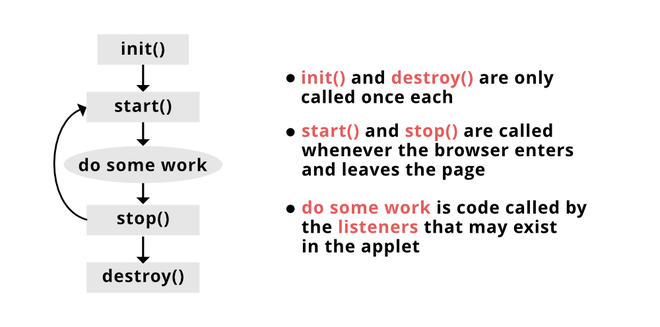
Java applets have been a significant technology in web development for many years. They are small applications written in Java that can be embedded into web pages to provide interactive features and functionality.

One of the key advantages of using Java applets is their platform independence. Since Java is a cross-platform language, applets can run on any system that has a Java Virtual Machine (JVM) installed, making them accessible to a wide audience.

Java applets are also known for their security features. They run in a sandbox environment that restricts their access to the system resources, providing a layer of protection against malicious activities.

With Java applets, developers can create dynamic and interactive content on web pages, such as games, animations, data visualizations, and more. This versatility makes them a valuable tool for enhancing user experience and engagement.

However, it’s essential to note that the use of Java applets has declined in recent years due to security concerns and the rise of other technologies like HTML5 and JavaScript. Despite this decline, Java applets still hold relevance in certain niche applications where their unique capabilities are required.

In conclusion, while the popularity of Java applets may have waned over time, their power and versatility in web development remain undeniable. For developers looking to add interactive elements to their web projects with cross-platform compatibility, Java applets can still be a valuable asset.


Understanding Java Applets: Key Questions and Insights for Web Development

  1. What is a Java applet?
  2. How do Java applets differ from standalone Java applications?
  3. Why are Java applets used in web development?
  4. What are the advantages of using Java applets?
  5. Are Java applets still relevant in modern web development?
  6. How do you embed a Java applet into a web page?
  7. What security considerations should be taken into account when using Java applets?

What is a Java applet?

A Java applet is a small application written in the Java programming language that can be embedded into web pages to provide interactive features and functionality. Unlike standalone Java applications, which are launched independently by the user, Java applets run within a web browser environment. They are often used to create dynamic content on websites, such as animations, games, data visualizations, and more. Java applets benefit from platform independence, allowing them to run on any system with a Java Virtual Machine (JVM) installed. Despite their declining popularity due to security concerns and the emergence of alternative technologies, Java applets still offer unique capabilities for developers seeking cross-platform compatibility in their web projects.

How do Java applets differ from standalone Java applications?

Java applets and standalone Java applications differ in their execution environments and intended use. Java applets are small Java programs that run within a web browser using a Java plugin. They are designed to be embedded in web pages to provide interactive content and functionality. On the other hand, standalone Java applications are programs that run independently on a user’s system without the need for a web browser. They have direct access to system resources and can perform tasks such as file manipulation, database operations, and more. While both applets and standalone applications are written in Java, their deployment methods and capabilities vary significantly, catering to different use cases and environments.

Why are Java applets used in web development?

Java applets are used in web development for their ability to provide dynamic and interactive content on web pages. One of the primary reasons for using Java applets is their platform independence, allowing them to run on any system with a Java Virtual Machine (JVM) installed. This cross-platform compatibility makes Java applets accessible to a wide audience. Additionally, Java applets offer enhanced security features by running in a sandbox environment that limits their access to system resources, mitigating potential security risks. Their versatility in creating engaging elements such as games, animations, and data visualizations makes Java applets a valuable tool for developers seeking to enhance user experience and interactivity on websites.

What are the advantages of using Java applets?

One of the frequently asked questions about Java applets is regarding their advantages. Java applets offer several benefits, including platform independence, security features, and the ability to create dynamic and interactive content on web pages. Their cross-platform compatibility allows them to run on any system with a Java Virtual Machine (JVM) installed, making them accessible to a wide audience. Additionally, Java applets operate in a secure sandbox environment that limits their access to system resources, enhancing overall security. Developers can leverage Java applets to enhance user experience by incorporating interactive elements like games, animations, and data visualizations into their web projects. Despite a decline in usage due to security concerns and the emergence of alternative technologies, Java applets remain valuable for specific applications requiring their unique capabilities.

Are Java applets still relevant in modern web development?

The relevance of Java applets in modern web development is a commonly debated topic. While Java applets were once a popular choice for creating interactive content on web pages, their usage has declined in recent years due to security concerns and the emergence of alternative technologies like HTML5 and JavaScript. Despite this decline, Java applets still hold value in niche applications where their unique capabilities, such as platform independence and security features, are required. Developers evaluating the use of Java applets in modern web projects should consider their specific needs for cross-platform compatibility and interactive functionality to determine if Java applets are still a relevant solution for their development requirements.

How do you embed a Java applet into a web page?

To embed a Java applet into a web page, you typically need to include the necessary HTML code within the webpage’s source code. This involves using the <applet> tag and specifying attributes such as the applet’s class file, width, height, and any other parameters required by the applet. Additionally, you may need to ensure that the Java applet’s class files are hosted on a server accessible to the web page. By following these steps and correctly configuring the <applet> tag, you can seamlessly integrate a Java applet into your web page and provide users with an interactive and engaging experience.

What security considerations should be taken into account when using Java applets?

When using Java applets, it is crucial to consider security implications to protect users and their systems. Java applets run in a sandbox environment with restricted access to system resources, but it’s essential to ensure that the applet code is from a trusted source to prevent malicious activities. Regularly update the Java Runtime Environment (JRE) to patch any security vulnerabilities. Limit the privileges granted to the applet and use digital signatures to verify the authenticity of the code. Additionally, consider implementing secure coding practices and monitoring for any suspicious behavior when incorporating Java applets into web applications. By addressing these security considerations, developers can mitigate risks and enhance the overall safety of using Java applets on websites.

computer software engineer

Unlocking Innovation: The Role of a Computer Software Engineer in Today’s Tech Landscape

Computer Software Engineer

The Role of a Computer Software Engineer

A computer software engineer plays a crucial role in the development, design, and maintenance of software applications. These professionals are responsible for creating innovative solutions to meet the needs of businesses and individuals in today’s digital age.

Responsibilities of a Software Engineer

Software engineers are involved in every stage of the software development process. They analyze user requirements, design software solutions, write code, test applications for bugs and errors, and maintain existing software systems. These professionals work closely with other team members, such as project managers, designers, and quality assurance testers, to ensure that the final product meets all requirements.

Skills Required

To excel as a computer software engineer, one must possess strong technical skills in programming languages such as Java, C++, Python, or JavaScript. Problem-solving abilities, attention to detail, and creativity are also essential qualities for this role. Additionally, effective communication skills are vital for collaborating with team members and stakeholders throughout the development process.

Educational Background

Most computer software engineers hold a bachelor’s degree in computer science or a related field. Some professionals may pursue advanced degrees or certifications to further enhance their skills and knowledge in specific areas of software engineering.

Career Outlook

The demand for computer software engineers is expected to continue growing as technology becomes more integrated into various industries. With the rise of mobile applications, cloud computing, and artificial intelligence, there are abundant opportunities for skilled software engineers to make a significant impact in the tech industry.

Conclusion

In conclusion, computer software engineers play a vital role in shaping the future of technology through their expertise in developing innovative software solutions. Their contributions drive progress and innovation across industries worldwide.


5 Essential Tips for Excelling as a Computer Software Engineer

  1. Stay updated with the latest programming languages and technologies.
  2. Practice coding regularly to improve your skills and problem-solving abilities.
  3. Collaborate with other software engineers to learn from each other and work on projects together.
  4. Document your code properly for easier maintenance and future reference.
  5. Stay curious and never stop learning about new developments in the field of software engineering.

Stay updated with the latest programming languages and technologies.

It is crucial for computer software engineers to stay updated with the latest programming languages and technologies. By continuously learning and adapting to new advancements in the field, software engineers can enhance their skills, remain competitive in the job market, and create more efficient and innovative solutions for various projects. Keeping abreast of emerging trends ensures that software engineers can tackle complex challenges with confidence and contribute effectively to the ever-evolving tech industry.

Practice coding regularly to improve your skills and problem-solving abilities.

To enhance your proficiency as a computer software engineer, it is crucial to engage in regular coding practice. By consistently working on coding exercises and projects, you can sharpen your skills and enhance your problem-solving abilities. This practice not only helps you become more proficient in programming languages but also allows you to tackle complex challenges with confidence and creativity. Embracing regular coding practice as a routine can significantly contribute to your growth and success in the field of software engineering.

Collaborate with other software engineers to learn from each other and work on projects together.

Collaborating with other software engineers is a valuable tip for professionals in the field. By working together on projects and sharing knowledge, software engineers can learn from each other’s experiences, expand their skill sets, and tackle complex challenges more effectively. This collaborative approach not only fosters a sense of teamwork and camaraderie but also leads to the development of innovative solutions that benefit both the individual engineers and the projects they are working on. Embracing collaboration allows software engineers to leverage diverse perspectives and expertise, ultimately enhancing their growth and success in the dynamic world of technology.

Document your code properly for easier maintenance and future reference.

Properly documenting your code is essential for computer software engineers to facilitate easier maintenance and reference in the future. Clear and concise documentation helps developers understand the purpose and functionality of the code, making it simpler to troubleshoot issues, make updates, and collaborate with team members. By documenting code effectively, software engineers can ensure that their work remains accessible and comprehensible over time, ultimately contributing to more efficient and successful software development projects.

Stay curious and never stop learning about new developments in the field of software engineering.

It is crucial for computer software engineers to stay curious and continuously seek out new developments in the field of software engineering. By maintaining a mindset of curiosity and a commitment to lifelong learning, software engineers can stay at the forefront of technological advancements, enhance their skills, and adapt to evolving industry trends. Embracing a culture of continuous learning not only expands one’s knowledge base but also fosters innovation and ensures relevance in an ever-changing technological landscape.