cfchris.com

Loading

udemy java

Udemy Java Courses: A Guide to Learning Java Online

Learning Java on Udemy: How to Choose the Right Course

Java is one of the most widely used programming languages, powering applications in areas such as web development, enterprise software, and Android development. For beginners and experienced programmers alike, Udemy offers a range of Java courses that can help build practical skills at your own pace.

What You Can Learn

Java courses on Udemy cover topics at different levels. A beginner course may introduce programming fundamentals, while an advanced course might focus on frameworks, testing, or application architecture. Depending on the course, you may learn:

  • Java syntax, variables, data types, and control flow
  • Object-oriented programming, including classes, inheritance, and interfaces
  • Collections, generics, and exception handling
  • Working with files, databases, and APIs
  • Building projects with tools and frameworks such as Spring
  • Testing, debugging, and using development environments

How to Choose a Java Course

The best course depends on your experience and goals. Before enrolling, read the course description and check that its content matches what you want to learn. A course designed for complete beginners should explain basic concepts and provide setup instructions. If you already know the fundamentals, look for lessons that go deeper or focus on a specific area of Java development.

It can also help to review the course curriculum, sample lessons, and recent student feedback. Look for a clear structure, hands-on exercises, and projects that let you apply what you learn. Check when the material was last updated, especially if the course covers development tools or frameworks that change over time.

Make the Most of Your Course

Watching lessons is only part of learning to code. Write the examples yourself, experiment with the code, and try solving small problems without immediately looking at the answer. When you encounter an error, practice reading the message and tracing the issue. These habits help turn new concepts into skills you can use independently.

Consider supplementing your course with a personal project. You could build a simple calculator, task tracker, or small application that works with a database. Projects give you a chance to combine concepts and create examples to discuss in a portfolio or interview.

Is Udemy a Good Way to Learn Java?

Udemy can be a flexible and affordable starting point for learning Java, particularly if you prefer video lessons and self-paced study. However, the experience varies by course, and completing a course alone does not guarantee professional proficiency. Consistent practice, independent projects, and learning to use documentation are important parts of the process.

With a course suited to your level and a steady routine of hands-on coding, Udemy can help you build a solid foundation in Java. Choose a learning path that supports your goals, practice regularly, and keep developing projects as your skills grow.


Learning Java on Udemy: 9 Frequently Asked Questions

  1. Is Udemy a good place to learn Java?
  2. Which Udemy Java course is best for beginners?
  3. Can I learn Java on Udemy with no programming experience?
  4. How long does it take to complete a Java course on Udemy?
  5. Do Udemy Java courses include hands-on projects?
  6. Do Udemy Java courses provide a certificate of completion?
  7. How much do Java courses on Udemy cost?
  8. Are Udemy Java courses kept up to date?
  9. Can a Udemy Java course help me get a job as a Java developer?

Is Udemy a good place to learn Java?

Yes, Udemy can be a good place to learn Java, especially if you prefer flexible, self-paced video lessons. Courses range from beginner fundamentals to advanced topics, so review the curriculum, sample lessons, and recent student feedback to find one that fits your experience and goals. To make real progress, practice writing code alongside the lessons and build projects of your own; watching videos alone is rarely enough to develop strong programming skills.

Which Udemy Java course is best for beginners?

The best Udemy Java course for beginners is one that starts with the fundamentals, explains concepts clearly, and includes plenty of coding exercises and practical projects. Before enrolling, review the curriculum, preview a lesson, and check recent student feedback to make sure the course matches your learning style and goals. Look for coverage of core topics such as variables, control flow, methods, and object-oriented programming, and choose a course that’s regularly updated.

Can I learn Java on Udemy with no programming experience?

Yes, you can learn Java on Udemy with no programming experience. Look for a beginner-friendly course that starts with the basics, explains how to set up your development environment, and includes hands-on exercises and projects. Work through the lessons at your own pace, write the code yourself, and practice regularly. Programming concepts can take time to understand, so starting small and reviewing lessons when needed can help you build confidence.

How long does it take to complete a Java course on Udemy?

The time it takes to complete a Java course on Udemy depends on the course’s length, your prior programming experience, and how much time you can study each week. Some introductory courses can be finished in a few days of focused learning, while more comprehensive courses may take several weeks or longer. Since Udemy courses are typically self-paced, you can pause, revisit lessons, and practice coding at a schedule that works for you.

Do Udemy Java courses include hands-on projects?

Yes, many Udemy Java courses include hands-on projects, coding exercises, or practice assignments to help you apply what you learn. The amount and type of project work vary by course, so review the curriculum and course description before enrolling. Look for projects that match your experience level and learning goals, and plan to write and adapt the code yourself to get the most benefit.

Do Udemy Java courses provide a certificate of completion?

Yes, many Udemy Java courses provide a certificate of completion after you finish all the course requirements. You can typically access and download the certificate from your Udemy account. Keep in mind that Udemy certificates recognize course completion but are not formal academic credit or an industry certification. Check the individual course details for its requirements and certificate availability.

How much do Java courses on Udemy cost?

Java course prices on Udemy vary by instructor, course content, and promotions. Many courses are regularly discounted, so the price you pay may be lower than the listed price. Check the course page for current pricing, included materials, and any applicable refund terms before enrolling.

Are Udemy Java courses kept up to date?

Udemy Java courses may be updated by their instructors, but how often they’re refreshed varies from course to course. Before enrolling, check the course’s “Last updated” date, curriculum, and recent student reviews to see whether the material still matches your learning goals and current tools. Java fundamentals often remain useful over time, while lessons on frameworks, software versions, and development tools may need more frequent updates.

Can a Udemy Java course help me get a job as a Java developer?

A Udemy Java course can help you build foundational skills and complete projects that may strengthen your job applications, but finishing a course alone usually isn’t enough to land a Java developer role. Employers often look for practical coding experience, familiarity with tools and frameworks used in the job, problem-solving skills, and the ability to explain your work. Choose a course with hands-on projects, then keep practicing, build a portfolio, and prepare for technical interviews to improve your chances.

freecodecamp java

FreeCodeCamp Java: A Beginner’s Guide to Learning Java for Free

Learning Java with freeCodeCamp: A Beginner’s Guide

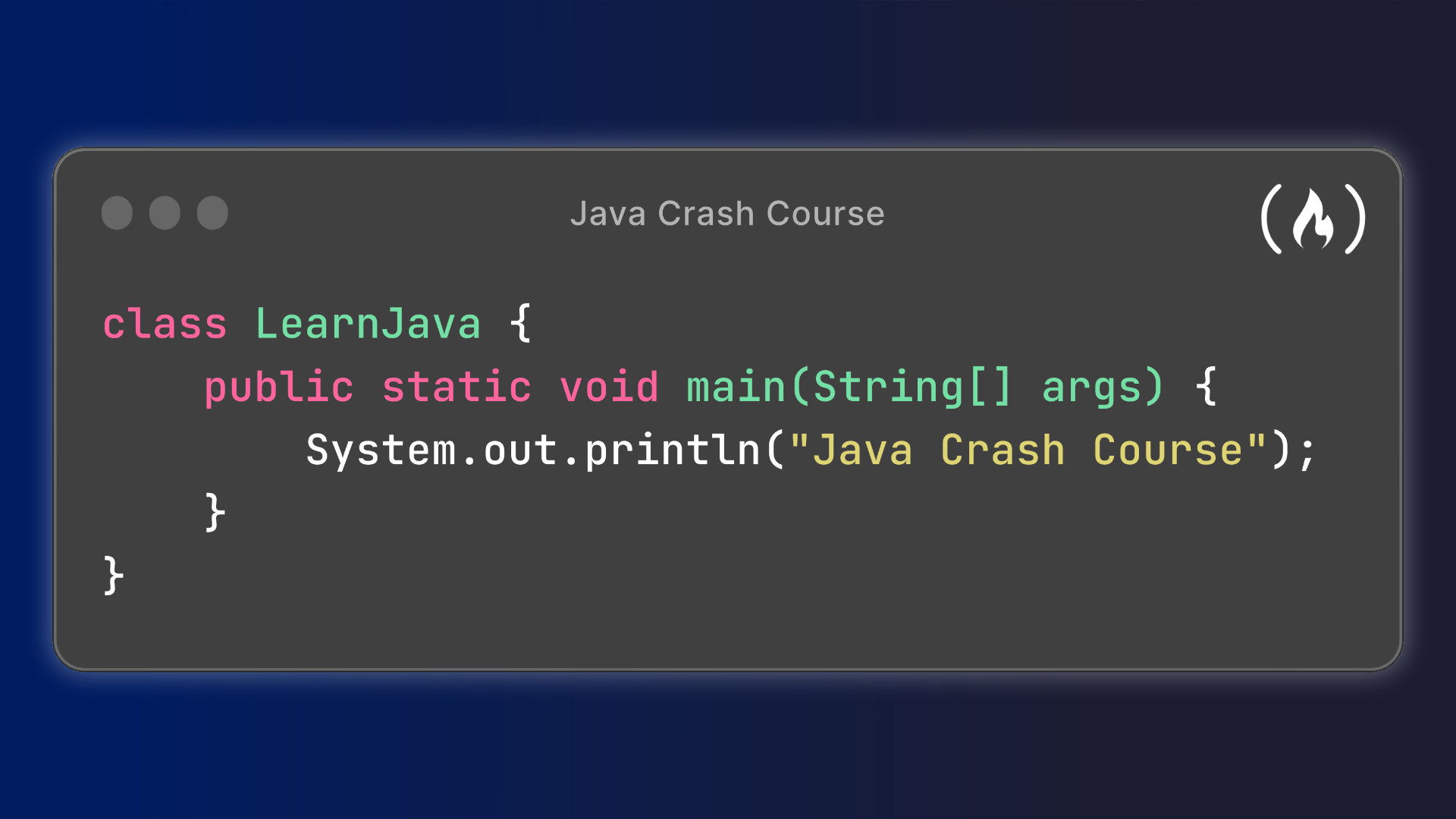
Java is a popular, general-purpose programming language used to build everything from Android apps and business software to web services and large-scale systems. For beginners looking for a place to start, freeCodeCamp offers free learning resources that can help explain Java fundamentals and provide a foundation for further study.

What Is freeCodeCamp?

freeCodeCamp is a nonprofit educational platform known for free programming lessons, projects, and video courses. Its learning materials are available online, making it possible to study at your own pace. Java content may appear in video tutorials, articles, and other resources, so learners should check freeCodeCamp’s website and YouTube channel for the latest offerings.

What You Can Learn

A Java beginner course typically introduces the core ideas and tools needed to write simple programs. Topics may include:

  • Installing and using a Java development environment
  • Java syntax, variables, and data types
  • Operators and expressions
  • Conditional statements and loops
  • Methods and basic program structure
  • Classes, objects, and object-oriented programming
  • Arrays and collections
  • Exception handling and debugging

The specific topics depend on the course or tutorial. Some resources focus on absolute beginners, while others move more quickly or explore a particular Java tool or project.

How to Study Java Effectively

Watching a lesson can help explain a concept, but writing code is what builds practical skill. After each section, try the examples yourself, change the code, and observe what happens. Small experiments can make ideas such as loops, methods, and objects easier to understand.

It also helps to build projects as you learn. A calculator, a number-guessing game, or a simple task tracker can give you practice combining several concepts. When a program fails, read the error message carefully and investigate the cause instead of simply copying a fix. Debugging is an important part of programming.

Is freeCodeCamp’s Java Content Enough?

FreeCodeCamp resources can be a useful starting point, but no single course is likely to cover every part of Java development. After learning the basics, continue with regular practice, documentation, and projects. Depending on your goals, you may also want to study topics such as data structures, testing, databases, web development, or Android development.

Java tools and recommended practices can change over time, so check the publication date of a tutorial and compare instructions with current documentation when needed. A course is most valuable as a guided introduction—not as a substitute for continued learning.

Getting Started

To begin, search freeCodeCamp’s website or YouTube channel for Java lessons, choose a course that matches your experience level, and set aside time to code along. Install a current Java Development Kit (JDK) and a suitable code editor or integrated development environment, then use the course exercises to write and run your own programs.

With consistent practice, freeCodeCamp’s free Java resources can help you take the first steps toward understanding the language. Keep building, keep experimenting, and use each project as an opportunity to strengthen your skills.


freeCodeCamp Java FAQ: Free Courses, Beginner Tips, Certificates, and Next Steps

  1. Does freeCodeCamp offer a Java course for beginners?
  2. Is freeCodeCamp’s Java course completely free?
  3. What topics are covered in freeCodeCamp’s Java tutorials?
  4. Do I need prior programming experience to learn Java with freeCodeCamp?
  5. How long does it take to learn Java through freeCodeCamp?
  6. Does freeCodeCamp provide a Java certificate?
  7. Can I practice Java coding directly on the freeCodeCamp website?
  8. What should I learn after completing a freeCodeCamp Java tutorial?

Does freeCodeCamp offer a Java course for beginners?

Yes. freeCodeCamp offers free, beginner-friendly Java tutorials that introduce fundamentals such as syntax, variables, loops, methods, and object-oriented programming. You can learn at your own pace and practice by coding along, though the exact course offerings may change over time.

Is freeCodeCamp’s Java course completely free?

Yes. freeCodeCamp’s Java lessons and course materials are free to access, with no subscription or course fee required. You’ll need an internet connection and a computer to follow along, and some tutorials may ask you to install Java development tools, which are also available for free. Check the course page for details about any certificates or additional resources.

What topics are covered in freeCodeCamp’s Java tutorials?

FreeCodeCamp’s Java tutorials typically cover the fundamentals of the language, including variables and data types, operators, conditionals, loops, methods, arrays, and object-oriented programming concepts such as classes and objects. Depending on the tutorial, they may also introduce debugging, exception handling, and hands-on projects. Topics vary by course, so check the tutorial’s description for its specific coverage.

Do I need prior programming experience to learn Java with freeCodeCamp?

No prior programming experience is required to start learning Java with freeCodeCamp. Beginner-friendly lessons can introduce basic concepts such as variables, data types, conditionals, and loops step by step. If you’re new to programming, take your time, practice by writing code alongside the lessons, and revisit concepts as needed.

How long does it take to learn Java through freeCodeCamp?

How long it takes to learn Java through freeCodeCamp depends on your experience, study schedule, and goals. If you’re new to programming, expect to spend several weeks or months learning the fundamentals through lessons and regular practice. You may pick up basic syntax sooner, but becoming comfortable building projects takes longer. Set aside consistent time to code, revisit challenging concepts, and work on small projects; completing a course is a starting point, not a measure of mastery.

Does freeCodeCamp provide a Java certificate?

freeCodeCamp does not currently offer a dedicated Java certification. It provides Java tutorials and other learning resources, but its certificates are awarded for completing specific certification curricula on the platform, not for studying Java through a tutorial alone. Check freeCodeCamp’s current certification page for the latest offerings.

Can I practice Java coding directly on the freeCodeCamp website?

FreeCodeCamp’s Java resources may include lessons and guided examples, but Java coding practice is not generally built into the website as an interactive, browser-based coding environment. You can follow along by writing and running code on your computer with a Java Development Kit (JDK) and a code editor or IDE, or use a separate online Java compiler. Check the specific course or lesson for its current setup and practice options.

What should I learn after completing a freeCodeCamp Java tutorial?

After completing a freeCodeCamp Java tutorial, reinforce what you’ve learned by building small projects, such as a calculator, quiz, or task tracker. Then deepen your understanding of object-oriented programming, collections, data structures and algorithms, debugging, and testing. Once you’re comfortable with the fundamentals, choose a direction—such as backend development, Android apps, or enterprise software—and learn the tools and frameworks used in that area. Keep practicing, consult the official Java documentation, and take on projects that gradually become more challenging.

nearshore it development

Nearshore IT Development: A Practical Guide for Growing Businesses

Nearshore IT Development: A Practical Guide for Growing Businesses

Building and maintaining software takes the right mix of technical skill, clear communication, and reliable project management. For companies that need to expand their development capacity, nearshore IT development can offer a useful alternative to hiring an entirely local team or working with a faraway provider.

What Is Nearshore IT Development?

Nearshore IT development is a form of outsourcing in which a business works with software developers or technology teams in nearby countries or regions. The teams are located outside the company’s home country but are typically closer in time zone and geography than offshore partners.

For a U.S. company, a nearshore partner might be based in Latin America or another nearby region. The exact location matters less than whether the team can support the company’s technical needs, communication practices, schedule, and security requirements.

How Nearshore Development Works

A nearshore engagement can take several forms. A company might hire a partner to deliver a complete software project, add developers to an existing team, or provide specialized expertise for a defined period. Common areas of work include:

  • Web and mobile application development
  • Cloud migration and infrastructure
  • Quality assurance and software testing
  • Data engineering and analytics
  • Cybersecurity and application maintenance
  • Product design and user experience

The arrangement can be project-based or ongoing. In either case, the company and provider should agree on goals, responsibilities, communication routines, delivery milestones, and how success will be measured.

Potential Benefits of Nearshore IT Development

More Overlapping Work Hours

Nearby time zones can make it easier to schedule meetings, review work, and resolve questions during the same business day. This overlap may be especially valuable for projects that require frequent collaboration or quick feedback.

Access to a Broader Talent Pool

Nearshore partnerships can help companies reach skilled professionals beyond their local hiring market. This can be useful when a business needs a particular technology skill, wants to expand a team quickly, or has difficulty filling specialized roles locally.

Flexible Team Capacity

External development teams can give a company additional capacity without requiring every role to become a permanent internal position. Depending on the provider and agreement, a team can be scaled up or adjusted as project needs change.

More Convenient Collaboration

Geographic proximity may make occasional in-person planning sessions or workshops more practical than with a distant provider. Even when teams work remotely, a closer location can simplify coordination and reduce the strain of large time differences.

Potential Cost Advantages

Nearshore development may cost less than hiring equivalent talent in some local markets, but savings are not guaranteed. Rates, project complexity, management effort, travel, and the cost of rework all affect the total. Comparing providers solely by hourly rate can lead to a misleading picture of value.

Nearshore, Offshore, and Onshore: What’s the Difference?

Onshore development generally means working with a team in the same country. Nearshore development involves a nearby country or region, while offshore development usually refers to a more distant location. These labels describe geography, not quality. A strong partner can be found in any model, and a poor fit can occur in any model as well.

When comparing options, consider more than distance. Evaluate communication, relevant experience, team stability, security practices, contract terms, and the provider’s ability to work with your existing processes.

Challenges to Plan For

Nearshore development still requires thoughtful management. A partner may work in a different legal environment, use different communication norms, or have limited familiarity with a company’s systems. Requirements can also be misunderstood if project goals and decision-making responsibilities are unclear.

To reduce these risks, document expectations early, establish a shared communication plan, and make sure the provider understands how the product will be used. Assign internal owners who can answer questions and make timely decisions. Treat the external team as a working partner rather than a task queue.

How to Choose a Nearshore Development Partner

Define the Work

Before speaking with providers, identify the problem to solve, the skills required, the expected timeline, and any constraints. A clear scope makes it easier to assess proposals and compare potential partners.

Assess Relevant Experience

Look for experience with projects of similar complexity, industry requirements, and technology. Ask how the team handled challenges, testing, deployment, and ongoing support—not just what technologies appear on a résumé.

Meet the People Who Will Do the Work

The sales team may not be the team assigned to your project. Ask to meet the proposed technical leads and developers, understand how responsibilities are divided, and learn how the provider handles staffing changes.

Review Communication and Delivery Practices

Discuss meeting schedules, documentation, project tracking, code reviews, testing, and escalation procedures. Ask how progress and risks will be reported, and make sure the proposed process fits your organization.

Check Security and Ownership Terms

Review how the provider protects data and systems, manages access, and handles incidents. Contracts should clearly address confidentiality, intellectual property, deliverables, data handling, and the process for ending the engagement.

Start with a Well-Defined Engagement

A small initial project or pilot can help both sides test communication, technical fit, and delivery practices. Set clear acceptance criteria and review the results before expanding the relationship.

Making a Nearshore Partnership Successful

Successful nearshore development depends on shared ownership. Keep product decisions close to the people who understand the business, give developers access to the context they need, and provide feedback regularly. Agree on measurable outcomes such as delivery milestones, defect rates, system performance, or user adoption.

It also helps to invest in team relationships. Introductions, clear documentation, inclusive meetings, and respectful communication can make collaboration smoother across organizations and cultures.

Is Nearshore IT Development Right for Your Business?

Nearshore development may be a good fit when your company needs additional technical capacity, values substantial time-zone overlap, and has the management practices needed to work with a distributed team. It may be less suitable when requirements are highly uncertain, internal decision-makers are unavailable, or the work depends on frequent hands-on coordination that has not been planned for.

The best choice comes from matching the engagement model to the work. With clear goals, careful partner selection, and consistent communication, nearshore IT development can help a business extend its capabilities while keeping collaboration practical and focused.


Nearshore IT Development: 7 Frequently Asked Questions

  1. What is the latest technology in software development?
  2. What does nearshore mean in technology?
  3. Can you give me an example of nearshore outsourcing?
  4. What is the difference between nearshore and offshore software development?
  5. What is an example of nearshore?
  6. What is the nearshore software development model?
  7. What is nearshore development?

What is the latest technology in software development?

There is no single “latest” technology in software development, but several major trends are shaping the field, including AI-assisted coding, generative AI integration, cloud-native applications, and platform engineering. Developers are also adopting technologies such as WebAssembly for running software across environments and memory-safe languages like Rust for performance-sensitive applications. For businesses considering nearshore IT development, the priority should be choosing a partner who can evaluate these technologies against specific project needs, security requirements, and long-term maintenance costs—not simply adopt the newest tools.

What does nearshore mean in technology?

In technology, “nearshore” means working with a software development team or IT service provider in a nearby country or region rather than hiring only locally or partnering with a distant offshore team. For U.S. companies, nearshore partners are often based in Latin America. The closer location may offer more overlapping work hours and easier collaboration, though the exact benefits depend on the team, project, and working arrangements.

Can you give me an example of nearshore outsourcing?

A U.S. company that needs a mobile app might partner with a software development team in Mexico or Colombia. Because the teams are in nearby time zones, they can more easily coordinate meetings, review designs, and address questions during overlapping work hours. The nearshore team could handle app development and testing while the company’s in-house staff manages product priorities and business requirements.

What is the difference between nearshore and offshore software development?

Nearshore software development means working with a team in a nearby country or region, while offshore development involves a team farther away, often across several time zones. Nearshore teams may offer more overlapping business hours, easier real-time communication, and more convenient travel for in-person meetings. Offshore teams can provide access to a broader talent pool and may have different cost advantages. The best choice depends on your project’s needs, budget, communication preferences, and the provider’s expertise—not location alone.

What is an example of nearshore?

An example of nearshore IT development is a U.S. company partnering with a software development team in Mexico to build a web application. Because the teams are in nearby countries and often share overlapping work hours, they can more easily schedule meetings, discuss requirements, and address issues during the same business day. The arrangement is considered nearshore because the development team is based in a geographically close country—not in the company’s home country or a distant region.

What is the nearshore software development model?

The nearshore software development model is a way for a company to work with a software team in a nearby country or region rather than hiring only locally or partnering with a distant offshore provider. The nearshore team may build a complete product, support an existing project, or add specialized skills to an in-house team. Because the teams are often in similar time zones, they can typically coordinate meetings, share feedback, and resolve issues during overlapping work hours. The arrangement can offer access to a wider talent pool and flexible capacity, but its success depends on choosing a qualified partner and setting clear expectations for communication, responsibilities, security, and delivery.

What is nearshore development?

Nearshore development is a way for a company to work with software developers or IT teams in a nearby country or region. Unlike offshore outsourcing, which often involves a significant time-zone difference, nearshore teams typically share more working hours with the client, making it easier to communicate, collaborate, and address issues in real time. Businesses use nearshore development to access skilled talent, add flexibility to their teams, and build or maintain technology products.

java course for beginners

Java Course for Beginners: Learn the Fundamentals and Build Your First Programs

Java Course for Beginners: A Practical Guide to Getting Started

Java is a popular programming language used to build everything from business applications and web services to Android apps and large-scale software systems. Its clear structure, broad ecosystem, and strong community make it a useful language for people learning to code. A well-designed Java course for beginners can help you move from basic concepts to building programs of your own.

Why Learn Java?

Java is designed to run on many types of computers. Java programs are typically compiled into bytecode, which runs on the Java Virtual Machine (JVM). This approach helps the same program work across different operating systems, provided a compatible JVM is available.

Java is also widely used in professional software development. Learning it can introduce you to essential programming ideas—including variables, loops, methods, and object-oriented programming—that apply to many other languages as well.

What a Beginner Java Course Should Cover

You do not need previous programming experience to begin. A good introductory course explains each idea step by step and gives you opportunities to practice it. Look for a course that includes these core topics:

  • Setting up your tools: Install a Java Development Kit (JDK) and choose a code editor or integrated development environment (IDE).
  • Your first program: Learn how to write, compile, and run a simple Java application.
  • Variables and data types: Store information using types such as int, double, boolean, and String.
  • Operators and expressions: Perform calculations and compare values.
  • Conditionals: Use if, else, and switch statements to make decisions.
  • Loops: Repeat tasks with for and while loops.
  • Methods: Organize code into reusable blocks.
  • Arrays and collections: Work with groups of values.
  • Object-oriented programming: Create classes and objects, and learn about fields, constructors, and methods.
  • Debugging and errors: Read compiler messages, find mistakes, and improve your code.

How to Choose the Right Course

Beginner courses come in many formats, including online lessons, classroom instruction, books, and self-paced tutorials. The best choice depends on how you like to learn and how much time you can set aside. Before enrolling, check that the course:

  • Clearly identifies itself as suitable for beginners.
  • Uses current Java tools and explains how to install them.
  • Includes coding exercises, not just videos or lectures.
  • Builds concepts gradually and explains unfamiliar terms.
  • Offers small projects that let you apply what you have learned.

A course does not have to teach every Java feature at once. A strong foundation in the basics is more valuable than rushing through advanced topics before you are ready.

Practice with Small Projects

Writing code regularly is one of the best ways to make progress. After learning the fundamentals, try projects that are simple enough to finish but flexible enough to expand. For example, you could create:

  • A temperature or unit converter
  • A basic calculator
  • A number-guessing game
  • A to-do list for the command line
  • A program that tracks books, movies, or personal expenses

Start with a basic version, then add features as your skills improve. A number-guessing game, for instance, can begin with a random number and a loop. Later, you can add input validation, a limited number of guesses, and a way to play again.

Tips for Learning Java Successfully

Set a manageable learning schedule. Short, frequent practice sessions often work better than trying to learn everything in one sitting. Type out examples yourself, change them, and observe what happens. When you encounter an error, read the message carefully and test one possible fix at a time.

It is also normal to revisit concepts. Object-oriented programming and other topics may take time to feel comfortable. Keep your early programs, review them later, and notice how your understanding has grown.

What Comes After the Basics?

Once you can write small programs and understand how classes and objects work, you can explore topics such as exception handling, file input and output, generics, testing, and common data structures. Your next steps can depend on your goals. For example, you might study web development, Android development, or backend application development.

Start Building with Java

A Java course for beginners can give you a clear path into programming, but progress comes from applying what you learn. Choose a course with hands-on exercises, practice consistently, and build small projects along the way. With patience and regular effort, you can develop the skills to create useful Java applications and continue learning more advanced programming concepts.


Top FAQs About Starting a Java Course for Beginners

  1. Which is the best Java course for beginners?
  2. How can I learn Java as a beginner?
  3. Is 1 month enough to learn Java?
  4. How do I start studying Java?

Which is the best Java course for beginners?

The best Java course for beginners is one that assumes no prior programming experience, teaches concepts step by step, and gives you plenty of hands-on practice. Look for lessons covering Java basics, problem-solving, and object-oriented programming, along with exercises and small projects that help you apply what you learn. The right choice also depends on your learning style, schedule, and budget, so preview a lesson or two before committing.

How can I learn Java as a beginner?

Beginners can learn Java by starting with the basics: installing the JDK and a code editor, then practicing variables, data types, conditionals, loops, methods, and classes. Follow a structured beginner course with hands-on exercises, and write code regularly rather than only watching lessons. Small projects—such as a calculator or number-guessing game—help reinforce new concepts. When errors come up, read the messages carefully and use them as clues; steady practice is more effective than trying to learn everything at once.

Is 1 month enough to learn Java?

One month is enough to learn Java’s fundamentals if you study consistently and practice regularly, but it’s usually not enough to master the language or become job-ready. In that time, you can learn basic syntax, variables, conditionals, loops, methods, and introductory object-oriented programming, then apply them in small projects. Your progress will depend on your prior experience and the time you can dedicate each day. Continue practicing after the first month to strengthen your skills and explore more advanced topics.

How do I start studying Java?

To start studying Java, install the latest Java Development Kit (JDK) and choose a beginner-friendly editor or IDE, such as IntelliJ IDEA or Visual Studio Code. Then follow a structured introductory course that covers basic syntax, variables, conditionals, loops, methods, and classes. Write and run small programs as you learn—such as a calculator or number-guessing game—and practice regularly. When you encounter errors, read the messages carefully and use them to understand how your code works.

java react

Mastering the Art of Java and React Integration for Modern Web Development

Java and React: A Powerful Combination for Modern Web Development

Java and React: A Powerful Combination for Modern Web Development

In the world of web development, Java and React have emerged as two powerful technologies that, when combined, offer a robust solution for building modern web applications. Let’s explore how Java and React work together seamlessly to create dynamic and interactive web experiences.

The Strengths of Java

Java is a versatile programming language known for its reliability, scalability, and performance. It is commonly used for backend development due to its strong typing system, extensive libraries, and platform independence. Java’s object-oriented approach makes it ideal for building complex applications that can handle high traffic and large datasets efficiently.

The Power of React

React is a popular JavaScript library developed by Facebook for building user interfaces. It allows developers to create interactive and responsive UI components that can be easily reused across different parts of an application. React’s virtual DOM (Document Object Model) enables efficient rendering of changes, resulting in faster performance and improved user experience.

Integration of Java with React

By combining Java on the backend with React on the frontend, developers can leverage the strengths of both technologies to create full-stack web applications. Java provides a robust server-side infrastructure for handling business logic, data processing, and database operations, while React handles the presentation layer with its declarative component-based architecture.

Through RESTful APIs or GraphQL endpoints, Java communicates with the React frontend to exchange data seamlessly between the client and server. This decoupled architecture enables developers to maintain clean code separation between the frontend and backend layers, making it easier to scale and maintain the application over time.

Benefits of Using Java and React Together

  • Scalability: Java’s scalability combined with React’s component-based architecture allows developers to build scalable web applications that can grow with user demand.
  • Performance: The efficient rendering mechanism of React paired with Java’s optimized backend processing results in high-performance web applications.
  • Maintainability: Separation of concerns between frontend and backend codebases simplifies maintenance tasks and facilitates code reusability.
  • User Experience: The interactive user interfaces created with React enhance the overall user experience of the application.

In Conclusion

The combination of Java and React offers a winning formula for developing modern web applications that are scalable, performant, maintainable, and user-friendly. By harnessing the strengths of these two technologies together, developers can deliver cutting-edge solutions that meet the demands of today’s dynamic digital landscape.


Exploring Java and React: Key FAQs for Web Development Integration

  1. What is Java?
  2. What is React?
  3. How can Java and React be used together?
  4. What are the advantages of using Java and React in web development?
  5. Are there any limitations or challenges when integrating Java with React?
  6. Can you provide examples of popular websites or applications built using Java and React?

What is Java?

Java is a versatile and robust programming language known for its reliability, scalability, and platform independence. It is widely used in backend development to build complex applications that can handle high traffic and large datasets efficiently. Java’s object-oriented approach, extensive libraries, and strong typing system make it a popular choice for developers looking to create secure and high-performance software solutions.

What is React?

React is a popular JavaScript library developed by Facebook for building user interfaces. It allows developers to create interactive and responsive UI components that can be easily reused across different parts of an application. React’s virtual DOM (Document Object Model) enables efficient rendering of changes, resulting in faster performance and improved user experience. With its declarative component-based architecture, React simplifies the process of building dynamic web interfaces and has become a go-to choice for frontend development in modern web applications.

How can Java and React be used together?

When it comes to integrating Java and React, developers can harness the strengths of both technologies to create powerful web applications. Java, with its robust backend capabilities, can handle business logic, data processing, and database operations effectively. On the other hand, React excels in building interactive and responsive user interfaces on the frontend. By establishing communication between Java backend services and React frontend components through APIs or other means, developers can achieve a seamless integration that ensures efficient data exchange and clean code separation. This collaborative approach allows for the development of scalable, high-performance web applications that deliver a superior user experience.

What are the advantages of using Java and React in web development?

When it comes to web development, leveraging Java and React offers a multitude of advantages. The combination of Java’s robust backend capabilities and React’s interactive frontend features results in a powerful synergy that enhances the development process. Java provides reliability, scalability, and performance on the server-side, while React simplifies the creation of dynamic user interfaces on the client-side. This integration allows for seamless communication between the frontend and backend components, enabling developers to build scalable, high-performance web applications with improved maintainability and enhanced user experience. By harnessing the strengths of both Java and React, developers can create modern web solutions that excel in functionality and performance.

Are there any limitations or challenges when integrating Java with React?

When integrating Java with React, developers may encounter certain limitations and challenges that need to be addressed. One common challenge is managing the communication between the frontend React components and the backend Java services effectively. Ensuring seamless data exchange through APIs and handling asynchronous operations can require careful coordination to maintain a smooth interaction between the two layers. Additionally, differences in programming paradigms between Java and React, such as object-oriented versus component-based approaches, may require developers to adapt their mindset and code structure to ensure compatibility and maintainability. Overall, while integrating Java with React offers numerous benefits, understanding and overcoming these limitations and challenges is crucial for a successful integration process.

Certainly! Several popular websites and applications have been built using the powerful combination of Java and React. One notable example is Facebook, which utilizes React for its frontend interface to deliver a seamless and interactive user experience, while Java powers its backend infrastructure to handle complex data processing and server-side operations. Another well-known platform that leverages Java and React is Airbnb, where Java manages the backend logic and data management, while React creates dynamic and responsive user interfaces for browsing listings and making bookings. These successful implementations showcase how Java and React work together harmoniously to create high-performance web applications that cater to millions of users worldwide.

java web development

Mastering Java Web Development: Building Dynamic and Secure Web Applications

Java Web Development

The Power of Java in Web Development

Java is a versatile and robust programming language that has been widely used in web development for many years. Its scalability, portability, and security features make it a popular choice for building dynamic and interactive web applications.

Key Benefits of Using Java in Web Development:

  • Platform Independence: Java applications can run on any device that supports Java Virtual Machine (JVM), making them highly portable.
  • Security: Java’s built-in security features help developers create secure web applications that protect against vulnerabilities.
  • Scalability: Java’s scalability allows developers to build web applications that can handle a large number of users and data without compromising performance.
  • Multithreading: Java’s multithreading capabilities enable developers to create efficient and responsive web applications that can handle multiple tasks simultaneously.
  • Rich Ecosystem: Java has a vast ecosystem of libraries, frameworks, and tools that simplify web development tasks and accelerate the development process.

Popular Java Frameworks for Web Development:

When it comes to building web applications with Java, developers often rely on popular frameworks such as:

  • Spring Framework: Known for its modular design and extensive features, Spring is widely used for building enterprise-level web applications.
  • Struts Framework: Struts provides a robust architecture for developing modern web applications with MVC (Model-View-Controller) design pattern.
  • JSP (JavaServer Pages): JSP allows developers to create dynamic web pages using Java code embedded in HTML pages.
  • Vaadin Framework: Vaadin simplifies the development of rich, interactive web interfaces by providing a set of customizable UI components.

In conclusion, Java remains a powerful choice for web development due to its versatility, security features, scalability, and rich ecosystem of frameworks. By leveraging the strengths of Java, developers can create sophisticated and high-performance web applications that meet the demands of modern users.


Top 8 FAQs About Java Web Development in 2026

  1. Is Java outdated in 2026?
  2. Is Java web development hard?
  3. Will AI replace Java devs?
  4. Can you build a website using Java?
  5. Which is better, HTML or Java?
  6. Is Java used in web development?
  7. Are Java and JavaScript the same?
  8. What is Java in web development?

Is Java outdated in 2026?

In 2026, the question of whether Java is outdated remains a common concern among developers and technology enthusiasts. Despite the emergence of newer programming languages and frameworks, Java continues to be a robust and versatile language that powers a significant portion of web applications and enterprise systems worldwide. With its strong community support, regular updates, and advancements in technologies such as Java EE and Spring Boot, Java remains relevant and adaptable to modern web development needs. While some may argue that newer languages offer more features or better performance, Java’s stability, scalability, and extensive ecosystem make it a reliable choice for building secure and efficient web applications in 2026.

Is Java web development hard?

Many individuals wonder, “Is Java web development hard?” Java web development can be challenging for beginners due to its learning curve and the complexity of the Java ecosystem. However, with dedication, practice, and access to resources such as tutorials and documentation, mastering Java web development is achievable. Experienced developers often appreciate Java’s robustness, scalability, and security features, making it a popular choice for building enterprise-level web applications. Ultimately, the difficulty of Java web development depends on one’s level of experience and willingness to learn.

Will AI replace Java devs?

The question of whether AI will replace Java developers is a common concern in the tech industry. While AI can automate certain tasks and enhance productivity, it is unlikely to completely replace Java developers. Java development involves complex problem-solving, creativity, and understanding user needs—skills that AI cannot fully replicate. Instead of replacing developers, AI is more likely to serve as a powerful tool that assists them in coding more efficiently by automating repetitive tasks, debugging code, or suggesting improvements. The role of Java developers may evolve with AI advancements, but their expertise and human insight will continue to be invaluable in creating innovative web applications.

Can you build a website using Java?

Yes, you can build a website using Java. Java is a versatile programming language that is commonly used in web development to create dynamic and interactive websites. With the help of Java frameworks like Spring, Struts, and Vaadin, developers can build robust web applications that are scalable, secure, and efficient. Java’s platform independence and rich ecosystem of tools make it a popular choice for building websites that can handle complex functionalities and provide a seamless user experience. By leveraging Java’s capabilities, developers can create sophisticated websites that meet the needs of modern users.

Which is better, HTML or Java?

When it comes to comparing HTML and Java in the context of web development, it’s important to understand that they serve different purposes. HTML (HyperText Markup Language) is a markup language used for creating the structure of web pages, defining content, and linking elements together. On the other hand, Java is a programming language that is often used for creating dynamic and interactive elements on websites, such as forms, animations, and functionalities that respond to user input. In essence, HTML lays the foundation for web content presentation, while Java enhances interactivity and functionality. Therefore, rather than being better or worse than one another, HTML and Java complement each other in web development to create comprehensive and engaging online experiences.

Is Java used in web development?

Yes, Java is commonly used in web development. Java’s versatility and robust features make it a popular choice for building dynamic and interactive web applications. With its platform independence, security features, scalability, and rich ecosystem of frameworks and tools, Java provides developers with the capabilities to create secure and efficient web solutions that cater to a wide range of requirements. Whether it’s developing enterprise-level applications or creating interactive web interfaces, Java remains a powerful language for web development that continues to be widely adopted in the industry.

Are Java and JavaScript the same?

In the realm of web development, a common question that arises is whether Java and JavaScript are the same. Despite their similar names, Java and JavaScript are distinct programming languages with different purposes and functionalities. Java is a versatile, object-oriented language often used for building robust backend systems and enterprise applications, while JavaScript is a lightweight, interpreted language primarily utilized for front-end web development to create dynamic and interactive user experiences. Understanding the differences between Java and JavaScript is essential for developers to choose the right tool for their specific programming needs in web development projects.

What is Java in web development?

In the realm of web development, Java plays a pivotal role as a versatile and robust programming language. Java is utilized to create dynamic and interactive web applications that are scalable, secure, and portable across various platforms. With its inherent security features, Java enables developers to build web applications that are resilient against vulnerabilities. Additionally, Java’s scalability allows for the creation of high-performance web applications capable of handling a large volume of users and data. Overall, Java serves as a foundational tool in web development, empowering developers to craft sophisticated and efficient online experiences for users worldwide.

javascript programming

Mastering JavaScript Programming: A Guide to Building Dynamic Web Applications

The Power of JavaScript Programming

The Power of JavaScript Programming

JavaScript is a versatile and powerful programming language that has become an essential tool for web development. Originally created to make web pages interactive, JavaScript has evolved into a full-fledged programming language that can be used for a wide range of applications.

One of the key strengths of JavaScript is its versatility. It can be used for front-end development to create dynamic and interactive user interfaces. With the rise of libraries and frameworks like React, Angular, and Vue.js, JavaScript has become the backbone of modern web development.

JavaScript is not limited to just front-end development. With Node.js, developers can use JavaScript for server-side programming as well. This allows for building full-stack applications using a single programming language, simplifying the development process and increasing efficiency.

Another advantage of JavaScript is its large and active community. Developers have access to a vast array of resources, libraries, and tools that make it easier to build complex applications quickly. The open-source nature of JavaScript ensures that there is always room for innovation and improvement.

JavaScript’s asynchronous nature also sets it apart from other languages. This allows developers to write non-blocking code that can handle multiple operations simultaneously, leading to faster and more responsive applications.

In conclusion, JavaScript programming offers endless possibilities for developers looking to create dynamic and engaging web applications. Its versatility, active community, and asynchronous capabilities make it a powerful tool in the world of software development.


7 Essential FAQs for Mastering JavaScript Programming

  1. What is JavaScript and what is it used for?
  2. How does JavaScript differ from other programming languages?
  3. What are the key features of JavaScript?
  4. How can I start learning JavaScript as a beginner?
  5. What are common mistakes to avoid when writing JavaScript code?
  6. What are the best practices for optimizing JavaScript performance?
  7. How can I stay updated with the latest trends and updates in the world of JavaScript programming?

What is JavaScript and what is it used for?

JavaScript is a versatile programming language commonly used in web development to make web pages interactive and dynamic. It is a client-side scripting language that runs in the browser, allowing developers to create engaging user interfaces and enhance the user experience. JavaScript can be used for a wide range of applications, including form validation, creating animations, handling events, interacting with APIs, and building full-fledged web applications. Its flexibility and ubiquity make it an essential tool for front-end developers looking to add interactivity and functionality to websites.

How does JavaScript differ from other programming languages?

JavaScript differs from other programming languages in several key ways. One significant difference is its ability to run directly in a web browser, allowing for dynamic and interactive web pages. Unlike languages that are compiled before execution, JavaScript is an interpreted language, which means it is executed line by line at runtime. Additionally, JavaScript is a loosely typed language, meaning variables do not have strict data types assigned to them. This flexibility can make coding faster and more straightforward but also requires careful attention to prevent unexpected behavior. Overall, JavaScript’s unique characteristics make it a versatile and essential tool for web development and beyond.

What are the key features of JavaScript?

JavaScript, a widely-used programming language, boasts several key features that make it a popular choice for web development. One of its primary characteristics is its versatility, allowing developers to create dynamic and interactive user interfaces for websites and web applications. JavaScript’s ability to run on both the client-side and server-side further enhances its flexibility, enabling developers to build full-stack applications using a single language. Additionally, JavaScript’s asynchronous nature facilitates the creation of responsive and efficient applications by handling multiple operations simultaneously. Its extensive community support, vast library of resources, and continuous innovation contribute to making JavaScript a powerful and essential tool in modern software development.

How can I start learning JavaScript as a beginner?

For beginners looking to start learning JavaScript, there are several steps to take to build a solid foundation in the language. First, it’s essential to familiarize yourself with basic programming concepts such as variables, data types, and control structures. Online tutorials and courses are great resources for beginners to grasp these fundamental concepts. Practice coding regularly by working on small projects or exercises to reinforce your understanding. Additionally, reading documentation and exploring code examples can help deepen your knowledge of JavaScript syntax and best practices. Joining online communities or forums where you can ask questions and collaborate with other learners is also beneficial for gaining insights and staying motivated on your learning journey. Remember that consistency and patience are key when starting out with JavaScript programming as a beginner.

What are common mistakes to avoid when writing JavaScript code?

When writing JavaScript code, there are several common mistakes that developers should avoid to ensure efficient and bug-free programming. One common mistake is not properly understanding the scope of variables, which can lead to unexpected behavior and bugs in the code. Another common pitfall is neglecting to handle errors effectively, resulting in code that is prone to crashing or malfunctioning. Additionally, relying too heavily on global variables can cause issues with variable conflicts and make the code harder to maintain. It’s crucial to pay attention to these common mistakes and follow best practices to write clean, reliable JavaScript code.

What are the best practices for optimizing JavaScript performance?

When it comes to optimizing JavaScript performance, following best practices is crucial for ensuring efficient and smooth-running web applications. Some key strategies include minimizing the use of global variables, optimizing loops and functions for better efficiency, reducing DOM manipulation, utilizing caching techniques to store reusable data, and implementing lazy loading to defer the loading of non-essential resources. Additionally, using tools like minification and compression can help reduce file sizes and improve load times. By adhering to these best practices, developers can enhance the performance of their JavaScript code and deliver a seamless user experience on websites and web applications.

To stay updated with the latest trends and updates in the world of JavaScript programming, there are several effective strategies you can employ. Firstly, following reputable websites, blogs, and forums dedicated to JavaScript, such as MDN Web Docs, JavaScript Weekly, and Stack Overflow, can provide valuable insights into new developments and best practices. Additionally, participating in online communities like GitHub repositories and developer meetups can help you engage with other professionals and stay informed about emerging trends. It is also beneficial to regularly explore new JavaScript libraries, frameworks, and tools to expand your knowledge and adapt to the evolving landscape of web development. By incorporating these proactive approaches into your routine, you can ensure that you remain up-to-date with the dynamic world of JavaScript programming.

java server pages

Exploring the Power of Java Server Pages in Web Development

Java Server Pages (JSP) – A Comprehensive Guide

Java Server Pages (JSP) – A Comprehensive Guide

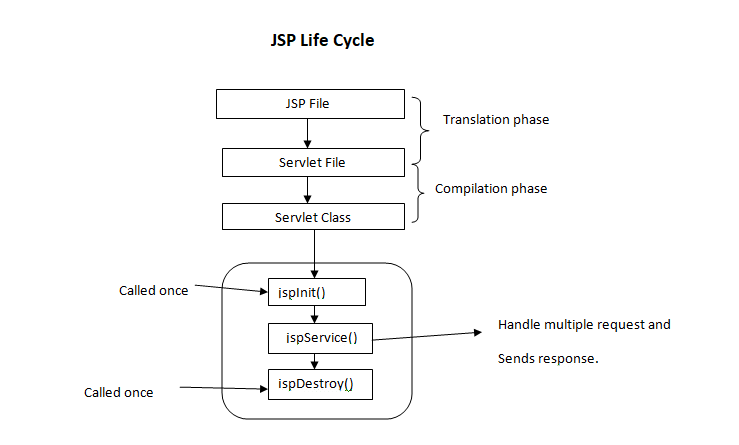
Java Server Pages (JSP) is a technology that helps developers create dynamic web pages based on HTML, XML, or other document types. It allows for the separation of logic and presentation in web development, making it easier to maintain and update websites.

How JSP Works

JSP pages contain a mix of HTML and Java code. When a client requests a JSP page, the server processes the Java code within the page to generate dynamic content. This content is then combined with the static elements of the page to produce the final output sent to the client’s browser.

Benefits of Using JSP

  • Easy Integration: JSP can be seamlessly integrated with Java code, allowing developers to leverage existing Java libraries and frameworks.
  • Reusable Components: JSP allows for the creation of reusable components that can be included in multiple pages, promoting code reusability and maintainability.
  • Rapid Development: With its familiar syntax and built-in tags, JSP enables developers to quickly build dynamic web applications without extensive coding.
  • Scalability: JSP applications can easily scale to accommodate increased traffic and user demands by leveraging Java’s robust scalability features.

JSP Tags

JSP provides a set of predefined tags that simplify common tasks such as displaying data, iterating over collections, and controlling flow. These tags help streamline development and improve code readability.

Conclusion

Java Server Pages (JSP) is a powerful technology for building dynamic web applications. By combining HTML with Java code, developers can create interactive and responsive websites that meet modern user expectations. Whether you are new to web development or an experienced developer, mastering JSP can enhance your skills and enable you to create sophisticated web solutions.


7 Essential Tips for Effective Java Server Pages (JSP) Development

  1. Use JSP for dynamic content generation in web applications.
  2. Separate Java code from presentation logic by using JSP scriptlets, expressions, and declarations.
  3. Utilize JSP standard actions like
  4. Avoid embedding complex Java logic directly within JSP pages to maintain readability and maintainability.
  5. Employ JSTL (JavaServer Pages Standard Tag Library) for simplifying common tasks in JSP development.
  6. Ensure proper error handling in JSP to provide meaningful feedback to users in case of exceptions.
  7. Optimize performance by minimizing the use of scriptlets and utilizing tag libraries efficiently.

Use JSP for dynamic content generation in web applications.

Utilizing Java Server Pages (JSP) for dynamic content generation in web applications is a highly efficient approach. By leveraging JSP, developers can seamlessly integrate Java code with HTML to create interactive and personalized web pages. This enables the generation of dynamic content based on user input, database queries, or other external factors, enhancing the overall user experience. JSP’s versatility and ease of use make it a valuable tool for building responsive and engaging web applications that meet the evolving demands of modern users.

Separate Java code from presentation logic by using JSP scriptlets, expressions, and declarations.

To enhance the maintainability and readability of Java Server Pages (JSP), it is recommended to separate Java code from presentation logic effectively. This can be achieved by utilizing JSP scriptlets, expressions, and declarations. By employing these features, developers can keep the presentation layer clean and focused on displaying content, while the Java code handles the underlying logic. This practice not only improves code organization but also makes it easier to troubleshoot and update the application in the future.

Utilize JSP standard actions like

When working with Java Server Pages (JSP), it is beneficial to utilize JSP standard actions like to modularize your code and promote reusability. By incorporating these standard actions, you can efficiently include external files or components within your JSP pages, making it easier to manage and maintain your web application. This practice not only enhances the organization of your code but also simplifies the development process by allowing you to focus on specific functionalities within each included file.

Avoid embedding complex Java logic directly within JSP pages to maintain readability and maintainability.

To ensure readability and maintainability in Java Server Pages (JSP), it is advisable to avoid embedding complex Java logic directly within the JSP pages. By separating the presentation layer from the business logic, developers can create cleaner and more organized code that is easier to understand and update. Instead, encapsulating complex Java logic in separate classes or scripts and invoking them from the JSP pages can improve code structure and facilitate future modifications without compromising code clarity.

Employ JSTL (JavaServer Pages Standard Tag Library) for simplifying common tasks in JSP development.

Employing JSTL (JavaServer Pages Standard Tag Library) in Java Server Pages development is a valuable tip for simplifying common tasks. By utilizing the predefined tags provided by JSTL, developers can streamline tasks such as iteration, conditionals, and data formatting within JSP pages. This not only enhances code readability but also reduces the need for extensive Java code, making development more efficient and maintainable. Embracing JSTL empowers developers to leverage its powerful features and accelerate the creation of dynamic and robust web applications.

Ensure proper error handling in JSP to provide meaningful feedback to users in case of exceptions.

Proper error handling in Java Server Pages (JSP) is crucial to provide users with meaningful feedback in case of exceptions. By implementing robust error handling mechanisms, developers can effectively communicate issues to users and guide them on how to proceed. This not only enhances the user experience but also helps in troubleshooting and resolving issues promptly, ensuring a smoother interaction between users and the web application.

Optimize performance by minimizing the use of scriptlets and utilizing tag libraries efficiently.

To optimize performance in Java Server Pages (JSP), it is recommended to minimize the use of scriptlets and instead utilize tag libraries efficiently. By reducing the reliance on scriptlets, which embed Java code directly into the JSP page, developers can improve code readability and maintainability. Tag libraries provide a cleaner and more structured way to incorporate dynamic functionality into JSP pages, leading to better performance and scalability of web applications. Efficient utilization of tag libraries not only enhances code organization but also helps streamline development processes and boost overall application performance.

java and javascript

Exploring the Contrasts: Java vs. JavaScript in Modern Programming

Article: Java and JavaScript

The Difference Between Java and JavaScript

Java and JavaScript are two popular programming languages that are often confused due to their similar names. However, they serve different purposes and have distinct characteristics.

Java

Java is a robust, general-purpose programming language that is widely used for developing desktop, web, and mobile applications. It is known for its platform independence, meaning that Java programs can run on any device that has a Java Virtual Machine (JVM) installed.

Java is statically typed, which means that variables must be declared before they can be used. It is an object-oriented language with a strong emphasis on code reusability and modularity.

JavaScript

JavaScript, on the other hand, is a dynamic scripting language primarily used for creating interactive web pages. It runs on the client side within a web browser, allowing developers to add functionality to websites such as form validation, animations, and dynamic content updates.

JavaScript is loosely typed, allowing variables to change data types dynamically. It is also an event-driven language, meaning that code execution is triggered by user actions or system events.

Main Differences

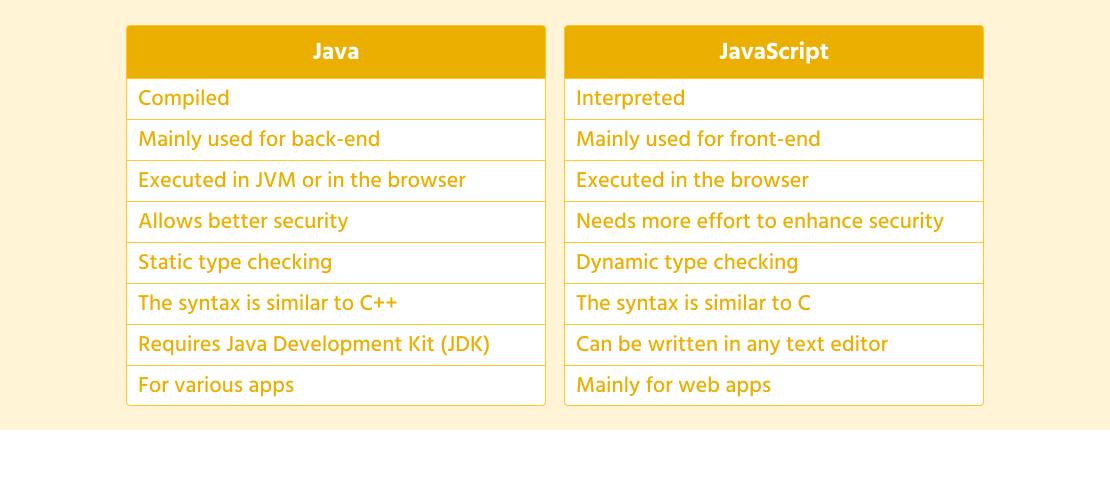
  • Java is a compiled language, while JavaScript is an interpreted language.
  • Java requires a specific development environment to run (JVM), whereas JavaScript runs directly in web browsers.
  • Java is more suitable for building complex applications with high performance requirements, while JavaScript excels in enhancing user interfaces and interactivity on websites.
  • Despite their differences, both languages play crucial roles in the world of software development and have their unique strengths and use cases.

In conclusion, while Java and JavaScript share some similarities in their syntax and structure, they cater to different needs in the realm of programming. Understanding their distinctions can help developers choose the right tool for the job when embarking on software development projects.


Understanding Java and JavaScript: Answers to 7 Common Questions

  1. Are Java and JavaScript the same thing?
  2. Which is the no. 1 coding language?
  3. Is Java and JavaScript the same thing?
  4. Can I learn JavaScript in 7 days?
  5. Should I learn Java or JavaScript?
  6. Can Java be used with JavaScript?
  7. Is JavaScript replacing Java?

Are Java and JavaScript the same thing?

One common misconception in the programming world is whether Java and JavaScript are the same thing. Despite their similar names, Java and JavaScript are two distinct programming languages with different purposes and characteristics. Java is a versatile, statically typed language primarily used for developing applications across various platforms, while JavaScript is a dynamic scripting language mainly utilized for enhancing interactivity on web pages. Understanding the differences between Java and JavaScript can help clarify their unique roles in software development and dispel the confusion surrounding their namesake similarity.

Which is the no. 1 coding language?

The question of which coding language holds the top spot as the number one choice is subjective and can vary depending on the context and purpose. Java and JavaScript are both widely used languages in the programming world, each excelling in different areas. Java is favored for its versatility and robustness in building various applications, while JavaScript shines in creating dynamic and interactive web experiences. Ultimately, there is no definitive answer to which coding language is the absolute best, as it ultimately depends on the specific requirements of a project and the expertise of the developer utilizing it.

Is Java and JavaScript the same thing?

The frequently asked question, “Is Java and JavaScript the same thing?” often arises due to their similar names. However, Java and JavaScript are two distinct programming languages with different purposes and characteristics. Java is a versatile language used for developing various applications, while JavaScript is primarily utilized for enhancing web pages with interactive elements. Despite sharing some syntax similarities, Java and JavaScript serve separate roles in software development, each offering unique features and capabilities tailored to specific use cases. Understanding the differences between Java and JavaScript is essential for developers to effectively leverage the strengths of each language in their projects.

Can I learn JavaScript in 7 days?

Learning JavaScript in 7 days is a common question among beginners eager to acquire programming skills quickly. While it is possible to grasp the basics of JavaScript within a week through intensive study and practice, mastering the language in such a short timeframe may be challenging for most individuals. JavaScript is a powerful and versatile programming language used for web development, and proficiency typically requires consistent practice and hands-on experience over an extended period. Setting realistic learning goals, dedicating time daily to study and code, and seeking guidance from resources like tutorials, documentation, and online communities can help accelerate the learning process effectively. Ultimately, the journey to becoming proficient in JavaScript is a continuous learning experience that evolves with time and practice.

Should I learn Java or JavaScript?

When faced with the frequently asked question of whether to learn Java or JavaScript, it’s essential to consider your specific goals and interests in programming. Java is a versatile language commonly used for building robust applications across various platforms, while JavaScript is primarily focused on enhancing web interactivity and user experience. If you aim to delve into desktop or mobile application development, mastering Java might be the way to go. On the other hand, if your focus lies in web development and creating dynamic website features, learning JavaScript would be more beneficial. Ultimately, both languages have their strengths and applications in the programming world, so choosing between Java and JavaScript depends on your desired career path and the type of projects you envision working on.

Can Java be used with JavaScript?

When it comes to the question of whether Java can be used with JavaScript, it’s important to clarify that while both languages share a similar name, they serve different purposes and operate in distinct environments. Java is a robust programming language commonly used for developing applications, while JavaScript is primarily utilized for enhancing web pages with interactive features. While there are ways to integrate Java and JavaScript in certain scenarios, they typically function independently due to their specific roles and execution environments. Developers may leverage tools like Java applets or server-side technologies to communicate with JavaScript on the client side, but direct integration between the two languages is not a typical practice in modern software development. Understanding the strengths and limitations of each language can help determine the most effective approach when considering their potential collaboration in a project.

Is JavaScript replacing Java?

The frequently asked question of whether JavaScript is replacing Java is a common topic of discussion in the programming community. While both languages have their strengths and use cases, it’s essential to understand that JavaScript and Java serve different purposes in the world of software development. JavaScript is primarily used for client-side web development, enhancing user interfaces and adding interactivity to websites. On the other hand, Java is a versatile language known for its platform independence and robustness, making it suitable for building complex applications across various domains. While JavaScript’s popularity has surged in recent years due to its role in web development, Java continues to be widely used in enterprise applications, mobile development, and other areas where its strengths shine. Ultimately, rather than replacing each other, JavaScript and Java coexist as valuable tools that cater to distinct programming needs.

java servlet

Harnessing the Power of Java Servlets for Dynamic Web Development

Article: Java Servlet

The Power of Java Servlets in Web Development

Java Servlets are an essential part of Java-based web development. They provide a robust and efficient way to handle server-side requests and generate dynamic web content.

Servlets are Java classes that extend the capabilities of servers that host applications accessed by means of a request-response programming model. They are platform-independent as they follow the Write Once, Run Anywhere (WORA) principle.

Key Features of Java Servlets:

  • Efficiency: Servlets are efficient in handling multiple requests concurrently, making them suitable for high-traffic websites.
  • Extensibility: They can be extended to support various protocols and technologies through interfaces like HttpServlet.
  • Session Management: Servlets enable developers to manage user sessions and maintain state across multiple requests.
  • Security: They provide built-in security features to protect web applications from common vulnerabilities.
  • MVC Architecture: Servlets can be used within the Model-View-Controller (MVC) architecture to separate concerns and enhance code maintainability.

Working Principle of Java Servlets:

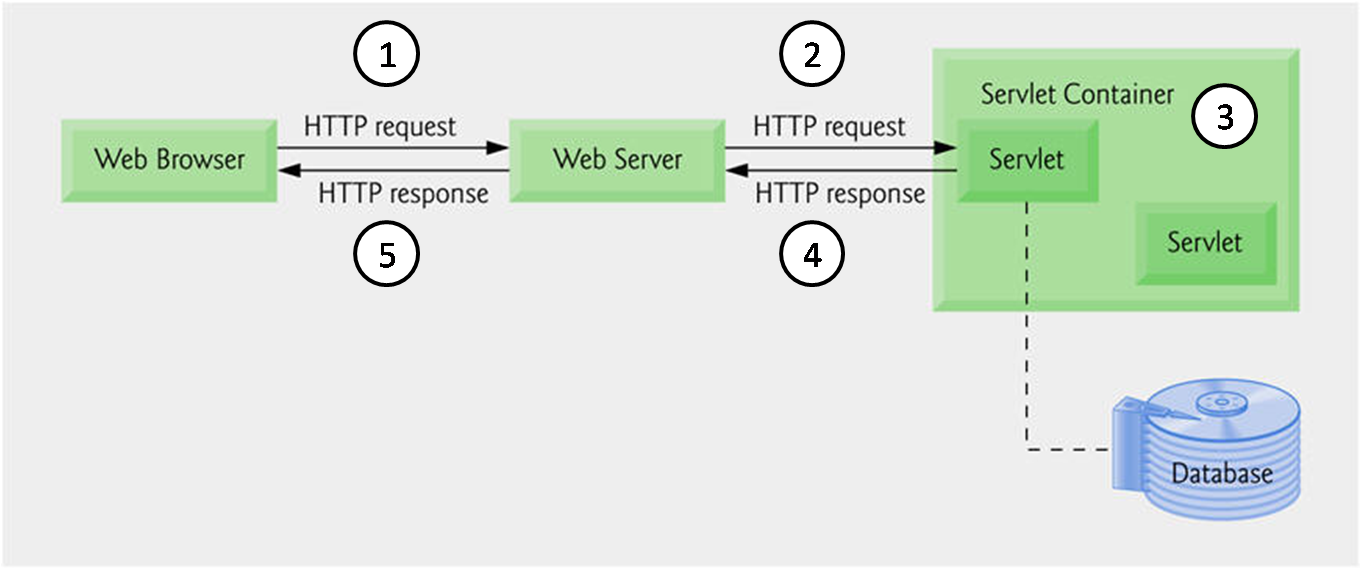
A servlet receives requests from clients, processes them, and generates responses dynamically. It interacts with web containers like Apache Tomcat or Jetty, which manage servlet lifecycle and handle communication with clients over HTTP.

Benefits of Using Java Servlets:

  • Scalability: Servlet-based applications can scale easily to accommodate growing user bases.
  • Cross-Platform Compatibility: Since servlets are written in Java, they can run on any platform that supports the Java Virtual Machine (JVM).
  • Flexibility: Developers have full control over request processing, allowing for customized solutions tailored to specific requirements.
  • In-depth Debugging: Servlet containers provide tools for debugging and monitoring servlet behavior during development and deployment phases.

In Conclusion

In conclusion, Java Servlets play a crucial role in modern web development by providing a powerful server-side technology for building dynamic and interactive web applications. Their versatility, efficiency, and scalability make them a preferred choice for developers looking to create robust web solutions. By mastering servlet programming, developers can unlock endless possibilities for creating feature-rich websites that meet the evolving demands of users in today’s digital landscape.


Top 7 Advantages of Java Servlets: Efficiency, Security, and Scalability in Web Development

  1. Efficient handling of multiple requests concurrently
  2. Platform-independent with Write Once, Run Anywhere (WORA) principle
  3. Extensibility to support various protocols and technologies
  4. Built-in session management for user state maintenance
  5. Incorporation into MVC architecture for code maintainability
  6. Enhanced security features to protect against vulnerabilities
  7. Scalability for accommodating growing user bases


Challenges with Java Servlets: Navigating Complexity, Memory Management, and Modern Development Needs

  1. Steep learning curve for beginners due to its complex nature
  2. Requires manual memory management, leading to potential memory leaks
  3. Limited support for asynchronous programming compared to newer technologies
  4. Can be verbose and boilerplate-heavy, increasing development time
  5. Tightly coupled with the HTTP protocol, limiting flexibility in handling other protocols
  6. Difficulty in unit testing servlets independently without a web container
  7. May not be the best choice for microservices architecture due to monolithic design

Efficient handling of multiple requests concurrently

One of the key advantages of Java Servlets is their efficient handling of multiple requests concurrently. This capability allows servlets to process numerous client requests simultaneously, making them well-suited for high-traffic websites and applications where responsiveness and scalability are crucial. By efficiently managing concurrent requests, Java Servlets ensure optimal performance and responsiveness, providing users with a seamless and uninterrupted experience while interacting with web-based services.

Platform-independent with Write Once, Run Anywhere (WORA) principle

One of the standout advantages of Java Servlets is their platform independence, adhering to the Write Once, Run Anywhere (WORA) principle. This means that servlets can be developed and deployed on any platform that supports Java without the need for modification, ensuring seamless compatibility across different operating systems and environments. This feature simplifies the development process and allows developers to focus on creating robust web applications without worrying about platform-specific intricacies, ultimately saving time and effort in the software development lifecycle.

Extensibility to support various protocols and technologies

Java Servlets offer a significant advantage in their extensibility to support various protocols and technologies. By leveraging interfaces like HttpServlet, servlets can be extended to seamlessly integrate with different communication protocols and technologies, allowing developers to adapt and enhance their web applications based on specific requirements. This flexibility enables Java Servlets to stay relevant in a rapidly evolving technological landscape, ensuring that developers can incorporate new features and functionalities efficiently while maintaining the core stability of their applications.

Built-in session management for user state maintenance

One significant advantage of Java Servlets is their built-in session management capability, which allows developers to maintain user state across multiple requests seamlessly. By leveraging this feature, developers can easily store and retrieve user-specific information during a user’s interaction with a web application. This ensures a personalized and consistent experience for users as they navigate through different pages or perform various actions on the website without losing their context. The built-in session management of Java Servlets simplifies the task of handling user sessions, enhancing the overall usability and functionality of web applications while streamlining the development process.

Incorporation into MVC architecture for code maintainability

Java Servlets offer a significant advantage by seamlessly integrating into the Model-View-Controller (MVC) architecture, enhancing code maintainability. By following the MVC design pattern, developers can separate the application’s logic (Model), presentation (View), and user interaction (Controller) layers. This separation of concerns not only improves code organization but also facilitates easier updates and modifications to individual components without affecting the entire application. The incorporation of Java Servlets into the MVC architecture promotes clean, structured code that is easier to understand, maintain, and scale as the project evolves.

Enhanced security features to protect against vulnerabilities

Java Servlets offer enhanced security features that play a vital role in safeguarding web applications against vulnerabilities. By incorporating built-in security mechanisms, such as input validation, authentication, and access control, servlets help prevent common threats like SQL injection and cross-site scripting attacks. This proactive approach to security not only protects sensitive data but also ensures the integrity and reliability of the application, instilling trust among users and maintaining a secure online environment.

Scalability for accommodating growing user bases

Java Servlets offer exceptional scalability, making them ideal for accommodating growing user bases. As the number of users accessing a web application increases, servlet-based applications can easily scale to meet the demand without compromising performance or user experience. This scalability feature allows developers to design robust and reliable web solutions that can seamlessly handle increased traffic and deliver consistent service quality to a growing audience.

Steep learning curve for beginners due to its complex nature

One notable drawback of Java Servlets is the steep learning curve that beginners may encounter due to its complex nature. The intricacies of servlet programming, including understanding servlet lifecycle, request handling, and session management, can be challenging for those new to web development. As a result, novice developers may require additional time and effort to grasp the concepts and best practices associated with Java Servlets, potentially slowing down their initial progress in utilizing this technology effectively.

Requires manual memory management, leading to potential memory leaks

One significant drawback of Java Servlets is that they require manual memory management, which can lead to potential memory leaks. Developers need to explicitly allocate and deallocate memory within servlet code, increasing the risk of memory leaks if not handled properly. Memory leaks can result in inefficient memory usage, degraded application performance, and even system crashes over time. This manual memory management aspect of Java Servlets poses a challenge for developers in ensuring proper memory allocation and deallocation to prevent such issues from occurring.

Limited support for asynchronous programming compared to newer technologies

One of the drawbacks of Java Servlets is their limited support for asynchronous programming when compared to newer technologies. Asynchronous programming allows applications to perform multiple tasks concurrently, improving performance and responsiveness. While servlets can handle concurrent requests, they rely on traditional thread-based models, which may not be as efficient as modern asynchronous frameworks that utilize non-blocking I/O operations. This limitation can impact the scalability and responsiveness of web applications, especially in high-traffic scenarios where efficient handling of multiple requests is crucial. Developers exploring asynchronous programming may find that newer technologies offer more robust solutions for building responsive and scalable web applications.

Can be verbose and boilerplate-heavy, increasing development time

One drawback of Java Servlets is that they can be verbose and boilerplate-heavy, which may lead to increased development time. Due to the nature of servlet programming, developers often need to write a significant amount of code to handle even simple tasks, resulting in redundant or repetitive code segments. This verbosity can make the codebase harder to maintain and extend, potentially slowing down the development process as developers navigate through the excess boilerplate code.

Tightly coupled with the HTTP protocol, limiting flexibility in handling other protocols

One significant drawback of Java Servlets is their tight coupling with the HTTP protocol, which restricts their flexibility in handling other protocols. Since servlets are specifically designed to work with HTTP requests and responses, integrating them with alternative communication protocols can be challenging and may require additional workarounds. This limitation can hinder developers who need to support diverse network protocols in their applications, leading to potential complexities and inefficiencies in the system architecture.

Difficulty in unit testing servlets independently without a web container

One significant drawback of Java servlets is the challenge of unit testing them independently without relying on a web container. Servlets are tightly coupled with the servlet container environment, making it difficult to isolate and test their functionality in isolation. This dependency on a web container can hinder the efficiency of unit testing processes, as developers may need to set up complex testing environments or resort to using specialized frameworks to simulate servlet behavior outside of a container. Overcoming this obstacle requires careful design considerations and the adoption of strategies that enable effective unit testing while maintaining the integrity and functionality of Java servlets.

May not be the best choice for microservices architecture due to monolithic design

When considering the use of Java Servlets in a microservices architecture, one potential drawback to keep in mind is their monolithic design. Java Servlets, being traditionally used in more monolithic applications, may not always align well with the principles of microservices architecture, which emphasize modularity and independent deployability of services. The monolithic nature of Java Servlets could introduce challenges in scaling and maintaining microservices-based systems where lightweight and decoupled components are preferred for easier management and scalability. In such cases, alternative technologies that better support the distributed nature of microservices might be more suitable choices.